 Skip to content
An accounts payable workflow is essentially the roadmap your finance team follows to take vendor invoices from the moment they arrive until every payment is reconciled. Along this route, there are five core stages—Invoice Receipt, Data Capture, Approval Routing, Payment Execution, and Reconciliation—all geared toward boosting accuracy, speed, and cash flow control.
How Accounts Payable Workflow Works
A thoughtfully laid-out AP workflow keeps people focused and safeguards against costly slip-ups. You’ll often see benefits like:
- Faster Processing: Fewer manual mistakes and more time back in your day
- Transparent Approvals: Everyone knows who’s signing off and when
- Reliable Reconciliation: Cleaner financial statements at close
- Unified Dashboards: Teams free up hours for analysis, not chasing documents
- Consistent Tracking: On-time reporting builds vendor confidence
Imagine each stage as a gear inside a clock. If one gear jams, the whole mechanism loses momentum. Knowing exactly how these steps interlock helps you pinpoint where to introduce automation—or when to step in and course-correct.
Laying out all five stages side by side also makes it simpler to assign clear roles, set the right controls, and spot bottlenecks before they drive up costs.
AP Workflow Quick Overview
Below is a high-level glance at each phase of the AP journey, its core purpose, and the KPI you’ll want to watch.
| Stage | Purpose | Key KPI |
|---|---|---|
| Invoice Receipt | Capture vendor invoices from mail, email or portals | Invoice Volume |
| Data Capture | Extract and validate invoice details | Data Accuracy Rate |
| Approval Routing | Send invoices to stakeholders for sign-off | Approval Time |
| Payment Execution | Release payments via ACH, cards or checks | Payment Cycle Days |
| Reconciliation | Match payments with ledger entries | Reconciliation Accuracy |
With this snapshot in hand, you have a clear framework for where to measure performance and focus your efficiency efforts.
The screenshot below shows a breakdown of accounts payable in a typical accounting system.
This screenshot highlights the main components and roles involved in an AP workflow.
Next, we’ll unpack each of these stages in detail.
Understanding Core AP Concepts
Think of your accounts payable (AP) workflow as a well-drilled relay team: every handoff must be precise, or an invoice can get dropped. Establishing a clear process from start to finish sets you up for on-time payments and steady cash flow.
Your AP journey kicks off the moment an invoice arrives. Whether it lands in your inbox, mailbox, supplier portal, or via EDI upload, errors introduced early will echo through every subsequent step. Catch them now and you’ll save hours later.
Next comes Three-Way Matching, where invoices get cross-checked against purchase orders and receiving reports. This critical control keeps service businesses from overpaying or paying for services they never received.
Once an invoice checks out, it moves into the Approval Chain. By defining spend thresholds and delegation rules, you avoid bottlenecks and ensure the right person signs off—no endless email loops.
After approval, invoices enter a Payment Run. Grouping payments into scheduled batches helps you optimize cash on hand and snag early-payment discounts. Too many early or late runs can strain your liquidity.
Finally, Reconciliation Controls tie everything back to your bank statements. Daily matches flag discrepancies before month end, so you never face surprises when closing the books.
Here’s a snapshot of each step:
- Invoice Capture collects invoices via email, mail, portals or EDI and centralizes the data
- Three-Way Matching compares invoice details against POs and receipts
- Approval Chain routes invoices based on department and value for swift sign-off
- Payment Run schedules grouped payments to manage cash flow
- Reconciliation Controls ensure ledger entries align with bank transactions
Essential AP Terms
In service firms, segregation of duties means no single person owns the entire invoice cycle. Splitting tasks and keeping detailed audit trails makes fraud far less likely—and keeps auditors happy.
For example, an invoice clerk might scan documents into OCR software with 95% accuracy. Yet even the best scanning can stall if managers are swamped with approvals.
“Consistent processes and audit trails are your best defense against errors,” notes a Steingard Financial controller.
Learn how receipts differ from invoices in our guide on the difference between a receipt and invoice for extra clarity.
Now, pause and consider:
- Are your capture methods consistent across every channel?
- Do matching controls catch errors before they snowball?
- Have you set clear approval thresholds?
- Is your payment timing aligned with cash flow goals?
- Do you reconcile daily to close the loop?
Building A Relay Race Analogy
Picture each AP team member on a straight track: the invoice catcher zooms ahead, tags the approver, who then sprint-passes to coding, payment, and finally reconciliation. One fumble and the whole process slows.
This simple image underlines why clear roles, consistent handoffs, and robust controls matter. With that mental picture in place, you’re ready to dive deeper into each phase—and keep your AP race running smoothly.
Core Workflow Stages From Invoice Receipt to Approval
The moment an invoice shows up—whether by mail, email, EDI feed or supplier portal—your accounts payable process springs to life. It all funnels into your capture queue, where the real work begins.
Teams typically handle incoming invoices in one of two ways:
- Manual data entry, where clerks type vendor details and line items by hand
- OCR automation that reads PDFs or scans and fills in fields automatically
OCR tools often hit 90% accuracy. Yet those remaining exceptions still need a human touch. And here’s the reality check: 68% of respondents are keying invoices manually into their ERP or accounting software, while under 32% enjoy fully automated workflows.
That manual grind costs around $15 per invoice. Best‐in‐class teams, on the other hand, spend just $2.78 when automation does the heavy lifting. Meanwhile, about 14% of invoices trigger exception handling—missing data or mismatches that slow everything down.
Learn more about these AP statistics
Invoice Capture Stage
Capture is all about gathering invoices into one central spot. You might scan paper bills at a station or have digital invoices drop directly into your AP system.
Right here is where missing purchase orders or unknown supplier references can throw a wrench in the works. Clerks often pause to hunt down documentation, creating a first choke point.
Below is an infographic covering the three initial steps of this core AP workflow.
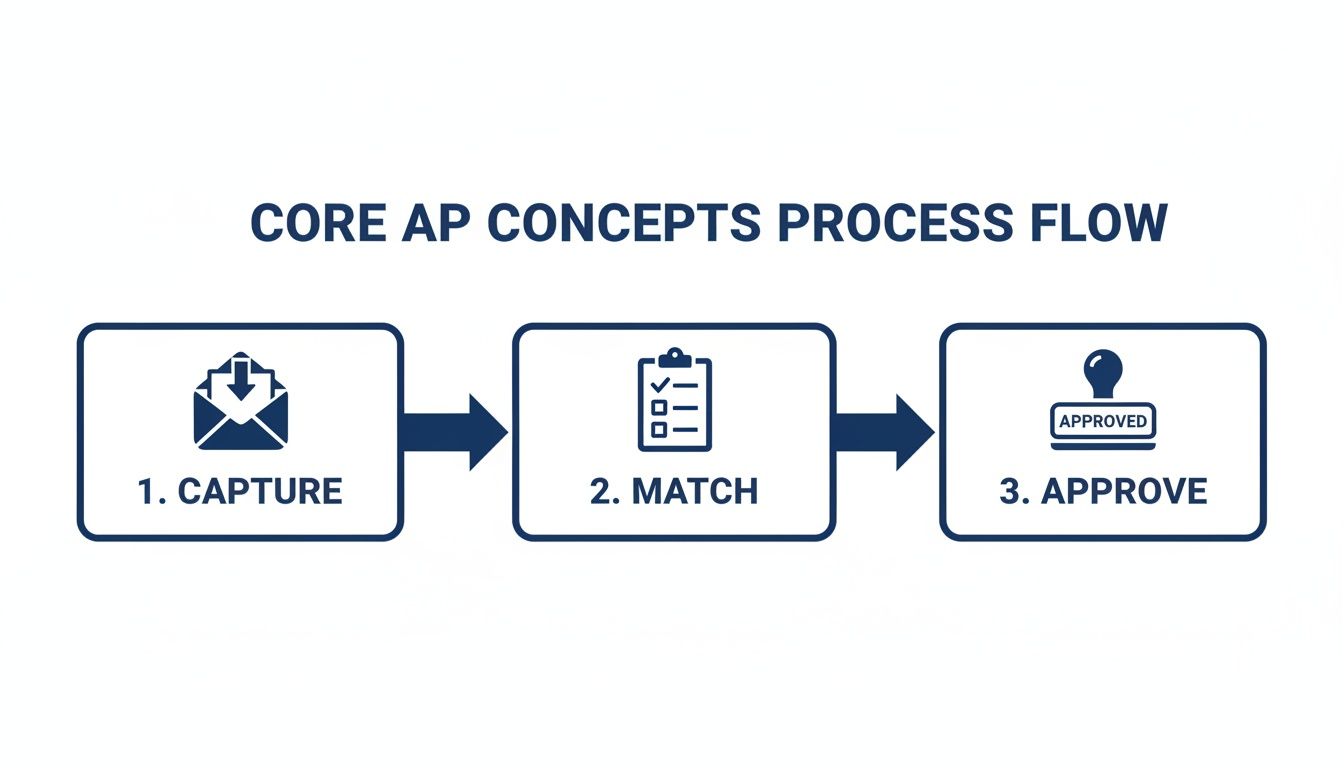
This visual lays out each transition, using clear icons and arrows to guide you from capture straight into approval.
Matching And Validation
Once captured, invoices need a reality check against purchase orders and receipts. Here’s how that typically breaks down:
- PO Match confirms unit prices and quantities
- Receipt Match verifies delivered items and dates
- Exception Handling flags any mismatches for manual review
Unresolved exceptions usually trace back to data-entry slips or unauthorized expenditures. Tackling these quickly stops delays cascading through the rest of the workflow.
Approval Routing
After validation, invoices move into the approval queue according to department rules and spend thresholds. When managers are swamped or traveling, approvals can stall—and that drags down your entire payment run.
“Clear delegation rules slash approval times by up to 40%,” notes an AP performance study.
You can fight back by defining approver roles clearly, setting time-based escalations and firing off gentle digital nudges when an invoice sits too long. Doing so shines a light on bottlenecks and keeps things moving.
Key Metrics To Monitor
Tracking the right KPIs highlights where your process needs attention:
- Invoice Cycle Time: Days from receipt to final approval
- On-Time Payment Rate: Percentage of invoices paid within agreed windows
- Exception Rate: Share of invoices flagged for discrepancies
Watch these numbers and you’ll know exactly which stage needs fine-tuning—capture, matching or approval.
Real-World Example
A midsize marketing agency faced weeks-long delays because their approvers were constantly on the road. Here’s how it unfolded:
- Monday: AP clerk scans and enters the invoice
- Wednesday: Approval request sits unread in the manager’s inbox
- Friday: Payment run executes—too late for early-payment discounts
The solution was simple: after 48 hours without sign-off, the system auto-escalates the request. Result? A 60% drop in approval delays.
Next, dive into payment execution controls.
Defining Roles Controls And Spotting Bottlenecks
Imagine your accounts payable workflow as a relay race. When every runner knows their position, the baton (your invoice) moves seamlessly from start to finish. Clear roles and built-in controls are what prevent dropped batons—keeping errors, fraud, and delays out of the picture.
In a typical AP setup, you’ll find Invoice Clerks, Approvers, Controllers, and Finance Managers. Each person adds a critical piece to the puzzle and helps push invoices toward payment.
- Invoice Clerks collect incoming bills from email, mail, or portals and key in the details.
- Approvers match invoices to purchase orders and verify receipts.
- Controllers enforce policies, build audit trails, and flag anomalies.
- Finance Managers set overall policy, track KPIs, and give the final payment sign-off.
Segregation of duties is your first line of defense. By splitting capture, approval, and payment among different hands, you greatly reduce the risk of mistakes or mischief.
Roles Overview
Breaking down responsibilities makes accountability crystal clear:
- Invoice Clerks verify vendor details and invoice metadata before anything moves forward.
- Approvers ensure every line item matches a valid purchase order or service agreement.
- Controllers monitor compliance and maintain a transparent audit log.
- Finance Managers analyze KPIs, tweak approval thresholds, and spearhead process improvements.
Key Controls To Prevent Errors
Approval thresholds set the guardrails for who can sign off at various levels. For instance, managers might clear invoices up to $5,000, while directors handle the heftier sums.
Audit trails capture every click and comment. They turn your software into a digital paper trail, making both internal checks and external audits far less painful.
Embedding control points at handoff stages cuts invoice errors by up to 30%, says a finance director.
Consistent coding rules keep your expense categories accurate, and automated checks flag mismatches before they become bigger headaches.
Common Bottlenecks
Every AP workflow hits snags. Often they look like:
- Overloaded Approvers creating long approval queues
- Missing Purchase Orders triggering manual hunting expeditions
- Exception Queues piling up when invoice details don’t match delivery records
When mismatched line items land in that exception queue, teams can end up spending 20% of their week on simple data fixes. And if your manager is out of office, approvals can grind to a halt.
Story Of Approval Limbo
Take the case of a mid-sized marketing agency. One busy season, their finance manager was on a two-week road trip. Invoices stacked up, payments were delayed, and vendors started threatening to cut off services.
Three simple fixes brought everything back on track:
- Auto-escalation kicks in after 48 hours without approval
- Digital reminders ping managers when invoices cross their threshold
- Delegation rules automatically assign backups during absences
As a result, approval time shrank from 10 days to 3 days. Cash flow steadied, vendor relationships healed, and the agency even snagged a few early-payment discounts.
Best Practices For Controls
Layering in smart controls makes your AP workflow resilient:
- Set multi-level approvals for amounts over $10,000 to spread the risk.
- Train backup approvers so invoices never stall during vacations or travel.
- Use real-time dashboards to spot bottlenecks before they snowball.
Well-defined roles and consistent controls are the bedrock of an efficient AP operation. With clear accountability and ongoing performance checks, your accounts payable workflow will run like clockwork.
Contact Steingard Financial to streamline these controls today.
Next we will explore payment execution and reconciliation tactics that close the cycle and ensure timely vendor settlements while enhancing cash flow visibility across your organization.
Managing Payment Execution Reconciliation And KPIs
Payment execution is the link between approved invoices and real cash outflow. Your choice—ACH, virtual cards, or paper checks—directly impacts processing time and banking costs. In fact, many small service businesses end up losing 2% of early-payment discounts because of slow check cycles.
Here’s how savvy AP teams handle payments:
- ACH Transfers: Batch processing, minimal fees, bank-grade security.
- Virtual Cards: Spending limits per card and direct integration with reconciliation tools.
- Paper Checks: Tangible audit trail but add several days before vendors are credited.
Setting Up Payment Runs
Predictable payment runs help you hit your target Days Payable Outstanding (DPO) and capture any available discounts. Whether it’s twice a week or every ten days, consistency matters.
Steps to configure a reliable run structure:
- Filter invoices due within the next 10 days.
- Flag discounts higher than 1% for top priority.
- Assign each invoice a payment type based on vendor terms.
- Schedule batch uploads to your AP platform before cutoffs.
Consistent cycles reduce friction and eliminate last-minute approvals.
Automated payment schedules can lower late payments by 35%, boosting vendor confidence.
Reconciling Bank Transactions
Matching payments to your ledger every day keeps month-end surprises at bay. Early discrepancy detection means fewer headaches when you close the books.
Check out our guide on reconciling bank accounts for step-by-step instructions: https://steingardfinancial.com/how-to-reconcile-bank-accounts/
Key actions for tight reconciliation:
- Import bank statements via API or secure file transfer daily.
- Apply auto-match rules to pair transactions with AP disbursements.
- Investigate exceptions within 48 hours to prevent backlog.
| Action | Description | Frequency |
|---|---|---|
| Statement Import | Auto-import via API or file upload | Daily |
| Transaction Matching | Auto-match plus manual review of exceptions | Within 2 days |
| Period Close Verification | Confirm cleared transactions and adjust entries | Month-end |
Tracking Key Performance Metrics
Data tells the story of your AP health. Keep an eye on these four metrics:
- Invoice Cycle Time – Days from invoice receipt to payment execution.
- On-Time Payment Rate – Percentage of invoices paid within agreed terms.
- Invoice Accuracy Rate – Share of invoices processed without exceptions.
- Days Payable Outstanding (DPO) – Average delay before disbursing funds.
Monitoring these monthly highlights bottlenecks and uncovers efficiency gains.
Keeping DPO within target ranges can increase liquidity by 15%, according to finance studies.
Balancing payment speed with cash preservation maintains vendor trust and optimizes working capital.
Optimizing For Continuous Improvement
An agile AP process evolves through regular reviews and tweaks:
- Automate notifications for overdue approvals to avoid manual chasing.
- Review payment schedules quarterly to align with cash flow patterns.
- Adjust approval thresholds based on spend categories and risk profiles.
- Leverage AP dashboards to spot trends before they become issues.
- Conduct monthly KPI audits to ensure data integrity and relevance.
- Train backup approvers to prevent delays during vacations or absences.
- Standardize coding rules to cut reconciliation errors in half.
By iterating on payment execution and reconciliation controls, you’ll drive better cash management outcomes.
Steingard Financial can support your AP transformation. Contact us for personalized AP review.
Leveraging Automation Tools And Integration
Accounts payable used to be a mountain of paper, filing cabinets, and manual follow-ups. Today, the smartest finance teams are swapping staplers for software, shifting those repetitive tasks into a well-oiled machine. Platforms like QuickBooks, Gusto, Bill.com and SAP Concur have changed the game, transforming invoice capture and payment runs into streamlined processes.
Start by considering what each solution brings to the table:
- QuickBooks offers a tight bookkeeping integration and straightforward approval chains.
- Gusto blends payroll expertise with AP controls and People Advisory insights.
- Bill.com leans heavily on machine learning for touchless invoice processing.
- SAP Concur scales effortlessly and ticks every compliance box for large enterprises.
Comparison Of AP Automation Platforms
Below is a side-by-side look at how QuickBooks, Gusto, and Bill.com stack up on core AP features.
| Feature | QuickBooks | Gusto | Bill.com |
|---|---|---|---|
| OCR Data Capture | Basic template scanning | Advanced invoice parsing | ML-driven extraction |
| Approval Routing | Two-step approval notifications | Multi-level routing and reminders | Dynamic routing with escalation |
| PO Matching | Manual and template match | Auto-match with three-way checks | Automated PO matching |
| Payment Execution | ACH and check runs | Virtual cards and ACH | Vendor payments via multiple rails |
Choosing the right platform hinges on your volume, team size, and the complexity of your workflows.

This QuickBooks dashboard brings invoice status, approval steps, and payment schedules into one central view, giving you instant visibility.
Integration Best Practices
- Verify your ERP or accounting solution has a supported API or connector.
- Map your chart of accounts and vendor records before you sync data.
- Run a pilot batch of invoices to catch any mapping errors early.
- Set up alerts for sync failures, mismatches, and unexpected gaps.
Well-designed integrations cut down on duplicate entries, speed up month-end closes, and make reconciliation almost a non-event.
“Touchless processing slashes errors and frees teams for supplier strategy,” says an AP director.
Selecting The Right Tool
When you shop around, keep these factors front of mind:
- Volume and Complexity: How many invoices do you process monthly?
- Existing Stack: What ERP or accounting software is already in place?
- Automation Needs: Do you need simple routing, or full AI-driven matching?
- Budget and Ownership Costs: Consider subscription fees and extra modules.
Scaling From Small Teams To Enterprise
A handful of users can get up and running on QuickBooks or Gusto within days. For organizations juggling thousands of invoices and intricate approval layers, Bill.com or SAP Concur typically win out.
Key AP Performance Metrics
Recent research from Medius highlights how AI is reshaping AP:
- 75% of AP departments now tap into AI to smooth out processes.
- Manual bottlenecks can drive costs up to $9.40 per invoice, while the best performers average $2.78.
- AI tools can cut processing time by up to 70% and reduce costs by 60%.
- By 2025, 68.3% of enterprise payments will shift to electronic rails like ACH and virtual cards.
- Top organizations clear invoices in 3.1 days, versus 17.4 days for others.
- Global AP automation spending is forecast to jump from $6.17 billion in 2025 to $11.17 billion by 2030.
Ongoing Improvement And Scale
The best AP workflows never stand still. Small tweaks yield big gains over time:
- Refresh OCR templates each quarter to match supplier invoice formats.
- Review exception logs weekly and refine your matching rules.
- Track KPIs—cycle time, error rates, late payments—every month.
- Cross-train backup approvers so no invoice gets stuck if someone’s out.
“Since partnering with Steingard Financial, our AP process has been error-free and scalable,” says a Gusto client.
Ready to accelerate your accounts payable workflow with AI-driven automation? Steingard Financial helps service businesses implement, integrate, and optimize AP workflows using your existing stack—empowering your team with faster closes, cleaner data, and strategic insights.
Real-World Example and Optimization Tips
Seeing a workflow come together in a real business can turn abstract ideas into practical know-how. Here’s how a mid-size consulting agency retooled its AP process with Gusto and a few simple controls.
Consulting Firm Scenario
A consulting firm was struggling with scattered approvals, late invoices piling up, and a lack of visibility into cash flow. They chose Gusto to unify payroll and payables under one roof.
Key spend categories they tackled:
- Contractor Invoices: Managed via fixed retainer agreements and three-way matching
- Software Subscriptions: Monthly renewals checked against budget codes
- Travel Expenses: Receipt uploads with built-in per diem validation
This setup illustrates exactly how what is accounts payable workflow looks when you follow a consistent path from invoice to payment.
Three-Step Approval Chain
To eliminate guesswork, they built a clear routing rule in Gusto:
- Initial Review by an Invoice Clerk—data capture and basic verification
- Secondary Check by the Project Manager—budget and scope approval
- Final Sign-Off by the Finance Controller—policy compliance
Payments go out in a weekly Friday batch, smoothing cash flow. Matching POs against retainer invoices now automates 85% of validations, cutting manual fixes almost in half.
“Consistency in approval stages helped us shorten cycle time by 40%,” says the firm’s finance lead.
Quick Wins Checklist
After locking in their approval path, they rolled out these easy wins:
- Standardize Invoice Templates: Uniform fields for every vendor
- Define Approval SLAs: 48-hour turnaround targets keep things moving
- Enable Vendor Portals: Vendors upload and track invoices on their own
For a deeper dive into these tactics, see our guide on accounts payable best practices.
Outsourcing Partner Guidelines
If you’re weighing an AP service provider, make sure you cover:
- Volume Capacity: Can they handle your monthly invoice load?
- Tech Stack Alignment: Do they integrate smoothly with Gusto or QuickBooks?
- Communication Protocols: What reporting cadence and issue-escalation paths exist?
A strong partner, like Steingard Financial, embeds SLAs, delivers real-time dashboards, and assigns a single point of contact.
By tracing this scenario step by step, you’ll see how AP can shift from a back-office chore to a strategic advantage. Apply these tips to overhaul your process, free your team from repetitive tasks, and focus on vendor relationships and planning.
Ready to streamline your AP process? Partner with Steingard Financial today—visit Steingard Financial.