 Skip to content
When you’re trying to find the best payroll software for small business, the conversation almost always narrows down to two major players: Gusto and QuickBooks Payroll. Think of it this way: Gusto shines as an all-in-one platform for HR and benefits, while QuickBooks Payroll leverages its deep, native connection to your accounting system. The right choice really hinges on what you value more—a unified system for your people or a tightly integrated financial hub.
How To Choose The Right Small Business Payroll Software
Picking your payroll software is a critical business decision. This isn’t just about cutting checks; it’s the engine that ensures your team gets paid correctly and on time, every single time. A good platform automates the tedious stuff, lifts the administrative weight off your shoulders, and keeps you compliant, letting you get back to actually growing your business.

The market is buzzing with options, and for good reason. The global payroll software market hit a valuation of $8.4 billion in 2024, which is a 12% jump from the year before. This isn’t just a random statistic; it shows that small businesses are waking up to the fact that dedicated software is a powerful tool for cutting administrative costs and dodging compliance headaches. You can discover more insights about this payroll market expansion to see the full picture.
A Quick Comparison Of Top Payroll Platforms
To make things simpler, let’s start with a high-level look at the most popular choices. Each one has its own personality and is built for different types of businesses. The table below is a quick snapshot to help you see which one might vibe with your company’s priorities, whether that’s having HR baked in or keeping your books and payroll perfectly in sync.
Payroll Software Head-To-Head Comparison
Here’s a quick rundown of how the two biggest names stack up against each other for small service businesses.
| Feature | Gusto | QuickBooks Payroll | Best For |
|---|---|---|---|
| Primary Strength | All-in-one HR, payroll, & benefits | Native QuickBooks Online integration | Businesses wanting a unified people platform vs. those prioritizing accounting synergy. |
| User Experience | Modern, intuitive, employee-focused | Familiar interface for existing QB users | Teams that value a clean, simple design vs. those already in the QuickBooks ecosystem. |
| HR Support | Built-in HR tools & advisory services | HR features available in higher tiers | Companies needing integrated HR support without adding another system. |
| Pricing Model | Tiered plans with clear features | Tiered plans that bundle with QBO | Businesses that prefer predictable, all-inclusive pricing for HR and payroll. |
This comparison is really just the starting point. Your final decision will come down to the details: what accounting software you already use, your future plans for offering benefits, and how much hands-on HR help you think you’ll need as you grow.
Comparing Core Payroll and Tax Compliance Features
At the end of the day, any payroll software worth its salt has to nail one thing above all else: paying your team correctly and on time while keeping you on the right side of the tax authorities. This is the absolute bare minimum. When you look past the feature lists, you start to see how different platforms handle these core jobs, and that’s what makes all the difference for your workload and peace of mind.
For instance, just about every system can automate your standard payroll runs. But the real test comes when you need flexibility. Can you easily cut an off-cycle check for a bonus, process a commission payment, or add a one-time reimbursement without throwing your entire workflow into chaos? This is where you really feel the difference between platforms.
The software also needs to handle all the different ways you might pay people. That includes everything from a straightforward salary to more complex situations like calculating pro rata salary for someone who joins your team in the middle of a pay period.
Automated Payroll and Payment Processing
The idea of putting payroll on “autopilot” is a huge selling point for busy owners. Both Gusto and QuickBooks Payroll do this well, but they approach it from different angles that suit different business styles. QuickBooks Payroll’s biggest advantage is its deep connection with QuickBooks Online, which means every payroll run syncs perfectly with your books.
If you’re already running your business on QuickBooks, this is a game-changer. Payroll expenses, tax liabilities, and bank debits are all categorized automatically. It creates one clean, unified financial picture, saving you a ton of time on reconciliation.
Gusto, on the other hand, builds its automation around making things easy for people—both you and your employees. Its interface is incredibly clean, so setting up different pay schedules or running a separate payroll for contractors is simple. The platform also sends out friendly reminders and gives your team a modern portal to check their pay stubs, which cuts down on the number of questions you have to answer.
Key Differentiator: QuickBooks Payroll is built for financial integration, perfect for owners who live inside their accounting software. Gusto is all about a simple, human-friendly workflow, making it a better choice if you want a standalone payroll system that you can set and forget.
Tax Calculations and Multi-State Filings
Tax compliance is where your payroll software truly proves its value. One small mistake in withholdings or a missed filing deadline can result in some serious penalties. This is one area you absolutely cannot afford to get wrong, especially when 89% of business leaders admit their current payroll tools aren’t giving them the support they need.
Modern platforms automate all the tricky calculations for federal, state, and local payroll taxes. They figure out the right amount to withhold from each employee’s check and calculate your share of taxes like FICA and unemployment.
The real headache starts when you hire remote employees in different states. Suddenly, you’re dealing with multi-state tax laws, which means registering with new agencies and juggling different withholding rules.
- QuickBooks Payroll handles multi-state payroll well, particularly in its higher-end plans. Its strength is keeping all those tax payments and filings right inside the QuickBooks ecosystem you already know.
- Gusto gets a lot of praise for how simple it makes multi-state compliance. The platform walks you through adding a new state, helps with the registration paperwork, and automatically handles all the unique tax calculations and filings.
Both systems will also generate and file your critical quarterly and annual forms, like the federal Forms 941 and 940, along with any state-specific reports. If you want to understand more about these federal requirements, our guide on https://steingardfinancial.com/form-941-electronic-filing/ is a great resource.
Year-End Reporting and W-2s
The grand finale of your payroll year is year-end reporting. This means getting W-2s out to employees and 1099s to your contractors. The best software makes this process almost completely hands-off.
By the January 31 deadline, both Gusto and QuickBooks Payroll automatically create and send these forms to your team electronically. They also file the required copies with the Social Security Administration and state agencies for you. This automation eliminates one of the biggest administrative pains of the year, ensuring you stay compliant without the stress of printing, stuffing, and mailing forms. For many business owners, this feature alone is worth the price of the software.
Evaluating HR And Benefits Administration Capabilities
Payroll software isn’t just for cutting checks anymore. The best platforms have grown into command centers for the entire employee lifecycle, from onboarding to retirement. This changes payroll from a back-office chore into a real tool for attracting and keeping great people.
This isn’t just a trend; it’s how smart businesses operate now. A surprising 57% of organizations are already using a single system for both payroll and HR because it’s just more efficient. This unified approach is exactly what we help clients build at Steingard Financial using tools like Gusto and QuickBooks. If you’re curious about the market shift, you can read the full research on unified HR payroll software to see the data for yourself.
Seamless Employee Onboarding And Management
You only get one chance to make a good first impression, and it all starts with onboarding. Modern payroll systems ditch the clunky paperwork for clean, digital workflows that new hires can finish on their own time.
Gusto, for instance, really nails the welcome experience. New team members get a friendly email that guides them to a personal dashboard. From there, they can enter their own details, sign documents, and set up direct deposit before they even step into the office. This self-service model cuts down your admin work and makes new hires feel empowered from day one.
QuickBooks Payroll also has solid onboarding tools, particularly in its higher-end plans. While it’s less focused on the warm-and-fuzzy employee experience, the process is incredibly efficient. It feeds information directly into the employee’s payroll profile, keeping everything organized inside the QuickBooks ecosystem.
Key Insight: Gusto builds its onboarding around the employee, creating a personal, modern feel. QuickBooks Payroll prioritizes function, making sure data is captured and synced with your accounting. A creative agency might lean toward Gusto’s approach, while a construction firm may prefer the straightforward efficiency of QuickBooks.
Integrated Benefits Administration
Offering great benefits is a must for attracting top talent, but managing them can be a huge headache for small businesses. This is where integrated benefits administration saves the day. Both Gusto and QuickBooks Payroll let you handle health insurance, dental, vision, and retirement plans right inside the platform.
Here’s how they differ in practice:
- Gusto as a Broker: Gusto can act as your licensed health insurance broker. They help you shop for, compare, and set up plans. It’s an all-in-one model that’s incredibly convenient because payroll deductions sync automatically as soon as an employee signs up.
- QuickBooks and Third-Party Brokers: QuickBooks Payroll partners with outside brokers, like Allstate Health Solutions, to provide benefits. This gives you more flexibility if you already have a broker you trust. The integration is still seamless, so deductions sync right up with payroll.
Both platforms also make it simple to manage plans like 401(k)s and Health Savings Accounts (HSAs). The goal is to find the right employee benefits management software that matches your company’s size and needs.
Access To HR Tools And Compliance Support
On top of payroll and benefits, these platforms give you a suite of HR tools to help manage your team and stay on the right side of the law. For a small business without a dedicated HR manager, this support is priceless.
Gusto, especially with its premium plans, gives you access to certified HR professionals. They can advise you on tricky situations like terminations, leave policies, and state-specific labor laws. You also get a library of templates for things like offer letters and employee handbooks.
QuickBooks Payroll offers a similar HR advisory service in its Elite plan through a partnership with Mineral, Inc. This includes access to compliance resources and expert help. If you’re growing fast and expect to face complex HR issues, these services can offer serious peace of mind and help you sidestep expensive mistakes.
Analyzing Integrations And Scalability For Growth
When you choose payroll software, you’re not just solving today’s payroll headaches; you’re picking a partner for your future growth. A system that’s perfect for a team of three can quickly turn into a frustrating bottleneck once you hit thirty employees. That’s why integrations and scalability are often the most critical factors in your decision.
The right payroll software needs to connect smoothly with the other tools you use every day, creating one cohesive system instead of a jumble of disconnected apps. It also has to be ready to grow with you, whether that means handling more employees, expanding into new states, or offering more complex benefits, all without forcing a painful migration.
Evaluating The Integration Ecosystem
Payroll software doesn’t exist in a bubble. You have to consider how well it will fit into your current tech stack and support your future plans. The quality of these connections is far more important than the sheer number of logos on a page. When you’re looking at critical software integrations, think about how deep and seamless they really are.
Gusto and QuickBooks Payroll both offer plenty of integrations, but they approach it from different angles. QuickBooks Payroll’s biggest selling point is its flawless, native connection with QuickBooks Online. If you’re already running your books on QBO, this is a massive advantage.
- Automatic Syncing: Every time you run payroll, pay taxes, or deduct benefits, it’s automatically recorded and categorized in your accounting ledger. No manual entry needed.
- Unified Reporting: This creates a single source of truth for all your labor costs, giving you much more accurate financial reports and better cash flow forecasts.
Gusto isn’t an Intuit product, but it offers a very solid and reliable integration with QuickBooks Online. Its real power, however, is its wider ecosystem of third-party apps for things like time tracking, project management, and expense reporting. This makes Gusto a fantastic choice if you’ve built your business on a “best-of-breed” tech stack with tools like TSheets (now QuickBooks Time), Asana, or Expensify.
The Real-World Difference: Let’s say you run a marketing agency that tracks billable hours. With QuickBooks Payroll, the integration with QuickBooks Time is perfect. With Gusto, you might connect to a tool like Harvest. Harvest can then sync employee hours to Gusto for payroll and push project data into your accounting software, creating a powerful, automated workflow between all your key systems.
Planning For Future Scalability
Scalability isn’t just about adding more employees. True scalability means the software can handle growing complexity. This includes hiring remote employees across different states, adding sophisticated benefits packages, and managing various types of workers like contractors and full-time staff.
One of the most common challenges growing businesses face is hiring in new states. Each state brings its own unique set of tax laws, registration requirements, and compliance rules.
- Gusto is known for making multi-state payroll incredibly straightforward. The platform actually walks you through the registration process for each new state and automatically handles all the different tax calculations and filings for you.
- QuickBooks Payroll also handles multi-state payroll well, especially in its higher-tier plans. It keeps all of your compliance tasks inside the familiar QuickBooks environment you already know.
Another part of scalability is the platform’s ability to evolve. The payroll services market, valued at $73.25 billion in 2025, is projected to hit $84.83 billion by 2029. A big driver of this growth is the move toward AI and automation to make things more efficient. As you compare your options, think about which provider seems better positioned to adopt these future advancements. You can discover more insights about these payroll market trends to get a feel for where the industry is headed.
Choosing a platform with a clear path for growth ensures your payroll system remains a helpful asset, not a roadblock to your success. A little foresight now can save you from the major cost and disruption of switching providers down the line.
Payroll Software Recommendations For Specific Scenarios
Figuring out the “best” payroll software isn’t about crowning one single winner. It’s really about finding the right tool for your specific business. The platform that works perfectly for a solo S-Corp owner is going to be completely different from what a growing marketing agency with employees and contractors needs.
Think of it less like a competition and more like a matchmaking process. Here, we’ll give you clear, targeted recommendations for the most common small business situations, so you can pick a system that feels like it was built just for you.
Best For The Solopreneur Or S-Corp Owner
If you’re the only employee in your S-Corp, your payroll needs are simple: pay yourself a “reasonable salary” correctly and handle quarterly tax filings without the headache. You don’t need a system loaded with features for big teams.
For this, QuickBooks Payroll is almost always the best bet, especially if your books are already in QuickBooks Online. The integration is seamless. Your salary and tax payments flow directly into your financial records, creating a clean, unified system that makes tax time much less painful for you and your accountant.
While Gusto can certainly do the job, its robust HR features are often more than a one-person shop needs. The direct accounting link you get with QuickBooks is a practical advantage that just makes sense for owner-operators focused on simple financial management.
Best For Businesses With W-2 Employees And 1099 Contractors
Many service businesses—from creative agencies to consulting firms—run on a mix of full-time employees and independent contractors. Juggling both payment types in one system without losing your mind is the name of the game.
This is where Gusto really shines. The platform was built from the ground up to handle both W-2 and 1099 workers beautifully. You can run different pay schedules, pay contractors with direct deposit for free, and the system automatically generates and files both W-2 and 1099-NEC forms when the year is over.
Key Takeaway: Gusto’s advantage is its people-first design. It treats your contractors like part of the extended team, giving them their own portal to manage their info and see payment history. This simple touch builds a better working relationship and cuts down on your admin work.
QuickBooks Payroll can handle contractors, but it feels more like an add-on to an employee-first system. Gusto’s fully integrated approach makes it the clear winner for any business relying on a blended workforce.
This chart can help you decide whether to prioritize your current needs or plan for future growth.
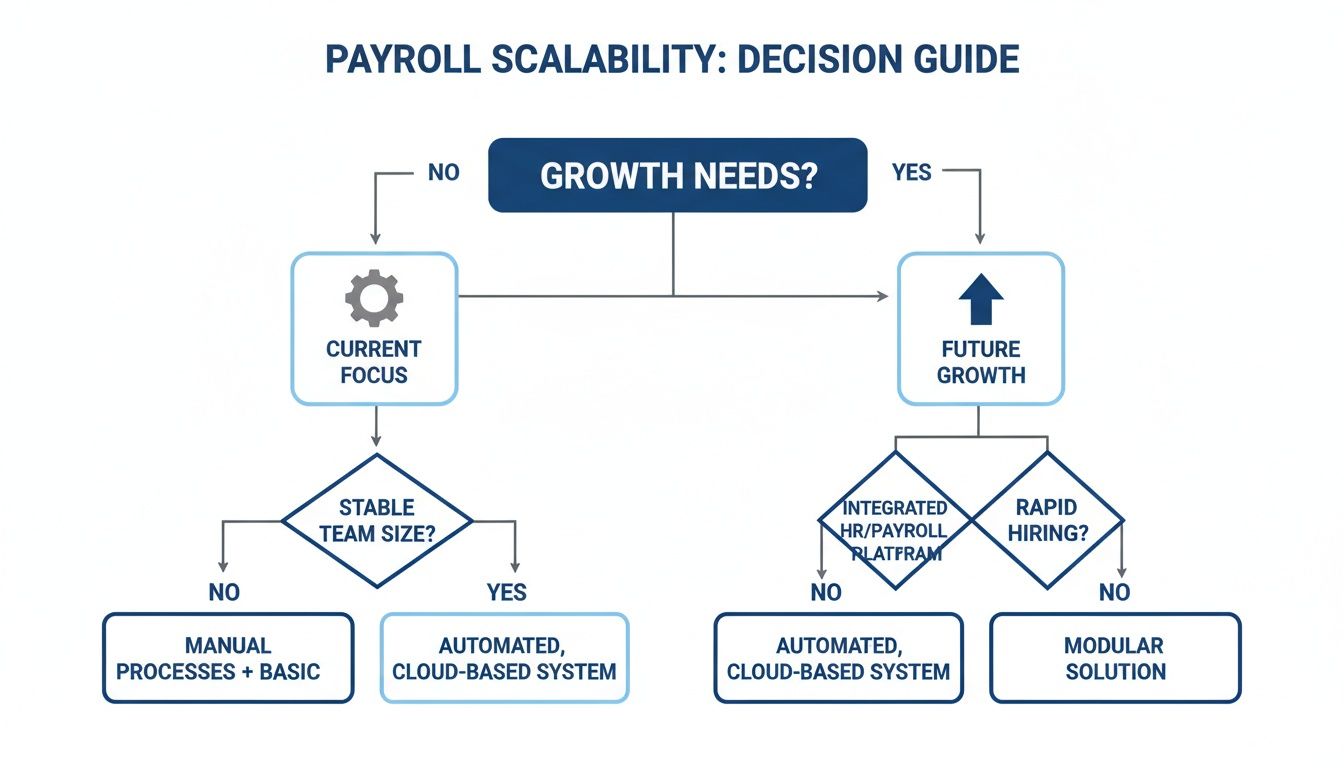
As the visual guide shows, the right choice for operational simplicity today might not be the one with the most scalable framework for where you want to be tomorrow.
Best For Companies Prioritizing Benefits And HR Support
When you’re trying to attract and keep great people, offering solid benefits and HR support is no longer a “nice-to-have.” Your payroll platform needs to be more than just a payment tool; it should be the hub for your entire team.
Gusto is the undisputed champ in this area. It’s a true all-in-one solution where payroll, benefits, and HR tools all live together harmoniously.
Here’s why it works so well for businesses focused on benefits:
- Integrated Broker Services: Gusto can act as your licensed health insurance broker, letting you shop for and manage plans right inside the platform.
- Automated Deductions: Once an employee signs up for a benefit, their payroll deductions are calculated and applied automatically. No more manual data entry or costly mistakes.
- HR Advisory Services: Their higher-level plans give you direct access to certified HR pros who can help with compliance, policy questions, and tricky employee situations.
QuickBooks Payroll offers benefits through third-party partners, but it just doesn’t have the deep, native integration or dedicated HR support that makes Gusto feel like a strategic partner in building a great company culture.
Best For Businesses Deeply Integrated With QuickBooks Online
If your business lives and breathes in QuickBooks Online, your top priority is a perfectly synced financial ecosystem. Every payroll expense and tax payment needs to show up instantly and accurately with zero manual work.
It’s no surprise that QuickBooks Payroll is the obvious choice here. The native integration is its superpower—a level of synergy no outside app can truly match. If you want to dive deep into making this work, our guide on how to set up QuickBooks Payroll walks you through the entire process.
This deep connection means every time you run payroll, your general ledger, expense accounts, and tax liabilities are updated in real time. This gives you an unparalleled, up-to-the-minute view of your labor costs, which is critical for accurate job costing and smart financial planning. Gusto’s sync is good, but it can’t compete with the effortless data flow of a native Intuit product.
Scenario-Based Payroll Software Recommendations
To make it even clearer, this table matches common business needs with the right payroll solution.
| Business Scenario | Top Recommendation | Key Reason Why | Alternative Option |
|---|---|---|---|
| Solo S-Corp Owner | QuickBooks Payroll | Flawless, native integration with QuickBooks Online for simplified accounting. | Gusto |
| Growing Team (W-2 & 1099) | Gusto | Best-in-class, unified management for both employees and contractors. | QuickBooks Payroll |
| Benefits & HR Focused | Gusto | All-in-one platform with integrated benefits brokerage and HR advisory. | Rippling |
| Deep QuickBooks User | QuickBooks Payroll | Unmatched real-time data sync for perfect financial visibility. | Gusto |
Choosing your software comes down to being honest about your company’s immediate needs and future goals. Use these scenarios as a starting point to find the platform that will truly support your business as it evolves.
Frequently Asked Questions About Payroll Software
Choosing the right payroll software brings up a lot of questions. It’s a big decision, and getting clear answers is the key to picking the right tool and getting it set up without any headaches. Below, we’ll tackle some of the most common questions we hear from business owners.
These answers should help you get a better handle on costs, timing, and the real differences between your options, so you can make a choice you feel good about.
How Much Should I Expect To Pay For Small Business Payroll Software?
This is a big one, and the honest answer is: it depends. Costs can really vary based on your team’s size and what features you actually need. For a simple setup, basic plans usually start around $40 per month plus $6 per employee.
If you need more horsepower—things like HR tools, help with taxes in multiple states, or benefits administration—you’re looking at plans that can run from $80 to over $150 a month, plus a higher per-employee fee.
It’s really important to look past that initial sticker price. Always ask about extra fees for things like filing year-end forms or getting dedicated support. Most providers, like Gusto and QuickBooks Payroll, use a tiered model, which is great because it lets your costs grow along with your business.
Can I Switch Payroll Providers Mid-Year?
Yes, you absolutely can switch payroll providers in the middle of the year. However, it requires some careful planning to make sure you don’t create a tax or compliance mess.
Your new provider will need all historical payroll data from the current year for every single employee. This is non-negotiable. That data is what they’ll use to generate accurate W-2s and make sure your tax filings are correct. The easiest times to make a move are at the end of a quarter or the end of the year, just because it makes the data transfer much cleaner.
A mid-year switch is entirely possible with the right preparation. The key is a clean data handoff. Partnering with a payroll expert can make this migration seamless by managing the historical data transfer and ensuring nothing falls through the cracks.
What Is The Difference Between Payroll Software And A PEO?
This is a critical distinction that every small business owner needs to understand. Payroll software, like Gusto or QuickBooks Payroll, is a tool you use to run your own payroll and manage HR. You remain the employer of record, always.
A Professional Employer Organization (PEO) is a completely different arrangement. When you sign on with a PEO, you enter into a “co-employment” relationship. The PEO becomes the official employer of record for tax purposes and takes over all payroll, benefits, and compliance tasks.
While a PEO can sometimes get you access to better benefits rates, they are almost always more expensive and mean you give up a significant amount of control over your own HR. For most small businesses just looking to automate their processes while staying in the driver’s seat, payroll software is the much better choice.
Navigating payroll setup, integrations, and ongoing compliance can be complex. Steingard Financial simplifies the entire process, ensuring your system is optimized for accuracy and growth. Schedule a consultation today to build a scalable and stress-free back office.