What Is AP Automation A Guide to Transforming Your Finances
AP automation is simply technology that takes over your accounts payable process, handling everything from the moment an invoice arrives to when the payment goes out, all with very little hands-on effort from you.
Think of it as the difference between sifting through a mountain of paper mail versus having a smart digital assistant that opens, sorts, files, and even pays your bills for you. This one shift frees up an incredible amount of time and slashes the risk of expensive mistakes.
Unpacking AP Automation and Why It Matters
Let’s get real about your current accounts payable process. Does it involve printing invoices, physically chasing down managers for a signature, keying data into QuickBooks, and then printing and mailing paper checks?
Every single one of those steps is a potential landmine. An invoice gets lost. A number is typed incorrectly. A deadline is missed, and now you’re stuck with a late fee. This manual grind isn’t just slow; it’s a constant drain on your most valuable asset: your team’s time.
AP automation completely changes the game. It uses software to digitize and streamline the entire invoice lifecycle, creating a transparent, efficient, and much more reliable system. This isn’t just a tool for giant corporations anymore—it’s become essential for any service business that wants to work smarter, not harder.
The Shift from Manual Drudgery to Digital Efficiency
The biggest problem with manual AP is that it’s choked with repetitive, low-value tasks that are just begging for human error. AP automation software is designed to tackle these exact pain points. For instance, instead of someone spending hours typing in invoice details, the software captures it all automatically.
This switch has a real, measurable impact. Recent data shows AP automation can reduce manual data entry from a staggering 30% of an employee’s day down to a mere 5%. With modern AI-powered tools now hitting 93-98% accuracy, the endless cycle of finding and fixing errors nearly disappears, shrinking the entire process from weeks down to just a few days. You can see more details on these accounts payable automation trends on atidiv.com.
By removing manual touchpoints, businesses not only speed up payments but also build a more resilient and transparent financial operation. It’s about replacing guesswork and administrative burdens with data-driven control.
The best way to really grasp the difference is to see the two methods side-by-side. The old way is all about paper, emails, and manual follow-ups. The new way centralizes everything in a single digital hub. Our guide on the accounts payable workflow breaks down the steps in more detail, but the table below gives a great at-a-glance comparison.
Manual AP vs Automated AP: A Quick Comparison
This table highlights the day-and-night difference between sticking with traditional AP methods and embracing automation.
| Process Step | Manual AP Process (The Old Way) | Automated AP Process (The New Way) |
|---|---|---|
| Invoice Arrival | Arrives via mail/email, needs manual sorting and distribution. | Automatically captured from a dedicated email or vendor portal. |
| Data Entry | Someone has to manually key in all the invoice data into QuickBooks. | Software uses OCR/AI to read and enter the data automatically. |
| Approval | Invoices are physically carried or emailed around for signatures. | Digital workflows route invoices to the right person instantly. |
| Payment | Paper checks are printed, signed, and mailed out. | Payments are made via ACH, virtual card, or check with a few clicks. |
| Record Keeping | Paid invoices are filed away in bulky physical cabinets. | All documents are stored in a secure, searchable digital archive. |
As you can see, automation doesn’t just speed things up—it fundamentally modernizes how your business handles its financial obligations, making the entire process more secure, visible, and efficient.
How AP Automation Transforms an Invoice’s Journey
To really get what AP automation is all about, let’s follow a single invoice from the moment it lands in your inbox to the final, reconciled payment. Seeing the step-by-step journey shows you exactly where the technology works its magic, turning what was a clunky, manual process into a smooth, hands-off workflow.
Imagine a vendor invoice arrives in a dedicated email. In the old system, this is where the busywork starts: someone has to open the email, download the PDF, and start keying in the data. With automation, this is the first point of change.
Stage 1: Invoice Capture
The journey kicks off with invoice capture, where the system acts like a digital mail clerk. Instead of a person sorting emails or scanning paper, the software automatically pulls invoices from designated sources—like a specific email address (think [email protected]) or a vendor portal.
This first step immediately gets rid of the risk that a bill gets lost in a crowded inbox or buried under a pile of papers on someone’s desk. It creates a single, organized starting point for every single payable.
Stage 2: Data Extraction and Coding
Once the invoice is captured, the software uses Optical Character Recognition (OCR) and artificial intelligence to essentially “read” the document. It intelligently pulls out all the key information without anyone having to type a thing.
This includes details like:
- Vendor Name: Who sent the bill.
- Invoice Number: The unique code for that specific invoice.
- Due Date: When you need to pay it by.
- Total Amount: What you owe.
- Line Items: The breakdown of what you actually bought.
The system is smart enough to then automatically code this data to the right accounts in your general ledger—like “Office Supplies” or “Software Subscriptions”—based on how you’ve handled past invoices from that same vendor. This is a massive time-saver and drastically cuts down on accounting errors. It also ensures you can tell the difference between a formal invoice and other documents, which we cover in our article on the difference between a receipt and an invoice.
This infographic really drives home the difference between the traditional, paper-choked process and the clean, digital workflow that automation brings.
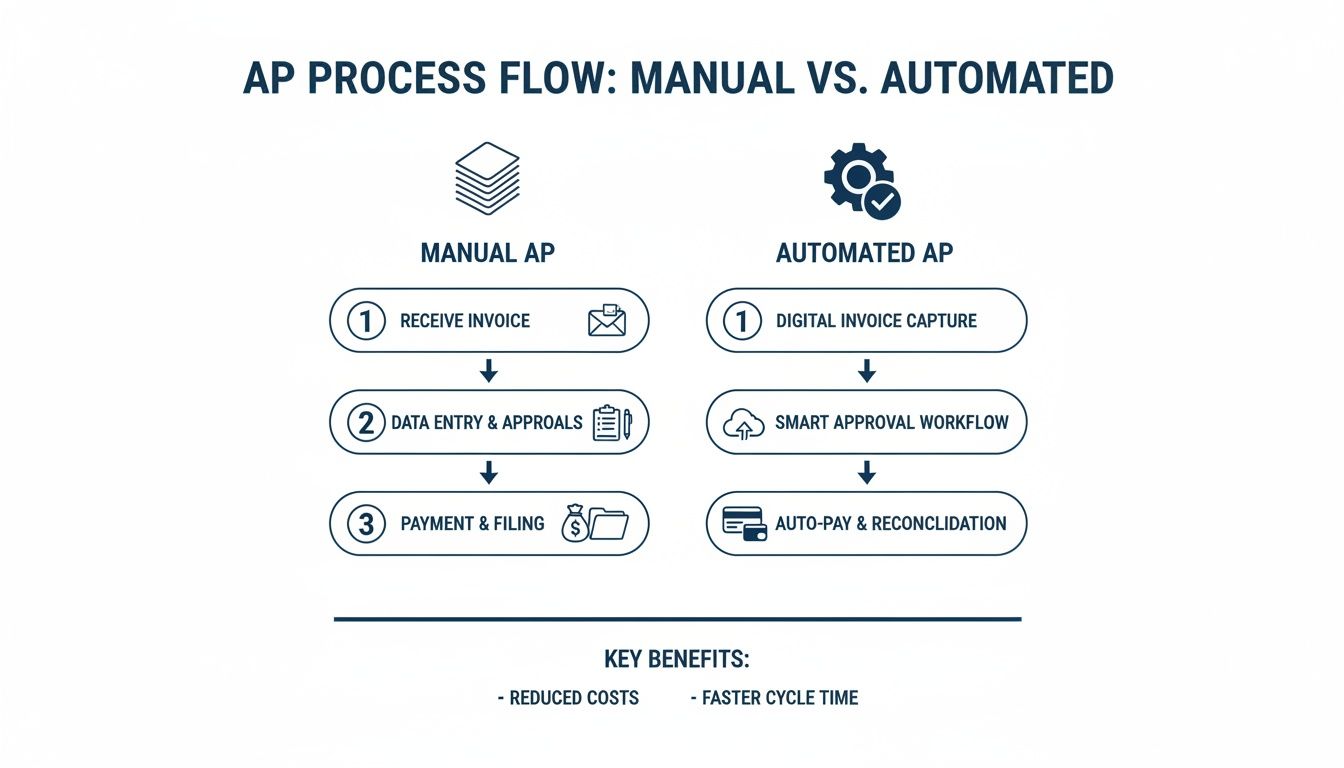
As you can see, automation replaces a chaotic mess of manual tasks with a unified, much faster process.
Stage 3: Approval Workflows
With the invoice data captured and coded, it’s time for approval. This is often the biggest bottleneck in a manual system, where paper invoices sit on desks for days or approval emails get lost in the shuffle.
AP automation solves this with digital approval workflows. To really get the most out of it, businesses are turning to advanced automated approval workflow systems. The software automatically sends the invoice to the right manager or department head based on rules you set up ahead of time.
For example, you can create a rule that any marketing expense over $1,000 has to go to the marketing director. The director gets an instant notification on their phone, can view the invoice with a click, and approve or deny it right there. If they forget, the system can even send gentle reminders.
This completely eliminates the need for your team to chase down approvals, saving a ton of time and preventing the delays that lead to late payment fees.
Stage 4: Payment and Reconciliation
The last step is paying the bill and closing the loop in your books. Once an invoice gets final approval, it moves into a “Ready for Payment” queue.
Your team can then schedule payments—either one by one or in batches—using your preferred method, whether that’s ACH, virtual card, or even a check sent by the automation provider. This gives you precise control over your cash flow. Once the payment goes out, the system automatically marks the invoice as paid and syncs the whole transaction back to your accounting software like QuickBooks. This two-way sync is absolutely critical.
This seamless connection makes your month-end close so much faster. For businesses using popular accounting software, ERP-integrated AP tools can cut reconciliation time by 55%. And with features like three-way matching, you can slash fraud risk by an impressive 74%, which is a big reason why “touchless” invoice processing has become so popular.
The Real-World Benefits of Automating Your AP
Understanding the mechanics of AP automation is one thing, but seeing how it can actually transform your business is another. Let’s move past the technical details and get straight to the powerful, real-world advantages that directly impact your bottom line, your team’s day-to-day, and your company’s future.
These aren’t just abstract ideas; they are measurable improvements that service businesses like yours can start seeing almost immediately.
We can break these benefits down into three core areas every business owner cares about: Financial Gains, Operational Efficiency, and Strategic Growth. Each one represents a massive upgrade from the old, manual way of handling bills.

Hard Numbers and Financial Gains
The most immediate and obvious win with AP automation is the direct impact on your cash flow and expenses. You might not realize it, but manual invoice processing is incredibly expensive when you add up the labor, printing, postage, and storage costs.
Industry research from experts at Gartner and Ardent Partners shows that processing a single invoice manually can cost anywhere from $8 to $30. In sharp contrast, an automated system can crush that cost down to under $4. This move allows for 50-60% touchless processing, which helps cut the month-end close by about three days and reduces late payments by an incredible 57%.
But the financial wins don’t stop at processing costs. Automation opens up other opportunities:
- Capture Early Payment Discounts: Many of your vendors likely offer a 1-2% discount for paying early. Manual processes are usually too clunky and slow to catch these deadlines, but automation makes it simple. Suddenly, your AP team isn’t just a cost center; it’s actively saving you money.
- Eliminate Late Fees: Automated workflows and payment reminders ensure bills are approved and paid on schedule. This puts a stop to those frustrating late-payment penalties that slowly eat away at your profit margin.
- Improve Cash Flow Visibility: Imagine having a real-time dashboard showing every outstanding invoice and its due date. This gives you a crystal-clear picture of your financial obligations, allowing you to manage cash flow with far more confidence and precision.
Smarter Operations and Greater Efficiency
While the financial gains are a huge draw, the improvements in your daily operations are just as important. Automating your accounts payable process frees your team from the tedious, repetitive tasks that drain their time and energy.
Think about all the hours currently spent on manual data entry, chasing down managers for approvals, and fixing typos. Automation hands all that time back. The result is a faster, more accurate, and much less stressful finance department. For a deeper look at setting up an effective workflow, check out our guide on accounts payable best practices.
The goal isn’t just to make the process faster—it’s to make it smarter. By removing the friction of manual work, you create a more resilient and reliable financial operation that can easily scale as your business grows.
Key efficiency improvements include:
- Reduced Error Rates: When software captures and validates invoice data, you virtually eliminate the human errors that come with manual keying. This leads to cleaner, more accurate financial records.
- Faster Month-End Close: With all your bills and payments synced directly into your accounting software, reconciliation becomes a quick review instead of a painful, multi-day project.
- Increased Team Morale: Nobody enjoys tedious administrative work. By removing it, you allow your finance staff to focus on more fulfilling tasks like financial analysis and vendor negotiations, which boosts job satisfaction.
Strategic Growth and Enhanced Security
Finally, AP automation delivers benefits that go far beyond immediate savings and efficiency. It gives your business the tools and insights you need to grow smarter and more sustainably.
One of the biggest strategic advantages is fraud protection. Manual, paper-based systems are wide open to risks like duplicate payments and fake invoices. Automated systems, on the other hand, have built-in safeguards. They can automatically flag duplicate invoice numbers and create a locked-down, unchangeable audit trail for every single transaction, adding a critical layer of security.
Furthermore, when you pay vendors on time, every time, you build stronger relationships. A happy vendor is far more likely to give you better payment terms or prioritize your orders when supplies are tight. This simple shift turns your AP function from a back-office chore into a strategic tool that helps you grow.
Your Practical Roadmap to AP Automation
Knowing you need AP automation is one thing, but actually making the change can feel like a massive project. Where do you even start? The trick is to break it down into a clear, practical roadmap with manageable steps.
This isn’t about flipping a switch overnight. It’s about a thoughtful process that takes you from where you are now to a successful company-wide rollout. Following these steps ensures you not only pick the right software but also get your team on board to see the benefits right away.

Step 1: Assess Your Current Process
Before you can fix anything, you need a painfully honest look at what’s broken. Start by mapping out your current accounts payable workflow, from the second an invoice hits someone’s desk to the moment it’s paid and filed.
Get real with yourself and ask some tough questions:
- How many hours a week are truly spent just keying in invoice data?
- Where are the black holes where invoices get stuck waiting for an approval?
- Did you pay a late fee last quarter because a bill got lost in the shuffle?
- If I asked you for a specific invoice from six months ago, how long would it take to find it?
Answering these uncovers your biggest headaches and builds the business case for making a change. This isn’t just about listing frustrations; it’s about collecting the baseline data you’ll use to measure your success later.
Step 2: Define Your Goals and Metrics
Now that you know the problems, you can set clear, measurable goals for what you want automation to fix. Vague targets like “be more efficient” just don’t cut it. You need specific numbers to aim for.
Good, tangible goals sound like this:
- Reduce our average invoice processing time from 15 days down to 3 days.
- Cut our cost-per-invoice by 50% within six months of going live.
- Completely eliminate late payment fees by the end of next quarter.
- Capture at least 95% of available early payment discounts.
These concrete targets do more than just sound good—they guide your software choice and give you a clear benchmark for seeing a return on your investment. Without them, you’re flying blind.
Step 3: Choose the Right Automation Tool
Let’s be clear: not all AP automation platforms are created equal. For a service business, especially one running on QuickBooks, this is the single most important decision you’ll make. The wrong tool will cause more problems than it solves.
Your evaluation has to focus on a few non-negotiables. First, look for a solution with a deep, two-way integration with QuickBooks. I’m not talking about a simple data dump; you need a sync that keeps your chart of accounts, vendor lists, and payment records perfectly aligned without any manual work. Second, a user-friendly mobile app is a must-have for getting approvals from busy managers who are constantly on the go.
The right software shouldn’t just automate tasks; it should simplify your entire financial tech stack. It needs to feel like a natural extension of your existing accounting system, not another disconnected platform your team has to learn.
Step 4: Plan a Phased Rollout
Trying to switch your entire AP process overnight is a recipe for pure chaos. A phased rollout is a much smarter, safer approach. It minimizes disruption and gives your team a chance to get comfortable with the new way of doing things.
Kick things off with a small, manageable pilot program. For instance, you could start by automating the AP for just one department or for a single, high-volume vendor. This controlled test run lets you iron out the kinks, get honest feedback from a small group, and build a success story that gets the rest of the company excited to join in.
Step 5: Train Your Team and Drive Adoption
A new tool is only as good as the people using it. A successful launch absolutely depends on great training and a clear communication plan. Don’t just show your team which buttons to push; explain the “why” behind the change.
Frame the new system as a way to get rid of their most boring, repetitive tasks. No more chasing down signatures or mind-numbing data entry. When your team sees that AP automation is here to help them, not replace them, they’ll be much more likely to embrace it. Offer ongoing support, celebrate the early wins, and watch the new, efficient process become the new normal.
To help you stay on track, we’ve put together a simple checklist that breaks down the entire process.
AP Automation Implementation Checklist
This checklist provides a clear, step-by-step guide for service businesses looking to select and implement an AP automation solution. Follow these phases to ensure a smooth and successful transition from manual processes to streamlined efficiency.
| Phase | Key Action | Pro Tip for Success |
|---|---|---|
| 1. Discovery & Planning | Map your current AP workflow from invoice receipt to payment. | Be brutally honest. Document every manual touchpoint, bottleneck, and delay to build a strong business case. |
| 1. Discovery & Planning | Set specific, measurable KPIs (e.g., reduce processing time by 70%). | Vague goals lead to vague results. Use hard numbers to define what a “win” looks like for your business. |
| 2. Vendor Selection | Shortlist 3-5 vendors with proven QuickBooks & Gusto integrations. | Ask for a live demo showing the two-way sync in action. A simple data export is not a true integration. |
| 2. Vendor Selection | Involve a key manager or team member in the final demos. | The people who will use the software daily are the best judges of its user-friendliness. Their buy-in is critical. |
| 3. Implementation | Design your new automated approval workflows within the chosen tool. | Start simple. You can always add complexity later. Focus on your most common approval paths first. |
| 3. Implementation | Run a small pilot program with one department or a key vendor. | This “test flight” lets you work out bugs in a controlled environment before a company-wide launch. |
| 4. Training & Rollout | Hold a training session focused on “what’s in it for them.” | Emphasize how the tool eliminates tedious tasks like data entry and chasing signatures, giving them back valuable time. |
| 4. Training & Rollout | Go live and provide immediate, hands-on support for the first two weeks. | Be visible and accessible. Quick answers to early questions will prevent frustration and build confidence in the new system. |
| 5. Measurement & Refinement | After 90 days, measure your results against the KPIs set in Phase 1. | Share the good news! Celebrating wins—like eliminating late fees—reinforces the value of the change and builds momentum. |
Following this checklist will help you avoid common pitfalls and ensure your move to AP automation delivers the ROI and efficiency you’re looking for.
Choosing the Right AP Software for Your Business
Not all AP automation software is built the same. The market is getting crowded—it’s projected to hit $5.8 billion by 2029, and cloud-based tools have seen a 72% jump in adoption since 2021. With so many options, picking the right one can feel overwhelming.
For a service business that runs on QuickBooks, this choice is especially critical. The wrong tool doesn’t just fail to help; it actively creates more work and more headaches. Learn more about how AP trends are shaping business finance on ramp.com.
Making the right decision isn’t about chasing the longest feature list. It’s about finding the software that fits into your existing workflow like a missing puzzle piece, simplifying your tech stack instead of making it more complicated.
Beyond the Buzzwords: Deep Integration Is Non-Negotiable
For any business using QuickBooks, the single most important factor is the quality of the integration. A lot of software providers will say they “integrate” with QuickBooks, but you really need to dig into what that means.
A flimsy, one-way “data sync” is a red flag. This often involves manually exporting a file from one system and uploading it to another—which is just trading one manual task for a different one. It’s still slow and ripe for error.
What you’re looking for is a true, deep two-way integration.
This means when you add a new vendor in your AP software, it automatically shows up in QuickBooks. When a bill is paid, the payment record syncs back instantly and correctly, closing out the payable. This constant, automatic communication is what keeps your books perfectly reconciled without you lifting a finger.
A deep integration ensures your AP automation software acts as a natural extension of QuickBooks, not a disconnected island of data. It should feel like you’re working within a single, unified system.
Must-Have Features for Service-Based Businesses
Beyond a rock-solid QuickBooks connection, service businesses have their own unique needs. Your operations are often organized around clients, projects, or specific service lines, and your accounting has to reflect that.
Look for a platform that can handle these key requirements:
- Project or Class Tracking: The software absolutely must let you code invoices to specific projects, jobs, or classes right inside the platform. That data should then sync perfectly to QuickBooks, giving you accurate job costing and profitability reports without any manual clean-up.
- A User-Friendly Mobile App: Your project managers and department heads are rarely sitting at a desk. A clean, intuitive mobile app for approving invoices on the go is essential. It should let them view, approve, or reject invoices with a quick tap, keeping the workflow from stalling.
- Flexible Approval Workflows: Can you set up rules based on dollar amounts, departments, or specific vendors? Your business needs a system that can automatically send a $5,000 software bill to the IT director but route a $500 supply invoice to the office manager.
Evaluating the Vendor Behind the Software
A great tool is only as good as the team that supports it. Before you commit, spend some time looking into the vendor’s customer support and onboarding process. Technology can be tricky, and you want a partner who will actually be there to help when you get stuck.
Ask potential vendors direct questions. Do they offer live phone support, or are you just another ticket in a slow email queue? What does their onboarding look like? A good vendor will have a structured plan to get you set up, help you configure your workflows, and train your team.
Remember, you aren’t just buying software; you’re investing in a relationship. Choose a vendor who is committed to your success long after they’ve made the sale. That focus on support is what ensures you get the full return on your investment.
Common Questions About AP Automation
Even with clear benefits, adopting any new technology usually brings up a few last-minute questions. Before making the leap, most business owners I talk to want to get clear on a few things, especially size, cost, and security. Let’s tackle these common hurdles head-on.
Is My Business Too Small for AP Automation
There’s a persistent myth that automation is only for big corporations processing thousands of invoices a month. The reality is, modern cloud-based AP tools are built specifically for growing businesses just like yours. Whether you handle 30 invoices a month or 300, the goal is the same: stop wasting time on manual work.
Starting with automation early on builds a financial foundation that can scale. It means that as your business grows, your back-office processes can keep up without you having to hire more people just to push paper.
The question isn’t whether you’re big enough for automation; it’s whether you want to build a business that’s efficient enough to grow. Adopting smart systems early is a strategic advantage, not an unnecessary expense.
How Much Does AP Automation Software Cost
AP automation software typically comes with predictable pricing, like a flat monthly subscription or a small fee for each invoice processed. And while yes, it’s a new line item on your budget, it’s crucial to look at it through the lens of return on investment (ROI). The real cost is often sticking with the manual process you have now.
To figure out the true value, just add up the savings:
- Reduced Labor: How many hours does your team spend on data entry, chasing down approvals, and fixing mistakes?
- Eliminated Fees: How much did you pay in late payment penalties last year?
- Captured Discounts: How many early payment discounts did you miss out on because invoices weren’t approved in time?
For a broader look at this topic, you might find some helpful answers to other common business automation questions. When you factor in the savings on labor, late fees, and fraud prevention, the software often pays for itself several times over.
How Secure Is My Financial Data
I get it—handing over sensitive financial data to a new system can feel like a big step. But the truth is, reputable AP automation platforms are almost always far more secure than paper-based or manual email systems. Think about it: manual processes are vulnerable to lost documents, internal fraud, and simple human error.
Digital platforms fight these risks with multiple layers of protection. We’re talking standard security features like data encryption, role-based user permissions (so you control exactly who sees what), and complete audit trails that log every single action taken on an invoice. In fact, some studies have shown that moving to a digital system can cut AP costs by over 40% while dramatically improving both payment accuracy and security.
Your Next Steps Toward Financial Automation
We’ve covered what AP automation is, how it actually works, and the powerful benefits it brings to the table. If there’s one thing to take away from this guide, it’s that this technology is no longer a “nice-to-have” for big corporations—it’s become an essential tool for any service business that wants to grow without the chaos.
Automating your accounts payable process is how you build a stronger, more scalable financial foundation for your business. It takes the manual, error-prone chores off your plate and replaces them with a clean system that delivers speed, accuracy, and a clear view of your finances. This is the shift that lets your team stop reacting to yesterday’s data and start making proactive financial decisions.
Moving From Understanding to Action
The next step is turning this knowledge into action. Don’t let clunky, outdated manual processes hold your business back for another quarter. The chance to get back countless administrative hours, stop paying late fees, and gain real-time control over your cash flow is right in front of you.
When you embrace this technology, you’re not just buying another piece of software; you’re investing in a more resilient and competitive future for your business. The best systems are built to grow with you, ensuring your back office can handle a flood of new invoices without you needing to hire more people just to keep up.
The real value of AP automation is its power to turn a cost center into a strategic asset. By cleaning up your financial data and processes, you give yourself and your team the clarity needed to make smarter decisions across the entire organization.
Waiting for a “better time” to fix your AP process usually means another year of wasted money, frustrated staff, and missed opportunities. The most successful businesses are the ones that take decisive steps to build efficient systems that actually support their goals. Your journey toward a smarter, more efficient back office starts right now.
Ready to see how this could look in your business? The team at Steingard Financial can help you map out your current workflow and find a solution that fits perfectly with the systems you already use. Schedule a discovery call with our team today.