 Skip to content
Hiring without a plan is just guessing with your payroll. A strategic staffing plan template transforms that guesswork into a financial blueprint, shifting your business from chaotic, reactive hiring to a proactive strategy where every role is directly tied to revenue and growth.
Why Your Business Needs a Real Staffing Plan

Most service business owners fall into a familiar trap: they hire when the pain becomes unbearable. A key employee quits, a big new client signs on, or the team is simply overwhelmed. This reactive approach feels necessary in the moment, but it’s an incredibly expensive way to build a team.
Hiring out of desperation often leads to rushed decisions, poor culture fits, and overpaying for talent. More importantly, it disconnects your single largest expense—payroll—from your strategic goals. Without a plan, you’re always one step behind, unable to anticipate needs and allocate resources effectively. This is where a well-structured staffing plan becomes a competitive advantage.
From Reactive Guesswork to Proactive Strategy
A staffing plan is so much more than a list of open positions. It’s a living document that connects your financial forecasts directly to your talent needs. By building a template, you create a system for making clear, data-driven decisions about who to hire, when to hire them, and how much you can really afford to invest in their roles.
This strategic shift provides some immediate, powerful benefits:
- Controlled Labor Costs: You can model the financial impact of each new hire, including salary, benefits, and taxes, ensuring your payroll stays aligned with revenue projections.
- Improved Scalability: The plan lets you anticipate future needs based on your sales pipeline, so you can start recruiting before your team hits its breaking point.
- Alignment Across Departments: It forces conversations between sales, operations, and finance, ensuring everyone is working from the same playbook. Sales can’t sell what operations can’t deliver.
- Strategic Role Definition: Every position is justified by the revenue it will support or the operational efficiency it will create, eliminating redundant or unnecessary hires.
A great staffing plan does more than fill seats; it builds the organizational capacity needed to achieve your financial targets. It’s the bridge between your growth ambitions and the team that will get you there.
The Foundation of a Strong Financial Future
Ultimately, your staffing plan template is a risk management tool. It helps you sidestep the costly hiring mistakes that can stall a growing business. Just think about the hidden costs of a bad hire: wasted salary, recruiting fees, lost training time, and the ripple effect on team morale and productivity. These expenses can be devastating for a small or medium-sized business.
To design a robust and future-proof staffing plan, it’s essential to understand various effective workforce planning strategies. By moving from an “emergency hire” mindset to a planned, strategic approach, you gain control over your financial health and build a resilient team ready for whatever comes next.
Gathering the Data to Power Your Forecast
A staffing plan built on gut feelings is a recipe for disaster. To get this right, you need to swap intuition for hard data. The good news? You probably already have all the information you need sitting in the systems you use every day.
We’re going to dig into your accounting and payroll software, like QuickBooks and Gusto. This isn’t just about pulling numbers; it’s about finding the story they tell. This process turns your growth goals from wishful thinking into a concrete, data-backed plan.
Uncovering Your Financial Baseline
First things first, let’s look at the money. Your historical revenue is the foundation for everything else, so head over to your QuickBooks account. Pull your Profit & Loss statements for the last 12 to 24 months to see what’s really going on.
- Revenue Growth: Are sales climbing steadily, or do you have busy and slow seasons? A marketing agency’s hiring needs will look very different from a landscaping company’s spring rush.
- Gross Profit Margins: For every dollar you make, how much is left after paying for the service itself? This number tells you exactly how much you can afford to spend on new team members as you bring in more work.
- Payroll as a Percentage of Revenue: Keep an eye on this metric. If it’s slowly creeping up but revenue isn’t, you might have an efficiency issue, not a headcount problem.
Looking at these numbers gives you a clear picture of your financial capacity. You’ll start to see the direct link between your revenue and the team needed to support it. For a deeper dive into this, check out our guide to budgeting and forecasting for your business.
Assessing Your Current Team Capacity
Next, let’s figure out what your current team can realistically handle. This data usually lives in your HR platform, like Gusto, or project management tools. This isn’t about micromanaging—it’s about understanding your operational limits so you know when they’re about to break.
Look at your team’s actual output. For instance, maybe your three bookkeepers can each comfortably manage 20 client accounts, giving you a total capacity of 60 accounts. If the sales team is projecting you’ll hit 75 accounts next quarter, you now have a clear, data-driven reason to start hiring a fourth bookkeeper.
Don’t mistake busyness for productivity. The data should tell you the true capacity of your team. This prevents burnout and ensures you hire proactively, not reactively when service quality starts to drop.
Identifying the Skills Gap
With a solid grasp of your financials and team capacity, you can now look at the skills you have versus the skills you’ll need. This is a simple but powerful exercise that makes your hiring plan truly strategic.
Grab a whiteboard or open a spreadsheet and map it out:
- List Required Skills: What expertise will you need in the next 6-12 months to hit your goals? Think about new software, certifications for a new service, or specific industry experience.
- Inventory Current Skills: Look at your current team. Who has these skills? Is anyone close enough that they could be trained?
- Identify the Gaps: The difference between what you need and what you have is your hiring priority list.
This analysis ensures you’re building a staffing plan template that focuses on hiring the right people, not just more people. Finally, don’t forget to factor in your historical employee turnover rate and your average time-to-fill an open role. This grounds your hiring timeline in reality, completing your data-driven forecast.
Building Your Dynamic Staffing Plan Template
Once you’ve pulled all your data together, it’s time to graduate from a basic spreadsheet. We’re going to build a truly dynamic staffing plan template. Think of this less as a list of names and more as a financial model for your team’s future. The whole point is to create a living document that ties every single hiring decision back to a specific business goal.
A solid plan starts with a clear structure. You’ll need to map out your current team, forecast future roles based on your growth targets, and—this is key—account for your contingent workers like contractors and freelancers. Getting this complete picture means no part of your workforce is left to chance.
The data gathering process itself has a natural flow, moving from revenue analysis to a hard look at your team, and finally, to spotting the gaps you need to fill.
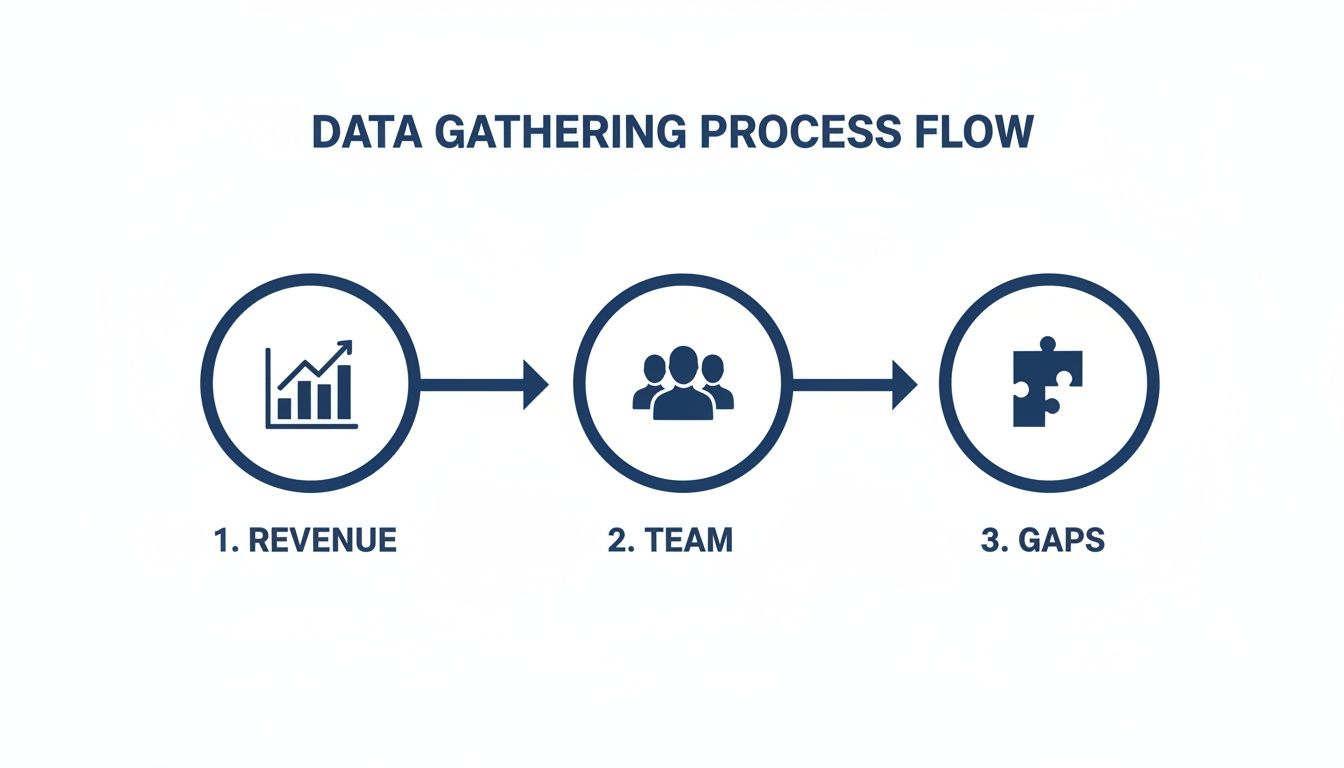
This visual shows how each piece of information builds on the last, turning raw financial numbers into a clear, actionable picture of your hiring needs.
At the heart of a truly useful staffing plan are several core components that work together. Without these, you’re just making a glorified roster.
Core Components of a Dynamic Staffing Plan Template
| Component | Description | Example Data Points |
|---|---|---|
| Current Team Roster | A snapshot of your existing workforce, including both full-time and part-time staff. | Role Title, Department, Start Date, Current Salary/Wage, FTE Value (e.g., 1.0, 0.5) |
| Forecasted Roles | The new positions you anticipate needing based on growth projections and strategic goals. | Proposed Title, Target Start Date, Projected Salary Range, Justification for Hire |
| Cost Modeling | A detailed breakdown of the total cost for each employee, not just their salary. | Base Salary, Payroll Taxes, Health Insurance, 401k Match, Onboarding Costs, Equipment |
| Hiring Timeline | A schedule for recruitment, from posting the job to the new hire’s first day. | Job Posting Date, Interview Window, Offer Date, Target Start Date |
| KPI Alignment | A direct link between each role and the key performance indicators it’s meant to impact. | Role: Sales Rep; KPI: Increase new client acquisition by 15% |
| Contingent Workforce | A section dedicated to non-permanent staff like freelancers, contractors, and consultants. | Contractor Name/Agency, Project, Hourly/Project Rate, Contract End Date |
Each of these sections provides a different lens through which to view your team, giving you a complete, multi-dimensional model to guide your decisions.
Calculating Full-Time Equivalents (FTEs)
One of the first practical steps is to standardize how you measure your team. Not everyone works a neat 40-hour week, and your plan has to reflect that. This is where Full-Time Equivalents (FTEs) are so valuable.
An FTE is just a simple way to convert the hours worked by all your people—full-time, part-time, and contractors—into an equivalent number of full-time positions. The math is easy:
- 1.0 FTE: A full-time employee working 40 hours per week.
- 0.5 FTE: A part-time employee working 20 hours per week.
- 1.5 FTE: A full-time employee who regularly puts in 20 hours of overtime.
By calculating FTEs for every role, you get a much more accurate sense of your actual workforce capacity. For instance, a bookkeeping firm might realize their three part-time tax preparers actually represent 1.5 FTEs, which clarifies their real capacity during the chaos of tax season.
Modeling the True Cost of a New Hire
Let’s be blunt: salary is just the tip of the iceberg. One of the biggest mistakes I see businesses make is forgetting to budget for the total cost of bringing someone new on board. For your staffing plan to be financially sound, it has to account for every related expense.
The total cost of an employee is often 1.25 to 1.4 times their base salary. Forgetting to model this loaded cost can throw your entire budget off track and put a serious strain on cash flow.
To get the real number, your template needs line items for things like:
- Payroll Taxes: FICA (Social Security and Medicare), FUTA (federal unemployment), and SUTA (state unemployment).
- Benefits: Health insurance premiums, retirement plan contributions (like a 401k match), and paid time off (PTO).
- Onboarding and Training: The cost of software, equipment, and the time your existing team spends training the new person.
- Recruiting Costs: Fees for job boards, recruiter commissions, or background checks.
Modeling these costs is the difference between a salary guess and a precise financial forecast. It gives you the confidence that you can actually afford the team you’re planning to build.
Planning for Different Growth Scenarios
The market couldn’t care less about your perfectly linear forecast. A great staffing plan isn’t rigid; it’s flexible and prepares you for what might happen, not just what you hope will happen. Building different growth scenarios into your template is how you make it a truly resilient tool.
Instead of a single forecast, build three:
- Conservative Scenario: What if sales are flat or only inch up? This plan focuses on must-have hires only, prioritizing roles that boost efficiency or keep clients happy.
- Moderate Scenario: This is your most likely path, based on historical data and your current pipeline. It includes the planned hires needed to support that steady growth.
- Aggressive Scenario: What happens if you land that whale of a client or a new service explodes in popularity? This is your “break glass in case of emergency” plan, outlining the hires you’ll need to scale fast without the wheels coming off.
By creating these scenarios, you’re not just planning—you’re preparing. As the year unfolds, you just activate the part of the plan that matches reality. It lets you respond quickly and strategically. In fact, workforce planning experts have shown that organizations using this approach during budgeting cycles can cut unplanned hiring costs by up to 15-20% just by forecasting quarterly needs. You can dig deeper into how this works by exploring different staffing playbooks.
Connecting Your Plan to Payroll and HR Systems
A staffing plan sitting in a folder is just a theoretical exercise. Its real power comes alive when you plug it into the daily pulse of your business—your payroll and HR systems like Gusto and QuickBooks. This step is what turns a strategic forecast into an operational reality.
When your plan lives inside these systems, it stops being a document you glance at quarterly. It becomes the guide for every single people-related decision you make. It’s the single source of truth that ensures your hiring, compensation, and budgeting are all perfectly aligned. Without this connection, even the best plan quickly becomes obsolete.
From Plan to Payroll in Gusto
Think of your staffing plan as the blueprint for every new hire you bring on board. When you finally decide to hire that new bookkeeper you forecasted, the plan has already done the heavy lifting. All the key details are right there, ready to be plugged directly into a new employee profile in a platform like Gusto.
This creates a seamless, error-free transition from making an offer to onboarding. Here’s how the data from your template maps directly into Gusto:
- Role and Title: This comes straight from your “Forecasted Roles” section.
- Compensation: The approved salary range from your cost modeling becomes the official pay rate. No guesswork.
- Department: Aligns the new hire with the correct team for reporting and management from day one.
- Benefits Eligibility: Your cost model already accounted for benefits, so enrollment is straightforward.
Using your plan as the guide for this process ensures consistency. Every team member is brought on according to the strategic framework you already built, preventing those one-off compensation decisions that can slowly wreck your budget. This process is fundamental, and if you need a refresher, our article on setting up payroll correctly is a great place to start.
Aligning Your Hiring Budget with QuickBooks
At its core, your staffing plan is a financial document. It outlines your single largest investment: your people. That makes syncing it with your accounting software an absolute must for maintaining financial control. The “Total Cost” you carefully modeled for each new role should become a line item in your company budget within QuickBooks.
This creates a powerful feedback loop. You can run budget vs. actual reports in QuickBooks to see exactly how your hiring is tracking against your plan. Are you overspending on salaries? Did you forget to account for recruiting fees? You’ll know immediately.
This real-time visibility is what gives you control. For example, some high-growth agencies use this data to maintain strict financial discipline. Metrics from recruiting experts show agencies targeting $4.2M in revenue with ten recruiters aim for $300K in gross profit per recruiter, carefully tracking compensation ratios every single month. Discover more about how agencies budget for growth to see this in practice.
Your accounting software should always reflect the reality of your staffing plan. When the numbers in QuickBooks match the strategy in your template, you’ve created a single, reliable source of truth for your people-related expenses.
This alignment prevents nasty surprises. You’ll know the second a hiring decision is pushing you over budget, allowing you to make adjustments before it becomes a real problem. It transforms your plan from a static document into a dynamic financial management tool that guides your business toward profitable growth. This is the kind of data-driven oversight that separates businesses that scale smoothly from those that stumble.
Putting Your Hiring Plan Into Action

So, you’ve got a data-driven forecast in your hands. That’s a fantastic start, but a great staffing plan template is only as good as its execution. This is where the rubber meets the road—turning those numbers and projections into a real-world hiring strategy that gets the right people in the door exactly when you need them.
The first move is to build out a hiring timeline that’s both clear and realistic. Your plan isn’t just about who you need, it’s about when they need to be fully ramped up and productive. To nail this, you have to work backward from their ideal start date, padding the calendar with enough time for every single step of the recruiting process.
Crafting a Realistic Hiring Timeline
Just saying, “I need a new bookkeeper by April 1st,” isn’t a plan; it’s a wish. You need to map out the entire chain of events leading up to that first day. A rushed timeline almost always leads to bad hires, so it’s critical to give each stage the time it deserves.
Your timeline should block out dedicated windows for things like:
- Finalizing the Job Description: Getting the hiring manager’s input and locking down the KPIs for the role.
- Posting and Sourcing: Pushing the job out to the right platforms and actively looking for great candidates.
- Reviewing Applications: Sifting through resumes to build a strong shortlist.
- Conducting Interviews: Scheduling a few rounds with different team members.
- Extending the Offer: Giving the candidate time to consider, negotiate, and accept.
- Factoring in a Notice Period: Don’t forget they’ll likely need to give their current employer two weeks’ notice, if not more.
Getting these timelines right is especially important in competitive fields. For example, finance roles take an average of 46 days to fill globally. This just goes to show how much a structured, well-paced process matters for finding skilled bookkeepers and payroll specialists.
From Forecast to Compensation Package
Your staffing forecast does more than just tell you who to hire; it’s the foundation for building competitive—and sustainable—compensation packages. Because your cost modeling already includes the total loaded cost of an employee, you can make offers that attract top talent without blowing up your budget.
Use the salary range you defined in your plan as your guide during negotiations. This data-first approach keeps you from making emotional or reactive decisions that can cause pay gaps or overspending. When you have a solid compensation framework, you create a sense of fairness and transparency, which is huge for both attracting and keeping great people.
To make sure your new hires get off to a great start, check out our guide on employee onboarding best practices.
Your staffing plan is your financial guardrail during the hiring process. It allows you to make compelling offers that are rooted in strategy, not desperation, ensuring every hire is a sound financial decision.
Once your team starts growing, you’ll want to manage them efficiently. Using tools like the best employee scheduling software can make a world of difference.
Making Your Plan an Ongoing Management Tool
The most successful businesses I’ve seen don’t treat their staffing plan as a one-and-done project. They treat it as a living document. Markets shift, clients change, and your business evolves—your plan has to keep up.
This means you need to set up a regular review schedule. For most growing service businesses, a quarterly review is perfect. It keeps you agile and lets you make small corrections before they turn into big problems.
During these check-ins, ask yourself a few key questions:
- How accurate were our forecasts? Compare your projected revenue and growth to what actually happened.
- Are we hitting our hiring timelines? Look for any bottlenecks in your recruiting process.
- Have any roles changed? Do the job descriptions still match what people are actually doing?
- What is our turnover data telling us? Use feedback from exit interviews to improve retention and fine-tune future roles.
When you consistently revisit and refine your staffing plan, it stops being a static document and becomes a dynamic guide. It becomes a central part of your strategic thinking, making sure your team—your most valuable asset—is always perfectly aligned with where the business is headed.
Common Questions About Staffing Plan Templates
Even with the best data and a solid structure, building your first real staffing plan template can feel a bit daunting. It’s a detailed process, and it’s only natural to wonder if you’re focusing on the right things.
Getting clear, straightforward answers to a few common questions can give you the confidence to move forward. Let’s tackle some of the most frequent uncertainties that service business owners face when turning their strategic goals into an actual hiring plan.
How Often Should I Update My Staffing Plan?
For a growing service business, a quarterly review is the sweet spot. This rhythm is frequent enough to keep you agile, letting you react quickly to a big new client win, an unexpected shift in the market, or a change in your sales pipeline. It stops the plan from becoming a static, outdated document.
At a bare minimum, you need to do a deep-dive review annually. This is typically a core part of your yearly budgeting and financial forecasting process.
Treat your staffing plan like a living document, not a historical artifact. If you lose a key employee or land a massive project that changes your capacity needs, revisit the plan immediately. It should always reflect your current business reality.
What Is the Biggest Mistake to Avoid?
The single biggest—and most costly—mistake is creating the staffing plan in a vacuum. I see it all the time. Staffing isn’t just an HR function; it’s a core business strategy that directly impacts finance, operations, and sales. When you build the plan without input from your department heads, you create a document that is fundamentally disconnected from reality.
Think about it: the sales team might project ambitious revenue targets that the operations team, with its proposed headcount, could never possibly service. This kind of misalignment leads to customer service failures, team burnout, and missed financial goals.
Collaboration is absolutely non-negotiable. Involving your key leaders ensures that your hiring goals are realistically tied to revenue projections, operational capacity, and, most importantly, the actual budget.
Should I Include Contractors and Part-Time Roles?
Absolutely. A complete and accurate staffing plan has to account for your entire workforce, not just your full-time employees. Leaving out contingent workers gives you a dangerously incomplete picture of your labor costs and operational capacity.
Your template should have dedicated sections for these roles:
- Freelancers and Contractors: Who are they, what projects are they on, and what are their rates?
- Part-Time Staff: How many hours do they work, and what is their role in supporting the full-time team?
The key here is to convert their hours into Full-Time Equivalents (FTEs). For example, two part-time bookkeepers each working 20 hours a week represent 1.0 FTE. This simple calculation gives you a true, apples-to-apples comparison of your workforce size and helps you accurately model total labor costs. For any service business that relies on flexible talent to manage fluctuating client demand, this level of detail is critical.
How Do I Forecast for a Completely New Role?
Forecasting for a role that has never existed in your company is a blend of internal analysis and external market research. It’s less about guesswork and more about a structured approach.
First, look internally. Start by clearly defining the “why” behind the hire. What specific business problems will this person solve? What key performance indicators (KPIs) will they be directly responsible for improving? Answering these questions justifies the role’s existence and its associated cost.
Next, turn to external research to ground your financial assumptions in reality.
- Gather Salary Data: Use platforms like LinkedIn Salary, Glassdoor, and Payscale to find benchmark compensation data for similar roles in your industry and geographic area.
- Network with Peers: Talk to other business owners or managers in your industry who have a similar position on their team. Ask them about the role’s impact and any unforeseen challenges they ran into.
- Model the Total Cost: In your staffing plan template, create a “best estimate” cost model. Make sure to include a realistic salary range, payroll taxes, benefits, and a budget for recruiting expenses.
You have to acknowledge the inherent uncertainty of a new role. Build some flexibility into your overall department budget to accommodate potential adjustments once the person is actually in the seat. This approach allows you to make an educated, data-informed decision while leaving room to adapt.
A robust staffing plan is the foundation for scalable growth, but building it and connecting it to your financial systems takes expertise. Steingard Financial offers People Advisory services to help you create a data-driven staffing plan, build competitive compensation frameworks, and integrate it all seamlessly with Gusto and QuickBooks. Move from reactive hiring to strategic workforce planning.
Learn more and schedule a consultation at https://www.steingardfinancial.com.