Mastering the Accounts Payable Aging Report for Your Business
It’s time to stop seeing the accounts payable aging report as just another boring accounting document. Think of it more like your business’s financial command center—it gives you a crystal-clear picture of who you owe money to, exactly how much, and precisely when those bills are due. This report is the secret to turning your liabilities into a strategic tool for growth.
Your Guide to Strategic AP Management

Most business owners lump accounts payable into the “cost center” category. It’s a necessary part of operations, sure, but not exactly exciting. But what if I told you that a goldmine of data is hiding inside your stack of unpaid bills? This guide is here to show you how to turn the AP aging report from a simple to-do list into a powerhouse for managing cash flow and building stronger relationships with your vendors.
When you truly get a handle on this report, you gain the insight needed to dodge late fees, snag valuable early payment discounts, and make spending decisions with real confidence. The moment you understand your payment cycles, you’re back in control of your working capital.
Why This Report Matters for Growth
For any growing service business, managing the cash going out is every bit as critical as bringing new revenue in. A well-run AP process creates stability and builds a foundation of trust with your suppliers—and they are absolutely essential partners in your success. On the flip side, a messy or ignored AP aging report can be a warning sign of deeper financial troubles.
By the time you’re done with this guide, you’ll know how to:
- Read and make sense of the different “aging buckets” that categorize your bills.
- Spot red flags that might point to cash flow issues or problems with an invoice.
- Use the data to decide which payments to make first and improve how you talk to vendors.
- Generate and customize the report in popular accounting software like QuickBooks Online.
The accounts payable aging report isn’t just about paying bills on time. It’s about understanding the rhythm of your company’s financial obligations so you can plan for the future with confidence.
Ultimately, taking a proactive approach to your payables—with the aging report as your guide—is a key part of building a back office that can scale with your business. To build that strong foundation, you need to understand the entire accounts payable process and how every step feeds into getting an accurate report. We’ll break it all down for you, starting with the basics and moving all the way to strategic financial planning, putting you in the driver’s seat.
Decoding Your Accounts Payable Aging Report
Think of the accounts payable aging report as your business’s ultimate payment to-do list, but way smarter. Instead of a messy pile of invoices, this report neatly organizes every single bill you owe to vendors, sorting them by how long each has been waiting to be paid.
This clarity is the first step toward getting ahead of your finances. It lets you shift from just reacting to due dates to actually planning your cash outflow. You can meet your obligations without putting unnecessary stress on your bank account.
What Are Aging Buckets?
The real magic of the report is its “aging buckets.” These are just time-based categories that group your unpaid bills together. Picture it like this: you have a few bins, each labeled with a time frame. When a new invoice comes in, it goes into the “Current” bin. If you haven’t paid it by the time it’s due, you move it to the next bin, “1-30 Days Past Due,” and so on.
This simple sorting method gives you an instant snapshot of which bills need your attention most urgently. A quick glance tells you if your payables are in good shape or if overdue bills are starting to pile up—a clear warning sign of a cash flow problem or maybe just a broken internal process.
An accounts payable aging report turns a boring list of debts into a clear action plan. It shows you which vendors to pay first, where to find early payment discounts, and when to sort out invoice problems before they hurt a good relationship.
For a growing service business, this kind of visibility isn’t just nice to have; it’s critical. In fact, not having a clear view of your aging payables can be incredibly expensive. Some businesses miss out on $46,000 in early payment discounts in just three months because they can’t see what’s due and when. By understanding these buckets, you can avoid becoming part of that statistic and start using your AP process to save money. You can check out more AP aging report insights to see how other businesses are using this data.
Breaking Down the Buckets
To really get the most out of this report, you need to know what each column, or “bucket,” is telling you. While the exact labels might change depending on your accounting software, the basic structure is almost always the same.
Here’s a simple breakdown of the standard buckets you’d see in a system like QuickBooks Online.
Understanding AP Aging Buckets
This table breaks down the standard time-based categories found in an accounts payable aging report and what each one means for your business’s cash flow.
| Aging Bucket | Time Frame | What It Means | Action Required |
|---|---|---|---|
| Current | Invoices not yet due | These are your healthy, on-time payables. They represent your immediate future financial obligations. | Plan for payment within the agreed-upon terms to maintain good vendor standing. |
| 1-30 Days Past Due | Invoices overdue by 1-30 days | This is the first warning sign. While not critical yet, these bills need prompt attention to avoid late fees. | Prioritize these for payment in your next payment run. |
| 31-60 Days Past Due | Invoices overdue by 31-60 days | This category often signals a cash flow issue or a disputed invoice that needs investigation. | Investigate the reason for the delay immediately and communicate with the vendor. |
| 61-90 Days Past Due | Invoices overdue by 61-90 days | Payments in this bucket are a big red flag and can seriously damage vendor relationships. | This requires urgent action. Resolve any issues and make the payment a top priority. |
| Over 90 Days | Invoices overdue by more than 90 days | These are critical liabilities. They risk damaging your business’s credit and could lead to collections. | Escalate this internally. Pay immediately and work to repair the vendor relationship. |
Getting comfortable with this structure is the first step. It gives you the context to not just read the report, but to understand what the numbers are saying about the health of your business.
How to Run an AP Aging Report in QuickBooks Online
If you’re running a service business, chances are QuickBooks Online is the heart of your financial operations. The good news is that you don’t need any special add-ons to get your hands on an accounts payable aging report—it’s built right in. You don’t have to be a CPA to pull this info; QuickBooks makes it pretty simple.
This report gives you a clean, organized list of all your outstanding bills. It’s the fastest way to see exactly who you owe, what you owe, and how far behind any payments might be. Let’s walk through the exact steps to get it done.
Step-by-Step Guide to Generating the Report
Pulling your AP aging report in QuickBooks Online really just takes a couple of clicks. The platform gives you two main options: a “Summary” report for a quick, high-level glance and a “Detail” report that breaks down every single invoice.
Here’s all you have to do:
- Navigate to the Reports Section: From your main dashboard, look at the menu on the left side and click on Reports.
- Find the Report: Once you’re in the Reports Center, scroll down until you see the section titled “What you owe.” You’ll find both the Accounts Payable Aging Summary and the Accounts Payable Aging Detail reports right there.
- Choose Your Report: Click on the “Summary” report for a quick overview. If you need to dig into the specifics of each bill, choose the “Detail” report instead.
The screenshot below shows you exactly where to look in the QuickBooks Online dashboard.
As you can see, both the summary and detail versions are easy to spot under the “What you owe” heading, putting these crucial financial insights just a click away.
Customizing Your Report for Better Insights
Running the standard report is a great start, but the real magic happens when you start customizing it. A generic report is one thing, but a report tailored to answer your specific questions is a powerful tool for analysis. QuickBooks offers several straightforward ways to tweak the data you see.
The default settings give you a snapshot, but customization turns your accounts payable aging report into a dynamic tool for cash flow management and strategic decision-making.
For instance, you can easily change the reporting date to see what your payables looked like at the end of last month, which is a huge help for reconciliations. You can also filter the report to show just one vendor, which is perfect if you’re getting ready to hop on a call with them to discuss their account.
Here are the key customization options you’ll want to get familiar with:
- Report Period: You can change the “As of” date to see your payables on any date in the past, not just today.
- Aging Method: You have the option to switch between “Current” (which bases the aging on today’s date) and “Report Date” (which bases aging on the “As of” date you selected).
- Days per Aging Period: The standard is 30-day buckets, but you can easily change this to 15, 60, or whatever interval makes the most sense for your business’s payment cycles.
- Vendor Filter: The “Customize” button lets you select one or more vendors, so you can zero in on specific accounts.
Once you get comfortable with these simple customizations, you’ll stop just looking at the data and start using your AP aging report to actively manage your cash flow and make smarter financial moves.
How to Analyze Your Report for Actionable Insights
Running your accounts payable aging report is only half the job. The real magic happens when you turn that data into smart, strategic decisions that protect your cash flow and strengthen your business. This report isn’t just a list of bills to pay; think of it as a roadmap showing you exactly where your money needs to go and when.
It’s a bit like a weather forecast for your finances. A clean report with everything current is like a clear, sunny forecast—it lets you plan ahead with confidence. A report filled with overdue bills, however, is a storm warning, telling you to prepare for a potential cash crunch. The key is to read between the lines and spot the patterns before they become real problems.
This simple decision tree lays out the basic workflow for turning your QuickBooks AP report into a strategic financial tool.
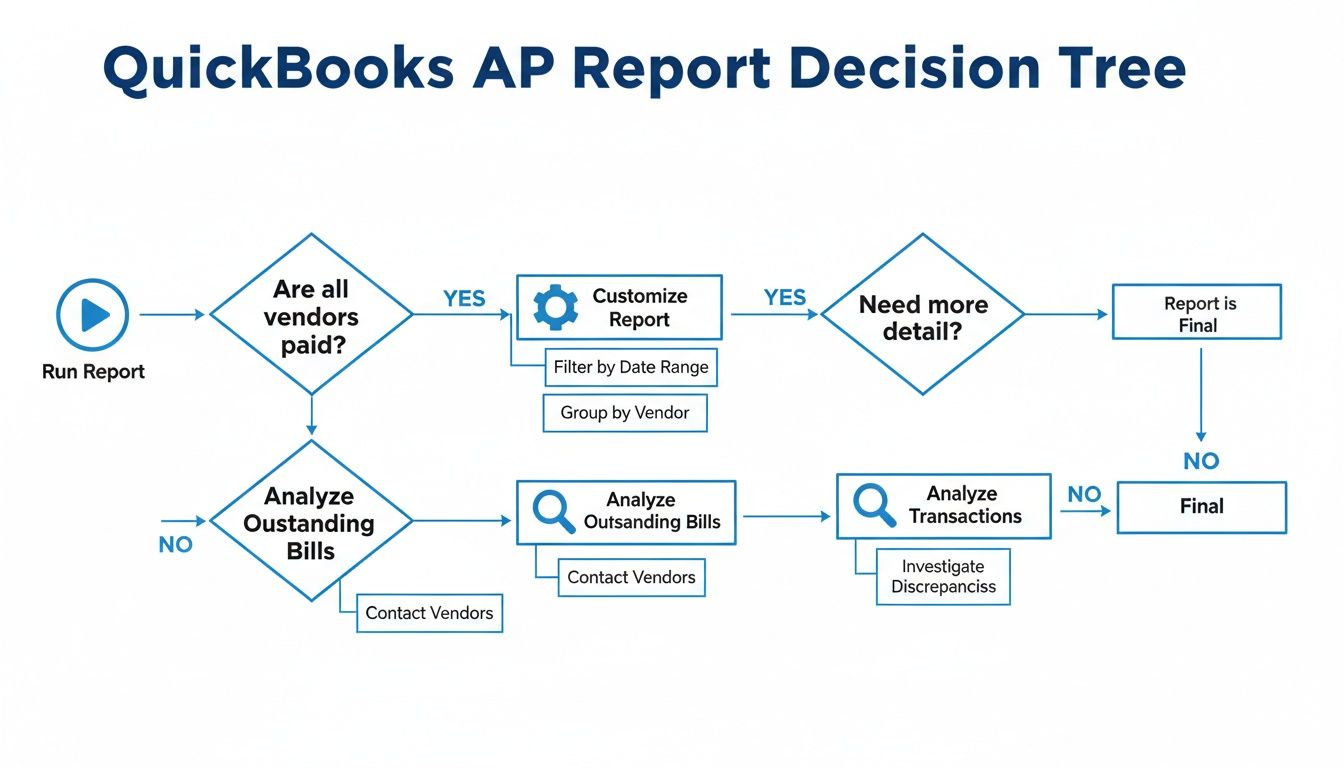
As you can see, analyzing the data is just as crucial as running the report. It’s the step that transforms raw numbers into actionable financial intelligence.
Identifying Critical Red Flags
When you first open the report, your initial scan should be a hunt for red flags. These are the immediate warning signs that demand your attention. Don’t get lost in the weeds just yet; look for the big, glaring issues first.
Here’s what to focus on:
- Large Balances in Older Buckets: Any big numbers in the “61-90 days” or “Over 90 days” columns are a major concern. This could signal a serious cash flow problem, a lost invoice, or a dispute with a vendor that you need to resolve right away.
- A Growing “31-60 Days” Column: If you notice the total in this column creeping up month after month, it’s a sign that your payment process is slowing down. It’s an early indicator that you might face a cash crunch if the trend continues.
- Consistently Late Vendors: Do you see the same one or two vendors always showing up in the past-due columns? This could point to an issue with their invoicing process or a recurring snag in your internal approval workflow for their specific bills.
Prioritizing Payments for Maximum Impact
Once you’ve spotted the urgent issues, it’s time to build a payment strategy. Here’s a secret: not all bills are created equal. Simply paying the oldest invoice first isn’t always the smartest move for your business.
Instead, prioritize your payments based on a few key factors:
- Strategic Vendor Relationships: Payments to your most critical suppliers—the ones you can’t operate without—should always be at the top of your list. Keeping them happy is essential for business continuity.
- Early Payment Discounts: Scan the “Current” column for any invoices offering discounts for paying early (like “2/10 net 30”). Grabbing these discounts is like getting free money and can add up to significant savings over the year.
- Upcoming Due Dates: Keep an eye on bills that are about to tip over into an older aging bucket. Paying these before they become officially “late” helps you avoid late fees and protects your credit with that vendor.
Your AP aging report empowers you to be proactive. Instead of just reacting to overdue notices, you can strategically manage your cash outflow, capture savings, and communicate with vendors before problems escalate.
This proactive mindset transforms accounts payable from a simple administrative task into a core part of your financial strategy. The data proves it works. A comprehensive study found that companies reviewing their aging reports weekly cut their overdue payment percentages from 28% to just 7% within six months, saving thousands in penalties. For more details, you can explore the full research on AP aging reports.
Tracking Key Performance Indicators (KPIs)
To really get the most from your analysis, you need to track your performance over time. A single report is just a snapshot, but tracking trends gives you true insight into your financial health. One of the most important metrics to watch is Days Payable Outstanding (DPO).
DPO measures the average number of days it takes for your company to pay its invoices. A high DPO means you’re holding onto your cash longer, which can be great for working capital. But if your DPO gets too high, it could mean you’re paying bills late and damaging important vendor relationships. The goal is to find the sweet spot that works for your business.
Fixing Common AP Aging Report Problems

Your accounts payable aging report is a powerful tool, but it’s only as reliable as the data going into it. Small errors can snowball, creating a misleading picture of what you actually owe. This can lead to bad cash flow decisions or even damage relationships with key vendors.
Think of it like using a GPS with the wrong starting address—the turn-by-turn directions might look correct, but you’ll never end up where you need to be.
The good news is that most issues aren’t complex accounting failures. They’re usually simple data entry mistakes that pile up over time. Once you know what to look for, spotting and fixing them is pretty straightforward. Regularly cleaning up your data ensures your report is a trustworthy guide for managing your company’s financial health.
Unapplied Vendor Credits
One of the most frequent problems we see is vendor credits sitting on the books that haven’t been applied to a specific bill. This makes it look like you owe more than you actually do because the credit isn’t reducing your total outstanding balance.
- How to spot it: Scan your report for any vendors that have open credits or even negative balances listed.
- How to fix it: Jump into your accounting software, find the vendor’s account, locate the unapplied credit, and link it directly to an outstanding invoice. This will instantly correct the total amount you owe.
Duplicate Invoices or Bills
Duplicate bills are another common culprit that can artificially inflate your total payables. This usually happens when an invoice gets entered manually more than once, or maybe a vendor sends the same bill through both email and snail mail.
It’s an easy mistake to make, but it throws your numbers off. When you export your data, a handy tool like a CSV duplicate remover can help you quickly identify these double entries. Once you find a duplicate in your system, you just need to void one of the entries to get your balances back on track.
An accurate AP aging report is built on clean data. Taking the time to troubleshoot common errors like unapplied credits and duplicate bills ensures your financial decisions are based on reality, not on flawed information.
Putting in the effort to clean up your books is more than just tidying up. Past experience shows it can help businesses recover 5-8% in unapplied credits that were essentially lost money. For a growing company, that recovered cash can be a huge boost to your working capital.
Incorrect Invoice Dates
The entire structure of an AP aging report hinges on dates. If an invoice date or its due date is entered incorrectly, a bill can land in the wrong aging bucket. This might create a false sense of urgency or, even worse, make a current bill look severely overdue.
- Identify the Problem: Look through your report for invoices that just seem out of place. For instance, a bill from a regular vendor you always pay on time suddenly appearing in the “90+ days” column should raise a red flag.
- Verify the Source Document: Pull up the original invoice PDF and compare its date and due date to what’s been entered into your accounting system.
- Correct the Entry: If you find a mismatch, simply edit the transaction in your software to reflect the correct date. It’s a quick fix that restores accuracy.
Fixing these common problems will build confidence in your financial reporting. As your business grows, you might find that it’s time to start thinking about how to automating your accounts payable process to prevent these manual errors from happening in the first place. After all, a clean report is the foundation of a scalable and efficient back office.
Building a Scalable AP Workflow
The true power of an accounts payable aging report isn’t just in the numbers—it’s in how you use them. The report becomes truly valuable when it stops being a static document you glance at and starts driving your entire financial workflow.
Getting there means moving from a reactive “pay-the-burning-fire” approach to a proactive, strategic system. This is how you build a back office that supports your company’s growth instead of holding it back. It’s all about creating a predictable, scalable process that runs on solid data and clear goals.
A scalable workflow doesn’t just appear out of thin air. It’s built on a foundation of clean data and consistent processes, which starts with meticulous transaction management. Every single invoice and credit needs to be entered correctly from day one. It also often means cleaning up the historical books to fix old errors that could be skewing your reports right now.
From Reactive to Proactive AP Management
Most businesses start out with a reactive approach to AP. You’re constantly putting out fires, paying bills only when they’re screaming for attention or a vendor calls asking for a check. A proactive workflow, guided by your AP aging report, lets you get ahead of the game. You can plan your cash outflow, build stronger vendor relationships, and even grab financial opportunities like early payment discounts.
Making this shift requires a system built on clear, repeatable procedures. To really nail this down, it’s worth learning more about creating finance standard operating procedures. Having these rules documented takes the guesswork out of the equation and creates consistency, no matter who is handling the payables.
A scalable AP workflow turns your financial obligations from a source of stress into a strategic asset. It provides the visibility needed to manage cash confidently, negotiate better terms, and build a resilient business.
This kind of structured approach completely transforms your accounts payable function. It’s no longer just a cost center buried in the back office. Instead, it becomes a hub of financial intelligence that informs your bigger business strategy. You can confidently forecast cash needs, manage working capital effectively, and build a reputation as a partner people want to do business with.
Partnering for Financial Clarity
Let’s be honest—implementing these systems can feel like a huge task, especially when you’re busy actually running your business. This is where bringing in a dependable financial partner can be a game-changer. A team of experts can help you design and roll out a workflow that’s built for your specific needs, making sure your AP process is both efficient and dead-on accurate.
A partner like Steingard Financial can help with things like:
- System Implementation: Setting up your accounting software to give you the best reports and automating workflows wherever possible.
- Historical Cleanup: Diving into past transactions to reconcile everything, ensuring your AP aging report starts from a clean, trustworthy slate.
- Ongoing Management: Handling the day-to-day bookkeeping and reporting that gives you a real-time pulse on your finances.
Ultimately, a well-managed AP workflow delivers the financial clarity you need to lead with confidence. You can get a head start on refining your system with our guide to accounts payable best practices. By building a scalable system now, you’re creating a strong financial foundation that will let your business thrive for years to come.
Common Questions About AP Aging Reports
Even after you get the hang of the accounts payable aging report, a few practical questions always seem to pop up. To help you feel more confident as you start using this report, we’ve put together some answers to the most common questions we hear from business owners.
Think of this as your go-to guide for those little “what if” moments during your financial reviews.
How Often Should I Run an AP Aging Report?
For most service businesses, running the accounts payable aging report on a weekly basis is the gold standard. This gives you a fresh, relevant snapshot of what you owe and helps you catch small issues—like a missing invoice or an unapplied payment—before they turn into big headaches. A quick weekly review keeps you in control of your cash flow.
If weekly isn’t feasible, you should review this report at the very least during your monthly closing process. A monthly check-up ensures your books are accurate and no overdue bills are falling through the cracks, but a weekly habit is what really lets you manage your cash proactively.
Summary Report vs. Detail Report
The names are similar, but the summary and detail reports do two very different jobs. It’s important to know which one to grab for the task at hand.
- AP Aging Summary Report: This is your high-level, 30,000-foot view. It shows one line per vendor with the total amount you owe them, spread across the aging buckets. It’s perfect when you just need a quick look at your total liabilities.
- AP Aging Detail Report: This report gets into the nitty-gritty. It lists every single unpaid bill that makes up each vendor’s total, complete with invoice numbers and dates. This is the report you’ll need when you’re figuring out a specific balance or getting ready to pay your bills.
A good workflow is to start with the summary report to see which vendors need your attention. Then, pull up the detail report to understand exactly which invoices to act on.
Using This Report for Budgeting and Forecasting
Absolutely! Your accounts payable aging report is a fantastic tool for making your financial forecasts much more accurate. By looking at your reports over several months, you can start to see clear patterns in your payment cycles and how much you typically spend with key vendors.
This historical data is a goldmine for forecasting future cash needs. You’ll have a much clearer picture of how much cash to keep on hand to cover bills next month or next quarter. This kind of insight is crucial for making smart budgeting decisions, like knowing when you can afford to invest in new equipment or bring on a new team member. It turns a simple list of debts into a powerful tool for planning your next move.
A clean, accurate accounts payable aging report is the bedrock of confident financial decision-making. If you’re tired of chasing down invoices or just want peace of mind that your books are right, the expert team at Steingard Financial can help. We specialize in building solid back-office systems that give you a clear, real-time view of your finances. Learn more about how we can help your business today.