Automating Accounts Payable Process: A Practical Guide to Smarter Payments
Automating your accounts payable process is all about using software to handle the heavy lifting. Think of it as digitizing and connecting every step, from the moment an invoice lands in your inbox to data entry, approvals, and finally, cutting the check. This move swaps out tedious, manual chores for smart, software-driven workflows, which immediately helps reduce costs and human error while getting your vendors paid faster.
The Hidden Costs of Manual AP vs The Power of Automation
Let’s be real: a manual accounts payable process isn’t just a bit of paperwork. It’s a genuine drag on your business. For so many growing service companies I’ve worked with, the reality is a constant battle with paper invoices, never-ending email chains to get approvals, and that nagging fear of a late payment damaging a key vendor relationship.
This manual grind doesn’t just feel inefficient—it has real, tangible costs that quietly chip away at your bottom line. Every hour one of your team members spends typing in invoice details or physically hunting down a manager for a signature is an hour they could have spent on strategic financial analysis. These “soft costs” add up fast, creating friction that slows down your entire operation.
The True Price of Sticking with Manual Methods
Sticking with manual AP is surprisingly common. Even with all the benefits of automation, roughly two-thirds of businesses are still keying in invoice data by hand. But the tide is turning. With about 41% of companies planning to automate in the next year, it’s clear that business owners are recognizing the competitive disadvantage of sticking with old-school methods.
Manual processes also open the door to risks that go way beyond wasted time. Simple human error can lead to paying the same invoice twice or overpaying, both of which hit your cash flow directly. Without a central digital system, you have zero real-time visibility into your liabilities, making an accurate financial forecast feel more like a wild guess.
A manual AP department is a cost center, plain and simple. Its job is to process transactions. An automated AP department, on the other hand, becomes a strategic hub that provides real-time data for smarter cash management and better vendor negotiations.
Unlocking Efficiency with Automation
To truly get a feel for how much automation can change the game, it helps to understand what workflow automation entails. When it comes to accounts payable, this means creating a system where invoices flow digitally through a clear, rules-based process that you define.
Before we dive into a side-by-side comparison, let’s look at the immediate and measurable benefits this shift delivers:
- Drastic Cost Reduction: Automation can slash the cost of processing a single invoice from several dollars down to mere cents by getting rid of most of the manual touchpoints.
- Enhanced Accuracy: Smart data capture and automated three-way matching (comparing the invoice to the purchase order and receiving report) massively reduce the risk of expensive human errors.
- Improved Vendor Relationships: Paying vendors on time, every time, builds trust. It can even open up opportunities for early payment discounts, which is a straight win for your bottom line.
- Strategic Financial Insight: With all your AP data in one place, you get an instant, clear view of spending, accruals, and cash flow. This empowers you to make proactive financial decisions instead of just reacting to problems as they pop up.
Manual vs Automated AP: A Quick Comparison
To put it all in perspective, here’s a quick breakdown of the common struggles with a manual process versus the direct solutions automation provides.
| Challenge Area | Manual Process Pain Points | Automated Process Solutions |
|---|---|---|
| Data Entry | Time-consuming, tedious, and prone to human error. | Software captures and digitizes invoice data automatically. |
| Approvals | Slow, paper-based, and difficult to track approvals. | Digital workflows route invoices to the right person instantly. |
| Visibility | No real-time view of liabilities or invoice status. | Centralized dashboard shows all AP data in one place. |
| Vendor Relations | Risk of late payments, lost invoices, and strained partnerships. | Timely, accurate payments build trust and unlock discounts. |
| Reporting | Financial forecasting is difficult and often inaccurate. | Real-time data empowers strategic, data-driven decisions. |
| Cost | High per-invoice processing costs due to labor intensity. | Drastically lowers processing costs by minimizing manual work. |
As you can see, the contrast is stark. Moving to an automated system isn’t just about saving a little time; it’s about fundamentally changing how your finance function operates, turning it from a reactive cost center into a proactive, strategic part of your business.
Designing Your Automated Accounts Payable Workflow
Now that you know why you need to automate, it’s time to figure out how. Designing a new workflow is so much more than just picking a piece of software. It’s about completely reimagining your accounts payable process from the ground up. The goal isn’t to slap a digital bandage on your current manual system. It’s to build something fundamentally better—a smarter, more secure, and more efficient way to manage your company’s cash flow.
Think of this stage as creating the blueprint for your new AP machine. You’ll map out where you are now, pinpoint every single point of friction, and then design a new path that smooths out all those bumps. It’s like trading a winding, pothole-filled country road for a direct, freshly paved highway.
Map Your Current AP Process
Before you can build something better, you have to get painfully honest about what you’re doing right now. Grab a whiteboard or even just a piece of paper and trace the journey of an invoice from the moment it lands in your business to the second the payment is confirmed.
Ask yourself these questions at every step:
- How do invoices even get to us? Are they coming through email, snail mail, or a chaotic mix of both? Who’s responsible for gathering them?
- Who’s doing the data entry? Who is manually typing all that information into QuickBooks? How much time does it really take for each invoice?
- How do we get approvals? Is it a messy email chain? Does a manager have to physically sign a piece of paper? What happens if that person is on vacation?
- Who actually pays the bill? Who schedules the payment, cuts the check, or initiates the ACH? How is that recorded?
This simple exercise is incredibly revealing. You’ll quickly spot the hidden time-wasters, like the three days an invoice sits in someone’s inbox or the time you burn hunting down a manager for a signature. Nailing down this entire path is a crucial first step in creating a successful accounts payable workflow.
This flowchart gives you a great visual of just how different a manual process is from an automated one.
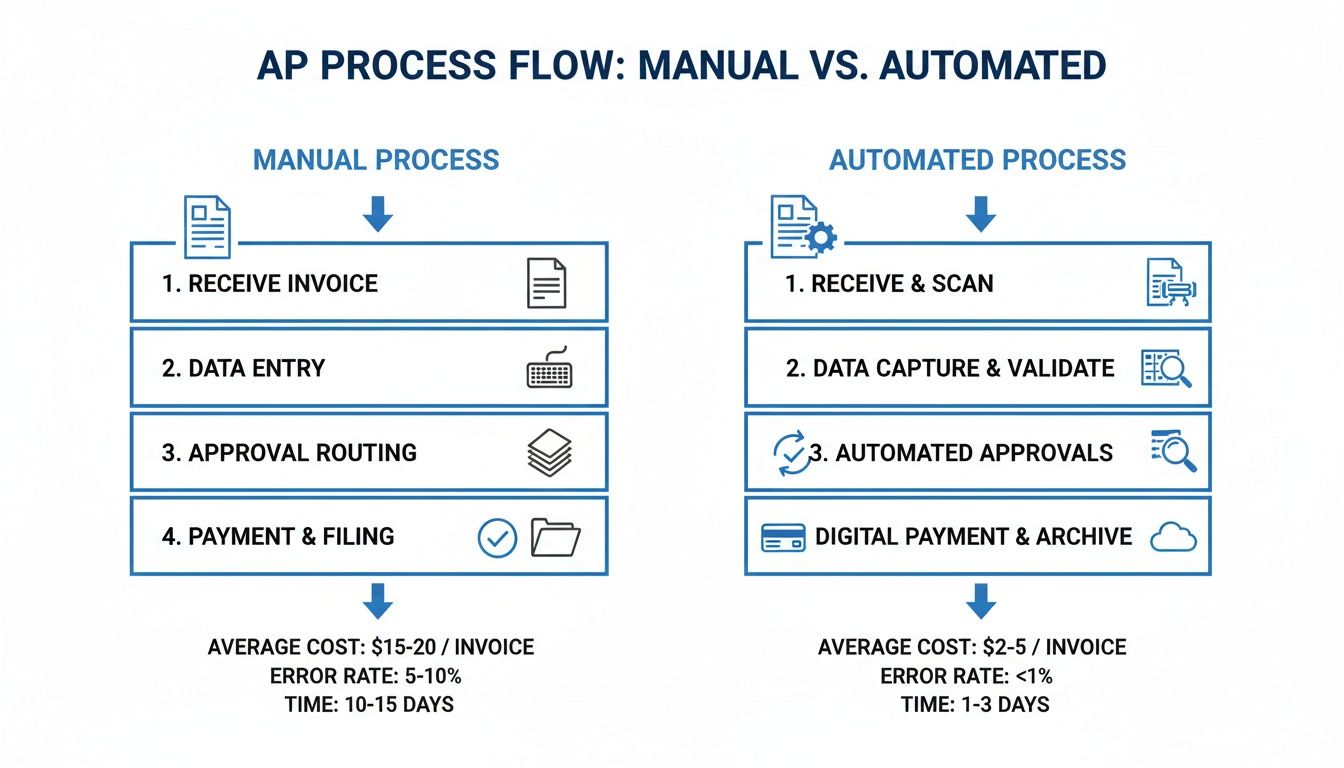
As you can see, automation gets rid of so many manual touchpoints. It replaces them with software-driven actions that slash processing times and dramatically reduce the chance of human error.
Establish Clear Requirements and Controls
Once you’ve mapped out the messy “before,” you can start defining the clean “after.” This is all about setting up clear rules and internal controls that your new software will enforce for you. This isn’t just about being faster; it’s about adding layers of security and financial governance.
A huge piece of this is creating an approval matrix. This is simply a set of rules that tells the system who needs to approve what. For instance:
- Any invoice under $500 from a known vendor? Auto-approved.
- An invoice over $5,000? It needs two sign-offs: the department head and a C-level executive.
This completely removes the guesswork and creates a digital, auditable paper trail for every single dollar that leaves your business. The impact is massive—top-performing companies have cut their invoice processing costs by as much as 78% and have 27% fewer errors. Approval cycles that used to take weeks can shrink to just a few days.
Designing the New Automated Workflow
Okay, now for the fun part: piecing it all together. Your new, automated workflow will let technology handle all the repetitive, soul-crushing tasks your team used to be stuck with. For a really deep dive into the technical side of things, check out this excellent guide to automating invoice processing.
But in a nutshell, your new process will probably look something like this:
- Automated Invoice Capture: All invoices get sent to one dedicated email address. Your software uses OCR technology to automatically read and pull out key data like the vendor, invoice number, amount, and due date. No more manual entry.
- Smart Coding & Routing: The system is smart. It looks at past invoices and automatically codes the expense to the right GL account. Then, based on your approval matrix, it instantly sends it to the right person for review.
- One-Click Digital Approval: The approver gets a notification on their computer or phone. They can review the invoice and approve it with a single click. No more chasing people down the hall.
- Seamless Sync & Payment: As soon as it’s approved, the bill syncs right into QuickBooks, marked as ready to pay. You can then schedule and send payments directly from your new AP platform.
This new design takes your AP function from a reactive, paper-shuffling cost center and turns it into a proactive, data-driven financial hub. This is the heart of automating your accounts payable process the right way.
Choosing the Right AP Automation Software
Picking the right tool to automate your accounts payable is a massive decision, one that will ripple through your entire operation. The market is crowded, and it’s easy to get distracted by flashy features. My advice? Look past the noise and get laser-focused on what your service business actually needs. The best place to start is with your existing tech stack, especially if you’re running on platforms like QuickBooks Online and Gusto.
The absolute, can’t-live-without-it feature is seamless, native integration. A tool that doesn’t play nicely with your accounting software isn’t a solution; it’s a new set of problems. You’ll end up with duplicate data entry and disconnected financial records, which completely defeats the purpose of creating a single source of truth for your finances.
Core Features Versus Nice-to-Haves
Before you even think about sitting through a vendor demo, you need to draw a clear line in the sand between your must-haves and your nice-to-haves. This list will look different for everyone, depending entirely on how many invoices you process and how complicated your approval process is.
A small consulting firm that handles 50 invoices a month has a completely different set of needs than a larger agency juggling hundreds. Start by mapping out your core requirements:
- Automated Data Capture: Does the software use reliable Optical Character Recognition (OCR) to pull data from invoices without mistakes? The whole point is to kill manual entry.
- Customizable Approval Workflows: Can you easily set up multi-step approval rules based on things like the invoice amount, the vendor, or the department?
- Digital Payment Capabilities: Does it let you pay vendors how they want to be paid—ACH, virtual cards, even good old-fashioned checks—all from one place?
- Vendor Management Portal: Is there a portal where your vendors can help themselves? Letting them update their own info and check on payment statuses saves everyone a ton of time.
These are the foundational pieces of a solid AP automation system. Fancy extras, like advanced spending analytics or procurement modules, might be great down the road, but they’re likely “nice-to-haves” for now.
The QuickBooks App Store is a fantastic starting point to see which AP automation tools have certified integrations that you can trust.
This marketplace lists pre-vetted apps, which takes a lot of the risk out of choosing a tool that might be incompatible or unreliable.
The Growing Role of AI and Machine Learning
Today’s AP platforms are getting smarter, using artificial intelligence and machine learning to do much more than just read an invoice. This isn’t just hype; these technologies are a true force multiplier for your finance team. We’re seeing AI used for things like intelligent fraud detection that flags unusual payment patterns and predictive analytics to help you optimize payment timing and hang onto your cash longer.
In fact, businesses using AI-powered AP automation have reported a 25% increase in cash flow predictability. On top of that, many AP pros in automated departments now spend fewer than 10 hours a week just processing invoices. You can discover more insights about these AP automation trends and see what’s coming next.
When you’re talking to vendors, ask them point-blank how they use AI. A good answer won’t be full of buzzwords. It will focus on tangible results, like better data accuracy, stronger fraud prevention, and real recommendations for managing cash.
At the end of the day, finding the right software is about solving today’s problems with a tool that’s flexible enough to grow with you. Prioritize deep integration, core functionality, and a clear return on investment. That’s how you’ll make your move to automating the accounts payable process a genuine success.
Leading Your Team Through the Change to Automation
Introducing a new tool is one thing; getting your team to actually embrace it is the real challenge when you automate your accounts payable process. The most powerful software on the market will fall flat if your team resists using it. Real success depends on great change management and clear communication right from the start.
Your first job is to sell the “why” behind the shift. Frame the conversation around the opportunities this creates, not just efficiency. Reassure your team that automation isn’t about replacing jobs—it’s about eliminating the repetitive, mind-numbing tasks like manual data entry and chasing down approvals.
This move frees them up for more valuable, strategic work like financial analysis, managing vendor relationships, and finding ways to improve cash flow.

Developing Effective Training and Documentation
Once you have buy-in, it’s time to build confidence through hands-on training. Let’s be honest: generic vendor webinars just won’t cut it. Your team needs training sessions that use your company’s actual vendors, real invoices, and your specific approval workflows. This real-world context makes the learning process tangible and immediately useful for their daily work.
Here are a few tips I’ve seen make all the difference in getting training to stick:
- Create a Sandbox Environment: Give your team a safe, consequence-free space to practice. Let them process invoices, flag issues, and run payments without any real-world risk.
- Identify Power Users: Find one or two team members who pick up the new system quickly. Empower them to be the go-to resources for their colleagues. This peer support is invaluable.
- Develop Role-Specific Training: A department head who only needs to approve invoices doesn’t need the same deep-dive training as an AP specialist who manages the entire workflow from start to finish.
Alongside live training, clear documentation is your best friend. Create simple, easy-to-scan Standard Operating Procedures (SOPs) filled with screenshots and checklists. These documents become your team’s trusted guide long after the official training is over.
This internal support is crucial, but for companies without the bandwidth, exploring outsourced accounting for small business can provide an expert team to manage these processes right from day one.
The ultimate goal of change management is to turn skepticism into advocacy. When your team sees firsthand how the new system makes their jobs easier and more impactful, they will become its biggest champions, ensuring a smooth and successful transition.
Measuring and Optimizing Your Automated AP System
Getting your accounts payable process automated is a huge step, but it’s not a “set it and forget it” deal. The real magic happens when you treat it like a living part of your business—something you constantly measure, tweak, and improve. The initial setup is just the starting line; the ongoing optimization is where you turn your AP function from an efficient chore into a real financial asset.
This is about more than just paying bills on time. It’s about digging into the data your new system is churning out. This information gives you a much clearer picture of your spending habits, cash flow, and vendor relationships. When you track the right things, you can spot those sneaky bottlenecks and find new ways to save money.
Defining Your Key Performance Indicators
You can’t know if you’re winning if you don’t have a scoreboard. Vague goals like “let’s be more efficient” are useless. You need to zero in on specific, measurable Key Performance Indicators (KPIs) that tell you exactly how healthy your AP operations are.
Thankfully, most AP automation platforms have great reporting dashboards that make tracking this stuff pretty simple. Your job is to focus on the KPIs that tell a clear story about your costs, speed, and accuracy.
To get you started, here’s a quick look at the most important KPIs we see service businesses track after they’ve automated their AP.
Key Performance Indicators for AP Automation
This table breaks down the metrics that truly matter. They show you whether your investment is paying off and where you can still improve.
| KPI | What It Measures | Why It’s Important |
|---|---|---|
| Cost Per Invoice | The total cost of AP operations (salaries, software) divided by the number of invoices processed. | This is your main ROI metric. A steady decrease shows your automation investment is paying off. |
| Invoice Cycle Time | The average time from when an invoice is received to when it is fully approved and ready for payment. | Shorter cycles mean better visibility into liabilities and a greater ability to capture early payment discounts. |
| Invoices Processed Per Employee | The number of invoices a single AP team member can manage within a specific period (e.g., per month). | A rising number here is a direct indicator of increased productivity and efficiency gains from automation. |
| Early Payment Discount Capture Rate | The percentage of offered discounts that your company successfully takes advantage of. | This metric turns your AP department into a profit center by directly saving the company money. |
Keeping an eye on these numbers gives you a real-time pulse on your AP health, helping you make smarter, data-driven decisions instead of just guessing.
Using Data to Drive Improvements
Once you start pulling in data on these KPIs, the real work begins. Your reporting dashboard isn’t just a report card; it’s a diagnostic tool that points you directly to areas that need a tune-up.
For example, maybe your Invoice Cycle Time is dragging on longer than you’d like. A quick look at the data might reveal that one specific manager consistently takes a week to review their invoices. This isn’t about pointing fingers; it’s about spotting a bottleneck in the system.
The goal of measurement is not just to see how you did, but to uncover actionable insights that drive future performance. Use your data to ask better questions and make smarter decisions.
Armed with that knowledge, you can take action. Maybe that manager needs a little extra training on the new system, or perhaps their notification settings need adjusting. You could even tweak the approval workflow to better fit their schedule. For more ideas on fine-tuning your system, brushing up on some fundamental accounts payable best practices can give you a solid framework for these improvements.
This cycle—measure, analyze, adjust, repeat—is how you get the most out of your investment in automating the accounts payable process. It ensures your system grows and adapts with your business, delivering more value and efficiency year after year.
Common Questions About Automating Accounts Payable
Making the switch to an automated system always brings up a few good questions. Business owners I talk to usually want to get a handle on the practical side of things—what it costs, how long it takes, and if it can really handle their specific way of doing things. Let’s dig into some of the most common questions we hear.
How Long Does Implementation Take?
For a small or medium-sized service business that’s already on a platform like QuickBooks, you’re typically looking at a four to eight-week timeline. This isn’t just about flipping a switch. That timeframe covers everything from mapping out your current process and setting up the new software to training your team and running plenty of tests.
A smart way to approach this is with a phased rollout. Start with a small, manageable group of your most frequent vendors. This lets you work out any kinks before you move everyone over, making the whole transition much smoother and less of a headache for your team.
What Are the Typical Costs Involved?
AP automation software costs can vary, but most of today’s platforms run on a subscription model. The pricing is usually tiered based on how many invoices you process each month or how many people on your team need to use the system.
For many small businesses, plans can start under $100 per month and scale up to several hundred for higher volumes or more advanced features.
The key is to look beyond just the monthly subscription fee. You need to calculate your true return on investment. Compare the software cost against the money you’ll save on labor, fewer errors, and all the early payment discounts you’ll finally be able to catch.
Can Automation Handle Complex Approvals?
Absolutely. In fact, this is where automating the accounts payable process really starts to pay for itself. Modern software is built to handle custom, multi-step approval workflows that can mirror—and often improve—your existing internal controls.
You can set up rules based on just about any criteria you can think of:
- Invoice Amount: Automatically send any bill over $5,000 to a senior manager for a second look.
- Vendor: Route all invoices from a specific contractor directly to the right project manager.
- Department or GL Code: Make sure all marketing expenses get approved by the head of marketing before payment.
This creates a crystal-clear digital audit trail for every single payment. No more chasing down approvals or guessing who signed off on what.
If you don’t have the internal bandwidth to manage this new process or just want an expert to make sure it’s running perfectly, Steingard Financial can help. We provide outsourced bookkeeping and AP management, ensuring your automated system is always optimized for accuracy and giving you the strategic insight you need. Learn how we can create a scalable back office for your service business at https://www.steingardfinancial.com.