Mastering Form 941 Electronic Filing for Your Business
Choosing to e-file Form 941 isn’t just a matter of convenience anymore. For the vast majority of businesses, it’s a hard-and-fast requirement. The IRS has made a significant push to prioritize digital submissions, and for good reason—they’re trying to clear the massive paper backlogs that have gummed up the works for years. Getting a handle on this shift is the first step to keeping your business compliant and avoiding some pretty painful penalties.
Why Electronic Filing Is Now The Standard
The days of printing, signing, and mailing your quarterly payroll tax forms are pretty much over. This move toward Form 941 electronic filing is part of a much bigger government effort to bring tax administration into the 21st century. The goal? Make the whole process faster, more secure, and less susceptible to simple human error.
For business owners, this means adapting to new rules that have real-world financial consequences.
The main reason for this mandate is the IRS’s struggle to manage processing bottlenecks. Paper returns have long been what the National Taxpayer Advocate once called the agency’s “kryptonite,” causing huge operational delays and opening the door to mail theft or lost forms. By requiring electronic submissions, the IRS can process returns and issue refunds much more quickly. It’s a win-win for both the agency and employers.
The New E-Filing Threshold
The game-changer was a major update to IRS regulations that drastically lowered the electronic filing threshold. This one move now affects nearly every employer in the country. Before, you only had to e-file if you were submitting over 250 returns a year.
The new rule mandates electronic filing for any business that files just 10 or more returns of any kind in a calendar year. This isn’t just about Form 941; it covers a whole range of forms, including information returns like Forms W-2 and 1099.
Think about what that means. If your business has even one employee, you’re filing four quarterly 941s, plus W-2s and other required forms. You’ll almost certainly hit that 10-form threshold and fall under the mandate.
The High Cost of Non-Compliance
Trying to ignore the e-filing requirement is a gamble you don’t want to take. The IRS isn’t messing around with penalties for businesses that are required to file electronically but don’t.
Under IRC Section 6721, penalties for failing to e-file information returns can climb as high as $290 per form. For many businesses, these penalties can add up to a shocking annual maximum of $3,532,500. You can discover more insights about the expanded IRS mandate and see just how it might affect your operations.
Let’s quickly compare the old way versus the new way.
Form 941 Filing Methods At-a-Glance
This table breaks down the key differences between electronic and paper filing, making it clear why the IRS is pushing for a digital-first approach.
| Feature | Electronic Filing | Paper Filing (Mail) |
|---|---|---|
| Speed | Instant submission and processing begins right away. | Takes days to arrive, plus weeks (or months) to process. |
| Security | Encrypted transmission protects sensitive data. | At risk of being lost, stolen, or damaged in transit. |
| Confirmation | Immediate acknowledgment that the IRS received it. | No confirmation until it’s manually processed. |
| Error Checking | Most software catches common errors before you file. | Easy to make typos or math mistakes, causing delays. |
| IRS Requirement | Mandatory for businesses filing 10+ returns/year. | Only allowed for a very small number of filers. |
As you can see, the benefits of e-filing are substantial, from instant peace of mind to enhanced security.
Ultimately, embracing Form 941 electronic filing is more than just following a new regulation. It’s a smart business move that shields you from unnecessary fines, gives you instant confirmation that your filings were received, and helps you manage your compliance risk in a world that is now digital-first.
Preparing Your Payroll Data for E-Filing
A successful Form 941 electronic filing starts long before you ever log into a piece of software. I always tell clients to think of this prep phase like gathering your ingredients before you start cooking—it just makes the whole process smoother and way less stressful. Trying to hunt down numbers at the last minute is a perfect recipe for mistakes that can lead to those dreaded IRS notices.
First things first, you absolutely need your Employer Identification Number (EIN). This is non-negotiable. One of the simplest yet most common reasons for an e-filing rejection is a typo in the EIN. Always, always double-check that the number you’re using matches the one on your official IRS documents, like your SS-4 confirmation letter.

Compiling Key Payroll Reports
With your EIN confirmed, it’s time to pull the specific payroll reports for the quarter. You’re going to need precise figures for several key areas. Having a consistent internal process here is vital for accuracy. To make sure your team gathers this info correctly every single time, it’s a great idea to create a standard operating procedure template. This creates a reliable system that cuts down on errors and saves a ton of time each quarter.
Here’s the data you’ll need at your fingertips:
- Total Employee Compensation: This is the gross wages paid out to all employees during the quarter.
- Federal Income Tax Withheld: The grand total of all federal income tax you withheld from employee paychecks.
- Social Security and Medicare Taxes: You need both the employee and employer portions. Don’t forget to check if any employee wages went over the Social Security wage base limit.
- Reported Tips: If you’re in an industry like hospitality, you have to report the tips your employees received.
Having well-organized payroll is the bedrock of accurate tax filing. For new businesses still getting the hang of this, our guide on how to set up payroll for small business offers a detailed roadmap to get you started on the right foot.
Reconciling Your Tax Deposits
From my experience, one of the most frequent sources of discrepancies on Form 941 is mismatched tax deposits. Your filing has to perfectly match the total amount of federal tax liabilities you actually paid to the IRS during the quarter.
Before you even think about filling out the form, run a report of all your federal tax payments. Compare this directly with your payroll liability report. These numbers must match perfectly. Even a tiny difference can trigger an IRS inquiry, creating a mountain of administrative work you don’t need.
For instance, if your payroll report shows a total tax liability of $15,250 for the quarter, your payment records must also show that exactly $15,250 was deposited. If you spot a mismatch, stop and figure it out before you file. This simple reconciliation step is your single best defense against the most common filing errors.
Choosing the Right E-Filing Software
Picking the right software for your form 941 electronic filing is a bigger deal than you might think. The tech you choose can either be a smooth, invisible part of your operations or a headache you have to deal with every three months. Your goal isn’t just to file the form; it’s to find something that makes your whole payroll tax process easier.
For most service businesses I work with, going with an integrated payroll platform like Gusto or QuickBooks Payroll just makes the most sense. These are built to be all-in-one systems. They do it all—from cutting employee paychecks and figuring out withholdings to zapping your quarterly 941s straight to the IRS.
The biggest win here is automation. All your payroll data for the quarter is already in the system, so it fills out most of Form 941 for you. This is huge because it slashes the risk of typos and manual data entry mistakes, which are one of the top reasons businesses get those dreaded IRS notices in the mail.
Integrated Payroll Platforms
These all-in-one platforms really shine when your payroll has some moving parts. Let’s say you own a busy restaurant. You’ve got salaried managers, hourly kitchen staff, and servers earning tips. Your payroll changes every single week, making the 941 calculations a real chore.
A platform like Gusto or QuickBooks Payroll tracks every one of those variables automatically. It’s constantly calculating total wages, tips, and the right tax withholdings. When quarter-end rolls around, the system pulls all that data together and preps your Form 941 in just a couple of clicks. This kind of automation is a lifesaver, turning what could be hours of spreadsheet work into a simple, accurate filing. If you’re leaning this way, knowing how to set up QuickBooks Payroll properly is the most important first step.
It’s hard to overstate how much these tools have changed the game. Integrated e-filing is now a standard feature in most big accounting platforms, and it’s made staying compliant so much easier for thousands of businesses.
Standalone E-File Providers
But what if you don’t use an integrated payroll service? Maybe you run payroll through a different accounting program or even a more hands-on, manual system. No problem. You’ll just need to use a standalone, IRS-approved e-file provider. These are services that specialize in one thing: transmitting tax forms electronically.
When you’re shopping for one of these providers, there are a few must-haves to look for:
- Direct IRS Integration: Make sure they are an officially authorized e-file provider. You can usually find a list on the IRS website.
- Error Checking: A good service will run some basic checks to catch common slip-ups—think math errors or blank fields—before you hit submit.
- Filing Confirmation: The provider has to give you an official IRS acknowledgment once your return has been accepted. This is your proof of filing.
Form 941, the Employer’s Quarterly Federal Tax Return, is a massive part of the IRS’s workload, with millions of businesses filing it every quarter. To handle that volume, the IRS partners with private companies to create a reliable e-filing system. This partnership is what allows accounting software to include features that file the form, track your deadlines, and process payments. You can dig into payroll tax statistics on the IRS’s official data page.
To get your payroll data ready for any e-filing system, it can be helpful to explore the best online form builders to tighten up your internal data collection first. This ensures the numbers you’re putting into the software are accurate from the get-go.
A Practical Walkthrough of E-Filing and Payments
You’ve gathered your payroll reports and reconciled the numbers. Now for the final leg of the journey: actually filing your Form 941 electronically. This is where all that prep work pays off, turning what could be a headache into a smooth, straightforward process.
Before you hit that final “submit” button, take a moment for one last, crucial review. Most payroll software will generate the complete Form 941 for you. Your job is to go through it line by line, comparing the figures on the screen with the payroll reports you have in hand. It’s a simple check, but it’s your final opportunity to spot a mistake before the IRS does.
Submitting Your Return and Getting Confirmation
Once you’re confident everything is accurate, go ahead and submit. Your software will handle the secure transmission to the IRS, but your work isn’t quite done. The most important step is yet to come: getting confirmation that they’ve received and accepted your return.
Within a day or two, you should get an electronic acknowledgment back through your software. This message will tell you if your return was Accepted or Rejected. An “Accepted” status is your official proof that you’ve filed, so save a copy of it for your records. If it’s “Rejected,” don’t panic. The notice will include an error code explaining what went wrong—maybe a typo in your EIN or a calculation error. You’ll just need to fix it and resubmit.
The process is really quite logical, moving from understanding your needs to choosing the right tools and filing with confidence.
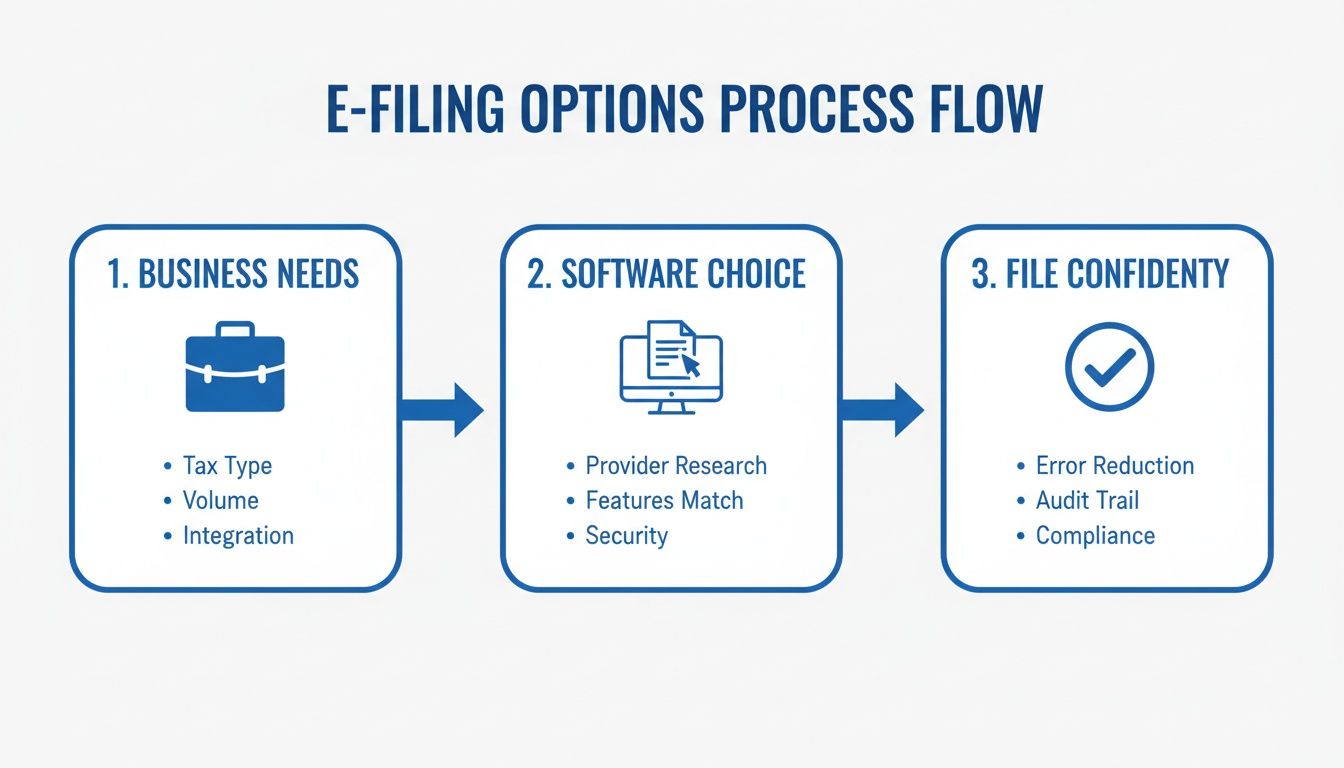
This visual really brings it home: a successful filing starts with picking the right software for your specific business.
Managing Payments Through EFTPS
Filing the form is only half the task; you still have to pay the taxes. The go-to method for this is the Electronic Federal Tax Payment System (EFTPS), a free service from the U.S. Treasury. If you’re not already enrolled, make it a priority. It can take a few business days to get set up, so don’t leave it to the last minute.
For most businesses, using EFTPS isn’t optional—it’s mandatory for making federal tax deposits. The great thing about it is you can schedule payments well in advance. For example, if you’re a semi-weekly depositor, you can log in once and schedule all your tax payments for the entire quarter. It’s a fantastic way to avoid late-payment penalties.
Pro Tip: Always schedule your EFTPS payment at least one business day before it’s due. The system processes payments overnight, and that extra day gives you a buffer against any unexpected hiccups. A missed deposit, even by a day, can trigger penalties.
Here’s a quick look at your payment options:
- EFTPS: The gold standard for all federal tax deposits. It requires enrollment but has powerful scheduling features that make life easier.
- IRS Direct Pay: A decent option for one-off business tax payments directly from your bank account without needing to enroll, but it’s not really built for recurring payroll deposits.
- Electronic Funds Withdrawal: This allows you to authorize a direct debit from your bank account at the same time you e-file your return.
By combining a careful review of your Form 941 with a disciplined payment schedule using EFTPS, you build a solid, reliable system. This two-part approach ensures both your forms and your payments are correct and on time, every single time.
Correcting Errors and Managing Deadlines
Look, nobody’s perfect. Even with the most careful prep work, payroll mistakes can and do happen. Maybe you miscalculated a wage, forgot to include an employee bonus, or botched a tax withholding. Little slip-ups like these can throw off your entire quarterly return.
Thankfully, the IRS has a specific process for fixing things after you’ve already completed your Form 941 electronic filing.
The key to making it right is Form 941-X, which is the Adjusted Employer’s Quarterly Federal Tax Return or Claim for Refund. You’ll use this form to report any corrections to a 941 you’ve already filed. It’s designed to handle both sides of the coin: underpayments (where you owe more tax) and overpayments (where the IRS owes you a refund or credit).

Navigating Form 941-X and Deadlines
Filing Form 941-X as soon as you spot an error is absolutely critical. Acting fast helps you avoid—or at least reduce—costly penalties and interest. This is more important than ever as the IRS works to modernize its systems. The nightmare of paper-based processing became painfully obvious during the pandemic, when massive backlogs brought everything to a crawl.
To give you an idea, by August 2023, the IRS was buried under 1.8 million unprocessed Forms 941 and another 505,000 unprocessed Forms 941-X. This mess really highlighted the urgent need for better electronic systems and is a big reason the agency is pushing so hard for digital-first solutions. As the IRS digitizes more forms, filing amendments electronically will become the norm. You can read the full research about IRS paperless initiatives to see where things are headed.
While fixing mistakes is important, avoiding them in the first place by hitting your deadlines is even better. Missing a deadline is one of the most expensive errors a business can make, since penalties are based on both how late you are and how much you owe.
Strictly following the quarterly deadlines isn’t just a suggestion; it’s non-negotiable for staying on the IRS’s good side.
The Cost of Missing a Deadline
Let’s be blunt: the penalties for late filing and late payment are steep, and they add up fast. Understanding how they work is usually all the motivation you need to get things in on time. The IRS has two main penalties that can bite you:
- Failure to File Penalty: This is 5% of the unpaid tax for each month (or part of a month) that your return is late. The penalty maxes out at 25% of your unpaid taxes.
- Failure to Pay Penalty: This penalty is 0.5% of the unpaid taxes for each month (or part of a month) the taxes go unpaid. This one is also capped at 25%.
Let’s put that into perspective. Imagine your business owes $20,000 in payroll taxes for the quarter ending March 31. The deadline is April 30. If you forget to file and pay until June 15 (making you two months late), you could be looking at a Failure to File penalty of 10% ($2,000) and a Failure to Pay penalty of 1% ($200), plus any interest that accrues.
These are significant, totally avoidable costs that come straight out of your bottom line. Sticking to a strict schedule for your Form 941 electronic filing is your best defense against them.
When to Partner with a Payroll Professional
Handling your own Form 941 electronic filing can seem manageable at first, especially when your business is small. But as you grow, so does the paperwork. What started as a simple quarterly task can balloon into a major administrative headache, pulling your focus away from what you do best—running your business.
Knowing when you’ve hit that tipping point is crucial.
Think about your current payroll process. Are you hiring employees in other states? Suddenly you’re tangled in a web of different state tax laws and withholding rules. Have you started paying out commissions or performance bonuses? Every new layer of complexity adds another opportunity for a costly mistake. If you’re seeing frequent IRS notices or constantly filing corrections, it’s a clear sign your system is stretched thin.
Signs It’s Time to Outsource Payroll
If any of this sounds painfully familiar, it might be time to call in a professional:
- Rapid Growth: Your team is expanding, but your back-office processes can’t keep up with the new hires.
- Multi-State Employees: You’re spending more time researching state tax laws than you are on your actual business.
- Recurring Mistakes: You find yourself filing a Form 941-X or dealing with IRS letters more than once.
- Time Constraints: Payroll and tax compliance are eating up hours that you should be dedicating to growth.
The true cost of in-house payroll isn’t just a software subscription. It’s the valuable time you and your team lose to administrative tasks instead of serving customers and building your business.
Outsourcing payroll isn’t just about handing off a task; it’s about bringing a strategic partner onto your team. A firm like Steingard Financial can take over the entire process, from running payroll in Gusto or QuickBooks to ensuring your Form 941 electronic filing is accurate and on time, every time.
By partnering with experts, you get a reliable, scalable financial back office. You can learn more about the benefits of outsourcing payroll and see how it can free you from compliance worries.
Answering Your Top Form 941 Questions
When you get into the weeds of Form 941 electronic filing, a few specific questions always seem to pop up. Let’s tackle some of the most common ones we hear from business owners just like you.
What If I Didn’t Pay Any Wages This Quarter? Do I Still File?
Yes, absolutely. Even with zero payroll for the quarter, you’re still required to file Form 941. This is what’s known as a “zero-wage” return.
Filing it sends a clear signal to the IRS that your business is still operational but just didn’t have any payroll activity. It’s a simple step that prevents them from thinking you’ve gone silent and sending out those dreaded failure-to-file notices.
I’m Behind on My Filings. Can I E-File for a Past Quarter?
You certainly can. Most reputable e-file providers and payroll software are equipped to handle filings for previous quarters. If you’ve fallen behind, getting caught up electronically is so much faster and more efficient than trying to sort out old paper forms.
Keep in mind, penalties and interest for late filing will still apply. But e-filing is the quickest way to get current and stop those penalties from growing. When it comes to back taxes, taking swift action is always the best move.
What Happens If I Shut My Business Down?
If you close your doors for good, you have one last payroll task: filing a final Form 941. It’s a crucial part of properly winding down your business.
On the form, you’ll check a box indicating that you’ve permanently stopped paying wages and that this is your final return. This officially closes out your payroll tax account with the IRS, ensuring they don’t expect future filings from you.
Feeling overwhelmed by payroll taxes? It doesn’t have to be a source of stress. The experts at Steingard Financial are here to manage your entire payroll process—from precise calculations to on-time electronic filing—so you can stay compliant without the headache. Schedule a consultation with us today and see how we can help.