How to Generate 1099 for Contractors: The Complete Guide
When tax season rolls around, generating 1099s for your contractors can feel like a daunting task. It’s not just about filling out a form; it’s about getting the details right to stay compliant with the IRS. The process involves collecting a Form W-9, making sure the contractor’s information is correct, adding up all the payments you made during the year, and then creating either a Form 1099-NEC or a 1099-MISC.
To give you a bird’s-eye view, let’s break down the essential stages.
Quick Overview of the 1099 Generation Process
| Stage | Key Action | Why It Matters |
|---|---|---|
| Information Gathering | Collect a completed Form W-9 from every contractor before you pay them. | This form gives you the contractor’s correct name, address, and Taxpayer Identification Number (TIN), which are required for the 1099. |
| Payment Tracking | Keep a meticulous record of all payments made to each contractor throughout the tax year. | You need an accurate total to report. Errors can lead to penalties and corrected filings down the road. |
| Form Generation | Use accounting software or a filing service to populate the correct 1099 form with the contractor’s and payment information. | This ensures the forms are created in the proper format and all required fields are completed. |
| Filing & Distribution | E-file the 1099s with the IRS and send copies to your contractors by the January 31 deadline. | Missing this deadline is a fast track to penalties from the IRS. Contractors also need their copies to file their own taxes. |
Think of this table as your roadmap. Each stage is a critical checkpoint on the path to a smooth and penalty-free tax season.
Why 1099 Reporting Is a Core Business Function

Learning how to generate a 1099 for contractors has moved from a simple year-end chore to a fundamental part of running a smart business. Handling your 1099 workflow properly isn’t just about taxes; it signals financial diligence and helps you sidestep expensive IRS penalties that can really hurt your operations.
This has become even more critical with the explosion of the gig economy. The number of full-time independent contractors in the U.S. shot up by an incredible 90% between 2020 and 2023. With forecasts showing over 90 million Americans will be freelancing by 2028, mastering this process is simply non-negotiable for any business that wants to stay competitive.
More Than Just a Tax Form
It’s easy to see 1099s as just more paperwork, but that’s a risky mindset. Accurate reporting is a cornerstone of good financial management. It proves you have solid systems for tracking payments and managing your relationships with non-employees.
Think of your 1099 process as a financial health checkup. A smooth, error-free filing season reflects clean, well-organized books. A chaotic one often points to deeper problems in your record-keeping.
This responsibility is a full-cycle process designed to protect your business. It includes:
- Proactive Information Gathering: Always collect a Form W-9 from every contractor before you issue their first payment. Don’t wait until January.
- Data Verification: Double-check that the name and Taxpayer Identification Number (TIN) on the W-9 match what the IRS has on file.
- Accurate Payment Tracking: Keep a careful log of every single payment made to each contractor throughout the year. No guesswork allowed.
- Timely Filing: Make sure you submit the correct forms to the IRS and send copies to your contractors by the January 31 deadline.
Beyond the tax forms themselves, it’s vital to ensure your business is protected on all fronts. This includes looking into the right business insurance for contractors to cover your bases. Getting this workflow right isn’t just about avoiding penalties; it’s about building a resilient, professional, and audit-ready operation.
Setting Up for Success with Contractor W-9s
The secret to a stress-free tax season doesn’t start in January. It begins the moment you bring a new contractor on board. The foundation for a smooth 1099 process is one simple, yet critical, document: Form W-9, Request for Taxpayer Identification Number and Certification.
Making the W-9 a non-negotiable part of your onboarding is the single best thing you can do for your future self. Don’t treat it like an afterthought you chase down later. This form gives you all the crucial data you’ll need: the contractor’s legal name, business type, address, and most importantly, their Taxpayer Identification Number (TIN)—either a Social Security Number (SSN) or an Employer Identification Number (EIN).
This isn’t just about a handful of freelancers. The scale of independent work is massive. The Bureau of Labor Statistics reported that in July 2023, 11.9 million people were independent contractors, making up 7.4% of total U.S. employment. In fields like construction and real estate, those numbers jump to 18.5% and 24.2%, respectively. Proper 1099 filing is clearly a huge part of doing business today. You can see more data on these trends from the Bureau of Labor Statistics.
Decoding the W-9 and Spotting Errors
When that completed W-9 lands in your inbox, don’t just file it away. Take a minute to actually look at it. A quick check right now can save you from filing corrections or—even worse—getting a notice from the IRS down the road.
Here’s what you should be looking for:
- Complete Name and Address: Is it their full legal name, the one that matches their tax return? A nickname or an incomplete business name won’t cut it.
- Correct Tax Classification: The contractor needs to check the right box for their federal tax status (like sole proprietor, S Corp, C Corp, etc.). This detail is important for your records.
- Legible TIN: The number must be easy to read and in the right format. Transposed numbers are an incredibly common mistake that can cause big problems.
- Signature and Date: An unsigned W-9 is basically invalid. It needs a signature and date to certify that the information is correct.
The most critical step isn’t just collecting the W-9. It’s verifying the information on it before you start cutting big checks. Discovering a problem in January is a recipe for a compliance headache.
Verifying Contractor Information with TIN Matching
The IRS gives you a free and incredibly useful tool for this: the Taxpayer Identification Number (TIN) Matching program. This online service lets you confirm that the name and TIN your contractor provided on their W-9 actually match what the IRS has on file. Enrolling in their e-services to get access is a no-brainer for any business that works with contractors.
Let’s walk through a real-world example. You hire a new marketing consultant, “Jen’s Creative Studio,” and get her W-9. Before you pay that first invoice, you pop her business name and EIN into the TIN Matching service. It comes back with a mismatch.
This isn’t a reason to panic. It’s an opportunity to fix a problem before it becomes one. You can simply reach out to Jen and let her know. Usually, the cause is simple:
- A typo on the W-9.
- She used her personal SSN by mistake instead of the business’s EIN.
- The business name you entered is slightly different from the official one on file (e.g., “Jen’s Creative Studio” vs. “Jen’s Creative Studio LLC”).
By catching this early, you avoid filing an incorrect 1099, which would likely trigger an IRS B-Notice and force you to start backup withholding—that means holding back 24% of all future payments. This simple verification step turns a potential compliance nightmare into a quick administrative fix. Keeping this kind of clean data is a core part of good financial management, just like the principles we cover in our guide on record keeping for small businesses.
Choosing the Right Form: 1099-NEC vs. 1099-MISC
When it comes to filing season, one of the first hurdles business owners face is picking the right form. For contractor payments, this almost always boils down to two options: the 1099-NEC and the 1099-MISC. A few years back, the IRS made our lives a lot easier by reintroducing Form 1099-NEC just for nonemployee compensation. This simple change cleared up a ton of confusion.
The key is knowing what each form is for. Getting this right from the start saves you the headache of filing corrections later.
1099-NEC vs. 1099-MISC Key Differences
To put it plainly, the 1099-NEC is for people, and the 1099-MISC is for other stuff. The NEC covers payments for services rendered by your contractors. The MISC, on the other hand, now handles a specific list of miscellaneous payments like rent and royalties.
Here’s a quick breakdown to help you decide which form you need at a glance:
| Criteria | Form 1099-NEC | Form 1099-MISC |
|---|---|---|
| Primary Use | Payments for services by independent contractors. | Miscellaneous payments like rent, royalties, and prizes. |
| Common Payments | Fees for freelancers, consultants, service providers. | Office rent, legal settlements, royalties. |
| Threshold | $600 or more in a calendar year. | Varies by payment type (e.g., $600 for rent, $10 for royalties). |
| Due Date to Recipient | January 31 | January 31 |
| Due Date to IRS | January 31 | February 28 (paper) / March 31 (e-file) |
This table covers the basics, but the real-world application is what matters most. Think about why you paid the person or company. Was it for their labor and expertise? If so, you’re almost certainly in 1099-NEC territory.
When to Use Form 1099-NEC
You’ll need to send a Form 1099-NEC (Nonemployee Compensation) if you paid an independent contractor $600 or more for their work during the year. This is the workhorse form for the gig economy and will cover most of your contractor payments.
Think about the people you hire to get things done. Common examples include:
- Creative and Marketing Help: The freelance graphic designer who created your logo, the web developer who built your e-commerce site, or the copywriter handling your blog.
- Professional Services: Your external bookkeeper, a marketing consultant running your social media ads, or a business coach.
- Trade Services: The IT specialist who fixes your network, the commercial cleaning crew that services your office, or the electrician who rewired a conference room.
The rule of thumb is simple: if you’re paying for services from someone who isn’t on your payroll, it’s a 1099-NEC payment.
When Form 1099-MISC Is the Right Choice
With the 1099-NEC taking over service payments, the Form 1099-MISC (Miscellaneous Information) now has a much more specific, and less common, role. You’ll only grab this form for a handful of non-service-related payments.
A 1099-MISC is generally required for payments like:
- Rent: Paying $600 or more in rent for your office space directly to an individual landlord (not a property management corporation).
- Prizes and Awards: Giving out $600 or more in prizes that aren’t tied to performing a service.
- Royalties: Paying at least $10 in royalties.
- Legal Settlements: Certain payments made to an attorney.
So, that $2,500 monthly rent check to your landlord? That gets a 1099-MISC. But the $1,200 invoice you paid your freelance developer? That requires a 1099-NEC. Mixing these two up is an easy mistake to make, but it’s also easy to avoid.
The simplest way to remember the difference is to ask: “Am I paying this person for their work?” If the answer is yes, you’ll almost always need a 1099-NEC. For most other business payments, the 1099-MISC is the correct choice.
This flowchart helps illustrate how W-9 information can trigger other requirements, like backup withholding.
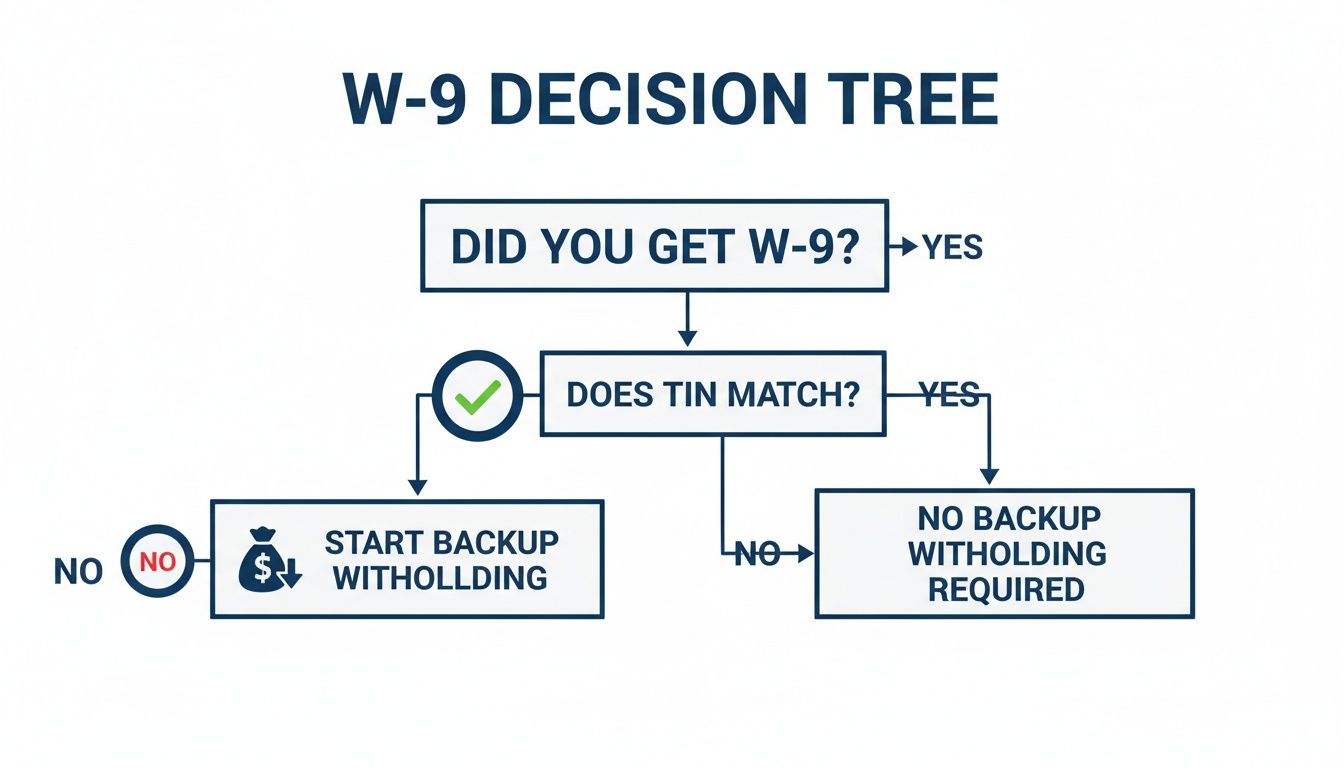
Before you can even choose the right 1099, you have to nail the W-9 collection process. Getting that form and verifying the contractor’s information is the foundation for accurate and stress-free tax filing.
Generating 1099s in QuickBooks and Gusto
Alright, let’s move from the ‘what’ and ‘why’ to the ‘how’. The good news is that you don’t have to tackle a mountain of paper forms by hand. Modern accounting and payroll software has made generating 1099s for your contractors much, much simpler.
Platforms like QuickBooks Online and Gusto have built-in workflows designed specifically for this. They pull payment data right from your books, fill out the forms, and can even handle the e-filing for you.
Let’s walk through how it works on each platform so you can get this done confidently.
How to Generate 1099s in QuickBooks Online
For millions of small businesses, QuickBooks Online (QBO) is the center of their financial universe, which makes it a natural place to prepare your 1099s. The secret to a painless process in QBO is good data hygiene throughout the year—making sure your contractors and their payments are set up and categorized correctly from the start.
When you’re ready, QBO’s 1099 wizard will walk you through the prep and filing steps.
- Check Your Contractor Info: First things first, go through your contractor list. Make sure every profile is complete with their legal name, address, and a valid Taxpayer Identification Number (TIN) from their W-9. Missing or incorrect info will bring the process to a halt.
- Map Your Payment Accounts: Next, you have to tell QBO where to look for 1099-reportable payments. This means “mapping” your expense accounts, like “Contractor Fees” or “Professional Services,” to the right box on the 1099 form—usually Box 1 on the 1099-NEC.
- Confirm the Totals: QBO will then pull together a list of contractors and their total payments based on the accounts you mapped. This is your moment to review everything and make sure the numbers look right before you finalize the forms.
This is where you should pull out your own records and cross-reference. A fantastic tool for this is the 1099 Transaction Detail Report in QBO. It breaks down the total for each contractor, showing you every single transaction that adds up to that number. If something seems off, that report is your first stop.
The most common snag I see in QBO is wrong account mapping. For example, if you accidentally paid a designer from your “Office Supplies” account, that payment won’t be picked up unless you map that account. A quick review of your chart of accounts before you start can save you a huge headache.
Once you’ve triple-checked everything, you can use QuickBooks’ e-filing service. They’ll file the forms with the IRS and required states, and they can mail or email copies directly to your contractors. It’s a huge time-saver.
The screenshot below gives you a peek at the beginning of the QBO 1099 workflow.
As you can see, it kicks off by verifying your own company information to ensure the filings are submitted with the correct payer details. This guided approach helps catch common mistakes early. If you’re newer to the platform, taking time to learn how to properly set up QuickBooks Online will make tax time significantly smoother.
How to Generate 1099s in Gusto
Gusto is famous for its payroll services, but its platform is also fantastic for managing and paying independent contractors. A major advantage here is how much of the 1099 process is automated, making it one of the most user-friendly options out there.
If you’ve been paying your contractors through Gusto all year, the process is almost laughably simple because all the data is already in the system.
- Automated W-9 Collection: Gusto has contractors fill out a digital W-9 when they’re onboarded, so you never have to chase down forms.
- Automatic Payment Tracking: Every payment made through the platform is automatically logged and flagged as nonemployee compensation.
- Proactive Reminders: As year-end gets closer, Gusto sends you notifications to review contractor payments and confirm everything is ready to go.
The filing itself is nearly hands-off. Gusto automatically prepares a Form 1099-NEC for every contractor you paid $600 or more.
Finalizing Your Filing in Gusto
When the filing window opens up, you’ll get an email prompting you to log in and give the final sign-off. Here’s what to expect:
- Head to Taxes & Compliance: From your main dashboard, you’ll find a section dedicated to tax forms.
- Review the Generated 1099s: Gusto will show you a summary of all the 1099s it has prepared. You can click on any of them to see the detailed breakdown and verify the total compensation.
- Approve and You’re Done: If it all looks good, you just click to confirm. That’s it. Gusto handles the e-filing with the IRS and states, and they send copies to each contractor for you.
The real beauty of a system like Gusto is that it’s designed to be a “set it and forget it” solution. By integrating your contractor payments into your payroll system, you completely eliminate the mad dash to gather data at the end of the year. This not only saves a ton of time but dramatically cuts down on the risk of human error—turning a dreaded tax chore into a quick year-end review.
Meeting Deadlines and E-Filing Requirements
Knowing how to generate 1099s for your contractors is only half the battle. A perfectly prepared form is worthless if it shows up late. The IRS has very firm deadlines, and missing them can trigger fines that add up quickly, turning a simple task into a costly headache.
The most important date to circle on your calendar is January 31. This is the deadline for two critical actions:
- You must get a copy of Form 1099-NEC or 1099-MISC into the hands of every qualifying contractor.
- You must also file all your 1099-NEC forms with the IRS by this date, whether you’re sending them by mail or filing electronically.
For Form 1099-MISC, the IRS gives you a little more breathing room: February 28 if you’re filing by mail, or March 31 if you e-file. But honestly, since most contractor payments now fall under the 1099-NEC, it’s just safer to treat January 31 as the universal due date for everything. To be sure you’re covered, it’s worth your time mastering the deadlines for issuing 1099 forms.
The E-Filing Mandate You Cannot Ignore
In recent years, the IRS has gotten serious about pushing businesses toward electronic filing. A major rule change now requires any business filing 10 or more information returns in total to do so electronically.
This isn’t just 10 forms of the same type. It’s a combined total.
Think about it this way: if you have six employees (getting W-2s) and four contractors (getting 1099s), you’ve hit the 10-form threshold. You must e-file. For most growing businesses, paper filing just isn’t an option anymore.
Thankfully, e-filing is a much better process. It’s faster, more secure, and you get an immediate confirmation that the IRS has received your forms. Platforms like QuickBooks and Gusto handle this automatically. The IRS even provides its own free Information Returns Intake System (IRIS) if you want to file directly. We’ve also put together a guide on how to handle Form 941 electronic filing if you want more insights into using IRS e-services.
State Filing Is Not Optional
Getting your federal forms filed is just one piece of the puzzle. Many states have their own, separate 1099 filing requirements. Just assuming they’ll get the information from the IRS is a risky bet that can lead to penalties.
While some states participate in a Combined Federal/State Filing (CF/SF) Program that simplifies things, many do not.
States like California, New Jersey, and Pennsylvania have their own deadlines and direct reporting rules. If you fail to file with the right state agency, you could be facing a whole separate set of fines on top of anything the IRS might levy. Your year-end checklist absolutely must include verifying the specific 1099 rules for every single state where your contractors worked.
How to Handle Common 1099 Mistakes and Corrections
We’ve all been there. That sinking feeling when you realize you’ve filed a 1099 with a mistake on it. Even the most careful business owners can slip up, but don’t panic. The IRS has a clear process for making corrections, and tackling it head-on is always the best approach.
The key is to act quickly. Most corrections involve filing a new, corrected version of the form, but the exact steps depend on what kind of error you made.
Correcting an Incorrect Payment Amount
This is probably the most common mix-up. Let’s say you filed a 1099-NEC for a contractor for $8,500, but later found an unpaid invoice that brought their actual total to $9,750. You absolutely need to file a correction to fix that discrepancy.
The fix is pretty straightforward. You’ll prepare a new Form 1099-NEC and check the “CORRECTED” box right at the top. From there, fill out the form with all the accurate information, making sure to put the new total of $9,750 in Box 1. Send a copy to your contractor and file it with the IRS, using the same method you used for the original.
Fixing Other Common Errors
Of course, mistakes aren’t just about the money. You might have used the wrong form entirely or typed in a contractor’s Taxpayer Identification Number (TIN) incorrectly. Each of these scenarios requires a specific fix.
Here’s how to handle them:
- Wrong Form Type: You sent a 1099-MISC when it should have been a 1099-NEC. First, you have to void the incorrect 1099-MISC. Do this by filing another 1099-MISC with $0 in the payment boxes and checking the “VOID” box. Then, you can prepare and file a brand-new, correct 1099-NEC form.
- Incorrect TIN or Name: This one has a few more steps. To correct a bad name or TIN, you’ll start by filing a form with the “CORRECTED” box checked. On this form, enter $0 in the payment boxes. Then, fill in all the other information—including the incorrect name and TIN—exactly as it appeared on the original. This action voids that first filing. Finally, you’ll prepare a completely new, original 1099 with all the correct information.
Correcting a 1099 is all about creating a clean paper trail for the IRS. Every step—voiding the old one, filing the corrected version—tells a clear story so your records and theirs are perfectly aligned.
No matter what you’re correcting, always send your contractor a copy of any new forms you file. Keeping them in the loop is professional and helps them amend their own tax returns if needed.
Got 1099 Questions? We’ve Got Answers.
Even with the best checklist, 1099 season can throw a few curveballs. You’re not alone if a specific situation has you scratching your head. Let’s walk through some of the most common questions we get from business owners trying to get their contractor payments squared away.
Do I Need to Send a 1099 for Payments Made by Credit Card or PayPal?
This is a big one, and the answer is usually no. When you pay a contractor through a third-party payment processor like PayPal, Stripe, or with a business credit card, you are generally off the hook for sending a 1099-NEC.
Why? Because those payment companies have their own reporting requirement. They are responsible for sending a Form 1099-K to the contractor and the IRS. You only need to worry about reporting the direct payments you made via check, ACH, or good old-fashioned cash.
What About Expense Reimbursements? Do They Go on the 1099?
This all comes down to how you reimburse your contractors. It depends entirely on whether you have an “accountable plan” in place.
An accountable plan means your contractors have to submit receipts or other proof of their business expenses to get reimbursed. If that’s your system, then those reimbursements are not considered income and should not be included on their 1099.
On the other hand, if you just give them a flat allowance—say, a $100 per diem for travel with no receipts required—that’s a “non-accountable plan.” In that case, the entire amount is treated as income and you must report it on the 1099.
What Happens if a Contractor Won’t Give Me a W-9?
This is a sticky situation, but the IRS has clear rules. If you’ve tried to get a completed Form W-9 from a contractor and they refuse or ignore you, you can’t just let it slide.
Your immediate responsibility is to start backup withholding. This is non-negotiable. You are required to withhold 24% of all future payments to that contractor and send that money directly to the IRS. Make sure you document every attempt you made to get that W-9—emails, letters, notes from phone calls. This paper trail is critical for protecting your business from penalties.
At Steingard Financial, we turn complex bookkeeping and payroll challenges into streamlined, reliable systems. If you’re tired of tax season headaches, let us build a back office that gives you accurate data and peace of mind. Learn how we can help at https://www.steingardfinancial.com.