How to Keep Track of Business Expenses: A Smarter Approach
To really get a handle on your business expenses, you need a solid system. I’ve found that the best ones are built on five core pillars: setting up an expense policy, consistently capturing receipts, categorizing every transaction, reconciling your accounts, and regularly analyzing where your money is going. This approach takes you from a chaotic shoebox of receipts to strategic financial management.
Why Smart Expense Tracking Is Non-Negotiable
Let’s get one thing straight: tracking expenses isn’t just a tedious administrative chore. It’s a fundamental business activity that directly impacts your company’s financial health, compliance, and your ability to make smart decisions. When it’s managed poorly, it’s not just an inconvenience—it’s a significant risk.
Without a reliable system, you’re essentially flying blind. You miss out on valuable tax deductions, leave your company open to compliance issues, and base your financial forecasts on guesswork instead of hard data. The consequences of disorganized, manual tracking are real. A staggering 71% of finance leaders report having a tough time maintaining expense compliance because of manual methods. This isn’t just a headache; it can cost companies up to 5% of their annual revenue due to fraud and policy violations, as highlighted in data from ExpenseOut.
This is exactly why building a solid framework for tracking your business expenses is so critical.
Before we dive into the nitty-gritty of each step, let’s look at the big picture. Here are the five essential pillars that make up a truly effective expense tracking system.
Core Components of an Effective Expense Tracking System
| Component | What It Is | Why It’s Critical |
|---|---|---|
| Policy Creation | A clear set of rules for how company money can be spent, who can spend it, and what’s required for reimbursement. | It eliminates guesswork, prevents overspending, and ensures everyone is on the same page, which is crucial for compliance. |
| Receipt Capture | The process of consistently collecting and storing proof of every single business purchase. | This creates an indisputable audit trail, makes bookkeeping accurate, and is a non-negotiable requirement for tax deductions. |
| Transaction Categorization | Organizing all your spending into specific groups (like “Software,” “Travel,” or “Office Supplies”). | It turns a long list of transactions into a clear story, showing you exactly where your money is going. |
| Account Reconciliation | Regularly comparing your internal financial records against your bank and credit card statements. | This guarantees your data is accurate, catches costly errors early, and helps detect any potential fraud. |
| Spending Analysis | Using your organized financial data to identify trends, spot savings opportunities, and inform your budget. | This is where you turn raw data into actionable insights that help you run a smarter, more profitable business. |
Think of these components as the foundation. With a strong base in place, you can build a system that not only keeps you organized but also provides the financial clarity needed to grow.
The Five Pillars of Expense Management
A robust expense management system can be broken down into five key stages, each one building on the last to give you a complete and accurate financial picture. This simple process flow shows how it all works together.
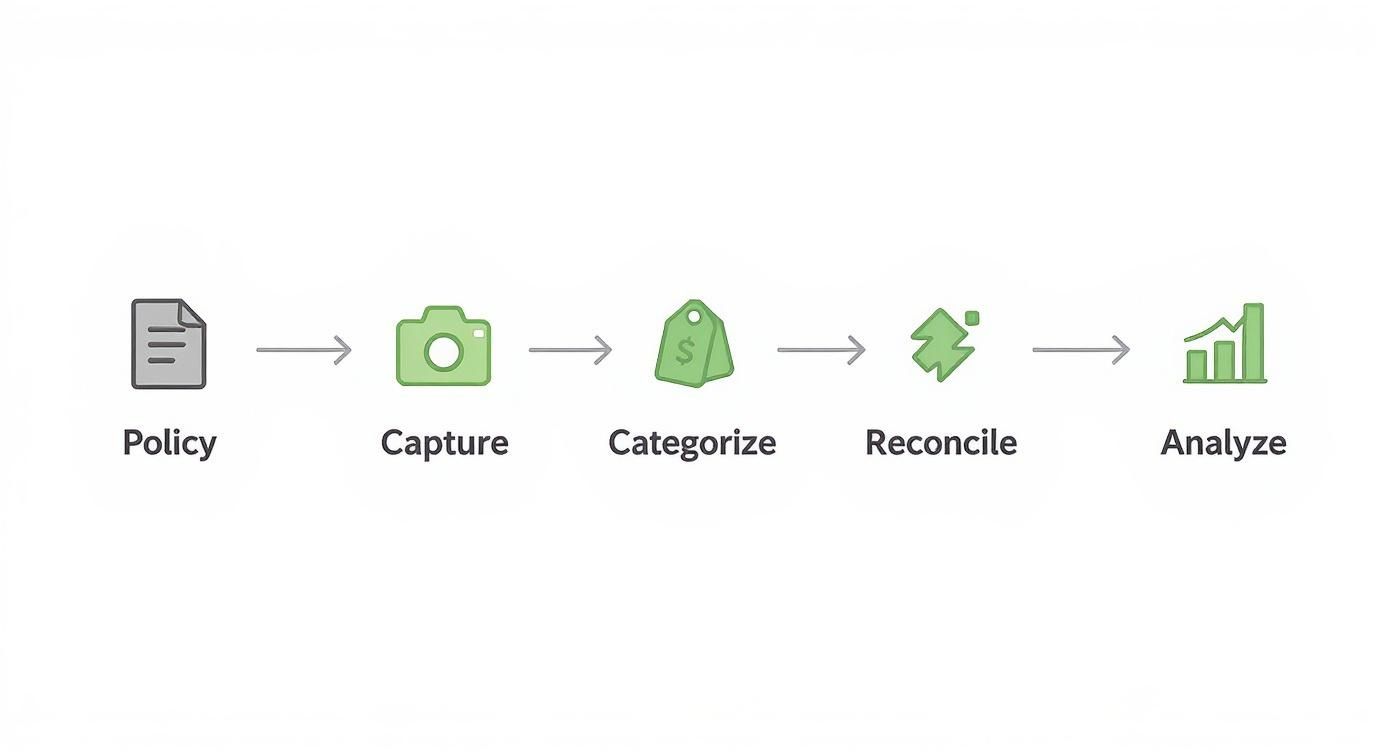
This visual shows how a structured system turns individual transactions into powerful business intelligence, stopping small issues before they snowball into major problems.
Mastering these five pillars transforms expense tracking from a reactive chore into a proactive strategy for growth. It gives you the clarity needed to operate with confidence.
By treating expense management as a strategic advantage rather than a back-office chore, you unlock the financial clarity required to scale your business sustainably. This guide provides a detailed roadmap for implementing this powerful system.
Building Your Expense Management Framework
If you want to get a real handle on your business expenses, you need more than just a spreadsheet or an app. You need a solid framework—a set of rules and structures that bring some order to the financial chaos. This is what turns reactive record-keeping into a proactive system that gives you real financial clarity.
The first building block of this framework is a straightforward expense policy. This doesn’t have to be some complicated legal document. It’s really just a simple set of rules that defines what counts as a legitimate business expense and how it should be handled. Think of it as answering common questions for you and your team before they even come up.

For instance, a clear policy prevents confusion. It takes the guesswork out of questions like, “Can I expense this premium software subscription?” or “What’s the daily limit for meals when I’m traveling?” A well-defined policy is your first line of defense against accidental overspending and keeps everything consistent.
Establishing a Clear Expense Policy
Your expense policy should be simple, accessible, and easy for everyone to understand. The goal here is clarity, not creating a bunch of red tape.
Start by tackling the most common spending categories in your business:
- Travel and Entertainment: Define daily meal allowances (often called per diems), set rules for booking flights and hotels, and clarify what counts as acceptable client entertainment.
- Software and Subscriptions: Lay out a simple approval process. Does a new SaaS subscription need a manager’s sign-off? Who is responsible for keeping an eye on recurring payments?
- Home Office and Supplies: If you have remote team members, outline what is considered a reimbursable home office expense. This could be anything from internet service to specific equipment.
- Professional Development: Set clear guidelines for courses, certifications, and attending conferences.
Your expense policy acts as a financial guardrail for your business. It empowers your team to make smart spending decisions independently while ensuring every dollar aligns with your company’s financial goals.
By putting these rules down on paper, you create a culture of accountability. Everyone knows what’s expected, which makes approvals faster and reduces the friction that so often comes with expense reporting.
Demystifying the Chart of Accounts
Once your spending rules are clear, the next step is building a system to organize the expenses themselves. This is where the Chart of Accounts (CoA) comes in. It might sound a bit intimidating, but it’s really just a list of all the financial accounts in your general ledger, neatly organized into categories.
Think of it like a filing cabinet for your business finances. Instead of one giant folder labeled “Expenses,” you have specific drawers for “Marketing,” “Office Supplies,” “Software,” and “Utilities.” This kind of detailed organization is fundamental for anyone serious about knowing how to keep track of business expenses accurately. A well-structured CoA gives you a much clearer view of where your money is actually going, making financial analysis truly meaningful.
To get a deeper understanding of its role, you can learn more about why your chart of accounts matters in our detailed guide. It breaks down how a properly set up CoA can unlock critical insights into your business’s financial health.
The structure of your CoA will be unique to your business. Let’s look at a couple of different examples to see what I mean.
Example 1: A Freelance Marketing Consultant
A consultant’s CoA would be pretty simple, focusing mostly on service-based costs. Key expense accounts might include:
6010– Software Subscriptions (e.g., SEO tools, CRM)6020– Marketing & Advertising (e.g., LinkedIn Ads)6030– Professional Development (e.g., online courses, conferences)6040– Subcontractor Fees6050– Home Office Expenses
Example 2: A Small E-commerce Shop
An e-commerce business deals with physical products, so its operational needs are totally different. Its expense accounts would look something like this:
5010– Cost of Goods Sold (COGS)5020– Shipping & Freight Costs6100– Platform Fees (e.g., Shopify, Amazon)6110– Packaging Supplies6120– Transaction Processing Fees
See the difference? The CoA is tailored to reflect exactly how each business operates and spends its money. Setting it up correctly from the very beginning makes everything from monthly reporting to tax prep so much easier. With a clear policy and an organized CoA, you have the essential foundation for a powerful expense management system.
Choosing Your Tools for Capturing Every Penny
Okay, you’ve done the foundational work. You have a clear expense policy and a tidy Chart of Accounts. Now comes the fun part: picking the tools that will make tracking every single expense feel less like a chore and more like a simple, daily habit.
The goal here is to find a system so easy to use that you and your team actually stick with it.
Forget about the old days of taping receipts into a dusty ledger. Today’s options range from smart spreadsheets to incredibly powerful software that automates almost the entire process. What’s right for you really just depends on your business’s size, how many transactions you handle, and frankly, how much you value your time.
This isn’t just a small shift; it’s a complete overhaul of how businesses manage expenses. The global expense management market is booming, thanks to new tech and everyone moving online. By 2030, it’s expected to grow massively as more companies lean on AI and mobile apps to get things done faster. You can get more insights on these key expense management trends and see where the industry is heading.
Methods for Capturing Receipts
The first real hurdle every business hits is just capturing the proof of purchase. Let’s be blunt: a lost receipt is a lost tax deduction. It’s that simple. Thankfully, modern methods make this way easier than the old shoebox full of crumpled paper.
- Mobile Scanning Apps: This is the most popular way for a reason. You just use your phone to snap a picture of the receipt the second you get it. Many apps even use Optical Character Recognition (OCR) to automatically read the vendor name, date, and amount, saving you the headache of typing it all in.
- Dedicated Email Inbox: This is a simple but effective trick. Create a special email address, something like [email protected], just for digital receipts. When you buy something online, just forward the confirmation email there. Boom—you’ve got a centralized, searchable archive.
- Cloud Storage Folders: If you prefer a more hands-on digital method, you can keep organized folders in a cloud service like Google Drive or Dropbox. I’ve seen people create folders for each month and then subfolders for each expense category. Just upload your scanned receipts or digital invoices there.
The best receipt capture method is the one that gets used 100% of the time. For most businesses, this means adopting a mobile-first strategy that allows expenses to be recorded on the go, in seconds.
Ultimately, you need a system that removes any excuse for not tracking an expense. The less friction, the more accurate your financial data will be.
Selecting the Right Software Solution
While a spreadsheet might work when you’re a one-person show with a handful of transactions, you’ll outgrow it fast. Dedicated expense tracking software is built to do the heavy lifting, saving you countless hours and cutting down on human error.
These platforms are more than just digital storage for receipts. They plug directly into your business bank accounts and credit cards, pull in transactions automatically, and often suggest categories based on your spending habits. For anyone serious about how to keep track of business expenses, this is an absolute game-changer.
Here’s a look at the simple interface of Expensify, a tool many businesses love for its straightforward receipt submission and reporting.

The whole point of a good interface is to make it fast. When your team can upload receipts and create reports with just a few clicks, they’re much more likely to do it.
When it comes to choosing software, you have to find what fits your specific needs. The market is packed with great options, but they’re not one-size-fits-all.
Expense Tracking Tool Comparison
To help you narrow it down, here’s a quick comparison of a few leading platforms that serve different types of businesses.
| Tool | Best For | Key Features | Pricing Model |
|---|---|---|---|
| QuickBooks Online | Small businesses already using QuickBooks for accounting. | All-in-one accounting, invoicing, and expense tracking. Robust reporting and solid receipt capture. | Monthly subscription based on feature tier. |
| Expensify | Teams needing automated expense reporting and approvals. | Top-tier receipt scanning, corporate card reconciliation, and multi-level approval workflows. | Per-user, per-month fee. |
| Zoho Expense | Businesses looking for an affordable, scalable solution. | End-to-end travel and expense management that integrates perfectly with the broader Zoho ecosystem. | Freemium model with paid tiers for more features. |
Think of your software choice as a long-term investment. Don’t just consider where your business is today—think about where you’ll be in a few years. Picking a tool that can grow with you will save you the massive headache of moving all your financial data to a new system later on.
Turning Your Data into Financial Insight
So, you’ve done the foundational work. You have a clear expense policy, an organized Chart of Accounts, and the right tools in place. That’s a huge step, but collecting data is only half the battle. Now it’s time to turn all that raw information into your biggest strategic advantage. This is where we stop just logging transactions and start generating real financial insight that can steer your business toward smarter decisions.

The critical bridge connecting data collection to analysis is reconciliation. This isn’t just about ticking boxes; it’s your quality control. Reconciliation is how you confirm that the numbers in your accounting software perfectly match the statements from your bank and credit card companies—down to the last penny. Without this crucial step, you simply can’t trust your financial reports.
The Essential Reconciliation Workflow
Think of reconciliation as the final review before your financial data goes “live.” It’s a methodical process where you match every single transaction you’ve recorded to its corresponding entry on your official bank statements. This is your chance to catch and fix issues before they grow into much bigger headaches.
Here’s what that workflow looks like in practice:
- Set a Regular Cadence: Don’t let this pile up. Reconcile your accounts weekly or, at the very least, monthly. The more transactions you have, the more often you should be doing this.
- Compare Line by Line: Go through your bank statement and check off each transaction in your accounting software. Pay close attention to amounts, dates, and who you paid.
- Investigate Discrepancies: Did a vendor accidentally double-charge you? Is there a bank fee you forgot to record? Did a payment fail to clear? This is where you uncover those costly errors.
- Confirm Balances Match: After you’ve accounted for every transaction, the ending balance in your software must perfectly match the ending balance on your bank statement.
For a deeper look into this process, our guide on how to reconcile bank accounts provides a step-by-step walkthrough to get your books squared away.
Reconciliation is non-negotiable for financial accuracy. It’s the single most effective way to detect fraud, spot bank errors, and ensure the data you rely on for decision-making is 100% reliable.
From Raw Numbers to Actionable Reports
With your accounts reconciled and your data verified, you can now confidently pull key financial reports. These documents are so much more than historical records; they are powerful tools for understanding your business’s health and planning its future. The most important report for analyzing your expenses is the Profit and Loss (P&L) Statement.
The P&L, sometimes called an Income Statement, gives you a clear summary of your revenues and expenses over a specific period, like a month or a quarter. It answers the most fundamental question in business: Are we making money?
When you review your P&L, you’re not just looking at the bottom-line number. You’re analyzing the story your spending tells you.
- Are your software subscription costs creeping up month after month? Maybe it’s time to audit your tools and cancel anything you aren’t using.
- Did that new marketing campaign lead to a huge spike in sales? That data tells you exactly where to double down on your advertising budget.
- Is your cost of goods sold (COGS) eating up too much of your revenue? Perhaps it’s time to renegotiate with your suppliers.
This level of analysis is impossible without a disciplined system. In fact, one recent report revealed that finance teams are increasingly strained by late submissions and missing receipts. This problem prompted nearly 87% of CFOs to invest in automation to improve accuracy and compliance. You can learn more about the latest expense management trends and see how technology is solving these challenges.
Ultimately, knowing how to keep track of business expenses is about more than just tax prep. It’s about creating a repeatable system that turns your daily spending into a clear roadmap for growth.
Automating and Scaling Your Expense Process
When you’re just starting, tracking expenses on a spreadsheet might feel manageable. But as your business grows, that manual approach will quickly start to show its cracks. More sales, more team members, and more transactions create a level of complexity that demands a smarter system. This is where you shift from tedious data entry to an efficient, automated process that can scale right alongside your company.
The first real step toward automation is connecting your expense management software with your accounting system, like QuickBooks Online or Xero. Honestly, this integration is a complete game-changer. It’s the difference between spending hours typing in numbers and having a system that does the heavy lifting for you.
Once connected, approved expense reports don’t just get filed away. They’re automatically pushed into your accounting software, creating journal entries in your general ledger without anyone having to lift a finger.
Leveraging Bank Feeds for Real-Time Data
Another powerful tool in your automation arsenal is setting up bank feeds. This feature lets your accounting software securely pull transaction data directly from your business bank and credit card accounts every single day.
Instead of waiting until the end of the month to manually enter a long list of transactions from a statement, they just appear in your software, ready for you to categorize. It saves a ton of time, but more importantly, it gives you an almost real-time look at your cash flow. You’re seeing what was spent yesterday, not last month.
Automation isn’t just about going faster; it’s about being more accurate. By taking manual data entry out of the equation, you slash the risk of human error. This means you can actually trust the financial reports you’re using to make big decisions.
When you combine bank feeds with your software integrations, you get a beautifully seamless workflow. A charge hits the company credit card, it’s automatically imported into your books, and it gets matched to the receipt an employee snapped a picture of on their phone. From purchase to bookkeeping, the whole process is streamlined. This is especially vital for keeping track of your outgoing cash, a topic we dive deeper into in our guide on accounts payable best practices.
Knowing When to Outsource Your Bookkeeping
Even with the best tools and automation, a time will come when doing the books yourself is no longer the best use of your time. As a business owner, you need to be focused on strategy and growth, not reconciling bank statements. So, how do you know when it’s time to pass the torch?
Here are a few tell-tale signs that it’s time to call in a professional:
- You’re spending more than 5 hours a month on bookkeeping. Your time is your most valuable resource. If financial admin is eating up half a day or more every month, that’s time you could have spent talking to customers or developing your next product.
- Your financial reports are always late. If you can’t get a clear look at last month’s numbers until this month is almost over, you’re flying blind. A pro bookkeeper will close your books promptly, giving you the timely data you need.
- You’re not confident in your numbers. That nagging feeling that you might be categorizing things wrong or that your reconciliations aren’t quite right can be incredibly stressful. An expert brings accuracy and, just as importantly, peace of mind.
- You’re facing a complex financial situation. Things like prepping for a business loan, getting ready for an audit, or just cleaning up months of messy records are situations best left to someone with experience.
Bringing on a bookkeeper isn’t just another expense. Think of it as an investment in your company’s financial health—and your own sanity. They provide the expertise to ensure your books are clean, compliant, and a reliable tool for making smart, strategic decisions. This frees you up to do what you do best: run your business.
A Few Common Expense Tracking Questions Answered
Even with a great system, real-world questions pop up. It’s one thing to build a solid process, but it’s another to handle the unique scenarios that come with the day-to-day work of managing your company’s finances.
Let’s clear up some of the most frequent questions business owners ask when they start getting serious about tracking their expenses. My goal is to tackle any lingering confusion so you can manage every transaction confidently.
Do I Still Need to Keep Physical Receipts?
This is a classic debate, but the answer is much simpler now than it used to be. For the vast majority of businesses, a good-quality digital copy of a receipt is just as valid as the paper version for both your books and tax purposes. The IRS has accepted digital receipts for years, as long as they are clear and contain all the necessary info.
Make sure your digital copy includes key details like:
- The vendor’s name
- The transaction date
- The total amount
- A description of what was purchased
So, should you hang onto the paper? My advice is no. A digital-first approach is far more efficient. Paper receipts fade, get lost, or become a crumpled mess in a shoebox. A digital copy stored in the cloud is permanent, searchable, and easy to access when you need it.
Ditching the paper clutter is a huge win for efficiency. As long as your digital scan or photo is a complete and clear image of the original, you’re good to go. This one shift can save you hours of sorting and filing.
How Should I Track Cash Expenses?
Cash can feel a bit like the wild west of expense tracking. It doesn’t leave an automatic digital footprint like a card transaction does, which makes it incredibly easy to forget those small, out-of-pocket expenses. The problem is, those unrecorded costs can add up to thousands in missed deductions over a year.
The key here is discipline and capturing the expense immediately. Don’t wait. The second you pay for something with cash—whether it’s a coffee for a client or supplies from the hardware store—it needs to be recorded.
Here’s a simple workflow that works every time:
- Always Get a Receipt: This has to be a non-negotiable rule. If a vendor can’t provide a printed receipt, ask for a handwritten one or jot down the purchase details yourself right away.
- Use Your Phone on the Spot: Snap a picture of the receipt immediately with your expense tracking app. This gets the transaction into your system before the receipt has a chance to disappear.
- Use a Petty Cash System: For an office setting, a dedicated petty cash fund is perfect. Use a simple log where employees sign out cash and return the receipt with any change. This creates a clean paper trail for reconciling later.
Treating cash with this sense of urgency ensures it gets captured accurately and doesn’t get forgotten.
How Often Should I Review My Expenses?
The right frequency depends on your transaction volume, but as a rule of thumb, never go longer than a month. For most businesses, though, a more frequent check-in works much better.
Here’s a practical schedule to think about:
- Weekly Review (Recommended): Set aside 30-60 minutes every Friday to go through the transactions that have come in from your bank feeds. This keeps the task from becoming overwhelming and helps you catch any issues right away. It also gives you a real-time pulse on your spending.
- Monthly Close: This is a more formal, deeper review. At the end of each month, you need to fully reconcile all bank and credit card accounts, generate your Profit & Loss statement, and see how your spending stacks up against your budget. This is non-negotiable for accurate financial reporting.
Putting this off until the end of the quarter—or worse, the end of the year—is a recipe for disaster. Small errors start to compound, records get lost, and you lose the chance to make smart, timely adjustments to your spending. A consistent weekly and monthly routine turns expense review from a dreaded chore into a simple business habit.
Feeling overwhelmed by the process? The team at Steingard Financial specializes in creating streamlined bookkeeping and payroll systems for service businesses. We handle the details—from transaction categorization to month-end reporting—so you can focus on growth with complete confidence in your numbers. Learn more about how we can help you build a scalable back office.