How to Organize Business Receipts: A Modern Digital System
Learning how to organize business receipts really just comes down to creating a simple, repeatable workflow. You capture every transaction on the spot with your phone, categorize it using a clear system, and store the digital copy somewhere secure and easy to find. It’s a modern process that completely replaces the old, chaotic shoebox method with something that works for you, not against you.
The end goal? Real-time financial clarity and a much, much less stressful tax time.
Why Your Receipt System Is Your Financial Backbone
Let’s be honest—dealing with receipts usually sinks to the bottom of the to-do list. But what if you started looking at it less like a chore and more like the central nervous system of your business’s finances? A good receipt organization system is your secret weapon, and its benefits go way beyond just being ready for tax season.
This is all about creating a live, accurate picture of where your money is going. An effective system helps you shift from reactive bookkeeping to proactive financial management. That shift has a direct impact on your ability to forecast cash flow, make smarter spending decisions, and build a financial foundation that can actually grow with your business.
The Strategic Value of Meticulous Organization
When you have a reliable flow of organized expense data, you get instant visibility into what’s happening in your business. This clarity makes everything from your month-end close to client invoicing and expense reimbursements so much simpler. More importantly, it gives you the clean data you need for accurate financial reporting—which is crucial if you ever want to get a loan, bring on investors, or just truly understand your own profitability. Our detailed guide on record keeping for small business offers a deeper look into these core ideas.
A disorganized approach, on the other hand, just creates headaches. It’s a huge reason why so many businesses get into financial trouble. For instance, a shocking 46% of small-business owners in the U.S. struggle with late payments, and messy receipts and invoices are often a big part of that cash flow nightmare. This really drives home why a systematic approach to organizing receipts is the backbone of healthy finances. You can see more on these challenges by reviewing the latest industry statistics.
Moving Beyond the Shoebox Method
The old-school “shoebox” method—just piling up paper receipts to sort through “later”—is a recipe for disaster. It leads to missed deductions, compliance risks, and hours of wasted time. A modern, digital system automates the most tedious parts of this process, making sure everything is accurate and freeing you up for more important work.
Think about the real-world benefits of going digital:
- Better Cash Flow Management: When you know exactly where your money is going in real-time, you can create much more accurate budgets and forecasts.
- Simpler Tax Compliance: With every expense documented and categorized, you can maximize your deductions and face any potential audit without breaking a sweat.
- Smarter Decision-Making: Having clean, reliable financial data allows you to spot spending trends, get costs under control, and make informed strategic choices.
- Room to Grow: As your business gets bigger, an automated system can handle the increase in transactions without falling apart. A shoebox just gets fuller.
The goal isn’t just to store receipts; it’s to turn them into financial intelligence you can actually use. An organized system is what connects a simple transaction to a smart business insight.
Ultimately, figuring out how to organize your business receipts is about putting a workflow in place that cuts out manual entry, reduces human error, and gives you genuine financial control and peace of mind.
Receipt Organization Methods At a Glance
Not sure which path is right for you? This table breaks down the fundamental differences between the old way and the new way of managing receipts. It’s a quick snapshot to show you what you gain by modernizing your process.
| Feature | Manual ‘Shoebox’ Method | Digital & Automated System |
|---|---|---|
| Capture Speed | Slow; requires manual collection and saving | Instant; capture with a mobile app |
| Accuracy | Prone to human error, typos, and lost receipts | High; OCR technology extracts data automatically |
| Searchability | Nearly impossible; have to sift through paper piles | Fast and easy; search by vendor, date, or category |
| Storage | Physical space needed; risk of fire, flood, or loss | Secure cloud storage with automated backups |
| Time Investment | Extremely high; hours spent on manual data entry | Minimal; most of the workflow is automated |
| Audit Readiness | Low; stressful and difficult to produce records | High; documents are organized and instantly accessible |
| Scalability | Poor; becomes unmanageable as business grows | Excellent; easily handles increasing transaction volume |
The contrast is pretty clear. While the shoebox feels simple upfront, it creates significant work and risk down the line. A digital system requires a small setup investment but pays off with massive gains in efficiency, accuracy, and strategic insight.
Creating Your Automated Receipt Capture Engine
Let’s be honest, the biggest hurdle in getting receipts organized isn’t the filing—it’s just getting them in the first place. An automated receipt capture engine is your frontline defense against lost deductions and messy, year-end scrambles. Think of it as a system designed to grab every receipt, physical or digital, the moment a transaction happens.
The whole point is to build a reliable, mostly hands-off workflow. Whether it’s a client lunch or a new software subscription, every expense gets accounted for and fed right into your financial system without you having to chase down paper later.
Mobile Apps for On-the-Go Capturing
If you run a service business, you know a ton of expenses happen out in the field. Grabbing coffee with a potential client, buying supplies for a job, paying for parking at a project site—these little paper receipts are notorious for disappearing. They end up crumpled in a wallet or lost in a glove compartment forever.
This is where mobile capture apps like Dext or Shoeboxed become your best friend. The process couldn’t be simpler:
- Snap a Photo: Right after you pay, open the app and take a clear picture of the receipt.
- Let AI Do the Work: The app uses Optical Character Recognition (OCR) to automatically read the vendor, date, and amount.
- Sync to the Cloud: That digital copy is instantly uploaded and stored securely, ready for you or your bookkeeper to categorize.
A core part of this whole system relies on using effective OCR for receipts to turn those physical slips into usable digital data. Once you get in the habit, you’ve closed the loop on a transaction before you even leave the restaurant or supply store.
This simple flow is the key to moving from just capturing a receipt to having real financial control.
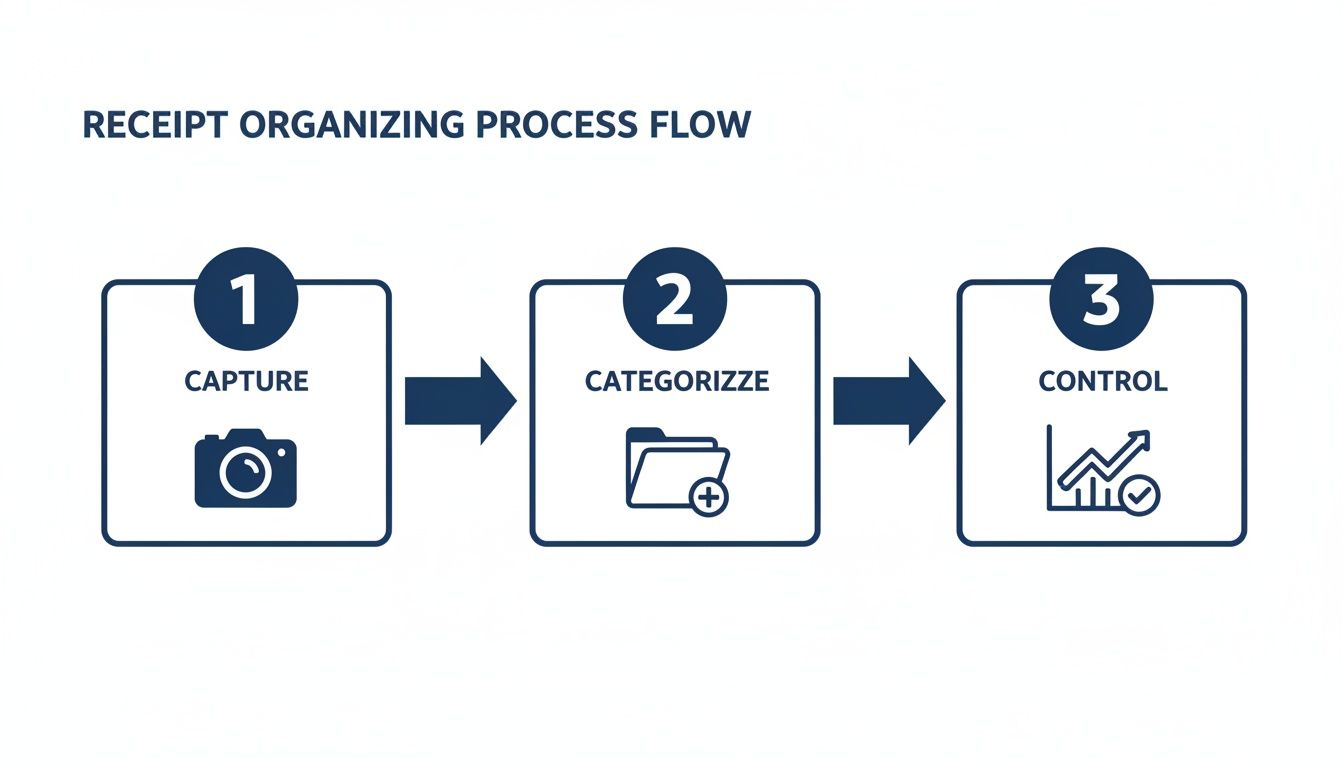
As you can see, the entire system hinges on a solid capture process. Get that right, and everything else falls into place.
Handling the Flood of Digital Receipts
While mobile apps solve the paper problem, digital receipts from online purchases bring their own headaches. Invoices from Amazon, ride-sharing services like Uber, and your monthly software subscriptions can quickly clog your main business inbox, making them a nightmare to track.
The solution is to automate how these emails are handled instead of manually forwarding each one.
Pro Tip: Set up a specific email address just for receipts, like
[email protected]or[email protected]. This keeps your main inbox clean and puts all incoming digital transaction records in one predictable place.
Once that dedicated inbox is live, you can connect it directly to your receipt management software. Many platforms, including QuickBooks Online and Dext, let you link an email account. They’ll automatically scan it, identify receipts, and pull them into your system for processing.
Building Smart Email Forwarding Rules
For an even slicker approach, you can create rules within your primary email client (like Gmail or Outlook) to automatically forward receipts. This is perfect for recurring charges or purchases you make using your main business email.
Here’s a real-world example for a marketing consultant:
- Trigger: An email arrives from “[email protected]“.
- Action: Your email rule automatically forwards it to
[email protected]. - Result: The Adobe Creative Cloud subscription receipt is captured without you lifting a finger.
You can set up similar rules for all your key vendors: Amazon Web Services, LinkedIn Premium, your project management software—you name it. This proactive approach ensures every digital receipt is captured the moment it arrives. This kind of organization is a huge part of automating the accounts payable process, which cuts down on manual data entry and costly errors.
By combining on-the-go mobile capture for physical receipts with automated email forwarding for digital ones, you build a powerful and comprehensive engine. It’s a system that works tirelessly in the background, ensuring 100% of your business expenses are documented accurately and efficiently.
Turning Receipt Data Into Actionable Insights
Having an automated system to capture every receipt is a massive win, but it’s only half the battle. A folder full of digital receipt images is just organized clutter. The real value comes when you turn those static images into clean, usable financial data that tells the story of your business’s health.
This is where you transform a simple photo into an accurately coded entry that directly fuels your financial statements and strategic decisions.
The magic behind this transformation is Optical Character Recognition (OCR) technology. Modern receipt management tools use OCR to scan a receipt image and automatically pull out the most important details: the vendor’s name, the transaction date, and the total amount. This single step eliminates countless hours of tedious, error-prone manual data entry, ensuring your records are both complete and accurate right from the start.
This shift toward intelligent data extraction isn’t just a niche trend. The global digital receipts market is booming, expected to jump from $2.1 billion in 2023 to a projected $5.1 billion by 2033. This incredible growth highlights a worldwide move away from paper, as businesses embrace digital solutions to organize expenses more efficiently. Email receipts, for example, captured nearly 39% of the market in 2023, showing just how much we rely on them for capturing transaction data. You can find more insights about this rapidly growing market on market.us.

Connecting Data to Your Chart of Accounts
Once OCR has pulled the basic information, the next crucial step is to give that data meaning within your financial ecosystem. This is done by mapping each expense to a specific category in your Chart of Accounts (CoA). Think of your CoA as the filing cabinet for your business’s finances; it’s a structured list of all your accounts, from income and expenses to assets and liabilities.
A well-organized CoA is the foundation of meaningful financial reporting. Instead of lumping all your spending into a generic “Miscellaneous” bucket, you can categorize them with precision.
- A lunch meeting with a client gets filed under “Meals & Entertainment.”
- Your monthly project management software subscription is coded to “Software & Subscriptions.”
- Gas for a company vehicle is assigned to “Automobile Expenses.”
This level of detail is what allows you to generate truly insightful reports. You can instantly see how much you’re spending on marketing, travel, or office supplies, which is essential for smart budgeting and cost control. To get the most out of your data, check out our guide on financial reporting best practices.
Setting Up Rules for Recurring Vendors
One of the most powerful features in modern accounting software is the ability to create rules that automate categorization. You can essentially teach your system how to handle transactions from specific vendors so you don’t have to manually code them every single time. For recurring expenses, this is an absolute game-changer.
Think about your monthly charges that are always the same—your Gusto payroll subscription, for example, or your Adobe Creative Cloud license. You can set up a rule that says, “Any transaction from vendor ‘Gusto’ should always be categorized under ‘Payroll Fees’.”
Once the rule is in place, the system handles it automatically. The charge hits your bank account, the software recognizes the vendor, applies the correct category, and all you have to do is give it a quick review. This saves an incredible amount of time and ensures consistency in your bookkeeping.
This level of automation is how you build a truly scalable system to organize business receipts. It minimizes manual work while maximizing the accuracy of your financial data. Ultimately, every receipt you capture becomes a valuable data point contributing to a clearer, more accurate, and more actionable understanding of your business’s financial performance.
Choosing Your Tech Stack for Storage and Integration
Once you’ve snapped a picture of a receipt and pulled the data off it, that digital file needs a permanent, secure home. But where you store these records is more than just a filing decision—it shapes how smoothly your entire financial system runs. The ultimate goal is to create a single source of truth where every piece of financial data lives in harmony.
This means your capture tool, storage solution, and bookkeeping software need to talk to each other flawlessly. A disconnected system forces you or your bookkeeper to manually bridge the gaps, which is a massive time-waster and an open invitation for errors. A well-integrated tech stack, on the other hand, builds an audit-proof trail that’s always just a click away.
General Cloud Storage vs. Integrated Accounting Platforms
When it comes to storing your digital receipts, you have two main options: using general-purpose cloud storage or keeping everything inside an integrated accounting platform. Each has its place, and the right choice really depends on your business’s complexity and workflow.
A freelance consultant just starting might find Google Drive or Dropbox to be perfectly fine. They can set up a simple folder structure—maybe organized by year, then month, and then client. It’s a low-cost approach that most people are already familiar with.
But a growing service agency with a team of people submitting expenses will outgrow this manual method almost immediately. The real power is in systems that do more than just store an image; they connect it directly to your financial records.
The most effective way to organize business receipts is to link the digital image directly to its corresponding transaction in your accounting software. This creates an unbreakable, easily verifiable chain of evidence.
Let’s put the two approaches side-by-side.
| Feature | General Cloud Storage (e.g., Google Drive) | Integrated Accounting Platform (e.g., QuickBooks) |
|---|---|---|
| Integration | Manual; requires you to find and match receipts to transactions | Automatic; receipts are attached directly to bank transactions |
| Workflow | Disconnected; involves multiple steps and platforms | Seamless; capture, storage, and reconciliation in one place |
| Audit Trail | Fragmented; proving a link can be difficult | Strong; a clear, clickable path from report to receipt |
| Efficiency | Low; time-consuming manual matching and filing | High; automation handles most of the organization |
| Best For | Sole proprietors with very low transaction volume | Businesses of any size seeking efficiency and accuracy |
Building an Audit-Proof Trail in QuickBooks
Let’s walk through a real-world example to see this in action. Imagine your project manager, Sarah, buys new design software for the team using the company card.
With an integrated system like QuickBooks Online, the whole process is seamless:
- Right after the purchase, Sarah uses the QuickBooks mobile app to snap a photo of the receipt.
- The app’s OCR tech automatically reads the vendor (Adobe), date, and amount ($59.99).
- Later, when the $59.99 charge from Adobe hits the bank feed, QuickBooks suggests matching the transaction to the receipt image Sarah uploaded.
- Your bookkeeper just has to click once to confirm the match.
Just like that, the digital receipt is permanently attached to that specific transaction in your books. If an auditor ever questions that expense, you can pull up the transaction and show them the receipt instantly. This is the gold standard for organizing business receipts in a way that’s both compliant and easy to defend.
Meeting IRS Digital Record-Keeping Requirements
Picking your tech stack isn’t just about making your life easier; it’s also about staying compliant. The IRS has clear guidelines for digital record-keeping, and your system has to meet them. Luckily, the rules are pretty straightforward.
According to the IRS, your electronic storage system must ensure:
- Accuracy: The digital copies have to be legible and complete, showing all the details from the original receipt.
- Accessibility: You must be able to find and produce the records if requested during an audit.
- Retention: You need to hold onto records for as long as they might be needed for tax purposes, which is typically three to seven years.
Modern accounting platforms like QuickBooks Online and dedicated expense tools like Dext are built to meet these requirements out of the box. They give you secure, long-term cloud storage with solid backup systems, ensuring your records are safe, accessible, and compliant. It’s all about giving you complete peace of mind.
Getting Your Team on Board with a Clear Policy
Your automated system is only as strong as the people using it. Even the best software in the world won’t organize your receipts if your team isn’t actually following the process. Getting everyone on the same page isn’t just about sending a memo—it’s about building a culture of financial accountability.
This all starts with a simple, clear, and non-negotiable expense policy. A good policy takes the guesswork out of the equation, prevents confusion, and empowers your team to do the right thing every time. Think of it as the foundation that ensures every expense gets captured correctly from the very beginning.

Defining Your Expense and Receipt Policy
A vague policy is an invitation for trouble. Your goal here is to leave zero room for interpretation. Start by clearly defining what actually counts as a legitimate business expense and, just as importantly, what doesn’t.
Next, you have to set firm deadlines for submissions. Waiting weeks or even months for receipts creates cash flow headaches and bookkeeping nightmares. A solid best practice is requiring all receipts to be submitted within 48 to 72 hours of the transaction. This simple rule ensures the purchase is still fresh in the employee’s mind. For many small businesses, picking the right tools is a big part of making this work. If you need some help, there’s a great resource on choosing the right document management software that can guide you.
Your policy must outline the exact steps someone needs to take. Be specific:
- Physical Receipts: Snap a picture immediately with the Dext mobile app. The photo has to be clear and legible before you even leave the store.
- Digital Receipts: Forward them to
[email protected]the same day you get them. No exceptions. - Required Information: For meals and client entertainment, employees must add a note in the app identifying who attended and the business purpose of the meeting.
Your expense policy is more than a set of rules; it’s a training tool. It should be the one place any team member can go to understand exactly what’s expected of them.
Implementing Internal Controls and Approvals
Technology can also help you build guardrails to enforce your policy. Most modern expense management platforms allow you to set up internal controls and approval workflows, which is a critical step for maintaining financial integrity.
For instance, you can configure the system to require a manager’s approval for any expense over a certain amount, like $100. This adds a layer of oversight without slowing things down for small, routine purchases. If an employee submits an expense that falls outside the rules—like a first-class flight when the policy is strictly economy—the system can automatically flag it for review.
Handling Common Roadblocks and Exceptions
No matter how clear your policy is, exceptions are going to pop up. Someone will lose a receipt or forget to submit an expense on time. It happens. Your policy should proactively address these common roadblocks so there’s no panic when they occur.
Create a straightforward process for handling lost receipts. This might involve a “Missing Receipt Affidavit,” which is just a simple digital form where the employee provides the vendor, date, amount, and business purpose, and then digitally signs it. This creates a documented paper trail even when the original receipt is long gone.
By clearly defining the process, setting up your tech with the right controls, and planning for the inevitable exceptions, you create a system that actually works. This is how you transform receipt management from a chaotic, reactive mess into a predictable and well-oiled part of your business.
Common Questions on Organizing Business Receipts
Even with a great system in place, you’ll always run into specific questions as you get the hang of organizing business receipts. Let’s tackle some of the most common ones with clear, straightforward answers to help you handle those tricky situations and keep your records in pristine shape.
How Long Should I Keep Business Receipts?
This is a big one, and the IRS has specific guidelines you need to follow to stay compliant. For most businesses, the rule is to keep receipts and all your supporting documents for three years from the date you filed your original tax return.
But, like with many things tax-related, there are a few key exceptions you need to know:
- Seven Years: If you claim a loss from worthless securities or a bad debt deduction, you’ll want to hold onto those records for seven years.
- Six Years: Keep records for six years if you happen to underreport your gross income by more than 25%.
- Indefinitely: Employment tax records need to be kept for at least four years after the tax is due or paid, whichever is later.
A good rule of thumb is to keep all your financial records for at least seven years. With digital storage being so easy and cheap, there’s really no downside to being a little extra cautious.
What If I Lose a Receipt?
It happens to all of us. You pay cash for parking or misplace a dinner receipt from a client meeting. While it’s not ideal, a single missing receipt doesn’t automatically mean you’ve lost the deduction for good.
When a receipt goes missing, your goal is to reconstruct the expense with as much credible evidence as you can pull together. A credit card statement showing the transaction is a great start. Pair that with a quick note detailing the business purpose, the date, and who you paid. For an even stronger record, many businesses use a “Missing Receipt Affidavit”—a simple form where the employee documents all the expense details and signs off on its legitimacy.
Can I Just Use Bank Statements Instead of Receipts?
This is a very common misconception. While your bank and credit card statements are absolutely essential for reconciling your accounts, they are not a substitute for itemized receipts in the eyes of the IRS.
Here’s why: a bank statement only proves a transaction happened. It shows the amount, date, and vendor, but it doesn’t have the crucial itemized details of what you actually bought. An auditor needs to see an itemized receipt to confirm that the expenses were legitimate business costs and not personal items. For example, a statement from Target doesn’t prove you bought office supplies instead of groceries for your home.
Do I Need to Keep Both Paper and Digital Copies?
Nope, you don’t. Once you have a clear, legible digital copy of a receipt, the IRS considers it a valid record. You are completely free to securely shred the original paper version.
This is honestly one of the biggest perks of going digital. It eliminates the need for filing cabinets and protects your records from fading, getting lost, or being damaged. Just make sure your digital storage system is secure, regularly backed up, and organized so you can pull up any record you need, when you need it. Making this switch is a huge step in successfully managing how you organize business receipts for the long haul.
Ready to build a financial system that gives you clarity and peace of mind? The team at Steingard Financial specializes in creating streamlined bookkeeping and payroll solutions for service businesses. We’ll help you implement a modern, automated system to organize your receipts, manage your books, and get the financial insights you need to grow. Learn more about our services at steingardfinancial.com.