Record Keeping for Small Business: A Practical Guide to Organized Finances
At its core, record keeping for a small business is the simple, systematic practice of tracking all your financial transactions. It’s the only way to truly monitor your performance, stay compliant, and build a solid foundation for managing cash flow. Without it, you’re just guessing.
Why Good Record Keeping Is Your Business’s Secret Weapon
Let’s be honest, record keeping often feels like a chore—a necessary evil you tackle to stay on the right side of the IRS. But what if it was the single most powerful tool for securing your business’s future? Proper financial tracking is the key to managing cash flow, making smart hiring decisions, and confidently asking for a loan.

This guide isn’t about repeating basic advice. It’s your playbook for turning bookkeeping from a reactive headache into a proactive strategy for real, sustainable growth.
A Real-World Scenario Uncovering Profitability
Picture a small contracting business that does a mix of landscaping, patio installations, and deck construction. The owner was constantly busy and saw money coming in, but profits always felt much tighter than they should have been.
Once they put a proper record-keeping system in place, they started tracking job costs—materials, labor hours, and subcontractor fees—for each individual service.
After just three months, the numbers told a surprising story. While landscaping jobs were frequent, their profit margins were razor-thin. On the other hand, deck construction projects, though less common, were significantly more profitable. Armed with this insight, the owner shifted their marketing to attract more deck projects and adjusted landscaping prices, dramatically boosting their overall profit margin.
This is the true power of meticulous record keeping. It’s not just about compliance; it’s about gaining the clarity needed to make smarter, data-driven decisions that directly impact your bottom line.
Beyond Compliance: Strategic Benefits of Clean Books
Good record keeping provides benefits that go way beyond tax season. It becomes the backbone of your entire operational strategy, letting you steer your company with confidence. Understanding the importance of bookkeeping is the first step toward unlocking that potential.
Here are a few key strategic advantages:
- Cash Flow Management: You know exactly who owes you money, when bills are due, and how much cash you have on hand. No more surprises.
- Informed Decision-Making: Accurate data helps you spot your most profitable services, cut unnecessary expenses, and know the right time to hire or invest in new equipment.
- Access to Funding: Banks and investors won’t even talk to you without seeing clean, professional financial statements.
- Simplified Tax Preparation: An organized system makes tax filing faster, less stressful, and helps you maximize every possible deduction.
Ignoring these fundamentals can have serious consequences. A staggering 82% of small businesses fail due to cash flow problems—a risk that is directly tied to poor financial tracking. With over 36 million small businesses in the U.S., these issues have a massive economic impact. You can discover more small business insights on QuickBooks.com.
Building Your Financial Foundation: The Essential Records to Keep
Good record-keeping isn’t about saving every single piece of paper that crosses your desk. It’s about knowing which pieces of information tell the financial story of your business. Forget generic checklists—let’s look at your records based on the critical questions they help you answer.

This approach transforms record-keeping from a tedious chore into a powerful business intelligence tool. I like to break it down into three key areas: records for cash flow, records for compliance, and the data you need for smart decisions.
Documents for Cash Flow Clarity
This first group of records gives you a real-time pulse on the money coming in and going out. Without this, you’re essentially flying blind, unable to spot cash crunches before they happen or see opportunities to reinvest.
Here are the key records you need to manage your cash flow:
- Invoices Issued to Clients: This is more than just a bill; it’s the official record of your earned revenue. Keeping track of invoices shows you exactly who has paid and, more importantly, who is late.
- Proof of Payment from Clients: This covers bank deposit slips, credit card transaction reports, and notifications from payment processors. These confirm when the money actually arrives in your account.
- Bank and Credit Card Statements: These are your ultimate source of truth, detailing every single debit and credit. They are non-negotiable for reconciling your books.
- Accounts Receivable (A/R) Aging Reports: This report is your crystal ball for future income. It breaks down unpaid invoices by how long they’ve been outstanding (e.g., 0-30 days, 31-60 days), helping you identify clients who might be a payment risk.
For example, a freelance designer might glance at their A/R aging report and notice a major client is consistently paying 15 days past the 30-day term. This insight allows them to adjust payment terms on the next contract or simply follow up sooner, preventing a potential cash flow gap next quarter.
Records for Tax and Legal Compliance
This is the category most people think of when they hear “bookkeeping,” and for good reason. The IRS and other agencies demand thorough documentation to back up the numbers on your tax returns. Messy records here can lead to audits, painful fines, and a whole lot of stress.
To keep everything in order, explore the various receipt templates available online to help standardize your documentation from the start.
Your essential compliance files should include:
- Expense Receipts and Invoices: You absolutely need proof for every business expense you claim. This means everything from software subscriptions to client lunches. If you’re ever confused, understanding the difference between a receipt and an invoice is a fantastic starting point.
- Payroll Records: For every employee, you must keep records of wages paid, hours worked, tax withholdings, and benefits. The IRS requires you to hold onto these for at least four years.
- Tax Filings: Always keep copies of all filed tax returns, including income, payroll, and sales tax.
- Legal Documents: This bucket includes your business formation paperwork (like articles of incorporation), permits, licenses, and any important contracts with clients or vendors.
Think of these records as your business’s legal shield. In the event of an audit or dispute, organized, complete documentation is your best defense and can save you thousands in potential penalties.
Here is a quick reference guide to help you keep track of what to keep and for how long.
Essential Small Business Records Retention Guide
| Record Type | Primary Purpose | Recommended Retention Period |
|---|---|---|
| Invoices & Receipts | Substantiate income and expenses for tax deductions | 7 years |
| Bank & Credit Card Statements | Reconcile accounts and verify transactions | 7 years |
| Payroll Records | Comply with IRS and Department of Labor regulations | At least 4 years |
| Tax Returns (All types) | Proof of filing and basis for audits or amendments | Permanently |
| Legal & Formation Documents | Prove ownership, structure, and legal standing | Permanently |
| A/R & A/P Aging Reports | Manage cash flow and credit | 1 year (for analysis) |
While some records can be discarded after a few years, keeping your core legal and tax documents permanently is always the safest bet.
The Chart of Accounts: Your Financial Filing System
Holding all of this together is your Chart of Accounts (COA). The COA is the index for your financial books, giving you a complete list of every account where a transaction could possibly be recorded. It’s the organizational backbone that brings order to your financial data.
A well-organized COA is typically broken down into five main categories:
- Assets: What your business owns (e.g., cash, equipment, accounts receivable).
- Liabilities: What your business owes (e.g., loans, credit card balances, accounts payable).
- Equity: The net worth of your business (e.g., owner’s investment, retained earnings).
- Revenue: Money you earn from selling goods or services.
- Expenses: The costs you incur to run the business (e.g., rent, marketing, salaries).
Setting up a thoughtful Chart of Accounts from day one is one of the most crucial steps you can take. It ensures that when you categorize a transaction—like buying a new company laptop—it goes to the correct place (“Fixed Assets”) instead of getting lost in a vague “Office Expenses” category. That level of precision is exactly what allows you to generate meaningful financial reports down the road.
Choosing Your Tools to Create a Scalable System
That moment you finally ditch the messy, error-prone spreadsheets is a huge milestone for any small business. It’s when you stop wasting time on tedious manual entry and start building a modern record-keeping system that actually saves you time and prevents costly mistakes.
Think of these tools not as an expense, but as your first automated employee, working tirelessly in the background.
The shift to digital platforms is more than just a passing trend; it’s a fundamental change in how successful businesses are run. The worldwide bookkeeping services market is now valued at around $50.62 billion, a number driven by small businesses finally adopting cloud accounting software. In fact, about 58% of enterprises now use platforms like QuickBooks Online and Xero to manage their finances. Find more details on the growth of bookkeeping services on outbooks.com.
This move is all about gaining back your time. Instead of spending hours punching in transactions, you can focus on what the numbers are actually telling you.
Finding the Right Accounting Software
The heart of any scalable system is good cloud accounting software. Platforms like QuickBooks Online and Xero are industry standards for a reason—they solve real problems for business owners like you. Their absolute killer feature is the automatic bank feed, which syncs directly with your business bank and credit card accounts to pull in transactions automatically.
That one feature completely eliminates the most time-consuming part of old-school bookkeeping. No more manual data entry, no more typos, and no more nagging feeling that you missed something.
When you’re comparing your options, keep these key features in mind:
- Bank Feed Reliability: How well does the software connect to your specific bank? This is the most important integration, period.
- Invoicing and Payments: Can you easily create professional, recurring invoices and let clients pay you online?
- Reporting Capabilities: How easily can you pull the reports you actually need, like a Profit & Loss, Balance Sheet, and Cash Flow statement?
- Third-Party Integrations: Does it play nice with the other tools you already use, like payment processors (Stripe, Square) or project management software?
The QuickBooks Online dashboard, for instance, gives you a clear, at-a-glance view of your most important financial numbers.
This kind of visual summary helps you quickly check your cash flow, profitability, and who owes you money, turning raw data into something you can actually use to make decisions. Choosing the best accounting software for startups really just comes down to which one feels the most intuitive for your specific workflow.
Integrating Payroll for a Seamless Back Office
Once you have your accounting hub set up, the next logical step is connecting your payroll. Manually entering payroll numbers into your books is just asking for errors and compliance headaches down the road.
Integrating a dedicated payroll platform like Gusto with your accounting software creates a powerful, seamless system. When you run payroll in Gusto, it automatically sends all the right journal entries over to QuickBooks. That means wages, employer taxes, and benefit deductions all get recorded correctly without you having to lift a finger.
This integration is the perfect example of a scalable system. As you hire more people, your workload doesn’t actually increase. The system handles all the complexity for you, ensuring everything stays accurate and saving you hours of admin work every single pay period.
Getting Started with Your New System
Setting up accounting software for the first time can feel a little intimidating, but it’s a pretty straightforward process if you tackle it one step at a time. Let’s use QuickBooks Online as our example and walk through a simple checklist.
Your QuickBooks Onboarding Checklist:
- Set Up Company Information: First things first, enter your business’s legal name, address, EIN, and business structure. This makes sure all your reports and tax info are correct from day one.
- Connect Bank and Credit Card Accounts: This is the most crucial step. Securely link all of your business accounts to turn on the automatic transaction feeds. This is the foundation of your automated record keeping for small business.
- Review and Customize Your Chart of Accounts: QuickBooks gives you a default Chart of Accounts, but you should absolutely tailor it to your business. Add expense categories that make sense to you, like “Software Subscriptions,” “Client Entertainment,” or “Subcontractor Fees.”
- Create Invoice Templates: Customize your invoice with your logo and brand colors. Set up your default payment terms and the payment methods you accept.
- Enter Opening Balances: If you’re switching from another system, you’ll need to enter the “opening balances” for your accounts as of your start date. This ensures your books are accurate right from the get-go.
- Catch Up on Past Transactions: Once the bank feed is active, go back and categorize all the transactions it pulled in. Getting this initial cleanup done gives you a clean slate to move forward.
By working through this setup methodically, you’re not just setting up software; you’re building a reliable financial foundation that will support your business as it grows.
Developing Your Daily, Weekly, and Monthly Financial Rhythm
A perfect record-keeping system is one thing, but it’s the consistent routine that makes it work. This is exactly where I see most business owners get tripped up. They treat bookkeeping like a dreaded, once-a-year scramble instead of a simple, ongoing habit. The trick is to break down your financial tasks into a manageable rhythm: daily, weekly, and monthly.
When you create this kind of structure, financial management stops being a source of panic and becomes a source of clarity. By building small, consistent habits, you get rid of the year-end chaos and gain a real-time pulse on your business’s health. You’ll always know your numbers, and that’s the foundation for making confident decisions.
This simple flow shows how to get the basics automated by connecting your accounts, sending invoices, and integrating your key software.
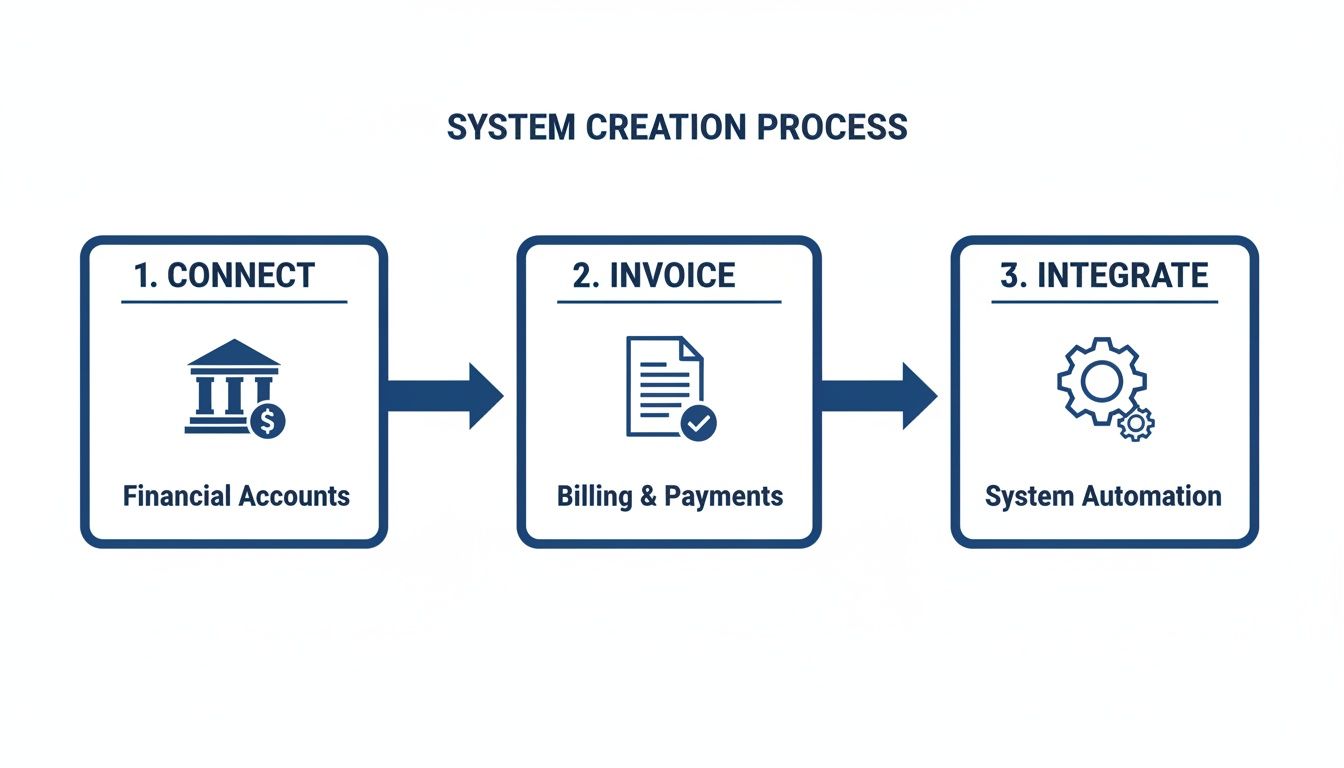
Each step naturally flows into the next, creating a loop of data that cuts down on manual entry and keeps your books clean from the start.
Your Daily Financial Habits
Daily tasks should be quick—we’re talking five minutes or less. The whole point is to capture information as it happens, so nothing gets lost in the shuffle. Think of it as the basic hygiene of good record keeping for small business.
Your daily checklist can be as simple as this:
- Snap Photos of Receipts: Stop letting receipts pile up in your truck’s glove box or the bottom of your bag. Use your accounting software’s mobile app (like QuickBooks) to snap a picture right after you buy something. The app does the heavy lifting, pulling the data and getting it ready to categorize.
- Review Daily Transactions: Just take 60 seconds to glance at the new transactions pulled in from your bank feed. You can often categorize the usual expenses on the spot, which prevents a massive backlog from building up.
For example, you take a client out for coffee. Snap a picture of the receipt right there at the counter. The next day, when the transaction pops up in your bank feed, you can tag it as “Meals & Entertainment” in seconds. It’s a tiny habit that saves you from a month-end guessing game.
Your Weekly Financial Review
Your weekly routine is all about managing your short-term cash flow and making sure your people get paid. Block out 30-60 minutes on your calendar—maybe every Friday afternoon—to knock these items out. You have to treat this time as non-negotiable if you want to stay on top of things.
Here are the key things to handle each week:
- Process and Approve Bills: Go through any vendor invoices that have come in (your Accounts Payable). Get them approved and scheduled for payment so you’re never hit with late fees.
- Send Invoices and Follow Up: Did you finish a job this week? Get that invoice out the door. Just as important, run an Accounts Receivable report to see who’s behind on their payments and send them a polite reminder.
- Run Payroll: If you have a team, your weekly rhythm will definitely include running payroll through a service like Gusto. This makes sure everyone is paid correctly and on time, and all the payroll taxes are handled without you having to think about it.
A consistent weekly review of who owes you money is the single most effective way to improve cash flow. Waiting a month to follow up on a late invoice makes it significantly harder to collect what you’re owed.
Your Monthly Financial Close
The monthly close is your chance to zoom out and look at the big picture. This is when you reconcile your accounts and generate the reports that tell you how your business is really doing. I always recommend getting this done within the first five business days of the new month.
Your monthly workflow should always include:
- Bank and Credit Card Reconciliation: This is the most critical monthly task, period. You’ll go line-by-line, comparing every transaction in your accounting software to your bank and credit card statements to make sure it all matches up. This process is what confirms your books are 100% accurate.
- Review Financial Statements: Once everything is reconciled, it’s time to pull your three core reports: the Profit & Loss (P&L), the Balance Sheet, and the Statement of Cash Flows.
- Analyze Performance: Now, ask the tough questions. Were you profitable? How does this month’s revenue compare to last month or this time last year? Are there any expenses that seem to be creeping up?
By sticking to this rhythm, you create a powerful feedback loop. The small daily habits make the weekly tasks easier, and the weekly tasks make the monthly close a smooth, insightful process. This is how you stop chasing paperwork and start using your financial data as the strategic tool it’s meant to be.
When to Outsource Your Bookkeeping and Payroll
When you’re running a growing business, you eventually become your own biggest bottleneck. Handling the books yourself is a fantastic way to understand your cash flow in the early days, but there’s a point where it stops being a good use of your time. In fact, it starts costing you money.
It’s a common feeling. Surveys show that 60% of small business owners don’t feel knowledgeable about accounting, and 21% admit they don’t know enough about bookkeeping. It’s no surprise that with almost 70% of small businesses running without an outside accountant, millions of owners are juggling complex tasks like payroll filings and bank reconciliations on their own.
Letting go isn’t about giving up control. It’s about making a strategic investment in your own time, accuracy, and sanity. Outsourcing frees you up to focus on the things only you can do: building relationships, creating products, and steering the ship.
Identifying the Triggers to Outsource
So, how do you know when it’s time to hand over the reins? It’s less about a magic revenue number and more about feeling the squeeze on your time and resources. The signs are usually pretty clear once you know what to look for.
Keep an eye out for these red flags:
- You spend more time on books than on sales: If you’re losing whole days to sorting receipts instead of closing deals, you’ve hit the limit of your DIY capacity.
- You’re making frustrating errors: Are bank reconciliations a constant headache? Small but persistent errors are a telltale sign that the financial complexity is getting ahead of your current system.
- You need sophisticated reports: The moment you need polished financial statements for a bank loan, an investor pitch, or a major strategic decision, it’s time to call in a pro.
- Tax season is a nightmare: If gathering documents for your tax return feels like a chaotic fire drill every single year, you need an expert to build a better system.
Think about it this way: a marketing consultant I know realized she was spending over ten hours a month on her books. At her billing rate of $150/hour, that was $1,500 in lost revenue every month—way more than it cost to hire a great bookkeeping firm.
Understanding the Different Professional Roles
“Outsourcing” doesn’t just mean finding one person to do everything financial. There are different experts for different needs, and knowing who does what helps you make the right hire.
Here’s a quick breakdown of the key players:
- Bookkeeper: This is your day-to-day financial operator. A bookkeeper handles the recording of transactions, reconciles your bank accounts, manages who you owe and who owes you, and runs payroll. Their job is to keep your data clean, accurate, and current.
- Accountant (CPA): An accountant uses the clean data from the bookkeeper to operate at a higher level. They prepare and file tax returns, provide strategic tax planning advice, and can produce audited financial statements.
- People Advisor: This is a newer but incredibly valuable role, often found in firms that use modern platforms like Gusto. They go beyond just payroll to help with HR functions like creating compensation plans, managing benefits, and helping you keep your best people.
Outsourcing your bookkeeping isn’t just about offloading tasks. It’s about gaining a strategic partner who provides the accurate, timely financial data you need to make confident business decisions.
When you’re debating whether to handle payroll yourself or bring in help, a great first step is to research the best payroll software for small businesses. This gives you a sense of the tools available, whether you use them yourself or hire an expert who does.
Ultimately, bringing in professional help is a proactive move. It ensures your financial foundation is solid, compliant, and ready to support your business as it grows.
Answering Your Top Record-Keeping Questions
Even with a great system, you’re bound to run into a few tricky questions. It’s just part of the process. Let’s walk through some of the most common issues business owners face and get you some clear, practical answers.
Think of this as your go-to guide for those “what do I do now?” moments.
Can I Just Use Spreadsheets for My Business Record Keeping?
This is one of the first questions almost every new business owner asks. And I get it—spreadsheets are familiar and seem free. But in my experience, they almost always end up costing you more in the long run.
The biggest danger is human error. One tiny typo in a formula, a misplaced decimal, or a copy-paste mistake can silently wreck your numbers. You might not even notice until tax time, when it becomes a very expensive problem to fix.
Beyond that, spreadsheets are a huge time sink. You have to manually enter every single transaction. They can’t give you a live look at your cash flow or generate the professional financial reports you need to get a loan or understand your profitability. Investing in real accounting software isn’t an expense; it’s an investment in accuracy and saving your future self from a world of headaches.
What Is the Difference Between Single-Entry and Double-Entry Bookkeeping?
The simplest way to think about this is to compare a basic checkbook register to a complete financial story.
Single-entry bookkeeping is just like that checkbook register. It tracks money in and money out. It’s a simple list that shows cash flow, but it misses the “why” behind the numbers. It’s an incomplete picture.
Double-entry bookkeeping, on the other hand, is the gold standard for a reason—it’s the foundation of all legitimate accounting. Every transaction is recorded in two accounts, creating a system of checks and balances.
For example: Let’s say a client pays their $1,000 invoice. In a double-entry system, your Cash account (an asset) goes up by $1,000, and your Accounts Receivable (what clients owe you) goes down by $1,000. See how it balances? One thing went up, another went down.
This method gives you the full story and allows you to generate essential reports like the Balance Sheet, which you absolutely need to understand the true financial health of your company.
How Long Do I Really Need to Keep Business Records?
The rules on this can feel a bit murky, but there’s a straightforward way to approach it so you’re always covered. The absolute minimum the IRS requires is keeping records for three years after you’ve filed your tax return.
But that’s just the baseline. For better protection, it’s wise to hold onto things a bit longer.
- Payroll Tax Records: Keep these for at least four years after the tax was due or paid, whichever is later.
- Asset Records: If you buy a major piece of equipment or property, you need to keep those records (invoices, depreciation info) for as long as you own it, plus another three years after you sell or dispose of it.
- The Seven-Year Rule: Honestly, the safest bet and what most accountants recommend is to just keep everything for seven years. This covers you for almost any potential audit or review.
Using cloud-based software like QuickBooks makes this a non-issue. Your records are stored securely online, easy to find, and don’t take up any closet space.
My Books from Last Year Are a Mess. Should I Fix Them Myself?
I’ve seen this situation countless times. You want to save money and think you can untangle the mess yourself, but trying to perform a historical cleanup without professional expertise is a recipe for disaster.
It’s so easy to misclassify old transactions or make incorrect adjustments that throw your reports even further out of whack. This can create serious headaches with the IRS and give you a completely false sense of your company’s performance.
This is the perfect time to call in a professional. A good bookkeeper has the tools and experience to diagnose what went wrong, clean up the data methodically, and get you back on a solid, reliable foundation. It’s an investment that pays for itself by giving you accurate numbers you can finally trust to make smart decisions for the future.
Ready to stop guessing and start making confident, data-driven decisions? The team at Steingard Financial provides meticulous bookkeeping, payroll, and People Advisory services to help you build a scalable financial foundation. Schedule a consultation today and get the clarity you need to grow your business.