Understanding What is a Sales Order: Drive Your Business Forward
So, you’ve closed a sale. That’s a great moment for any business. But what happens right after the customer says "yes"? Before you send an invoice or start the work, there’s a crucial internal step that many businesses overlook: creating a sales order.
A sales order is an internal document that confirms a customer's intention to buy. It’s not a bill—that comes later. Instead, it’s the official kickoff for your team, detailing exactly what needs to be delivered.
Your Quick Guide to Sales Orders
Think of it like a ticket sent to a restaurant kitchen. When you order dinner, the waiter doesn’t just hand you the check. They first send a detailed ticket to the chefs telling them what to cook. That ticket is the restaurant's sales order—it gets the whole operation moving behind the scenes.
In your business, the sales order acts as the bridge between your customer's "yes" and your team's "go." It’s the internal game plan that translates a sale into action.
Why It's An Internal Game Plan
Unlike an invoice, which is a customer-facing request for payment, a sales order is really for your team’s eyes only. It gets everyone on the same page and serves a few critical functions:
- It green-lights the work. This document gives your operations team the official go-ahead to pull inventory, schedule services, or allocate resources.
- It creates total alignment. With one central document, your sales, operations, and finance teams are all working from the same information. No more confusion or "he said, she said."
- It helps you track future revenue. A sales order gives you a clear picture of confirmed work in the pipeline before you've actually billed for it.
This isn’t just about being organized; it's about protecting your bottom line. For service businesses especially, poorly managed orders can lead to 15-20% revenue leakage. You can learn more about how a solid order management system impacts your finances on Hyperbots.
A sales order is your promise to deliver. An invoice is your request to get paid. Getting the first part right makes the second part much smoother.
To make sure your sales orders are effective, they need to include a few key pieces of information. This table breaks down the essentials.
Key Components of a Sales Order
| Element | Purpose | Example |
|---|---|---|
| Customer Information | Identifies who the order is for. | ABC Corp, 123 Main St, Contact: Jane Doe |
| Sales Order Number | Provides a unique ID for tracking. | SO-1056 |
| Order & Delivery Dates | Sets expectations for fulfillment. | Order Date: 10/26, Est. Delivery: 11/05 |
| Item/Service Details | Specifies what will be delivered. | 20 hours of bookkeeping services |
| Pricing & Terms | Confirms the agreed-upon costs. | $75/hour, Net 30 |
Having these details clearly documented ensures there’s no guesswork involved. It’s the first step toward a seamless fulfillment process and a happy—and paying—customer.
Sales Order vs Purchase Order vs Invoice
Trying to manage your business's finances can feel overwhelming, especially when so many documents look and sound alike. It's easy to get purchase orders, sales orders, and invoices mixed up, but each one has a very different and critical role. Let's clear up the confusion by walking through the typical lifecycle of a sale.
Think of the purchase order (PO) as the official starting gun. This document is created by your customer (the buyer) and sent to you (the seller). It’s their formal, written commitment to buy your services or products, and it's what gets the ball rolling.
Once you have the customer's PO in hand, you create a sales order. This is a document for your team's eyes only—it’s not sent to the customer. Its job is to turn the customer’s request into a concrete action plan for your business, confirming the sale internally and getting your fulfillment process started.
The Transaction Story Unfolds
Understanding who creates each document, and when, is vital for keeping your books in order and your cash flow healthy. The sequence matters.
A sales order is your internal command center for getting the job done. After you receive and approve a customer's purchase order, your team generates the sales order. This document contains all the crucial details—SKUs, service descriptions, quantities, and delivery instructions—that guide your operations team.
Getting this document right is a big deal. For instance, using unique order numbers can slash duplicate shipments by as much as 18%. Double-checking discounts and pricing on the sales order also prevents invoicing errors, which can average 8-12% on almost half of all orders. You can find more practical tips for creating effective sales orders on Megaventory's blog.
The final step is the invoice. After you've delivered the product or completed the service, you create and send an invoice to your customer. This is the official bill—your formal request for payment for the value you've provided.
Key Takeaway: The PO is the customer's request. The sales order is your internal plan to fulfill it. The invoice is your bill for the completed work.
Knowing this flow helps avoid the paperwork headaches that cause payment delays and unhappy clients. It’s also useful to have a clear understanding of What Is an Invoice and Why Does It Matter? as a distinct part of your financial process.
A Direct Comparison
To make the distinctions even clearer, this table breaks down the key differences at a glance.
While we're focused on these three documents, it's worth noting how an invoice differs from other financial papers. You can learn more by reading our guide on the difference between a receipt and an invoice.
Sales Order vs Purchase Order vs Invoice
| Document | Created By | Purpose | When It's Used |
|---|---|---|---|
| Purchase Order | Buyer (Customer) | To officially request goods or services from a seller. | At the beginning of a transaction, before the sale is confirmed by the seller. |
| Sales Order | Seller (Your Business) | To confirm a sale internally and schedule the fulfillment of goods or services. | After receiving a purchase order but before the work is done or goods are shipped. |
| Invoice | Seller (Your Business) | To formally request payment from the buyer for delivered goods or services. | After the work is completed or goods have been delivered, based on the sales order. |
Each document serves a unique purpose, and using them correctly is fundamental to sound financial management and smooth business operations.
The Sales Order Lifecycle From Creation to Fulfillment
A sales order isn’t just a static piece of paper; it’s the internal playbook that gets the ball rolling on a new project or service. Think of it as the bridge that connects your sales team's promises to your operations team's actions. Following its journey, or lifecycle, is what turns a customer's request into a job well done and, ultimately, money in the bank.
This whole process kicks off the moment a customer agrees to do business with you, usually right after they’ve accepted a quote or signed off on a proposal. That’s your team's cue to create a sales order, which acts as the official internal command to start the work.
From Creation to Internal Kickoff
Once you’ve created the sales order, it becomes your single source of truth for that job. It holds all the critical details in one place: exactly what the customer is buying, the price they agreed to, and when they expect it to be done. Getting this right from the start is the key to a smooth delivery process.
Before your team jumps in, the order usually needs a quick internal sign-off. This might just be a manager double-checking that you have the staff and resources available. It’s a simple but crucial step to prevent you from over-promising and under-delivering.
This flow chart shows how a sales order fits neatly between the customer’s request and you sending the final bill.
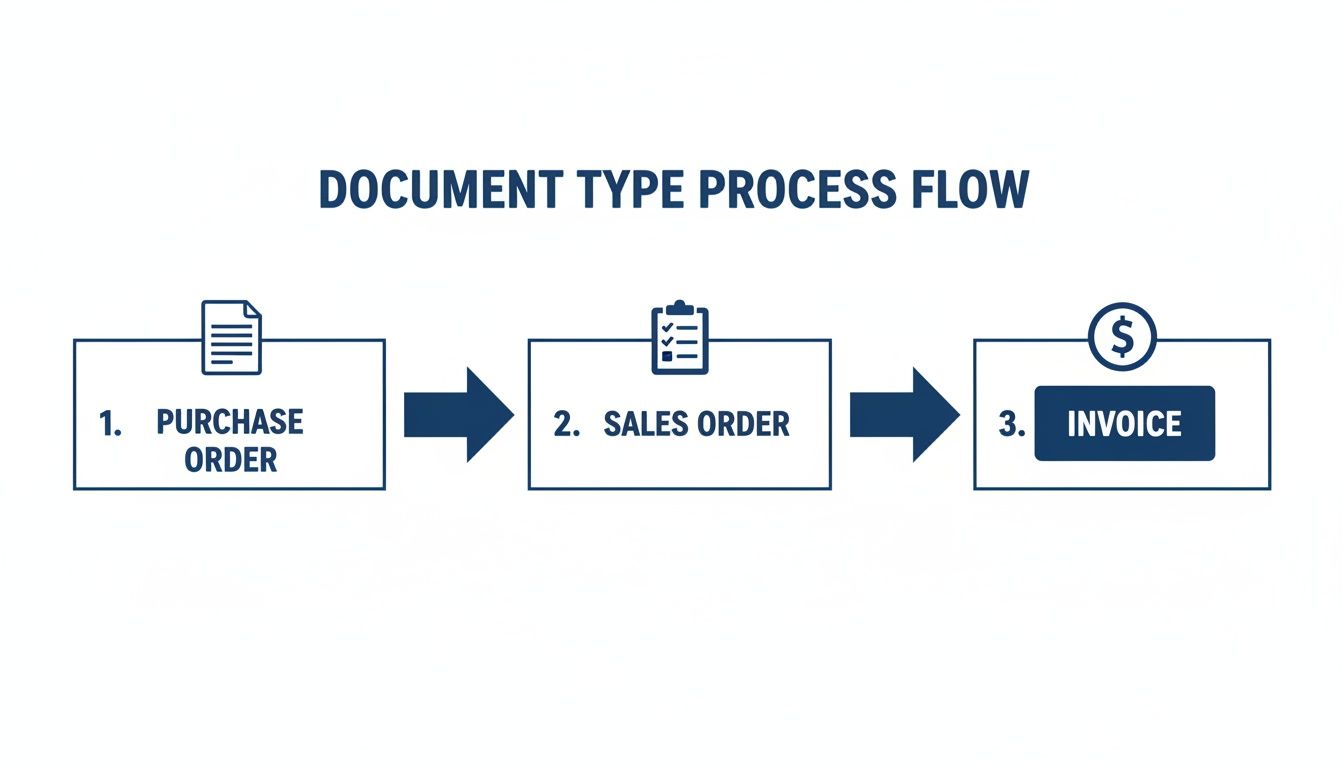
As you can see, it’s the link that confirms the sale internally before you move on to invoicing.
Fulfillment and Closing the Loop
With approvals handled, your operations team can get to work, using the sales order as their guide. Whether they’re blocking out project hours or scheduling service calls, the sales order helps track their progress against what was originally promised. This is not only great for managing your team but also for keeping your client in the loop.
Getting this right is a bigger deal than you might think. According to 2026 Gartner data, companies with solid sales order systems see 22% higher on-time delivery rates. They also process 95% of their orders without any issues, a huge leap from the 68% for businesses with weaker processes. For service businesses, messing this up can even delay your payments, increasing Days Sales Outstanding (DSO) by an average of 11 days. You can dig deeper into these findings on sales order management from Conexiom.
The lifecycle isn't complete when the work is done. It's complete when the work is documented as done, paving the way for accurate and timely invoicing.
Once the service has been delivered or a project milestone is hit, the sales order gets marked as "fulfilled" or "closed." This final status update is the green light for your finance team. It tells them it’s time to generate an invoice, turning that completed sales order into a formal request for payment. This simple handoff closes the loop and makes sure you get paid correctly for every single job you complete.
How Sales Orders Impact Your Financial Reporting
It’s easy to get lost connecting your day-to-day work to your official financial statements. A question that comes up all the time is, "Does creating a sales order immediately change my books?" The simple answer is no.
A sales order is what accountants call a non-posting transaction. This just means that creating one doesn't automatically trigger a journal entry. It won't increase your revenue numbers or add to your accounts receivable.
Think of it more like a financial to-do list. It's a documented instruction from your client, not a completed task. But don't underestimate its importance—it's the critical first step that feeds directly into your invoice, which is a posting transaction. All the key details like services, quantities, and prices are locked in, ensuring the final bill is spot-on.
The Before-and-After Picture
Let’s walk through a simple scenario to see how this plays out on your books.
Before You Do the Work (Sales Order Created):
- Accounts Receivable: $0
- Revenue: $0
- Financial Impact: At this point, there is none. You have a firm commitment from a client, which is great, but you haven't technically earned the money yet. Your balance sheet and income statement remain unchanged.
After You Do the Work (Invoice Created from the Sales Order):
- Accounts Receivable: This account increases by the full invoice amount (say, +$5,000). This shows up as a current asset on your balance sheet—money you have a right to collect.
- Revenue: Your revenue also increases by the same amount (+$5,000). This appears on your income statement, directly boosting your company’s top-line performance.
- Financial Impact: Now we see a real change. On paper, your business is more valuable because you've officially earned revenue and have a legal claim to that cash.
This smooth handoff from a non-posting sales order to a posting invoice is the heart of proper revenue recognition. If you want to go deeper on this topic, our guide on financial reporting best practices offers some great insights.
Forecasting What's to Come
Maybe the biggest strategic win from using sales orders is the visibility it gives you into the future. That stack of open, unfulfilled sales orders isn't just a work pile; it’s a backlog of guaranteed future revenue.
An open sales order isn't just a task; it's a reliable indicator of cash flow you can expect in the coming weeks and months. This makes it one of the most powerful forecasting tools at your disposal.
Why is this so important for your business?
- Better Planning: Knowing you have $50,000 in confirmed projects lets you make confident calls on hiring new staff, buying equipment, or even expanding your services.
- Easier Financing: When you're applying for a business loan, showing a healthy pipeline of open sales orders proves to lenders that you have stable income on the horizon. This makes you a much less risky borrower.
- Smarter Resource Management: A clear view of what’s coming up helps you schedule your team and manage resources without overworking anyone or having people sit idle.
So, while a sales order doesn't hit your ledger right away, it's the foundation for clean invoicing and gives you a priceless window into the future health of your business.
Managing Sales Orders in QuickBooks Online
Alright, let's move from theory to action and see how this works inside a tool you probably use every day: QuickBooks Online. While a full guide on how to set up QuickBooks Online is a separate conversation, using its sales order feature is quite simple. If you’re a service business on the QuickBooks Online Advanced plan, this capability is already waiting for you.
First things first, you'll need to turn the feature on. It's a quick, one-time flip of a switch in your settings that activates the entire sales order system.
Activating and Using Sales Orders in QBO Advanced
Once you’ve enabled sales orders, you can start creating them to act as the command center for your client projects. The workflow is logical and easy to follow.
- Turn on Sales Orders: Go to Settings, then click Account and settings. Head over to the Sales tab, find the Sales form content section, and simply switch the Sales orders feature on.
- Create a New Sales Order: In the main menu, click + New and then choose Sales order. You'll notice the form looks a lot like an estimate or invoice. Just fill it out with the client's information and the services, rates, and terms you've both agreed on.
- Convert to an Invoice: Here’s where you save a ton of time. After you’ve delivered the service, just open the original sales order. In one click, you can convert it into an invoice, which automatically pulls all the pre-approved details right into the bill. This cuts down on data entry and helps prevent costly mistakes.
The QuickBooks Online Advanced dashboard provides a great high-level view of your sales pipeline, including all your open sales orders.

This kind of reporting is invaluable. It lets you track everything from new leads to your cash position, with sales orders feeding you crucial data about your future revenue. It's also smart to connect your other sales tools. For instance, a seamless WooCommerce QuickBooks integration can be a game-changer for e-commerce shops, making sure sales data flows perfectly from your website to your books.
A Workaround for Other QuickBooks Plans
But what if your business isn't on the Advanced plan? No problem. You can build a very effective workaround using the Estimate feature that's available on all plans.
Simply create an estimate to document all the sale's details, exactly as you would with a sales order. Once the client gives their approval and you finish the work, you can convert that same estimate into an invoice.
This approach perfectly mimics the sales order workflow, creating a clear link between your confirmed work and your final bill.
You can then run reports on your "Open Estimates" to get a solid handle on your project pipeline. This little trick ensures you can improve your process and keep a clear line of sight from commitment to payment, no matter which version of QuickBooks Online you're using.
Common Sales Order Mistakes to Avoid
A solid sales order process is a huge asset, but even the best systems can get tripped up by small, avoidable mistakes. These slip-ups can easily spiral into client disputes, delayed payments, and a lot of internal confusion. Fixing these potential problems before they start is the key to running a smooth, professional operation.
One of the most common errors we see is inaccurate pricing or service details. This often happens when details from a custom quote don’t get transferred correctly, or maybe a sales rep accidentally uses an outdated price list. The result is an incorrect invoice, a frustrated client, and an awkward conversation about money that chips away at trust.
Another big issue is failing to update an order’s status. When a project is done but the sales order is still marked as "open," it jams up the entire workflow. Your finance team never gets the green light to send the invoice, which means your cash flow gets delayed for no good reason.
Fixing Breakdowns Before They Happen
More often than not, these problems are just symptoms of a deeper communication breakdown. When your sales, operations, and finance teams are working in separate bubbles, information inevitably gets lost. A quick verbal agreement with a client might never make it onto the final order, or the team doing the work might not know about a last-minute change.
The most expensive mistake is poor communication. An un-synced team creates friction for the client, and that friction costs you time, money, and future business. A sales order is only as good as the communication that surrounds it.
To keep these issues from happening, the goal is to build clear, repeatable processes. Here are a few practical steps you can put in place right away:
- Standardize Your Services: Inside a tool like QuickBooks, create a master list of all your products and services with their set prices. This simple step ensures everyone on your team is pulling from the same, pre-approved information, which dramatically cuts down on pricing errors.
- Hold Weekly Pipeline Meetings: Get key people from sales and operations together for a quick weekly huddle. Use that time to run through all the open sales orders, confirm their status, and flag any potential problems before they get bigger.
- Centralize All Communication: Make it a rule that any change or special request related to a job must be documented directly on the sales order itself. If not there, it should be in a connected project management tool. This creates a single source of truth that everyone can rely on.
By putting these simple checks and balances into practice, your sales order becomes more than just a piece of paper. It becomes an active tool that helps your whole team deliver great work.
Frequently Asked Questions About Sales Orders
As you start using the sales order process in your business, it’s natural for a few questions to pop up. Let's walk through some of the most common ones we hear, so you can feel confident putting them to work.
Do I Need Sales Orders for a Small Service Business?
Even if you’re a solopreneur, using sales orders is a great habit to build. While they might not feel essential at first, they set up a professional process right from the start.
This helps you keep track of all the work you've committed to and makes scaling your business much easier down the road. When you eventually hire help or apply for a business loan, having a documented history of managing your projects shows you’re on top of your operations.
Can I Use a Sales Order as a Legal Contract?
A sales order can become part of a binding agreement once it's accepted by the client, but it is not a substitute for a formal contract. This is especially true for complex or high-value services.
Think of a contract as the master rulebook for your entire relationship with a client, covering all terms, responsibilities, and liabilities. The sales order is just the play-by-play for a single job under that agreement.
For any significant project, a separate, lawyer-reviewed contract is always the safest way to protect your business.
My QuickBooks Version Lacks a Sales Order Feature. What Can I Do?
This is a common issue for businesses on QuickBooks Online Plus or simpler plans. The good news is you can set up a great workaround using the Estimate feature that's already there.
You just create an estimate to record all the details of the sale, exactly like you would on a sales order. Once your client gives the green light and you’ve delivered the service, you can convert that same estimate into an invoice with a single click. By running "Open Estimates" reports, you can get a clear view of your work pipeline, effectively mimicking a sales order workflow.
At Steingard Financial, we help service businesses implement solid financial processes, from setting up QuickBooks correctly to managing your entire bookkeeping and payroll back office. Contact us today to build a financial system that supports your growth.