 Skip to content

Your chart of accounts, or COA, is a complete list of every single financial account in your company’s general ledger. The easiest way to think about it is as your business’s financial GPS. It gives every transaction a unique number and name, creating a clear map of where your money comes from and where it goes. This organized index is the backbone of your entire accounting system.
Your Business’s Financial GPS Explained
Imagine trying to build a library without any kind of filing system. Books would be everywhere, finding what you need would be a nightmare, and you’d have no real clue what you actually owned. That’s what running a business without a Chart of Accounts is like—pure financial chaos. The COA is the essential system that brings order to your financial world, moving you from a shoebox of receipts to a clear, organized framework.
This isn’t just about being tidy. Your COA is the engine that powers critical financial reports like your income statement and balance sheet. Every time you log a sale, pay a bill, or run payroll, that transaction gets coded to a specific account in your COA. This simple act of categorization is what allows your accounting software to instantly tell you:
- How much cash you have on hand.
- What your company owes to vendors.
- Which services are bringing in the most revenue.
- Exactly where your money is going each month.
The Five Pillars of Your Financial Foundation
At its core, every chart of accounts is built on five fundamental account types. Getting a handle on these pillars is the first real step toward financial clarity. Each one tells a different part of your company’s story.
Here’s a quick breakdown to help you get started.
The Five Pillars of Your Chart of Accounts
| Account Category | What It Represents | Common Examples |
|---|---|---|
| Assets | Everything your company owns that has value. | Cash, Accounts Receivable, Equipment, Property |
| Liabilities | Everything your company owes to others. | Accounts Payable, Loans, Credit Card Balances |
| Equity | The net worth of the business (Assets – Liabilities). | Owner’s Capital, Retained Earnings |
| Revenue | The income your business earns from its operations. | Consulting Fees, Sales Income, Service Revenue |
| Expenses | The costs incurred to run the business. | Rent, Salaries, Software Subscriptions, Ads |
Think of this table as your cheat sheet for understanding where every dollar fits into the bigger picture.
By organizing your financial data this way, your COA becomes the bedrock for mastering various financial analysis techniques that are crucial for smart, strategic planning. For an even deeper dive, check out our guide on why your chart of accounts matters for business success.
A well-designed COA is the foundational backbone of your financial reporting. It’s the comprehensive catalog you use to record and categorize every single transaction, no exceptions.
This structured approach is proven to make your financial processes faster and more reliable. In fact, companies with well-organized COAs often report closing their books up to 30% faster at the end of the month. Why? Because the system does the heavy lifting, pulling data together without needing a bunch of manual fixes. A clean COA gives you the solid numbers you need to make informed decisions and drive real growth.
How to Structure Your Chart of Accounts
The real magic of a chart of accounts isn’t just the list itself—it’s the structure. Think of it like a library’s Dewey Decimal System. Every book has a specific number that tells you exactly where it fits on the shelves. Your COA does the same thing for your finances, using a logical numbering system to give every single transaction a proper home.
This framework creates a clear hierarchy, letting you zoom out for a high-level view of your business’s health or zoom in to examine the tiniest details. It’s what turns a mountain of raw data into real business intelligence, showing you precisely where your money comes from and where it goes.
This diagram shows how the five main account types form the top-level categories of your financial hierarchy.
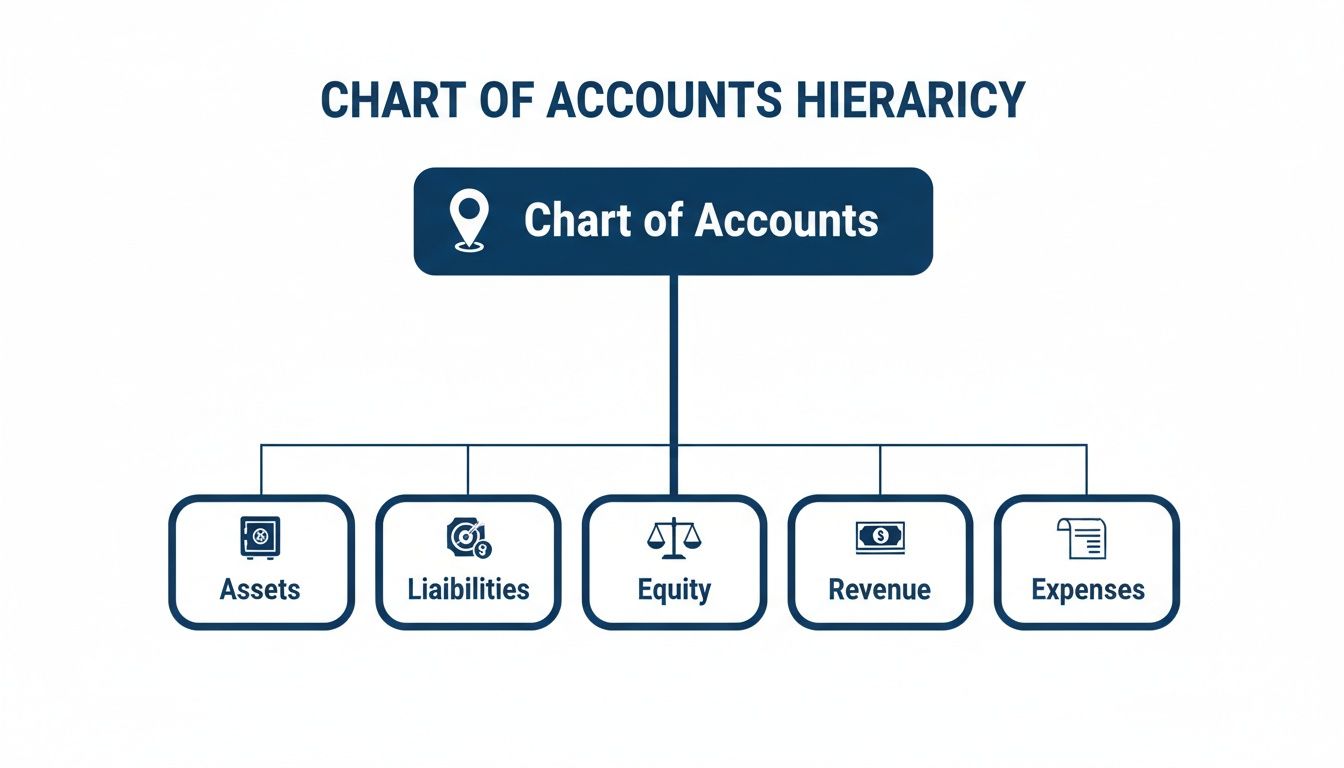
Each of these core pillars—Assets, Liabilities, Equity, Revenue, and Expenses—is the starting point for building out the rest of your COA.
The Logic of Account Numbering
The secret sauce is in the numbers. Most businesses assign a specific range of numbers to each of the five main account types, creating an intuitive system that makes financial reporting so much easier down the road.
A very common numbering convention looks like this:
- 1000–1999: Asset Accounts (what you own)
- 2000–2999: Liability Accounts (what you owe)
- 3000–3999: Equity Accounts (your net worth)
- 4000–4999: Revenue Accounts (money you earn)
- 5000–9999: Expense Accounts (money you spend)
This approach immediately tells you what kind of account you’re looking at just by its number. For example, you know right away that account 1110 is an asset, while account 5200 is an expense. This kind of consistency is the bedrock of good bookkeeping. To get a better feel for how these accounts all work together, check out our guide on double-entry bookkeeping explained.
Using Parent Accounts and Sub-Accounts
Once you have a numbering system, you can start building a more detailed hierarchy using parent accounts and sub-accounts. A parent account is a general category, and sub-accounts (sometimes called child accounts) break that category down into more specific pieces.
This lets you group related transactions together for much better analysis.
By using parent and sub-accounts, you move from just tracking spending to actually understanding it. You can see not just that you spent money on marketing, but how you spent it and what the return was.
Let’s walk through a practical example. Imagine a creative agency wants to track its marketing expenses with more precision.
- 5000 Marketing Expenses (Parent Account): This is the main bucket, giving them a total marketing spend.
- 5010 Digital Advertising (Sub-Account): For tracking costs from platforms like Google Ads or social media.
- 5020 Content Creation (Sub-Account): This could cover payments to freelance writers or graphic designers.
- 5030 SEO Tools (Sub-Account): For software subscriptions like Ahrefs or Semrush.
This level of detail is huge. When the agency owner looks at their reports, they won’t just see one big, vague number for “Marketing.” Instead, they can see exactly how each channel is performing, which helps them make smarter budget decisions next quarter. This detailed structure is also critical when you need to categorize business expenses effectively for taxes and internal planning.
You can apply the same logic to every part of your business. You might have a parent “Revenue” account with sub-accounts for “Website Design Services,” “Branding Projects,” and “Monthly Retainer Fees.” This kind of detail transforms your chart of accounts from a simple compliance checklist into a powerful strategic tool that can grow right alongside your business.
A Practical Chart of Accounts Template
Theory is great, but seeing a chart of accounts in action is where it really clicks. To move from the abstract to the concrete, let’s look at a practical COA template built specifically for a service-based business—think a marketing agency, an IT consultancy, or a coaching practice.
This example uses the standard five-digit numbering system we talked about, which gives you a logical and scalable structure right from the start. You’ll notice it includes accounts that are critical for any business selling expertise and time instead of physical products.

Here’s a sample Chart of Accounts template you can adapt. It lays out the typical accounts a consulting or professional services agency would need to get a clear picture of its financial health.
Example Chart of Accounts for a Consulting Agency
| Account Number | Account Name | Account Type |
|---|---|---|
| 1010 | Business Checking Account | Current Asset |
| 1020 | Business Savings Account | Current Asset |
| 1200 | Accounts Receivable | Current Asset |
| 1500 | Computer Equipment | Fixed Asset |
| 1510 | Accumulated Depreciation – Equipment | Fixed Asset |
| 2010 | Accounts Payable | Current Liability |
| 2100 | Business Credit Card Payable | Current Liability |
| 2200 | Unearned Revenue | Current Liability |
| 2500 | Business Loan Payable | Long-Term Liability |
| 4010 | Consulting Services Income | Revenue |
| 4020 | Project-Based Fees | Revenue |
| 4030 | Retainer Income | Revenue |
| 4500 | Reimbursable Expenses Income | Revenue |
| 5010 | Salaries and Wages | Cost of Goods Sold |
| 5020 | Contractor Fees | Cost of Goods Sold |
| 6010 | Software Subscriptions | Expense |
| 6020 | Marketing and Advertising | Expense |
| 6030 | Office Rent | Expense |
| 6040 | Professional Fees (e.g., legal, accounting) | Expense |
| 6050 | Business Insurance | Expense |
| 6060 | Travel Expenses | Expense |
This template isn’t just a list of accounts; it’s a blueprint for telling your business’s financial story.
Why This Structure Works for Service Businesses
This layout is a powerful starting point because it’s tailored to the unique way money flows through a service business. By separating Consulting Services Income (4010) from Retainer Income (4030), you can instantly see which revenue stream is your bread and butter.
Notice how Accounts Receivable (1200) is right there under Assets? That’s your lifeline for tracking money clients owe you for work you’ve already done. On the flip side, Unearned Revenue (2200) is a liability that tracks payments for work you haven’t done yet, like a deposit on a big project.
Here’s the real pro move: putting Salaries (5010) and Contractor Fees (5020) under the “Cost of Goods Sold” (COGS) category. For a service business, your people are your product. Their labor is the primary cost of delivering your service.
Structuring your COA this way lets you calculate your true gross profit margin—how much you make on your services before accounting for overhead like rent and software. This is the kind of insight that helps you price your work profitably and scale with confidence.
Connecting Your COA with Accounting Software
Your Chart of Accounts is much more than a simple list of names and numbers. Think of it as the engine powering your accounting software. The software itself—whether it’s QuickBooks or Xero—is the dashboard, but the COA is the complex wiring under the hood that makes all the gauges and readings work correctly. Without that wiring being hooked up just right, the dashboard can’t give you an accurate picture of what’s happening.
This connection is where the theory behind the COA turns into a practical, everyday tool for managing your finances.
When you first launch your accounting platform, you’ll find it comes with a default chart of accounts. This is a generic starting point, but the real magic happens when you customize it to mirror how your unique business actually operates. The goal is to get to a point where every single transaction—every invoice, every bill, every swipe of the company card—maps directly to its proper account.
For example, when you invoice a client, you’ll tag it to a revenue account like “Consulting Services Income.” When you pay for your monthly CRM subscription, you’ll categorize it under an expense account like “Software & Subscriptions.” This direct link gives every dollar a home, turning a flood of raw data into financial intelligence you can actually use. For some guidance on picking the right platform, our breakdown of the best accounting software for startups is a great place to start.

This kind of software integration is what makes modern bookkeeping so powerful, organizing accounts by type (Bank, Accounts Receivable, etc.) so you can see your financial structure at a glance.
The Critical Link Between Your COA and Payroll
One of the most important—and often overlooked—integrations is the one between your COA and your payroll system, like Gusto or QuickBooks Payroll. When you run payroll, a flurry of transactions happens in the background, all directed by your COA. Getting this link right is absolutely essential for keeping clean books and staying compliant.
Without a properly mapped COA, payroll becomes a manual, error-prone mess. But when they’re synced up, the whole process is smooth and precise.
When your COA and payroll are in sync, every paycheck you cut automatically splits into its correct financial categories. This isn’t just about saving time; it’s about making sure your financial reports reflect the true cost of your labor, down to the last penny.
Let’s follow the money on a single payroll run to see what this looks like. The moment you hit “approve,” your system fires off a series of journal entries that post to several different accounts in your COA.
Here’s a simplified look at what’s happening behind the scenes:
- Wages Expense: An employee’s gross pay lands here. This is an expense account on your income statement, showing the direct cost of your team’s labor.
- Payroll Tax Expense: The employer’s share of taxes (like Social Security and Medicare) gets posted here, another key expense.
- Cash: The net pay—the actual money hitting your employee’s bank account—is deducted from your main business checking account (an asset).
- Payroll Tax Liabilities: All the taxes withheld from your employee’s check, plus your employer portion, are parked in this liability account. It’s a running tally of what you owe to government agencies.
Later, when you send those taxes to the IRS and state, the payment is recorded against the Payroll Tax Liabilities account, bringing its balance back down to zero. This clean, automated trail is crucial for tax season and gives you a perfect audit trail of all payroll activity.
Customizing Your Software’s Default COA
Most accounting software makes it pretty easy to add, edit, or hide accounts. While the default COA is a decent foundation, you’ll want to tweak it to tell a more detailed story about your specific business.
Actionable Tips for Customization
- Archive Unused Accounts: That default list might have accounts that make no sense for you (like “Inventory” if you’re a service business). Archive them to declutter your COA and make it easier to navigate.
- Add Specific Sub-Accounts: Instead of a generic “Marketing” expense account, break it down. Create sub-accounts like “Digital Advertising,” “Content Creation,” and “SEO Tools” to get a much clearer view of where your money is going.
- Use Consistent Naming Conventions: Decide on a clear, logical way to name your accounts from the start. This prevents confusion down the road, especially as your team grows.
- Map Bank and Credit Card Feeds: This is a game-changer. Connect your business bank and credit card accounts so transactions flow in automatically. Then, you can set up rules to categorize recurring expenses, saving yourself hours of manual data entry every month.
Taking the time to properly connect your chart of accounts with your software and payroll isn’t just a setup task—it’s about building a reliable financial foundation. This structure not only automates your bookkeeping but also delivers the accurate, real-time data you need to make smart, confident business decisions.
Best Practices for Maintaining a Healthy COA
Getting your chart of accounts set up is a massive first step, but the real magic happens when you keep it clean and organized over time. If you neglect your COA, it can quickly become a cluttered mess that hides the very financial story you need to understand. Think of it like a garden—it needs consistent care to keep the weeds out and make sure it stays productive.
These practices will help you turn your COA from a simple list into a powerful tool for managing your business finances. By building these habits, you’ll ensure your financial data remains a reliable asset for making smart decisions as your company grows.
Start Simple and Customize
When you first build your chart of accounts, it’s easy to get carried away and create an account for every single expense you can think of. Try to resist that urge. Making your COA too complex from the start is a classic mistake that just leads to confusion and makes your financial reports a headache to read. The goal is clarity, not complexity.
A much better way to go is to start with a standard industry template. Most accounting software like QuickBooks has them built-in, or your bookkeeper can provide one. This gives you a solid foundation that covers the basics. From there, you can add or tweak accounts to perfectly match how your business actually operates.
Establish Clear Naming Conventions
Consistency is everything when you’re managing a COA. If your account names are vague or all over the place, you’re creating chaos for yourself. Imagine one person books a software payment to “SaaS Subscriptions” while another uses “Software Tools.” This splits your data, making it impossible to see your total software spending without a bunch of manual cleanup.
You need to establish a clear, logical naming system and make sure everyone sticks to it.
- Be Specific: Instead of a generic “Advertising” account, use “Google Ads Expense” or “Facebook Ads Expense.”
- Use a Pattern: Group related costs together, like “Travel – Airfare,” “Travel – Meals,” and “Travel – Lodging.”
- Document Everything: Create a simple guide that explains what each account is for and when to use it. This becomes incredibly important as you add more people to your team.
A well-maintained chart of accounts tells a clear story about your business’s financial health. Vague names and inconsistent entries turn that story into a confusing puzzle that no one can solve.
Implement a Policy for New Accounts
Your business is going to change, and you’ll inevitably need to add new accounts. But this process needs to be controlled, not a free-for-all. Without a clear policy, you could end up with dozens of redundant accounts that just add clutter. The best way to handle this is to designate one person—like your bookkeeper or accountant—as the gatekeeper for new accounts.
This person can review any requests to see if a new account is really necessary or if a transaction could just as easily fit into an existing one. This simple checkpoint prevents your COA from getting bloated and ensures every account has a clear and valuable purpose.
Schedule an Annual Review
Your business doesn’t stand still, and neither should your chart of accounts. The structure that worked perfectly last year might not capture the full picture today. Maybe you launched a new service, expanded into a new region, or just changed how you do things.
Set aside time at least once a year to review your entire COA. You should be asking some critical questions:
- Are there accounts we never use anymore? (Archive them!)
- Are some accounts too broad and need to be broken down with sub-accounts?
- Does our current structure still give us the insights we need from our reports?
This annual check-up keeps your COA in sync with your business, ensuring it remains a powerful and relevant tool for years to come.
Common Mistakes to Avoid With Your Chart of Accounts
Knowing what to do is half the battle. Knowing what not to do can save you from a world of financial headaches down the road. A clean chart of accounts is a powerful tool, but a few common missteps can quickly turn it into a cluttered, confusing liability.
One of the biggest mistakes business owners make is creating too many accounts. It usually starts with good intentions—the desire for ultimate detail. But when you have ten different accounts just for office supplies, your financial reports become bloated and almost impossible to read. Your income statement turns into an intimidating wall of text, and you lose sight of the bigger picture.
Finding the Right Balance
Of course, the opposite is just as bad: having too few accounts. This happens when you start lumping unrelated expenses into one generic bucket. If all your marketing campaigns, software subscriptions, and ad spend just get labeled “Business Expenses,” you have zero insight into what’s actually working. You can’t make smart budget decisions because you have no idea which specific investments are paying off.
Another classic error is using vague or inconsistent names. Every bookkeeper has seen it: the dreaded “Miscellaneous Expense” account.
The ‘Miscellaneous’ account is often where financial clarity goes to die. It becomes a black hole for uncategorized expenses, making it impossible to analyze your spending or prepare accurate tax filings.
This catch-all category just hides valuable information about your business. A much better approach is to create a specific, new account whenever a recurring expense pops up. This way, every dollar has a clear and logical home.
Keeping Your COA Clean and Relevant
Finally, a chart of accounts isn’t a “set it and forget it” task. Many business owners neglect ongoing maintenance, which usually leads to two big problems:
- Failing to Archive Old Accounts: Think of it like cleaning out a closet. If you’re no longer using an account, make it inactive. This declutters your reports and keeps your team from accidentally posting transactions to outdated categories.
- Inconsistent Categorization: This is when one software subscription gets coded to “SaaS Fees” and the next one goes to “IT Expenses.” This kind of inconsistency splits your data across multiple accounts, skews your totals, and completely undermines the reliability of your financial reports.
Setting up clear guidelines for your team and doing a quick review once a year will keep these issues from spiraling out of control. Remember, a well-maintained chart of accounts isn’t just a list; it’s the strategic tool you need to guide your business forward with confidence.
Common Questions About the Chart of Accounts
Even when you’ve got the basics down, a few questions always pop up when it’s time to put the chart of accounts into practice. Let’s tackle some of the most common ones so you can manage your finances with more confidence.
How Many Accounts Should I Have?
There’s no magic number here. A solo consultant might get by just fine with 30-50 accounts, while a larger company juggling multiple departments could easily have hundreds. The real goal isn’t to have the most accounts; it’s to have the right accounts for clarity.
Start with the essentials you need for tax filing and your key financial statements. You should only add a new account when a specific income or expense category gets big enough that tracking it separately gives you a real business insight you didn’t have before.
The right number of accounts gives you actionable insights without drowning you in detail. If your income statement is ten pages long, you’ve probably gone too far.
Can I Change My Chart of Accounts Later?
Absolutely, and you should. Your business changes over time, and your chart of accounts needs to keep up. As you grow, you’ll naturally need to add new accounts for different revenue streams or expense types. It’s also smart to clean house by archiving old accounts you no longer use.
A word of caution, though: try to avoid making huge structural changes in the middle of your fiscal year. This can make comparing your performance month-to-month a real headache. The best time for a major overhaul is at the very beginning of a new fiscal year.
Is a General Ledger the Same as a Chart of Accounts?
Nope, but they’re a team. They work very closely together, but they serve different functions.
Think of it this way:
- The Chart of Accounts is the table of contents. It’s the organized list of every single account your business uses.
- The General Ledger is the book itself. It holds the detailed, running record of every transaction posted to each of those accounts.
The COA creates the structure, and the general ledger fills that structure with all the day-to-day transactional details. You can’t have a useful general ledger without a solid chart of accounts in place first.
A well-structured chart of accounts is the foundation of clear financial reporting, but maintaining it takes expertise. The team at Steingard Financial specializes in setting up, cleaning up, and managing your books so you can focus on growth. Learn how our bookkeeping and payroll services can give you the financial clarity you need at https://www.steingardfinancial.com.