 Skip to content
If you’ve ever felt like you’re drowning in spreadsheets trying to manage your company’s benefits, you’re not alone. Think of employee benefits management software as the digital command center for your entire program. It’s a system designed to connect everything—health insurance, retirement plans, paid time off, and other perks—into one clean, easy-to-use platform. This technology gets rid of the old, clunky manual processes, which means less administrative work and fewer chances for costly mistakes.
What Is Employee Benefits Management Software

At its core, employee benefits management software is a specialized platform that automates how your company offers and manages benefits. It turns what is often a complex, paper-heavy headache into a smooth, digital experience for everyone involved—both your HR team and your employees.
Trying to manage modern benefits with spreadsheets is a bit like trying to conduct an orchestra with sticky notes. It’s chaotic. A benefits platform, on the other hand, is the conductor’s podium. It’s a single source of truth that makes sure every part of your benefits package works together in perfect harmony.
From Administrative Burden to Strategic Advantage
For a long time, benefits administration has been a major pain point for businesses, especially those without a big HR department. The manual way of doing things is filled with challenges that hurt both your efficiency and your employees’ happiness.
Benefits software steps in to solve these exact problems:
- Manual Data Entry: It gets rid of the tedious, error-prone task of typing employee information into separate systems for insurance, payroll, and 401(k)s.
- Compliance Headaches: It helps automate the tracking and reporting needed for regulations like the ACA, COBRA, and HIPAA, saving you from the risk of steep financial penalties.
- Inconsistent Employee Experience: It gives employees a single, self-service portal where they can easily find, understand, and enroll in their benefits. This cuts down on confusion and endless questions to HR.
- Lack of Insight: It provides clear reports and analytics, so you can actually see how benefits are being used and what they cost. This lets you make smarter, data-driven decisions.
By fixing these issues, the software does a lot more than just save time. It shifts benefits management from a reactive chore into a proactive part of your talent strategy. A smooth, transparent benefits experience can be a huge reason why top talent decides to join—and stay—with your company.
This move toward automation isn’t just a trend; it’s a fundamental shift in how businesses operate. When employees feel empowered by their benefits program, it directly lifts morale and engagement.
The Growing Demand for Digital Solutions
The market for these platforms is growing fast as more companies see the value in automation. The global employee benefits administration software market was valued at USD 1.04 billion in 2025 and is expected to nearly double to USD 2.06 billion by 2035. This growth shows just how quickly businesses are moving to get a handle on their complex benefits programs.
Today’s software goes beyond the basics, too. Many now integrate specialized tools like financial wellness apps and platforms to meet the modern employee’s expectation for more personalized and holistic perks.
Core Features That Drive Business Growth
Good benefits software does more than just keep your data organized; it’s an engine for efficiency that can genuinely help your company grow. The right platform isn’t just a digital filing cabinet—it’s a command center for your entire HR operation. The core features are the gears that make this engine turn, transforming administrative headaches into real strategic advantages.
Let’s dig into the essential functions that do more than just simplify daily tasks. These are the features that deliver a tangible return on your investment, solving real business problems from the chaos of open enrollment to empowering employees with information at their fingertips.
Automated Open Enrollment
For many HR teams, open enrollment is the most dreaded time of the year. It’s a perfect storm of paperwork, frantic employees, missed deadlines, and endless questions. An automated open enrollment feature is what brings calm to that chaos.
Instead of your team manually handing out, chasing down, and trying to decipher paper forms, the software walks employees through a guided digital experience. They get automated reminders and can log in to compare plans side-by-side, see their costs, and make their choices online. The system won’t let them submit an incomplete form, which cuts down on errors and the need for constant follow-ups.
This one feature has a direct impact on your bottom line:
- Fewer Admin Hours: HR teams can reclaim dozens—sometimes hundreds—of hours previously lost to chasing paperwork and fixing mistakes.
- Better Accuracy: Digital enrollment gets rid of sloppy handwriting and missing information, ensuring the data you send to insurance carriers is correct from the start.
- Happier Employees: A simple, clear process helps your team feel more confident and in control of their own benefit choices.
Centralized Employee Self-Service Portals
Think of an employee self-service (ESS) portal as a 24/7 benefits expert for every single person on your team. It gives them one secure, centralized place to find answers and manage their own information without having to ping someone in HR.
Through the portal, an employee can quickly review their current health coverage, check their 401(k) balance, or find a doctor in their network. They can also handle their own life updates, like changing an address or adding a new baby to their plan.
This kind of empowerment is a game-changer. When employees can handle routine questions themselves, it frees up your HR team to focus on bigger-picture initiatives. In fact, a well-implemented ESS portal can slash routine HR inquiries by up to 40%.
The strategic benefit here is twofold. First, it gives your staff a sense of ownership and autonomy. Second, offering modern, easy-to-use tools is a massive part of creating a positive employee experience, which is crucial for keeping your best people. A great benefits platform simply makes it easier for people to stay. For more on this, check out our guide on how to improve employee retention.
Compliance Reporting and Automation
Trying to navigate the alphabet soup of benefits regulations—ACA, COBRA, HIPAA—is a major headache for any business owner. A single misstep can trigger an audit and lead to some seriously expensive penalties. Good benefits software acts as your compliance safety net.
The software automates the most critical compliance tasks. It keeps track of employee eligibility for benefits, monitors hours worked to meet ACA requirements, and even generates the necessary 1094-C and 1095-C forms for you. It also handles COBRA notifications for departing employees, making sure every legal timeline is met without you having to think about it.
To see how these features translate into business value, take a look at this table.
Essential Software Features and Their Business Impact
This table connects the dots between the software’s capabilities and the tangible results you can expect for your business.
| Core Feature | Description | Strategic Business Benefit |
|---|---|---|
| Automated Open Enrollment | Guides employees through a digital enrollment process with reminders and plan comparison tools. | Drastically reduces administrative workload, minimizes data entry errors, and improves the employee experience. |
| Employee Self-Service Portal | A secure online hub where employees can view benefits, update information, and find answers independently. | Empowers employees, reduces routine HR inquiries by up to 40%, and enhances overall job satisfaction. |
| Compliance Reporting | Automatically tracks eligibility and generates reports for ACA, COBRA, and other regulations. | Mitigates the risk of costly penalties, ensures timely filings, and provides peace of mind for leadership. |
| Integrated Analytics | Provides dashboards and reports on benefits enrollment, utilization rates, and overall costs. | Enables data-driven decisions to optimize benefit packages, control spending, and stay competitive. |
It’s clear that each feature isn’t just about convenience; it’s about protecting and strengthening your business.
Integrated Analytics and Data Insights
Finally, you can’t manage what you don’t measure. The best benefits platforms come with powerful analytics tools that give you a clear, bird’s-eye view of your entire benefits program. These dashboards are designed to give you actionable information, not just a pile of raw numbers.
In just a few clicks, you can spot enrollment trends, see which health plans are the most popular, and track your total benefits spend across the company. This kind of insight is pure gold for making smart decisions. For instance, if you see that almost no one is using a specific voluntary benefit, you can dig in to find out why. Was it poorly communicated, or is it just not something your team values? This data empowers you to fine-tune your offerings, ensuring your money is going toward perks that actually matter to your people.
Integrating Benefits With Your Payroll System
Running your benefits and payroll on separate systems is a bit like trying to sail a ship with two different captains yelling orders. One handles the crew (your employees’ benefits) while the other steers the ship (payroll). It’s a recipe for confusion, inefficiency, and some very costly mistakes.
That’s why a seamless connection between your employee benefits management software and your payroll platform, whether it’s Gusto, QuickBooks, or another provider, isn’t just a nice-to-have—it’s essential. This integration creates a single, well-oiled machine for your entire back-office operation. When these two systems talk to each other, data flows automatically, establishing one reliable source of truth for all your employee and financial information.
The Power of Automated Data Syncing
The real magic of this integration is the automatic data sync. When a team member enrolls in a new health plan or tweaks their 401(k) contribution, that change is instantly and correctly passed over to payroll. No one has to remember to go in and manually update the deduction amounts.
This simple automation prevents the most common—and frustrating—payroll headaches. It guarantees the right premium amounts for health, dental, and vision insurance are pulled from every single paycheck, every single time. It completely gets rid of the soul-crushing task of manually cross-checking spreadsheets, a process that can eat up hours of an admin’s time each pay period. Getting ahead of common data integration problems from the start can make the whole process go much more smoothly.
Eliminating Costly Payroll and Tax Errors
Having disconnected systems is a notorious source of expensive compliance nightmares. One simple manual data entry error—like messing up a pre-tax health insurance deduction—can throw off tax filings for both the employee and your company. Those kinds of mistakes can easily trigger IRS penalties and force you to file complicated, time-consuming amendments.
An integrated system makes payroll accuracy a default feature. Because all your benefit deductions are calculated automatically using real-time enrollment data, you can feel confident that your payroll is right and your tax contributions are compliant. This automated accuracy is fundamental for keeping your finances clean and avoiding unnecessary stress. If you’re just starting to build out your financial systems, our guide on how to set up payroll for a small business is a great place to start.
The Risks of a Disconnected Back Office
Sticking with a disconnected system creates risks that go way beyond simple administrative burdens. It can set off a chain reaction of problems that hurt your bottom line and your team’s morale.
Think about these all-too-common scenarios:
- Employee Frustration: Nothing erodes trust faster than an incorrect paycheck. When an employee sees the wrong deduction, they have to spend their time flagging the issue, and your team has to drop everything to investigate and fix it.
- Compliance Penalties: Manually calculating pre-tax versus post-tax deductions is tricky. One slip-up can lead to underpaying taxes, which means fines and interest charges from government agencies.
- Wasted Administrative Hours: Your team’s time is one of your most valuable assets. Making them manually reconcile reports and perform double data entry isn’t just inefficient; it’s a poor use of their skills.
In short, an integrated system isn’t a luxury; it’s a foundational piece of a scalable, resilient business. It transforms your back office from a source of operational headaches into a strategic asset that actually supports your growth and keeps your employees happy. This unified approach ensures every financial detail is accurate, compliant, and managed without all the manual effort.
Navigating Compliance and Data Security
For many business owners, benefits compliance feels like a minefield. It’s a world filled with acronyms and ever-changing regulations, where one small mistake can lead to hefty financial penalties. This constant worry is exactly why employee benefits management software is so much more than a convenience—it’s a critical safeguard for your business.
Think of it as your digital compliance officer. Instead of you having to manually track who’s eligible for what and when reports are due, the platform does it for you. It’s built to understand the complex rules of the road, protecting your business from some of the most common and costly compliance mistakes.
Staying Ahead of Complex Regulations
The legal side of employee benefits isn’t something you can set and forget. The rules change, and keeping up is a full-time job most business owners don’t have time for. A good software solution is constantly updated to reflect the latest requirements for major regulations affecting businesses of all sizes.
Here’s a practical look at how it keeps you on track:
- Affordable Care Act (ACA): The software can automatically monitor employee hours to figure out full-time equivalent (FTE) status and eligibility. When it’s time for annual reporting, it generates the required 1094-C and 1095-C forms, lifting a massive administrative weight off your shoulders.
- COBRA: When an employee leaves, the system can automatically trigger the required COBRA notifications. This ensures you meet the strict legal timelines for offering continued health coverage without missing a beat.
- HIPAA: Protecting employee health information is absolutely non-negotiable. The software provides a secure, central hub for this sensitive data, drastically reducing the risk of a breach that could easily happen with paper forms or unsecured spreadsheets.
By automating these tasks, the software doesn’t just save you time. It creates a reliable, repeatable system that significantly reduces your legal and financial risks.
Protecting Your Most Sensitive Data
Beyond just following the rules, you have a major responsibility to protect your employees’ data. You are the guardian of their most personal information, from social security numbers to medical details. A data breach can be devastating, not just for your team’s trust but for your company’s reputation as well.
Modern benefits management software is built with serious security protocols designed to protect this information.
The core idea is simple: treat employee data with the same level of security as a bank. This means using advanced encryption and strict access controls to make sure only authorized people can see or manage sensitive information.
This approach gives you peace of mind, knowing your data is stored in a secure environment. It’s a huge reason why cloud-based solutions are taking over the market. In fact, the North American market for cloud-based employee benefits management software is projected to grow from USD 487 million in 2021 to USD 691 million by 2025. This growth is all about the security, real-time updates, and automated compliance these platforms offer. You can find more insights in a detailed analysis of the benefits administration market.
Ultimately, investing in secure software is an investment in trust. It shows your employees you take their privacy seriously, while also protecting your business from the massive financial and reputational fallout of a data breach.
How to Choose the Right Benefits Software
Choosing the right employee benefits management software can feel like a huge decision, but it doesn’t have to be a stressful one. The secret is to follow a clear process that puts your company’s specific needs first.
Think of it less like buying a piece of software and more like finding a long-term partner for a critical part of your business. This guide will walk you through figuring out what you need, checking out different platforms, and planning a smooth launch.
Assess Your Company’s Unique Needs
Before you even start looking at demos, the first step is to look inward. What works for a 500-person tech company is not going to be the right fit for a 50-person service business. You need to start by writing down exactly what you require.
Focus on these key areas:
- Company Size and Complexity: How many employees do you have? Are you working in multiple states with different rules? The more complex your business is, the more powerful your software needs to be.
- Benefits Offerings: Are you managing a simple package with just health and dental? Or do you have a complex mix of HSAs, 401(k)s, and other voluntary benefits? Make a list of everything you offer now and what you plan to add later.
- Technical Ecosystem: What payroll system are you on? Whether it’s Gusto or QuickBooks, a seamless integration is a must-have. Any software you consider has to play nice with the tools you already use.
- Administrative Resources: Do you have a dedicated HR manager, or is the business owner wearing that hat? The answer will tell you how much automation and support you’ll need from the platform.
Create Your Evaluation Checklist
Once you have a clear picture of your needs, you can build a checklist to compare different software vendors fairly. This keeps you from getting distracted by a slick sales pitch and helps you focus on what really matters for your business.
Your checklist should score vendors on these key points:
- Integration Capabilities: Does it connect directly with your payroll software? Ask for the details on how the data syncs up to avoid tedious manual entry down the road.
- User Experience (UX): The software has to be easy for both administrators and employees to use. A clunky, confusing system will just create more headaches than it solves.
- Scalability: Will this platform grow with you as you go from 50 to 150 employees? Look for flexible pricing and features you can turn on as your needs change.
- Customer Support: What happens when something goes wrong? Check out their support options—do they offer phone, email, or chat? Read reviews to see what others say about their response times and expertise.
The market for these tools is growing fast, especially for small and medium-sized businesses. With 68% of organizations now using automated solutions, these platforms are becoming more specialized. The top vendors now control over half the market, using AI to manage everything from onboarding to claims. To learn more, you can review key findings on the benefits software market.
Plan for a Smooth Implementation
Picking the software is only half the job; a successful rollout is what actually gets you a return on your investment. A solid implementation plan is key to avoiding common issues and making the transition easy for your whole team.
A great implementation isn’t just about moving data from one system to another. It’s a change management process that requires clear communication, thorough training, and a focus on the employee experience from day one.
Your plan should have these clear phases:
- Data Migration: Work with your vendor to cleanly move all employee and benefits data from your old system (even if that’s just a collection of spreadsheets).
- System Setup and Configuration: This is where you build out your specific benefit plans, rules, and contribution amounts in the new software.
- Employee Training: Don’t just send everyone a login link and hope for the best. Host a training session—live or recorded—to show employees how to use the new self-service portal and navigate open enrollment.
- Go-Live and Support: Make sure there’s a clear point of contact for any questions or problems that pop up right after you launch.
Compliance is another massive piece of the puzzle. The diagram below shows how the software should handle key regulations like the ACA, HIPAA, and COBRA.
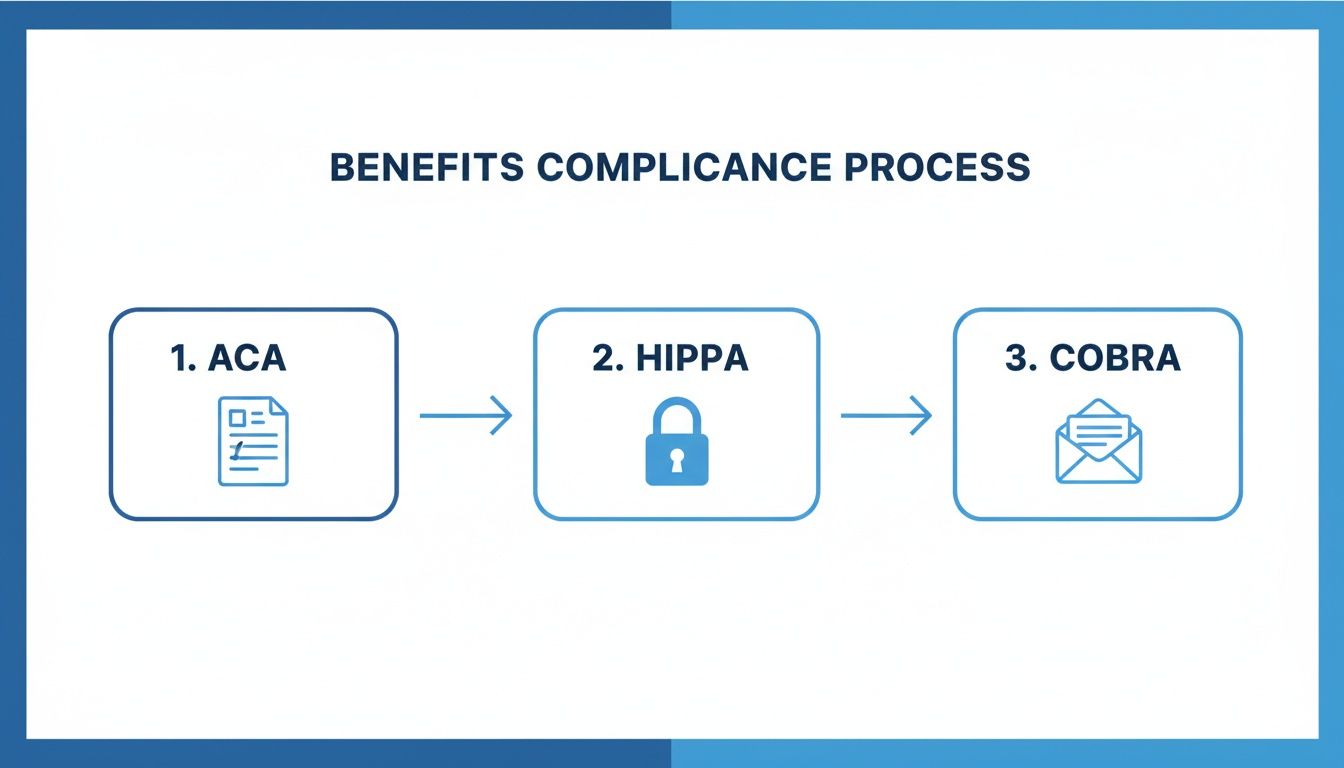
This shows how good software can automate reporting and notifications for major federal rules, acting as a built-in safety net for your business. Following this structured approach will set you up for success from the start.
When to Partner With a Benefits Expert
Think of modern employee benefits management software as a high-performance race car. It has incredible potential, but without a skilled driver, you’re not going to win any races. The software is great at handling the what—like automating enrollments and keeping data accurate. But an expert partner provides the crucial why and how behind your strategy.
Partnering with a benefits expert isn’t just a luxury; it becomes a strategic necessity when your business hits certain growth points. It’s the difference between just administering benefits and actually building a competitive, scalable benefits strategy that helps you grow.
Scenarios That Demand Expert Guidance
Knowing when you’ve outgrown a DIY or software-only approach is key. If any of these situations sound familiar, it’s a clear sign that technology alone isn’t enough.
- Rapid Business Growth: Scaling from 20 to 100 employees isn’t just about adding more people; it adds massive complexity. An expert helps you evolve your benefits package to stay competitive, navigate multi-state compliance, and make sure your tech stack can handle the load without cracking under pressure.
- Complex Compliance Challenges: If you’re dealing with multi-state payroll, confusing ACA reporting, or specific industry regulations, software might not catch everything. An expert serves as your compliance safety net, helping you avoid costly risks that an automated system could easily miss.
- Lack of Strategic Insight: Is your benefits package truly helping you attract and keep top talent, or is it just another expense? A partner brings data analysis and market benchmarking to the table, helping you design a program with a clear, measurable return on investment.
The Value of a Managed Service
An expert partner does more than just help you pick an insurance plan. They become an extension of your team, focused on optimizing your entire back-office operation. They ensure your software is set up correctly, that your data is clean across all platforms, and that you’re using every feature to its fullest potential.
This is what turns benefits administration from a cost center into a powerful tool for growth. You’re not just checking a box; you’re building a scalable foundation that supports your business goals.
For businesses that need this kind of hands-on support, exploring professional services is the next logical step. You can learn more about employee benefits administration outsourcing to see how a dedicated team can take these complexities off your plate.
Ultimately, the smartest approach is to combine powerful software with human expertise. It’s how you build a resilient, efficient, and strategic benefits program that truly serves both your company and your people.
Frequently Asked Questions
Jumping into the world of employee benefits management software always brings up a few key questions. We’ve put together some straightforward answers to help you get a clear picture of the costs, timelines, and real-world impact of using one of these platforms for your business.
Think of this as your practical guide to making a confident, informed decision for your company.
How Much Does This Software Typically Cost?
The cost really depends on your team’s size and the specific features you need. Most software providers use a per-employee, per-month (PEPM) pricing model, which usually lands somewhere in the $4 to $12 per employee range.
It’s worth noting that some platforms, like Gusto, bundle benefits administration right into their broader payroll and HR plans. The key is to look at the total cost—including any one-time setup fees—and weigh it against the huge amount of time you’ll save and the costly mistakes you’ll avoid.
How Long Does Implementation Take?
Getting a new benefits system up and running hinges on how complex your current benefits are and how clean your existing data is.
For most small to medium-sized businesses with pretty standard plans, you can expect the whole process to take anywhere from two to six weeks. This timeline covers everything from initial setup and migrating your data to connecting with insurance carriers and getting your team trained up. A well-organized rollout with expert support can definitely speed things up and make for a much smoother transition.
Can My Small Business Really Benefit?
Absolutely. In fact, smaller businesses often see the biggest and most immediate improvements. Without a dedicated HR department, owners and managers get stretched thin handling all the administrative tasks that this software was built to automate.
It really levels the playing field. You get to offer a professional, seamless benefits experience that helps you compete with much larger companies for top talent. By taking all the compliance headaches and paperwork off your plate, you get to focus on what you do best: growing your business.
What Happens During Open Enrollment?
Open enrollment goes from a frantic paper chase to a simple, streamlined digital process. You just set up your plans and the enrollment dates in the software, and you’re good to go.
Employees get automated reminders that guide them to a self-service portal. From there, they can easily compare their plan options, see what each one costs, and make their choices right online. The system makes sure they fill out everything correctly, which cuts down on errors. Once the window closes, the software automatically sends the final data to your insurance carriers and updates your payroll for perfect deductions.
Ready to get your benefits and payroll running smoothly with expert support? The team at Steingard Financial combines powerful software with hands-on guidance to build a back office that grows with you. Get in touch with us today to see how we can help.