 Skip to content
If you run a service business, payroll and HR probably aren’t what fill your calendar. Client work does. Delivery does. Sales does. Yet every pay period, you’re pulled into questions about hours, overtime, onboarding forms, reimbursements, benefits, and whether payroll is syncing to your books the way you think it is.
That tension is common. A growing company can look healthy from the outside while the back office feels shaky inside. One new hire in another state, one contractor who should’ve been an employee, or one payroll platform that doesn’t talk cleanly to QuickBooks can turn routine admin into a weekly source of stress.
Small business payroll and hr services exist to fix that. Not by forcing you to become a payroll specialist, but by giving you a clear system for paying people correctly, staying organized, and handling HR responsibilities without losing hours every week. For service businesses, that matters even more because staffing often changes with demand. Hours fluctuate. Roles blur. Billing cycles don’t always line up neatly with payroll cycles.
Your Guide to Mastering Payroll and HR
You might be doing payroll at night after finishing client work. You approve hours from your phone, answer an employee question about a pay stub, then realize a new hire still hasn’t completed all their forms. The next morning, your bookkeeper asks why payroll expenses don’t match the departments in QuickBooks.
That doesn’t mean you’re disorganized. It usually means your business has outgrown a patchwork process.
Many owners stay in that mode longer than they should because payroll feels deceptively simple. You pay people, file taxes, keep records, and move on. In practice, payroll touches hiring, worker classification, benefits, time tracking, compliance, bookkeeping, and employee trust. HR adds another layer. It shapes how people enter the company, what they receive, what policies apply, and how issues get handled.
Practical rule: Payroll is never just about running checks. It’s about building a repeatable operating system for your team.
The challenge isn’t only complexity. It’s timing. In service businesses, payroll and HR decisions often happen while you’re already managing customers, staffing gaps, and month-end reporting. That creates risk. Small mistakes can travel across systems and become bigger problems later.
A useful approach is to break the topic into parts you can act on:
- Start with definitions: Know what payroll covers, what HR covers, and where they overlap.
- Focus on compliance: Some tasks are operational choices. Others are legal obligations.
- Choose tools carefully: Gusto, QuickBooks Payroll, and connected systems solve different problems.
- Plan transitions: Switching providers or moving from in-house to outsourced support takes preparation.
- Use expert help where it counts: Especially when your workforce changes often or your books need cleanup before a migration.
By the end, you should be able to look at your current setup and answer a practical question: keep it, upgrade it, or hand it off.
Defining Payroll and HR Services for Your Business
Think of your people operations like a work vehicle your business depends on every day. Payroll is the engine. It has to start on time, run accurately, and keep moving without fail. HR is the rest of the vehicle. It includes the controls, safety systems, and structure that make the ride manageable for everyone involved.

If the engine fails, employees don’t get paid correctly. If the rest of the system fails, hiring feels messy, records get scattered, and compliance gaps start to appear. That’s why small business payroll and hr services are related, but they aren’t the same thing.
What payroll services actually include
Payroll is the technical process of turning hours, salaries, deductions, and tax obligations into correct pay.
In practical terms, that usually includes:
- Pay calculation: Regular wages, salary, overtime, bonuses, and reimbursements.
- Withholding and deductions: Federal, state, and local taxes, plus benefit and retirement deductions where applicable.
- Payment delivery: Direct deposit or other approved payment methods.
- Filing and forms: W-2s for employees, 1099s for contractors, and required payroll tax filings.
- Recordkeeping: Maintaining payroll reports, pay histories, and supporting documentation.
For many owners, the confusion starts here. They assume payroll software only “runs payroll.” Good payroll support also helps create clean rules around earnings codes, time inputs, deduction setup, and how payroll maps into accounting. If you want a deeper operational definition, this overview of what payroll processing includes is a useful starting point.
What HR services cover beyond payroll
HR is broader. It deals with the employee lifecycle, not just payday.
A small business HR function may include hiring support, onboarding paperwork, policy administration, time-off tracking, benefits coordination, and help with employee documentation. In some businesses, HR also includes compensation planning and retention support.
Here are the areas owners usually notice first:
Hiring and onboarding
Offer letters, new hire forms, handbooks, and getting people set up correctly from day one.Benefits administration
Coordinating enrollment, deductions, eligibility, and employee questions.Policy and compliance support
Helping the business follow wage and hour rules, documentation requirements, and workplace policies.Employee support
Managing requests related to pay stubs, PTO balances, and changes in personal information.
Where the two functions overlap
Payroll and HR share data constantly. A new hire entered by HR affects payroll setup. A benefits election changes deductions. A title change can change pay rates, manager approvals, and reporting lines.
That overlap is why disconnected systems cause trouble. If one system says an employee started this week and another doesn’t, someone has to manually fix the difference. If no one catches it, errors move into payroll, books, and tax filings.
Good systems don’t just store information. They keep one change from needing three separate updates.
For a service business owner, the question isn’t whether you need payroll or HR. You already do. The question is how much of each you want to manage manually, how much you want software to handle, and where an outside advisor should step in.
Key Benefits and Critical Compliance Requirements
Owners usually start looking at payroll and HR support because they’re frustrated by the time drain. That’s valid. But time savings aren’t the only reason to professionalize these processes. Accuracy, employee trust, and legal exposure matter just as much.
The business case for getting this right
Small businesses in the United States play a major role in the labor market, contributing a net increase of 1.2 million jobs in the latest reported period and representing 88.9% of total net job gains across all business sizes, according to the OnPay 2025 small business outlook. Those same businesses often carry substantial payroll responsibilities with lean teams.
When payroll runs smoothly, people notice in quiet ways. Employees stop asking whether direct deposit will hit on time. Managers trust labor numbers more. Your books close with fewer cleanup entries. Your hiring process feels more credible because new employees enter a system that works.
A stable setup can also improve the day-to-day experience for owners:
- Less rework: Fewer manual corrections after a payroll run.
- Cleaner books: Payroll expenses and liabilities post more consistently.
- Faster responses: Employees can get documents and answers without emailing you for everything.
- Better visibility: You can see labor costs as part of operating decisions, not just after the fact.
The emotional benefit matters too. Payroll is one of the few business processes where a small error feels personal to the employee receiving it.
Compliance isn’t optional
Many businesses feel uneasy about this, and with good reason. Compliance isn’t a feature you can postpone until the company is larger. It starts as soon as you hire and pay people.
The major risk areas usually include:
- Tax filings across jurisdictions: Federal, state, and local withholding and reporting requirements can differ.
- Overtime and wage rules: Especially important when employees have variable schedules or mixed duties.
- Worker classification: Paying someone as a contractor doesn’t automatically make them one.
- Required forms and reporting: Year-end forms, new hire reporting, and payroll records all need to line up.
A useful compliance resource for owners who want to understand the broader risk picture is this guide to HR compliance for small businesses.
What automation changes
Modern payroll systems don’t remove responsibility, but they do reduce the chance that an avoidable mistake slips through. According to ADP’s payroll for 1-49 employees overview, automated payroll compliance tools in platforms like ADP and OnPay handle complex multi-jurisdictional tax calculations and deductions with 98% accuracy, help prevent errors that average $845 per misfiled form, and real-time error flagging can reduce audit risks by 60% while freeing 10 to 15 hours monthly for more strategic HR work.
That doesn’t mean every business needs the most complex software available. It means manual work should be a conscious choice, not the default. If your team works in more than one state, earns overtime, receives reimbursements, or switches between part-time and full-time schedules, a basic process can break down quickly.
If you’re relying on memory, email threads, and spreadsheets to hold payroll together, you’re taking on compliance risk whether you intend to or not.
The service business angle owners often miss
Service companies often have more payroll complexity than they realize. Technicians, consultants, administrators, project staff, seasonal hires, and part-time support workers can all create different pay rules. Some hours are billable. Some aren’t. Some bonuses tie to jobs completed. Some roles mix salary and variable compensation.
That complexity doesn’t always show up in headcount. A team can be relatively small and still have a payroll environment that needs careful controls.
A professional payroll and HR setup gives you something more valuable than convenience. It gives you a reliable process that can keep up with the way your business operates.
Exploring Platform and Integration Options
Choosing software isn’t really about choosing software. It’s about choosing how information moves through your business. Payroll by itself can work. Payroll connected to bookkeeping, time tracking, and employee records works much better.

Why integration matters more than feature lists
Owners often compare payroll systems by looking at dashboard screenshots or monthly pricing. Those things matter, but they don’t answer the biggest operational question: what happens after payroll is approved?
If payroll data has to be re-entered into accounting, if benefits changes don’t sync, or if time data needs manual cleanup every period, the system is still expensive even if the subscription looks reasonable.
According to TechnologyAdvice’s review of HR software for small businesses, integrated HRIS and payroll platforms like UKG Ready can reduce manual data entry by up to 70%, businesses using such systems often process payroll 50% faster, and employee self-service portals can cut HR administrative queries by 40%. That’s the practical value of integration. It removes duplicate work and reduces the number of places errors can start.
Where Gusto often fits
Gusto is often a good fit for businesses that want payroll and people operations to live in one employee-friendly system. Owners tend to like it when they need a simpler onboarding experience, benefits coordination, and a cleaner employee portal.
For a service business, Gusto can be especially useful when:
- You want employees to self-serve: Pay stubs, tax forms, and basic profile updates can happen without sending requests to admin staff.
- Your HR needs are expanding: New hire onboarding and benefits administration start to matter more as the team grows.
- You want a smoother employee experience: That’s often important when you’re competing for skilled staff.
If recruiting is becoming a larger concern too, it’s worth reviewing broader talent acquisition software platforms so your hiring tools don’t end up disconnected from your payroll and HR stack.
Where QuickBooks Payroll often fits
QuickBooks Payroll tends to make the most sense when your accounting lives in QuickBooks Online and you want tighter financial alignment. For many owners, the appeal is straightforward. Payroll and bookkeeping sit closer together, which can make reconciliations and reporting easier to manage.
This can be a strong fit when:
- Your finance process is the priority: You need payroll to map cleanly into your chart of accounts.
- Your bookkeeper works in QuickBooks every day: Fewer exports and imports usually mean fewer mistakes.
- You want one financial back office: Payroll becomes part of the accounting workflow, not a separate island.
The real decision isn’t Gusto versus QuickBooks
For many companies, both are viable. The better question is what pain you’re trying to remove.
Use this quick comparison:
| Business need | Better fit to evaluate first |
|---|---|
| Employee experience and onboarding simplicity | Gusto |
| Tight accounting workflow inside QuickBooks Online | QuickBooks Payroll |
| Growing benefits administration needs | Gusto |
| Finance-first reporting and bookkeeping alignment | QuickBooks Payroll |
A service provider such as Steingard Financial’s employee benefits administration outsourcing support can also sit alongside these platforms when the technology is only part of the solution and you need help tying payroll, benefits, and bookkeeping together.
The strongest payroll stack is usually the one that creates a single source of truth, not the one with the longest feature list.
For service businesses with variable staffing, that principle matters. Every manual handoff creates one more chance for hours, deductions, job costing, or employee records to go out of sync.
How to Choose the Right Payroll and HR Provider
A payroll and HR provider can be a software company, an outsourced payroll firm, an HR support partner, or a combination of all three. The right choice depends less on branding and more on fit. You need a system and a provider that match how your business hires, pays, tracks time, and records labor costs.
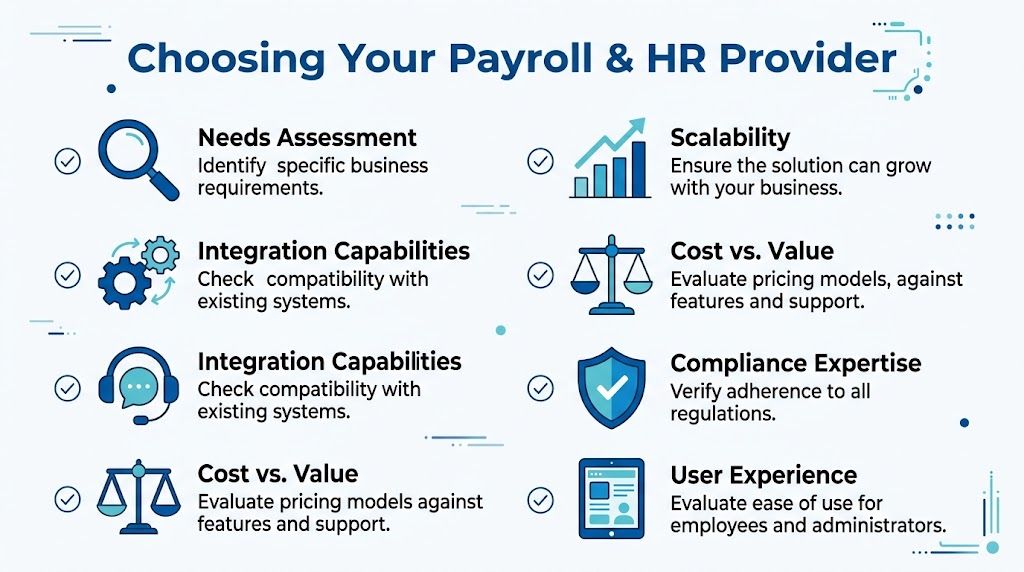
A lot of owners make this decision too quickly. They sit through a polished demo, hear about automation, and assume implementation will work itself out. It usually doesn’t. The better move is to score each option against the same set of criteria before you commit.
Start with your actual operating needs
Write down how payroll and HR work in your business today. Not how you wish they worked.
That list should include things like multi-state employees, variable schedules, overtime, reimbursement rules, contractors, benefits enrollment, new hire volume, and whether payroll needs to sync with QuickBooks. If hiring is active, your recruiting process matters too. For owners who need to tighten the front end of hiring before payroll even begins, this guide to Applicant Tracking Systems for small companies is a useful companion resource.
Then ask a harder question: where do mistakes happen now? That’s where your evaluation should focus.
Watch how the provider thinks, not just what they sell
A strong provider asks detailed questions. They want to know how employees are paid, who approves hours, how benefits are handled, whether your books need cleanup, and what systems are already in place.
A weaker provider stays at the feature level. They talk about dashboards, apps, and support portals without digging into your workflows.
These questions help reveal the difference:
- Implementation: Who handles setup, testing, and migration?
- Responsibility: Who files taxes, who reviews reports, and who owns corrections?
- Support: When something breaks near payroll cutoff, who responds?
- Scalability: Can the setup still work if your team adds locations, managers, or benefit plans?
- Accounting alignment: How does payroll map into the chart of accounts and reporting structure?
Use a scorecard instead of gut instinct
The easiest way to compare options is to force them into the same framework.
| Criteria | What to Look For | Provider A Score (1-5) | Provider B Score (1-5) |
|---|---|---|---|
| Scope of services | Payroll only, or payroll plus onboarding, benefits, compliance, and advisory support | ||
| Industry fit | Experience with service businesses, variable schedules, and changing workforce needs | ||
| Integration capabilities | Clean connection to QuickBooks, time tracking, and benefits systems | ||
| Implementation process | Clear migration plan, testing steps, and assigned contacts | ||
| Support quality | Responsive help, payroll deadline coverage, and escalation paths | ||
| Compliance expertise | Ability to handle tax filings, worker setup, and documentation requirements | ||
| Pricing clarity | Transparent fees, add-ons, and service boundaries | ||
| Employee experience | Easy onboarding, self-service access, and understandable workflows | ||
| Reporting and visibility | Useful payroll reports and clean financial outputs for management | ||
| Scalability | Can support growth without forcing another switch too soon |
Review a practical walkthrough before you buy
A short visual explanation can help you spot questions you might otherwise miss during vendor demos.
After watching a walkthrough like that, go back to your shortlist and ask each provider to show your workflow, not a generic one. Ask them how a new hire gets onboarded, how time is approved, how deductions are added, how payroll posts to accounting, and what happens when something is wrong after payroll runs.
Red flags worth taking seriously
Some warning signs don’t show up in pricing sheets.
Look closely if you see any of these:
- Vague setup promises: “We’ll handle implementation” without a written migration plan.
- Weak accounting detail: No clear answer on how payroll data reaches QuickBooks or your general ledger.
- Generic support language: No explanation of response times, escalation, or who owns tax notices.
- One-size-fits-all demos: The provider can’t explain how they handle service businesses with irregular schedules or mixed worker types.
- No process for cleanup: They assume your historical payroll and employee data are already accurate.
A provider isn’t just selling software access. They’re stepping into a process that affects pay, taxes, records, and trust.
The right choice should lower friction, not hide it behind a sales presentation.
Implementation and Common Pitfalls to Avoid
Many owners assume switching payroll providers is mostly a data transfer. Export the employee list, import it into the new system, reconnect bank details, and you’re done. For service businesses, that assumption causes trouble.
A transition touches historical payroll data, tax setup, deduction rules, time tracking, bookkeeping, and employee communication. If any of those pieces are wrong, the new system can reproduce old errors faster than the old one did.

Why switching feels harder than it should
The hesitation is understandable. According to the OnPay 2025 small business outlook, 66% of small business owners handle HR tasks themselves, they spend over six hours monthly on payroll, and small businesses collectively spend $27 billion annually on HR administration, often wasting up to 60% of HR time on transactional duties that could be automated. When you’re already carrying that load yourself, a system transition can feel like adding risk to an already crowded schedule.
For service companies, the fear is usually specific:
- payroll downtime during a busy pay period
- employee frustration during portal changes
- historical errors carrying into the new platform
- broken links between payroll and accounting
- time-tracking mismatches for variable schedules
Those are real concerns. The answer isn’t to avoid switching forever. It’s to stage the switch properly.
A better rollout for variable workforces
A safer implementation usually starts before any data is moved.
Begin with cleanup. Confirm employee names, tax details, pay rates, classifications, benefit deductions, and year-to-date payroll information. Review how payroll should map to your chart of accounts. If your business uses departments, classes, locations, or job costing, decide those rules before setup, not after the first run.
Then phase the rollout.
Audit the old system
Identify duplicate records, outdated employees, inconsistent pay codes, and bookkeeping issues.Map the workflow
Decide who enters hours, who approves payroll, who reviews reports, and how data reaches accounting.Test before go-live
Run sample payroll scenarios, especially for employees with overtime, reimbursements, or unusual deductions.Train employees early
Show staff how to log in, access documents, and update basic information before the first live payroll.
The smoothest implementation isn’t the fastest one. It’s the one with enough review points to catch bad data before employees do.
Common pitfalls that create avoidable pain
Some problems repeat across nearly every migration.
- Skipping historical cleanup: Bad employee records and year-to-date data don’t fix themselves during import.
- Ignoring accounting structure: If the chart of accounts isn’t set correctly, payroll may post inaccurately and require manual cleanup.
- Moving too much at once: Payroll, benefits, time tracking, and new policies don’t all need to launch on the same day.
- Assuming employees will “figure it out”: Even simple systems need communication and basic training.
- Treating implementation as only an HR task: Payroll affects operations, finance, and management reporting too.
Service businesses need extra care here because labor often drives both delivery and profitability. If payroll data is messy, billing, margins, and staffing decisions can all become less reliable.
A deliberate transition, guided by someone who understands both payroll and bookkeeping, usually prevents the most expensive kind of problem: the one you don’t notice until after payroll has already gone out.
The Steingard Financial Difference in Action
The ideas above become more useful when you can picture them in a real business.
One common scenario is a growing consulting firm with employees in multiple states and contractors supporting projects as needed. Payroll starts in one platform, bookkeeping lives somewhere else, and no one is fully sure whether worker records, tax settings, and account mappings are consistent. The immediate need isn’t “better software.” It’s historical cleanup, a working payroll process, and cleaner reporting after each run.
Another example is a field service company with changing schedules and frequent hiring. New employees need onboarding documents, payroll setup, and access to pay information without creating more admin work for the owner. In that kind of environment, the right system has to connect payroll, time inputs, and employee records in a way that managers can use.
A third scenario looks less urgent on the surface. A startup hires carefully and pays on time, but benefits, compensation structure, and employee administration are still being handled informally. Nothing appears broken yet. Still, as headcount grows, the lack of process starts to show up in inconsistent onboarding, scattered records, and more questions flowing back to the founder or operations lead.
What helps in each case isn’t just software access. It’s combining setup, cleanup, and ongoing review so the system reflects how the business really works. That includes payroll configuration, books that can absorb payroll data correctly, and HR support that doesn’t sit in a silo.
For companies using Gusto or QuickBooks Payroll, that often means deciding what to automate, what to standardize, and what should still receive human review. A firm like Steingard Financial can fit into that process by supporting payroll operations, helping clean up historical books, aligning payroll with accounting, and assisting with people operations such as onboarding and benefits coordination.
Small business payroll and hr services work best when the provider understands both the human side of the workflow and the financial side behind it.
That combination is what turns payroll from a recurring scramble into a stable part of the business.
If your payroll process feels more fragile than you’d like, or your HR tasks keep landing back on your plate, Steingard Financial can help you evaluate your current setup, clean up the gaps, and build a payroll and HR system that fits a service business with real-world complexity.