 Skip to content
You just landed a new client. The agreement is signed, the kickoff call is booked, and your instinct is to send an invoice right away so cash starts moving.
That instinct is understandable. It also causes a lot of bookkeeping problems.
For a US-based service business, the first document you create after a client says yes shapes everything that follows. It affects how your team schedules work, how QuickBooks tracks the job, when revenue hits your books, how easy month-end reconciliation feels, and whether your records hold up when tax and compliance questions come up later. If you skip the sales order step and jump straight to invoicing, you make billing do work it was never designed to do.
That’s the core issue in the sales order vs sales invoice conversation. These documents are connected, but they are not interchangeable. One confirms the work and starts fulfillment. The other asks for payment after delivery and carries accounting weight.
Service businesses often assume sales orders are only for companies shipping physical products. In practice, that’s too narrow. A service firm still needs a formal internal handoff that confirms scope, timing, owner, and billing conditions before an invoice goes out. In QuickBooks, that step is often the difference between clean reporting and a pile of corrections at month-end.
Introduction The Critical First Step in Your Sales Process
A common example is a three-month consulting engagement. The client approves the proposal. The owner wants to bill immediately. Operations wants to assign staff. Bookkeeping wants to know whether this is a deposit, a milestone invoice, or a final invoice. If nobody defines that workflow first, the records start drifting before the project even begins.
That drift usually shows up in familiar ways:
- Work starts without clear internal authorization: Team members assume the job is approved, but nobody has locked the final scope or billing terms.
- Invoices go out too early: The client receives a demand for payment before the service milestone that justifies billing.
- QuickBooks becomes a workaround tool: Staff use invoices to track project approval, delivery status, and collections all at once.
- Month-end gets messy: Revenue, accounts receivable, and deferred amounts need manual cleanup because the original sequence was wrong.
A sales order solves the internal side of that problem. It confirms that the client has committed, the scope is approved, and the business is ready to deliver. A sales invoice solves the external side. It creates the formal payment request after goods or services are delivered, and it becomes part of the accounting record.
Practical rule: If the document’s purpose is to authorize work internally, it shouldn’t be doing the job of an invoice.
This distinction matters in QuickBooks because your books need separate answers to two different questions. First, has the client committed? Second, have you earned the right to bill? Those are not the same event.
For service businesses, the operational consequences are easy to underestimate. You may not reserve inventory in the traditional sense, but you do reserve something valuable: staff time, delivery capacity, project slots, and subcontractor availability. If those commitments aren’t tied to an internal order step, billing gets ahead of delivery and reporting gets unreliable fast.
Defining the Sales Order and Sales Invoice
A sales order is the internal confirmation that tells your business, “we are doing this work.” It starts the fulfillment process after the customer places an order. In a standard workflow, the sales order comes first, and the sales invoice follows after delivery. That sequencing is one reason this distinction became formalized with early ERP systems in the 1970s. Today, it still matters. A 2023 QuickBooks-related finding summarized here states that 42% of small businesses faced cash flow delays from premature invoicing without sales order confirmation.
What a sales order actually does
Think of a sales order like a restaurant reservation. It confirms the customer’s request and lets the business prepare. It is not the final bill.
In a service business, that preparation can include:
- Reserving capacity: blocking consultant, developer, payroll, or admin time
- Confirming terms: locking deliverables, dates, billing milestones, and internal owner
- Starting workflow: moving the engagement from sold to active
- Creating an audit trail: documenting what was approved before any invoice is issued
If you want a deeper operational view, Steingard’s guide on what a sales order is is a useful reference.
What a sales invoice actually does
A sales invoice is the final bill after the meal. It is the formal request for payment after goods or services have been delivered. It includes the amount due, payment terms, and due date, and it becomes the document that drives accounts receivable.
For service businesses, owners often get tripped up. They treat the invoice as a project setup form, a client confirmation, and a payment request all at once. That usually leads to disputes over what was delivered, what period was billed, or whether a milestone had been reached.
A sales order confirms intent and starts work. An invoice confirms delivery and starts collection.
Why the distinction matters for service firms
Product companies usually understand this immediately because they can see inventory move. Service firms need to think in terms of labor allocation and delivery commitments instead.
A clean process separates these events:
- Client approval
- Internal confirmation and scheduling
- Delivery or milestone completion
- Invoice issuance
- Collection and reconciliation
When those events collapse into a single invoice, QuickBooks has less structure to work with, and your books often show activity before the business has earned the revenue.
Key Differences Between a Sales Order and Sales Invoice
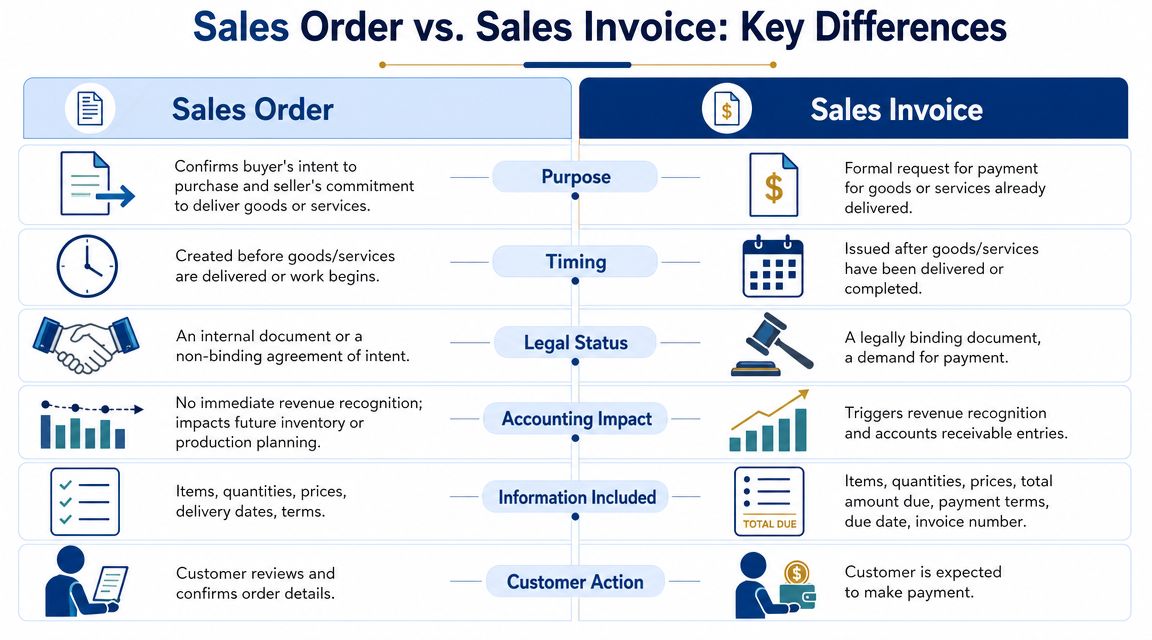
The easiest way to understand sales order vs sales invoice is to compare what each document is supposed to do in the workflow.
| Criterion | Sales Order | Sales Invoice |
|---|---|---|
| Purpose | Internal confirmation of a customer order and authorization to begin fulfillment | External request for payment after delivery |
| Timing | Created when the customer places the order or approves the work | Issued after goods or services are delivered |
| Audience | Primarily internal, though a confirmation may be shared with the customer | Sent to the customer for payment |
| Accounting impact | No immediate revenue recognition on core financial statements | Creates accounts receivable and supports revenue recognition |
| Operational role | Reserves capacity, confirms scope, starts fulfillment planning | Starts collections and tracks what the customer owes |
| Editability | Can often be revised or canceled before fulfillment | Should be accurate at issue because it carries legal and accounting weight |
| Use in service businesses | Useful for project setup, milestones, staffing, and proof of commitment | Necessary for billing, AR, and month-end reporting |
| Compliance role | Supports pre-delivery documentation and internal audit trail | Supports tax, financial reporting, and payment enforcement |
Purpose
A sales order is for your team. A sales invoice is for your customer.
That sounds simple, but it matters operationally. The sales order gives operations, delivery, and bookkeeping a common starting point. It tells everyone what was approved and what needs to happen next. The invoice has a different job. It tells the customer what they owe now that work has been delivered.
Core distinction: Sales orders manage commitment. Invoices manage collection.
Timing
This is the biggest practical separator. A sales order comes at the beginning of the process. An invoice comes later.
For service firms, “later” can mean after a project milestone, after a monthly retainer period, after hours are approved, or after a deliverable is accepted. That timing needs to be defined before billing starts. If it isn’t, staff often invoice based on urgency rather than earned revenue.
Legal and bookkeeping weight
Sales orders matter operationally. Invoices matter financially and legally.
The invoice is the formal payment demand and the document that enters the accounting workflow. In contrast, the sales order is there to support fulfillment planning and confirm approved terms before the financial event occurs.
This distinction is one reason service businesses that skip sales orders run into reconciliation trouble. According to Stride Retail’s summary, service businesses that skip sales orders can face 28% higher month-end reconciliation issues in platforms like QuickBooks, based on 2024 reporting across 1.2 million US firms.
Accounting treatment
A sales order does not put revenue on your profit and loss statement by itself. It does not create accounts receivable by itself. It is a workflow document.
The invoice does the accounting work. Once issued for delivered services, it supports the receivable and the related revenue entry under your accounting policy.
That’s why using invoices as “project placeholders” creates cleanup later. If an invoice exists too soon, your books may show a receivable that doesn’t match actual delivery.
To see a visual explanation before going deeper, this short walkthrough is helpful:
Operational effect inside QuickBooks
In QuickBooks, owners often want one form to do everything. That usually backfires.
When a service business skips the order step, the invoice has to carry too much context:
- Approval evidence: who approved the scope and when
- Project setup: who owns delivery and what milestone was promised
- Billing logic: whether it’s deposit, progress, or final billing
- Collection tracking: due dates, reminders, and AR follow-up
QuickBooks works better when each stage has a defined role. Approval and fulfillment setup happen first. Billing happens second.
Customer action
A customer reacts differently to each document.
With a sales order, the customer reviews details and confirms the work. With a sales invoice, the expected action is payment. Mixing those moments creates confusion. Clients may treat an early invoice like a draft, while your bookkeeping team records it as a live receivable.
Send a sales order when you want clarity. Send an invoice when you’re prepared to collect.
How Each Document Impacts Revenue Recognition and Financials
For accounting purposes, the most important point is this: a sales order has no direct impact on your financial statements when it is created, but an invoice can.
That’s why the sales order vs sales invoice distinction matters far beyond admin workflow. It affects your income statement, balance sheet, and the quality of every momonth-end close

What hits the books and what doesn’t
A sales order confirms customer intent and starts internal fulfillment. It does not create revenue by itself. It does not create accounts receivable by itself. It’s a control document.
The invoice is different. As explained in Razorpay’s overview, the invoice is the legally authoritative document that triggers revenue recognition and creates accounts receivable entries. The same source notes that maintaining 98%+ invoice accuracy is critical because billing errors delay payments and undermine the reliability of month-end statements.
Why this matters under accrual accounting
If you keep your books on an accrual basis, revenue belongs in the period when it is earned, rather than when someone wants cash in the bank. That means your records need a clean line between approved work and delivered work.
A service business usually earns revenue when a milestone is completed, a billing period closes, or the agreed service is delivered. The invoice documents that event. The sales order supports the chain of evidence before that point.
If you need a practical refresher on the mechanics behind timing entries, this explainer on accruals and deferrals helps clarify where businesses often misstate activity.
The effect on your statements
When invoices are issued correctly, your financial statements become more reliable:
- Profit and Loss statement: shows earned revenue in the correct period
- Balance Sheet: shows receivables that are valid and collectible
- Cash flow planning: becomes more realistic because open invoices reflect real billing events
If you want a plain-English companion on how revenue flows through reporting, this guide to understanding Profit and Loss Statements is a useful reference for owners who review financials each month.
A sales order tells your team what should happen. An invoice tells your books what did happen.
Where service businesses usually go wrong
The common mistakes are not complicated. They are usually process mistakes:
Billing before delivery
The owner wants to move fast, so the invoice goes out before the milestone is complete.Using invoices as internal approvals
Instead of creating a separate approval step, the business sends the invoice and hopes everyone treats it as a project confirmation.Editing around bad timing
Staff later revise dates, split lines, or add notes to force the invoice to match the work after the fact.
Those habits make financial reporting less dependable. They also create confusion during month-end close because bookkeeping has to decide whether each invoice represents earned revenue, a deposit, or a timing issue that needs adjustment.
Real-World Scenarios with Journal Entry Examples
The clearest way to see the difference is to follow two transactions from start to finish. One is a product sale. The other is a service engagement, which is where many QuickBooks users get sloppy with document flow.

Scenario one custom hardware sale
A customer approves a custom equipment order. The business creates a sales order that confirms the item, quantity, delivery timeline, and internal fulfillment responsibility.
At this stage, there is usually no journal entry just because the sales order exists. The company has a commitment to fulfill, but no revenue event has occurred yet.
The equipment ships later. Once shipped and billed, the company issues the invoice. That’s when the receivable and revenue entry is recorded.
Journal entry at invoicing
- Debit Accounts Receivable
- Credit Sales Revenue
When the customer pays, the second entry is straightforward:
Journal entry at payment
- Debit Cash
- Credit Accounts Receivable
That flow is clean because the documents did separate jobs. The sales order handled operations. The invoice handled accounting.
Scenario two multi-stage consulting project
Now take a service example. A client approves a software implementation project with defined milestones. The business creates a sales order, or an order-equivalent internal record, to confirm scope, lead consultant, start date, and billing checkpoints.
Again, the creation of that order record does not post revenue.
The team completes the first milestone. Only then does the business issue an invoice tied to that completed work.
Journal entry at milestone invoice
- Debit Accounts Receivable
- Credit Service Revenue
When payment is collected:
Journal entry at receipt
- Debit Cash
- Credit Accounts Receivable
If the engagement has multiple milestones, the cycle repeats as each deliverable is completed and billed. That gives the owner a much better view of what has been earned versus what has merely been sold.
Why this workflow improves cash flow
A lot of owners assume adding an order step slows billing down. In practice, a clean workflow usually speeds up payment because the invoice is better supported and easier for the client to approve.
According to Zintego’s explanation of the order-to-cash cycle, automating the sales order-to-invoice workflow can reduce the average payment cycle from an industry average of 30-45 days to as little as two days. For service businesses, that improvement can materially change working capital planning.
Clean order setup doesn’t delay billing. It removes the reasons clients delay payment.
Where journal entries usually get distorted
Service firms often create avoidable cleanup when they skip the order stage. The most common distortions look like this:
- Premature receivables: invoices are posted before the milestone is complete
- Misclassified deposits: an advance invoice is treated like earned revenue without clear support
- Broken audit trail: there’s no internal record showing what the client approved before billing
If you want a simple refresher on the structure behind these postings, Alignmint’s guide to journal entries is a helpful plain-language resource.
A better habit for service businesses
For consulting, bookkeeping, payroll, marketing, recruiting, and software services, the strongest routine is usually:
- Confirm the sale internally with an order record
- Assign owners and delivery dates
- Complete the milestone or service period
- Issue the invoice tied to that completed work
- Reconcile payment against the invoice, not against a vague project note
That sequence gives QuickBooks cleaner source data, and it makes disputes easier to resolve because every invoice can be traced back to a specific approved commitment.
Optimizing Your Sales Order and Invoice Workflow in QuickBooks
QuickBooks works best when you stop asking one form to serve three jobs. Your setup should separate internal approval, service delivery, and billing.
For businesses on QuickBooks Online Advanced, the sales order feature can support that structure directly. For businesses on other QuickBooks plans, an estimate can often serve as the practical stand-in for an internal sales order, as long as your team treats it as a controlled approval document rather than a casual quote.
A workable QuickBooks flow for service firms
A simple workflow usually looks like this:
- Start with an estimate or sales order: Use it to confirm scope, timing, owner, and billing terms.
- Add internal tracking fields: Record project lead, service period, milestone status, or client location if tax treatment may vary.
- Convert only after delivery: Turn the approved record into an invoice when the milestone or service period is complete.
- Automate AR follow-up: Use reminders and clean due dates so collections happen consistently.
For firms setting up their system from scratch, this walkthrough on how to set up QuickBooks Online for service businesses is a practical starting point.
Why tax linkage matters more now
For multi-state service businesses, the document trail is no longer just an internal convenience. It can affect tax exposure.
Misclassified tax liabilities are a common problem for small businesses, especially when sales orders and invoices aren’t properly linked in the accounting software, and for some US service businesses economic nexus may be tracked from sales orders, not just invoices. That means weak linkage between the order stage and the billing stage can create audit risk.
What works and what doesn’t
What works in QuickBooks:
- Consistent naming rules: one client, one project naming convention, one source of truth
- Milestone-based billing logic: staff know exactly when an invoice is allowed
- Connected reporting: estimates, sales orders, invoices, and payments can be traced in sequence
What doesn’t:
- Creating invoices to “reserve” work
- Editing invoice dates later to make reports look cleaner
- Tracking project approval in email while QuickBooks only holds the bill
If you want better visibility across billing data after invoices are issued, tools that connect revenue data to analytics can help. For example, a revenue mcp for analytics setup can improve downstream reporting when you need cleaner insight into billing activity and collections.
How Steingard Financial Builds Your Scalable Back Office
Most service businesses don’t struggle because the sales order vs sales invoice distinction is confusing in theory. They struggle because nobody owns the full workflow inside the bookkeeping system.
That’s where a strong back office changes the outcome. A properly designed process turns client approvals into clean internal records, converts completed work into accurate invoices, and keeps accounts receivable tied to real delivery instead of guesswork.
Steingard Financial builds that structure around the way service businesses operate. That includes chart of accounts design, QuickBooks cleanup, accrual-based reporting, AP and AR management, reconciliations, and consistent month-end close practices. The result is fewer timing errors, cleaner financial statements, and less back-and-forth when owners need answers quickly.
For companies also managing payroll, staffing, and people operations, the value goes beyond bookkeeping. A dependable financial system supports better hiring plans, compensation decisions, and cash planning because leadership can trust what the books are saying.
A scalable back office is not just about staying organized. It gives the business a repeatable order-to-cash process that holds up as volume grows, clients expand across states, and reporting expectations get higher.
Frequently Asked Questions
| Question | Answer |
|---|---|
| Do service businesses really need sales orders? | In many cases, yes. Even if you don’t ship products, you still need a formal internal approval record before billing. It helps with scope control, staffing, and cleaner reconciliation in QuickBooks. |
| What comes first, the sales order or the invoice? | The sales order comes first. It confirms the order and starts fulfillment. The invoice follows delivery and requests payment. |
| Is a sales order legally the same as an invoice? | No. A sales order is primarily an internal operational document. An invoice carries much more legal and accounting weight because it is the formal payment demand. |
| Can I use an estimate instead of a sales order in QuickBooks? | Yes, many service businesses do that as a practical workaround, especially if they don’t use a QuickBooks plan with sales orders. The key is to apply a clear internal process so estimates function as approved order records. |
| Is a purchase order the same as a sales order? | No. A purchase order is typically issued by the buyer to request goods or services. A sales order is created by the seller to confirm and process that order internally. |
| Can I invoice a retainer client without a sales order? | You can, but it’s often cleaner to maintain an internal approval record that documents service period, scope, and billing terms before each invoice cycle starts. |
If your QuickBooks workflow is mixing client approvals, delivery tracking, and billing into one messy process, Steingard Financial can help you clean it up. The team builds reliable bookkeeping and payroll systems for service businesses that need accurate reporting, better AR discipline, and a back office that scales with growth.