 Skip to content
Friday afternoon payroll is coming up. A few employees use direct deposit. One still wants a paper check. Another doesn’t have a bank account and asks whether there’s a card option. You’re trying to keep payroll clean inside Gusto or QuickBooks, avoid compliance mistakes, and not create a payment method that chips away at your team’s take-home pay.
That’s where payroll cards enter the conversation.
For some service businesses, they solve a real problem. For others, they create a different one. Payroll card usage in the United States grew from 1% of U.S. workers to 5% between 2011 and 2014, and by 2017, $20.9 billion was loaded onto active payroll cards, according to the Center for American Progress report on payroll cards. That growth tells you two things. The option is real, and a lot of employers have had to think through it.
Is a Modern Payroll Card Right for Your Business
If you run a restaurant group, cleaning company, home services firm, salon, security company, or healthcare support business, your workforce probably isn’t uniform. Some employees want everything digital. Some don’t trust banks. Some open and close accounts often. Some need wage access without delays.
A payroll card can help in that kind of environment. It gives an employee a card that receives wages electronically, even if the employee doesn’t have a traditional checking account. That can reduce the scramble around paper checks and make payday more predictable.
But convenience alone isn’t enough.
The payroll cards pros and cons discussion gets messy because the employer benefit and the employee experience aren’t always aligned. A business may save time and reduce check handling, while an employee may face fees, limited access, or confusion about how the card works. If you only evaluate the admin side, you can make a choice that looks efficient in your payroll dashboard but feels expensive to your staff.
Practical rule: If a payment method is easier for your office but harder for your employees to use, it needs a closer review.
A good decision usually starts with three questions:
- Who needs this option: Are you solving for a meaningful unbanked or underbanked segment of your workforce, or are you adding complexity for a small edge case?
- What happens after payday: Can employees use the card without constant friction, fees, or branch hunting?
- How will this live inside your payroll stack: Will Gusto, QuickBooks Payroll, or your provider support the workflow cleanly?
That’s why this topic deserves more than a generic list of benefits and drawbacks. You need a framework that balances operations, employee impact, compliance, and system fit.
What Exactly Is a Payroll Card
A payroll card is a prepaid card an employer uses to deliver wages electronically. The easiest way to understand it is as a pay container. Each payday, net wages are loaded onto the card, and the employee can then use those funds through the card network.
For a service business owner, that places payroll cards between paper checks and direct deposit. They are electronic like direct deposit, but they do not require the employee to already have a bank account. That middle position is the whole reason they come up so often in restaurants, home services, retail, hospitality, and other businesses with hourly teams.
How the employer side works
On the employer side, the process is usually simple. You run payroll in your payroll system, calculate net pay as usual, and assign selected employees to the payroll card payment method. The payroll provider or card program then loads those wages onto each employee’s card account.
In practical terms, your payroll software still does the math. The card program handles the stored funds and card access.
If you use a platform like Gusto or QuickBooks Payroll, the key question is not just whether payroll cards are available. It is whether setup, funding, employee enrollment, and reporting fit cleanly into your normal payroll process. A payment option can look fine on paper and still create extra admin work if your team has to manage exceptions outside the system.
How the employee side works
For the employee, the card often works much like a debit card for day-to-day use. They may use it for store purchases, online payments, bill pay, or ATM withdrawals, depending on the card network and provider rules.
This point often confuses readers. A payroll card is different from three other products that look similar at first glance:
- A gift card: wages can be loaded repeatedly each pay period
- A retail reloadable prepaid card: the funding source is the employer’s payroll process, not casual cash reloads
- A bank account: the card may allow spending and withdrawals, but it may not include the broader features, protections, or service experience of a checking account
That difference matters because employees tend to judge the card by how easily they can live on it after payday. If they can check balances, withdraw cash reasonably, and pay bills without extra friction, the card may work well enough. If basic tasks trigger fees or confusion, the card stops feeling like a convenience and starts feeling like a pay cut.
Why the definition matters more than it seems
A lot of business owners hear “card” and assume the decision is mostly about payroll delivery. It is broader than that. You are not only choosing how wages leave your payroll system. You are also choosing the tool some employees may rely on to buy groceries, pay rent, or get cash before a shift.
That is why payroll cards need a clearer lens than a generic definition. For your business, the key question is whether this payment method fits your payroll stack and your workforce at the same time. For your employees, the key question is whether the card acts like a useful bridge or an expensive workaround.
A payroll card is an electronic wage payment method that can solve a real access problem, but its value depends on both system fit and day-to-day usability for employees.
The Complete Pros and Cons for Employers and Employees
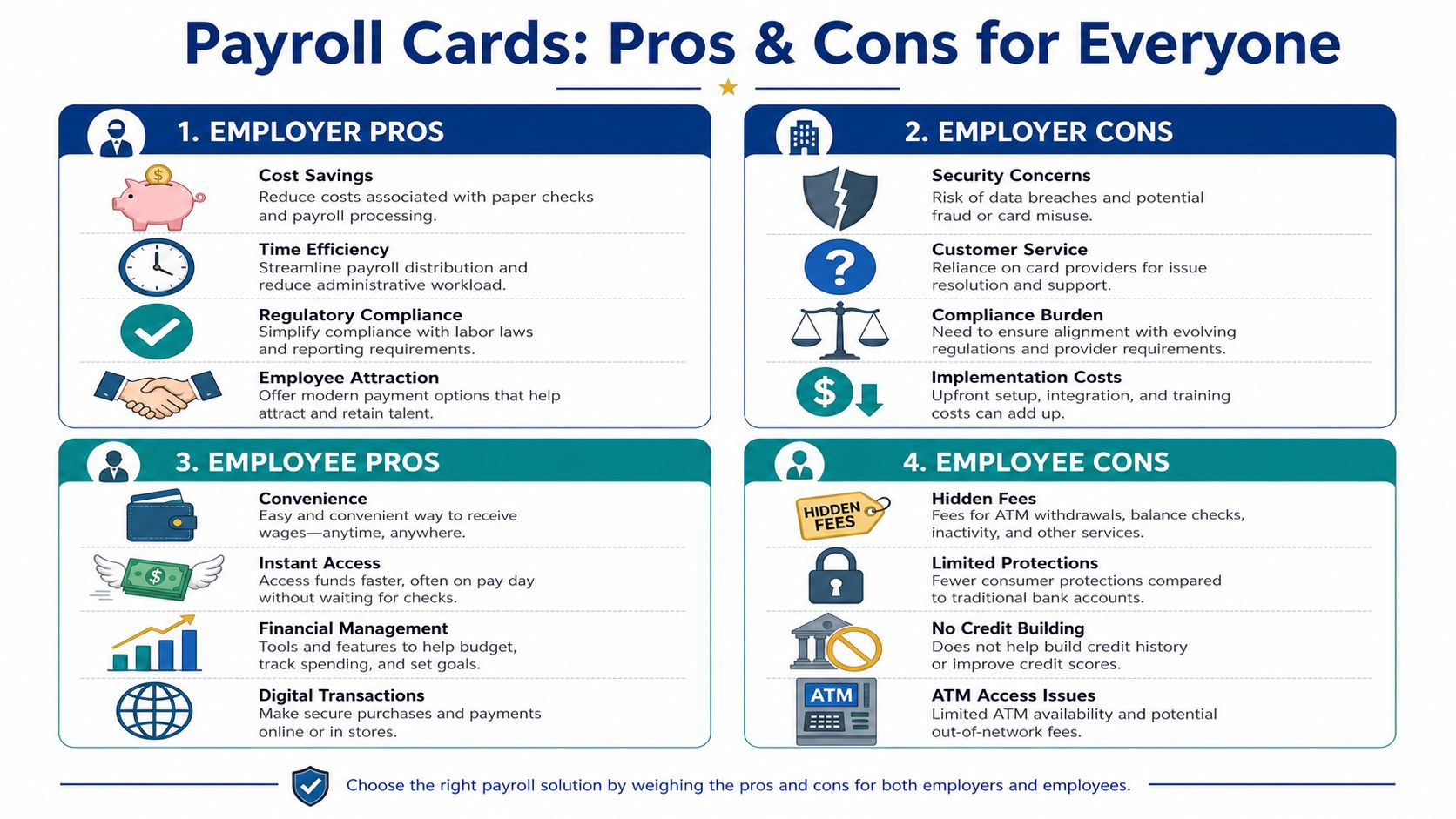
Some payment methods are clearly good or clearly bad. Payroll cards aren’t one of them. They can reduce administrative drag for a service business while creating real financial friction for the employee using the card.
Employer pros
The strongest employer advantage is cost reduction when you’re replacing paper checks. According to Business.com’s payroll card overview, paper checks average $4.00 to $6.00 per transaction when you factor in paper, printing, postage, and manual reconciliation. The same source says shifting from physical checks to payroll cards can reduce annual payroll processing expenses by 30% to 50% for mid-sized service businesses, especially once you’re operating at scale.
That matters more in service businesses than in office-heavy firms. If you have a distributed team, changing schedules, or employees who don’t come to a central office every payday, paper check logistics create labor you don’t always see on a payroll report.
A payroll card can also help with:
- Coverage for unbanked employees: You can offer an electronic wage method without requiring a bank account.
- Less check replacement work: Fewer lost checks, stop payments, and reprints.
- Cleaner payroll operations: Electronic disbursement is easier to track than hand-delivered paper.
Employer cons
The downside is that card programs shift some of your payroll risk from printing and delivery to provider oversight and employee support. If a card isn’t working, your employee still sees it as a payroll problem, even if the technical issue sits with the card vendor.
You may also end up fielding questions that look small but take time:
- Why was a transaction declined?
- Where can the employee withdraw cash?
- What fee applies to a balance check?
- How does the employee replace a lost card?
Those issues can land on your manager, bookkeeper, or HR contact, even if they aren’t the one controlling the card platform.
Employee pros
For employees without a bank account, the biggest benefit is access. They can receive wages electronically and use the funds right away without visiting a check-cashing service or waiting in line to cash a paper paycheck.
That can reduce payday disruption. In businesses with hourly teams, evening shifts, or frequent turnover, simplicity matters. If the employee can use the card for purchases and bill payments, the card may feel much easier than managing paper checks every pay cycle.
A payroll card may also help an employee who wants to separate payroll spending from a main account. Some workers like having wages land on a dedicated card for budgeting purposes.
A short explainer can help clarify the tradeoff:
Employee cons
On this point, many employer-focused articles are too shallow.
A CBS News summary of the New York State attorney general’s findings reported that workers using payroll cards incurred an average of $20 in fees per month, and about 75% were charged at least one fee. Those fees may come from ATM balance checks, declined transactions, maintenance fees, replacement cards, account closure charges, or low-balance rules.
For a low-wage worker, that isn’t a minor annoyance. It can change how much of their pay they keep.
Another issue is what some commentators describe as wealth stagnation. The FreshBooks discussion of payroll cards argues that these cards can limit financial progress because they don’t function like savings tools, earn no interest, and may not let workers combine outside funds with wages in the way a regular bank relationship can. The same source notes that this matters especially for the 5% to 7% of U.S. adults who are unbanked.
Here’s the practical version. A payroll card may solve wage delivery without solving financial inclusion.
| Group | Main upside | Main downside |
|---|---|---|
| Employer | Lower check handling cost and less manual administration | More vendor oversight and employee support burden |
| Employee | Access to wages without a bank account | Fees, usage limits, and weaker long-term financial utility |
If you offer payroll cards, don’t treat them as a free employee benefit by default. Review them like a financial product your team will live with every payday.
Navigating Compliance and State Law Requirements
Payroll cards aren’t just an operational choice. They’re a compliance choice.
At the federal level, one of the most important principles is employee choice. Workers can’t be forced onto a payroll card if that’s the only wage access option available. Employers must offer another method, such as direct deposit or paper check. Fee disclosures also need to be clear enough that employees understand what they’re agreeing to.
Federal baseline and practical employer duty
The legal risk often starts with implementation mistakes, not bad intent. A manager tells a new hire, “This is how we pay everyone.” The employee signs because they think they have to. That’s where a business creates avoidable exposure.
Your onboarding packet should make three things unmistakable:
- Participation is voluntary: The employee has a real choice.
- Fees are disclosed upfront: The employee can review likely charges before opting in.
- Pay statements remain available: Wage payment method doesn’t replace your recordkeeping duties.
If you’re tightening your payroll controls broadly, this IRS audit payroll checklist is a useful companion resource because it helps you review the surrounding documentation habits that often surface during payroll reviews.
State rules and provider risk
State law can add another layer. Some states focus closely on fee limits, access requirements, consent standards, or how easy it must be for an employee to obtain full wages without unreasonable cost. Because those rules vary, you need a state-by-state review based on where employees work.
This broader payroll foundation matters too. If you want a plain-English primer on the bigger compliance picture, this guide to what payroll compliance means for employers is a helpful reference point.
Provider stability is the newer concern many employers still miss. According to M2P Fintech’s discussion of payroll card risks, business owners need to think about vendor fund segregation, the possibility of provider-led card freezes, and the limits of FDIC pass-through insurance on prepaid accounts compared with traditional bank accounts.
A compliant payroll card program isn’t just about disclosures. It also depends on whether employees can reliably reach their money when they need it.
Before choosing a vendor, ask for written answers about freeze procedures, complaint handling, card replacement timing, and how employee funds are held. If the provider can’t explain those points clearly, keep looking.
Implementation How-To and System Integration
A payroll card rollout usually fails in one of two places. Either the provider is weak, or the employee communication is weak. The mechanics inside your payroll system are often the easy part.
Pick the provider before you pick the feature
Start with the fee schedule. Not the marketing summary. The full fee schedule.
You’re looking for plain-language answers to questions like these:
- ATM access: Can employees get cash without hunting for a specific machine network every time?
- Basic account actions: Is checking a balance free, or does the provider charge for that simple step?
- Replacement process: What happens when a card is lost right before rent is due?
- Support quality: Can employees reach a real support line without your office becoming the middleman?
If the provider’s materials are hard to understand, your employees won’t understand them either.
Fit the process into Gusto or QuickBooks
Most service businesses aren’t building payroll from scratch. They’re already operating in Gusto, QuickBooks Payroll, or a similar platform. In practice, payroll cards usually sit alongside those systems rather than replacing them. You still calculate wages, taxes, deductions, and net pay in your payroll platform. The payout method changes for a subset of employees.
That means your checklist should include:
- Map employee payment types: Who uses direct deposit, who needs a payroll card, and who still needs a paper check option.
- Confirm export or integration workflow: Some providers connect more directly than others. Others rely on manual setup and ongoing reconciliation.
- Test one payroll cycle first: Don’t launch company-wide on the first try.
- Verify pay stub delivery: Employees still need timely, readable wage statements.
If you’re already refining QuickBooks workflows, this walkthrough on how to set up QuickBooks Payroll helps frame the setup questions that matter before layering in a card program.
Onboard employees like you mean it
This part gets rushed, and that’s where complaints begin.
Don’t hand over a card packet and assume the provider’s brochure will do the job. Give employees a short explanation in plain English:
- what the card is
- how wages load
- where fees may apply
- what the alternative payment options are
- who to contact if the card stops working
A simple one-page FAQ often does more than a long enrollment booklet.
Tell employees what the card costs before they choose it, not after the first fee appears.
Also keep your internal support line clear. Supervisors shouldn’t improvise answers about payroll cards. Give them a short script and one escalation path so employees get consistent information.
Payroll Card Alternatives Compared
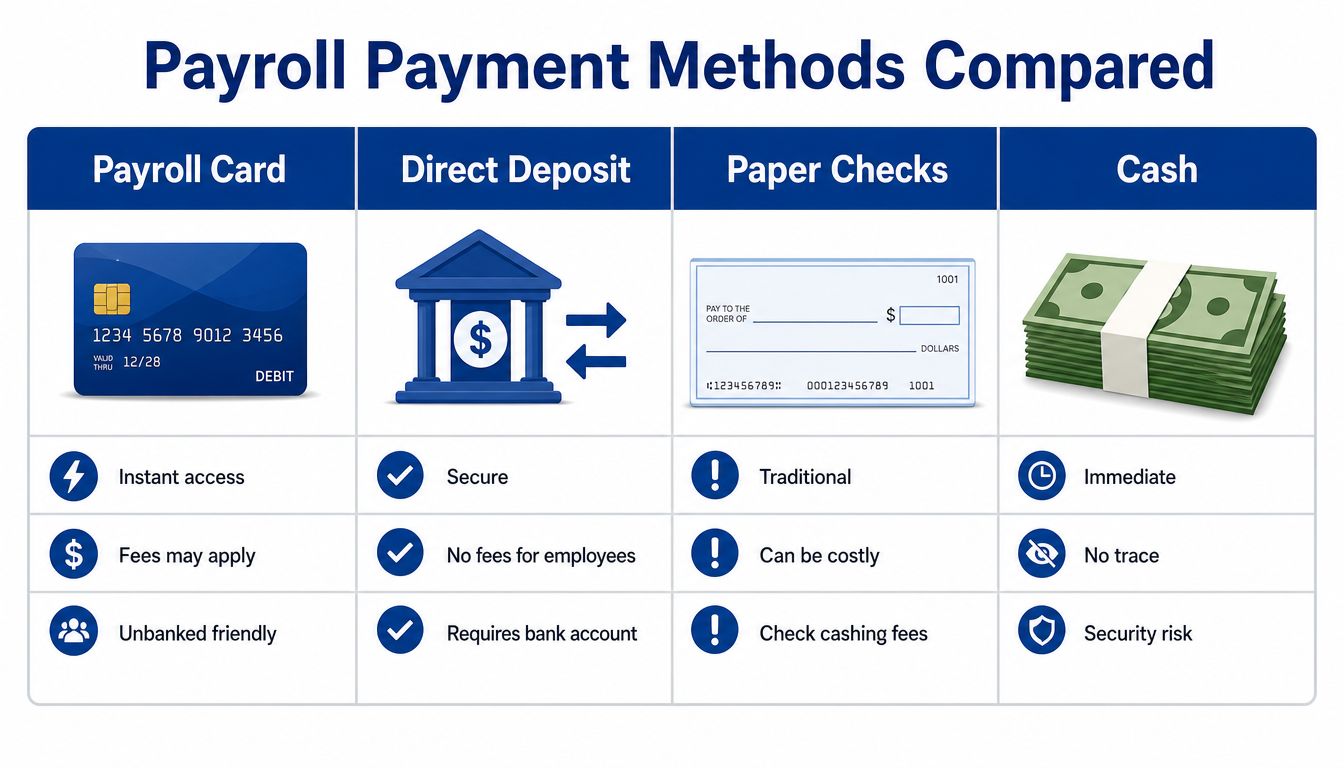
Payroll cards make the most sense when you compare them to the practical options sitting beside them. For most service businesses, those options are direct deposit, paper checks, and newer wage-access tools.
Side-by-side practical comparison
Direct deposit is usually the cleanest standard for employees who have bank accounts. It’s familiar, low-friction, and typically avoids the card-specific fee issues that cause employee complaints.
Paper checks still matter as a fallback. They’re slower and more expensive to administer, but they remain useful for edge cases, legal choice requirements, and employees who don’t want digital wage delivery.
Payroll cards sit in the middle. They’re more modern than checks and more accessible than direct deposit for unbanked employees, but they often come with fee and usability tradeoffs.
Earned wage access and real-time pay tools are worth a look if your main goal is faster access to wages rather than bank-account substitution. Some employers prefer them because they address cash-flow timing without making a payroll card the employee’s primary wage container.
Here’s the simple decision lens:
- Choose direct deposit when the employee has a stable bank account.
- Keep paper checks available when compliance or employee preference requires it.
- Use payroll cards carefully when you need an electronic option for workers without bank access.
- Review newer pay-access tools if your workforce’s main issue is timing, not account access.
If you’re comparing business payment tools more broadly, this piece on a prepaid debit card for business helps clarify how payroll-specific cards differ from other prepaid card use cases.
What service businesses usually need
Service businesses rarely need one universal payment method. They need a payment mix that fits a mixed workforce.
That usually means direct deposit as the default, a compliant fallback method, and a carefully vetted card option only where it solves a real employee need.
Decision Framework for Your Service Business
The best payroll card decision usually comes from pressure-testing the details, not from saying yes or no too quickly.
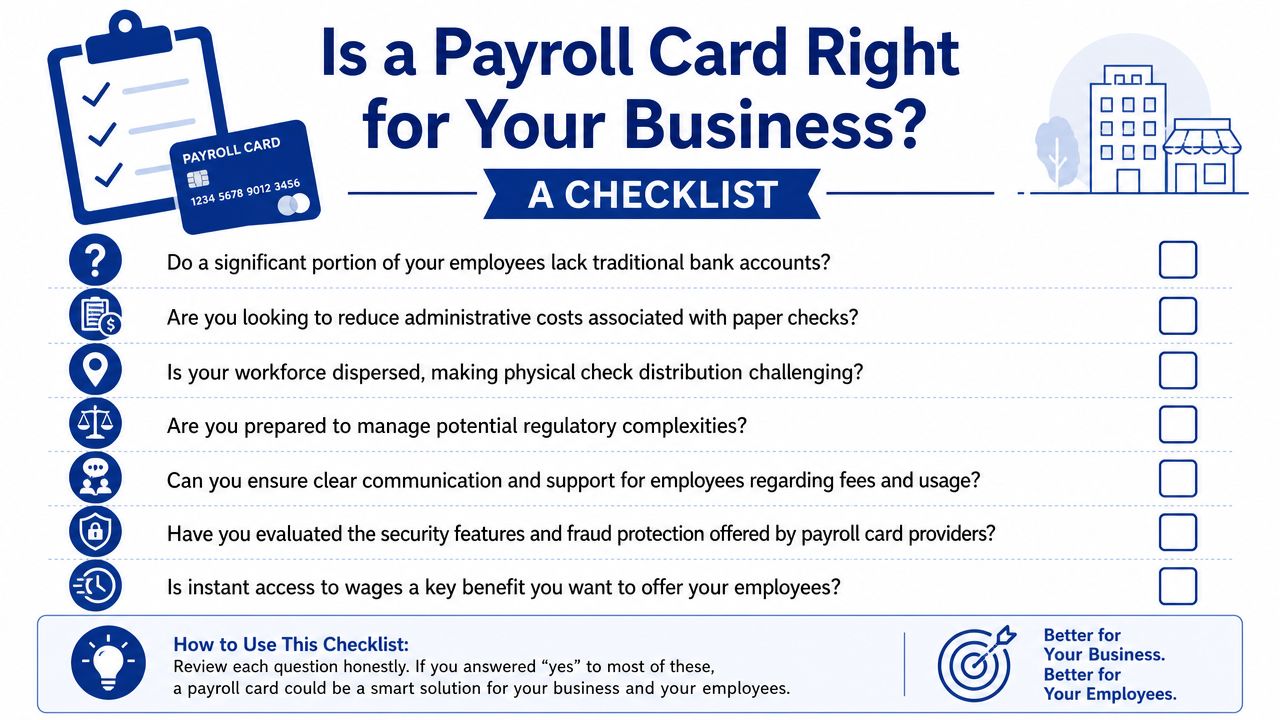
Run through this checklist before adopting any program.
Questions worth asking first
- Do enough employees need it to justify it: If only one employee needs an alternative, a check option may be simpler.
- Will the employee fee structure hold up under scrutiny: If the card works well for payroll admin but creates repeated employee charges, the tradeoff may not be worth it.
- Can your team support the program consistently: Managers and payroll staff need a clear process for enrollment, disputes, and troubleshooting.
- Does the provider look stable: If fund access is ever interrupted, your employees will feel the impact immediately.
- Will it fit cleanly into your payroll tech stack: A messy workaround inside Gusto or QuickBooks can erase the efficiency you were hoping to gain.
A workable decision standard
Payroll cards are usually a good fit when all of these are true:
| Good fit signs | Warning signs |
|---|---|
| You have employees who can’t use direct deposit | You’re using cards mainly to push everyone off checks |
| The provider’s fees and support are clear | The fee schedule is dense or hard to explain |
| Your state-law review is complete | You’re assuming federal rules are enough |
| Employees have a real alternative payment option | Enrollment language feels mandatory or confusing |
The core issue in the payroll cards pros and cons debate is simple. A payroll card should solve an employee access problem without creating a new employee money problem. If it can’t do both, it’s the wrong tool.
If you want help choosing the right payroll mix, cleaning up payment workflows in Gusto or QuickBooks, or building a payroll process that’s compliant and easier on your team, Steingard Financial can help you evaluate the options and set up a back office that fits how your service business operates.