 Skip to content
You finish a client call, open QuickBooks, and realize the bank feed hasn’t been reviewed in weeks. A contractor sent a receipt by text. Payroll runs tomorrow. Two invoices are still in draft. You know the business is healthy, but you can’t see cash clearly enough to feel calm.
That’s where many service business owners get stuck. Not because they’re careless. Because the back office grows in small increments. One more client. One more employee. One more software subscription. Before long, bookkeeping turns into a pile of repeated tasks that only get attention at month-end.
Most owners don’t need more accounting theory. They need a system that keeps up with the business while they focus on delivery, sales, and team management. That’s where accounting software automation starts to matter. Done well, it cuts the busywork, reduces avoidable errors, and gives you cleaner numbers sooner.
The catch is that automation isn’t magic. It works best when the workflow is clear, the tools fit together, and someone still watches the exceptions. That matters even more for service businesses, where billing terms, payroll timing, reimbursable expenses, and project-based work rarely fit a perfect template.
From Manual Overload to Automated Efficiency
A typical month-end in a service business looks the same across industries. The owner or office manager logs into QuickBooks after hours, tries to remember what three bank transactions were for, chases a missing vendor bill, and hopes payroll and client payments land in the right week.
Meanwhile, the ultimate cost isn’t just time. It’s the constant shift into reactive mode. You stop asking, “Should I hire?” or “Which client line is most profitable?” and start asking, “Why doesn’t this account reconcile?”
Consider a simple example. A consulting firm sends invoices manually at the end of each month. Employee reimbursements come in by email. Payroll lives in one system, bookkeeping in another, and receipts sit in a shared folder until someone has time to sort them. Nothing is technically broken. But the process depends on memory, follow-up, and clean handoffs that rarely happen under pressure.
You don’t feel the pain of manual accounting all at once. You feel it in delays, interruptions, and the lack of confidence in your own numbers.
Automation changes that by shifting routine work away from human memory and into defined workflows. Instead of entering the same data twice, the system captures it once and routes it where it belongs. Instead of waiting until month-end to understand what happened, you get activity recorded closer to real time.
For a service business owner, that’s a fundamental upgrade. You buy back attention. You reduce administrative drag. And you create the conditions for better decisions because the books stop lagging behind the business.
What Is Accounting Software Automation
Accounting software automation means using software to handle repeatable accounting tasks without someone manually touching every step. Think of it as a smart digital assistant for your finances. It doesn’t replace judgment, but it does take over the repetitive work that slows your team down.
Manual bookkeeping is like running a paper library. Every item has to be filed by hand, found by hand, and checked by hand. Automated accounting is more like a searchable digital library. The system helps read documents, sort transactions, match records, and keep everything connected.
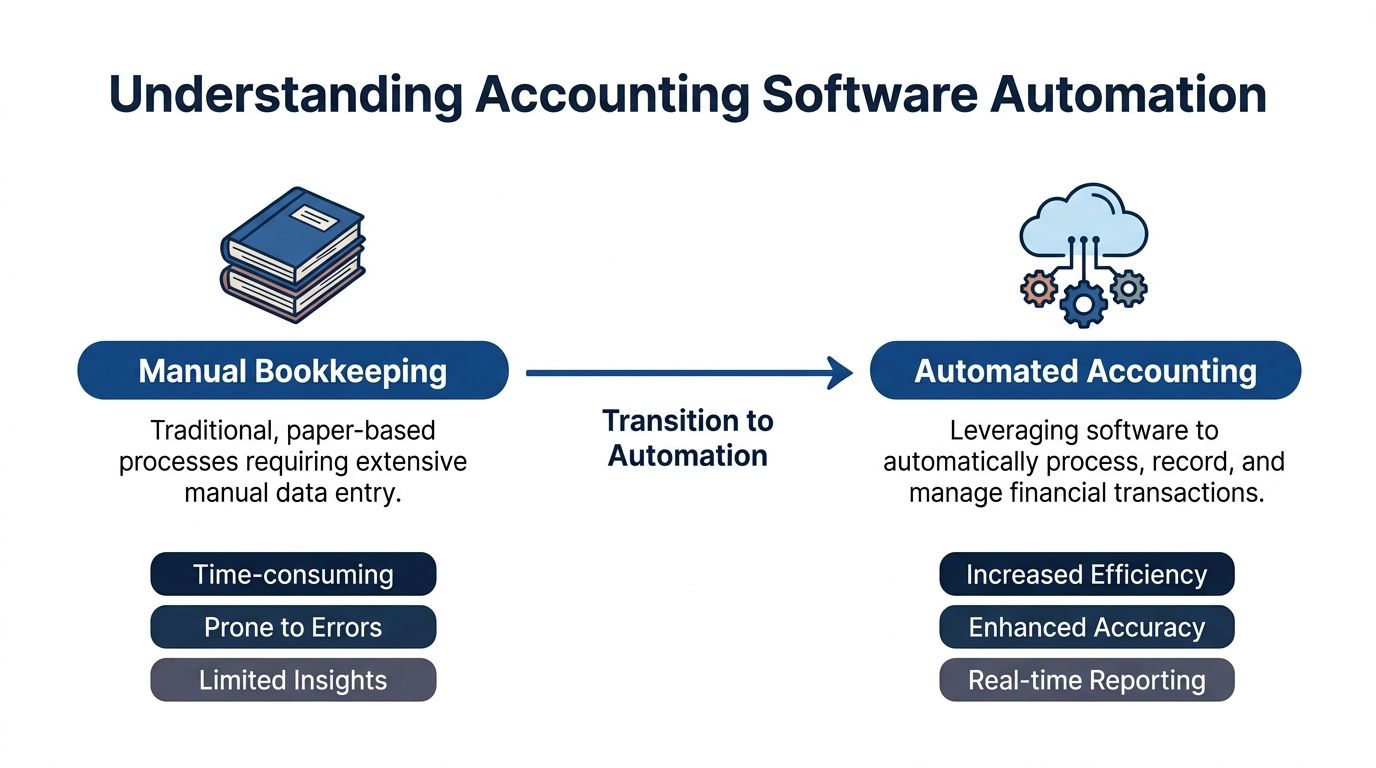
This shift isn’t niche anymore. The AI in accounting market reached $10.87 billion in 2026 and is projected to reach $68.75 billion by 2031 at a 44.6% CAGR, with automated bookkeeping identified as the fastest-growing sub-segment driven heavily by SME adoption.
The three technologies people confuse most
When owners hear terms like AI, OCR, and RPA, the language can sound more technical than it is. In practice, each does a very simple job.
- OCR reads documents. OCR stands for optical character recognition. In plain English, it’s the feature that reads a receipt, bill, or invoice so you don’t have to type the vendor, date, and amount yourself.
- AI suggests patterns. If your software learns that charges from a certain vendor usually belong in software expense or subcontractor cost, it can suggest that coding automatically.
- RPA moves data through steps. Robotic process automation handles repetitive actions, such as routing an approved bill for payment or moving synced payroll data into the ledger.
What automation looks like in real life
In a service business, accounting software automation usually shows up in familiar places:
| Task | Manual version | Automated version |
|---|---|---|
| Expense capture | Staff email receipts or save paper copies | Software reads and stores receipts digitally |
| Transaction coding | Someone categorizes each line item | The system applies rules based on history |
| Invoice follow-up | You remember to send reminders | The platform sends reminders on schedule |
| Reconciliation | Month-end matching by hand | Transactions are matched as activity comes in |
The important distinction is this. Automation handles process, not ownership. You still need someone deciding how the chart of accounts should work, how revenue should be tracked, and when a transaction doesn’t fit the normal rule.
That’s why the best use of automation isn’t “set it and forget it.” It’s “set it up well, then let it remove friction.”
The Business Case for Automation ROI and Key Benefits
Owners usually ask the right first question. “Will this save me time, or am I just adding another app?” The answer depends on whether automation is solving real bottlenecks.
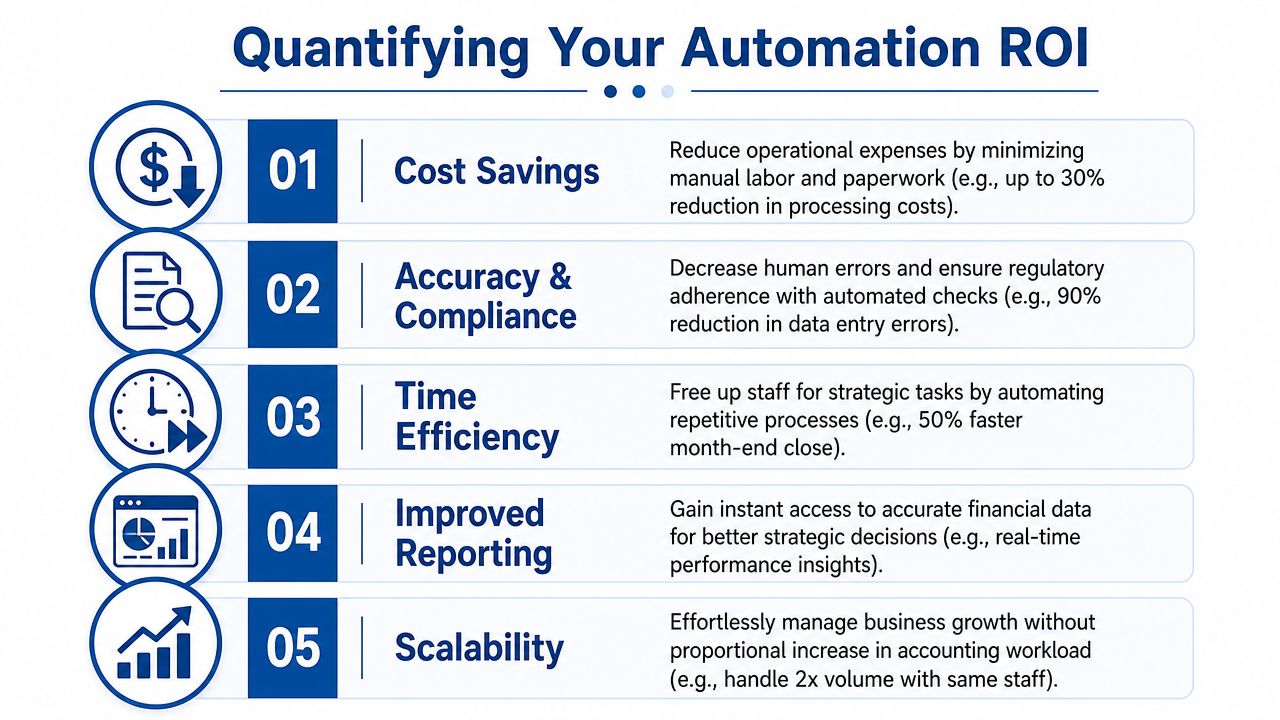
Here’s why it often pays off quickly in an accounting function. Systems that combine AI, machine learning, and RPA can deliver 2 to 3 times faster financial document processing and 95%+ accuracy. In the same source, those workflows are tied to a 3x+ improvement in accountant productivity when transaction recording, processing, and reconciliation move out of manual handling.
Time savings are the obvious win
If your team is entering vendor bills, rekeying payroll summaries, or manually matching deposits to invoices, you’re paying skilled people to do clerical work. Automation moves that effort into the system.
That matters most in growing service businesses because transaction volume rises before finance headcount does. You may not need another administrator. You may need fewer repeated touches on the same transaction.
A quick visual helps frame the upside:
Accuracy changes decision quality
Faster processing is useful. Better data is more important. When coding is consistent and records sync automatically, your profit and loss statement becomes more trustworthy.
That changes owner behavior. Instead of delaying decisions until the books are “cleaned up,” you can review current numbers with less second-guessing.
Practical rule: If your reports require a mental disclaimer every month, your process needs automation or redesign.
Better timing improves cash visibility
For service businesses, cash issues often come from lag, not from lack of revenue. Invoices go out late. Payments aren’t matched quickly. Expenses sit uncoded. By the time you review results, the decision window has passed.
Automation reduces that lag by keeping activity flowing into the ledger with fewer pauses. The result isn’t just a faster close. It’s a more current view of collections, spending, payroll impact, and operating margin.
Three ROI categories matter most:
- Operational payoff. Staff spend less time on repetitive processing.
- Financial payoff. Fewer manual touches usually means fewer avoidable errors.
- Strategic payoff. Owners get usable numbers sooner and can act before small problems become expensive ones.
That’s the actual business case. Accounting software automation doesn’t just help you process the past faster. It helps you run the business with better timing.
Common Automated Workflows for Service Businesses
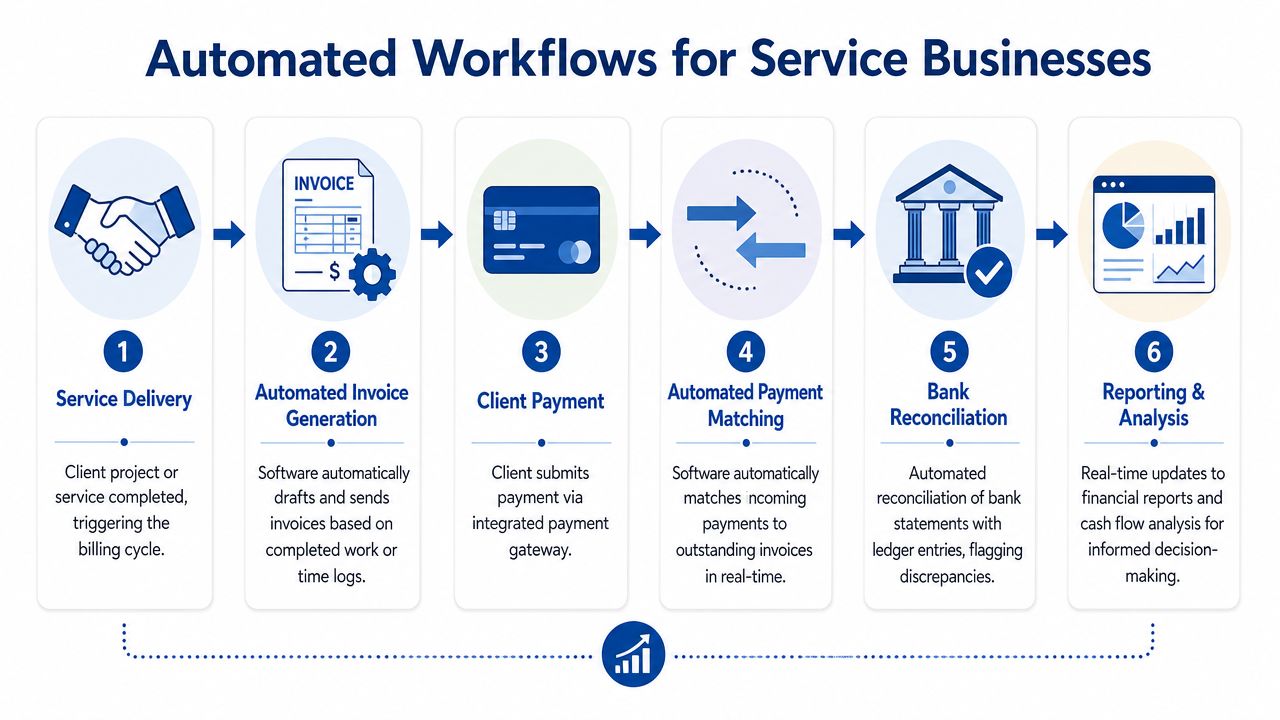
The easiest way to understand automation is to watch a normal workday move through it. In a service business, the biggest gains usually come from the handoffs. Client work finishes, a bill gets sent, payroll runs, expenses hit the books, and reports update without someone babysitting each step.
Invoicing and collections
A marketing agency finishes a monthly retainer cycle. Instead of drafting each invoice from scratch, QuickBooks uses saved products, customer terms, and recurring templates to generate invoices. If the firm tracks time, those records can feed billing support. Once the client pays, the system matches the deposit to the open invoice.
That removes the small delays that hurt cash flow. You’re not waiting for someone to notice which invoices still need to go out or which payments are sitting unmatched in the bank feed.
For owners who want a tighter bill pay workflow on the expense side too, this walkthrough on automating accounts payable processes is useful because it shows how approvals and payment timing fit into the broader accounting cycle.
Payroll and people operations
Payroll is one of the first areas worth automating because it touches taxes, employee trust, and reporting. A tool like Gusto can automate payroll runs, tax filings, and employee onboarding tasks. The accounting side improves when payroll data flows into QuickBooks consistently instead of being summarized manually after each run.
That consistency matters in service businesses with changing hours, bonuses, reimbursements, or benefit deductions. If payroll lives outside the books for too long, your financial reports become stale quickly.
Reconciliation without the month-end scramble
Modern platforms have become much more practical. Brex describes automated accounting systems that use AI-driven historical pattern learning, instant expense coding, and automated receipt matching to reduce reconciliation time and support a continuous close.
In plain language, that means your books don’t have to wait until the end of the month to start making sense. Transactions can be categorized and matched as they happen.
Here’s what that looks like in a service firm:
- Bank feed activity arrives and rules classify recurring software subscriptions.
- Employee card transactions sync and receipts attach to those purchases.
- Client payments land and the system matches them to open invoices.
- Exceptions get flagged when a transaction doesn’t fit the normal rule.
The best reconciliation workflow doesn’t eliminate review. It shortens the list of items that actually need review.
Reporting that stays current
When invoicing, payroll, and reconciliations run through connected systems, reports stop being a month-end artifact. Your P&L, balance sheet, and cash view become more useful during the month.
That’s a major shift for service owners. Instead of waiting for cleanup before discussing margin or staffing, you can spot trends while there’s still time to adjust. If labor is climbing too fast relative to collected revenue, or if one service line is carrying more overhead than expected, those patterns show up sooner.
The key is that each automated workflow should serve a business decision. If a process saves time but leaves your reports confusing, it isn’t finished.
Your Implementation and Integration Checklist
Most automation problems start before the software is turned on. Owners buy a tool, connect a bank, import transactions, and assume the system will organize itself. It won’t. Good accounting software automation starts with process design.

Start with bottlenecks, not features
Before choosing apps, list the places where work gets delayed or duplicated. For many service businesses, the trouble spots are easy to spot:
- Receipts are scattered across email, text, and paper.
- Invoices go out late because billing depends on manual review.
- Payroll entries lag behind the actual payroll run.
- Reconciliation gets pushed until someone has a free afternoon.
If you can name the bottleneck clearly, you can choose the right automation target. If you can’t, you’ll end up with attractive software and the same operational mess.
Build around one core ledger
For many growing businesses, QuickBooks Online becomes the hub. Other systems should feed into it cleanly. Gusto handles payroll. An expense tool captures receipts and card transactions. Payment platforms feed customer collections. The ledger remains the source for reporting.
That hub-and-spoke model is why integration quality matters more than feature count. A simple system that syncs reliably beats a powerful one that creates duplicates or broken mappings. If you want a non-technical overview of what strong connectivity should look like, Blowfish Technology has a helpful guide to business software integration.
A practical setup sequence often looks like this:
- Map the chart of accounts first so categories reflect how you run the business.
- Choose core systems second so payroll, billing, and expenses have a clear home.
- Set rules before launch for coding, approvals, and exception handling.
- Test the flow with sample transactions before relying on live results.
Define who approves what
Automation gets messy when nobody owns the decision points. A bill can be captured automatically, but someone should still approve payment. Payroll can sync automatically, but someone should verify unusual changes. Client deposits can match automatically, but someone should investigate partial payments or credits.
A short checklist helps here:
| Area | What to decide before go-live |
|---|---|
| Expenses | Which vendors auto-code, and which require review |
| Payroll | Who checks unusual hours, bonuses, and reimbursements |
| Revenue | How deposits, retainers, and prepayments should be handled |
| Reporting | Which reports matter weekly and which matter monthly |
Train for exceptions, not just clicks
Teams usually learn the buttons quickly. What they struggle with is judgment. They need to know what to do when a transaction lands in the wrong category, a sync breaks, or a client payment doesn’t match neatly.
That’s why implementation should include a written exception process. Who gets notified. What gets paused. When something should be posted versus escalated.
If QuickBooks Online is your accounting hub, this QuickBooks Online setup guide is a useful starting point because it focuses on creating a stable structure instead of only walking through screens.
A well-implemented system feels boring in the best way. The routine work flows smoothly. The unusual items rise to the surface. That’s exactly what you want.
Maintaining Control and Security in an Automated System
One of the most common objections to automation is emotional, not technical. Owners worry they’ll lose visibility. They picture software posting entries, moving cash, and syncing data in the background while nobody fully understands what happened.
That fear is healthy. Automation should never mean “hands off.” It should mean “routine work is system-driven and high-risk work is easier to monitor.”
Control comes from design
A controlled automated system has clear permissions, approval rules, and documented review points. The software may capture a bill automatically, but not everyone should be able to approve and pay it. Payroll may sync into the ledger, but only limited users should edit payroll accounts or post manual entries.
Separation of duties matters, even in a small company. If one person can create a vendor, approve a payment, and reconcile the bank account, the process is fragile. Good automation makes these handoffs visible.
A few control practices matter immediately:
- Use role-based access so employees only see what they need.
- Set approval workflows for payments, credits, and unusual journal entries.
- Review exception reports instead of trying to review every normal transaction.
- Keep audit trails on so changes can be traced back to a user and timestamp.
For a practical small-business framework, this resource on internal controls for small business lays out the kind of checks that make automation safer.
Secure automation is different from simple automation
The appeal of cloud tools is convenience. The risk is that convenience can outrun governance. Personiv notes that payment automation can save 500+ hours annually, but total cost of ownership can rise because of ongoing system tuning and security upgrades, while cloud-based automation also increases cyber threat exposure.
That means owners shouldn’t just ask, “Can this automate?” They should ask, “How will this be secured and maintained over time?”
If your team needs a broader primer on policies and practices around confidential information, FaxZen has a practical guide on how to secure your sensitive business data.
A secure accounting workflow has two layers. The software does the routine work. People verify access, approvals, and unusual activity.
Watch a few indicators consistently
You don’t need a giant dashboard. You need a handful of signals that tell you whether the system is healthy.
Useful monitoring points include invoice aging, unreconciled transactions, duplicate vendors, failed syncs, and changes to user permissions. If one of those starts drifting, the answer usually isn’t more manual work. It’s a workflow problem that needs adjustment.
That’s the broader lesson. Automation doesn’t remove control. It changes where control lives.
When to Partner with an Expert Bookkeeping Firm
There’s a practical ceiling to the do-it-yourself approach. You can automate recurring invoices, payroll sync, receipt capture, and basic reconciliations on your own. That’s often the right place to start.
But service businesses eventually hit the point where the software works and the numbers still need interpretation. That’s where the automation paradox shows up. The more routine work the system handles, the more valuable experienced oversight becomes.
A useful benchmark comes from a controller-focused perspective shared by Jason Staats. About 80% of transactional work is automatable, but automation doesn’t replace the strategic analysis and nuanced judgment of skilled accountants, especially when service businesses deal with irregular revenue or unique expense categories that require human intervention.
You’ve probably reached that transition point if any of these are true:
- Your services don’t bill cleanly. Retainers, milestone billing, prepayments, pass-through costs, and project true-ups all create exceptions.
- You spend more time managing apps than reading reports. The stack exists, but nobody owns the outcome.
- Your books are technically current but strategically weak. You have reports, but not clarity on margins, cash timing, or decision support.
- Your business is getting more complex. New states, more employees, additional service lines, and changing compensation structures raise the stakes.
At that point, professional help isn’t a step backward from automation. It’s how automation becomes reliable, reviewable, and useful to the business owner.
If your current system feels half-manual, half-automated, and never fully under control, Steingard Financial can help you tighten the workflow, clean up the books, and build a back office that supports real decisions instead of creating more admin work. For service businesses using QuickBooks, Gusto, or a mix of connected tools, that kind of partnership often becomes the difference between having software and having a system.