How to Set Up Payroll for Small Business
Before you can even think about running your first payroll, you need to get your house in order legally and financially. This means getting a federal Employer Identification Number (EIN), registering for state tax accounts, and opening a bank account just for payroll.
Getting these pieces in place first isn’t just busywork; it’s what keeps you compliant and out of trouble down the road.
Building Your Payroll Foundation
Jumping straight into paying your team without the proper groundwork is a recipe for future headaches. Think of this initial setup as pouring the concrete foundation for a house—it’s not the most exciting part, but everything you build later depends on its strength and accuracy. Without it, you risk compliance penalties, messy books, and a system that’s bound to crack under pressure.
This pre-flight checklist covers the non-negotiable legal and financial steps every small business must complete. We’ll walk through obtaining your federal ID, navigating state requirements, and structuring your finances for total clarity.
Securing Your Federal Employer Identification Number
Your very first move is to get an Employer Identification Number (EIN) from the IRS. This unique nine-digit number is essentially a Social Security number for your business. You absolutely must have one if you hire employees, as you’ll use it for all federal tax reporting.
Applying for an EIN is free and you can do it online directly through the IRS website. The process is quick, and you’ll typically get your number immediately. Don’t skip this—it’s the key that unlocks almost everything else, from opening a bank account to registering with your state.
Registering for State and Local Tax Accounts
With your EIN in hand, your next stop is your state and local tax agencies. Every state where you have an employee has its own payroll tax rules, and you have to play by them. These registrations are critical for two main reasons:
- State Income Tax Withholding: This account is what allows you to withhold state income tax from your employees’ paychecks and send it to the state.
- State Unemployment Tax Act (SUTA): As an employer, you’ll be paying SUTA taxes. This is what funds the unemployment benefits for workers who have lost their jobs. Once you register, the state will assign you your specific SUTA tax rate.
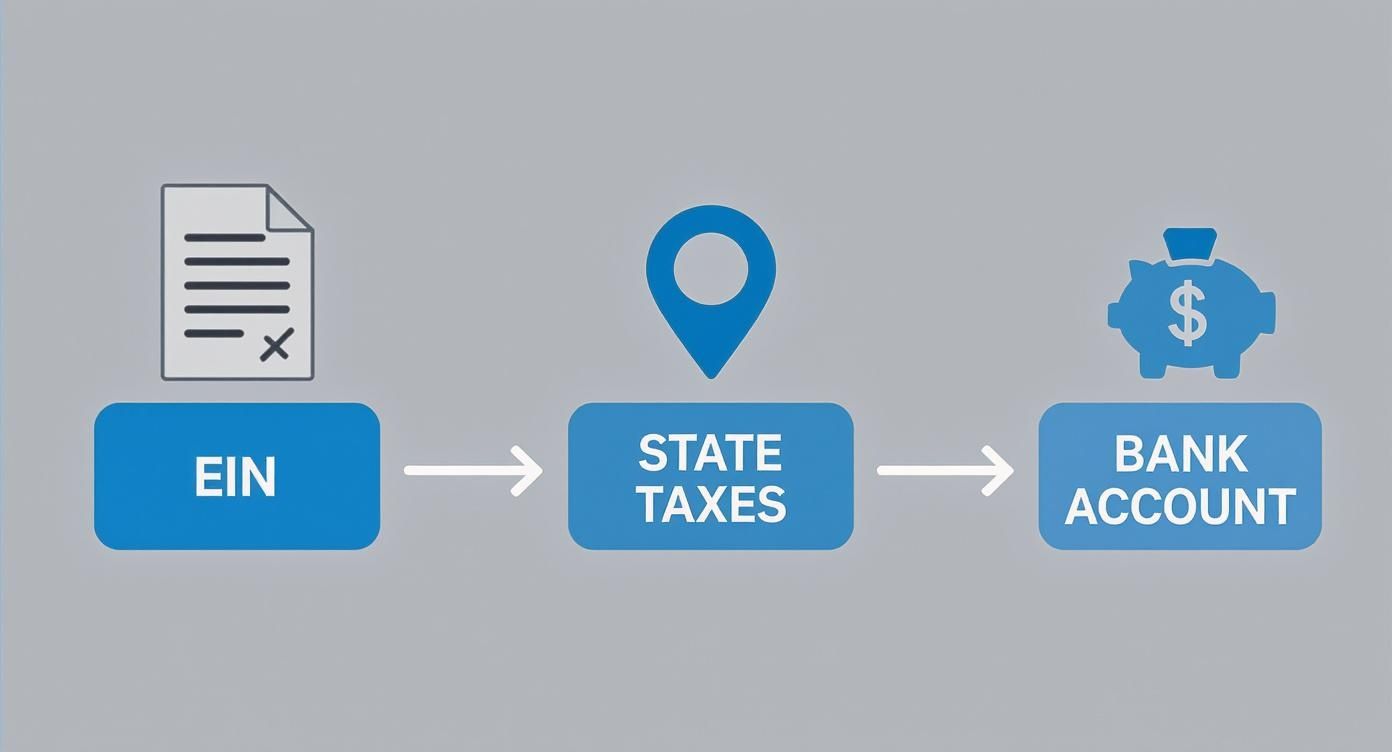
As you can see, it’s a linear path. Each step builds on the last, creating a system that’s both compliant and organized from day one.
Let’s be real: setting up payroll has gotten more complicated. It’s no wonder that 24% of small businesses have been hit with penalties for payroll mistakes. And with 59% of companies now using remote or hybrid workers, managing compliance across different state tax codes has become a massive headache.
Establishing a Dedicated Payroll Bank Account
Here’s a simple but powerful move: open a separate bank account exclusively for payroll. I know it’s tempting to run everything through your main business account, but trust me, mixing payroll funds with operational cash is a fast track to a bookkeeping nightmare.
A dedicated payroll account makes life so much easier:
- Clarity: You can see exactly what’s going out for payroll, taxes, and benefits each pay period. No guesswork.
- Easy Reconciliation: Matching your payroll reports to your bank statements becomes a breeze.
- Better Cash Management: You can transfer the exact amount needed for each payroll run into this account. This helps you budget and protects the money that’s owed to your team and the tax agencies.
To give you a clear, at-a-glance view of these foundational tasks, here’s a quick checklist summarizing the essentials.
Core Payroll Setup Checklist
| Requirement | What It Is | Why It’s Essential |
|---|---|---|
| Federal EIN | A unique nine-digit number from the IRS that identifies your business. | Required for federal tax filings, hiring employees, and opening business bank accounts. |
| State Tax IDs | Account numbers for state income tax withholding and unemployment insurance (SUTA). | Legally required to withhold and pay state taxes; non-compliance leads to steep penalties. |
| Dedicated Bank Account | A separate checking account used only for payroll transactions. | Prevents commingling of funds, simplifies bookkeeping reconciliation, and improves financial clarity. |
Think of these three items as your license to run payroll. Getting them sorted out up front saves you from countless hours of stress and potential fines later on.
This financial separation is a core principle of good money management. To go a bit deeper on organizing your business finances, check out our guide on bookkeeping basics for small business. Keeping these funds separate not only helps with payroll but strengthens your overall financial reporting and decision-making.
Choosing Your Payroll System and Pay Schedule

With your legal and financial framework in place, it’s time to decide on the engine that will actually run your payroll. This is a big one. The choices you make here—how you’ll process payments and how often—will have a direct ripple effect on your time, your budget, and your compliance risk.
Your decision really comes down to three paths, and each has its own trade-offs. The right one for you depends entirely on your business’s size, complexity, and frankly, how much you want to be in the weeds with payroll details.
Evaluating Your Payroll System Options
The first route is manual payroll processing. Think spreadsheets, IRS tax tables, and a whole lot of your own time. You’d be responsible for calculating every paycheck, withholding, and tax liability yourself. For a solo entrepreneur with just one part-time assistant, this might seem like the cheapest way to go.
But the risk of human error is sky-high. One typo or a misunderstanding of a new tax code can spiral into serious penalties. This path demands a deep knowledge of payroll rules and an almost obsessive eye for detail.
Your second, and frankly better, option is dedicated payroll software. Platforms like Gusto and QuickBooks Payroll are built for small businesses. They automate the really hard parts—calculating taxes, handling deductions, and even filing your payroll taxes.
This is where most small businesses are heading. While it might be surprising that 51% of companies still use spreadsheets, the shift to automated solutions is picking up speed as owners look to dodge compliance headaches. For a deeper dive, check out the small business payroll software market report.
The third path is to outsource to a payroll service. This is the full-service, “set it and forget it” option where an outside company manages everything. It’s the most hands-off approach but also comes with the highest price tag. It’s usually a great fit for businesses with more complex situations, like employees in multiple states, or for owners who just want payroll completely off their plate.
Expert Insight: For almost any small business with one or more employees, investing in good payroll software hits the sweet spot. It offers the best balance of cost, control, and compliance. The time you’ll save and the errors you’ll avoid nearly always justify the monthly subscription fee.
Selecting the Right Pay Schedule
Once you’ve settled on a system, you have to decide how often you’ll pay your people. This schedule impacts your cash flow, employee morale, and your own administrative workload. There are four common choices.
- Weekly: Paying every week is standard in industries like construction and restaurants, where hours can vary a lot. While employees love it, it means you’re running payroll 52 times a year. That’s a lot of admin work.
- Bi-weekly: This is the most popular schedule in the U.S. for a reason. You pay employees every two weeks on the same day, which adds up to 26 paydays a year. It’s a predictable rhythm that works well for employee budgeting and is much more manageable on the business side.
- Semi-monthly: With this schedule, employees get paid twice a month on specific dates, like the 15th and the last day of the month (24 paydays a year). It’s great for salaried employees, but it can make calculating overtime for hourly staff a bit tricky since pay periods sometimes end mid-week.
- Monthly: Paying just once a month is the least common option and can be a real financial strain for hourly or lower-wage employees. While it’s the least amount of work for you (only 12 payrolls a year), be aware that some states actually have laws against paying certain workers this infrequently.
Making a Practical Choice for Your Business
So, how do you pick? Let’s look at a couple of real-world examples.
Imagine a new marketing agency with five salaried employees. A semi-monthly schedule makes a lot of sense. The pay dates are consistent, which makes budgeting easy for everyone. They’d likely use software like Gusto to automate the process, turning payroll day into a quick, 15-minute task.
Now think about a small coffee shop with ten baristas working different shifts. A bi-weekly schedule is probably the better fit. It helps employees manage their cash flow and makes overtime calculations much simpler. For them, using a payroll system that connects directly with their time-tracking app would be a game-changer, saving hours of manual data entry and preventing mistakes.
Ultimately, this is about finding what works for your business. You need to balance your budget, how much time you can spare, and what your team needs to build a payroll process that runs smoothly without causing you constant stress.
Bringing People Onboard and Getting Classification Right
With your payroll system and schedule locked in, it’s time to shift focus to the most important part: your people. Welcoming a new team member is a huge step, but it’s more than just a handshake. There’s a specific set of paperwork and decisions you need to make to ensure they get paid correctly and you stay on the right side of the law from day one.
Getting these initial steps right saves you from massive headaches later. It’s all about making sure your tax withholdings are accurate, you’re legally allowed to employ your new hire, and you don’t get hit with the serious financial penalties that come from misclassifying someone.
Must-Have New Hire Paperwork
Before you can pay anyone, you need to collect a couple of key government forms. These aren’t optional—they’re federal requirements. The two big ones you’ll handle immediately are the Form W-4 and the Form I-9.
First up is the Form W-4, Employee’s Withholding Certificate. Think of this as your employee’s instruction manual for how much federal income tax to take out of their paycheck. They’ll fill it out with their filing status, dependents, and any other adjustments. Without a completed W-4, you’re just guessing at their take-home pay.
Next, you need the Form I-9, Employment Eligibility Verification. This is the form that proves your new hire is legally authorized to work in the United States. They handle Section 1 on or before their first day, and you have to complete Section 2 within three business days of their start date by physically examining their ID documents. Don’t mess around with this one; keeping accurate I-9s for every employee is a strict legal must.
The Million-Dollar Question: Employee or Contractor?
Here’s one of the riskiest decisions a small business owner makes: is this person an employee (W-2) or an independent contractor (1099)? This isn’t just a label. It has huge legal and financial consequences. Getting it wrong and misclassifying an employee as a contractor can open you up to a world of pain, including back taxes, fines, and penalties from both the IRS and state agencies.
The IRS looks at three main areas to figure out a worker’s status:
- Behavioral Control: Do you control how the work gets done? If you set their hours, tell them what tools to use, require them to work at your office, and provide specific training, they’re leaning heavily toward being an employee.
- Financial Control: Do you control the business side of their job? This includes things like how they’re paid (hourly vs. a flat project fee), if you reimburse expenses, and who provides the equipment. If the worker has their own tools and can make a profit or loss on the project, they start to look more like a contractor.
- Relationship of the Parties: What does the relationship look like? Is there a contract? Are you providing benefits like health insurance or paid vacation? Is the work they do a core part of your business, and do you expect them to stick around long-term?
Let’s Make It Real: Imagine you run a small graphic design agency and hire a writer. If you set the writer’s hours, make them come into the office, have them use your computer and software, and give them step-by-step instructions, that writer is an employee. Period.
But, if you hire that same writer for a specific project, they work from their home office on their own laptop, set their own schedule, and just send you an invoice when the work is done? That person is almost certainly an independent contractor.
Figuring this out is absolutely foundational for anyone learning how to set up payroll for a small business. You only process W-2 employees through your payroll system. Contractors get paid differently (usually through your regular accounts payable) and are responsible for handling their own taxes.
When in doubt, it’s always safer to classify a worker as an employee. If you’re on the fence, talk to an HR pro or an attorney before you make a call you might regret.
Calculating Paychecks Taxes and Deductions

This is where the rubber meets the road—turning employee hours and salaries into an actual paycheck. At its core, the process involves starting with what an employee earned, subtracting taxes and other deductions, and landing on their net (or take-home) pay. It can feel a little intimidating at first, but if you break it down, the math is much more approachable.
From Gross Wages to Net Pay
Every paycheck calculation begins with one number: gross pay. This is the total amount an employee earns before a single deduction is taken out. The calculation itself just depends on how you pay them.
For salaried employees, it’s a simple division problem. You just divide their annual salary by the number of pay periods in the year. If you pay bi-weekly (that’s 26 pay periods) and an employee’s salary is $52,000, their gross pay for each period is $2,000.
For hourly employees, you’ll multiply their hourly rate by the number of hours they worked. It’s absolutely critical to include any overtime, which for most non-exempt employees must be paid at 1.5 times their regular rate for any hours worked over 40 in a single week.
Let’s imagine you have an hourly employee who makes $20 per hour and worked 45 hours last week.
- Regular Pay: 40 hours x $20/hour = $800
- Overtime Pay: 5 hours x ($20 x 1.5) = $150
- Total Gross Pay: $800 + $150 = $950
Understanding Payroll Tax Withholdings
Once you’ve got the gross pay figured out, it’s time for the deductions, starting with taxes. These aren’t optional—as the employer, you are legally required to withhold these amounts and send them to the right government agencies.
The biggest piece is usually federal income tax. The amount you hold back is dictated by the information on your employee’s Form W-4. The good news is that modern payroll software does this calculation automatically based on their filing status, dependents, and any other adjustments they’ve noted.
Next up are FICA taxes, which is short for the Federal Insurance Contributions Act. This is a flat-rate tax that funds both Social Security and Medicare.
- Social Security: You’ll withhold 6.2% from the employee’s pay (and you match another 6.2% as the employer) on earnings up to an annual limit.
- Medicare: You’ll withhold 1.45% from the employee’s pay (you also match 1.45%), and this has no wage limit.
Finally, you’ll likely have state and local taxes. These can vary dramatically depending on where your business and employees are located. Some states have a flat income tax, others use progressive brackets, and a lucky few have no income tax at all.
A Note on Compliance: Keeping up with ever-changing tax laws is one of the biggest headaches for small business owners. Honestly, this is the main reason why learning how to set up payroll for a small business often leads directly to adopting payroll software. It just handles the tax table updates for you.
Factoring in Pre-Tax and Post-Tax Deductions
Beyond taxes, your employees might have other deductions coming out of their checks. These are typically for benefits and can be taken out either before or after taxes are calculated, which makes a big difference in their taxable income.
Pre-tax deductions are subtracted from gross pay before income taxes are figured. This lowers the employee’s taxable income—a win-win since they pay less in taxes, and you may even pay less in employer payroll taxes.
- Health, dental, and vision insurance premiums
- Contributions to a 401(k) or similar retirement plan
- Contributions to a Health Savings Account (HSA)
Post-tax deductions are taken out after all taxes have been withheld from the paycheck. These don’t offer any tax savings.
- Roth 401(k) contributions
- Wage garnishments (like for child support)
- Charitable donations set up through payroll
A Sample Paycheck Calculation in Action
Let’s walk through a real-world example. We’ll use our salaried employee who earns $2,000 in gross pay for a bi-weekly period. Let’s assume they have the following deductions:
- Federal Tax Withholding: $150 (based on their W-4)
- State Tax Withholding (5%): $100
- Health Insurance Premium (Pre-Tax): $75
- 401(k) Contribution (Pre-Tax): $100 (5% of gross pay)
Here’s how the calculation breaks down:
- Calculate Taxable Income: First, subtract the pre-tax deductions from the gross pay.
$2,000 (Gross) – $75 (Health) – $100 (401k) = $1,825 Taxable Income - Calculate FICA Taxes: Now, apply the FICA rates to the original gross pay.
Social Security (6.2% of $2,000) = $124
Medicare (1.45% of $2,000) = $29
Total FICA = $153 - Calculate Net Pay: Finally, subtract all taxes and deductions from the gross pay to find what they take home.
$2,000 (Gross)- $150 (Federal Tax)
- $100 (State Tax)
- $153 (FICA Taxes)
- $75 (Health Insurance)
- $100 (401k)
= $1,422 Net Pay
Getting this process right ensures you stay compliant and your team gets paid accurately every single time. Mastering these calculations is a huge part of running your business well, and it’s also fantastic practice for when you need to prepare for tax season and reconcile your annual payroll reports.
Running Payroll and Maintaining Ongoing Compliance

You’ve configured your system and onboarded your team, which means the moment of truth has finally arrived—it’s time to run your first official payroll. This isn’t just a one-off task; it’s the start of a critical, repeating cycle that truly forms the backbone of your business operations. Nailing down a reliable workflow now will save you countless hours and prevent costly mistakes down the line.
The first part of this cycle is, of course, paying your employees. Modern payroll systems offer a few solid options for getting money into your team’s hands, each with its own perks.
- Direct Deposit: This is the gold standard for good reason. Funds move electronically from your business account straight to your employees’ accounts. It’s fast, secure, and you don’t have to deal with printing, signing, and handing out physical checks.
- Paper Checks: While they’re becoming less common, some employees might still prefer or require a traditional check. If you go this route, make sure you’re using high-quality check stock with security features to help prevent fraud.
- Pay Cards: Think of these as reloadable debit cards. You load an employee’s net pay onto the card each payday, which is a fantastic alternative for employees who don’t have a traditional bank account.
Mastering Your Tax Payment Schedule
Paying your team is only half the battle. The other, arguably more critical, part is sending all those taxes you withheld—plus your employer contributions—to the government. Trust me, failing to do this on time is one of the fastest ways to get unwanted attention and heavy penalties from the IRS and state agencies.
Your deposit schedule for federal taxes (that’s income tax, Social Security, and Medicare) will be either monthly or semi-weekly. This is determined by the total tax liability you reported during a prior “lookback period.” The IRS will notify you of your required schedule, and it’s your job to stick to it without exception.
Key Takeaway: Treat your tax payment deadlines as non-negotiable. Set calendar reminders, and if you’re using payroll software, triple-check that the automated tax payments are configured correctly. Late payments bring on penalties that can snowball quickly.
This diligence is so vital because payroll is a massive part of any small business budget. Labor can eat up as much as 70.4% of total expenses, and small businesses in the U.S. handle a staggering $2.9 trillion in private sector payroll every year. With about a third of owners spending over six hours a month on this single task, automating and streamlining compliance isn’t just a convenience—it’s a financial necessity. You can find more insights on these payroll outsourcing statistics and trends.
Staying on Top of Quarterly and Annual Reporting
Beyond making regular tax deposits, you also have to file detailed reports with federal and state governments. These reports summarize all the wages you’ve paid and the taxes you’ve collected over a specific period. Think of them as a report card for your payroll compliance.
You’ll want to mark these key forms on your calendar:
- Form 941, Employer’s Quarterly Federal Tax Return: You’ll file this every three months to report federal income taxes and FICA taxes you withheld, plus your share of FICA.
- Form 940, Employer’s Annual Federal Unemployment (FUTA) Tax Return: This is an annual filing for your FUTA tax liability. Even though the form is filed once a year, you might need to make FUTA tax deposits quarterly if you owe more than $500.
- Forms W-2 and W-3: At the end of the year, you must give a Form W-2 to every employee and send copies to the Social Security Administration. The Form W-3 is a transmittal form that summarizes all your W-2s for the year.
Getting into this rhythm of paying employees, remitting taxes, and filing reports keeps your business in good standing. Accurate record-keeping is the thread that ties it all together, making it much easier to match up your payroll transactions with your bank statements. To get a better handle on that, take a look at our guide on how to reconcile bank accounts for a clear, step-by-step approach.
Common Payroll Questions for Small Business Owners
Even with the best checklist, you’re going to have questions when getting your payroll system off the ground. That’s perfectly normal. Getting clear answers to these common hurdles early on will save you a ton of time and help you sidestep some expensive mistakes.
Think of this section as your practical, no-fluff FAQ—just straightforward answers to give you the confidence to move forward.
How Often Should I Run Payroll?
One of the first real decisions you have to make is your pay frequency. This choice affects everything from your company’s cash flow to your team’s morale. The most common options you’ll see are weekly, bi-weekly (every two weeks), semi-monthly (twice a month), and monthly.
For the vast majority of small businesses I’ve worked with, a bi-weekly schedule is the sweet spot. It’s consistent and frequent enough for employees to manage their personal budgets, but it also keeps your administrative workload reasonable—you’re only processing payroll 26 times a year.
- Weekly: This is great for industries with a lot of hourly workers and fluctuating schedules, like construction or restaurants. The downside is that it creates more administrative work for you.
- Semi-monthly: This can work well if your team is all salaried. But it can get tricky for hourly employees because pay periods often end in the middle of a workweek, which complicates overtime calculations.
- Monthly: This is usually too infrequent for most workers and can even violate wage payment laws in some states. Be sure to check your local regulations before even considering this option.
Can I Do Payroll Myself or Should I Hire Someone?
Yes, you can absolutely do payroll yourself, especially if you only have a handful of employees. Modern software from providers like Gusto or QuickBooks Payroll is designed for business owners, not just accountants. These platforms do the heavy lifting by automating the most complicated parts, like tax calculations and filings.
The real question comes down to time versus complexity. As your business grows—maybe you hire employees in a few different states or you just find the process is eating up too much of your week—outsourcing becomes a very smart move. Handing it off to a payroll service or a firm like ours frees you up to actually run your business, all while knowing the compliance details are being handled by experts.
The biggest payroll mistakes often stem from simple human error—miscalculating overtime, missing a tax deadline, or misclassifying a worker. Using a reliable system is your best defense against these costly pitfalls.
What Are the Biggest Payroll Mistakes to Avoid?
Knowing where the common traps are is the best way to avoid falling into them. From what I’ve seen, the most significant and costly errors tend to fall into just a few categories.
The first major one is misclassifying employees as independent contractors. This is a huge red flag for the IRS and state agencies. If you get it wrong, you could be on the hook for back taxes, penalties, and fines for failing to withhold income and FICA taxes.
Next up is failing to remit payroll taxes correctly and on time. Government agencies are incredibly strict about their deadlines, and the penalties for late payments add up fast. This is where the automation in good payroll software really proves its worth.
Finally, poor recordkeeping can turn into a massive headache. Whether you’re facing an audit or just trying to answer a simple question from an employee about their pay stub, you need organized records. Keeping detailed, accessible files for hours worked, pay rates, and tax forms isn’t just a good idea—it’s non-negotiable for a smooth-running payroll system.
Navigating the complexities of payroll setup and ongoing management can be challenging. At Steingard Financial, we specialize in taking the burden of bookkeeping and payroll off your shoulders. We work with your existing systems, like Gusto or QuickBooks Payroll, to ensure accuracy, compliance, and peace of mind. Let us build a scalable back office for your business so you can focus on growth. Learn more about how we can help.