A Complete Guide to the Invoice to Pay Process
The invoice to pay process is the entire journey a vendor bill takes inside your company, from the moment it lands on your desk (or in your inbox) to the moment you pay it and log it in your books. A well-oiled process means paying bills on time and keeping your financial records clean. A chaotic, paper-shuffling one? That’s a recipe for late fees, accidental double payments, and unhappy vendors.
What Is the Invoice to Pay Process and Why It Matters
Think of your company’s invoice to pay process like the circulatory system for your finances. When it’s healthy, cash flows smoothly and on schedule to your suppliers, keeping those crucial business relationships strong and your day-to-day operations humming.
But when that system gets clogged with manual data entry, stacks of paper invoices, and messy email approval chains, you get serious financial blockages. These aren’t just small headaches; they cause real problems that hit your bottom line. Hidden costs, wasted staff hours, and broken supplier trust are the direct results of a broken process. Getting this workflow right is the key to finally gaining control over your company’s cash flow.
The Real Cost of Manual Processing
The financial drain from an inefficient system is often way bigger than business owners realize. It’s not just about the time your team spends chasing down approvals; it’s a hard, measurable cost.
Here’s a staggering fact: the average cost to process a single invoice by hand is around $22.75. But top-performing teams who use automation get that cost down to just $2.78 per invoice. That’s an enormous difference that separates a reactive, cost-heavy back office from a strategic, efficient one.
To get a handle on this, you first need to understand the document that kicks the whole thing off: a business invoice. It’s the starting pistol for the entire workflow.
A well-managed accounts payable process doesn’t just improve cash flow visibility. It reduces risk, guarantees timely payments, and builds stronger relationships with the vendors you rely on. Mastering this cycle is fundamental to your financial health.
It’s also crucial to know what an invoice is and what it isn’t. People often mix them up with other documents, but they have very different jobs. For a deeper dive, check out our guide on the difference between an invoice and a receipt.
Manual vs. Automated Invoice Processing at a Glance
When you put the two approaches side-by-side, the contrast is night and day. This table shows just how stark the differences are between a traditional, manual workflow and a modern, automated one.
| Metric | Manual Process | Automated Process |
|---|---|---|
| Average Cost per Invoice | $22.75 | $2.78 |
| Processing Time | Days to weeks | Hours to days |
| Error Rate | High due to manual data entry | Near-zero with OCR and validation |
| Cash Flow Visibility | Limited and delayed | Real-time and accurate |
| Fraud Risk | High (duplicate payments, fake invoices) | Low (automated checks and controls) |
The numbers speak for themselves. Shifting from a manual system riddled with high costs, slow timelines, and human error to an automated one is one of the most impactful financial upgrades a business can make. It’s about working smarter, not harder.
Mapping the Six Stages of the Invoice to Pay Lifecycle
To really get a handle on your financial operations, you first have to understand the journey an invoice takes from the moment it lands in your business to the moment it’s paid. The invoice to pay process isn’t just a single event; it’s a series of connected steps, each with its own job and potential for things to go wrong.
Think of it like a factory assembly line, but for your company’s bills. When every station on that line works smoothly, the end product—a paid, reconciled invoice—is flawless. But if one station is slow or sloppy, it creates a bottleneck that gums up the entire operation. Let’s walk through the six critical stages of this financial assembly line to see exactly how it works.
This infographic hammers home the dramatic cost difference between a clunky manual process and a modern, automated one.
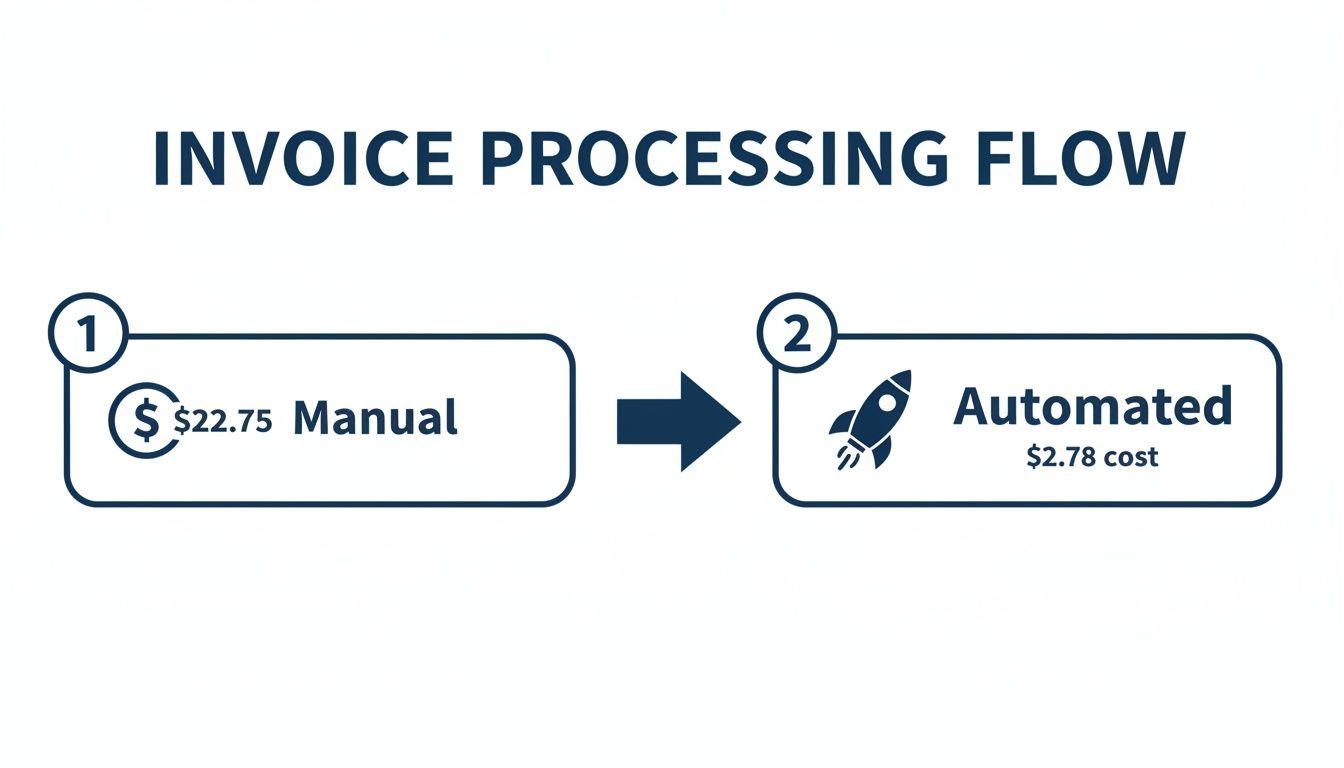
It’s clear that automation isn’t just about saving a few bucks here and there. It fundamentally overhauls the cost of your accounts payable, slashing expenses by nearly 90%.
Stage 1: Invoice Receipt and Capture
The whole process kicks off the second a vendor invoice shows up. In a manual world, this is pure chaos. Invoices flood in from every direction—paper mail, a half-dozen email inboxes, maybe even the occasional fax—with no central place to wrangle them.
This first stage is simply about getting the invoice into your system. Without a standard way to bring them in, bills get lost, forgotten in an employee’s inbox, or just sit on a desk waiting for someone to notice. The goal here is to capture every single invoice right away, creating one reliable source for everything you owe.
Stage 2: Data Extraction and Validation
Once an invoice is in the door, its key details have to be pulled out and checked. We’re talking about the vendor name, invoice number, date, total amount, and all the line-item details. Manually, this means someone is tediously typing all this information into your accounting software—a task practically designed for human error.
A single typo can lead to paying too much, too little, or paying the same bill twice. This is also where you do an initial check, like making sure the vendor is on your approved list and that the invoice looks legitimate. Automation tools use Optical Character Recognition (OCR) to “read” and pull this data in seconds, taking manual mistakes out of the equation.
The whole point of this stage is to turn an unstructured document (the invoice) into structured, clean data for your accounting system. If you get this part wrong, you’re poisoning the well for every step that follows.
Stage 3: GL Coding and Verification
After the basic data is captured, the invoice needs a home in your General Ledger (GL). This is called GL coding, and it’s how you tell your books what the company spent money on. Was it marketing software, office supplies, or a consulting fee?
Getting the coding right is absolutely critical for accurate financial reports and budgets. A miscoded expense can warp your financial statements, leading you to make bad business decisions based on faulty numbers.
This is also where the three-way match often happens—a crucial control where you compare three documents to confirm everything is legitimate:
- Purchase Order (PO): What your team agreed to buy.
- Receiving Report: Proof of what goods or services you actually got.
- Vendor Invoice: What the vendor is asking you to pay for.
If all three line up, the invoice is verified. But if there’s a mismatch—like getting a bill for 10 laptops when you only received eight—it gets flagged for someone to look into.
Stage 4: Approval Workflows
With the invoice coded and verified, it’s time to get it approved for payment. Honestly, this is where things usually grind to a halt. The invoice needs to find its way to the right department head or manager who actually has the authority to sign off on the expense.
In a manual system, this means forwarding emails, walking paper copies down the hall, or leaving a stack of bills on someone’s desk. If that approver is busy, out of the office, or just plain forgets, the invoice sits there, getting older and putting you at risk for late fees. A solid invoice to pay process uses clear, pre-set approval chains to make sure the bill moves quickly to the right person without getting stuck.
Stage 5: Payment Execution
Once it’s fully approved, the invoice is ready for the final action: payment. The accounts payable team schedules and sends the payment based on the invoice due date and any early-payment discount terms you might want to catch.
Payments can be sent out in a few different ways, each with its own process:
- ACH or Electronic Funds Transfer (EFT): A simple bank-to-bank transfer.
- Paper Check: A slow, manual method that involves printing, signing, and mailing.
- Virtual Card: A secure, single-use credit card number.
- Wire Transfer: Usually reserved for very large or international payments.
The keys here are accuracy and timing. Paying vendors correctly and on schedule keeps those important relationships healthy and protects your company’s reputation.
Stage 6: Reconciliation and Reporting
The final stage happens after the money has been sent. The payment needs to be recorded in your accounting system, and the original invoice marked as paid. This officially closes the loop on the transaction.
This step is vital for reconciliation, which is just a fancy word for matching the payments leaving your bank account with the invoices you recorded in your books. It ensures everything balances out and leaves a clean audit trail for every dollar you spend. All this data then flows into your financial reports, giving you a crystal-clear picture of your company’s spending and cash flow.
Common Bottlenecks in Your Invoice to Pay Process
An inefficient invoice to pay process does more than just create a few administrative headaches. It actively bleeds money from your business and can seriously damage your reputation with the people you rely on most—your vendors.
Too many business owners write these problems off as just “the cost of doing business.” But they aren’t. They are symptoms of a broken, manual process that’s holding you back.
Imagine getting a collections call from your most critical software provider. Why? Because their invoice got lost in an employee’s inbox for three weeks. This isn’t a hypothetical; it’s a classic bottleneck where a simple breakdown snowballs into a real financial and relationship crisis. Once you start spotting these pain points, you’ll see just how much a disorganized process is truly costing you.
The High Cost of Late Payments and Lost Discounts
Late payments are probably the most immediate and painful result of a slow AP process. When invoices get misplaced, sit on a desk waiting for a signature, or just get forgotten, you miss payment deadlines.
This isn’t just about paying late fees, which are essentially penalties for being disorganized. It also means you’re throwing away valuable early payment discounts that many vendors offer as an incentive. These small losses add up incredibly fast, turning your accounts payable function from a standard operation into a needless expense center. It’s like choosing to pay more for every single service you use, simply because your internal workflow can’t keep up.
The invoice-to-pay cycle drags on for an average of 9.2 days from receipt to payment. That’s nearly two full weeks where your cash is tied up and your suppliers are left waiting. This isn’t just a local problem; it’s a global bottleneck. A staggering 63% of AP teams waste over 10 hours every week on manual processing. This leads to 17.4-day cycles for average companies versus just 3.1 days for top performers. You can find more details about these AP automation statistics on Quadient.com.
Accidental Duplicate Payments and Invoice Fraud
A chaotic, paper-based system is the perfect breeding ground for expensive mistakes. Without a single, digital source of truth to track every invoice, it’s dangerously easy to pay the same bill twice. All it takes is for a vendor to send a friendly reminder for an invoice that’s already in the payment queue. Without clear visibility, your team processes it again, and poof—cash is gone.
This lack of control also swings the door wide open for invoice fraud. A fake bill designed to look like a real one from a familiar vendor can easily slip through the cracks when approvals are rushed and there are no solid checks and balances. Each one of these errors pulls cash directly out of your business that is often difficult, if not impossible, to ever get back.
Eroding Supplier Trust and Damaged Relationships
Your suppliers are your partners. A reliable and timely payment process is the bedrock of that partnership. When you consistently pay late, you’re sending a clear message: you’re disorganized, and maybe even unreliable. This can quickly lead to strained relationships and much less favorable terms down the road.
Think about the real-world consequences here:
- Tighter Payment Terms: A supplier might slash your payment window from 30 days to 15, putting a serious squeeze on your cash flow.
- Loss of Goodwill: You lose the flexibility and understanding you might need during a genuine cash crunch of your own.
- Refusal to Work with You: In the worst-case scenario, a key vendor might just decide you’re not worth the hassle and stop doing business with you entirely.
To get ahead of these problems, it’s worth reviewing some core accounts payable best practices that can tighten up your internal controls.
Zero Visibility into Cash Flow
This might be the most damaging bottleneck of all: a complete lack of real-time financial visibility. When you don’t know exactly what you owe and when it’s due, you simply can’t make smart decisions about your cash flow.
You’re flying blind. You can’t accurately forecast expenses, you can’t plan for future investments, and you can’t manage your cash with any confidence. This constant uncertainty forces you to operate in a reactive mode, always putting out fires instead of planning for growth. A smooth invoice to pay process fixes this, giving you the clarity you need to lead your business forward.
Building a Scalable and Efficient AP Workflow
Knowing where your bottlenecks are is one thing; building a system to get rid of them for good is where the real work begins. An AP workflow that can handle growth doesn’t just appear out of nowhere. It has to be designed with clear rules, standardized processes, and solid internal controls that protect your business as it scales.
Think of it like designing a highway. If you don’t have clear lanes, on-ramps, and exit signs, all you get is chaos and traffic jams. A well-designed accounts payable workflow is that highway for your invoices, guiding them smoothly from arrival to payment without getting stuck. This is the practical blueprint for turning your AP team from a cost center into a strategic part of your business.
Standardize Your Invoice Intake
The very first step in creating an orderly invoice to pay process is to control exactly how bills get into your company. When invoices show up through a dozen different channels—multiple email inboxes, snail mail, maybe even a photo sent via text—it’s just a matter of time before one gets lost or paid late.
To fix this, you need a single, mandatory channel for every vendor invoice. A dedicated email like [email protected] is a simple but incredibly effective solution. This creates one central mailbox where every single bill lands, making sure nothing falls through the cracks. The key is to communicate this policy clearly and consistently to all your vendors.
Design Clear Approval Hierarchies
Okay, the invoice is in the system. Now who has to approve it? A vague approval process is a guaranteed way to slow everything down. Invoices end up sitting in inboxes for days because managers aren’t sure if they have the authority to sign off, or they forward it to the wrong person, adding unnecessary delays.
A strong workflow needs a well-defined approval hierarchy. This means you need to document who is responsible for approving specific types of expenses and what their spending limits are.
- Manager-Level Approvals: Set a clear threshold (e.g., up to $1,000) for frontline managers to handle routine operational costs.
- Director-Level Approvals: Give department heads a higher limit (e.g., up to $10,000) for bigger items like project expenses or software contracts.
- Executive-Level Approvals: Reserve the highest level of approval for major capital expenditures or significant strategic investments.
This kind of structure removes all the guesswork. Invoices get routed to the right person automatically, which dramatically speeds up the whole process.
An effective AP workflow isn’t about adding more bureaucracy; it’s about creating the right rules. By defining clear pathways for invoices and approvals, you remove ambiguity and empower your team to act decisively and quickly.
Implement Strong Internal Controls
Internal controls are the guardrails on your financial highway. They are there to prevent expensive mistakes like paying the same invoice twice or falling victim to fraud. For any business serious about protecting its cash, these controls are non-negotiable. A cornerstone control is the three-way match, which confirms an invoice is legitimate by comparing it against its matching purchase order and receiving report.
Another critical control is the segregation of duties. Simply put, the person who approves an invoice should never be the same person who processes the payment. This separation makes it much more difficult for any fraudulent activity to go unnoticed. For a truly scalable system, documenting every step is key, as covered in this ultimate process documentation software guide.
Maintain a Clean Chart of Accounts and Reconcile Timely
Finally, a couple of foundational bookkeeping habits are essential for a healthy AP workflow. First, you need a well-organized Chart of Accounts (CoA). Think of it as your financial filing system; it ensures every dollar spent is categorized correctly, which is crucial for accurate financial reporting and budgeting.
Second, timely reconciliations are an absolute must. Reconciling your bank and credit card statements each month confirms that the payments recorded in your books actually match the cash that left your accounts. This simple practice helps you catch errors early and gives you a clear, accurate picture of your company’s financial health—the ultimate goal of a well-run invoice to pay process.
Choosing The Right Technology For AP Automation
Technology is the engine driving an efficient invoice-to-pay process. The right tools don’t just accelerate tasks—they reshape your back office, turning it from a manual cost center into a strategic source of financial insight. Instead of listing features, let’s match solutions to the real-life bottlenecks you face.
If your team is drowning in data entry, there’s a tool to scan and extract fields automatically. If approval hold-ups are triggering late fees, you’ll find platforms built to keep invoices moving. The goal? A tech stack where each component talks to the next, creating a frictionless path for every invoice.
Foundational And Specialized AP Tools
Start with your core accounting system—most service businesses rely on QuickBooks Online. It’s the general ledger, the single source of truth for all financial data. But when vendor invoices pile up or approval workflows get complex, QuickBooks alone can feel like using a wrench for every job.
That’s where dedicated AP automation platforms come into play. Solutions such as Bill.com and Melio sit on top of QuickBooks, tackling the heavy lifting:
- Capturing invoices and extracting data
- Automating approval queues and reminders
- Executing payments and syncing back to your ledger
For a step-by-step guide on how these tools integrate, see our deep dive into automating the accounts payable process.
The Power Of OCR And Smart Integrations
Imagine invoices landing in your AP inbox and vanishing—data captured, coded, and queued for approval without a single keystroke. That’s Optical Character Recognition (OCR) at work. It “reads” each document, pulling out:
- Vendor name
- Invoice number and date
- Total amount due
- Line-item details
Once the system has this data, the next magic trick is integration. A platform like Bill.com can:
- Route approvals automatically based on your rules
- Sync payment activity back into QuickBooks
- Maintain a closed-loop record so no one ever enters the same invoice twice
“Tech should solve problems, not create new ones. The ideal AP stack works quietly behind the scenes—eliminating manual tasks, enforcing controls, and giving you real-time cash-flow visibility.”
Key AP Automation Features and Their Business Impact
Below is a snapshot of essential automation features and the direct benefits they deliver to service businesses.
Before diving in, let’s see how each capability transforms day-to-day operations:
| Automation Feature | What It Does | Primary Business Benefit |
|---|---|---|
| OCR Invoice Capture | Scans and extracts invoice data automatically | Cuts manual entry time and reduces errors |
| Automated Approval Routing | Sends invoices to the right approver based on preset rules | Eliminates approval delays and avoids late fees |
| Payment Execution | Schedules and delivers payments directly through the platform | Improves cash-flow visibility and vendor relationships |
| ERP/Accounting Integration | Syncs transactions back to QuickBooks or other ledgers | Maintains accurate, up-to-date financial records |
| Audit Trail and Compliance | Logs every action in a secure, time-stamped history | Strengthens internal controls and simplifies audits |
By combining these features, you build a seamless, end-to-end AP operation that scales with your business.
Selecting And Implementing Your Tech Stack
Picking the right software matters, but rolling it out smoothly is what makes the difference. That’s where an experienced partner like Steingard Financial comes in. We don’t just recommend platforms—we help you:
- Choose the right mix of tools for your transaction volume and approval structure
- Configure workflows so they mirror your existing processes (and improve them)
- Train your team on best practices to avoid common pitfalls
The result? A truly integrated system that grows with you, freeing your team to focus on strategic tasks instead of chasing paper.
Letting an Expert Optimize Your Process
Trying to overhaul your entire invoice to pay process can feel like a massive, overwhelming project. The good news is, you don’t have to go it alone. Partnering with a financial expert like Steingard Financial can turn that daunting task into a strategic, manageable upgrade for your business.
It all starts with a simple conversation. We dig into your biggest frustrations and operational headaches to understand what’s really going on. From there, we move from diagnosis to design. A generic, one-size-fits-all approach just doesn’t work, so we design a system built specifically for your business, combining best practices with the right technology to solve your unique challenges.
From Pain Points to Peace of Mind
The goal is to deliver real results you can see and feel in your day-to-day operations. A properly tuned system gives you more than just efficiency—it offers genuine financial clarity and control.
This transformation focuses on a few key outcomes:
- Accurate, Real-Time Data: No more guessing games. You get a clear, up-to-the-minute view of where your money is.
- Better Cash Flow Visibility: You can make decisions with confidence, knowing exactly what you owe and when. This makes planning and forecasting so much easier.
- A Reliable, Scalable System: You get the peace of mind that comes from a dependable back office that can grow right alongside your business.
With dedicated AP management, meticulous transaction coding, and seamless QuickBooks integrations, we provide a complete solution. We can turn your accounts payable from a source of stress into a source of strength.
Turning Mandates into Advantages
The push toward digital workflows isn’t just a good idea anymore; it’s quickly becoming a global requirement. E-invoicing is now a mandate in countries like Singapore, Spain, and Romania, forcing businesses to adapt.
In fact, 41% of firms are already planning to adopt AP automation. Ignoring this shift can lead to compliance headaches and operational delays. An expert partner helps you turn these requirements into a competitive advantage, ensuring your back office is not just compliant, but built for growth. You can read more about how businesses are adapting to these top accounts payable trends on Ascendsoftware.com.
A strategic financial partner does more than just process transactions. They build the system, implement the technology, and provide the ongoing support needed to ensure your financial operations run flawlessly.
Ultimately, working with an expert is an investment in your company’s stability and future. It frees you and your team from the daily grind of manual AP tasks, letting you focus on what you do best—serving your clients and growing your business. The right partnership provides not just accurate books, but a solid financial foundation you can truly rely on.
Your Top Questions Answered
Even with a clear plan, questions always come up when you start improving your company’s financial systems. Here are some direct answers to the most common things business owners ask about getting their invoice to pay process in order.
What Is the First Step to Automating Our Process?
Before you even think about software, the best first step is to simply audit your current workflow. Grab a notepad or open a document and trace every single step an invoice takes in your business right now.
Follow its entire journey, from the moment it hits an inbox or lands on a desk, all the way to the final step when you file away the proof of payment. This simple exercise is incredibly revealing. It will immediately show you the biggest bottlenecks, the most time-consuming manual tasks, and where mistakes are most likely to happen. This clarity is exactly what you need to figure out where automation will help the most.
How Much Does AP Automation Software Typically Cost?
The cost can vary quite a bit, depending mostly on how many invoices you process each month and the specific features you need. Most of the popular platforms use tiered pricing, and you can often get started with an entry-level plan for a very reasonable monthly fee.
The real key is to stop thinking about it as a “cost” and start seeing it as an “investment.” When you weigh the software fee against the average manual processing cost of over $22 per invoice, the math becomes pretty clear. The savings you’ll see from less manual labor, capturing early-payment discounts, and avoiding late fees usually make the software more than pay for itself.
Can We Automate This Process If We Already Use QuickBooks?
Absolutely. In fact, QuickBooks Online is built to be the core of a modern accounting system. It’s designed to connect with a whole ecosystem of other applications that handle specialized jobs, like paying bills.
Leading AP automation platforms like Bill.com and Melio have powerful, ready-to-go integrations that create a perfect, two-way sync with QuickBooks. This connection means all your invoice details, approval statuses, and payment records flow automatically between the systems without you lifting a finger.
This integration does a few critical things for you:
- Ends Double Data Entry: You’ll never have to type the same invoice information into two different places again.
- Keeps Everything Accurate: Your books in QuickBooks are always up-to-date, reflecting what’s really happening with your bills.
- Creates One Smooth Workflow: Your team can manage everything from invoice to payment without having to jump between different, disconnected tools.
A good financial partner can help you choose the right tools, get them set up correctly, and make sure this integrated system runs smoothly from day one.
Ready to build an invoice to pay process that gives you clarity, control, and peace of mind? The team at Steingard Financial specializes in designing and managing efficient back-office systems for service businesses. Schedule a consultation today to see how we can transform your financial operations.