 Skip to content
You finish an event exhausted, the client is happy, the staff is clocking out, and then the least glamorous part of the job lands on your desk. The invoice. If that invoice is vague, slow to prepare, or disconnected from your books, the event isn’t really done. You’ve only moved the stress from operations into cash flow.
That’s why a good catering invoices template matters more than most operators think. It isn’t just a bill. It’s the handoff between sales, service, collections, and bookkeeping. Done well, it helps you get paid faster, answer client questions quickly, and keep your records clean enough to trust your numbers at month-end.
Why a Professional Invoice Is Your Most Important Tool

Time in a catering business is often lost after the event. Someone has the final guest count in a text thread, rentals changed the night before, bar service ran long, and the deposit record sits in a separate system. If the invoice is built from memory, small errors turn into payment delays, disputed charges, and bad reporting in your books.
A professional invoice fixes that by forcing the event into a clear financial record. The client sees the date, location, agreed services, approved changes, taxes, gratuity, balance due, and payment deadline in one place. Your team gets a document that can be matched to the proposal, the payment received, and the revenue entry in QuickBooks without extra cleanup later.
That second part is what many template articles miss.
A catering invoice is not just a client-facing form. It is one of the source documents your bookkeeping depends on. If the invoice is structured properly from the start, you can code income correctly, track sales tax liability, separate food from staffing or rentals, and see which events produced margin. If it is vague, QuickBooks becomes a storage bin for bad data.
Operators still working through the early steps to starting a catering business should treat invoicing as part of operations, not an admin task to patch later. I have seen growing catering companies create real cash flow strain because invoices went out late, line items were too broad, or deposits and final balances were not tied together cleanly.
Practical rule: The invoice should document what you delivered well enough that a client, bookkeeper, or auditor can follow it without asking for a second explanation.
A strong invoice also keeps the difference between billing and proof of payment clear. If your files mix up invoices, receipts, and deposits, reconciliation gets messy fast. This guide on the difference between a receipt and invoice explains that distinction clearly, and it matters because accurate records depend on using each document for the right job.
Download Your Editable Catering Invoice Templates
If you’re searching for a catering invoices template, you probably need something usable right now. The best starting point is an editable file that matches how your team operates, not just what looks polished on screen.
Use these download placeholders as your working set:
- Microsoft Word template for easy text edits, branding, and quick custom client notes
- Microsoft Excel template for formulas, tax calculations, and structured line items
- Google Docs template for shared access when multiple people touch the document
- Fillable PDF template for sending a finalized, professional version to clients
Which format works best
The file type changes more than convenience. It affects accuracy, consistency, and how easy it is to move invoice data into your accounting system.
| Format | Best for | What works | What breaks |
|---|---|---|---|
| Word | Light customization | Easy to edit wording and layout | Totals are usually manual unless you’re very disciplined |
| Excel | Detailed itemization | Strong for formulas and repeatable pricing structures | Can get messy if multiple versions circulate |
| Google Docs | Team collaboration | Accessible from anywhere, simple approvals | Weak for calculations compared with spreadsheets |
| Client delivery | Clean, locked presentation | Poor as the master file because editing is limited |
Word is often the fastest path when you’re still changing service language or adding event notes. Excel is usually the strongest operational file if your pricing relies on quantities, rates, taxes, gratuity, and frequent revisions.
Google Docs can work for internal drafting, especially if sales and operations both need eyes on the same file. PDF should usually be the final output, not the source document.
A quick visual walkthrough can help if you’re choosing between formats or setting up the layout for the first time.
A simple way to choose
Pick the format based on your workflow, not preference alone.
- Use Excel if you regularly bill food, beverages, labor, rentals, delivery, tax, and gratuity on one invoice.
- Use Word if each event is highly custom and the wording changes more than the math.
- Use Google Docs if your team needs shared drafting before the final invoice goes out.
- Use PDF when you’re ready to send the final client-facing version.
A good template should be easy to update internally and hard to misunderstand externally.
That’s the standard worth aiming for.
Building Your Invoice From the Ground Up
A strong catering invoice starts with structure. Every field should do two jobs at once. It should make the bill easy for the client to understand, and it should make the transaction easy to track in your books.
Business and client details
Start with your own business information. Include your business name, logo if you use one, billing address, phone number, email, and any other core contact detail the client would need to ask a payment question.
Then add the client’s details. That usually means the client name, company name if applicable, billing address, email, and phone number. For corporate clients, it’s smart to include the attention line for the actual payables contact if someone other than the event planner handles payment.
This sounds basic, but it solves a common problem. Payments are often delayed because the invoice was sent to the right person for planning the event, but not the right person for approving payment.
Dates and invoice numbering
Every invoice needs three dates that are easy to spot:
- Issue date so there’s no confusion about when the bill was created
- Event date so the client can tie the charges to the actual service
- Due date so collections are based on a stated term, not assumptions
The invoice number matters just as much. Use a sequential format and stick with it. Some templates start at #0001, and that kind of consistency makes internal tracking much easier when you’re sorting open invoices, checking payment history, or answering a client question months later.
Bookkeeping note: If you skip invoice numbers or reuse them, your accounts receivable reports become harder to trust.
A clear numbering system also helps when you’re exporting invoice data into QuickBooks or reviewing historical records for tax prep.
Event details that prevent confusion
Often, catering invoices fall short. They list charges, but they don’t tie those charges to the actual event.
Include enough event-specific detail that someone reading the invoice later can understand the service without opening three other files. Useful fields include:
- Event type such as wedding, corporate luncheon, private dinner, or holiday party
- Venue with the address or venue name
- Guest count
- Service window including start and end times if labor is billed or overages are possible
- Special notes such as dietary requests, staffing expectations, or delivery instructions
If the event changed after the original proposal, show that clearly on the invoice. Don’t hide revisions inside a total.
The financial fields that do real work
The pricing table should have consistent columns. At minimum, use description, quantity, rate, and amount. That format lets the client verify the charge and gives your bookkeeping system information that’s easier to categorize later.
For a catering business, common categories include food, beverages, labor, rentals, delivery, tax, gratuity, deposits applied, and remaining balance due.
Here’s what each one accomplishes:
- Description explains what was sold
- Quantity supports volume-based pricing
- Rate shows the unit price, hourly rate, or flat fee
- Amount confirms the calculated charge
- Subtotal separates service revenue from tax and gratuity
- Tax line supports cleaner compliance and reporting
- Deposit credit prevents double billing
- Balance due tells the client exactly what remains unpaid
The best invoice answers the client’s payment question before they ask it.
Terms, methods, and internal control
At the bottom, state the payment terms in plain language. If the invoice says Net 15, due upon receipt, or references a prior deposit, write that clearly. Also list accepted payment methods so there’s no delay while the client asks how to pay.
Before sending, review one last internal checklist:
- Confirm the invoice number matches your sequence.
- Match guest count and event date to the final event record.
- Verify deposit credits and prior payments.
- Check that tax, gratuity, and fees are separated correctly.
- Save the final version in the same naming convention every time.
That last point matters. Even a well-built invoice can create bookkeeping problems if the file naming and storage process is inconsistent.
Itemizing Services and Setting Watertight Payment Terms
A catering invoice starts to break down when the event is over, the client asks one question about the bill, and nobody can tell from the document what was delivered.
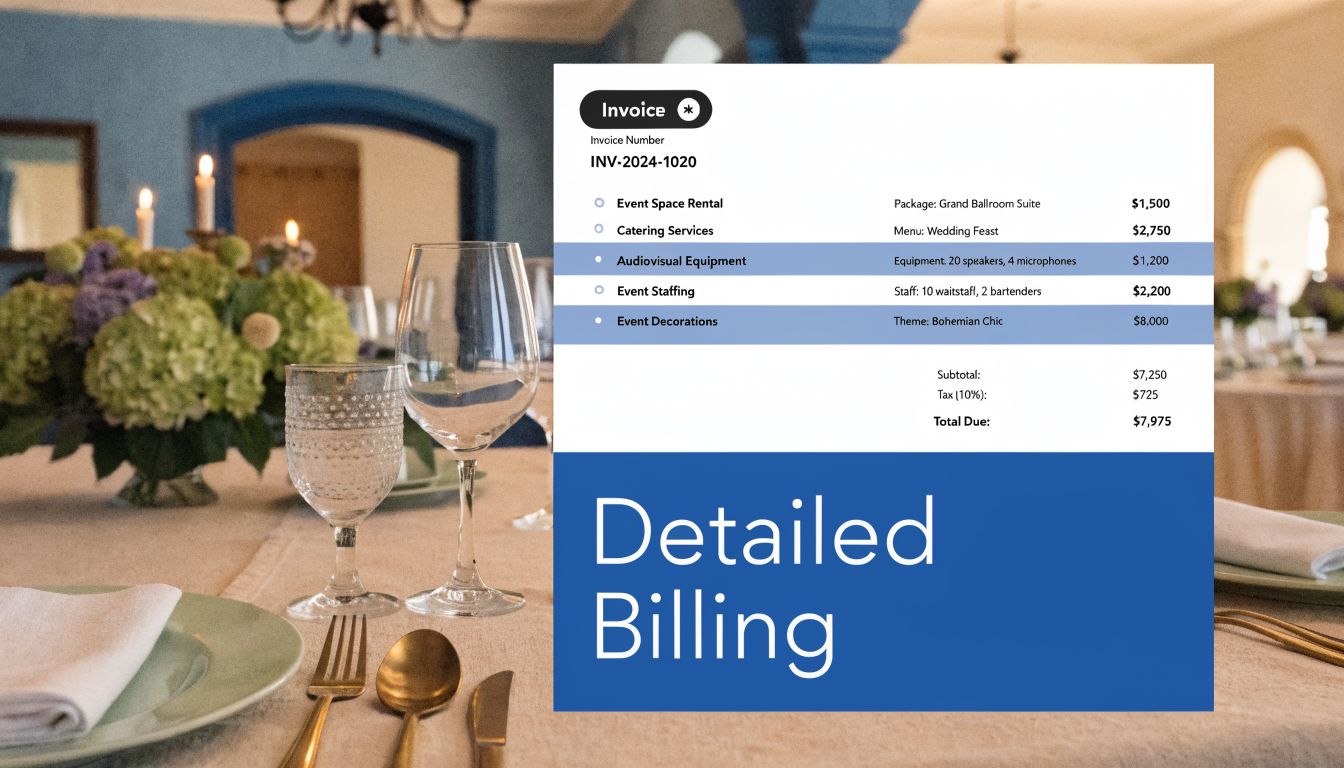
Take a 100-person corporate lunch. If the invoice shows one line for “catering services,” the client has to guess what is included, and your accounting team has to do the same later. A stronger invoice shows the event in billable pieces. Food, beverages, staffing, rentals, delivery, taxes, gratuity, and deposit credits each belong on their own lines or grouped sections.
That level of detail does two jobs at once. It gives the client a clean approval path, and it gives your books usable transaction data instead of a lump sum that has to be split up later.
Build line items that support bookkeeping
The simplest way to keep invoices readable is to group charges by revenue type. That structure also makes accounting software setup easier because each line can map to the right product, service item, or income account.
A practical layout looks like this:
- Food
- Entrées
- Appetizers
- Desserts
- Beverages
- Non-alcoholic service
- Bar service or bar setup
- Staff labor
- Setup crew
- Service staff
- Bartenders
- Equipment and rentals
- Chafers
- Linens
- Serving equipment
- Logistics
- Delivery
- Pickup
- Travel fees approved in the contract
For example, “200 boxed lunches at $15” tells a different financial story than “Corporate lunch package $3,000.” The first version supports margin review, sales analysis, and cleaner coding in QuickBooks. The second version forces someone to reconstruct the event later.
Operators who bill for rented serving pieces, crockery, or event ware benefit from using the same kind of item descriptions rental companies use. The examples from ABC Hire in Cape Town show how specific rental wording can get. That helps you write invoice lines a client can recognize and your staff can defend if there is a billing dispute.
Structure each line for clean import and clean reporting
Every line item should answer four questions. What was provided. How much was provided. What was the rate. What is the charge.
That means using:
- Description
- Quantity
- Rate
- Amount
If you plan to push invoices into QuickBooks, consistency matters more than fancy formatting. “Server labor,” “waitstaff,” and “event staffing” may sound interchangeable to a client, but they create cleanup work if they point to different items in your books. I usually recommend setting one naming standard and sticking to it across proposals, invoices, and accounting entries. If your setup still needs work, this guide on setting up QuickBooks Online for service businesses will help you build item and account structures that support invoicing instead of fighting it.
A template’s value extends beyond being merely a document. A well-structured invoice feeds revenue categories, deposit tracking, and customer balances with less rework at month-end.
Payment terms should remove doubt
Clients pay faster when the invoice answers the operational questions before they have to email your team.
State these terms directly on the invoice:
| Term area | What to include |
|---|---|
| Deposit status | Show the deposit as a separate credit line with the date received if possible |
| Balance timing | State the exact due date or the agreed term, such as due upon receipt or Net 15 |
| Accepted methods | List ACH, card, check, or any method you actually process |
| Late fees | Include them only if your contract allows them and state the rule clearly |
| Change charges | Show approved additions, guest-count increases, or overtime as separate billed lines |
A good invoice might show the event subtotal, then tax, gratuity, and rentals, then a line that reads “Deposit received and applied,” followed by the final balance due. That format prevents one of the most common payment delays I see in catering. The client is not sure whether the deposit was already deducted, so the invoice sits while they ask for clarification.
What holds up under scrutiny
Clear invoices hold up better in collections, bookkeeping, and client communication. They use consistent item names, separate taxable and non-taxable charges correctly, and show prior payments without burying them inside the total.
Weak invoices usually fail in predictable ways. Labor is mixed into food revenue. Rentals are buried in package pricing. The deposit is mentioned in an email but not shown on the invoice. The client may still pay, but your records get harder to trust, and month-end cleanup takes longer than it should.
From Invoice to Insight with QuickBooks Integration
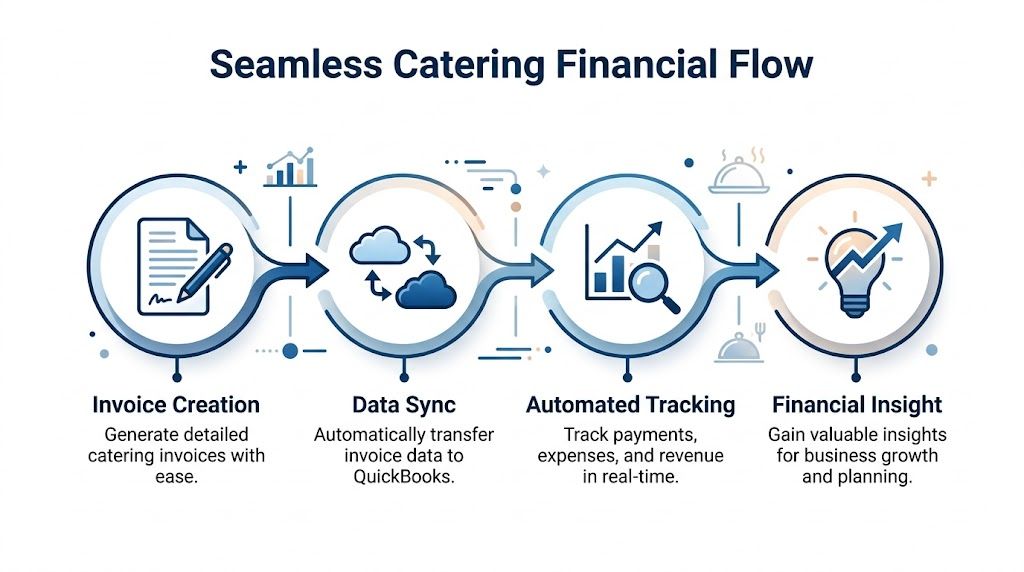
Most template articles stop at formatting. That’s where the critical work starts. If your invoice doesn’t flow cleanly into QuickBooks, you’re still doing duplicate data entry and cleaning up preventable mistakes at month-end.
Why integration matters
Existing catering invoice templates usually handle branding and item lists well enough, but they often miss the accounting side. That gap matters because a 2025 QuickBooks survey found 68% of small service businesses struggle with manual invoice-to-ledger syncing, leading to 15 to 20% reconciliation discrepancies, and templates with proper setup can reduce month-end close time by 40%, according to this analysis of catering invoice template gaps.
That’s the difference between invoicing as paperwork and invoicing as a data source.
If your chart of accounts, item list, and invoice template are aligned, every invoice starts feeding useful reporting. If they aren’t, your team spends month-end reclassifying income, chasing missing deposit entries, and matching payments by hand.
A clean workflow inside QuickBooks
This is the setup that usually works best for caterers using QuickBooks Online:
Create products and services first
Build items for food sales, beverage sales, labor, equipment rental, delivery, gratuity if separately tracked, and any recurring fees you use often.Map each item to the right income account
Don’t let everything hit one generic income line if you want meaningful reports later.Customize your invoice form
Add branding, event fields, customer details, and any notes the client needs to approve and pay promptly.Enter the invoice using category-based line items
Keep the same order every time so internal reviews are faster.Record deposits properly
Apply the deposit as a credit against the invoice balance instead of reducing revenue informally in the notes.Track payment status through accounts receivable
Open, partial, and paid statuses should be visible without separate spreadsheets.Reconcile the payment to the bank feed
Match the incoming deposit to the recorded payment so month-end stays clean.
For businesses setting up the system from scratch, this guide on how to setup QuickBooks Online for service businesses is useful because the invoice works best only when the wider bookkeeping structure is sound.
What the invoice should feed
A good integrated invoice gives you more than a receivable. It feeds decisions.
- Revenue by category shows whether food, labor, or rental-related services are carrying margin.
- Accounts receivable aging shows which clients pay slowly.
- Deposit tracking helps you separate cash received from revenue earned.
- Event-level review becomes easier when item lines are consistent across jobs.
Your invoice format determines the quality of your reporting later.
That’s why I recommend treating invoice design as a bookkeeping decision, not just an admin template choice.
Common integration mistakes
Several problems show up again and again:
Using free-text lines for everything
This makes reporting inconsistent because the same service gets entered under slightly different names.Recording deposits outside the invoice workflow
That creates confusion when the final payment arrives and someone can’t tell what was prepaid.Combining tax, gratuity, and service charges into one total
That weakens both client clarity and financial reporting.Sending polished invoices from one tool while bookkeeping in another with no sync process
That’s where duplicate entry and reconciliation gaps usually begin.
The best catering invoices template isn’t the prettiest one. It’s the one that produces clean, repeatable accounting data every single time.
Advanced Tactics and Common Invoicing Questions
Catering gets messy at the edges. Guest counts change. Service runs long. Extra staff stay on-site. Those aren’t rare exceptions anymore. Templates often miss variable event costs, and the U.S. catering market saw a 22% rise in variable-cost events post-2025. Dynamic templates with conditional fields, such as overtime logic tied to timesheets, can cut disputes by 28%, according to WebstaurantStore’s catering template guidance.
Build for changes, not just plans
Static invoices work for fixed packages. They break down when an event changes in real time.
Add fields or internal workflows for:
- Headcount revisions so added guests can be billed visibly
- Extended service time tied to actual staff hours
- Rental overages or damage-related charges if your agreement allows them
- Allergen or event-specific notes when documentation needs to follow the job clearly
If you’re trying to reduce manual handling after the event, this overview on how to automate invoices with Snyp is worth a look. The main benefit isn’t novelty. It’s reducing the handoffs where details get lost.
Questions that come up often
Keep the original invoice intact when possible. Add a revised invoice or supplemental invoice instead of rewriting history.
How should I bill last-minute additions?
Use separate lines that identify the added item or extra labor clearly. Don’t bury them inside an existing food or staffing line.
What should I do if service hours run over?
Your template should allow an overtime field or a separate labor section tied to approved timesheets. If your agreement includes conditional pricing, reflect that directly on the invoice.
Can I include a deposit on the final invoice?
Yes. Show it as a credit already received, then calculate the remaining balance due. That gives the client a clean payment trail.
How do I handle cancellations?
Follow the signed terms. The invoice should reflect what was retained, refunded, or applied. Keep the documentation aligned with your cancellation policy.
For owners tightening their collections process, these accounts receivable best practices are helpful because invoice quality and AR discipline always work together.
The practical takeaway is simple. Your invoice template should reflect how catering happens, not how a static form designer thinks it happens.
If your invoicing process still lives across spreadsheets, PDFs, emails, and memory, it may be time to tighten the whole back office. Steingard Financial helps service businesses build clean bookkeeping, stronger AR workflows, and reliable QuickBooks systems so every invoice turns into accurate reporting instead of cleanup work.