Cost Centers and Profit Centers: Boost Your Margins
Let’s get one thing straight: not all parts of your business are created equal when it comes to money. Some departments are built to spend it, and others are built to make it. That’s the simple idea behind cost centers and profit centers.
A cost center is a part of your business that costs money to run but doesn’t bring in revenue on its own. Think of your HR, IT, or administrative teams. They are absolutely essential, but they don’t directly bill clients.
A profit center, on the other hand, is a division that not only has its own costs but also generates direct revenue. This could be a specific service you offer, a product line, or your sales department.
Getting a handle on this difference is the first real step toward seeing your business finances with total clarity.
The Hidden Power Behind Your Business Structure
Think of your company as a high-performance ship. You have a crew in the engine room keeping things running smoothly—they’re vital, but they aren’t the ones finding treasure. They manage the ship’s resources and make sure you have the power to move forward. This is your cost center.
Then you have the crew chartering new voyages and bringing gold aboard. They are your profit centers. This isn’t just accounting jargon; it’s the key to smarter financial management and strategic growth. It moves you from just “doing the books” to truly managing your business.
This guide will walk you through how to use these concepts to build accountability and boost performance across every single part of your company.
Why This Distinction Matters
Separating your operations into these two buckets is more than an academic exercise. It’s a strategic framework that has been sharpening business performance for nearly a century. The idea of cost centers took hold in the early 20th century as manufacturing boomed. By 1930, over 60% of large U.S. manufacturing firms had already adopted this kind of accounting.
It worked, too. Companies like Ford Motor Company reported a stunning 15% drop in production costs between 1925 and 1935 right after implementing this structure. You can read more about the historical impact of cost centers on manufacturing efficiency.
By clearly defining each part of your business, you can:
- Improve Accountability: Managers have clear goals. They are either responsible for controlling costs or for driving profits. No more gray areas.
- Enhance Decision-Making: You can finally get a true read on how a product line is performing or how efficient a support department really is.
- Allocate Resources Smarter: See exactly where your money is going and which parts of the business give you the best return on your investment.
The goal is to see your business not as one giant monolith, but as a collection of smaller, specialized units, each with a clear financial purpose. This shift in perspective lets you manage performance on a much more detailed level.
This structure allows leaders to pinpoint exactly which areas are firing on all cylinders and which ones are lagging. Without this divide, it’s all too easy for inefficient departments to hide behind the success of profitable ones, quietly draining resources without anyone noticing.
Distinguishing Between Cost and Profit Centers
To really get a handle on your business’s finances, you have to draw a clear line between the parts of your company that spend money and the parts that make money. It’s a simple but powerful distinction.
On one side, you have the cost center. Think of this as any department that’s essential for your business to run but doesn’t bring in cash directly. We’re talking about functions like human resources, IT support, or your administrative team. Their mission is all about efficiency and sticking to the budget.
On the other side, you have the profit center. This is a division that not only has its own expenses but also generates its own revenue—and hopefully, a healthy profit. Examples could be a specific product line, a dedicated sales team, or a service department that bills clients directly. Its success is measured by the bottom line.
Getting this fundamental difference right is the first step toward building a business structure that’s crystal clear and holds everyone accountable. This simple diagram shows how both of these arms—the operational gears (cost centers) and the revenue engines (profit centers)—connect back to the main business.
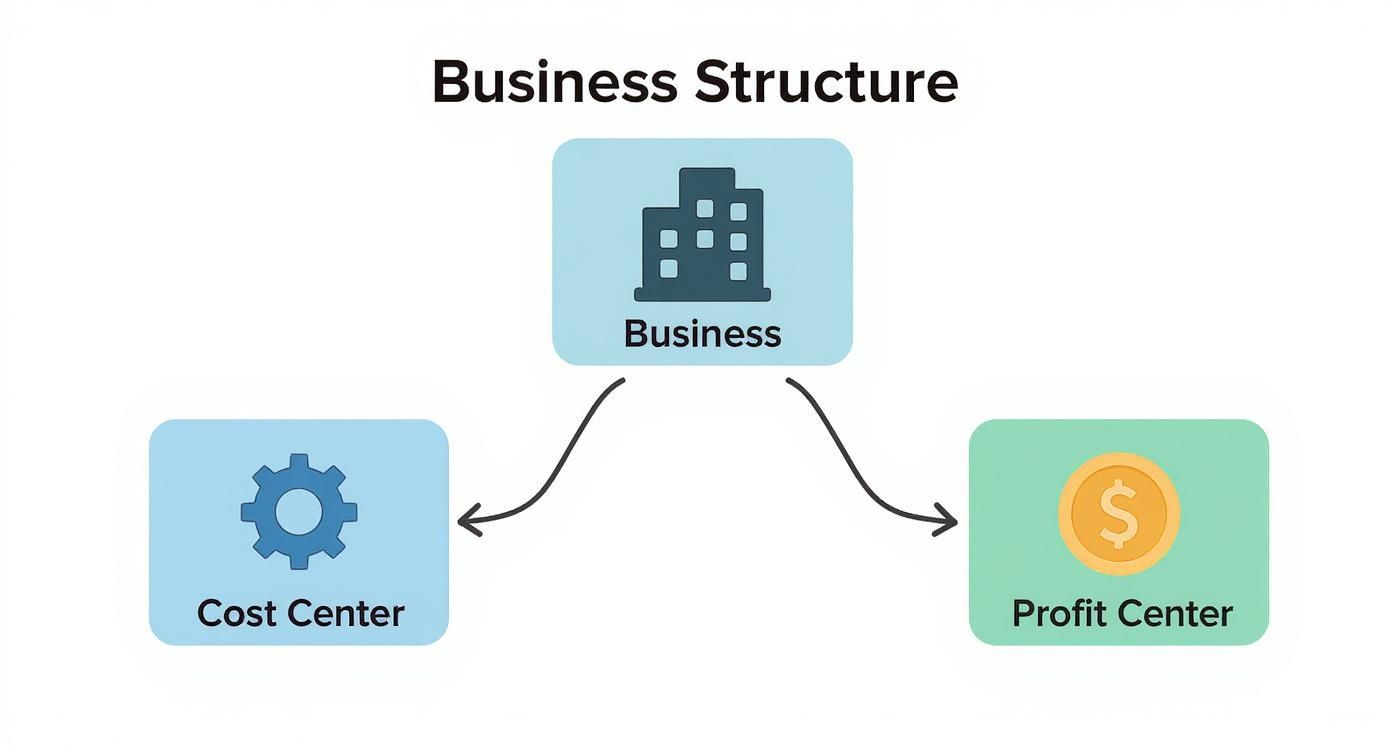
As you can see, both are integral, but they serve completely different financial roles within the organization.
To make this distinction even clearer, let’s break down their core attributes side-by-side.
Key Differences Between Cost Centers and Profit Centers
| Attribute | Cost Center | Profit Center |
|---|---|---|
| Primary Goal | Minimize costs while maintaining quality and service. | Maximize revenue and profit. |
| Financial Focus | Controlling expenses and adhering to a budget. | Driving sales, managing costs, and increasing margins. |
| Decision Making | Focused on operational efficiency and cost-saving measures. | Focused on market opportunities, pricing, and sales strategies. |
| Performance Metrics | Budget variance, operational efficiency KPIs. | Revenue, profit margin, return on investment (ROI). |
| Managerial Responsibility | Responsible for managing departmental expenses. | Responsible for both revenues and expenses (the P&L). |
This table lays out the fundamental divide: cost centers are about managing inputs, while profit centers are all about maximizing outputs.
A Tale of Two Departments
Let’s make this real with an example. Imagine a marketing agency. It has a creative services team (the designers and writers) and a human resources (HR) department.
- The HR department is a classic cost center. It doesn’t bill clients. Its job is to support the whole agency by hiring great people, running payroll, and making sure everyone stays compliant. The HR manager is judged on how well they can stay within their budget while keeping the team staffed and happy.
- The creative services team is a profit center. The team’s time and the work they produce are billed directly to clients. The manager of this team is on the hook for project profitability, making sure that what they bill clients for is more than the team’s salaries and overhead. They are judged on the revenue and profit margin their team brings in.
This clean separation allows the agency’s leaders to see exactly how profitable their core services are, completely separate from the administrative costs needed to keep the lights on.
A cost center focuses on inputs—the resources it consumes. A profit center focuses on outputs—the net income it generates. This simple shift in perspective completely changes how performance is measured and managed.
This isn’t just a new idea; the concept of creating distinct profit centers really took off in the 1950s and 1960s with giants like General Electric and Procter & Gamble. Decades of data have shown that companies with well-defined profit centers tend to outperform their peers by 10-15% in terms of return on investment. If you’re curious, you can learn more about the historical impact of this strategic shift in business management. This shows just how much impact this structure can have on financial performance.
Real-World Examples in Service Businesses
Okay, the theory is great, but let’s get down to brass tacks. Seeing how cost centers and profit centers actually work in the real world is where the lightbulb really goes on. We’ll move past the definitions and look at how actual service-based businesses organize themselves to get a crystal-clear view of their finances. This is where you can start to see your own company in a new light.
The trick is to draw a straight line from an activity to the money it brings in. If a team’s work is billable and directly makes the cash register ring, it’s a perfect fit for a profit center. If its main job is to keep the lights on and support the people doing the billable work, it’s almost certainly a cost center.
A Digital Marketing Agency Breakdown
Picture a digital marketing agency that’s hitting its stride. They offer a bunch of different services, and their teams are specialists. If all their income and expenses are dumped into one big bucket, it’s nearly impossible to know which services are the real moneymakers.
Here’s a smarter way they could set things up:
- Profit Centers:
- SEO Team: This group bills clients directly for getting them to the top of Google. Their success is simple to measure: client revenue minus the team’s salaries and direct costs.
- Paid Ads (PPC) Team: Same idea here. This team runs client ad campaigns and bills for their management fees, making them a separate revenue-generating machine.
- Content Marketing Team: When they’re creating blog posts or videos for a specific client project, their time is billable. That makes them a profit center.
- Cost Centers:
- Internal Marketing Team: This team is writing blog posts for the agency’s own website and running its social media. It’s crucial for getting new leads, but it doesn’t bring in direct, billable revenue.
- Administrative Staff: The office manager and assistants are the glue holding the company together, making sure everything runs smoothly for everyone.
- IT Support: This department keeps the agency’s laptops, software, and network humming. It’s an essential internal service, not a client-facing one.
This kind of separation gives the agency’s leadership incredible insight. They might discover their SEO services are wildly profitable, but maybe their content marketing margins are razor-thin. You just can’t see that when everything is mixed together.
The Structure of a Law Firm
Law firms are another perfect example of how to segment a service business. Different practice areas often act like little businesses-within-a-business, each with its own clients and revenue targets.
A typical law firm structure could look like this:
- Profit Centers:
- Litigation Department: This is the team representing clients in court. They bill for their hours, expertise, and courtroom wins.
- Corporate Law Department: Handling big-ticket items like mergers and contracts, this division brings in major revenue from corporate clients.
- Real Estate Law Department: This team focuses on property transactions, operating as its own profitable unit within the firm.
- Cost Centers:
- Legal Library and Research: This is a central resource that all attorneys use, but its existence isn’t billed directly to any single client.
- Records Department: Managing mountains of sensitive client files is a critical function, but it doesn’t generate revenue.
- Human Resources: HR is responsible for hiring the firm’s next top lawyer or paralegal—a necessary operational cost.
By treating each practice area as a profit center, the firm’s partners can accurately judge how each division is performing. It helps them answer the big questions: Is our litigation practice carrying a less profitable department? Where should we invest in hiring new partners?
This level of detail is the bedrock of good strategic planning. It also shines a spotlight on why careful expense tracking is so important. If a cost center’s expenses aren’t recorded correctly, it can throw off the profitability numbers for the entire firm. For a deeper dive, check out our guide on how to keep track of business expenses—getting this right is the foundation for any good reporting.
Choosing the Right KPIs for Management
Once you’ve separated your business into cost centers and profit centers, the real work begins. You have to measure what actually matters, because you can’t manage what you don’t measure. Generic, off-the-shelf metrics just won’t do the trick; each center needs its own set of Key Performance Indicators (KPIs) that tell a clear, concise story about its performance.
Good KPIs give your managers the data they need to make smart decisions, hold their teams accountable, and connect their daily efforts to the company’s bigger financial picture. For a profit center, that story is all about growth and margins. For a cost center, it’s about efficiency and the value it provides.

Essential KPIs for Cost Centers
The goal for a cost center isn’t just about spending as little as possible. That’s a common misconception. The real mission is to deliver excellent internal service while staying on budget. A cost center that slashes its budget but can’t support the revenue-generating teams is actually hurting the business.
Because of this, its KPIs need to strike a careful balance between cost control and operational effectiveness.
- Budget Variance: This is your foundational metric. It’s simply the difference between what you planned to spend and what you actually spent. A small variance is normal, but a big, unexpected one is a red flag that needs your attention right away.
- Cost-Efficiency Ratios: This metric goes a step further than just tracking spending. It connects costs to a specific output. For an IT department, you could track IT Cost per Employee. For an HR team, you might measure the Cost per Hire.
- Operational Metrics: These KPIs look at the quality and speed of the service being delivered. For a customer service team (which is usually a cost center), this could be Average Response Time or the Customer Satisfaction Score (CSAT).
The most effective cost center managers are the ones who consistently provide high-quality support to the rest of the company while also showing they can be fiscally responsible. Their KPIs should reflect this dual focus on service and savings.
By tracking these kinds of metrics, you ensure your cost centers are running like lean, effective support systems—not just money pits. This is a critical piece of building a solid financial foundation. For more on this, check out our guide on creating a https://steingardfinancial.com/budget-for-small-business/.
Crucial KPIs for Profit Centers
When it comes to profit centers, the focus is squarely on the bottom line. Revenue is a great place to start, but it really only tells you half the story. Real performance is measured by profitability and how efficiently the center uses its assets to generate that profit.
Managers of profit centers need KPIs that paint a complete picture of their division’s financial health.
- Contribution Margin: This is a powerhouse metric, plain and simple. You calculate it as
Revenue - Variable Costs, and it shows you exactly how much money a specific product or service is contributing to cover fixed costs and generate profit. A high contribution margin is a sign of a very healthy profit center. - Return on Assets (ROA): This KPI measures how efficiently a profit center is using its assets—like equipment or inventory—to generate earnings. A rising ROA tells you that management is getting more bang for every buck invested in that division.
- Client Lifetime Value (CLV): This is especially important for service-based businesses. CLV helps you predict the total net profit you can expect from a single client relationship over time. It helps profit center managers make much smarter calls on client acquisition costs and retention strategies.
Building an Effective Reporting Dashboard
The best KPIs in the world are useless if they’re buried in some complicated spreadsheet nobody wants to open. The solution is to create a simple, visual reporting dashboard that gives your managers the data they need at a glance. It doesn’t matter if you’re using reports in QuickBooks or a specialized dashboard tool; the principle is the same.
A well-designed dashboard should always:
- Be Role-Specific: The head of a cost center needs to see budget variance and efficiency numbers, not sales figures. A profit center manager needs to see contribution margins, not the company’s total overhead.
- Focus on Trends: A single number is just a snapshot in time; a trend tells a story. Your dashboards should display KPIs over time (monthly or quarterly, for example) to show progress or highlight problems before they get out of hand.
- Highlight Key Metrics: Don’t drown your managers in data. Pick the 3-5 most critical KPIs for each center and make them the star of the show.
When you provide clear, relevant, and timely data, you empower your managers to take real ownership of their results. This is how the concept of cost centers and profit centers transforms from a simple accounting exercise into a powerful management tool that drives actual growth.
Structuring Your Accounting System for Clarity
Understanding cost centers and profit centers on paper is a good first step, but the real power comes when you build this logic directly into your accounting software. This is where the theory becomes a practical tool you can use every day to manage your business’s finances. When you set your system up correctly, you’ll go from a single, blended Profit & Loss statement to detailed reports that show you how each part of your company is really performing.
The whole point is to tag every single transaction—every dollar in and every dollar out—to a specific department or function. This allows you to generate reports that answer crucial questions like, “How profitable is our SEO service line?” or “Is our administrative department blowing its budget?”
For most service businesses using software like QuickBooks Online, the secret weapon for this is a feature called Class Tracking.
Activating and Using Class Tracking
Think of “Classes” as digital labels you can attach to any transaction. You simply create a class for each of your cost and profit centers. Then, when you run a report, you can filter it to see only the income and expenses tied to a specific class.
Getting this started is pretty straightforward. Inside QuickBooks Online, you just need to head to your settings and flip the switch to turn on class tracking.
Here’s what that toggle looks like inside the QuickBooks settings menu.
That one simple action unlocks the ability to assign every invoice, bill, and expense to a specific segment of your business.
Once it’s on, you can start defining your centers. For a marketing agency, your class list might look something like this:
- Profit Center Classes
- Paid Ads Team
- SEO Services
- Web Development
- Cost Center Classes
- Administration
- Internal Marketing
- IT Support
This structure absolutely must be supported by a well-organized chart of accounts. While classes help you slice and dice your data, your chart of accounts provides the fundamental buckets for your transactions. To learn more about getting this foundational piece right, check out our guide on why your chart of accounts is so important.
Training Your Team for Accurate Data
Your system is only as good as the information you put into it. The most important step after setup is training your team to code every transaction correctly. Every single person who creates an invoice, enters a bill, or records an expense has to know how to assign the right class.
Consistency here is non-negotiable. If half your team forgets to assign classes, your reports will be incomplete, inaccurate, and ultimately useless.
The ultimate payoff for this diligence is the “Profit & Loss by Class” report. This single report completely transforms your financial visibility, giving you a side-by-side comparison of each profit center’s performance and a clear view of each cost center’s spending.
This level of detail is a game-changer. It clearly shows which services are your cash cows and which departments might need some operational tightening. It also pushes you to think more strategically. For example, a 2020 McKinsey report found that when companies transformed their supply chains from simple cost centers into strategic units, they saw an average profitability increase of 12-18%.
By getting disciplined with your data, even internal departments can start to prove their value far beyond just controlling costs. And it all begins with diligent tracking inside your accounting system.
Avoiding Common Implementation Mistakes
Setting up cost centers and profit centers is a fantastic move for any business, but a great strategy can easily get tripped up by a clumsy rollout. Even with the best intentions, companies often stumble over a few common hurdles, turning a powerful tool for clarity into a source of internal arguments and bad data.
One of the most frequent mistakes is messy allocation of overhead costs. Imagine you incorrectly dump a huge slice of the office rent onto your top-performing sales team. All of a sudden, their incredible performance looks just average, their margins shrink on paper, and the team’s morale takes a nosedive. This isn’t just a numbers problem; it’s a people problem.
Getting this right is all about being fair and accurate, making sure the financial picture you’re painting actually reflects what’s happening on the ground.
Unrealistic Budgets and Flawed Incentives
Another major pitfall is setting budgets that just aren’t realistic, especially for cost centers. When you choke an essential support department like IT or HR with an impossible budget, you aren’t encouraging them to be efficient; you’re crippling the entire business. Innovation stops, crucial support tasks get ignored, and the teams that actually bring in revenue start to suffer from the lack of internal help.
This often leads to another big mistake—designing incentive plans that create conflict instead of teamwork.
- The Silo Effect: If you only reward a profit center manager for their own division’s numbers, you’re telling them not to help other departments. They might start hoarding resources or refuse to collaborate on projects that benefit the whole company but don’t directly pad their own P&L.
- Cost Center Punishment: When cost center managers are only judged on cutting expenses, they have zero reason to invest in tools or people that could make the whole organization more productive.
A well-designed system makes everyone feel like “we’re all in this together.” A poorly designed one creates a dog-eat-dog environment where departments see each other as rivals for resources, not partners in growth.
Creating a Fair and Balanced Framework
To dodge these issues, you need a clear and logical cost allocation model from the very beginning. This means spreading out shared costs like rent, utilities, and administrative salaries in a way that just makes sense. A common approach, for example, is to allocate rent based on the square footage each department actually uses.
It’s also absolutely critical to design performance bonuses that encourage teamwork. Think about adding company-wide performance goals to every department manager’s bonus plan. This motivates the head of a profit center to lend their best salesperson for a cross-departmental project and encourages a cost center manager to invest in software that helps everybody win.
Ultimately, your goal is a system that gives you accurate insights without creating friction. By thinking ahead and avoiding these common mistakes, you can make sure your move to cost centers and profit centers drives accountability, clarity, and real, sustainable success for your whole organization.
Getting Your Questions Answered
Even with the best plan, you’re bound to have questions as you start putting these ideas into practice. Here are some of the most common ones we hear from business owners trying to get their financial structure right.
Can A Department Be Both a Cost and Profit Center?
This is a fantastic question and it comes up a lot. While we usually classify a department as one or the other, it’s definitely possible for a single team to wear both hats.
Think about a marketing department. Typically, its job is to support the company’s brand, which makes it a cost center. But what if that same team starts selling its marketing expertise to outside clients? That specific service becomes a new revenue stream, and you’d want to track it as a profit center. The trick is to keep the accounting separate for each function so you always have a clear picture.
How Often Should I Review My Structure?
Your business changes, so your financial structure needs to keep up. A good rule of thumb is to review your cost and profit center setup at least once a year. You should also revisit it anytime something big happens.
What kind of big changes?
- Launching a new service that brings in direct revenue.
- Acquiring another company that comes with its own teams.
- Doing a major internal shuffle of your departments.
An annual review makes sure your financial reports actually reflect how your business runs today. An outdated structure gives you bad data, which leads to bad decisions. Keeping it current is key to getting insights you can trust.
What Is an Investment Center?
An investment center is the next level up from a profit center. Just like a profit center, it’s responsible for its own revenue and costs. The big difference is that an investment center manager also gets to make decisions about capital investments for their division.
This means their performance isn’t just about profit; it’s about their return on investment (ROI). They are basically running a mini-business within the larger company, deciding whether to buy new equipment or even acquire smaller companies to fuel growth. You’ll see this structure most often in large, decentralized corporations where divisions need a lot of autonomy to operate effectively.
Ready to get crystal-clear visibility into what’s really driving your business’s bottom line? The team at Steingard Financial specializes in building accounting systems that deliver the data you need to make smarter, more confident decisions. We can help you structure your chart of accounts, track performance, and create reports that tell the true story of your growth. Learn how we can build a stronger financial back office for your service business.