 Skip to content

You hired a contractor because you needed speed. Maybe it’s a designer, a bookkeeper, a developer, a project manager, or a specialist you couldn’t justify hiring full time. The work starts quickly. Then the first invoice lands in your inbox, and a task that looked simple turns into a chain of decisions about tax forms, payment timing, approval controls, and how to keep a clean record if anyone ever asks questions later.
Most owners start with the wrong assumption. They think paying contractors is just a lighter version of payroll. It isn’t. It sits somewhere between accounts payable, tax compliance, and worker classification. If you treat it casually, small mistakes pile up fast.
Introduction The Hidden Complexities of Contractor Payments
Paying contractors looks easy until you have to do it repeatedly, on time, and with documentation that can survive an audit. The money transfer itself is the easy part. The hard part is making sure the person is classified correctly, the payment method fits the relationship, the invoice matches the agreement, and your books tell the same story your contract does.

That matters because payment friction isn’t a niche problem. Slow payments cost the U.S. construction industry $280 billion last year, representing 14% of total spending, and 82% of contractors are now waiting over 30 days for payment, up from 49% two years earlier, according to Foundation Software’s summary of the payment delay problem. Service businesses feel the same pressure. A late payment doesn’t just annoy a contractor. It strains cash flow, weakens trust, and creates operational drag on both sides.
The compliance side has also gotten sharper. The Department of Labor changed its rule in 2024, and that rule pushed more attention toward whether a contractor is operating independently or working like an employee. That means a sloppy setup is no longer just an administrative issue. It can become a tax and labor issue.
Paying contractors well means building a system that works before the first invoice arrives.
If you’re building that system from scratch, start with process, not software. Good tools help, but they can’t rescue a bad workflow. Before you automate anything, it helps to understand broader contractor management best practices so payment decisions line up with onboarding, scope control, and documentation.
Your Pre-Payment Compliance Foundation
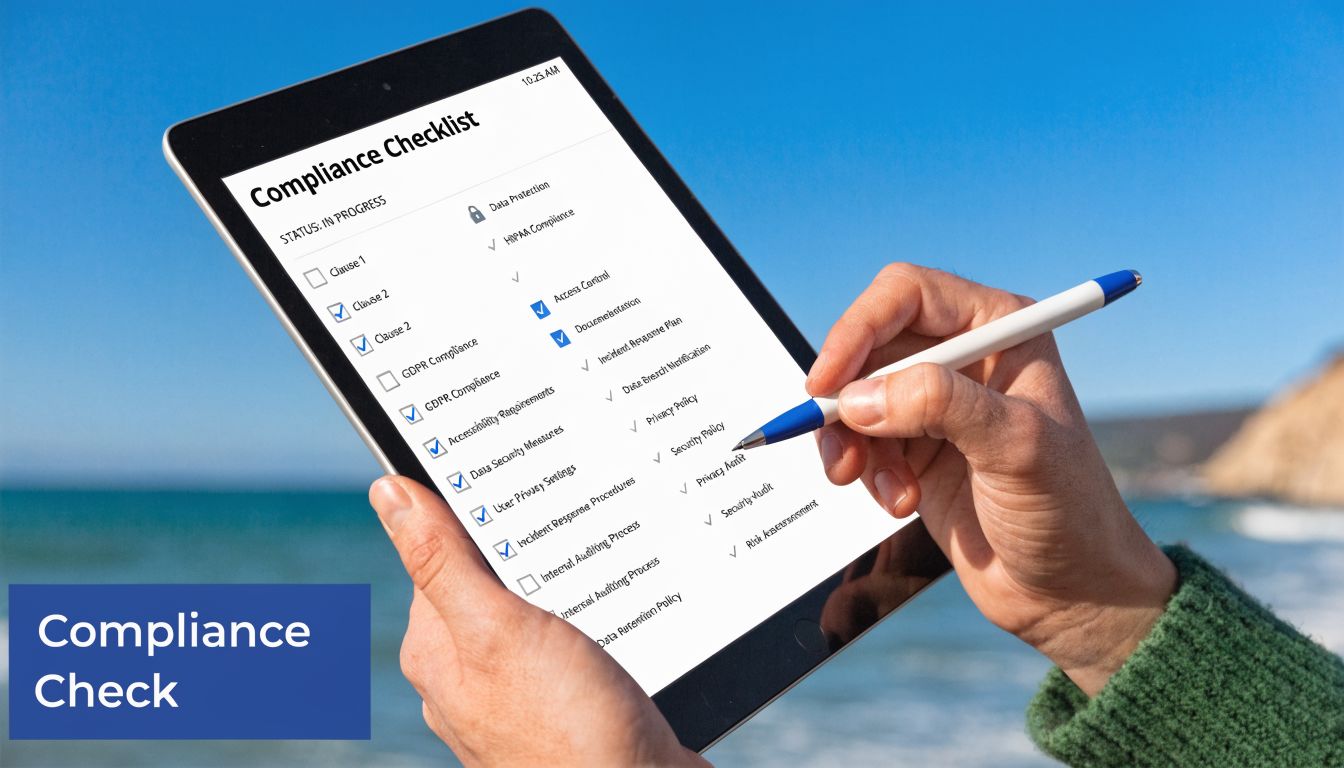
Most contractor payment mistakes happen before money moves. They start with a rushed classification decision, a missing W-9, or an agreement that says almost nothing about how the work will be paid and approved.
Classify the worker before you onboard them
The first question is simple to ask and easy to mishandle. Is this person an independent contractor, or are they functioning like an employee?
The Department of Labor’s 2024 rule change uses an economic reality test and is expected to lead to over 1 million potential worker reclassifications annually. Misclassification can expose businesses to back taxes and penalties up to 40% of the unpaid amount, as explained in Rippling’s guide to paying independent contractors. That is not a paperwork technicality. It’s a financial risk.
In plain English, the DOL is looking at whether the worker is in business for themselves. The six factors are legal in nature, but owners can understand them operationally:
- Control over the work. If you decide when, where, and how the work must be done every day, that points more toward employee status.
- Opportunity for profit or loss. Contractors usually have room to manage margin through pricing, efficiency, staffing, or business decisions.
- Investment in tools or business operations. Independent contractors often bring their own systems, equipment, software, or support.
- Skill and initiative. Specialized skill alone isn’t enough. The worker should also use business judgment, not just follow your process.
- Permanence of the relationship. An open-ended, indefinite relationship can raise questions.
- Whether the work is integral to the business. If the work is core to your day-to-day service delivery, classification gets more sensitive.
A contract that says “independent contractor” helps, but it doesn’t override the working relationship. If your operations treat someone like staff, the label won’t save you.
Collect the W-9 before work starts
Once classification is defensible, get the W-9 before the first invoice. Don’t wait until year end when you’re trying to figure out who was paid and under what tax ID.
The W-9 gives you the contractor’s legal name, tax classification, and taxpayer identification information. From a bookkeeping standpoint, it keeps your vendor file complete. From a compliance standpoint, it supports later 1099 reporting and helps avoid backup withholding issues.
A clean onboarding checklist should include:
- Signed agreement before work begins
- Completed W-9 stored with the vendor record
- Approved payment method with banking details collected securely
- Internal owner who reviews and approves invoices
- Expense coding rule so each payment hits the right account
If you’re handling card or bank information directly, the storage method matters too. Owners often focus on tax compliance and forget payment data security. If your process touches sensitive payment details, basic familiarity with PCI DSS compliance is useful, especially if multiple team members can access contractor payment records.
Build a contract that supports the books
Most contractor agreements are too vague to support accounting control. They describe the work but not the payment mechanics. That creates disputes later when the invoice doesn’t match expectations.
Your agreement should answer these questions clearly:
| Contract element | What it should state | Why it matters for payment |
|---|---|---|
| Scope of work | Deliverables, responsibilities, exclusions | Prevents billing for undefined work |
| Payment basis | Hourly, fixed fee, retainer, or milestone | Tells accounting how to review invoices |
| Timing | Due dates, approval window, payment terms | Supports scheduling and cash planning |
| Invoice requirements | Detail level, backup, submission method | Reduces back-and-forth |
| Change process | How scope changes are approved | Stops surprise charges |
| Confidentiality and IP | Ownership and data handling terms | Protects business assets |
Set your documentation standard early
A contractor payment file should be easy to audit internally. If someone asked why a payment was made, you should be able to show the agreement, the invoice, the approval, the payment confirmation, and the ledger entry without hunting through email threads.
Practical rule: If approval only exists in Slack or someone’s memory, it doesn’t exist well enough.
This is also the stage where owners should decide who is responsible for year-end reporting. If you need a practical walkthrough later, this guide on how to generate 1099 for contractors is a useful reference point for what your records need to support. Getting that judgement wrong turns a contractor payment into a payroll problem; Employee Classification sets out the test and what rides on it.
A short explainer can help if you want to hear the operational side discussed out loud.
Choosing the Right Contractor Payment Method
Once compliance is in place, the next decision is practical. How are you going to pay the contractor every time without creating extra cost or messy records?
For most U.S. service businesses, the answer is usually ACH. But “usually” matters. The right choice depends on whether the payment is recurring, urgent, domestic, international, or tied to a milestone release.
What each payment method does well
ACH transfer is the default for domestic contractor payments. It works well for recurring engagements, monthly retainers, and any setup where you want low cost and easy reconciliation.
Paper checks still show up in small businesses because they feel familiar. They also create manual work, mailing delays, and more room for mismatched records.
Wire transfers have a place when speed or transfer size matters, but they are expensive for routine domestic payments.
Payment apps and third-party platforms can be convenient, especially for one-off payments or international relationships, but they introduce another layer to reconcile and may not fit every bookkeeping workflow cleanly.
According to Tipalti’s overview of contractor payment methods, ACH transfers cost around $0.40 per transaction, paper checks cost about $2.01 to $4.00 each, and wire transfers often carry fees of $35 to $50. That cost difference becomes obvious once you move from occasional payments to a repeat process.
Contractor Payment Method Comparison
| Method | Typical Cost | Processing Speed | Best For | Bookkeeping Integration |
|---|---|---|---|---|
| ACH | Around $0.40 per transaction | Standard bank processing | Recurring U.S. contractor payments | Usually strong in payroll and accounting tools |
| Paper check | About $2.01 to $4.00 each | Slower and mail-dependent | Rare vendors who insist on checks | Manual entry and more follow-up |
| Wire transfer | Often $35 to $50 | Fast bank transfer | Urgent or high-value payments | Trackable, but costly for repeat use |
| Third-party app | Varies | Varies by platform | One-off or special cases | Often requires extra reconciliation |
A practical decision framework
If you’re deciding how to pay contractors, use these checkpoints in order.
- Look at frequency. Recurring payments favor ACH because setup effort pays off quickly.
- Check urgency. If same-day movement matters and the amount is large, a wire may be worth it once.
- Consider contractor preference. Some contractors care a lot about payment method because it affects their own records and fees.
- Think about reconciliation. The best payment method is the one your accounting system can trace cleanly.
- Avoid exceptions becoming habits. One emergency wire is fine. A weekly wire process is usually a system problem.
A good payment method doesn’t just move funds. It leaves behind a record your books can use without guesswork.
What works and what doesn’t
What works is boring. A contractor submits an invoice, it matches the agreement, approval is documented, payment runs through the same channel each time, and the bank activity matches the ledger.
What doesn’t work is improvisation. Paying one contractor by check, another through a personal app, another by wire, and a fourth through a corporate card may get money out the door, but it creates cleanup work and weakens year-end reporting.
If you want consistency, choose one primary domestic method and use exceptions sparingly. For most businesses paying U.S. contractors on an ongoing basis, that primary method is ACH.
The Step-by-Step Payment Execution Workflow
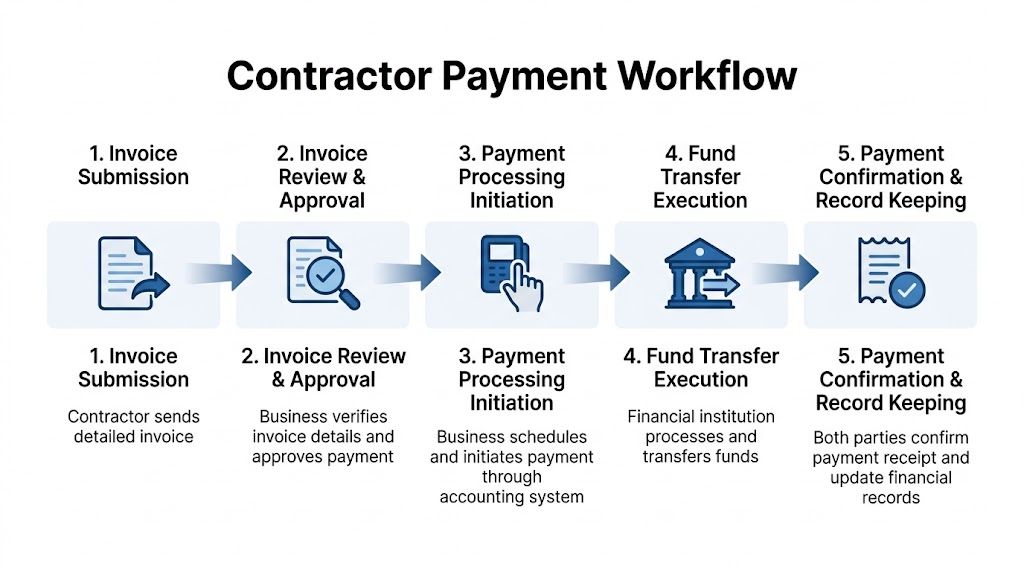
A reliable contractor payment process should feel routine. If every invoice requires detective work, the issue isn’t the contractor. It’s the workflow.
Start with invoice review, not payment
When the invoice comes in, compare it to the contract before anyone clicks approve. If the agreement is hourly, review hours and rate. If it’s milestone-based, confirm the milestone was met. If it’s a retainer, verify the billing period and whether any out-of-scope work appears separately.
The invoice should also meet your submission standards. If your process requires line-item detail, project name, service dates, or backup documentation, send incomplete invoices back for correction. That sounds strict, but it saves time later.
A simple approval checklist helps:
- Match to contract so the rate and billing model are correct
- Confirm services received with the internal owner
- Review coding so the expense lands in the right account or class
- Check due date against the agreed payment terms
- Document approval in the accounting or payroll system, not just by email
Approve and schedule with intention
Paying on time is not the same as paying instantly. Good processes respect the agreed terms while protecting cash flow. If the contract says Net 30, schedule the payment so it arrives on time, not weeks early because someone wanted the invoice off their desk.
For recurring contractor relationships, create a payment calendar. That keeps invoice review and bank activity predictable. Predictability matters because contractors notice consistency. Your internal team does too.
If your accounts payable process still lives in email threads and calendar reminders, tighten that up first. This walkthrough on what is accounts payable workflow is a practical reference for organizing approvals, due dates, and posting steps into one repeatable system.
Record the bookkeeping entry correctly
Small businesses often get casual, paying the bill and assuming the bank feed will handle the rest. Sometimes it does. Sometimes it posts the wrong category, misses the payable, or creates an uncategorized mess at month end.
The cleaner approach is standard double-entry bookkeeping:
| Stage | Debit | Credit |
|---|---|---|
| Invoice entered | Contractor expense | Accounts payable |
| Payment made | Accounts payable | Cash |
That structure matters because it separates the obligation from the cash movement. You can see what you owe before payment and confirm the liability clears when payment goes out.
If you skip the payable step and just book directly to expense when cash leaves the bank, you lose visibility into unpaid invoices. That may seem harmless with one contractor. It becomes a problem when you have several open bills across multiple dates.
Move from manual control to system control
Manual steps are fine at very low volume. The trouble starts when growth adds more contractors, more approvers, and more invoice variation. Then every missing step turns into a delay.
A stronger workflow usually looks like this:
- Contractor submits invoice through a defined channel.
- Internal owner confirms work was received.
- Accounting reviews contract match and coding.
- Payment is scheduled in Gusto or QuickBooks.
- Confirmation is stored with the transaction record.
If you can’t tell, in a few clicks, who approved an invoice and when it was paid, the process still needs work.
The goal is not complexity. It’s evidence. A payment process should prove what happened without relying on memory.
Automating Payments with Gusto and QuickBooks
Manual contractor payments break down in the same places every time. Someone enters bank details incorrectly. An approver forgets to respond. A due date passes because the invoice was buried in email. Year end arrives and no one is fully sure which payments were made by bank transfer and which were sent somewhere else.
Automation fixes those problems when the setup is right. It also creates cleaner records. According to Homebase’s guide to paying your first contractor, automating contractor payments through platforms like Gusto or QuickBooks can reduce payment errors by 70 to 80 percent and cut administrative time by 60 percent. The same source notes that paying a contractor $2,000 weekly for 25 weeks would cost $750 in wire fees, while automated ACH is nearly free.
How Gusto works for contractor payments
Gusto is useful when you want contractor onboarding, payment execution, and tax reporting to sit in one payroll-oriented flow. For many service businesses, that’s the fastest way to reduce loose ends.
A practical Gusto setup usually looks like this:
- Create the contractor profile with legal name and email
- Send the self-onboarding invite so the contractor enters their own W-9 and banking details securely
- Choose the payment structure based on your agreement, such as one-time invoice payments or recurring amounts
- Review and approve payouts inside the system
- Store confirmations and year-end reporting data in the same record
The big advantage is consistency. Contractors enter their own information, which reduces manual keying mistakes. The payment history sits in one place. The 1099 workflow is easier because the vendor file is already built around compliance.
Gusto is especially helpful when you have repeat contractor relationships and want one person in operations or finance to manage approvals without chasing forms in separate folders.
How QuickBooks fits the workflow
QuickBooks Online works well when your priority is accounting visibility first. If you already manage expenses, classes, customers, or project profitability inside QuickBooks, keeping contractor payments close to the ledger can make review easier.
A strong QuickBooks contractor workflow includes:
- Create the vendor record with tax and contact details.
- Attach the contract and W-9 to the vendor or transaction history if your document workflow supports it.
- Enter bills from invoices instead of waiting for bank feed cleanup.
- Route approvals internally before scheduling payment.
- Pay through the connected payment method and reconcile the bank activity promptly.
QuickBooks gives you better expense reporting when contractors are tied to departments, customers, projects, or service lines. That matters if you want to know whether outsourced work is profitable or if a retainer arrangement is drifting beyond budget.
If you’re still building your accounting foundation, this guide on how to setup QuickBooks Online for service businesses is a useful starting point before you layer in contractor automation.
What audit-proofing actually looks like
Owners often say they want an “audit-proof” process. In practice, that means the system leaves a complete trail:
- Who the contractor is
- Why they were classified as a contractor
- What agreement governed the work
- What invoice was submitted
- Who approved it
- How and when it was paid
- How it hit the books
- What year-end reporting followed
Software helps because it centralizes those records. But the platform alone isn’t the control. The control is the workflow you require people to follow inside it.
The main trade-off between Gusto and QuickBooks
If you want a simpler contractor payroll experience, Gusto is often easier operationally. If you want deeper accounting context around contractor spend, QuickBooks often gives you more reporting value. Some businesses use both. They run contractor payments through one platform and rely on synced accounting records for the full financial picture.
That can work well when roles are clear. Operations owns onboarding. Finance owns coding and review. Leadership owns approval thresholds.
A platform reduces errors only after you stop making exceptions outside the platform.
For businesses that need bookkeeping, payroll support, and People Advisory tied together, Steingard Financial works with Gusto and QuickBooks to build those controls into the day-to-day process rather than treating contractor payments as a separate admin task.
Year-End Reporting and Avoiding Common Pitfalls
The contractor payment cycle ends with reporting. If your records were sloppy all year, year end is where the mess becomes visible.
The core tax task is issuing Form 1099-NEC to qualifying contractors and filing it on time. The threshold and filing rules depend on current IRS requirements, so confirm the latest instructions before filing. Operationally, the cleanest businesses don’t scramble in January because they’ve tracked payment method, vendor data, and totals throughout the year.
What year-end prep should look like
By the time year end arrives, you should be able to pull a contractor list and answer these questions quickly:
| Question | What you need on file |
|---|---|
| Is the vendor properly set up? | Legal name, tax information, W-9 |
| Were payments coded correctly? | Clean expense accounts and vendor history |
| Were all invoices approved? | Approval trail in system or attached records |
| Can payment totals be trusted? | Reconciled books and payment confirmations |
| Is reporting ready? | Year-to-date totals by contractor |
If any of those answers depend on searching old emails, your process needs more structure next year.
The pitfalls that cause the most damage
Contractor payment mistakes usually cluster around a few habits.
- Treating classification like a formality. If the working relationship looks like employment, the agreement wording won’t fix it.
- Paying before documentation is complete. Missing W-9s and unclear contracts create avoidable cleanup work.
- Using too many payment channels. When payments happen across checks, apps, wires, and reimbursements, reporting gets messy.
- Skipping bill entry and relying on bank feeds. That weakens payable tracking and can distort month-end results.
- Waiting until January to think about 1099s. By then, bad records are much harder to repair.
A good contractor process also affects retention. According to Deel’s overview of contractor payment systems, businesses using automated platforms for contractor management see an 85% contractor retention rate compared with 60% for manual processes, alongside 40% faster payouts and a 90% reduction in manual payment errors. Reliable payment is part of the working relationship. Skilled contractors remember who pays cleanly and who creates friction.
Keep the books aligned with the relationship
The cleanest year-end files come from businesses that treated contractor payments as part of finance operations all year. That means the contract supports the invoice. The invoice supports the bill. The bill supports the payment. The payment supports the ledger. The ledger supports the reporting.
That chain matters because audits and disputes rarely hinge on one missing document. They hinge on contradictions. If your records, approvals, and payment history tell the same story, you’re in a far stronger position.
Year-end reporting is easier when every payment already has a file behind it.
Conclusion Building a Scalable and Compliant Payment System
Learning how to pay contractors isn’t about finding the fastest way to send money. It’s about building a repeatable system that protects cash flow, supports accurate books, and holds up when compliance questions come up.
The strongest process starts before payment. Classify the worker carefully. Collect the W-9 early. Use a written agreement that spells out scope, rates, timing, and approval. Choose a payment method that fits the relationship, not just the moment. Then run every invoice through the same review, approval, payment, and bookkeeping workflow.
Automation helps once the foundation is sound. Gusto and QuickBooks can reduce manual effort, improve consistency, and create a cleaner audit trail. But software only works when the business stops relying on one-off exceptions and undocumented approvals.
That discipline also helps you keep strong contractors. People who do good work want predictable payment, clear terms, and fewer administrative headaches. A stable payment process is part of being a well-run client.
If your current setup still depends on inbox searches, manual checks, or year-end cleanup, fix the process before volume increases. Contractor payments don’t get easier when the business gets busier. They only get easier when the workflow gets better.
If you want help building a cleaner contractor payment process inside Steingard Financial, the team can support the bookkeeping, payroll workflows, approval controls, and reporting structure that keep contractor payments accurate, documented, and easier to manage as your business grows.