 Skip to content
You probably know the routine.
A client asks for a split invoice. Another wants a monthly retainer plus extra hours. A third signed a project agreement with billing tied to milestones, but someone on your team is still tracking progress in a spreadsheet and sending the final numbers to QuickBooks by hand. Then payroll runs in Gusto, customer payments trickle in, and month-end turns into detective work.
For a growing service business, invoicing problems rarely start with the invoice itself. They start when the contract lives in one place, time or project data lives somewhere else, and accounting has to stitch the story together after the fact. That’s when invoices go out late, payments come in later, and your books need cleanup every month.
Contract billing software fixes that by turning client agreements into a working system. Instead of asking your team to remember every retainer rule, overage threshold, milestone date, and renewal term, the software applies those rules automatically and pushes cleaner data into your accounting stack.
Moving Beyond Manual Invoicing Chaos
A lot of service businesses hit the same wall at the same time. The company grows, clients become more varied, and the billing process that worked for a handful of accounts starts breaking under the weight of exceptions.
One client pays a flat monthly fee. One gets billed hourly. One wants the first half upfront and the second half at delivery. Another wants expenses billed separately. None of that is unusual. What’s hard is managing all of it consistently when your process depends on memory, calendar reminders, and spreadsheets.

What manual billing really costs
The visible cost is admin time. Somebody has to gather hours, review agreements, build invoices, send them, follow up, and update QuickBooks when payments arrive.
The hidden cost is worse.
- Late invoices: Revenue that should have been billed this week gets pushed into next week.
- Inconsistent charges: A capped contract gets overbilled, or approved extra work gets missed.
- Messy reconciliation: Deposits hit the bank, but matching them to the right invoice takes too long.
- Weak reporting: You can’t easily tell what’s billed, what’s earned, and what’s still sitting in unbilled work.
That strain is one reason billing automation keeps gaining traction. The global subscription billing software market was valued at USD 4.18 billion in 2023 and is projected to reach USD 19.87 billion by 2033, growing at a 16.87% CAGR, according to Spherical Insights.
A better way to run revenue operations
Contract billing software isn’t just an invoicing add-on. It’s a system that manages the path from signed agreement to collected cash.
Think of it as moving from handwritten kitchen tickets to a point-of-sale system. The work still needs to happen, but the instructions become standardized, trackable, and much harder to lose.
If you’re curious how another service-heavy industry approaches recurring collections, this overview of gym payment software is useful because it shows how billing systems reduce missed payments when contracts and payment rules are built into the workflow.
When billing depends on individual memory, growth creates mistakes. When billing depends on rules inside software, growth becomes manageable.
What Is Contract Billing Software Really
The simplest definition is this: contract billing software stores the terms of a client agreement and uses those terms to create invoices, track billing events, and support reporting over time.
That sounds technical, but the day-to-day meaning is practical. It remembers the rules so your team doesn’t have to.
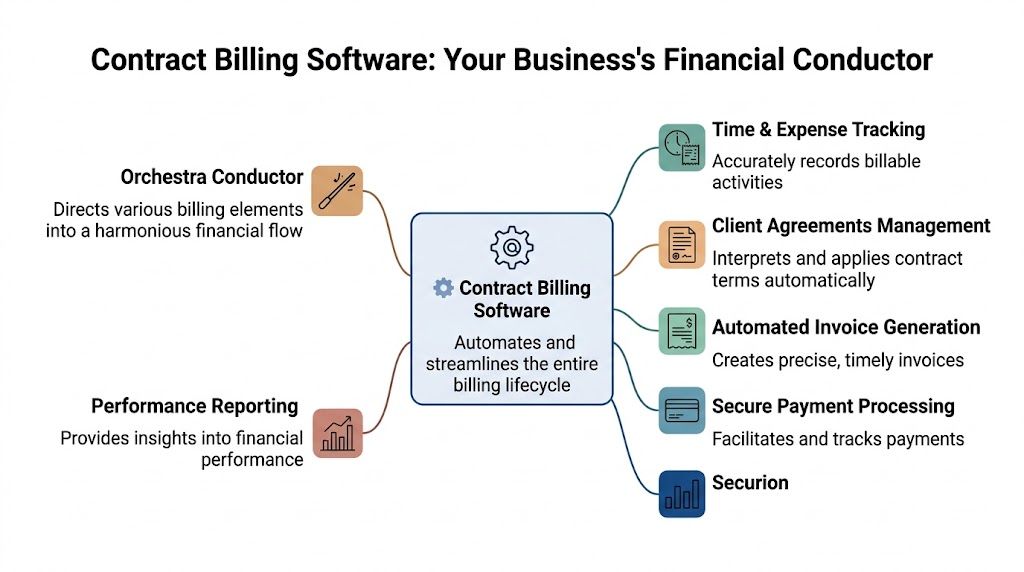
Think of it as an automated financial pilot
Basic invoicing software helps you send a bill. Contract billing software helps you manage the logic behind the bill.
If QuickBooks is the ledger that records what happened, contract billing software is the operating layer that says what should happen next.
A simple analogy helps:
| Tool | What it does |
|---|---|
| Basic invoicing | Creates and sends one invoice at a time |
| Contract billing software | Applies contract terms repeatedly and automatically |
| Accounting software | Records the financial result in your books |
That difference matters most when your business has repeat complexity.
A consulting firm might bill a monthly retainer on the first of the month, extra strategy hours at month-end, and a one-time setup fee only after kickoff. A basic invoicing tool can send all three invoices. Contract billing software can decide when each one should happen and keep the rules consistent.
The four parts that matter
Most contract billing software has a few core building blocks.
Contract repository
Here, the agreement lives in structured form. Not just a PDF in a folder, but billable terms that the software can read and act on.
That might include start dates, billing frequency, milestone triggers, overage rules, renewal terms, and payment requirements.
Billing rule engine
This is the heart of the system. It applies the agreement’s logic.
If a client gets billed monthly in advance, the engine schedules that. If a project invoice should only go out after approval, it waits for the trigger. If an overage starts after a threshold, it calculates it.
Invoice generation
Once the rules are met, the system creates the invoice using consistent formatting, line items, taxes, and due dates.
That means fewer handwritten workarounds and fewer situations where each account manager bills clients differently.
Reporting dashboard
Owners usually feel the biggest shift here. You can see billed revenue, unbilled work, overdue invoices, and contract status without asking three people to export data from three systems.
Practical rule: If your team still has to read the contract manually every time they send an invoice, you don’t have a billing system. You have a billing task list.
Why this matters more for service firms
A lot of software content is written for SaaS companies. Service businesses have a different kind of complexity.
Your contracts often include retainers, project phases, billable hours, employee or contractor time, reimbursable expenses, and change requests. That means the software has to handle human work, not just subscriptions.
For consultants, agencies, bookkeeping firms, payroll providers, and other B2B service companies, contract billing software shifts the focus from “Did we send the invoice?” to “Did the system apply the agreement correctly, and did the books stay clean?”
That’s a much better question.
Key Features Your Service Business Needs
A long feature list isn’t helpful if it doesn’t match how your business bills. Service companies need tools that reduce admin work, speed up collections, and keep accounting accurate when invoices sync into QuickBooks and labor costs connect back to payroll data.
One market trend points in the same direction. Real-time billing and payment processing volumes are projected to reach 511.7 billion by 2027, growing at a 21.3% annual rate, according to FlexPoint. For service firms, that matters because faster billing usually means faster cash collection.
Billing automation that matches service work
Some features are nice to have. Others solve daily headaches.
- Recurring billing schedules: For retainers, maintenance plans, and advisory agreements, the system should generate invoices on the right cadence without manual reminders.
- Milestone triggers: Project firms need invoices tied to delivery points such as kickoff, approval, launch, or signoff.
- Time and expense capture: If your pricing includes hourly work or reimbursable costs, billing should pull approved data into invoices instead of relying on copy and paste.
- Change handling: Clients add scope. They pause work. They shift timelines. Good software can accommodate amendments without forcing you to rebuild the agreement from scratch.
A tutoring business is different from an agency, but the operational lesson is similar. Looking at tutoring billing software can be useful because it shows how session-based services need billing rules tied to real activity, not just a flat monthly invoice.
Features that improve collections
Many owners focus on invoice creation. Collection tools deserve equal attention.
Dunning and payment follow-up
When a card fails or an invoice ages past due, the software should send reminders automatically and track what happened. That reduces the awkward manual chase and keeps receivables from getting stale.
Real-time payment visibility
You want to know quickly whether an invoice is paid, partially paid, disputed, or overdue. That helps operations and bookkeeping stay aligned.
Client-facing clarity
A clean invoice format matters more than people think. When the client can see exactly what they’re being charged for, disputes usually drop and approvals move faster.
A confusing invoice gets treated like a problem to investigate. A clear invoice gets treated like a bill to pay.
Features that protect your books
Many service businesses get tripped up here. An invoice can be sent correctly and still create accounting problems if the underlying setup is weak.
QuickBooks sync that preserves clean accounting
The software should push customers, invoices, payments, credits, and status changes into QuickBooks in a structured way. If your team has to re-enter data, you lose the biggest advantage.
You should also review accounts receivable best practices when evaluating tools, because billing software only helps if receivables follow a disciplined process after the invoice goes out.
Revenue recognition support
Complex contracts often don’t line up neatly with one invoice and one accounting period. If you bill before work is complete, or recognize revenue over time, your system should support that logic instead of forcing spreadsheet adjustments.
Audit trail
You need to see who changed terms, when invoices were generated, and how billing values were calculated. That matters during disputes, close, and compliance review.
ASC 606 support isn’t only for large companies
Service business owners sometimes assume revenue recognition automation is a big-enterprise issue. It isn’t.
For contracts with milestones, deferred revenue, bundled services, or multiple deliverables, automation matters because the software can separate billing events from revenue events. That means you can invoice a client on one date and still recognize the revenue according to the agreement and delivery schedule.
Without that structure, accounting teams end up patching the gap manually at month-end.
A quick feature filter
When you review contract billing software, test each option against these questions:
| Question | Why it matters |
|---|---|
| Can it handle retainers, projects, and overages in one client account? | Many service firms use hybrid pricing |
| Does it sync cleanly with QuickBooks? | Manual re-entry creates errors |
| Can it connect labor or payroll-related data from Gusto workflows? | Cost and billing visibility should live in the same process |
| Does it support amendments and milestone billing? | Service contracts change often |
| Can non-technical staff manage billing rules? | Finance shouldn’t need a developer to update contract terms |
Aligning Billing Models With Your Services
The best contract billing software won’t help much if the billing model inside it doesn’t match how you deliver work. Owners often feel friction here because their actual pricing is more mixed than they realize.
A client might pay a fixed monthly fee for ongoing support, a one-time implementation fee, and hourly charges for work outside scope. That’s not one model. That’s three.

Fixed-fee retainers
Retainers fit agencies, outsourced finance teams, HR support providers, and advisory firms that deliver a steady level of monthly work.
The software should invoice automatically on a set date, apply the right service period, and carry the same billing rules forward unless the contract changes.
This model is easiest to manage operationally, but it still needs structure. You want renewal dates, scope limits, and any out-of-scope billing terms clearly tied to the account.
Project-based flat fees
Flat-fee projects work well when the scope is defined and the value is tied to a deliverable rather than hours.
Examples include a financial cleanup project, a payroll implementation, a recruiting engagement, or a website build. In contract billing software, this usually means setting up invoice stages such as deposit, midpoint, and completion.
That keeps everyone honest. Operations can see what has been billed. Accounting can see what’s still pending.
Time and materials
This model makes sense when the scope changes frequently or the amount of effort can’t be predicted well in advance.
The software should pull approved hours and expenses into the invoice, apply the right billing rate, and preserve the supporting detail. If the process requires exporting timesheets, editing them manually, and then rebuilding them in QuickBooks, you’re not getting the benefit of automation.
For firms using payment terms, pairing billing rules with a disciplined receivables policy matters. This guide to Net 30 invoicing is useful because payment terms only work well when your billing process is consistent.
Milestone billing
Milestone billing is common in consulting, implementation work, and multi-phase projects. You bill when a defined event occurs, such as strategy approval, system launch, or final delivery.
The challenge isn’t the idea. It’s the trigger.
If the milestone depends on someone remembering to email finance, invoices go out late. Contract billing software gives you a place to define those events and release billing when they occur.
Milestone billing fails when the milestone lives in a project manager’s head instead of the billing system.
Usage-based and hybrid models
Some service businesses now bill part of the work based on consumption. That could mean support hours above a retainer cap, payroll per employee, or advisory tied to transaction volume.
Modern platforms support usage-based billing with real-time metering and dynamic pricing, and that flexibility can lead to 40 to 60 percent faster payment cycles, according to Orb.
That matters for firms with variable deliverables because it lets you connect actual activity to client charges without waiting for a manual month-end tally.
A hybrid setup often looks like this:
- Base retainer: Covers standard monthly support
- Overage fees: Apply after included hours or units are consumed
- One-time charges: Setup, training, or cleanup work
- Milestone invoices: Used for major project phases layered onto the ongoing relationship
This short video offers a useful walkthrough on how businesses think through billing structure and automation in practice.
How to pick the right model
Use the pricing model that reflects the work your client buys.
If the client is paying for ongoing access to your team, use a retainer. If they are paying for a defined outcome, use project or milestone billing. If effort changes materially month to month, include time-based or usage-based elements.
The important point is consistency. Your contract, delivery process, and billing logic should all tell the same story.
How to Choose and Integrate Your Software
Most billing software demos look good. The true test comes later, when invoices start syncing into QuickBooks, payments hit the bank, payroll runs in Gusto, and your team wants reporting that still makes sense at month-end.
For B2B service businesses, the wrong choice usually isn’t a platform with weak invoice design. It’s a platform with weak integration.

Integration isn’t a side feature
A lot of tools are built with SaaS billing in mind. They may handle subscriptions beautifully but create friction for service firms that need clean AP and AR workflows, labor visibility, and straightforward reconciliation.
That gap has real consequences. According to LedgerUp, SaaS companies lose 1 to 5 percent of revenue to billing gaps, and service businesses face similar 2 to 4 percent leakage from miscategorized transactions caused by poor integration.
For a service firm, that leakage doesn’t always show up as an obvious missed invoice. Sometimes it shows up as revenue posted to the wrong client, payroll-related charges that don’t tie back to billable work, or a receivables balance that looks right in one system and wrong in another.
What good QuickBooks integration looks like
A vendor may say they “integrate with QuickBooks.” That phrase isn’t enough. Ask what syncs and how.
Look for this:
- Customer sync: New clients and updates shouldn’t require duplicate entry.
- Invoice sync: Invoice numbers, dates, line items, taxes, and status should transfer cleanly.
- Payment sync: When a client pays, the accounting record should update without manual re-keying.
- Credit and adjustment handling: If you issue credits or revise a bill, those changes should flow properly.
- Chart of accounts discipline: Revenue categories should map correctly so reports stay usable.
If you want a practical lens for this, review the broader invoice to pay process. Billing software should reduce friction across that full workflow, not just speed up invoice creation.
What good Gusto alignment looks like
Gusto isn’t a billing system, but it often sits close to billable work in service companies.
If payroll hours, departments, contractors, or teams influence what gets billed to clients, your billing process needs a reliable way to connect labor data with invoicing logic. That connection might happen directly or through middleware, but the result should be the same: less manual matching.
A useful test is simple. Ask whether your team can answer these questions without exporting three files and combining them manually:
| Question | Why it matters |
|---|---|
| Which payroll costs supported which client work? | Helps with margin analysis |
| Which employees or contractors drove overage billing? | Supports accurate invoicing |
| Do billed services align with payroll periods and service dates? | Prevents timing confusion |
| Can accounting reconcile payroll-related contract charges cleanly? | Keeps books accurate |
Questions to ask vendors before you buy
Some of the best buying decisions come from asking boring questions.
Ask about exceptions
How does the software handle contract amendments, paused work, partial periods, credits, and multi-step approvals? Service businesses live in exceptions.
Ask about reconciliation
Can invoices and payments be traced cleanly from the billing platform to QuickBooks to bank activity? If the answer is fuzzy, your month-end close will be fuzzy too.
Ask about ownership
Who on your team can maintain billing rules? If every change requires a specialist or developer, the system becomes a bottleneck.
Ask for a real workflow demo
Don’t settle for a polished invoice screen. Ask the vendor to show a contract being created, billed, synced, edited, paid, and reported.
Buyer check: If a platform can generate an invoice but can’t explain how that invoice becomes a clean accounting entry, keep looking.
Choose for your next stage, not your last stage
A lot of owners buy software based on today’s volume and forget tomorrow’s complexity.
The better question is whether the system can support more clients, more billing models, and more internal accountability without forcing a rebuild. For service businesses, that usually means prioritizing integration depth over flashy features.
The software should fit your stack. If it fights QuickBooks, creates extra work around Gusto, or makes reporting harder, it isn’t solving the right problem.
A Practical Implementation Roadmap
A good rollout is less about speed and more about order. The easiest way to avoid chaos is to implement contract billing software in phases.
Phase one begins with cleanup
Gather every active client agreement, invoice schedule, pricing rule, and exception before you configure anything. If the contracts are inconsistent, the software will expose that quickly.
Create a simple review list:
- Active contracts: Confirm start dates, renewal terms, billing cadence, and payment terms.
- Pricing logic: Identify retainers, milestones, hourly rates, overages, credits, and special rules.
- Client records: Make sure names, contacts, tax settings, and legal entities are consistent.
- Accounting mappings: Decide how revenue lines should land in QuickBooks.
Configure the rules before you migrate everyone
Start with a small group of clients, ideally one from each major billing type you use.
That lets you test different scenarios without putting the whole company at risk. A retainer client, a project client, and a time-based client usually provide a strong sample set.
Test the whole path, not just the invoice
Run sample billing cycles and follow them all the way through.
- Generate the invoice
- Sync it to QuickBooks
- Record a sample payment
- Review the accounting result
- Check reporting outputs
- Confirm any payroll-related data lines up as expected
If something breaks, fix the workflow before expanding the rollout.
Train the people who will touch it every week
Training shouldn’t be limited to finance. Operations, project leads, account managers, and anyone who approves scope changes should know what triggers billing and what needs to be entered consistently.
Start small, test thoroughly, then expand. That’s how billing implementations stay manageable.
Go live in a controlled sequence
Don’t switch every client at once if you can avoid it. Move a manageable batch, review the first live cycle carefully, then continue in waves.
That gives your team time to catch issues while the process is still easy to adjust.
Common Pitfalls And How To Avoid Them
Most billing implementations don’t fail because the software is incapable. They fail because the business carries old habits into the new system.
The contract says one thing, the system says another
A common mistake is loading high-level pricing into the software but skipping the details that drive billing. That includes milestone definitions, overage rules, amendment history, and approval triggers.
When those details stay outside the platform, the team falls back to manual work. The result is a half-automated process that still breaks at month-end.
Teams forget that billing is cross-functional
Finance may own the platform, but operations often controls the data that triggers billing. If project managers don’t update milestones or account leads don’t flag contract changes, invoices still go out wrong.
Prevent that by assigning ownership clearly. Someone should own contract setup. Someone should own approvals. Someone should own accounting review.
Compliance gets treated as an afterthought
This one matters more than many owners expect.
Manual handling of complex contracts can lead to 20 to 30 percent error rates in compliance audits, while automated systems support accuracy for milestone billing and deferred revenue, according to Tensoft.
That matters when your contracts include prepayments, deferred revenue, multiple deliverables, or milestone-based recognition. If those rules aren’t configured correctly, the invoices may look fine while the accounting treatment is wrong.
Companies ignore change orders and exceptions
A system works well during the demo because the sample contract is clean. Real clients are not.
Scope changes, credits, pauses, rush work, and contract amendments need a defined billing path. If they don’t have one, your team will invent workarounds. Those workarounds usually create errors later.
The fix is usually simple
Avoid most problems by doing four things well:
- Use clean contract data: Garbage in still means garbage out.
- Define ownership: Billing events need accountable people.
- Test unusual cases: Don’t only test ideal scenarios.
- Review accounting outputs: The invoice is only part of the workflow.
The software should reduce judgment calls, not create new ones.
Frequently Asked Questions For Service Business Owners
Can contract billing software handle complex projects with frequent change orders
Yes, if the platform is designed to manage amendments and revised billing rules without rebuilding the whole contract. For service businesses, that usually means the software can update milestones, add one-time fees, revise recurring amounts, or adjust billable scope while preserving a clear audit trail.
If a tool only works well when the contract never changes, it won’t fit most agency, consulting, payroll, or advisory environments.
How does it work with QuickBooks if I’m already invoicing there
Think of QuickBooks as your accounting home base. Contract billing software sits upstream and manages the contract logic.
In a strong setup, the billing platform creates and manages invoices based on contract terms, then syncs the finalized transactions into QuickBooks so your books stay accurate. That gives you more control over billing without losing the accounting history and reporting structure you already rely on.
How does Gusto fit into the picture
Gusto usually matters when payroll data influences billing, staffing analysis, or service delivery economics.
For example, if certain employees support specific client accounts, or if labor effort drives overage charges, your systems should help connect those facts. Sometimes that’s a direct integration. Sometimes it’s a workflow that maps data through another tool. The important part is consistency and traceability.
Is this only useful for companies with subscription pricing
No. That’s one reason service firms often overlook it.
Contract billing software is useful anytime the invoice depends on contract terms that repeat or change over time. That includes retainers, project billing, milestone schedules, time and materials, hybrid pricing, and client-specific exceptions.
Will this replace my bookkeeper or accounting team
No. It changes the kind of work they do.
Instead of spending time rebuilding invoices, matching details by hand, or cleaning up avoidable errors, the team can focus on review, reconciliation, cash flow visibility, and reporting. Good software removes repetitive tasks. It doesn’t remove the need for financial oversight.
What’s a realistic return for a small consulting firm
The return usually shows up in a few places at once: fewer missed invoices, faster collections, less rework in QuickBooks, cleaner month-end closes, and better visibility into what has been billed versus what is still unbilled.
If you have around 20 clients, the biggest gain may not be headcount savings. It may be reliability. Owners feel that as fewer surprises, tighter cash flow, and less scramble at the end of the month.
What’s the first sign we need contract billing software
You likely need it when any of these become normal:
- Invoices depend on spreadsheets or memory
- Different clients follow different billing rules
- Scope changes keep creating manual corrections
- QuickBooks needs frequent invoice cleanup
- Your team debates what should be billed and when
Once billing becomes a recurring source of delay or confusion, software isn’t a luxury. It’s part of building a stable back office.
If your service business needs cleaner billing workflows, tighter QuickBooks reporting, and better alignment between invoicing, bookkeeping, and payroll, Steingard Financial can help you build a process that fits your current stack instead of forcing you to start over.