 Skip to content
You open QuickBooks to answer a simple question: Did we make money last month?
The dashboard shows income. Your bank balance says something else. A contractor bill is still sitting in your inbox. Gusto already ran payroll. One client paid late, another prepaid for work you haven’t finished, and your software subscriptions all hit on different dates. You know your business is moving, but the numbers don’t line up cleanly enough to trust.
That’s where most service business owners get stuck. Not because they can’t understand accounting, but because the daily pace of operations leaves no room to stop and build a system. You start with good intentions, then bank feeds auto-categorize transactions, invoices pile up, and the books become something you only look at when taxes or cash stress force the issue.
The good news is that the fundamentals of accounts aren’t mysterious. They’re a set of simple rules for organizing what already happened in your business, so you can see it clearly. Once those rules are in place, QuickBooks and Gusto become useful tools instead of noisy dashboards.
Why Your Business Needs a Financial Blueprint
A service business can look healthy from the outside and still feel chaotic on the inside.
Maybe you’re booking work, your calendar is full, and money keeps hitting the bank. But when it’s time to hire, raise prices, or decide whether you can afford a new tool, you hesitate. You don’t have a clean answer because you’re working from fragments: bank balance, memory, unpaid invoices, and a rough sense of what payroll will be next week.

That’s what poor accounting feels like in real life. It’s not just “messy books.” It’s delayed decisions, second-guessing, and pricing your services without a full view of your costs.
What the blueprint actually does
Good accounting gives your business structure in the same way architectural plans give structure to a building. It tells you:
- What you own: cash, receivables, and other assets
- What you owe: bills, payroll liabilities, loans, and taxes
- What you earned: revenue from the work you delivered
- What it cost: software, payroll, contractors, insurance, and overhead
Once that structure exists, everyday decisions get easier. You can see whether a busy month was also a profitable month. You can spot when strong sales are hiding weak collections. You can tell whether a rising bank balance comes from real operating performance or from client prepayments you still owe work against.
Clean books don’t just help at tax time. They help on ordinary Tuesdays when you need to make a decision fast.
Why this matters for service businesses
Service companies often have fewer physical products, but they don’t have simpler finances. They have timing issues. Revenue may be tied to retainers, milestones, or project completion. Labor costs may run through payroll in Gusto, through contractor bills, or both. Some expenses are paid upfront and need to be spread across months.
That’s why a basic planning habit matters too. If you’re trying to connect accounting with future spending choices, a practical guide to budgets for business can help you turn past financial data into a plan instead of just a report.
A financial blueprint doesn’t remove uncertainty from running a business. It removes avoidable confusion. That’s a big difference.
Understanding the Language of Debits and Credits
It’s common to tense up when hearing debits and credits. That’s understandable. The words sound technical, and banks use them differently than accounting does. In bookkeeping, they aren’t good or bad. They’re just the two sides of every transaction.
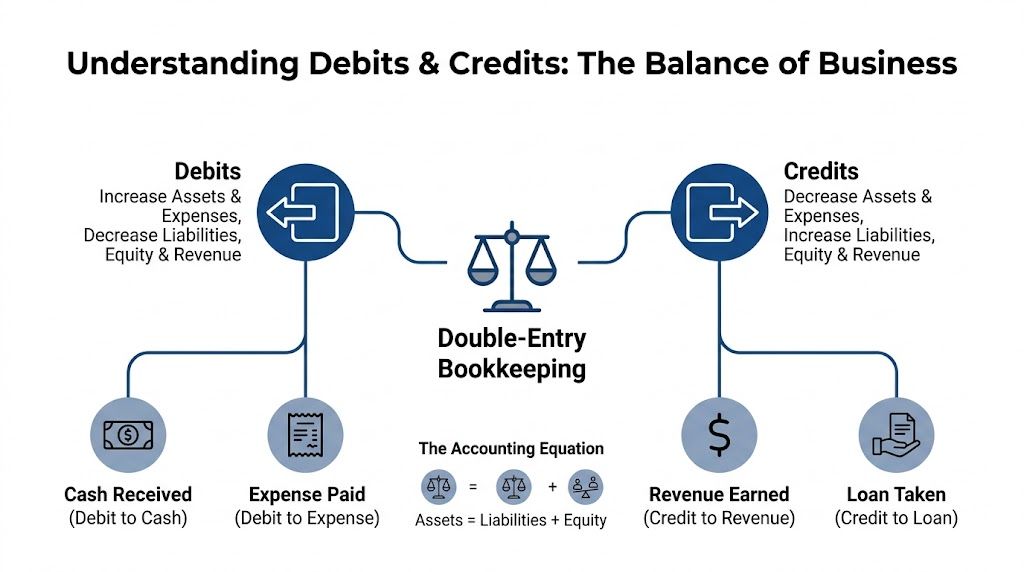
The core idea comes from double-entry bookkeeping, which was documented by Luca Pacioli in 1494. The system requires every transaction to be recorded in at least two accounts so debits and credits stay balanced, and the accounting equation Assets = Liabilities + Owner’s Equity stays intact, as explained in Wolters Kluwer’s overview of accounting basics.
Think of it like a balanced scale
Picture your books as a scale that must stay level. Every business event affects at least two places. If cash goes up, something else has to change too. If you record revenue, you also need to record what you received in return, or what the client still owes you.
That balance is why accounting works. It forces completeness.
Here’s the simplest version to remember:
- Assets are things your business has
- Liabilities are things your business owes
- Owner’s equity is the owner’s stake after liabilities are accounted for
Debits and credits are the mechanics that keep those categories in order.
The practical rule for owners
You don’t need to memorize every textbook definition on day one. Start with the pattern.
- Debits increase assets and expenses, and decrease liabilities, equity, and revenue
- Credits increase liabilities, equity, and revenue, and decrease assets and expenses
Practical rule: If you’re confused, ask two questions. What changed, and where is the other half of that change?
That question alone prevents a lot of bad bookkeeping.
A service business example in QuickBooks
Say you finish a website project and send the client an invoice. You haven’t been paid yet, but you did earn the revenue.
Your books record:
- Debit Accounts Receivable
- Credit Revenue
Why? Because the client now owes you money, which increases an asset called Accounts Receivable. At the same time, your revenue increases.
Later, the client pays the invoice.
Your books then record:
- Debit Cash
- Credit Accounts Receivable
Now the receivable disappears, and cash increases. No new revenue is created at payment time because you already recorded it when the work was earned.
Many owners get tripped up. They think money in the bank automatically means revenue, or they think sending an invoice doesn’t matter until payment arrives. In accrual-based bookkeeping, those are different moments.
If you want a more detailed walkthrough of the mechanics, this guide on understanding debit and credit in accounting is a helpful companion.
Another example you already live with
Now take a common operating expense. You pay a contractor bill for design support.
If you enter and pay it properly, the books usually reflect:
- the expense tied to the work received
- the reduction in cash when payment goes out
If you first enter the bill before paying it, you create a payable. If you pay immediately, QuickBooks may combine the effect into one workflow. Either way, the transaction still has two sides. The software may hide some of the journal mechanics, but the logic doesn’t disappear.
Why this matters more than people think
Double-entry bookkeeping became the backbone of modern accounting because it built a self-checking system. When the books don’t balance, something is missing, duplicated, or categorized incorrectly. That’s why debits and credits aren’t academic trivia. They’re the reason your reports can be trusted.
Here’s where that trust shows up in daily operations:
Invoices don’t vanish into memory
You can see what was earned and what’s still unpaid.Expenses land in the right period
You get a cleaner view of profitability.Your balance sheet stays meaningful
Cash, liabilities, and owner equity connect instead of drifting apart.Cleanup gets easier
When something looks wrong, you can trace both sides of the entry.
If one side of a transaction is missing, the books may still look busy, but they won’t tell the truth.
That’s the actual language of debits and credits. Not jargon. Just balance.
Building Your Financial Filing Cabinet
Once you understand that every transaction needs a home, the next question is obvious: where do all those entries go?
They go into your Chart of Accounts, often shortened to CoA. Think of it as your business’s financial filing cabinet. Each drawer holds a category of activity, and each folder inside that drawer holds a specific account.
A messy filing cabinet creates messy reporting. A clean one makes QuickBooks far easier to use.
The five main drawers
Historically, accounting frameworks organized records into core categories including assets, liabilities, capital, income, and expenditure. Modern bookkeeping for service businesses still follows the same basic structure.
Here’s what each drawer means in practical terms.
Assets
Assets are what the business has or controls.
For a service company, this often includes checking accounts, savings accounts, undeposited funds, accounts receivable, prepaid expenses, and maybe equipment. If a client owes you money, that’s an asset. If you paid for annual insurance in advance, that starts as an asset too because you haven’t used it all yet.
Liabilities
Liabilities are what the business owes.
These can include credit card balances, vendor bills, payroll liabilities, sales tax payable, loans, and client deposits for work you haven’t performed yet. That last one surprises a lot of owners. If a client prepays, it may feel like earned income, but until you deliver the work, part of that amount may belong in a liability account.
Equity
Equity tracks the owner’s stake in the business.
In a small service business, this usually includes owner contributions, owner draws, and retained earnings. Equity is one of the easiest places to create confusion when owners pay personal expenses from the business account or move money in and out without a clear label.
A chart of accounts should help you answer questions faster. If it creates more confusion, it’s overbuilt or misused.
Income
Income accounts track revenue from your services.
Thoughtful detail proves valuable. A single “Sales” line doesn’t tell you much if your company offers multiple services. Separate income accounts can show whether consulting, monthly retainers, project work, or implementation services are driving the business.
Expenses
Expense accounts track what it costs to run the company.
Typical examples include payroll, contractor payments, software subscriptions, insurance, advertising, rent, merchant fees, and professional services. The goal isn’t endless granularity. The goal is useful clarity.
A sample structure for QuickBooks
Here’s a simple model many service businesses can adapt.
| Account Number Range | Account Type | Example Accounts |
|---|---|---|
| 1000-1999 | Assets | 1100 Checking Account, 1200 Accounts Receivable, 1300 Prepaid Insurance |
| 2000-2999 | Liabilities | 2100 Credit Card Payable, 2200 Unearned Client Deposits, 2300 Payroll Liabilities |
| 3000-3999 | Equity | 3100 Owner Contributions, 3200 Owner Draws, 3300 Retained Earnings |
| 4000-4999 | Income | 4100 Consulting Revenue, 4200 Monthly Retainer Revenue, 4300 Project Revenue |
| 6000-6999 | Expenses | 6100 Payroll Expense, 6200 Contractor Expense, 6500 Software Subscriptions |
This kind of numbering isn’t mandatory, but it helps keep reports ordered and readable.
What owners usually get wrong
The most common CoA problem isn’t having too few accounts. It’s having too many poorly named ones.
A QuickBooks file that has “Office Expense,” “Office Supplies,” “Admin,” “Misc,” “General Expense,” and “Other Business Expense” usually signals years of inconsistent data entry. Reports become hard to read because similar costs are split across duplicate buckets.
Here’s a better standard:
- Name accounts by decision value: “Software Subscriptions” is more useful than “Misc Expense.”
- Separate operations from owner activity: Don’t bury owner draws inside regular expenses.
- Keep revenue categories aligned with how you sell: If you quote retainers separately from projects, your income accounts should reflect that.
- Use liability accounts for obligations: Client prepayments and payroll withholdings shouldn’t sit in income.
If you’re still setting up your system, choosing the tool matters too. A side-by-side look at how to choose the right accounting software can help if you’re comparing platforms before building your books around one workflow.
For a more detailed setup approach inside QuickBooks, this walkthrough on how to create a chart of accounts is worth bookmarking.
Managing Daily Cash Flow with AP and AR
Cash flow problems often start as process problems.
A client payment arrives late because the invoice went out late. A contractor bill gets missed because it stayed in email instead of being entered into QuickBooks. The bank balance looks fine until payroll hits, then suddenly it doesn’t.
That’s why two basic workflows matter so much: Accounts Receivable (AR) and Accounts Payable (AP).

AR is how you get paid
Accounts Receivable tracks money customers owe you.
For service businesses, AR usually begins the moment you send an invoice for completed work, a milestone, or a recurring retainer. If you skip proper invoicing and only watch bank deposits, you lose visibility into who owes what and how long invoices have been sitting unpaid.
A clean AR workflow in QuickBooks looks like this:
Create the invoice promptly
Use the correct customer, service item, and date. The date matters because it affects when revenue appears in your reports.Set clear payment terms
QuickBooks lets you assign due dates and terms. That makes aging reports more useful later.Receive the payment against the invoice
Don’t just categorize the bank deposit as income. Match it to the open invoice so Accounts Receivable clears correctly.Review open invoices routinely
An aging report tells you which balances are current and which need follow-up.
If a payment hits the bank but isn’t matched to the invoice, your cash may look right while your receivables stay wrong.
AP is how you control what you owe
Accounts Payable tracks vendor and contractor bills that you’ve received but haven’t paid yet.
Many owners operate from the bank account only. They wait until money leaves the account to record the expense. That approach hides upcoming obligations and makes cash planning harder than it needs to be.
For AP in QuickBooks, the process is different from AR:
- Enter the bill when you receive it
That records the expense or asset and creates the liability. - Code it to the right account
A contractor payment, software bill, and insurance premium shouldn’t all land in the same place. - Set the due date
Now QuickBooks can help you manage timing. - Pay the bill through the bill-pay workflow
This clears the payable instead of duplicating the expense.
A contractor invoice is a good example. If the work supported a client project this month, you want that cost in this month’s books, even if you pay the bill later.
Why both sides matter together
AR and AP are often taught separately, but owners feel them together. One controls incoming cash. The other controls outgoing cash.
That’s why I like to think of them as the two hands on your working capital. If AR is slow and AP is unmanaged, the squeeze shows up fast.
For a simple side-by-side explanation, this resource on accounts payable vs. accounts receivable lays out the distinction clearly.
A short visual explanation can also help if you want to see the workflows in a different format:
A simple operating habit
If you want one habit that improves daily cash control, use this one:
- Invoice work as soon as it’s earned
- Enter bills as soon as they’re received
- Match payments instead of recategorizing bank feed items
- Review open AR and unpaid AP on a fixed weekly schedule
That habit won’t solve every cash issue. It will stop avoidable surprises.
Closing Your Books for Accurate Reporting
A lot of business owners think bookkeeping is done once transactions are entered.
It isn’t. Data entry gets activity into the system. The month-end close is what turns that activity into reliable financial statements. Without a close process, your Profit & Loss can look finished while key details are still wrong.
That’s why closing the books each month is not optional if you want reports you can use.
What a month-end close actually includes
At minimum, a solid close means reviewing whether the books match reality.
That usually includes:
- Reconciling bank accounts: Every transaction in QuickBooks should match the bank statement.
- Reconciling credit cards: Charges, payments, and fees need to land in the right period.
- Reviewing AR aging: Open invoices should be real, collectible, and properly dated.
- Reviewing unpaid bills: AP should reflect actual obligations, not forgotten duplicates.
- Posting adjusting entries: Some costs and revenues need timing corrections before reports are accurate.
When owners skip this process, they often rely on numbers that are technically current but economically misleading.
Reconciled books answer a different question than unreconciled books. Not “what got entered?” but “what’s true?”
Where the matching principle matters
One of the most important close concepts is the matching principle. It requires you to record expenses in the same period as the revenue they help generate.
A straightforward example comes from prepaid software. A $12,000 annual software subscription should be recognized as a $1,000 monthly expense, not one large expense in a single month, according to Interactive College of Technology’s explanation of accounting fundamentals. That same source notes that misapplying this principle can cause 10-25% variance in quarterly P&L for service firms.
For a service business, this matters constantly:
- annual insurance premiums
- software subscriptions
- retainers paid in advance
- contractor costs related to work delivered in a specific period
- payroll items tied to the month that just ended
A common service-business example
Suppose your team earned strong fourth-quarter revenue, and part of a manager’s bonus relates to that period. If you wait until the payment date to record the expense, your Q4 profitability may look stronger than it really was, and the following period may look weaker.
That’s not a small reporting quirk. It changes how you judge pricing, margins, and staffing decisions.
The same issue shows up with prepaid tools in QuickBooks. Owners often let the bank feed classify the full annual charge to software expense the day it clears the card. That’s convenient, but convenience isn’t the same as accuracy.
Why the close protects decision-making
The month-end close matters because every major report depends on timing.
If transactions are missing, duplicated, unmatched, or sitting in the wrong month, you may:
Overestimate profitability
Revenue appears now, while related costs show up later.Misread cash needs
Unpaid bills and liabilities stay out of sight.Delay collections
Old invoices remain open because no one reviewed AR aging.Confuse owners and advisors
Meetings focus on fixing the books instead of discussing the business.
A disciplined close creates a rhythm. Enter activity during the month. Review and adjust at month-end. Then use the reports confidently.
That’s the moment accounting becomes management, not just record-keeping.
Translating Numbers into Business Insights
Once your books are closed properly, the numbers start to answer useful questions.
Not every report answers the same question. That’s where owners often get frustrated. They open three financial statements and assume they’re seeing three versions of the same story. They aren’t. Each report shows your business from a different angle.

The Profit and Loss statement
The Profit & Loss, or P&L, shows performance over a period of time. It answers: Did the business generate profit from its operations during this month, quarter, or year?
For a service company, this report usually helps you see:
- whether revenue is growing or uneven
- whether payroll and contractor costs are rising in line with sales
- whether overhead is creeping up
- whether specific service lines are pulling their weight
The P&L is where many owners first look, but it’s easy to misuse. If revenue timing or expense matching is off, the report may look clean while telling the wrong story.
A useful habit is to compare each month not just to the prior month, but to your expectations. If software expense spikes unexpectedly, ask whether a prepaid item was posted incorrectly. If revenue jumps, ask whether it was earned or collected.
The Balance Sheet
The Balance Sheet shows your financial position at a single point in time. It answers: What does the business own, what does it owe, and what remains for the owner?
This report matters more than many owners realize because it reveals problems the P&L can’t.
Look here for:
- Cash balances: obvious, but still foundational
- Accounts Receivable: are unpaid invoices accumulating?
- Accounts Payable and liabilities: are obligations being tracked fully?
- Equity movement: are owner draws and contributions recorded properly?
The balance sheet is often the fastest way to spot bookkeeping problems. Old receivables, strange negative balances, duplicate liabilities, or a bloated “ask my accountant” account usually show up here first.
The P&L tells you how the movie is going. The balance sheet shows where the business stands when the screen freezes.
The Statement of Cash Flows
The Statement of Cash Flows answers a different question: Where did cash come from, and where did it go?
That distinction matters because profitable businesses can still feel cash-tight. A growing service firm may report solid income while cash is tied up in receivables, owner distributions, debt payments, or prepaid costs.
The cash flow statement helps separate:
Operating activity
Cash generated or used in running the businessInvesting activity
Cash used for equipment or other longer-term assetsFinancing activity
Cash moving through loans, owner contributions, or distributions
If your P&L looks healthy but your bank account feels thin, this is the report to inspect.
The KPIs worth watching
Financial statements become more useful when you turn them into a few repeatable indicators.
Two especially helpful measures for service businesses are:
Gross Profit Margin
This shows how much revenue remains after direct costs related to delivering services. It helps you judge pricing and delivery efficiency.Net Profit Margin
This shows what remains after all operating expenses. It’s the clearest big-picture measure of whether the business keeps enough of what it earns.
You can also track collection patterns, payroll as a share of revenue, and overhead trends by service line. The exact KPIs vary by business model, but the principle stays the same. A metric only helps if the underlying books are accurate.
How owners can use this monthly
You don’t need a long finance meeting to make reports useful. A focused monthly review often works better.
Try scanning the numbers in this order:
P&L
Did the month produce the level of profit you expected?Balance Sheet
Do receivables, payables, cash, and equity balances make sense?Cash Flow Statement
Did cash move the way you thought it would?A short KPI summary
Are margin, collections, and overhead trending in the right direction?
That sequence helps you move from activity to meaning. And that’s the payoff of the fundamentals of accounts. You stop collecting numbers and start using them.
Common Accounting Mistakes and How to Fix Them
Many bookkeeping problems don’t start with negligence. They start with convenience.
QuickBooks bank feeds make it easy to accept suggestions without reviewing them. Owners create new accounts on the fly because they’re in a hurry. Personal charges slip into the business card. A payroll setup works mechanically, but the accounting side never gets cleaned up.
Mistake one is a cluttered chart of accounts
If your books have duplicates, vague categories, or owner transactions mixed into operating expenses, reports become harder to trust.
Fix it by consolidating similar accounts, renaming unclear ones, and separating owner activity from business operations. If a report line doesn’t help you make a decision, question whether that account should exist.
Mistake two is trusting automation too much
Bank rules and auto-categorization save time, but they can also repeat bad assumptions month after month.
A software charge may get posted fully to expense when part of it belongs in prepaid assets. A loan payment may be booked entirely as expense instead of split between liability and interest. A client deposit may be treated as income before the work is done.
Automation is only as good as the accounting logic behind it.
Mistake three is mixing personal and business activity
This one creates confusion fast. It muddies expense reporting, complicates equity tracking, and forces cleanup later.
The fix is simple in principle, though sometimes annoying in practice: use business accounts for business activity, personal accounts for personal activity, and clearly record any owner contributions or draws.
Mistake four is misapplying the matching principle
This is especially common in service businesses using QuickBooks. A common error is mishandling prepaid services or software licenses. According to the cited construction accounting material, this can inflate short-term profits by 15-20% per quarter, and over 60% of small service businesses make this mistake because of automated categorization pitfalls, as noted in this accounting fundamentals resource.
The fix is to review timing-sensitive transactions during the close, not just when they first hit the bank feed. If a payment benefits multiple months, part of the job is deciding how much belongs now and how much belongs later.
None of these mistakes means your business is bad at accounting. They mean your system needs attention. That’s normal. The important part is catching the issue before bad data turns into bad decisions.
If your QuickBooks file is messy, your payroll entries don’t line up, or your monthly reports still feel unreliable, Steingard Financial can help you build a cleaner back office. Their team supports service businesses across the United States with bookkeeping, payroll, reconciliations, chart of accounts setup, cleanup work, and reporting that gives owners numbers they can use.