 Skip to content
Your accounting software worked fine when you had a small team, a simple service offering, and one person who knew where every number lived. Then the business grew. Payroll moved into Gusto, invoicing stayed in QuickBooks, project data sat in a CRM, and reporting started happening in spreadsheets that only made sense to the operations manager.
That’s usually the moment business owners start asking the wrong question. They ask, “Should we replace the software?” Often the better question is, “What exactly needs to change, and what should stay standard?”
That’s where customization in ERP becomes useful. Not as a flashy technology project, but as a practical way to shape your financial system around how your business operates. For service businesses, that might mean cleaner job-cost visibility, better approval flows, stronger payroll handoffs, or reporting that reflects retainers, utilization, locations, or service lines without manual cleanup every month.
When Your Business Processes Outgrow Your Software
A familiar example looks like this. A marketing agency starts with QuickBooks Online, Gusto, and a few manual reports. For a while, that stack works. Then the agency adds departments, recurring retainers, contractor payments, multi-step approvals, and clients who all want reporting in slightly different formats.
Nobody notices the problem all at once. It shows up in smaller ways. The bookkeeper exports data to Excel every Friday. The owner asks for profitability by service line and gets three different answers. Payroll codes don’t match project categories. Month-end closes depend on one employee remembering a dozen manual steps.
At that point, the issue usually isn’t that QuickBooks is “bad.” It’s that the business has outgrown a standard setup. If you’re still tightening fundamentals, a guide to setting up QuickBooks Online for service businesses is often the right starting point. If your needs are broader, it also helps to understand how cloud ERP for small businesses can support more connected workflows.
This is why customization deserves a calmer, more strategic look. It’s not rare, and it’s not only for giant enterprises. NetSuite’s compiled statistics report that more than 25% of organizations implemented ERP software without any customizations, while about 45% used moderate customizations and about 21% used heavy customizations to fit their processes, according to NetSuite’s ERP statistics compilation.
Most growing businesses don’t need a totally custom system. They need fewer workarounds and better alignment between software and process.
For a service business owner, that distinction matters. You’re not trying to build software for its own sake. You’re trying to make billing, payroll, reporting, approvals, and forecasting easier to run as the company gets more complex.
Understanding ERP Customization vs Configuration
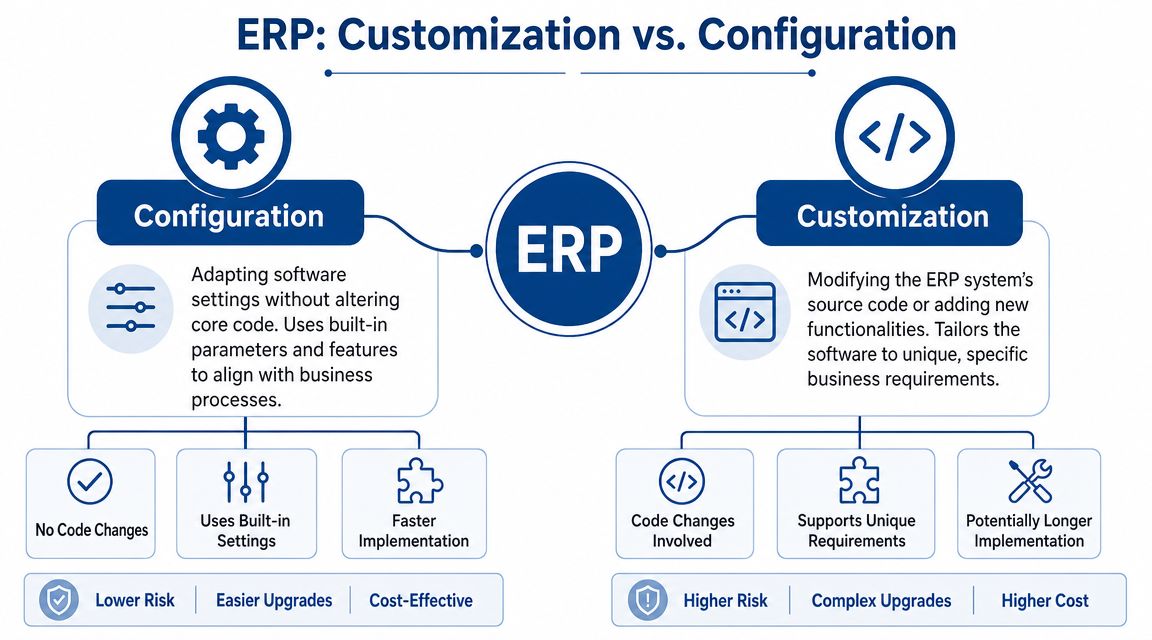
A lot of confusion starts with one basic mix-up. People use configuration and customization as if they mean the same thing. They don’t.
Configuration is changing settings
Configuration means you’re using the options the software already gives you. In QuickBooks, that could mean setting up your chart of accounts, enabling classes or locations, defining user permissions, or adjusting invoice templates. In a larger ERP, it might include approval rules, financial calendars, dimensions, or workflow routing.
Think of configuration like arranging furniture in a house you already own. You’re making the space work better, but you’re not changing the structure.
Common service-business examples include:
- Role setup: Giving payroll staff different access than project managers.
- Reporting structure: Using classes, departments, or tags to separate service lines.
- Workflow rules: Requiring invoice approval above a certain threshold.
- Form changes: Adjusting invoice layouts or standard document fields.
Customization is changing behavior
Customization goes further. It changes core source code or extension logic instead of just built-in settings. That can mean adding new business logic, creating a new interface, or building functionality the system didn’t originally include. According to Opkey’s explanation of ERP configuration versus customization, that difference matters because customizations create upgrade friction and higher maintenance burden.
That’s the house analogy at a different level. Configuration is rearranging furniture. Customization is moving walls, adding a room, or rewiring the kitchen.
Here’s a simple way to:
| Approach | What you’re doing | QuickBooks-style analogy | Long-term effect |
|---|---|---|---|
| Configuration | Adjusting built-in options | Turning on classes, editing permissions | Usually easier to maintain |
| Customization | Adding or changing logic | Building a special approval app tied to your books | Usually harder to upgrade |
A service business often sits somewhere in the middle. You might configure most of the system, then customize one piece that gives you a real operational advantage.
A short visual walkthrough can help make the distinction clearer:
Practical rule: Start by asking, “Can the system already do this if we structure it properly?” Ask about custom code only after that answer is clearly no.
That question alone saves a lot of money.
The Four Main Types of ERP Customization
Not all customization looks the same. For service businesses, most requests fall into four practical buckets. Once you separate them, it becomes easier to choose the lightest solution that solves the problem.
Extensions and field-level changes
This is the smallest form of customization. You’re adding fields, validation rules, small workflow logic, or lightweight forms that the standard product doesn’t include.
A consulting firm might add a custom field for engagement type so finance can report differently on advisory work, recurring bookkeeping, and implementation projects. That’s not a whole new system. It’s a targeted extension.
This kind of change can be useful when the process is stable and the reporting value is clear.
Integrations between systems
For many service businesses, this is the most valuable category. Instead of making extensive changes to the ERP, you connect it to the tools you already use.
Examples include linking payroll data from Gusto into the financial system, syncing customer records from a CRM, or moving approved bills into an AP workflow. If you’re evaluating payable workflows, this overview of what AP automation is helps clarify where integration often creates more value than heavy customization.
The key benefit is that integrations can reduce double entry. The risk is that a poorly planned integration can push bad data across systems faster.
Custom reports and dashboards
Sometimes the process is fine, but the visibility is weak. That’s a reporting problem, not a workflow problem.
A service business may want dashboards for:
- Profitability by client group: Not just total revenue, but margin by segment.
- Payroll burden visibility: So labor-heavy service lines are easier to manage.
- WIP and deferred revenue views: Especially for retainers or project-based billing.
- Approval and collections views: To spot bottlenecks before cash flow suffers.
This is often where owners first feel the need for customization. They’re not asking for code because they love code. They’re asking because they can’t get answers out of the system fast enough.
Custom modules
This is the heaviest option. A custom module means building a new functional area that isn’t available out of the box.
A good example is a specialized project billing engine for a professional services firm with unusual billing rules. Maybe invoices depend on milestones, staffing mix, client-specific markups, and a special approval path. If standard billing can’t support that model, a custom module may make sense.
But this is also where discipline matters most. Custom modules can solve a real business problem, yet they create the biggest maintenance obligation.
Comparing ERP customization methods
| Customization Type | Typical Cost | Maintenance Level | Example for a Service Business |
|---|---|---|---|
| Extensions | Lower relative cost than broader custom work | Low to moderate | Adding service-line fields and validation rules |
| Integrations | Varies by system complexity | Moderate | Syncing Gusto, CRM, and accounting data |
| Custom Reports & Dashboards | Moderate | Low to moderate | Profitability dashboard by client and team |
| Custom Modules | Highest relative cost | High | Building a specialized project billing workflow |
A useful pattern shows up here. The most successful service businesses usually don’t jump straight to custom modules. They get a lot of value from better structure, targeted integrations, and reporting first.
Evaluating the Benefits Costs and Risks
Customization can absolutely improve a financial stack. It can also become the reason your system gets harder to manage every year. Both statements are true.
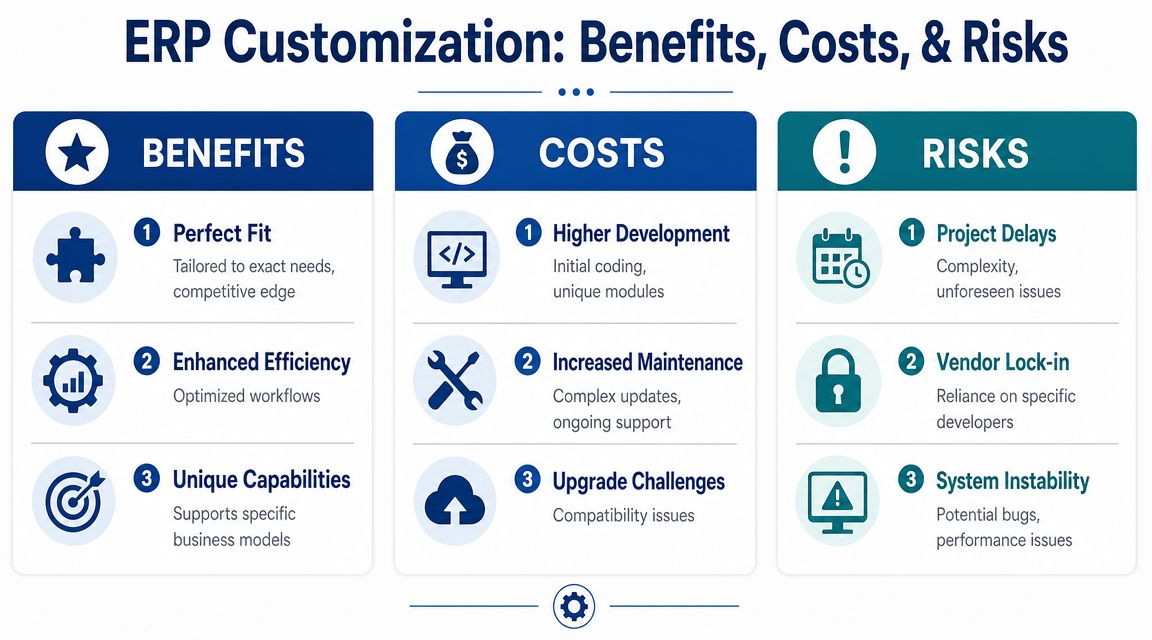
Where customization creates value
The upside is straightforward. A well-chosen customization can make software reflect the way your business earns money.
For a service business, that may include:
- Process fit: Your approvals, billing, or reporting match your real workflow.
- Better decisions: Owners and managers get useful financial views without spreadsheet gymnastics.
- Compliance support: Certain controls or documentation steps become easier to enforce.
- Operational consistency: Staff follow one clear process instead of inventing workarounds.
If a custom workflow removes repetitive manual review from invoicing or payroll mapping, that’s meaningful. If a custom dashboard helps you price services correctly, that has business value too.
Where the economics change
The part owners often underestimate is the full cost of carrying custom work over time. A key statistic from Stellar One’s discussion of ERP customization economics is that customization can represent 10% to 30% of the total ERP budget, and it’s associated with higher long-term complexity because custom code can make upgrades harder.
That budget impact matters before a project starts. It matters even more later, when the vendor releases updates and your team has to test whether custom logic still works.
A customization isn’t finished when the developer ships it. It stays on your balance sheet as an operational responsibility.
The practical risks owners feel later
The most common risks aren’t dramatic. They’re operational.
| Risk area | What it looks like in practice |
|---|---|
| Upgrade friction | A routine software update now requires extra testing |
| Developer dependence | Only one partner understands the custom logic |
| Slower changes | Small process updates take longer because custom pieces interact |
| Technical debt | Old custom work limits what you can improve next |
That doesn’t mean “never customize.” It means the bar should be higher. If the change supports a real business advantage, a compliance requirement, or a workflow you can’t reasonably redesign, it may be worth it. If it only avoids a short-term inconvenience, it usually isn’t.
Adopting Smart Customization Practices
The strongest customization decisions usually begin outside the software. They start with process design.
Many service businesses label a request as a system limitation when the actual problem is messier basics. Team members use inconsistent client names. Payroll roles don’t match reporting categories. Approval responsibilities are vague. New staff haven’t been trained on the intended workflow. No amount of code fixes that cleanly.

Fix the process before the platform
Core Catalysts makes an important point in its discussion of ERP balance. A frequently under-answered question is how to measure the long-term cost of customizations, and some customization requests are really process problems that could be solved with better data definitions, role design, or training instead of code, as noted in Core Catalysts’ ERP customization guidance.
That’s especially true for service businesses. A lot of what owners want falls into these categories:
- Reporting structure issues: Revenue, payroll, and expenses aren’t tagged consistently.
- Role confusion: Too many people can edit the same transactions, or nobody owns approval.
- Training gaps: Staff know how to do the task their own way, but not the standard way.
- Workflow design flaws: A process depends on email threads and memory instead of clear routing.
A business should clean those up before paying for code.
Use a simple decision screen
When someone asks for a customization, test it with three questions:
Does this create real business value?
For example, does it improve billing accuracy, client reporting, or payroll control in a way the business will utilize?Is this a compliance or control requirement?
If the answer is yes, the request may justify extra complexity.What happens at upgrade time?
If every future update becomes harder, that cost has to be part of the decision today.
Good governance sounds formal, but in practice it means this: no custom work gets approved just because one person is annoyed by the current screen.
Choose partners who prefer maintainability
A thoughtful implementation partner won’t say yes to every request. They’ll push back when configuration, training, or workflow redesign can solve the problem more cleanly.
That’s a good sign, not resistance.
For service businesses, the best long-term outcome usually comes from a smaller number of high-value customizations surrounded by strong process discipline, clear ownership, and reliable reporting structure.
An Implementation Checklist for Your Financial Stack
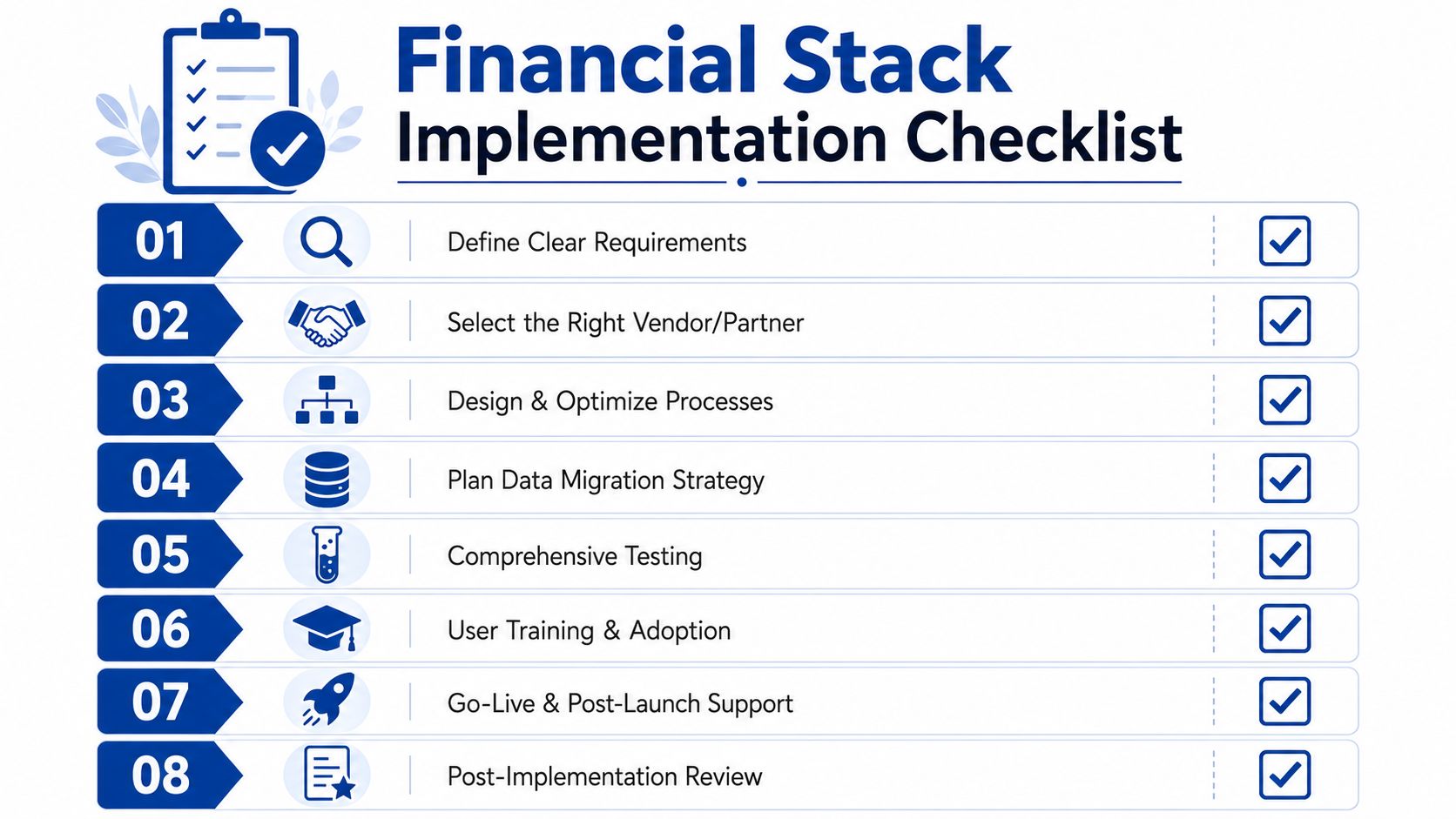
Once you decide a change is worth making, execution matters as much as strategy. Most failed customization efforts don’t fail because the idea was terrible. They fail because the business skipped scoping, testing, or ownership.
Start with your reporting and process reality
Before anyone touches code, document what’s broken now. Not in vague terms like “reporting is hard.” Write down the specific failure points.
A strong discovery list includes:
- Manual tasks: Which recurring steps depend on spreadsheets or copy-paste work.
- Decision gaps: Which questions owners can’t answer quickly from the current stack.
- Control gaps: Where approvals, permissions, or reconciliation handoffs break down.
- Data issues: Which fields, categories, or entities are inconsistent across systems.
If your financial structure still needs work, review how to create a chart of accounts before layering customization on top. A weak chart of accounts makes every downstream report harder.
Compare standard options before custom work
Many businesses jump from frustration straight to bespoke development. Slow down there.
Use this order instead:
Built-in configuration
Check whether the ERP or accounting platform already supports the process through settings, permissions, dimensions, or workflow tools.Add-on application
A supported app may solve the need without modifying system logic.Integration
If the issue is data flow, connect systems before changing the core process.Customization
Use custom work when the business need is specific, durable, and worth maintaining.
Scope tightly and test in phases
A good scope is narrow enough that everyone can answer three questions clearly: what changes, who uses it, and how success will be judged.
That usually means:
- One process at a time: Billing, payroll sync, approvals, or reporting. Not all of them together.
- Named owners: Finance, operations, and implementation leads each need explicit responsibility.
- Test scenarios: Use real examples from your business, including edge cases.
- Fallback plan: Decide what happens if the customization needs to be rolled back.
Field advice: If you can’t explain the desired workflow on one page, the project probably isn’t scoped tightly enough yet.
Define ROI in operating terms
Service business owners don’t need abstract “digital transformation” language. They need practical proof that the change helped.
Track outcomes such as:
- Month-end effort: Does close feel simpler and more repeatable?
- Billing quality: Are fewer invoices getting corrected after review?
- Reporting speed: Can managers get the information they need without offline manipulation?
- Payroll alignment: Do labor costs map cleanly into the financial views you use?
- Team adoption: Are people following the intended workflow, or avoiding it?
The best checklist is not a technical checklist. It’s a business checklist with technical support.
Building Your Future-Proof Financial Engine
Customization in ERP works best when you treat it as a business design choice, not a software hobby. The goal isn’t to make your system unique. The goal is to make it reliable, scalable, and useful as your service business gets more complex.
For most owners, the winning path is selective. Configure aggressively. Standardize where you can. Integrate the tools that already matter to your team. Customize only where the business gains something meaningful in return.
That mindset builds a stronger financial engine. It also gives you a stronger position when evaluating bigger platform changes later. If you’re comparing broader system rollouts, resources like DynamicsHub’s implementation guide can help you think through implementation planning in a more structured way.
A healthy back office doesn’t depend on heroic spreadsheet work or one employee who remembers every exception. It depends on systems that fit the business well enough to support growth without creating unnecessary drag.
If your service business needs help cleaning up books, improving reporting, aligning payroll tools like Gusto and QuickBooks, or designing a financial stack that can grow with you, Steingard Financial can help you make those decisions with clear process thinking and dependable financial operations support.