 Skip to content
Your month-end close probably doesn’t fail because you don’t care. It usually fails because too much of it still depends on memory, spreadsheets, downloaded bank files, payroll reports, and one person on the team knowing where everything goes.
For a service business, that problem gets bigger fast. Client payments hit one account. Software subscriptions hit a card. Payroll clears through Gusto. Reimbursements sit in a clearing account longer than expected. Then QuickBooks shows balances that are close, but not quite right. You know the books need to be clean, but getting them there takes more time than you have.
That’s where automated reconciliation software becomes useful. Not as a flashy add-on, but as a practical accounting tool. If your business runs on QuickBooks and Gusto, automation can reduce manual matching, catch unusual items earlier, and give you cleaner financials without turning every close into a scramble.
Beyond Spreadsheets An Introduction to Reconciliation
A familiar scene plays out near the end of every month. The owner has a full day of client work behind them, then opens QuickBooks after hours to “just check a few things.” One bank balance doesn’t tie out. A credit card charge is duplicated. A payroll withdrawal from Gusto looks different from what was expected. Soon there are browser tabs open, receipts on the desk, and a spreadsheet built to “temporarily” sort it out.

That’s reconciliation in its most frustrating form. Reconciliation involves comparing what your bank, credit card company, or payroll system says happened against what your books say happened. The purpose is simple. You want your financial statements to reflect reality.
Why manual reconciliation breaks down
Manual reconciliation often starts out manageable. Then the business grows.
A service firm adds more clients, more subscriptions, more employee expense reimbursements, and more payroll activity. QuickBooks gets busier. Gusto creates wage expense, tax payments, benefits deductions, and cash movements that all need to land correctly. If your process still depends on exported CSV files and hand-checked spreadsheets, accuracy starts depending on endurance.
Common pain points look like this:
- Downloaded files everywhere because each account has its own format and timing
- Timing differences when deposits, payroll withdrawals, and bank postings don’t line up neatly
- Small coding mistakes that create larger reporting problems later
- Unclear ownership when nobody knows who should resolve a mismatch
Manual reconciliation doesn’t just consume time. It also lowers confidence in the numbers you use to run the business.
What automation changes
Automated reconciliation software acts like a systemized review process. It connects your financial data sources, looks for expected matches, and isolates the items that need actual judgment.
That matters most when you’re already using tools like QuickBooks Online and Gusto. Instead of rechecking every transaction by hand, you can let the system handle routine matching and reserve human attention for exceptions.
If your current process still leans heavily on spreadsheets, it helps to understand the basics of how to reconcile bank accounts in QuickBooks. And if your finance stack touches client data, banking data, and payroll systems across multiple devices, reliable IT support also matters. Many firms look for specialized partners such as Technovation IT for financial firms when they need stronger operational controls around those systems.
How Automated Reconciliation Actually Works
The easiest way to think about automated reconciliation software is this: it’s a digital bookkeeper for the repetitive part of the job. It doesn’t replace accounting judgment. It handles the constant checking, matching, and flagging that would otherwise eat up hours.
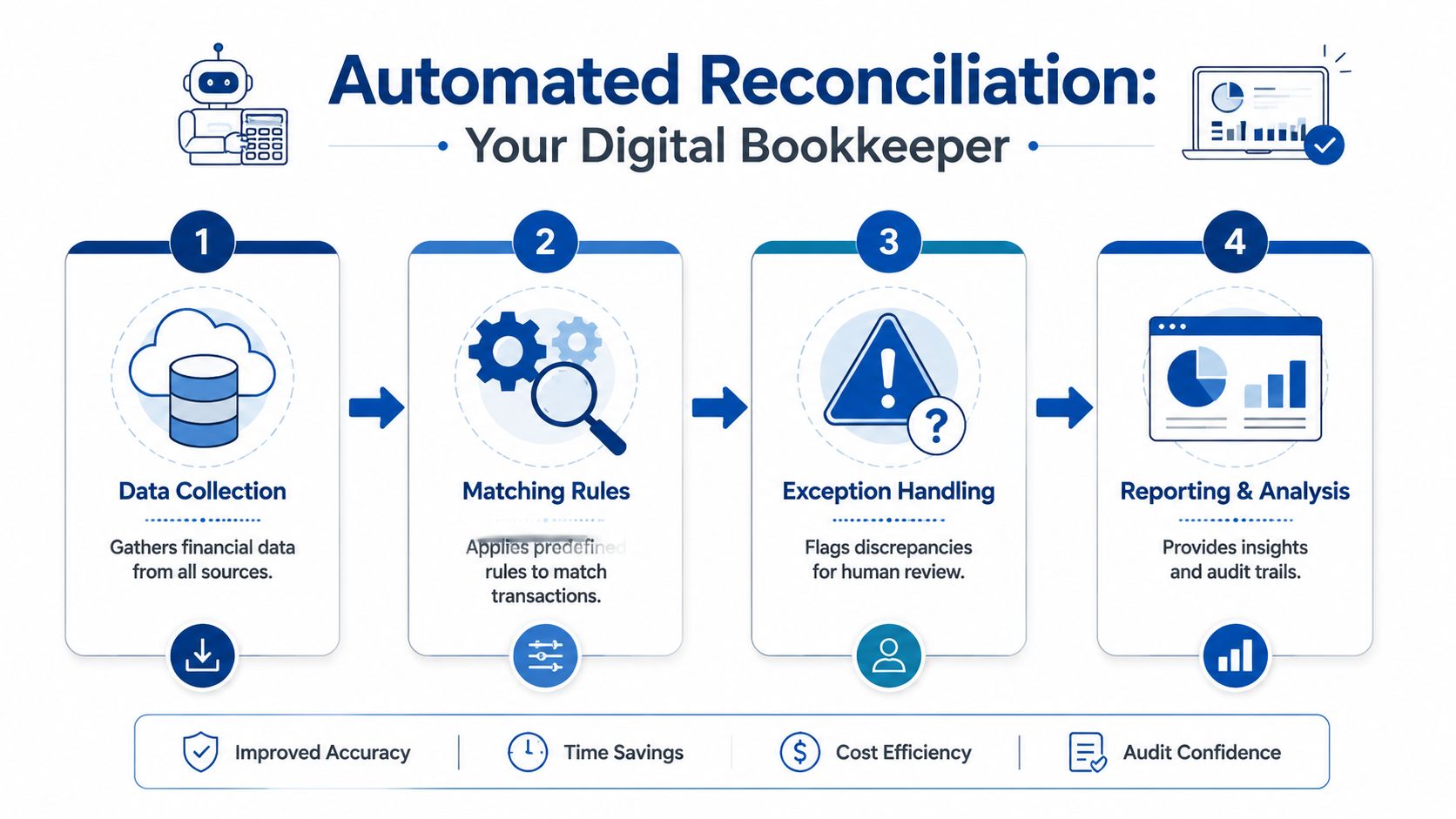
Step one is data collection
The software starts by pulling in activity from the places where money moves. For a service business, that usually includes bank accounts, business credit cards, payment processors, and QuickBooks.
When payroll is part of the mix, Gusto matters too. Payroll doesn’t show up in one neat line. You may see gross wages, employer taxes, benefit deductions, contractor payments, and the actual cash withdrawal clearing on different dates. A good reconciliation setup gathers that activity in one workflow so you’re not comparing disconnected systems by hand.
Step two is matching rules
Once the data is in, the software applies rules to look for likely matches.
Some rules are basic. Same amount, same date, same reference. Others are more practical. A payroll withdrawal from the bank may match a payroll journal in QuickBooks even if the descriptions differ. A credit card payment might clear a liability account rather than an expense account. A grouped deposit may represent several customer payments combined.
Often, owners get confused. Automation is not “guessing” in the casual sense. It’s applying logic you define or approve.
A typical rule set might look like this:
- Match exact transactions when date and amount line up cleanly
- Allow expected differences when timing or processor formatting changes the description
- Group related items such as batched deposits or payroll-related entries
- Route uncertain items out of the automatic flow and into review
Here’s a visual overview of that workflow:
Step three is exception handling
No software should auto-clear everything. Primary value comes from narrowing the list.
Instead of forcing you to review every line, the system highlights the ones that deserve attention. That might include a duplicate transaction, an uncategorized vendor payment, a payroll tax item that posted to the wrong account, or a transfer recorded on one side but not the other.
Practical rule: If a transaction needs explanation, approval, or correction, it should appear in an exception queue rather than disappear inside a spreadsheet.
Step four is updating the books
After the matching and review process, confirmed data flows into the ledger in QuickBooks. That creates a cleaner bank reconciliation, a more reliable balance sheet, and a profit and loss statement you can use.
For a busy service business owner, that’s the real point. You don’t need a mystery box. You need a repeatable process that keeps QuickBooks aligned with what happened in the bank and what ran through Gusto.
Key Features and Why They Matter for Your Business
A long feature list doesn’t help much if you can’t connect it to daily operations. What matters is whether the software reduces bookkeeping friction inside the tools you already use.
Direct connections reduce file handling
The first feature to look for is direct syncing with banks, credit cards, and QuickBooks. If your team still downloads statements, reformats columns, and imports files manually, the reconciliation process starts with avoidable risk.
For a service business, cleaner data intake means fewer broken handoffs. Transactions arrive faster, descriptions stay intact, and your team doesn’t waste time correcting import errors before real accounting work even begins.
That’s especially useful in a QuickBooks workflow where bank feeds, journal entries, and categorization all need to stay consistent.
Smart matching improves accuracy
Transaction matching is where many owners expect too much or too little. They either hope software will solve every accounting issue automatically, or they assume it can only handle basic duplicates.
Modern tools can do more than exact line matching. They can apply logic to common patterns such as client deposits, software subscriptions, card payments, and recurring transfers. Some platforms also learn from repeated approvals and help surface likely matches more quickly over time.
The business benefit is straightforward:
- Less rework because routine items don’t need repeated manual review
- Cleaner books because matching follows consistent logic
- Faster review cycles because your team focuses on unusual transactions
If you’re comparing platforms, looking at a product’s workflow depth is more useful than reading marketing copy. Reviewing Hopted’s full functionality can help you see the kinds of automation, approval, and workflow controls that matter in day-to-day finance operations.
Exception-only workflows protect your time
One of the best features in automated reconciliation software is the exception-only workflow. In plain terms, that means your bookkeeper or controller doesn’t spend the same amount of time on every transaction.
Routine items get matched. The odd ones rise to the surface.
That matters because accounting bottlenecks usually come from a short list of unresolved issues, not from every line in the bank feed. A focused queue helps your team answer the questions that matter:
- Was this charge personal or business?
- Did this payroll withdrawal include taxes and benefits as expected?
- Is this customer payment already recorded in accounts receivable?
- Should this item hit the P&L, the balance sheet, or a clearing account?
Audit trail and approvals create accountability
Spreadsheets are weak at memory. They don’t tell you who approved a change, why an item was cleared, or when a correction was made unless someone maintains that discipline manually.
A stronger system keeps the support behind the answer. That can include notes, attachments, approvals, and a visible record of how an item moved from unresolved to complete.
That same principle shows up in other accounting workflows too. If your team is also streamlining payables, it helps to understand what AP automation is because reconciliations and payables often share the same approval and documentation problems.
Clean books come from consistent decisions, not just faster data entry.
Payroll-aware workflows matter more than most guides admit
Generic software guides often treat payroll like just another expense. It isn’t.
In QuickBooks and Gusto, payroll creates multiple accounting effects at once. Wages, employer taxes, benefits, reimbursements, and the net cash movement may not all appear in one place or at one time. If your reconciliation software can’t handle payroll clearing logic, you’ll still end up manually untangling month-end balances.
That’s why service businesses should care less about broad promises and more about whether the software fits the accounting reality of a payroll-heavy operation.
Evaluating Software for Your Service Business
Most software demos look polished. The hard part is figuring out whether the system will fit your books after the demo ends.
For a US-based service business, the single most important question is usually not “How many features does it have?” It’s “How well does it work with QuickBooks Online and Gusto in practice?” If those connections are shallow, your team will still spend too much time fixing sync issues, mapping accounts, and cleaning up payroll-related differences by hand.
Start with the QuickBooks and Gusto connection
A deep QuickBooks integration should do more than import balances. It should respect your chart of accounts, classes or locations if you use them, clearing accounts, and the way your team reviews exceptions before posting.
The same goes for Gusto. A useful payroll connection should support the accounting side of payroll, not just show that payroll happened. You want a workflow that helps your books reflect wages, taxes, benefits, and cash movement clearly enough that month-end doesn’t become detective work.
The checklist that matters during vendor demos
Use this table during evaluations. It will help you keep the discussion grounded in operations rather than feature theater.
| Criterion | What to Look For | Importance |
|---|---|---|
| QuickBooks integration depth | Syncs cleanly with chart of accounts, bank activity, journal workflows, and reconciliation processes | High because your general ledger has to stay reliable |
| Gusto payroll compatibility | Handles payroll journals, tax payments, benefits, reimbursements, and cash clearing logic | High because payroll creates frequent reconciliation issues |
| Exception management | Clear review queue, notes, ownership, and approval process for unresolved items | Important because automation is only useful if exceptions are manageable |
| Matching flexibility | Supports exact matches, recurring rules, grouped transactions, and timing differences | Important for real-life service business activity |
| Multi-entity support | Works if you operate more than one company or legal entity | Valuable for firms that are growing or restructuring |
| Multi-currency handling | Can manage foreign client payments or international vendors without creating chaos | Important if your business has cross-border activity |
| Audit trail | Keeps documentation of who reviewed, changed, and approved transactions | Important for clean oversight and easier year-end support |
| Scalability | Can support higher transaction volume without forcing a process redesign | Important if your client base or team is expanding |
| Ease of implementation | Clear setup path, manageable rule building, and straightforward user training | Important because stalled implementations waste time |
| Reporting visibility | Dashboards or summaries that show unresolved items and reconciliation status | Useful for owners who want fast oversight |
Questions owners should ask in the demo
A good demo should answer practical accounting questions, not just show colorful screens.
Ask things like:
- How does this handle Gusto payroll entries in QuickBooks?
- What happens when a single bank transaction relates to several book entries?
- Can I review exceptions without giving full admin access to everyone?
- How are duplicate transactions flagged and resolved?
- What does the month-end review process look like after setup?
If a vendor can’t answer those clearly, the software may be better at selling than reconciling.
Service businesses need workflow fit, not generic fit
A marketing agency, consulting firm, law practice, engineering firm, or design studio may all be “service businesses,” but they share a few accounting patterns. Revenue often comes in uneven timing. Payroll is a major expense. Owner distributions can muddy the picture. Subscription software spend is constant. Reimbursable expenses sometimes pass through the business awkwardly.
That means your evaluation should prioritize fit for those realities.
For example, organizations with specialized funds and account structures often need stronger controls around matching and oversight. Even though it’s written for a different context, this discussion of efficient fund accounting reconciliation is helpful because it shows why structure, approval flow, and exception handling matter more than a flashy dashboard.
Don’t buy based on how automated the vendor says it is. Buy based on how little cleanup your team will need after the sync.
A Practical Implementation Checklist
The biggest mistake owners make with automated reconciliation software is treating it like a switch. It’s closer to a process redesign. If you install it on top of messy books, weak account structure, and inconsistent payroll mapping, the software will automate confusion.
A better rollout follows four phases.
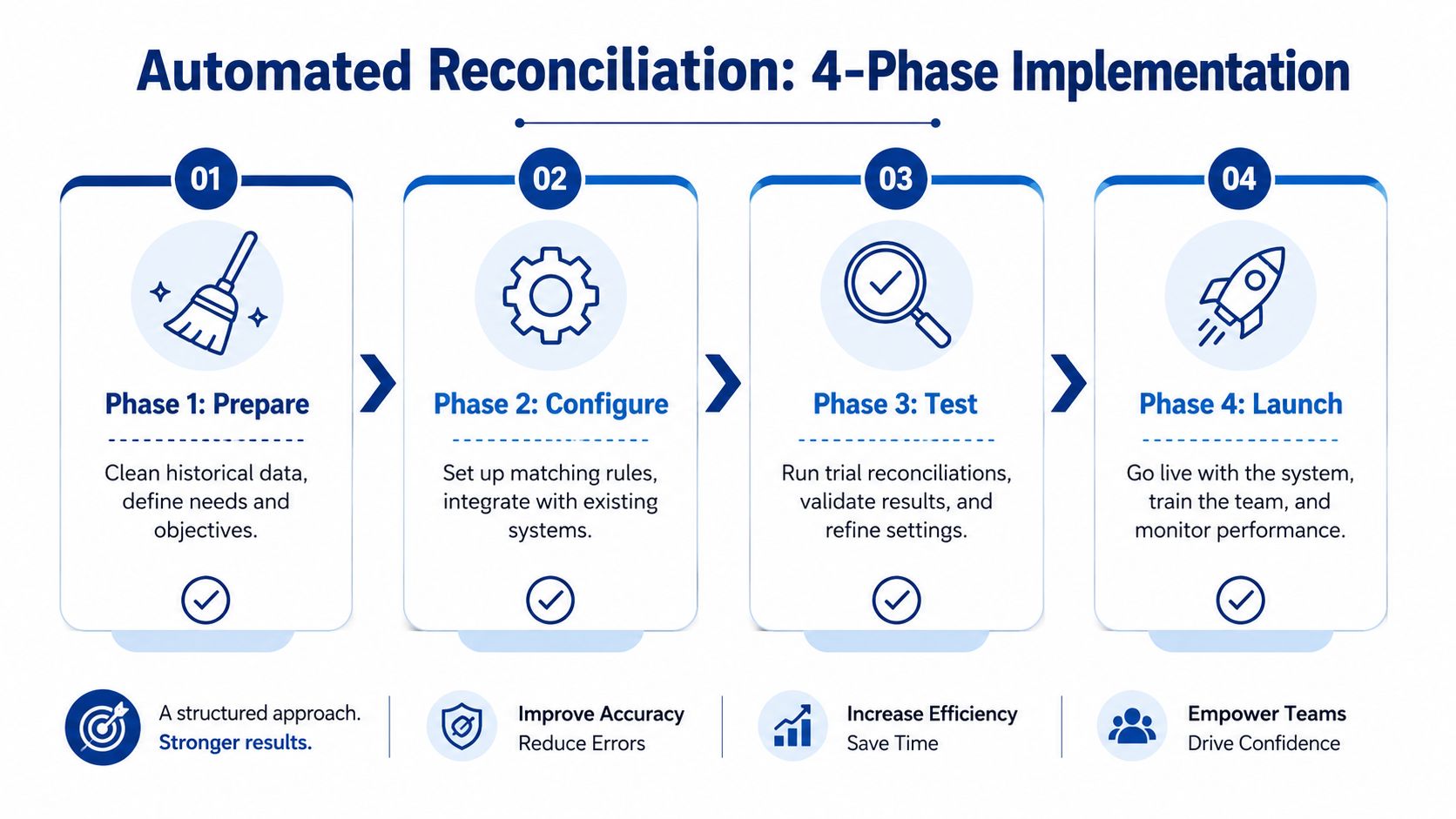
Phase one is preparation
Before connecting anything, clean the foundation.
If QuickBooks contains uncategorized transactions, duplicated entries, stale clearing accounts, or an overloaded chart of accounts, fix those first. Reconciliation software works best when account structure is intentional and historical problems are known.
During preparation, focus on these items:
- Clean prior bookkeeping so the opening data set is credible
- Review the chart of accounts and remove unnecessary complexity
- Identify recurring transaction types such as payroll, software spend, owner draws, and customer deposits
- Decide who owns exceptions before the tool goes live
This phase is also where many firms decide whether they need outside help. A cleanup project is often faster and less disruptive than trying to configure automation around old mistakes.
Phase two is configuration
Once the books are ready, connect the systems and define the rules.
That usually includes bank and card connections, QuickBooks integration, and payroll mapping if Gusto is part of the stack. You also need to choose a reconciliation start date. That date matters because it determines where the automated process begins and what still needs to be handled manually.
Configuration usually includes:
- Account connections for all banks, cards, and relevant financial platforms
- General ledger mapping so QuickBooks receives data in the right place
- Initial matching rules for recurring vendors, transfers, payroll entries, and grouped deposits
- User permissions so review and approval responsibilities are clear
Phase three is validation
Don’t trust a new workflow just because it runs.
Run the software in parallel with your old process for one close cycle or one reporting period. Compare the outputs. Review unmatched items carefully. Check that payroll entries from Gusto are landing in the right wage, tax, and benefits accounts. Confirm that bank balances in QuickBooks tie out the way you expect.
This phase is where confidence gets built. It’s also where hidden mapping issues usually surface.
A useful validation routine looks like this:
- Reconcile one account type at a time instead of trying to approve everything at once
- Review payroll separately because it often has the most moving pieces
- Document rule changes so the team knows why an item matched or failed
- Escalate unusual exceptions instead of forcing a quick close
A clean implementation doesn’t mean zero exceptions. It means the exceptions make sense.
Phase four is optimization
After the first successful cycle, the software still needs tuning.
This is the point where teams refine rules, shorten review time, and improve visibility for the owner or finance lead. You may decide to create a weekly exception review instead of waiting for month-end. You may also split responsibilities so a bookkeeper handles routine items while a controller reviews payroll and higher-risk balances.
A practical optimization plan often includes:
- Team training so each person knows what to review and what to leave alone
- Close process checkpoints to prevent issues from piling up
- Rule refinement for transactions that recur but didn’t match cleanly at first
- Management reporting so the owner can see unresolved items without digging into the ledger
If you want one outside option in the mix, Steingard Financial provides bookkeeping and payroll support that includes cleanup work, chart of accounts design, and AI-assisted reconciliation workflows for businesses using platforms such as QuickBooks and Gusto. That kind of support is useful when the software setup and the accounting design need to work together.
When to Partner with a Bookkeeping Professional
Automated reconciliation software is a strong tool. It is not a substitute for accounting judgment, payroll understanding, or a clean bookkeeping process.
That distinction matters most when your service business has grown past the point where one person can keep the books in their head. Once you have multiple bank accounts, credit cards, payroll runs, reimbursements, owner activity, and recurring software expenses, the problem is no longer just transaction volume. It’s process design.

When outside help makes sense
You should consider a bookkeeping professional when any of these are true:
- Your QuickBooks file needs cleanup before automation can work reliably
- Payroll entries from Gusto keep creating confusion in wages, taxes, or clearing accounts
- Month-end depends on one employee who carries too much unwritten process knowledge
- You don’t trust the balance sheet even when the bank feed looks current
A professional partner can help choose the right workflow, map accounts correctly, review exception logic, and keep the process healthy after launch.
What the right partner actually does
The right advisor doesn’t just “use software.” They shape how the software fits your business.
That includes cleaning historical transactions, simplifying the chart of accounts, aligning payroll mapping, documenting approval flow, and setting a review cadence that your team can maintain. If you need ongoing support after implementation, outsourced bookkeeping can also provide a stable owner for reconciliations, close review, and financial reporting. You can see how that fits into a broader back-office model through these bookkeeping services for small businesses.
Software handles repetition well. Professionals handle judgment, exceptions, and the accounting choices that affect your reports.
When those two work together, month-end gets calmer. QuickBooks becomes easier to trust. Gusto payroll entries stop creating surprise balances. And you spend less time checking whether the numbers are right.
If your business runs on QuickBooks and Gusto and you want cleaner books without the monthly scramble, Steingard Financial can help you evaluate your current process, clean up the foundation, and build a reconciliation workflow that fits how your service business operates.