 Skip to content

If you’re managing more than a handful of Linux systems, local accounts stop being “simple” and start becoming a liability. Offboarding takes too long. Password resets turn into ticket churn. Auditors ask who still has shell access, and you end up grepping /etc/passwd, checking old sudoers fragments, and hoping nobody left a forgotten service account behind.
That’s the point where organizations often begin considering Active Directory on Linux. Not because they want Linux to behave like Windows, but because they need one place to control identity, access, and account lifecycle across mixed infrastructure. Done well, AD integration gives you centralized authentication, cleaner access control, and fewer surprises when someone changes roles or leaves the company.
The catch is that the basic tutorials usually stop at realm join. In production, that’s only the beginning. The essential work is choosing the right integration model, mapping Unix identities correctly, and hardening the system so it still behaves during outages and policy changes.
Why Integrate Linux with Active Directory
Most Linux fleets don’t break because the servers are unstable. They break operationally because identity is scattered.
A team starts with a few local admins on each host. Then more systems appear. Someone adds a contractor account on one box but not another. A former employee still has sudo on a legacy VM because nobody remembered that machine existed. At that point, account management stops being a sysadmin task and becomes a cleanup project.
Active Directory on Linux solves that by moving identity decisions into a central directory. Instead of maintaining users host by host, you let Linux authenticate against the same identity source the rest of the organization already uses. SUSE’s AD guidance describes that model as centralized resource and service management, with Linux clients authenticating directly against AD and even supporting offline authentication when the server is unreachable, which matters in real enterprise environments where connectivity isn’t always perfect (SUSE documentation on AD integration).
What this fixes in practice
When Linux systems use AD properly, daily admin work gets cleaner:
- Access changes happen centrally. Disable an account in AD and you don’t have to chase local credentials on every server.
- Group-based access becomes usable. You can tie login rights and sudo policy to AD groups instead of hand-editing files per machine.
- Authentication is more consistent. Users stop asking which password applies to which host.
- Remote and outage scenarios are less painful. Cached credentials and offline behavior can keep a machine usable when the domain controller can’t be reached.
Practical rule: If your Linux hosts are part of a business environment with shared staff, audited access, or onboarding and offboarding pressure, local-only identity management usually doesn’t scale cleanly.
This isn’t only about convenience. It’s about reducing drift. Every host-specific exception adds risk. Centralizing identity removes a large class of those exceptions.
Core Concepts of Linux and AD Integration
Before joining anything to a domain, understand what Linux is doing. AD integration on Linux is not magic, and it isn’t a Windows-only trick. It’s a standards-based combination of LDAP, Kerberos, and identity mapping, usually managed through SSSD. In practical deployments, admins typically choose between automatic SID-to-UID/GID conversion with ldap_id_mapping = True or explicit POSIX attributes such as uidNumber, gidNumber, unixHomeDirectory, and loginShell assigned in AD (Linux authentication with Active Directory notes).
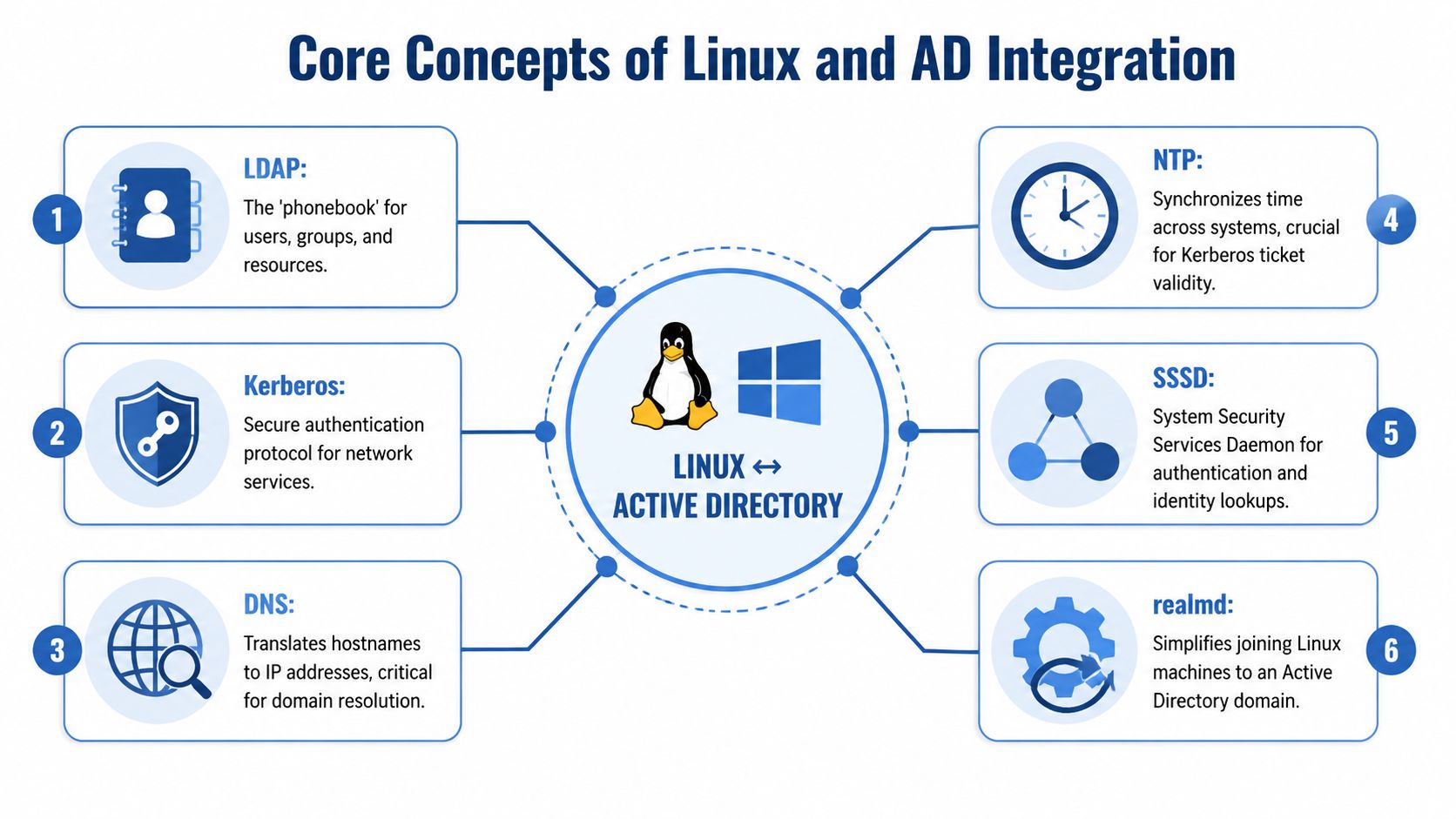
LDAP is the directory lookup layer
Think of LDAP as the directory lookup system. Linux uses it to ask questions like:
- who is this user
- which groups are they in
- what shell should they get
- where should their home directory live
LDAP doesn’t prove identity by itself. It answers “who is this account and what attributes belong to it?”
That distinction matters because many join problems aren’t authentication problems at all. Sometimes Kerberos works, but NSS lookups fail, which leaves you in the ugly state where the machine is technically joined but users still can’t log in properly.
Kerberos handles authentication
Kerberos is the trust mechanism. Instead of passing passwords around to every service, the user gets a ticket and presents that ticket to prove identity.
In production, this is why time sync and realm discovery matter so much. Kerberos is not forgiving when the system clock is wrong or the client can’t find the right domain services. When login works, you can often confirm the ticket path with klist. That’s one of the simplest checks available after a join.
A Linux host joined to AD should be able to answer two separate questions cleanly: “Can I authenticate this user?” and “Can I resolve this user into a usable Unix identity?” If either half fails, the login experience fails.
Identity mapping is where many teams make the wrong default choice
This is the part junior admins often skip, then rediscover later during a migration.
You usually have two models:
- Automatic mapping with
ldap_id_mapping = True
Linux derives Unix IDs from Windows SIDs. This is fast to deploy and reduces directory-side work. - Explicit POSIX attributes in AD
You assignuidNumber,gidNumber,unixHomeDirectory, andloginShelldirectly. This gives you tighter control and predictable Unix identity values.
Automatic mapping is fine when you want a straightforward join and don’t need strict UID consistency across many systems or external Unix dependencies.
Explicit POSIX attributes are better when identity stability matters. NFS permissions, shared storage, older Unix tooling, and cross-platform file ownership usually benefit from fixed UID and GID assignments.
The supporting pieces admins forget
AD on Linux also depends on a few unglamorous basics:
- DNS must resolve the AD domain and controllers correctly.
- NTP or equivalent time sync must keep the client clock sane enough for Kerberos.
- SSSD usually handles identity caching, lookups, and remote authentication behavior.
- realmd often simplifies discovery and enrollment.
If your environment is moving beyond classic on-prem AD toward hybrid identity, it also helps to understand where Entra ID fits and where it doesn’t. For teams sorting out that boundary, Ollo’s Entra ID expertise is a useful companion read because it frames the cloud identity side without confusing it with traditional Linux domain join mechanics.
Choosing Your Integration Strategy
Not every Linux machine should be integrated the same way. The right method depends on what the host does.
If the box is a standard server that needs centralized login, SSSD with realmd is usually the cleanest choice. If the machine is closely tied to Samba file sharing or needs behavior aligned with classic SMB infrastructure, Winbind still has a place. If all you need is directory-backed application authentication and not full host login integration, direct LDAPS to AD may be enough.
Comparison of Linux AD integration methods
| Method | Primary Tool | Best For | Offline Caching | Complexity |
|---|---|---|---|---|
| SSSD with realmd | realmd, sssd, adcli |
Most modern Linux servers and workstations | Yes | Low to medium |
| Samba with Winbind | samba, winbind |
Samba-heavy environments and older interoperability patterns | Can be used, but setup is more involved | Medium to high |
| Direct AD LDAPS authentication | LDAP client stack, app-specific auth modules | Applications that need AD-backed auth without full domain join | Typically limited and application-dependent | Medium |
When SSSD is the right answer
For host login, NSS integration, PAM integration, and credential caching, SSSD is usually the default recommendation. It’s the best fit for standard enterprise Linux use because it handles both identity lookups and authentication in a way that’s easier to reason about than older Samba-heavy designs.
If your goal is “let approved AD users log into this Linux system and manage access sanely,” start here.
When Winbind still makes sense
Winbind is not obsolete. It’s just more specialized now.
Use it when the Linux system is part of a Samba-centric design, especially where file-serving behavior and Windows-style domain interaction are tightly coupled. I still see it in environments where the Linux host is effectively acting as part of a broader SMB identity model, not just as a Unix server with AD-backed login.
When LDAPS is enough
Some teams don’t need a full machine join. They need an app to bind to AD, search for users, and authenticate requests. In that case, direct LDAPS can be simpler than joining the host itself.
The trade-off is obvious. You don’t get the full Linux login stack, cached credentials, or the same quality of Unix identity handling. You’re solving application authentication, not system integration.
Direct and indirect integration are different architectural bets
This is the part most tutorials miss. Red Hat’s Windows integration guidance distinguishes between direct integration, where Linux systems connect to AD without intermediaries, and indirect integration, where a separate identity server manages Linux systems and connects to AD server-to-server (Red Hat Windows integration guide).
Direct integration is usually enough when:
- you have a manageable number of Linux systems
- you want simple troubleshooting
- your AD team is comfortable exposing the needed services directly to clients
Indirect integration is worth considering when:
- policy control needs to be centralized beyond basic AD group membership
- Linux systems are spread across segments or regions where direct joins are harder to govern
- you want a cleaner abstraction layer between Linux clients and AD
The question isn’t “Can this server join AD?” The better question is “Do I want every Linux host talking to AD directly for the next several years?”
At scale, consistency matters more than elegance. If you’re deploying whichever model you choose across many hosts, automate it, as a disciplined approach with Ansible for configuration management pays off because identity integration fails less often when package sets, config files, and access rules are enforced the same way every time.
The Modern Method Using SSSD and realmd
For most current Linux deployments, this is the method I’d recommend first. It’s the shortest path to a working join, and it maps well to how modern distributions expect authentication to work.
Red Hat’s operational guidance is straightforward: install realmd and the SSSD stack, discover the domain with realm discover, join with realm join, and make sure DNS resolves the AD domain properly before you try any of it (Red Hat on Linux and Active Directory).

Start with prerequisites, not the join command
Most failed joins happen because the machine wasn’t ready.
Check these first:
- Hostname and FQDN must be set sanely. Domain joins get weird fast when the host has a temporary or inconsistent name.
- DNS resolution must work against the AD environment. If discovery fails, don’t continue.
- Reachability to domain services must be in place before login attempts.
A clean operator sequence is:
- validate DNS and host naming
- run discovery
- join
- test identity lookup
- test interactive login
That order prevents the classic “computer object exists in AD but users still can’t resolve” mess.
Install packages on RHEL, Rocky, AlmaLinux, or CentOS Stream
sudo dnf install -y realmd sssd adcli oddjob oddjob-mkhomedir samba-common-tools krb5-workstation
sudo systemctl enable --now oddjobd
What these do:
realmdhandles discovery and enrollmentsssddoes identity lookups and authenticationadclihandles AD domain join operationsoddjob-mkhomedirhelps create home directories on first loginkrb5-workstationgives you tools likeklist
Install packages on Debian or Ubuntu
sudo apt update
sudo apt install -y realmd sssd sssd-tools adcli packagekit libnss-sss libpam-sss oddjob oddjob-mkhomedir krb5-user samba-common-bin
sudo systemctl enable --now oddjobd || true
On Debian-family systems, package names vary a bit by release. The goal is the same: install the realm tooling, SSSD, Kerberos utilities, and home-directory support.
Discover the domain before joining
realm discover EXAMPLE.COM
If discovery doesn’t return useful domain information, stop there. Don’t try to force a join. Discovery problems usually point to DNS, hostname, or service reachability issues.
Join the domain
sudo realm join EXAMPLE.COM -U Administrator
If your AD team delegates join rights to a lower-privilege account, use that instead of a high-privilege admin. Joining with privileged credentials just because it’s convenient is a bad habit.
After the join, check membership:
realm list
Many admins quit too early. realm list confirms enrollment, not usability.
Make SSSD behavior predictable
A lot of “it works, but badly” problems come from leaving defaults untouched. Review /etc/sssd/sssd.conf and tune it for your environment.
Example:
[sssd]
domains = example.com
config_file_version = 2
services = nss, pam, sudo

[domain/example.com]
id_provider = ad
access_provider = ad
cache_credentials = True
default_shell = /bin/bash
fallback_homedir = /home/%u
use_fully_qualified_names = True
ldap_id_mapping = True
ad_gpo_access_control = permissive
If you want to restrict logins to a specific AD group or directory subset, use an access filter. Example:
ad_access_filter = (memberOf=CN=Linux-Admins,OU=Groups,DC=example,DC=com)
That kind of filter is much better than letting every domain user log into every joined host.
Field note: A successful join with bad access control is still a bad deployment. Decide who should log in before the first user tests it.
After editing sssd.conf, lock down permissions and restart:
sudo chmod 600 /etc/sssd/sssd.conf
sudo systemctl restart sssd
A short walkthrough can help if you’re setting this up for the first time:
Enable automatic home directory creation
If your distribution doesn’t already wire this in during the join, enable it explicitly:
sudo pam-auth-update --enable mkhomedir
Or on RHEL-family systems:
sudo authselect select sssd with-mkhomedir --force
Home directory creation is small until the first time a valid AD user logs in and lands in a shell with no writable home. Then it becomes urgent.
Test the part that actually matters
Use a real AD identity lookup before declaring victory:
getent passwd [email protected]
id [email protected]
If those resolve correctly, your NSS path is working. Then test an actual login. If the account can authenticate but doesn’t resolve into a valid Unix identity, go back to SSSD configuration and mapping choices.
The Classic Method Using Samba and Winbind
SSSD is the default in most modern environments, but Winbind still matters when Samba is central to the design. If the Linux host is serving SMB shares, participating in older Windows interoperability patterns, or relying on Samba-specific behavior, Winbind can still be the better fit.
This method is more manual. That’s not automatically bad. It just means you need to understand the moving parts instead of relying on realmd to assemble them for you.
The first risk is DNS, not Samba syntax
For Samba-based AD integration, DNS dependency is severe. A common failure mode is resolver mismatch after setup, where the Linux host points at the wrong DNS path and authentication fails even though the domain controller is healthy. In practice, admins often need to rewrite /etc/resolv.conf to use the AD DNS path and disable conflicting resolver behavior such as systemd-resolved when it interferes (Samba AD DNS walkthrough).
If you remember one thing from this section, remember this: bad DNS makes every Samba AD problem look like something else.
Install the required packages
Package names differ by distribution, but you generally need:
sambawinbind- Kerberos client tools
- PAM and NSS Winbind modules
On RHEL-family systems, the package set often looks like this:
sudo dnf install -y samba samba-winbind samba-winbind-clients krb5-workstation pam_winbind
On Debian or Ubuntu, it commonly looks like this:
sudo apt update
sudo apt install -y samba winbind libnss-winbind libpam-winbind krb5-user
Build smb.conf carefully
Most Winbind failures come from bad assumptions in /etc/samba/smb.conf.
A practical starting example:
[global]
   workgroup = EXAMPLE
   security = ads
   realm = EXAMPLE.COM

   kerberos method = secrets and keytab

   dedicated keytab file = /etc/krb5.keytab

   winbind use default domain = no
   winbind enum users = no
   winbind enum groups = no
   winbind refresh tickets = yes

   idmap config * : backend = tdb
   idmap config * : range = 10000-19999

   idmap config EXAMPLE : backend = rid
   idmap config EXAMPLE : range = 20000-999999

   template shell = /bin/bash
   template homedir = /home/%D/%U
What matters here:
security = adstells Samba this is an AD member setup, not standalone auth.realmmust match the Kerberos realm.workgroupis the short domain name, not the full realm.idmap configdecides how Windows identities become Unix IDs.template shellandtemplate homedirgive users a predictable Unix session.
If you’re using explicit directory-side Unix attributes, your idmap design changes. If you just copy a sample config without understanding the mapping backend, you’ll create ownership problems later.
Join with Samba tools
Once Kerberos and DNS are sane, join the host:
sudo net ads join -U Administrator
Then start and enable services:
sudo systemctl enable --now smb winbind
Some environments don’t need the smb daemon for file serving on the same host, but if you’re already in a Samba-centric setup, it’s common to manage both together.
Tell NSS and PAM to use Winbind
If Linux doesn’t ask Winbind for user and group data, your join won’t help much.
Check /etc/nsswitch.conf and make sure relevant lines include winbind, for example:
passwd:     files winbind
group:      files winbind
shadow:     files winbind
PAM configuration varies by distro, but the goal is the same: allow Winbind-backed authentication and session handling.
Verify with Winbind tools
These commands are useful after the join:
wbinfo -u
wbinfo -g
getent passwd
If wbinfo works but getent doesn’t, the problem is usually NSS integration, not domain membership.
Winbind rewards careful configuration and punishes guesswork. If the machine is only a standard Linux server, this extra complexity usually isn’t worth it. If Samba is core to the workload, it’s still a valid tool.
Verification and Security Best Practices
A domain join is only the midpoint. The fundamental question is whether the system behaves correctly after the join, under policy changes, under outages, and under pressure.
That’s where many guides stop too early. Recent security coverage has pointed out that most Linux-on-AD tutorials focus on installation rather than attack surface, least privilege, and what happens when the domain controller becomes unavailable. That gap matters because real admins need secure logins and consistent access during outages and other messy conditions, not just a one-time successful join (Linux security coverage on AD hardening).
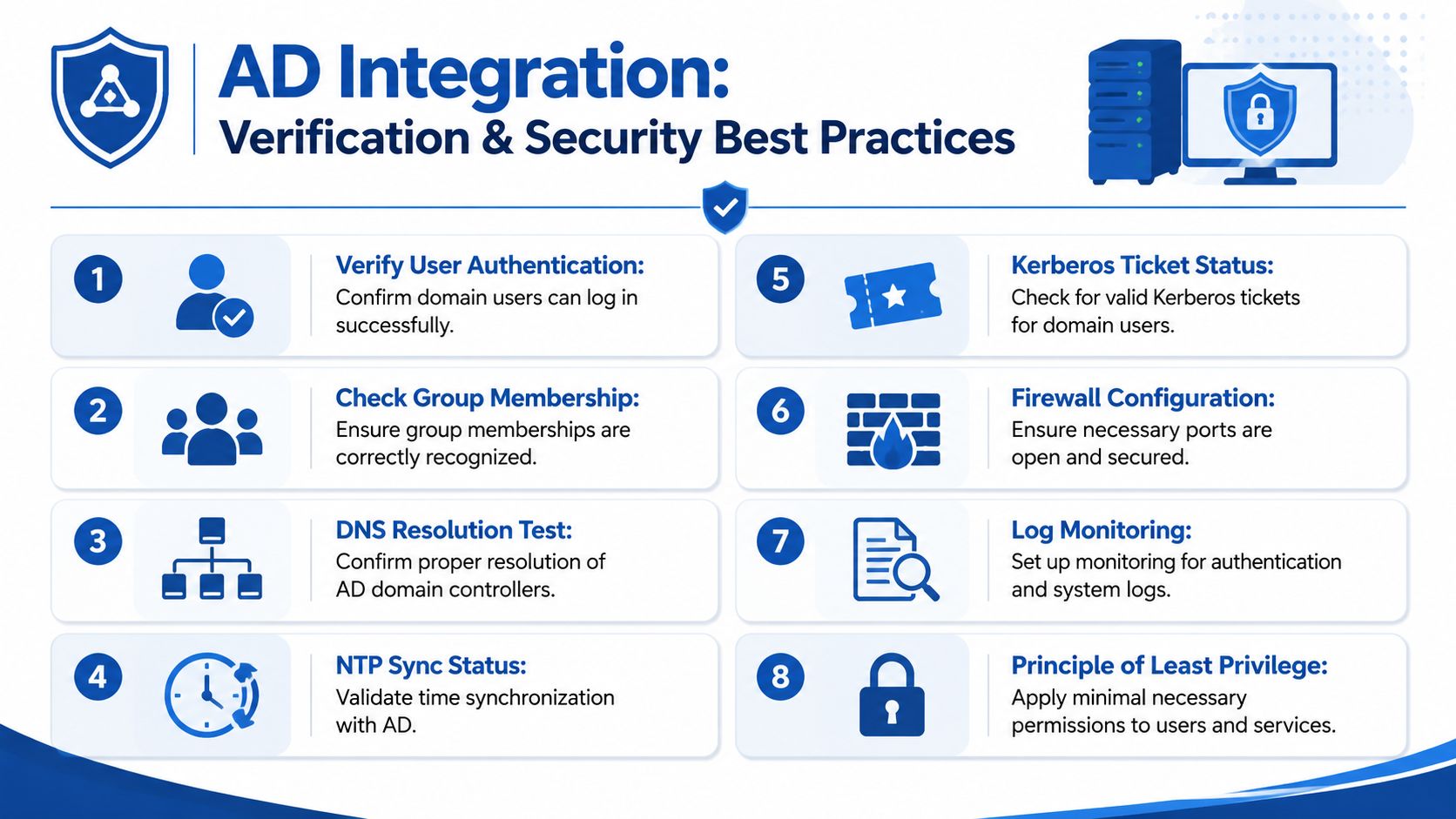
Verify the basics first
Start with commands that prove the host can resolve identity and use Kerberos.
getent passwd [email protected]
id [email protected]
klist
These tell you different things:
getent passwdchecks whether the user is visible through NSSidconfirms UID, GID, and group membership resolutionklistshows whether Kerberos tickets exist and look sane
If the environment supports offline auth and caching, test that behavior deliberately in a maintenance window instead of assuming it works because the docs say it should.
Use a post-join checklist
After joining a Linux host to AD, I check the following:
- User resolution works. A known AD user appears through
getentandid. - Interactive login works. The account gets a shell, not just a successful auth event.
- Home directory behavior is correct. The system creates or mounts the right home path.
- Group membership is accurate. Access controls depending on AD groups behave the way you expect.
- Kerberos is healthy. Tickets can be obtained and inspected.
- Fallback behavior is understood. The host does something predictable when AD can’t be reached.
Harden access after the join
A joined system that allows broad domain logon is rarely what you want.
Use AD groups to control access. On SSSD systems, that often means restricting who can log in through access filters or realm permissions. On Samba and Winbind systems, it means validating that only approved groups map into usable login paths.
For privilege escalation, tie sudo to AD groups instead of local user entries wherever possible. That keeps admin rights aligned with directory lifecycle. If someone leaves the admin group in AD, their Linux privilege should disappear without a host-by-host cleanup.
Examples of good post-join habits:
- Restrict shell access to Linux-specific AD groups.
- Separate login from sudo so not every login-capable user becomes an admin.
- Review default shell and home directory behavior to avoid accidental interactive access for service identities.
- Watch logs for authentication failures, repeated cache issues, and group-resolution errors.
Secure AD integration on Linux isn’t just “can the user log in.” It’s “can the right user log in, with the right privileges, and does the host fail safely when AD isn’t available.”
Plan for outages, not just success
Resilience matters as much as security.
Offline authentication can keep users productive when the machine temporarily loses contact with AD. That’s useful, but you should know who can still log in under those conditions and how cached credentials affect your risk model. Availability features are operationally valuable, but they need policy behind them.
This is also where home directory creation, shell assignment, and access filtering stop being cosmetic. During an outage, you want the machine to behave in a controlled way, not improvise.
Troubleshooting Common Integration Problems
When AD integration fails, the error text usually points in the wrong direction first. Keep the troubleshooting sequence simple.
DNS discovery fails
Symptom: realm discover returns nothing useful, or the join fails early.
Cause: The host can’t resolve the AD domain or related services properly.
Fix: Verify the system is using the intended resolver path for the AD environment. Then rerun discovery before trying another join.
Kerberos errors and ticket failures
Symptom: Authentication fails even though the user exists, or klist shows no useful ticket state.
Cause: Kerberos depends on correct realm behavior, working discovery, and sane clock sync.
Fix: Confirm time synchronization first. Then verify the machine can discover and reach the correct AD services. Kerberos usually breaks because one prerequisite is off, not because Kerberos itself is mysterious.
Joined but users still can’t log in
Symptom: realm list or net ads join suggests success, but logins fail.
Cause: Identity lookup through NSS, PAM, SSSD, or Winbind isn’t fully wired in.
Fix: Test getent passwd user@domain and id user@domain. If those fail, focus on client-side identity configuration, not the join object in AD.
Access works for everyone or no one
Symptom: Too many AD users can log in, or approved users are blocked.
Cause: Access filters, group logic, or sudo mapping is wrong.
Fix: Inspect the exact group names and filter rules in your Linux config. Test with one known-good user and one known-denied user before rolling policy out broadly.
If you run a growing service business, clean systems matter on the finance side too. Steingard Financial helps companies keep bookkeeping, payroll, reporting, and people operations organized so leadership can make decisions from accurate numbers instead of cleanup work.