 Skip to content
If you’re running a service business, you probably know the routine. An invoice goes out from QuickBooks. A client pays by ACH, card, or sometimes a paper check. The deposit hits the bank in a lump sum that doesn’t match the invoice total because of fees, timing, or batching. Then someone on your team has to figure out what got paid, what is still open, and why the receivable aging doesn’t agree with the bank activity.
That process works when volume is low. It starts breaking when you add more clients, recurring invoices, contractor payments, payroll runs in Gusto, and a growing month-end close list. At that point, b2b payment platforms stop being a nice add-on and become part of your accounting infrastructure.
The mistake I see most often is evaluating these platforms like a commodity. Owners compare transaction fees and stop there. For a service business, the better question is simpler: does the platform make bookkeeping easier and reporting cleaner, or does it create another system your team has to clean up later?
| Platform type | Best fit | Strength | Common weakness | What it means for bookkeeping |
|---|---|---|---|---|
| Integrated ERP modules | Businesses already running a larger ERP | Native workflow inside the main system | Can be more than a small service firm needs | Strong control if the ERP is already central |
| Standalone payment solutions | QuickBooks-based firms needing faster setup | Easy to adopt and focused on payments | Integration depth varies a lot | Can save time or create cleanup work, depending on sync quality |
| Network-based platforms | Firms with many vendors or customer payment relationships | Useful collaboration and broad payment reach | May add process layers your team has to learn | Good visibility if remittance data is consistent |
| Treasury management systems | Complex cash management environments | Better oversight of liquidity and approvals | Often too heavy for a typical service business | Useful for larger operations, less practical for lean back offices |
The End of Manual Invoice and Payment Chaos
A common growth problem looks boring from the outside. Revenue is up. Clients are paying. Payroll is running. But the owner still can’t get a clean cash position without asking three people and opening five systems.
It usually starts with workarounds. One person tracks unpaid invoices in QuickBooks. Another tracks expected deposits in a spreadsheet. Someone else logs vendor payments in email threads. By month-end, the books are technically closed, but no one trusts them without a second review.
That isn’t just an annoyance. It slows billing follow-up, hides collection issues, and turns simple reconciliation into detective work. The broader market is moving away from that model. The global B2B payments market is projected to reach US$1.477 trillion in 2025 and US$2.943 trillion by 2033 according to Straits Research’s B2B payments market analysis. The practical takeaway isn’t the headline number. It’s that manual handling is no longer the default operating model for serious back-office teams.
A good payment platform helps because it ties invoice delivery, payment acceptance, remittance data, and reconciliation into one process. If you’re trying to build more efficient financial operations with Zaro, that’s the lens to use. Less chasing. Less rekeying. Fewer open loops.
For businesses still patching together AP and AR manually, it also helps to understand where workflow automation fits into the bigger process. This overview of AP automation is useful because it frames payment tools as part of a controlled accounting system, not just a faster way to move money.
Practical rule: If your payment process depends on someone remembering what happened, the process is already too fragile.
Decoding B2B Payment Platform Types
Not all b2b payment platforms solve the same problem. Owners often compare brands that belong in completely different categories, then wonder why demos feel confusing.
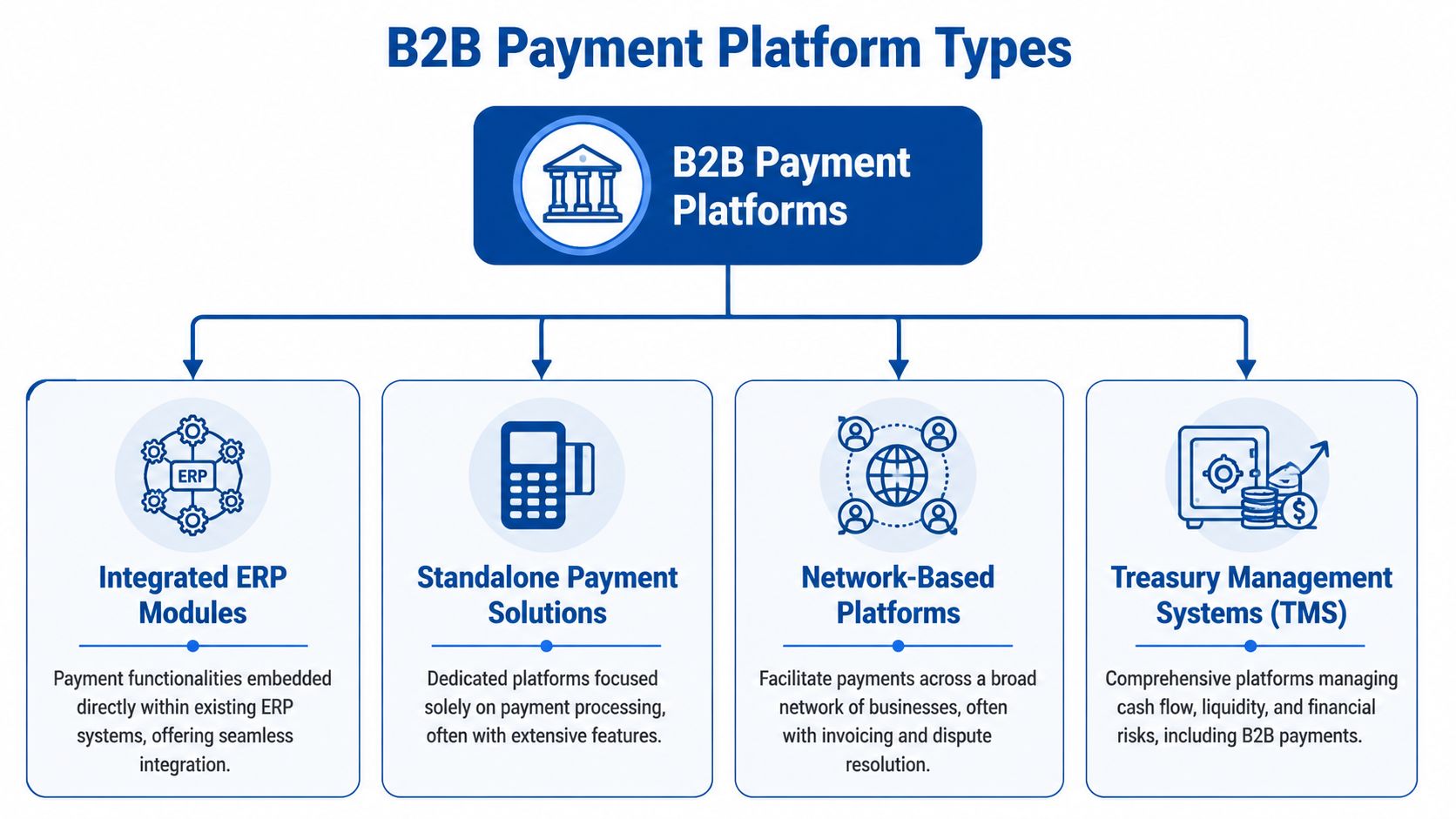
Integrated ERP modules
These are payment functions built directly into an ERP or tightly connected enterprise accounting environment. They make sense when your business already lives inside that system for billing, accounting, approvals, and reporting.
For bookkeeping, the advantage is obvious. Fewer handoffs. Fewer export and import routines. A cleaner audit trail. The drawback is that many service businesses on QuickBooks don’t need ERP-level complexity.
Standalone payment solutions
This category includes tools that focus on collecting or sending payments and then syncing data back to accounting software. For many service firms, the shortlist typically begins with such options.
These platforms can work well when setup is straightforward and the QuickBooks connection is solid. They work poorly when the sync only pushes summary totals, creates duplicate customers, or posts fees in inconsistent accounts. If you’re reviewing tools that overlap with recurring invoices or project billing, this guide to contract billing software helps separate billing workflow needs from pure payment features.
Network-based platforms
Some platforms create a shared environment where buyers and suppliers, or businesses and their customers, transact through the same network. That can reduce friction if both sides use the platform consistently.
The accounting issue is adoption. A network only helps if customers pay through it and if remittance information comes through cleanly. Otherwise, your team still spends time matching deposits manually.
Treasury management systems
Treasury tools sit higher in the finance stack. They focus on liquidity, controls, approvals, bank connectivity, and cash oversight. Payments are part of the picture, but not the whole point.
A typical U.S.-focused service business usually doesn’t need a treasury-heavy platform unless cash management is unusually complex. These tools can be excellent for control, but they often introduce more process than a lean bookkeeping team wants.
Choose the platform type that matches your operating model, not the one with the most impressive demo.
A simple way to sort your options
Use this filter before you evaluate any vendor:
- Stay close to accounting first: If QuickBooks is your system of record, start with platforms that sync deeply into QuickBooks.
- Separate billing from payments: Some tools are strong at invoice generation but weak at reconciliation.
- Check who uses it daily: Owners buy the tool, but bookkeepers and AR staff live with the consequences.
- Match complexity to the business: A platform built for multi-entity treasury control may be the wrong answer for a service company with straightforward AP, AR, and payroll.
Core Features That Drive Back-Office Efficiency
Most feature lists are built for sales demos. Bookkeepers need a different list. The question isn’t whether the platform accepts ACH or cards. The question is whether it removes repetitive accounting work and improves reporting accuracy.

One of the most useful tests comes from the middle-market payments discussion collected by Deloitte. The operational question for service firms is how much manual reconciliation, exception handling, and month-end close time gets removed. That same discussion notes that leaders are integrating B2B payments with AP/AR automation to gain visibility into payment patterns and discrepancies, which is the real efficiency test in practice, as summarized in Deloitte’s middle-market B2B payments perspective.
Automation that actually saves labor
Some automation is cosmetic. Real automation changes who has to touch a transaction.
Look for these capabilities:
- Automated cash application: Payments should match to open invoices without manual lookup for ordinary transactions.
- Exception queues: When something doesn’t match, the platform should isolate it instead of forcing your team to review everything.
- Approval workflows: For outgoing payments, rules should route approvals based on vendor, amount, or payment type.
- Real-time status visibility: Your team should be able to see paid, pending, failed, and partially applied items without pulling separate reports.
If a platform can’t handle exceptions cleanly, you’ll still have human bottlenecks. They’ll just happen in a prettier interface.
Payment methods matter less than remittance quality
ACH is often the practical favorite for business payments because it’s familiar and generally easier to manage from an accounting standpoint. Cards can be useful, especially when clients want flexibility. The problem isn’t the payment rail. It’s whether the related data is complete enough to reconcile.
A platform that supports multiple methods but sends poor remittance detail back into accounting creates hidden labor. Someone still has to identify what each deposit belongs to, where fees go, and whether the invoice should remain partially open.
The invoice-to-pay workflow matters more than the payment button itself. If you’re mapping out the full accounting side, this breakdown of the invoice-to-pay process is a good checklist.
A payment received is not the same as a payment reconciled. Your books only care about the second one.
Reporting features worth paying for
The best reporting features aren’t flashy dashboards. They’re the ones that help you trust your numbers faster.
Focus on whether the platform can show:
| Feature | Why it matters |
|---|---|
| Open invoice status by client | Helps collections without separate aging cleanups |
| Deposit and fee detail | Prevents net deposit confusion in bank recs |
| Exception reporting | Gives your team a clear work queue |
| Payment timing visibility | Improves cash forecasting and follow-up |
| Sync status logs | Helps identify what posted and what failed |
Owners usually ask, “How fast do we get paid?” Controllers and bookkeepers ask, “What does this do to close?” The second question usually leads to the better buying decision.
Integrating Platforms With Your Financial Stack
The integration question is where many good demos fall apart in real life. A vendor says it integrates with QuickBooks or Gusto. That sounds reassuring. Then implementation starts, and you learn the connection is shallow, one-way, or dependent on manual review every week.
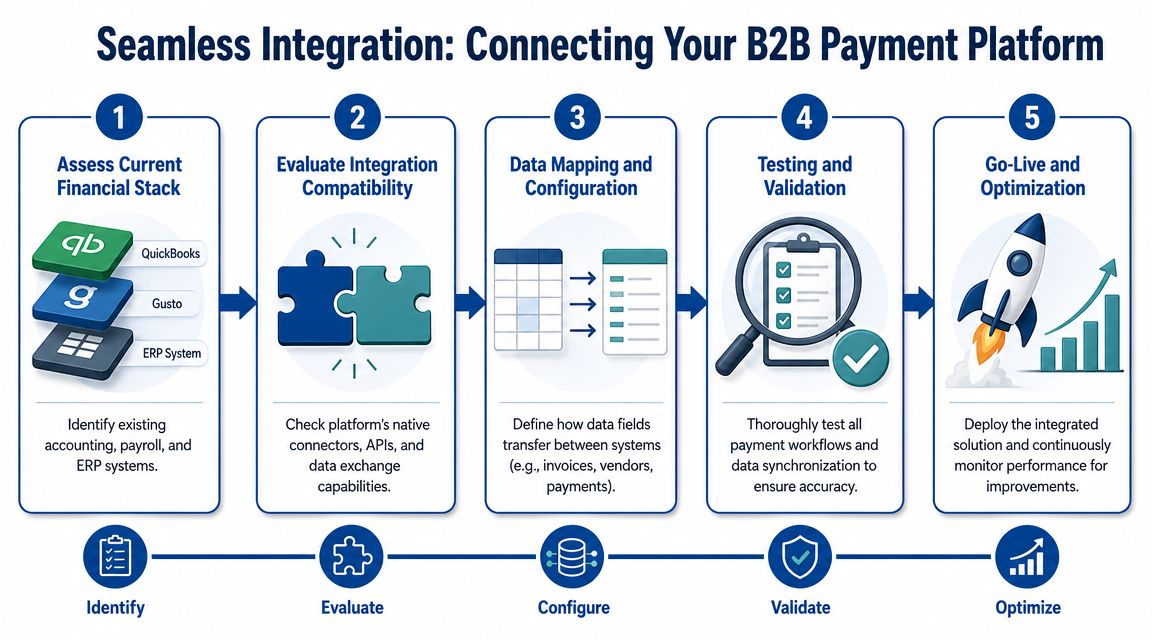
The technical differentiator that matters most is end-to-end invoice-to-cash automation. That depends on deep ERP integration that removes manual data entry across accounting, payment, and banking systems, as explained in Upflow’s view of the ideal B2B payment experience.
What a deep integration looks like
A strong QuickBooks integration should do more than post a deposit summary. It should handle customer records cleanly, sync invoice status accurately, map fees consistently, and avoid duplicate entries.
For service businesses using Gusto, the payroll side matters too. A payment platform doesn’t need to run payroll, but it should fit into the same control environment. If incoming cash timing is unreliable or reporting is delayed, payroll planning gets harder. That is where a resilient payment system integration mindset is useful. The system has to work under normal conditions and under messy ones.
Demo questions that expose weak integrations
Ask these during a demo, and don’t accept vague answers:
- How are processing fees posted into QuickBooks? You want a clear account mapping method.
- What happens with partial payments or short pays? This reveals whether exceptions are manageable.
- Does the platform create or update customer and vendor records? Poor sync logic can clutter your lists.
- How are failed syncs identified and corrected? Silent failures create month-end surprises.
- Can deposits be traced back to individual invoices? If not, bank rec work remains manual.
This walkthrough gives a useful visual for the implementation flow:
The hidden cost of a shallow sync
A surface-level integration often shifts work instead of removing it. The platform collects money. QuickBooks gets a summarized entry. Then your team has to rebuild the detail for reporting, cleanup, and close.
That’s not modernization. It’s just moving labor to a different screen.
Evaluating Platform Security and Pricing Models
Security and pricing deserve the same level of scrutiny. Owners often focus on cost first, but a cheap platform that creates risk or accounting cleanup isn’t actually cheaper.
Security in practical terms
You don’t need to become a compliance specialist, but you do need clarity on how the platform protects payment data and access. Ask whether the provider documents card handling controls, user permissions, approval layers, and audit logging in a way your finance team can effectively use.
Also look at process security, not just technical security. Approval routing, user role limits, and documented exception handling matter because internal mistakes often create just as much pain as external threats. For a plain-language view aimed at smaller businesses, GenerateSEPA’s UK SME security advice is a useful primer.
Security isn’t only about stopping fraud. It’s about keeping payment activity traceable enough that your accounting team can prove what happened.
Pricing models that deserve a second look
Most vendors price some combination of subscription fees, transaction fees, method-based charges, and add-on services. The sticker price rarely reflects the full accounting cost.
Review pricing through these lenses:
- Workflow fit: A lower transaction fee may still be expensive if your staff spends hours reconciling deposits.
- Payment mix: Costs change depending on whether clients pay by ACH, card, wire, or another method.
- Exception workload: Manual review time has a real cost, even if it doesn’t show up on the invoice.
- Implementation effort: Data cleanup, account mapping, and approval design all take time.
The growth of newer rails and financing options is also changing how pricing behaves. Real-time payments are projected to grow at 35.4% CAGR, and B2B BNPL options are influencing cash flow management, pricing, and conversion behavior. Merchants offering credit financing have seen conversion improve by about 60%, according to Resolve’s summary of real-time payments and B2B BNPL statistics. For a service firm, that doesn’t automatically mean “faster is better.” Faster settlement can create reporting issues if controls and remittance detail aren’t equally strong.
Calculate total cost, not just fee cost
A practical cost review should include:
| Cost area | What to ask |
|---|---|
| Subscription | What is included, and what counts as an add-on |
| Transaction charges | Do fees differ by payment type |
| Accounting labor | How much monthly reconciliation work remains |
| Support | Is implementation help included |
| Control overhead | Will approvals or permissions require manual workarounds |
The best-priced platform is the one that lowers total administrative friction while keeping your books dependable.
Your Decision Framework and Vendor Scorecard
The cleanest buying process starts with one question: what is broken today?
If the answer is “fees are too high,” you’ll evaluate one way. If the answer is “our books are late because cash receipts are messy,” you’ll evaluate very differently. For U.S.-focused service companies, a central issue is whether modernization reduces bookkeeping labor or moves it. Practical guidance for this segment consistently points back to dependable QuickBooks integration and strong controls over raw speed, as discussed in Versapay’s B2B payments guide.
A practical five-part evaluation method
Define the main failure point
Be specific. Late collections, messy reconciliation, weak approval controls, and poor reporting are different problems.List required integrations
QuickBooks is usually nonnegotiable for service businesses. Gusto may also matter if cash timing affects payroll planning and reporting.Score operational features
Focus on invoice matching, remittance quality, approval routing, exception handling, and audit trail quality.Review total cost of ownership
Include implementation time and monthly cleanup work, not just vendor pricing.Run a realistic demo
Use your own scenarios. Partial payments, recurring invoices, net deposits, payment fees, and customer-specific terms tell you more than a polished generic walkthrough.
Sample B2B Payment Platform Vendor Scorecard
| Criterion | Weight (1-3) | Vendor A Score | Vendor B Score | Notes |
|---|---|---|---|---|
| QuickBooks sync depth | 3 | Does it sync invoice status, fees, and deposit detail cleanly | ||
| Approval workflow flexibility | 2 | Can you route by vendor, amount, or payment type | ||
| Remittance detail quality | 3 | Is the payment easy to match without manual digging | ||
| Exception handling | 3 | Are short pays and partial payments manageable | ||
| Customer payment experience | 2 | Is paying easy without creating support tickets | ||
| Reporting visibility | 2 | Can finance see paid, pending, failed, and unapplied activity | ||
| Implementation burden | 2 | How much setup and data cleanup is required | ||
| Permission controls | 2 | Are roles and approvals strong enough for your team | ||
| Ongoing reconciliation effort | 3 | Does the platform reduce month-end labor | ||
| Total cost of ownership | 3 | Include fees plus internal admin time |
What strong vendors do in demos
Good vendors answer operational questions directly. Weak vendors redirect to broad claims about automation and ease of use.
Watch for these signals:
- Specific mapping answers: They can explain exactly how entries reach QuickBooks.
- Exception examples: They don’t dodge edge cases.
- Control clarity: They show permissions and approvals, not just payment screens.
- Honest limits: They tell you what still requires human review.
If a vendor can’t explain how the platform behaves when something goes wrong, you haven’t really evaluated the platform.
Planning Your Transition and Next Steps
Once you’ve selected a platform, the implementation work determines whether it improves your accounting.
Start with data hygiene. Clean up customer and vendor lists in QuickBooks. Review open invoices, stale balances, duplicate names, and account mappings before any sync goes live. A new platform won’t fix bad records on its own.
Then define the workflow in plain language. Who approves outgoing payments. Who handles failed transactions. Who owns exception review. What happens when a client pays partially. If those answers aren’t documented, your team will make them up under pressure.
A phased rollout usually works better than an all-at-once switch. Start with one billing group, one set of vendors, or one type of recurring invoice. Confirm that deposits, fees, remittance data, and reporting all behave the way you expect before you widen the rollout.
Communication matters too. Clients and vendors need clear instructions about how payments will be made or received, what changes for them, and who to contact with questions. Most rollout frustration comes from silence, not software.
Use this short checklist:
- Clean records first: Remove duplicates and review account mappings.
- Define approvals: Set payment authority before launch.
- Pilot the process: Start narrow and verify entries in QuickBooks.
- Test reporting: Confirm aging, bank recs, and close reports stay clean.
- Train the team: Everyone touching AP, AR, and cash should know the new workflow.
A good transition leaves you with fewer manual steps, not just a new login.
Frequently Asked Questions About B2B Payments
Are b2b payment platforms the same as Zelle or Venmo for business
No. Consumer-style apps move money. B2b payment platforms are built to handle invoices, approvals, remittance data, accounting sync, and reporting. For a service business, that difference matters because your books need context, not just a transfer.
Do clients need to create an account to pay an invoice
Sometimes, but not always. Many platforms let clients pay directly from an invoice or payment link. That’s usually better for collection speed and client experience. During a demo, ask exactly what your clients will have to do.
How long does implementation take
It depends on the complexity of your current process, the state of your QuickBooks file, and whether your team has clean customer and vendor data. A simple setup can move quickly. A messy chart of accounts, duplicate records, and unclear approval rules will slow everything down.
Can these platforms handle international payments
Some can, but service businesses shouldn’t assume international capability is automatically useful. Cross-border support matters only if it fits your actual billing and vendor profile. If most of your business is domestic, prioritize clean reconciliation and reporting first.
Will a new platform reduce bookkeeping time immediately
Not automatically. The platform has to be configured correctly, and your workflows have to change with it. If you keep the same manual review habits after implementation, the time savings will be smaller than expected.
What’s the biggest mistake owners make when choosing
They focus too much on transaction pricing and not enough on accounting impact. The better choice is usually the one that keeps QuickBooks accurate, supports approval controls, and cuts exception work.
A reliable payment process should make your month-end close easier, your cash position clearer, and your reporting more trustworthy. If it doesn’t do those things, it isn’t solving the right problem.
If you’re evaluating b2b payment platforms and want help thinking through the bookkeeping, payroll, and reporting side before you commit, Steingard Financial can help you assess the workflow impact, clean up the underlying records, and make sure your QuickBooks and Gusto stack supports the way your business runs.