 Skip to content
You’ve probably felt this already. A client project wraps up, your team delivers the work, and then billing turns into a second job. Someone checks a spreadsheet, someone else updates QuickBooks, an invoice goes out late, a client replies with a question about the amount, and now your month-end close is messier than it should be.
That’s the reason service businesses start looking at automated billing software. It’s rarely because invoice creation is impossible by hand. It’s because manual billing leaks time, delays cash, and creates accounting cleanup work that keeps showing up weeks later.
For a service business, the billing process demands more than just “send invoices faster.” Your billing process has to produce clean data that flows into your books, matches your contracts, and supports reporting you can trust. If your billing tool speeds up invoicing but creates a second set of numbers that doesn’t match your general ledger, you haven’t solved the problem. You’ve just moved it.
What Is Automated Billing and Why It Matters Now
Friday afternoon is a common breaking point. A project is finished, the client is expecting an invoice, your team is asking what was approved, and accounting is trying to work out which number belongs in the books. The work is done, but cash is still stuck behind a messy handoff.
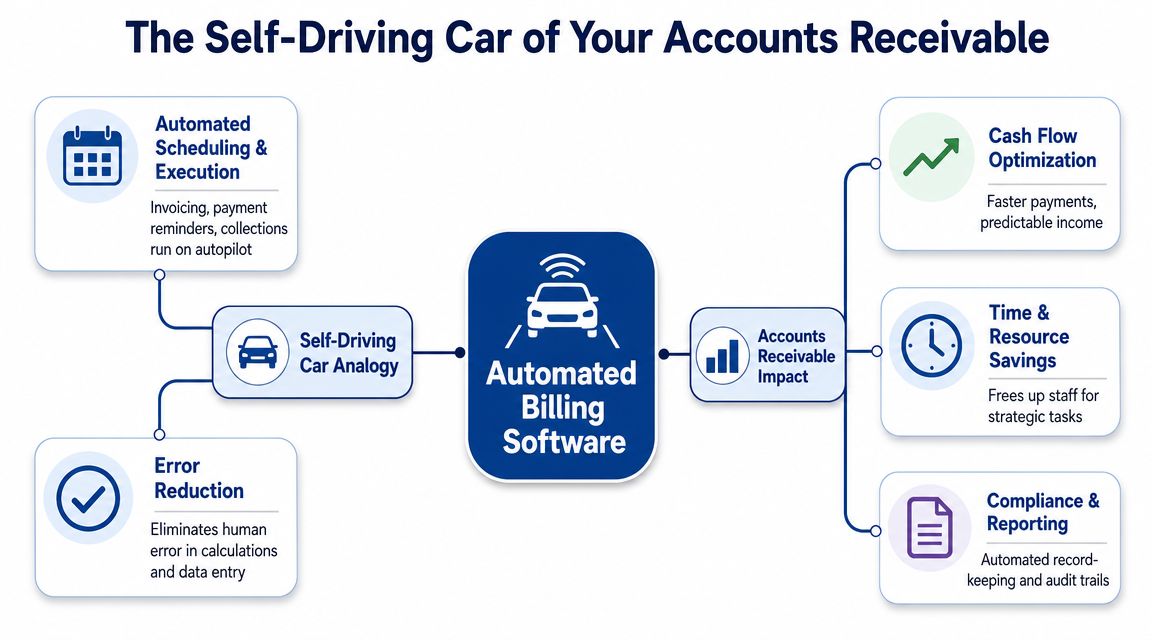
Automated billing software handles that handoff with rules instead of memory. It generates invoices from agreed billing terms, sends them on schedule, tracks payment status, and triggers follow-up when accounts go past due. For a service business, that matters because billing is not just a client communication task. It is the point where delivery, contracts, accounts receivable, and financial reporting all have to line up.
For owners, the practical question is simple. Will this system produce invoices and payment records that your bookkeeper can reconcile cleanly, month after month?
Why it matters more now
Manual billing usually fails gradually, then all at once. It may hold together when you have a few clients and simple monthly invoices. It gets harder to control when you add retainers, milestone billing, hourly overages, credits, deposits, partial payments, and staff in different roles touching the same account.
That complexity is one reason more businesses are buying billing tools. DataIntelo estimates the billing and invoicing software market was worth $7.4 billion in 2025 and is projected to reach $18.9 billion by 2034, growing at 10.9% annually, according to its forecast for global billing and invoicing software market growth through 2034. The same report says cloud deployment accounted for 58.4% of revenue in 2025, showing that many buyers now prefer software they can deploy and update without managing on-premise systems.
The bigger shift is operational. Service firms now need billing data to feed collections, forecasting, and month-end close without manual cleanup. If the billing platform creates figures that do not match your accounting records, you gain speed in one place and lose control in another.
What automated billing should replace
A good billing system works like a well-run front desk. It checks the client record, applies the agreed terms, sends the right document at the right time, and records what happened so finance is not reconstructing events later.
In practice, it usually replaces work such as:
- Invoice assembly: Pulling rates, dates, contract terms, and service details into the invoice without copying data between systems.
- Billing schedules: Sending recurring, milestone, or usage-based invoices based on rules instead of calendar reminders.
- Collections follow-up: Triggering due-date reminders and overdue notices consistently, which supports stronger accounts receivable management best practices for service businesses.
- Status tracking: Recording sent, viewed, paid, partially paid, and overdue statuses in one place instead of spreading them across inboxes and spreadsheets.
- Exception visibility: Flagging missing approvals, disputed charges, credits, and failed payments before they become close-month surprises.
That last point is where many implementations succeed or fail. If your billing software becomes a second unofficial ledger, bookkeeping gets harder. If it feeds your accounting system cleanly, with clear customer records, tax treatment, payment status, and audit trails, it reduces rework and gives you reporting you can trust.
If you are reviewing connected workflows at the same time, it can also help to uncover AI workflow opportunities across billing approvals, collections, and back-office handoffs.
The Core Benefits for Service-Based Businesses
It is the last business day of the month. Your team delivered the work, but three invoices are still waiting on approvals, one has the wrong service dates, and another went out without the agreed credit. Revenue exists on paper, but cash will arrive later because billing was messy. That is the daily cost of a weak billing process for a service business.
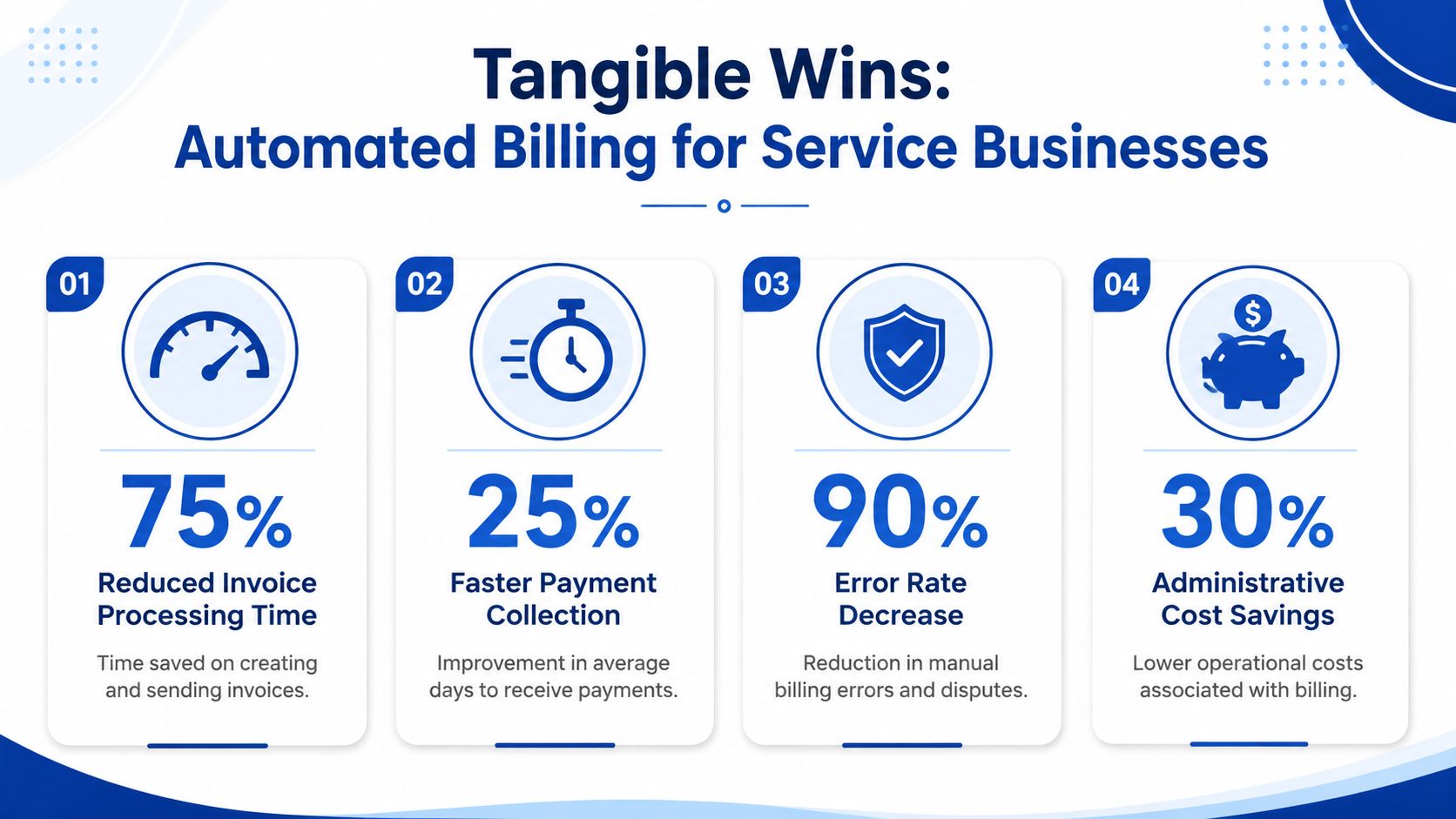
Automated billing improves more than speed. It creates a repeatable billing routine that sends accurate invoices on time, follows up consistently, and records each step clearly enough that bookkeeping is easier, not harder. For firms that bill retainers, recurring services, milestone work, or a mix of all three, that matters because late or confusing invoices delay cash and create cleanup work at month end.
Better cash flow starts with cleaner first-touch billing
Cash flow usually weakens before anyone notices it in the P&L. The first slippage often happens at the invoice stage. A bill that goes out five days late usually gets paid five days late. If the client then has a question, the delay grows again.
Automation helps by turning billing into a scheduled process instead of a memory test. Recurring invoices go out on the right date. Milestone invoices trigger when work is approved. Reminder sequences run without your team writing one-off chase emails. If you want that process to stay disciplined after launch, combine the system with clear accounts receivable follow-up practices for service businesses.
The result is simpler than it sounds. You shorten the time between doing the work and collecting the cash.
Fewer disputes because the invoice matches the job
Service businesses do not usually lose time on invoice creation alone. They lose it on questions, corrections, credits, and reissued bills.
A good billing system applies the same rules every time, which cuts the common errors that trigger disputes:
- Wrong service periods: The invoice reflects the correct dates from the contract or billing schedule.
- Missed credits or changes: Adjustments, prepayments, and approved scope changes flow through before the bill is sent.
- Duplicate or inconsistent charges: The same work is not billed twice because one spreadsheet said one thing and accounting said another.
- Vague descriptions: Clients can see what was delivered, for when, and under which fee structure.
That consistency does more than reduce awkward emails. It protects trust with clients and gives your bookkeeping team cleaner data to reconcile. If billing software produces records that match the accounting file, month-end close gets calmer. If it creates its own version of customer balances, finance ends up fixing two systems instead of one.
More capacity without turning billing into another full-time job
Growth puts pressure on back-office processes before it shows up in headcount plans. Ten more clients can mean dozens more invoices, exceptions, approvals, reminders, and payment checks. Without automation, the finance team often becomes a human routing system.
Billing automation changes the shape of the work. Staff spend less time assembling routine invoices and more time reviewing exceptions, resolving disputes, and checking that revenue and receivables are landing in the right place. That is a better use of skilled finance time.
It also helps to pair billing rules with invoice automation solutions that standardize reminder workflows. The benefit is not just fewer manual follow-ups. You get a clearer record of what was sent, when it was sent, and what happened next, which makes collections activity easier to track and explain.
Here is the practical difference:
| Pain point | What automation changes |
|---|---|
| Late invoices | Scheduled billing runs send invoices at the right time |
| Manual chasing | Reminder workflows handle routine follow-up consistently |
| Month-end cleanup | Cleaner billing records reduce rework in reconciliation |
| Client confusion | Standardized invoice detail makes charges easier to verify |
For a service business, that is the key win. Automated billing should reduce admin work and strengthen financial reporting at the same time. If it only sends invoices faster but leaves finance sorting out mismatched records later, the process is only half fixed.
Key Features and Must-Have Integrations
A billing system can look efficient on the surface and still create extra cleanup at month-end. A service firm sends the invoice, collects the payment, then discovers the accounting file is full of duplicate customers, uncategorized credits, or payments that do not match the original invoice. That is not automation. It is admin work shifted downstream.
The features that matter most are the ones that keep billing activity tied to clean books.
Core essentials
Start by checking whether the platform can handle routine billing without forcing your team into manual fixes later. In practice, that means four basics working together.
- Recurring invoicing: Retainers, support plans, and fixed monthly fees should generate on schedule with the right client, amount, tax treatment, and service period attached.
- Automated reminders and dunning: Overdue follow-up should run from the same billing record, so your team can see what was sent and clients are not chased from a separate tool with conflicting balances.
- Flexible invoice templates: Clear line descriptions, service dates, terms, and contact details reduce client questions and make disputes easier to trace.
- Payment collection support: Clients need an easy way to pay, and finance needs payments to post back against the correct invoice so accounts receivable stays accurate.
As Stripe explains in its overview of billing and invoicing software, billing tools are most useful when they automate recurring charges, payment collection, and invoice workflows in a way that supports the full payment cycle, not just invoice creation.
That last point trips up many service businesses. Sending an invoice is only step one. If payment status, credits, or failed charges live in a separate corner of the system, your bookkeeper still has to stitch the story together by hand.
Features that matter once pricing gets messy
Service billing rarely stays simple for long. A client starts mid-month. A scope changes. A block of hours rolls over. A partial credit is issued after an approval delay.
Your billing software should handle those real-world adjustments without turning every exception into a spreadsheet exercise.
Look for features such as:
- Proration support: Useful when a client starts, pauses, upgrades, or changes plan partway through a billing period.
- Usage-based or variable billing: Helpful if fees depend on hours, seats, transactions, or another measurable input.
- Credit and adjustment workflows: Needed when project scope changes, discounts are approved, or service issues lead to partial credits.
- Revenue recognition support: Important when the invoice date and the period you earned the revenue are not the same.
Spendesk notes in its guide to automated billing systems that modern platforms may support complex dunning and revenue recognition requirements such as IFRS 15 and ASC 606. For a service business, the practical question is simpler. Can the system reflect what happened commercially and still produce records your accountant can reconcile without detective work?
The integration that deserves the most scrutiny
The most important integration is usually your accounting system.
If invoices sync over but credits do not, the receivables report becomes unreliable. If payments sync as deposits without invoice references, cash comes in but reconciliation slows down. If customer records flow both ways without clear rules, duplicates appear and reporting gets muddy fast.
A good sync works like a clean handoff between front office and back office. Billing creates the transaction. Accounting records it in the right place. Finance can then trace each invoice, payment, credit, and tax entry without maintaining a second version of the truth.
That is why many firms compare billing platforms alongside guides on contract billing software. The software has to match how your agreements are structured, including fixed fees, milestones, recurring retainers, and change orders, so the accounting output still makes sense after implementation.
Do not treat collections tooling as an afterthought
Many billing problems show up after the invoice is sent. The reminder goes out late. A client says they never saw the invoice. One team member follows up, another does not, and now the aging report reflects process inconsistency more than client behavior.
That is where surrounding workflow tools can help, especially if collections discipline is the weak point. For firms reviewing complementary tools, invoice automation solutions can support reminder workflows and invoice chasing without leaving finance guessing what communication happened and when.
The test for every feature and integration is straightforward. Does it save time and also leave a clean audit trail? If the answer is no, the software may speed up billing while slowing down bookkeeping.
Choosing the Right Automated Billing Vendor
Most vendor demos look good. The hard part is figuring out which platform will still look good after your first month-end close.
A service business doesn’t need the “best” billing software in the abstract. It needs the vendor that fits its pricing model, accounting workflow, and reporting requirements. That means your evaluation should focus less on feature lists and more on operational fit.
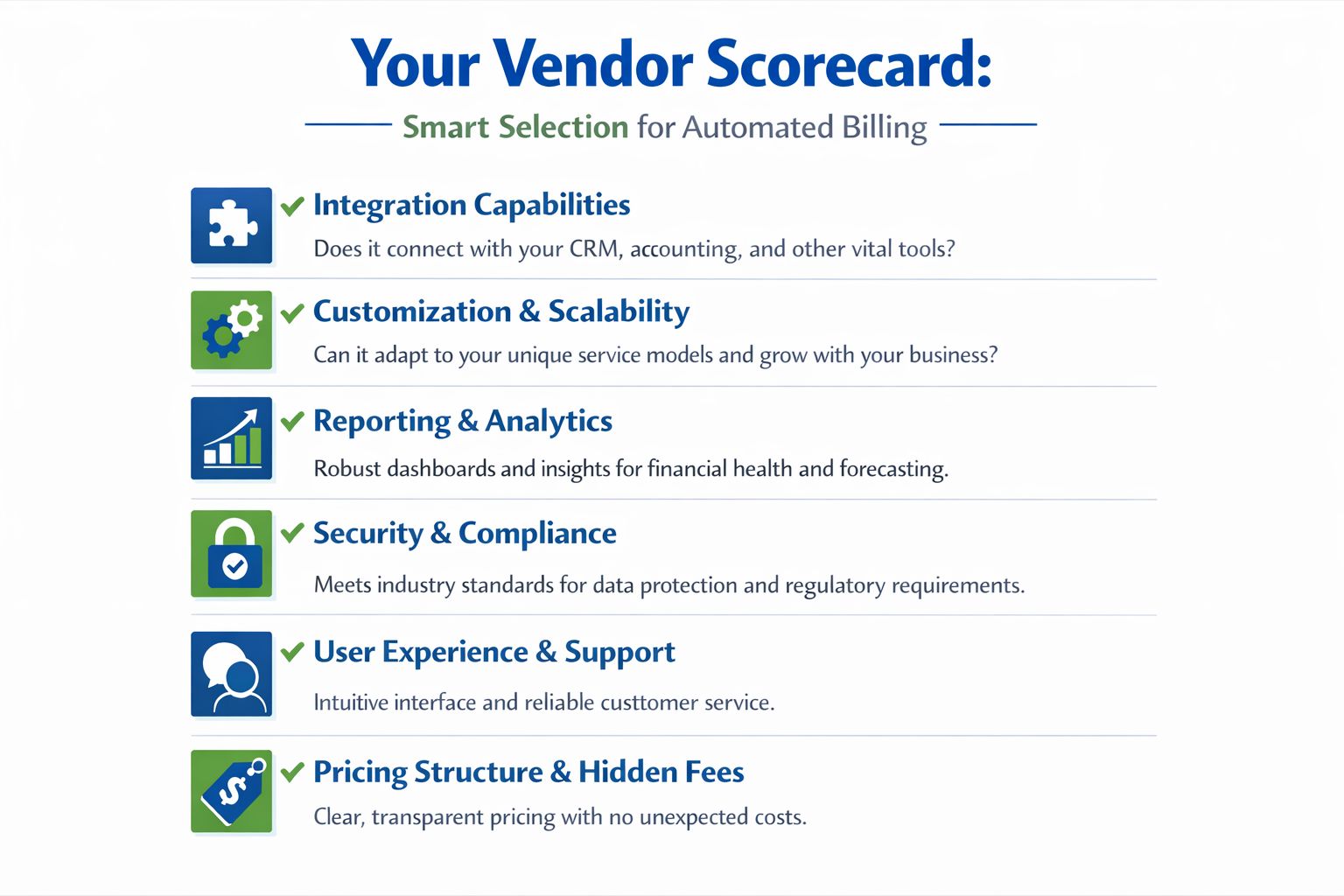
Early in the process, use this checklist as a visual gut check.
Questions that reveal the real fit
Ask vendors to show you exactly how the software handles your edge cases. Don’t settle for “yes, we support that.”
Here are the questions that usually uncover the truth:
| Evaluation Criterion | Why It Matters | Key Questions to Ask |
|---|---|---|
| Integration capabilities | Billing data has to land cleanly in your accounting system | How does the sync handle invoices, payments, credits, taxes, and customer updates? |
| Customization and scalability | Service models change over time | Can we support retainers, milestones, variable charges, and contract changes without workarounds? |
| Reporting and analytics | Owners need visibility, bookkeepers need reconciliation clarity | Can we trace invoice status, collections activity, and exceptions without exporting everything? |
| Security and compliance | Billing data includes sensitive financial information | What controls, permissions, and audit trails are available? |
| User experience and support | A clunky tool gets bypassed | What does onboarding look like, and who helps when sync issues appear? |
| Pricing structure and hidden fees | Cheap software can become expensive quickly | What changes based on users, invoice volume, payment processing, or advanced features? |
Watch the product in action
Marketing copy rarely tells you how a system behaves during real use. A short product walkthrough can help you spot workflow assumptions and evaluate whether the tool feels built for finance operations or just sales-friendly checkout flows.
Red flags that bookkeepers notice early
Some problems don’t show up until implementation starts. These are the ones worth spotting before you sign:
- One-way syncs: Data exports into accounting, but corrections don’t flow back clearly.
- Weak support for credits and adjustments: Fine until your first contract change or billing dispute.
- Rigid product structure: The system expects every service to behave like a subscription box.
- Reporting gaps: Teams end up rebuilding AR visibility in spreadsheets.
- Unclear ownership: The vendor expects your staff to solve accounting design questions on their own.
If a vendor can’t explain how your books stay clean, that’s a bigger issue than any flashy dashboard.
A Practical Roadmap for Implementation and Migration
Most automated billing projects get harder than expected. The software may be modern. The migration work usually isn’t.
ScienceSoft’s guidance on automated billing highlights a problem many businesses discover too late. The challenge isn’t generating invoices. It’s preventing the new system from becoming a second source of truth that has to be manually reconciled with the general ledger. ScienceSoft also emphasizes that chart-of-accounts mapping and data migration are the main bottlenecks in its overview of automated billing software.
The hidden work that decides success
A clean implementation usually starts before any data import. You need agreement on how the business should bill, what the accounting treatment should be, and who owns exceptions.
That often means sorting through questions like:
- Which services map to which income accounts?
- How will deposits, credits, and write-downs post?
- What happens when a client pauses, upgrades, or disputes an invoice?
- Which system is the final authority for customer records, invoice status, and payment activity?
If those decisions are fuzzy, the new platform will only automate confusion.
Field note: The fastest way to ruin a billing rollout is to import messy customer and contract data and hope the software will clean it up for you.
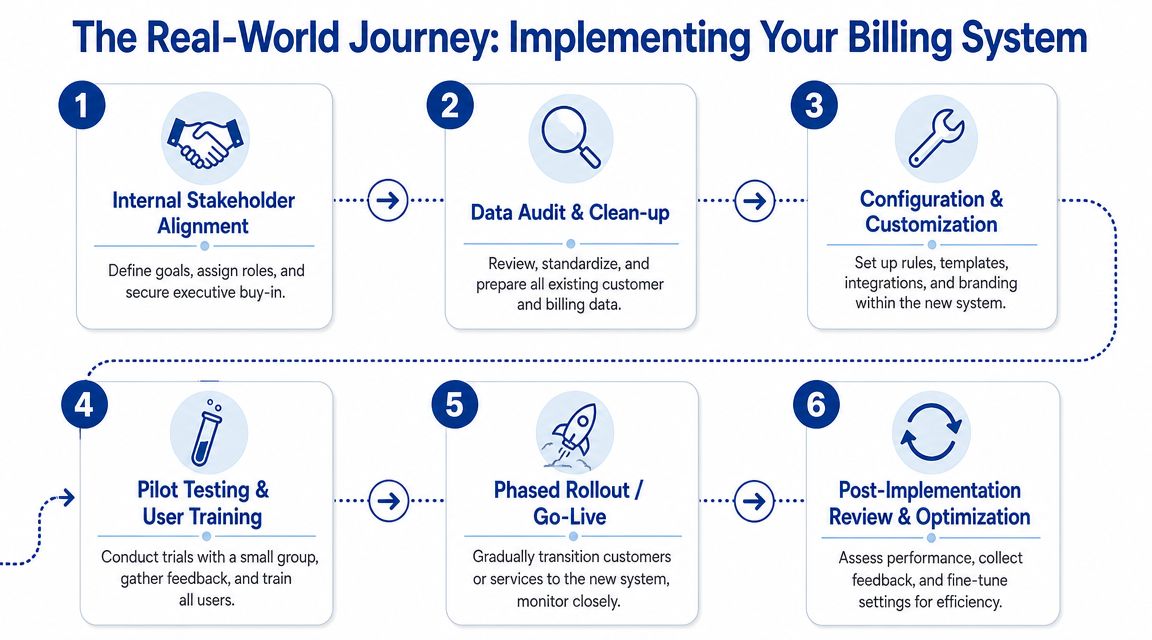
A workable migration sequence
Most service businesses do better with a phased rollout than a big-bang switch.
- Audit your current billing data. Clean customer names, terms, service items, open balances, and recurring schedules.
- Map the chart of accounts. Decide where each billing event posts in the general ledger before you sync anything.
- Configure templates and rules. Build invoice layouts, reminder timing, tax settings, and approval steps.
- Test with real scenarios. Run recurring retainers, one-time project invoices, credits, and failed payments.
- Run one billing cycle in parallel. Compare outputs from the old process and the new one.
- Review the first close carefully. Reconcile AR, payments, and revenue postings before declaring success.
If your team also manages payables and process handoffs, a stronger invoice-to-pay process can reduce the number of reconciliation problems that show up after go-live.
What to check after launch
Don’t judge the implementation by whether invoices were sent. Judge it by whether the books stayed clean.
Review:
- AR aging: Does it match what the billing platform shows?
- Customer balances: Are credits and payments landing correctly?
- Revenue postings: Do they match how your accountant expects them to be recognized?
- Exception handling: Can the team fix unusual cases without manual journal-entry gymnastics?
A billing system is only “live” when the data reconciles.
Calculating the ROI of Billing Automation
It is the 28th of the month. Your team has sent the invoices, but your bookkeeper is still chasing a different question: do the customer balances in the billing system match accounts receivable in the general ledger?
That is the right place to measure ROI.
A useful ROI model for billing automation goes beyond invoice speed. It should capture time saved, fewer corrections, faster collections, and the finance benefit of data that reconciles cleanly at month-end.
ROI = time saved + fewer billing mistakes + faster cash collection + less close and reconciliation work
For service businesses, that last part matters more than many software demos suggest. If the new tool sends invoices faster but posts messy data, creates duplicate customer records, or forces manual journal entries, the apparent gain disappears. You have traded one manual process for another.
A practical way to estimate your return
Start with the work your team does today after an invoice is created, not just before it is sent. That is where hidden cost lives.
Look at four areas:
- Billing labor: Time spent preparing invoices, checking rates or retainers, sending invoices, and following up on unpaid balances
- Error correction: Time spent fixing wrong dates, duplicate invoices, missed credits, payment mismatches, or client-specific billing exceptions
- Cash timing: The business effect of invoices going out late, reminders going out inconsistently, or disputed invoices sitting unresolved
- Finance cleanup: Bookkeeping time spent reconciling billing activity to AR, investigating sync issues, and correcting revenue or payment postings
A simple analogy helps here. Billing software is not only a faster printer for invoices. It is also a pipe into your books. If the pipe is clean, finance gets usable numbers. If the pipe leaks, your team spends month-end mopping the floor.
What a real before-and-after looks like
Consider a service firm with recurring client work, occasional one-off projects, and a few custom billing arrangements.
Before automation, someone builds invoices from spreadsheets, checks contract notes in email, sends reminders manually, and answers client questions by tracing changes across three systems. Cash comes in, but the finance team still has to sort out unapplied payments, credits, and timing differences during close.
After a well-set-up automation project, recurring invoices run on schedule, reminders follow consistent rules, and payments post back in a way the accounting team can use. The gain is not just fewer admin hours. It is fewer interruptions for senior staff, more confidence in AR aging, and less rework to get reliable financial reporting.
That is the difference between automation that saves time and automation that improves the business.
Keep the business case conservative
Use cautious assumptions. If you estimate savings only from reduced invoice prep time, you will probably understate the value. If you assume every invoice goes out perfectly and every sync works on day one, you will overstate it.
A grounded ROI case usually looks at these drivers:
| ROI driver | How to evaluate it |
|---|---|
| Labor savings | Hours no longer spent on repetitive billing tasks and follow-up |
| Fewer exceptions | Time not spent correcting invoice errors, credits, duplicate records, and payment confusion |
| Better collection timing | Cash benefit from sending invoices and reminders on schedule |
| Cleaner books | Less reconciliation work and fewer manual fixes during close |
One caution matters here. Count the software as a win only if the billing output supports clean reporting. For a service business, real ROI shows up when accounts receivable, payments, and revenue postings make sense without detective work.
If the new system reduces admin time and gives your bookkeeper cleaner, reconcilable data, the return is usually easy to defend. If it creates a second system of record that finance cannot trust, the cost shows up later in missed time, slower closes, and avoidable headaches.
The Finance Leader’s Action Checklist
The businesses that get the most from automated billing software treat it like a finance systems project, not just an invoicing upgrade. That mindset keeps the focus on reporting integrity, not just speed.
Before you buy
- Audit the current process: Document how invoices are created, approved, sent, tracked, and reconciled.
- Identify failure points: Note where delays, disputes, duplicate work, and manual corrections happen.
- Define essential features: Decide which features you must have, such as recurring billing, credits, reminders, and accounting sync.
- List your edge cases: Include retainers, milestone billing, deposits, usage fees, client pauses, and contract changes.
- Test the accounting fit: Ask every vendor how data maps into your general ledger and what happens when something changes.
During implementation
- Clean master data first: Standardize customers, service items, terms, tax settings, and open invoices.
- Lock down account mapping: Make sure revenue, AR, payments, credits, and liabilities post where they should.
- Assign ownership clearly: Someone should own billing rules, someone should own bookkeeping review, and someone should own exceptions.
- Train for unusual scenarios: Your team needs to know how to handle disputed invoices, payment failures, and contract changes.
- Run a parallel cycle: Compare old and new results before fully switching over.
Your first success metric isn’t “the invoices sent.” It’s “the invoices, payments, and books matched.”
After launch
- Review the first AR aging report: Confirm balances agree across systems.
- Check payment application: Make sure receipts, credits, and unapplied cash are behaving correctly.
- Inspect month-end close quality: Look for fewer reconciliation surprises, not just faster invoice runs.
- Get client feedback: If the invoice format or payment experience is confusing, fix it early.
- Refine exception workflows: Automation handles routine work well. Humans still need a clean process for unusual cases.
A strong billing system should make your books easier to trust. If it doesn’t, it needs more work.
If you want help evaluating billing workflows, cleaning up your books before a migration, or making sure your billing system works cleanly with QuickBooks and payroll, Steingard Financial can help service businesses build a back office that produces reliable numbers, smoother closes, and fewer day-to-day finance headaches.