 Skip to content
You’ve probably had this moment already. Someone joins your team, they ask when they’ll get paid, and what seems like a simple answer quickly turns into a stack of decisions about hours, taxes, forms, deadlines, direct deposit, benefits, and filings.
That’s why new owners ask, how does payroll work. They’re not really asking how to press “Run Payroll” in software. They’re asking how to build a system that pays people correctly, on time, and in a way that doesn’t create tax problems later.
The easiest way to understand payroll is to stop thinking of it as a paycheck task. Payroll is like the foundation under a house. Employees see the finished room. You’re responsible for the framing, wiring, permits, and inspections underneath it. If the foundation is off, the whole structure starts cracking.
What Payroll Is More Than Just Paychecks
A lot of business owners assume payroll starts when payday arrives. In practice, it starts much earlier, with setup, documentation, classification, timekeeping, approvals, and tax rules.
Payroll is a control system. It takes raw inputs about your workers and turns them into regulated outputs: wages, withholdings, tax payments, reports, and records. If one input is wrong, the error travels all the way through the process.
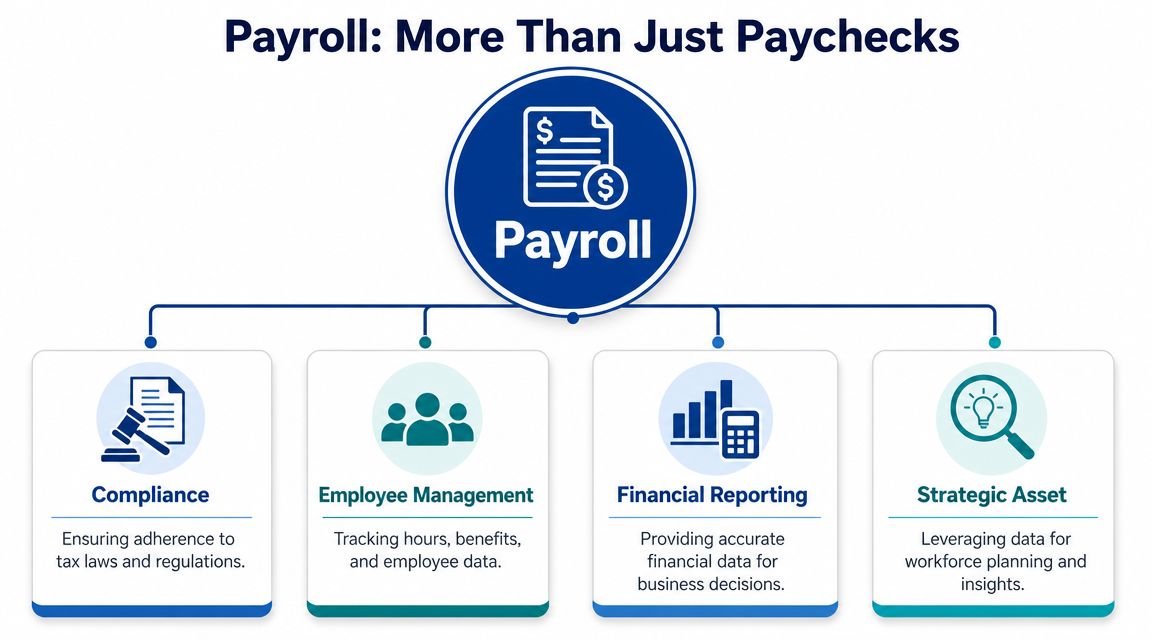
Payroll starts with inputs, not checks
A reliable payroll process usually begins with collecting the right employee and business information. NetSuite’s payroll overview describes payroll as a multi-step control process where employers collect tax and banking data, compute gross pay, apply required and voluntary deductions, remit payroll taxes, and retain records for compliance.
In the U.S., that setup commonly includes an EIN and forms such as W-4, W-9, I-9, plus state withholding certificates where needed. That matters because many payroll mistakes don’t start with the final calculation. They start with bad setup. A wrong withholding form, an incorrect pay rate, or missing banking details can create problems before payroll even runs.
Payroll touches more than wages
When owners say, “I just need to pay my people,” they often mean salary or hourly wages. Payroll is broader than that.
It also has to account for things like:
- Hours and earnings: Regular time, overtime, bonus pay, paid time off, and adjustments.
- Deductions: Taxes, benefit premiums, retirement contributions, garnishments, and other required withholdings.
- Employer obligations: Tax remittance, filings, reconciliation, and record retention.
- Accounting impact: Payroll feeds labor costs, tax liabilities, benefit expenses, and cash activity into your books.
Payroll is where HR data, tax rules, cash flow, and accounting records all meet. That’s why small errors often create bigger downstream problems.
A useful analogy is airport security. The passenger only notices whether they boarded the plane. The airport has to verify identity, screen baggage, follow procedures, and document what happened. Payroll works the same way. The employee sees net pay. Your business has to manage everything that makes that net pay legitimate.
Why this framing matters
If you see payroll only as payment delivery, you’ll focus on the end of the process. If you see it as compliance and controls, you’ll focus on the whole chain.
That shift changes how you run your business:
- You document approvals instead of relying on memory.
- You fix source data instead of patching errors after payroll runs.
- You keep records because proof matters when questions come up.
- You review exceptions like bonuses, PTO, or garnishments before they turn into corrections.
That’s the starting point. Payroll isn’t just about getting money out the door. It’s about building a repeatable process that stands up when an employee asks a question, an agency requires a filing, or your accountant needs clean numbers.
The Journey from Gross Pay to Net Pay
Once payroll is set up correctly, the core calculation becomes easier to follow. I tell owners to think of it as a funnel. Money starts at the top as gross pay. It passes through deductions and tax rules. What lands at the bottom is net pay, the employee’s take-home amount.
This is the part software handles quickly, but you should still understand the logic behind it.
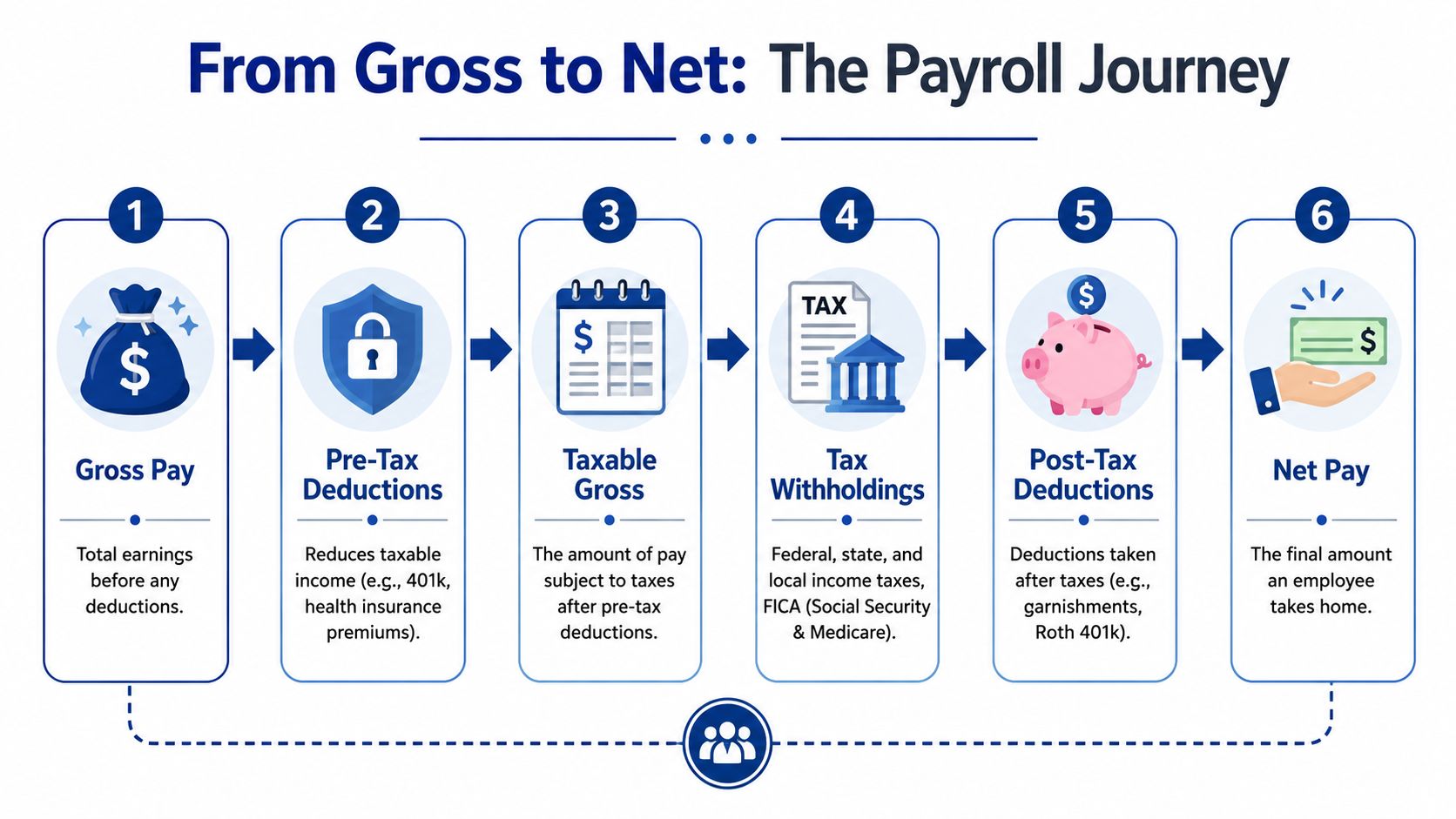
Step one is gross pay
Gross pay is the employee’s earnings before deductions.
For an hourly employee, that usually starts with approved hours multiplied by the pay rate, plus any overtime or other earnings that belong in that pay period. For a salaried employee, it usually means the salary amount allocated to that specific pay cycle.
A simple example helps. Suppose an hourly employee worked regular hours in the pay period and also earned a bonus. Their gross pay is the total of those earnings before anything is withheld.
Then payroll applies deductions in order
Many owners get lost because not all deductions work the same way. Some come out before certain taxes. Others come out after taxes are calculated. Some are required by law. Others are elected by the employee.
The sequence matters:
- Start with gross pay
- Subtract any pre-tax deductions that apply
- Calculate taxable wages
- Withhold required taxes
- Subtract post-tax deductions
- Arrive at net pay
If you want a broader walkthrough of the operational side, this guide on what payroll processing involves is a useful companion to the gross-to-net view.
Here’s a short visual summary before the final step.
Net pay is what the employee actually receives
Net pay is the amount sent by direct deposit or printed on a check after all applicable deductions are taken out.
A new owner sometimes thinks, “If an employee earns this amount, that’s what leaves my bank account.” Not exactly. The employee’s net pay is only one part of the cash movement. Your business may also owe employer payroll taxes and may need to remit withheld amounts to agencies and benefit providers.
Practical rule: Never review payroll by looking only at net pay. Review the earnings, deductions, and tax liabilities together.
That’s why payroll reports matter. They show how the gross amount was transformed into the final payment and what obligations still sit with the business. If you understand that journey from gross to net, payroll stops feeling mysterious. It becomes a sequence of controlled calculations.
Decoding Payroll Taxes and Other Withholdings
Most basic explanations stop at “calculate wages, withhold taxes, pay employees.” Real payroll gets harder in the exceptions. That’s where business owners usually run into trouble.
Friday’s guide on small business payroll makes this point clearly: real payroll also involves time cards, benefit premiums, garnishments, PTO, bonuses, and multi-jurisdiction tax rules. That’s why payroll works better when you treat it as a compliance system instead of a simple payment routine.
Required withholdings versus voluntary deductions
Start with two buckets.
Required withholdings are amounts you must calculate and withhold under tax or court rules. These often include income tax withholding and other payroll-related tax obligations, depending on where the employee works.
Voluntary deductions are amounts the employee elects, such as certain benefit premiums or retirement contributions.
That distinction matters because the rules differ. You don’t have the same flexibility with a garnishment that you have with a voluntary benefit election.
Here’s a practical way to sort them:
- Tax withholdings: Driven by tax forms, earnings, and jurisdiction rules.
- Benefit deductions: Often tied to enrollment choices and plan setup.
- Retirement deductions: May be pre-tax or post-tax depending on the plan design.
- Garnishments: Usually come from an outside order and have strict handling requirements.
Pre-tax and post-tax are not bookkeeping trivia
Owners often hear these terms and tune out. Don’t. This part affects how much income is subject to tax and what the employee takes home.
A pre-tax deduction reduces certain taxable wages before taxes are calculated. A post-tax deduction comes out after applicable taxes have already been computed.
That’s why two deductions for the same dollar amount can produce different net pay results. The deduction category changes the tax treatment.
A few examples help:
- Health insurance premium: May be set up as pre-tax in many payroll systems.
- Traditional retirement contribution: Often treated differently from a post-tax retirement option.
- Roth contribution: Typically handled as post-tax.
- Garnishment: Commonly withheld after taxes, based on the governing rules.
If your team receives paperwork from multiple employers or prior jobs, tools that streamline W2 data entry can reduce manual typing and cut down on input errors during onboarding or record collection.
The edge cases that trip people up
At this point, payroll stops being routine.
Bonuses may be taxed differently in processing logic than regular wages, depending on how they’re paid and configured in the system. PTO requires accurate accrual tracking and correct treatment when used or paid out. Garnishments have ordering and handling rules. Multi-state work can create withholding and reporting questions when an employee lives in one place and works in another.
A short checklist helps:
- Before processing a bonus: Confirm how it should be coded in payroll, not just how much you want to pay.
- When PTO is involved: Verify the balance, the policy, and whether unused time has special payout rules.
- If a garnishment arrives: Don’t improvise. Follow the order and document each step.
- For multi-state employees: Confirm where the work is performed, where the employee lives, and what registrations or withholding rules apply.
If you want the accounting side behind these amounts, this overview of payroll liabilities helps explain what your business still owes after payroll runs.
A payroll item can look small on a pay stub and still create a large compliance problem if it’s coded or remitted incorrectly.
Establishing Your Payroll Rhythm and Timeline
Payroll works on repetition. Once you choose a pay frequency, that schedule shapes everything else: time collection, approvals, processing deadlines, cash planning, and filing cadence.
In the U.S., SelectSoftware Reviews cites Bureau of Labor Statistics data showing that in February 2023, 43.0% of private establishments paid employees biweekly, 27.0% paid weekly, 19.8% paid semimonthly, and 10.3% paid monthly. Biweekly was the most common. That’s useful because it gives you a benchmark, but the right choice still depends on how your business operates.
How to choose a pay frequency
A weekly schedule gives employees more frequent pay and can fit businesses with changing hours. It also creates more processing cycles to manage.
A biweekly schedule is common because it balances regular employee pay with manageable admin work. Many service businesses find it practical.
A semimonthly schedule can align neatly with monthly accounting cycles, but it may be less intuitive for hourly timekeeping. A monthly schedule is simpler administratively in some environments, though it can feel too infrequent for many teams.
Here’s a simple comparison:
| Pay frequency | Often fits best when | Main challenge |
|---|---|---|
| Weekly | Hours change constantly | More frequent processing |
| Biweekly | You want balance and predictability | Timing can affect month-end reporting |
| Semimonthly | You want fixed calendar dates | Harder for hourly payroll |
| Monthly | Payroll is stable and simple | Less frequent employee pay |
What the payroll timeline usually looks like
Good payroll isn’t only about the pay date. It’s about the steps before the pay date.
A typical cycle includes:
- Time entry closes: Employees submit hours, PTO, and adjustments.
- Manager approval: Someone confirms the data is complete and reasonable.
- Payroll review: Rates, deductions, and exceptions are checked.
- Processing day: Payroll is submitted in the system.
- Payday: Net pay reaches employees, and liability tracking continues.
Choose a rhythm your team can actually support. A perfect schedule on paper fails if hours are always late or approvals are rushed.
When owners struggle with payroll, the issue often isn’t the math. It’s the calendar. Missed cutoffs, late approvals, and last-minute edits are what create avoidable corrections.
Choosing Your Payroll System In-House vs Outsourced
Once you understand the mechanics, the next question is operational. Who’s going to run payroll, monitor deadlines, handle notices, and keep the records clean?
Most businesses end up choosing between in-house payroll software and an outsourced payroll provider or bookkeeping firm. Both can work. The better option depends on how much complexity you have and who on your team owns the process.
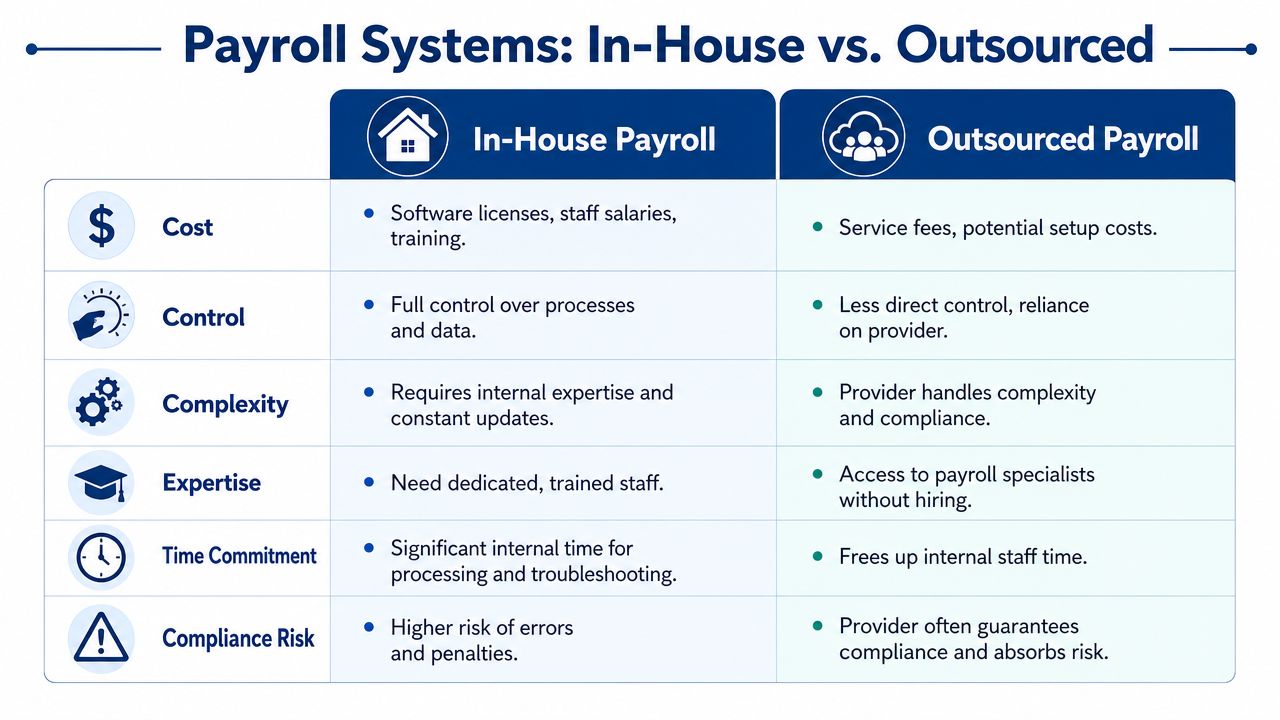
When in-house software makes sense
In-house software can work well if your payroll is fairly straightforward and you have someone who can stay on top of details. Tools like Gusto and QuickBooks Payroll are common choices for small businesses because they combine pay processing with tax features, employee self-service, and reporting.
You keep more direct control. You can review payroll each cycle, make edits quickly, and connect the process to your bookkeeping.
That said, software doesn’t replace judgment. Someone still has to notice when an employee was set up incorrectly, when a deduction wasn’t activated, or when a tax notice doesn’t match what was filed.
When outsourcing makes sense
Outsourcing often becomes attractive when payroll complexity grows faster than your internal capacity. Multi-state staff, benefits administration, frequent adjustments, and compliance questions all increase the burden.
A provider can handle processing, filings, reconciliations, and payroll-related troubleshooting. Some firms also support onboarding, chart of accounts cleanup, and the accounting side of payroll. For businesses evaluating support options, the benefits of outsourcing payroll are easiest to see when owner time is being pulled into administrative cleanup instead of operations.
Steingard Financial is one example of a firm that works with payroll platforms such as Gusto and QuickBooks Payroll while also supporting bookkeeping, reporting, and people operations. That setup can help when payroll doesn’t live in isolation from the rest of your back office.
The real question is integration
Modern payroll is moving toward connected systems rather than stand-alone processing. Paylocity’s overview of payroll processing describes payroll as software-driven, with employee data collection, time tracking, deductions, direct deposit, tax filing, and general-ledger posting handled in one workflow. That matters because payroll data should flow into your accounting records, not sit in a silo.
For example, each payroll run should connect to journal entries that reflect:
- Wage expense
- Employer tax expense
- Employee tax withholdings
- Benefit deductions
- Cash paid out
If you operate a specialized service business, niche tools can also matter. For education businesses, tutor payroll software may help connect scheduling, tutor compensation, and payroll workflows in one place.
Here’s the practical comparison:
| Factor | In-house software | Outsourced support |
|---|---|---|
| Control | Higher day-to-day control | Less direct control |
| Internal workload | More staff involvement | Less internal admin |
| Expertise needed | Higher | Shared with provider |
| Flexibility for custom review | Strong | Depends on provider process |
| Compliance monitoring | Your team owns it | Often shared or provider-led |
The wrong system isn’t the cheaper one or the more expensive one. It’s the one your team can’t maintain consistently.
Common Payroll Pitfalls and How to Avoid Them
Payroll errors aren’t rare exceptions. They’re common enough that they should be treated as an operating risk.
According to Clockify’s payroll statistics roundup, nearly 1 in 4 payroll runs contain data errors or require correction, the global mean payroll accuracy rate is 78%, and 18% of employees experienced payroll mistakes three or more times in a single year. That tells you something important. Even companies with systems still get payroll wrong when controls are weak.

The mistakes I see most often
The first is bad worker setup. A person is entered with the wrong tax settings, rate, or classification, and the error keeps repeating until someone notices.
The second is poor timekeeping discipline. Hours are approved late, overtime is missed, or PTO is entered after payroll has already processed.
The third is filing and remittance problems. The pay stub looks fine, but the business falls behind on a deposit, a report, or a reconciliation.
How to reduce payroll mistakes
You don’t need a heroic process. You need a repeatable one.
- Lock your inputs early: Set deadlines for timecards, new hire paperwork, and pay changes before processing day.
- Review exception items separately: Bonuses, off-cycle pay, garnishments, and final checks deserve their own review.
- Use checklists: A short payroll checklist catches more than memory does.
- Reconcile every cycle: Compare payroll reports to bank activity and payroll liabilities.
- Keep documentation: Save approvals, notices, and employee election records in one place.
Small payroll errors often repeat because nobody fixes the source. They just correct the symptom on the next run.
A useful habit is to ask one question every time something goes wrong: Was this a setup error, a timing error, or a review error? That answer tells you where the control broke.
When to Call a Payroll Professional for Your Business
Some owners should absolutely run payroll internally. If your team is small, your pay structure is simple, and someone on staff can manage the process carefully, a software-based approach can work.
But there’s a point where DIY payroll stops being efficient and starts creating drag. You spend more time checking edge cases, answering employee questions, and sorting out notices than running the business itself.
Signs you’ve outgrown DIY payroll
A few situations usually mean it’s time to bring in help:
- You’re hiring quickly: More employees means more onboarding data, more changes, and more room for setup errors.
- You have multi-state workers: State and local rules add complexity fast.
- You offer richer benefits: Deductions, eligibility changes, and payroll coordination get harder.
- You’ve had past payroll issues: Once errors start repeating, you need process repair, not just another correction.
- Your books don’t match payroll: If payroll liabilities and payroll reports aren’t tying into accounting cleanly, you need tighter integration.
- Owner time is getting burned up: If payroll keeps interrupting higher-value work, that’s a business problem, not just an admin task.
What a professional should help you do
A payroll professional shouldn’t just push buttons in software. They should help you create a cleaner operating system.
That usually means:
- reviewing setup and classifications
- aligning payroll with bookkeeping
- documenting deadlines and approvals
- handling filings and notices
- reducing the chance that edge cases turn into recurring problems
The best time to ask for help is before payroll becomes a source of employee frustration or agency correspondence. Once those issues show up, you’re already paying the cost of weak controls.
If your payroll has grown beyond a simple internal workflow, Steingard Financial can help you set up or manage payroll alongside bookkeeping, reporting, and people operations support, using tools such as Gusto and QuickBooks Payroll to fit your existing stack.