 Skip to content
January and February are when a lot of business owners realize ACA reporting has been building in the background all year. Payroll ran. Benefits elections were made. People moved between part-time and full-time schedules. Someone terminated, someone went on leave, someone changed coverage tiers. Then the forms come due, and suddenly a simple question turns into five harder ones. Are we an ALE? Which form applies? Are our codes right? Can payroll export what we need? Who’s responsible for filing?
That’s why ACA reporting requirements feel heavier than many tax filings. They don’t just test whether you offered coverage. They test whether your payroll, HR, and benefits records agree with each other month by month.
From a practitioner’s standpoint, the businesses that handle ACA reporting well don’t treat it as a once-a-year paperwork project. They treat it like a controlled system inside their payroll and HR stack. If you use Gusto, QuickBooks Payroll, or another platform, the software can help, but only if the underlying employee classifications, coverage records, and contribution data are clean. If the setup is sloppy, the software just produces sloppy forms faster.
Your Guide to Navigating ACA Compliance
Most employers don’t struggle with ACA reporting because the rules are impossible. They struggle because the rules are fragmented across payroll, HR, and benefits administration. One person knows hours worked. Another knows who enrolled in the plan. A third person handles year-end forms. The IRS, however, expects one coherent story.
That’s the practical lens to use for ACA reporting requirements. This isn’t only about filling out Forms 1094-C and 1095-C. It’s about building a repeatable process that starts with workforce classification, continues through monthly coverage tracking, and ends with timely filing.
A clean ACA process usually has four moving parts:
- Status determination: You need to know whether your company falls into the filing framework that applies to Applicable Large Employers.
- Data integrity: Employee names, Social Security numbers, monthly offer data, and premium details need to match across systems.
- Form logic: The forms aren’t hard because they’re long. They’re hard because each code communicates a compliance position.
- Delivery and filing workflow: Someone has to own employee statements, IRS submission, corrections, and record retention.
Practical rule: If you wait until form season to reconcile eligibility, affordability, and payroll records, you’re already behind.
Business owners usually want one thing from this process. They want it to stop being an annual fire drill. That’s realistic. The right setup turns ACA work into a checklist, not a scramble.
The sections below stay focused on what matters in practice. First, confirm whether the ACA reporting rules apply to you. Then understand the forms. Then tighten the coding and filing workflow. Finally, make your payroll and HR systems carry more of the load so your team doesn’t rebuild the same report every year.
Determining Your ACA Reporting Obligations
A common January problem looks like this. Payroll is closing the year, HR is cleaning up enrollments, and someone asks whether the company even had to file ACA forms in the first place. If that question comes up after year-end, the process is already harder than it needs to be.
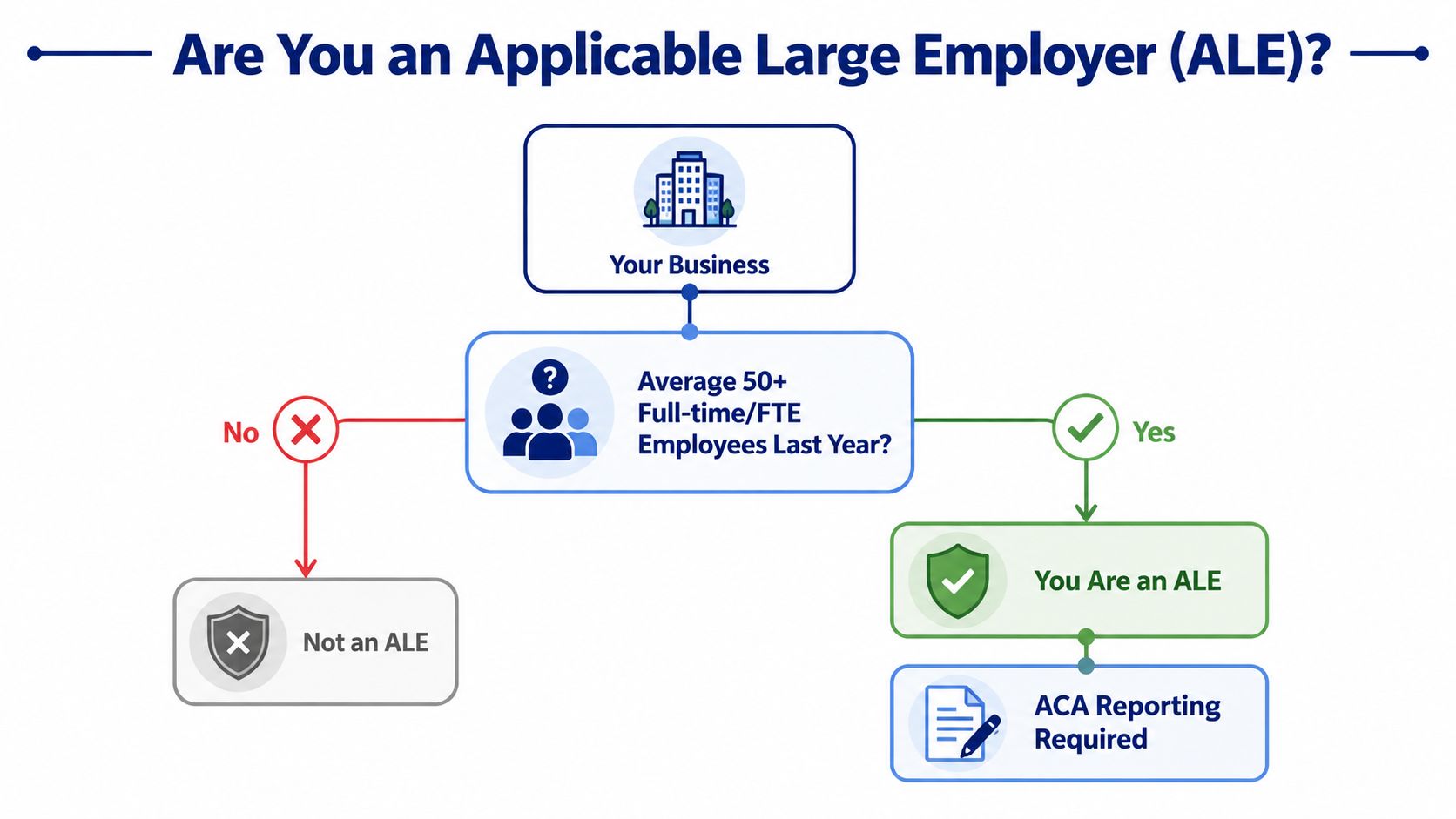
The first determination is whether the business is an Applicable Large Employer, or ALE. That decision is based on prior-year workforce data, not on who happened to enroll in the health plan and not on rough headcount from memory. In practice, this works like a gate. If your prior-year employee counts and hours put you over the ALE threshold, ACA reporting becomes a required annual workflow. If not, your filing obligations are different.
Here’s the decision visually.
Start with hours, not titles
The ACA uses its own full-time standard. For compliance purposes, an employee generally counts as full-time if they average 30 hours a week or 130 hours in a month, as outlined in the Kaiser Family Foundation explanation of employer responsibilities under the ACA.
That is why payroll records carry so much weight. A job title in QuickBooks or an eligibility label in your HR system does not settle the issue if the hour totals point somewhere else.
Owners run into trouble here with variable-hour staff, seasonal help, and related entities under common ownership. Those cases are manageable, but only if someone reviews them methodically. I usually tell clients to treat ACA status like a year-end close item. Pull the data, test it, document it, and store the conclusion where payroll and HR can both reach it next year.
A practical review process
Use a process your team can repeat inside the systems you already use:
- Pull prior-year payroll hours by employee and by month. This is the raw input for the ALE analysis.
- Identify employees who consistently worked at full-time levels. Stable groups are usually easy.
- Review variable-hour and seasonal populations separately. Errors often begin here.
- Check related entities and ownership structure. Controlled-group rules can change the answer.
- Write down the conclusion and who approved it. Good documentation matters if the IRS asks later why you filed or did not file.
This is part of broader payroll compliance responsibilities, not a stand-alone tax exercise. The cleaner your payroll and HR data flow between systems like Gusto and QuickBooks, the less cleanup you face during form season.
Many business owners also need a practical employee-facing process, especially when former workers ask for tax documents. If your team gets questions about missing statements, this guide on how to find a 1095 for taxes can help support staff respond consistently.
Later in the process, many owners also benefit from a plain-English walkthrough like this video before they assign tasks internally.
What works in practice
What works is a documented look-back using actual payroll hours, a defined owner for the review, and a simple handoff into your reporting workflow. What fails is guessing based on current headcount, treating benefit enrollment as proof of status, or keeping the whole analysis in one spreadsheet that only one person understands.
If your ACA determination lives in one employee’s memory, you do not have a compliance process. You have a continuity risk.
The business reason is straightforward. A sound ALE determination helps avoid penalties, reduces correction work, and turns ACA reporting into a repeatable system instead of an annual scramble.
Understanding Forms 1095-C and 1094-C
A common January problem looks like this: payroll has one set of employee dates, benefits has another, and someone realizes the ACA forms are due soon. At that point, the question is not just which form to file. The key question is whether the systems feeding those forms agree with each other.
That is why Forms 1095-C and 1094-C need to be understood as part of a reporting process, not just as year-end paperwork. One form reports employee-level facts. The other tells the IRS, at the employer level, how that full filing set fits together.
Cover sheet and detail pages
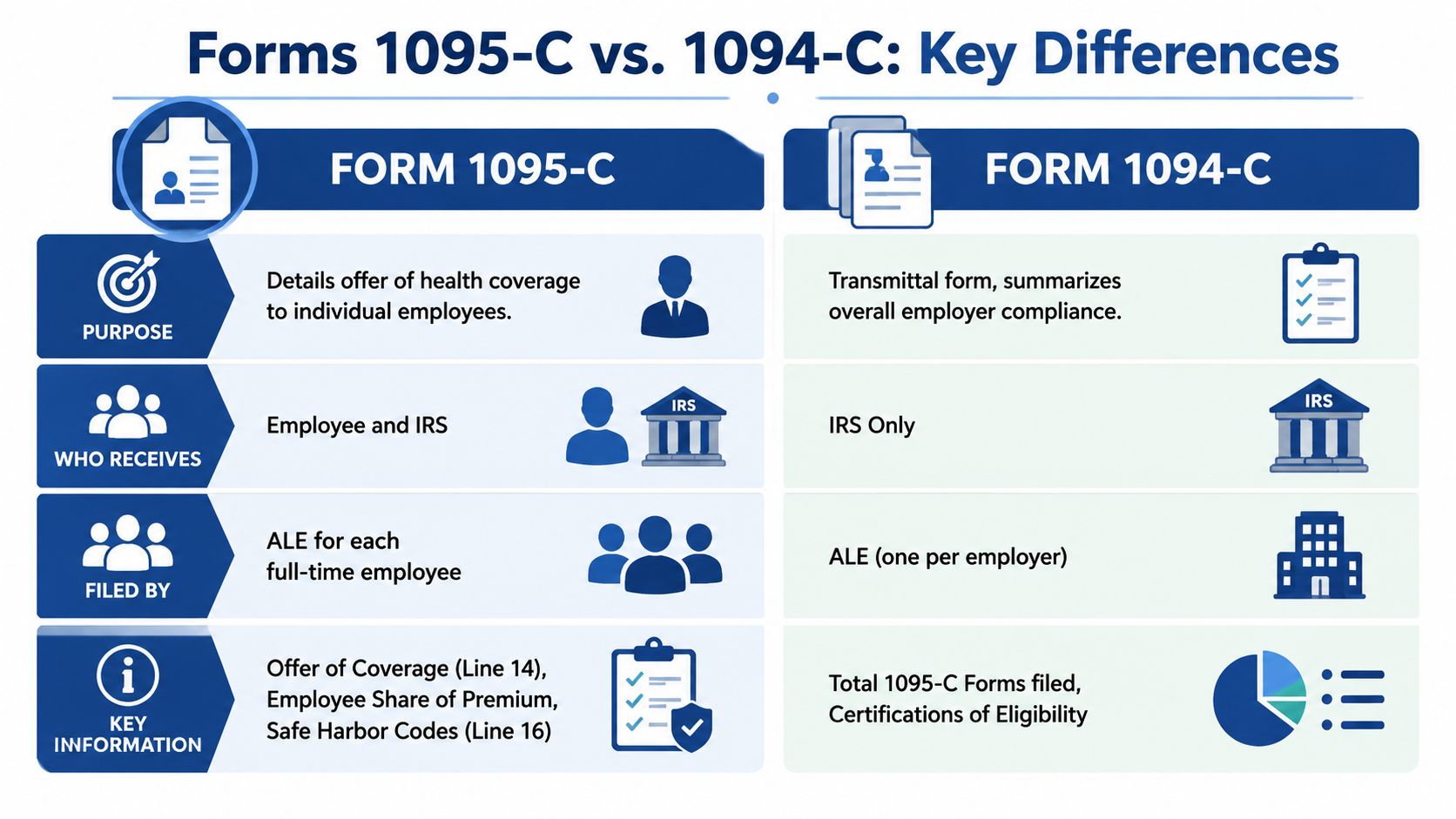
Form 1094-C works like the cover sheet for the employer’s ACA filing. It summarizes the filing and gives the IRS the employer-level context behind the batch of employee statements.
Form 1095-C is the detail page for each employee who must receive a statement. It reports the month-by-month offer information tied to that individual.
That distinction matters during corrections. If the filing package has an employer-level issue, the problem sits with the 1094-C. If one employee’s months, offer, or cost data are wrong, the correction usually belongs on the 1095-C.
What each form does
| Form | Main role | Who uses it |
|---|---|---|
| 1095-C | Employee-by-employee monthly offer reporting | Employee and IRS |
| 1094-C | Employer summary and transmittal of 1095-C filings | IRS |
The form names are straightforward. The harder part is controlling the inputs.
In practice, a reliable 1095-C usually depends on several systems lining up:
- Payroll records for legal name, address, and employment dates
- Benefits enrollment records for offer and coverage elections
- Employee contribution data for the lowest-cost self-only option
- HR status records for hires, terminations, waiting periods, unpaid leave, and status changes
I tell clients to treat ACA forms the way they treat a bank reconciliation. If payroll says one thing and benefits says another, the form is only as good as the mismatch you failed to catch.
Where employers get tripped up
The better question is not, “Who can fill out the form?” It is, “Who owns each field on the form, and when is that data reviewed?”
That shift helps turn ACA reporting into a repeatable system inside your payroll and HR stack. If you use tools like Gusto and QuickBooks, assign ownership early. Payroll should not guess at benefits eligibility, and benefits should not guess at compensation-based affordability fields. Each team should confirm the data it controls before forms are generated.
Employee requests create a second pressure point. Former workers often ask for copies during tax season, and your staff needs a standard response. If someone needs help locating a statement, this guide on how to find a 1095 for taxes can answer the common retrieval questions without turning a simple request into a long internal chase.
For the employer side, ACA form prep should sit inside a broader employee benefits compliance checklist so reporting does not get separated from eligibility tracking, onboarding, and termination procedures.
Key distinction: Form 1094-C summarizes the employer’s filing position. Form 1095-C records the monthly facts for individual employees.
Businesses usually run into trouble when they generate forms straight from payroll and never reconcile them against benefits records. The output may look finished. Finished is not the same as accurate, and accuracy is what keeps penalty exposure and correction work under control.
Mastering Codes and Measurement Methods
A common January problem looks like this: payroll exports the 1095-C file, HR spots a few odd codes on Lines 14 and 16, and nobody can tell whether the issue is the offer, the employee status, or the affordability test. By that point, the form is already built. Fixing it is slower and more expensive than setting up the logic earlier in the year.

Lines 14 and 16 are the IRS’s shorthand for your compliance position. Line 14 reports what coverage, if any, was offered for the month. Line 16 reports why a penalty should not apply for that same month, such as a safe harbor, a limited non-assessment period, or another permitted relief. If those two lines do not match the payroll and benefits record, the form tells the IRS the wrong story.
The monthly structure is what trips employers up. ACA reporting is not an annual summary in the way a W-2 is. It works more like a month-by-month attendance sheet. A midyear hire, waiting period, leave, change from part-time to full-time, or termination can change the code sequence even if the employee only remembers one enrollment decision.
Minimum value and affordability matter here because the codes are how you document both. The plan generally must meet minimum value standards, and the affordability position on Line 16 needs support from payroll data or a retained worksheet. Entering a safe harbor code without backup is like claiming a deduction with no file behind it. It may pass unnoticed, or it may become a notice you now have to defend.
I tell clients to review coding failures in four buckets:
- Offer code does not match the actual offer. Benefits records show an offer was made, but the form code suggests otherwise.
- Enrollment is confused with offer. An employee waived coverage, yet the coding implies the employer failed to offer it.
- Affordability safe harbor is selected without support. Payroll has no rate-of-pay, W-2, or federal poverty line calculation saved for the month or plan year.
- Status changes break the monthly pattern. Hire dates, waiting periods, rehires, and terminations are not flowing correctly from HR to payroll.
That is why I prefer a system view over a forms view. In Gusto, QuickBooks, or any payroll platform, the goal is not just to generate codes. The goal is to feed the platform clean status dates, eligibility dates, premium amounts, and affordability inputs so the code output is predictable and reviewable.
Monthly measurement versus look-back measurement
The next decision is how you determine full-time status for employees with uneven hours. Employers usually choose between the monthly measurement method and the look-back measurement method described in the IRS guidance for applicable large employers in the IRS Questions and Answers on Employer Shared Responsibility Provisions.
The monthly measurement method looks at each calendar month on its own. It is easier to explain and often fits employers with steady schedules. The trade-off is volatility. If hours swing, eligibility can swing with them, and your coding process has to keep up.
The look-back measurement method uses a defined measurement period to test hours, followed by a stability period. It works better for variable-hour, seasonal, and staffing-heavy environments because it gives the employer a clearer framework for determining full-time status over time. The trade-off is administration. You need disciplined tracking, documented period settings, and consistent handoffs between HR, benefits, and payroll.
Here is the practical comparison:
| Method | Best fit | Main trade-off |
|---|---|---|
| Monthly measurement | Stable schedules | Easier to administer, but employee status can change quickly |
| Look-back measurement | Variable-hour workforces | More control over fluctuating hours, but more setup and tracking |
Neither method is automatically better. The right choice is the one your team can apply consistently. A technically correct method that no one maintains inside your payroll and HR stack creates the same downstream problem as picking the wrong method.
Filing method affects your process design
Coding is only part of the job. Submission method now shapes the workflow too. The IRS reduced the electronic filing threshold for many information returns to a much lower aggregate level, so many employers that once paper-filed now need an electronic process. The rule is set out in the IRS final regulations on e-filing requirements for information returns.
For business owners, the takeaway is simple. ACA reporting should run like a controlled year-round process, not a year-end scramble. Clean digital records, tested exports, and documented code logic do more than save staff time. They reduce the odds of corrections, notices, and the cost of preventing IRS tax penalties.
A workable routine is straightforward. Review eligibility and status changes each month. Confirm employee premium amounts after renewals and midyear changes. Save affordability support in the same place each time. Then test a sample of code results before forms are produced at year-end. That turns ACA reporting from a once-a-year fire drill into a repeatable compliance system.
The High Cost of Non-Compliance Penalties
ACA reporting is one of those areas where “we’ll fix it later” can become an expensive sentence. The penalties don’t wait for your internal cleanup project. They’re structured to increase as delays continue, and they’re assessed per return.
According to Paycom’s ACA reporting requirements overview, the penalty tiers for the filing cycle are:
| Filing Delay | Penalty Per Return | Annual Maximum (Large Business) |
|---|---|---|
| Late by 30 days or less | $60 | $683,000 |
| 31 days through August 1 | $130 | $2,049,000 |
| Late after August 1 or not filed at all | $330 | $4,098,500 |
Those numbers are why I advise clients to think about ACA reporting as a risk-control process, not just a compliance chore. If an employer has a broad filing population, “per return” adds up fast. The cost of review, reconciliation, and correction before submission is usually far lower than the cost of a preventable notice cycle.
Why penalty exposure grows so quickly
Three things usually drive the problem:
Bad underlying data
Wrong hire dates, wrong status changes, or missing premium values produce flawed forms at scale.Late escalation internally
HR assumes payroll owns the filing. Payroll assumes benefits owns the coding. Nobody finds the gap until a deadline is close.Weak correction process
An employer knows forms are wrong but doesn’t move quickly enough to limit exposure under the lower penalty tier.
Business takeaway: Penalties make the strongest argument for doing ACA work early, not cheaply.
If you’re building a broader compliance mindset around year-end tax and payroll obligations, a practical outside resource on preventing IRS tax penalties can help frame how documentation and response discipline reduce downstream problems.
Where owners should invest time
Not every dollar of compliance effort has the same value. The highest-return work is usually:
- Pre-submission validation of employee census, status dates, and premium records
- Manager assignment so one person owns the filing calendar
- Correction readiness in case a mismatch or employee dispute surfaces after forms go out
A lot of employers focus on the final transmission step because that feels official. In reality, the expensive mistakes happen earlier. If the data is wrong before the forms are created, filing on time only locks in the error faster.
Navigating State Mandates and E-Filing
Federal ACA reporting gets most of the attention, but employers often miss the second layer. State rules may create additional reporting expectations, especially when employees live or work in jurisdictions with their own health coverage mandates.
For service businesses with remote staff, that changes the compliance question. It’s not just “What does the IRS require?” It’s also “Do any of the states where we employ people expect separate reporting or separate coordination?”
Why multistate employers feel this more
A single-location business with one payroll tax footprint usually has fewer moving parts. A distributed team creates more chances for mismatch. Benefits may be administered centrally, while state obligations attach based on employee residency or work location.
That’s why a federal-only mindset can be risky. Your payroll platform may help produce federal reporting data, but state filing support varies widely. Some systems handle part of the workflow. Others require exports, vendor add-ons, or separate filing steps.
The filing method has changed the workflow
The federal side has also become more operationally demanding because mandatory e-filing now applies much more broadly. Paper filing is no longer the default fallback for many employers. That means your internal process needs to support digital submission, consistent file preparation, and pre-filing review.
In practical terms, a compliant process now usually requires:
- A payroll or ACA reporting platform that can generate the necessary files
- A benefits dataset that ties each offer and enrollment record to the right employee and month
- A cross-check routine before submission so the e-file isn’t just technically complete but substantively right
State mandates and federal ACA filings often fail for the same reason. The employer has the data somewhere, but not in one coordinated workflow.
This is why ACA reporting requirements increasingly behave like an HR operations issue. Tax knowledge matters, but so do onboarding practices, address accuracy, eligibility tracking, and system ownership. If those aren’t aligned, the filing channel becomes the messenger for bigger back-office problems.
Your ACA Compliance Checklist and System Integration
A common ACA failure starts the same way. In January, payroll has one employee count, HR has another, and the benefits file tells a third story. Then someone pulls a 1095-C draft and realizes the problem is not the form. The problem is that the systems were never aligned to produce the right monthly record in the first place.
The employers who handle ACA reporting well usually are not doing anything flashy. They run the same control process each year, assign clear ownership, and set up payroll and HR systems so the filing is the output of good operations instead of a year-end rescue project.
A practical checklist that works
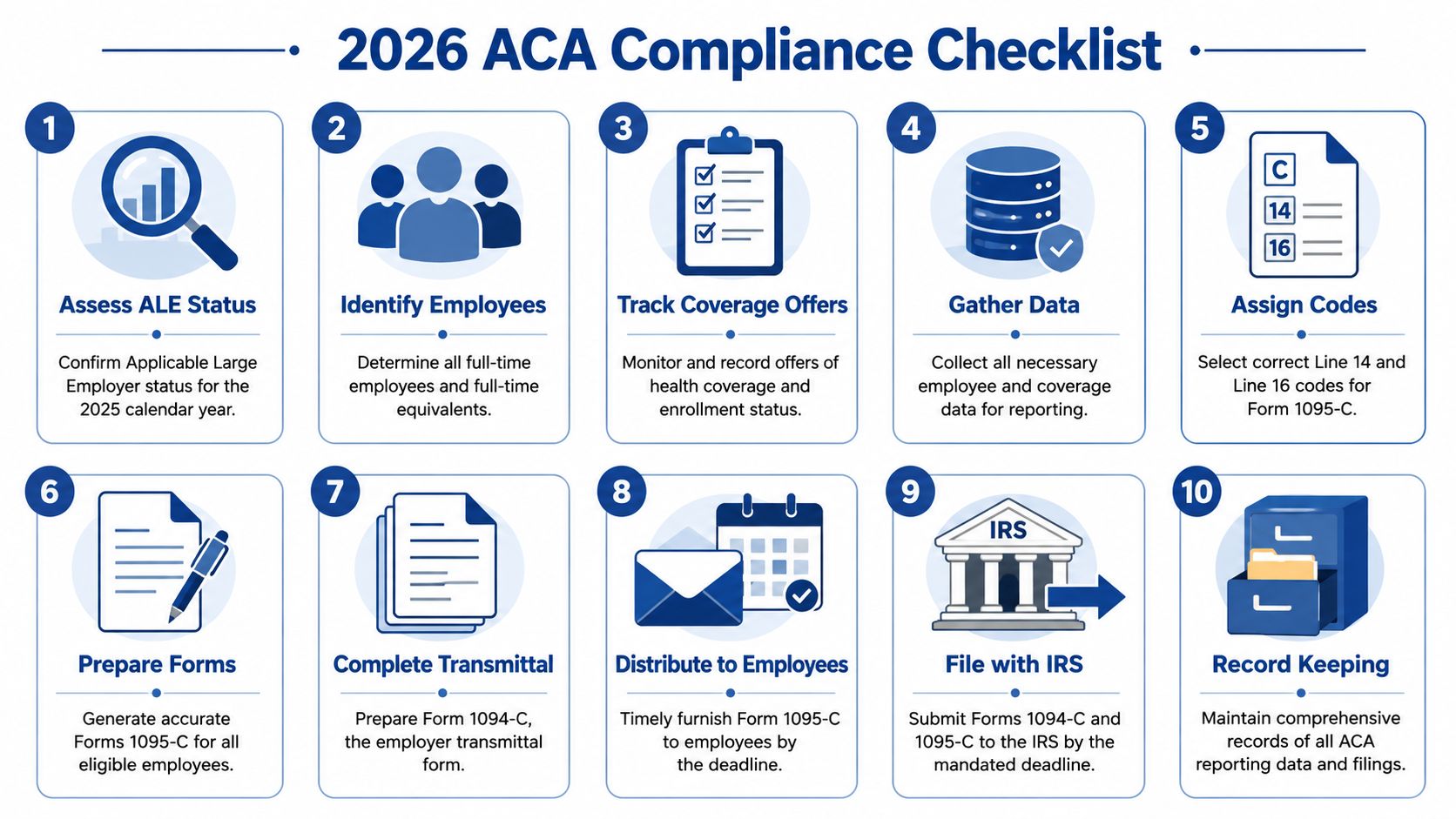
Use this as an operating checklist. If these steps happen during the year, filing season gets much easier.
Confirm ALE status early
Use prior-year workforce data and document the conclusion. Do not carry last year’s answer forward without checking it.Lock down employee classification data
Review full-time, part-time, variable-hour, seasonal, and terminated employee records in payroll and HR. ACA mistakes often begin with how the employee was classified, not how the form was coded.Reconcile benefit eligibility with payroll
Compare who was eligible for coverage, who received an offer, and what payroll shows for deductions. If those records do not match, stop there and fix the mismatch before any forms are generated.Track monthly changes, not annual summaries
ACA reporting works like a calendar ledger. Midyear hires, unpaid leaves, terminations, waiting periods, and employee contribution changes need to be captured in the month they happened.Validate employee identity fields
Clean up names, Social Security numbers, dates of birth, and addresses before form production starts. Bad identity data creates avoidable corrections and can slow down statement delivery.Retain support for affordability positions
If you are using an affordability safe harbor, keep the workpapers that support it. An affordability code without backup is like a tax deduction without documentation. It may look fine until someone asks for proof.Set the statement delivery method in advance
Employers also need a clear furnishing process. Recent ACA relief allows some Forms 1095-B and 1095-C to be provided upon request instead of mailed automatically if the employer posts the required website notice and follows the response rules, as outlined in Alliant’s ACA reporting relief FAQ.Build the filing calendar into your workflow
Set internal deadlines for data review, coding review, statement furnishing, and e-filing submission. The legal deadline matters, but the key control point is the date your team must finish reconciliations so errors are found before the file goes out.
Where Gusto and QuickBooks help, and where they don’t
Platforms like Gusto and QuickBooks Payroll can reduce manual work if they are set up correctly. They are useful for employee identity data, payroll history, and deduction records. They do not solve ACA logic on their own.
In practice, payroll software is the engine, not the steering wheel. It can process what you feed it. It cannot correct a waiting period that was applied inconsistently, an eligibility rule that changed midyear, or an HR process that failed to update a status change on time.
What works well:
- Use payroll as the primary record for identity data and employment status where possible
- Assign ownership by task between payroll, HR, and benefits administration
- Run periodic audits during the year instead of relying on one year-end export
- Map ACA data fields in advance so each line on the form ties back to a known system source
- Document exception handling for rehires, leaves of absence, and variable-hour employees
What usually fails:
- Separate employee rosters maintained by different departments
- Treating benefit enrollment as proof that a compliant offer was made
- Assuming an old software setup is still correct after workforce or plan changes
- Waiting until filing season to test ACA reports
Build a repeatable system
A good ACA workflow should be boring. The same reports are pulled on a schedule. The same reconciliation steps happen. The same review questions get answered before filing.
That systems approach matters because ACA reporting is really a recordkeeping discipline. Business owners do not need another list of IRS rules sitting in a PDF folder. They need a process inside their existing payroll and HR stack that catches errors while there is still time to fix them.
If you are evaluating tools, this employee benefits management software guide can help you assess what your platform should support beyond enrollment. Steingard Financial also manages payroll and benefits administration inside platforms such as Gusto and QuickBooks and helps clean up the data and process issues that often surface during ACA reporting.
Clean ACA reporting usually comes from clean payroll and HR operations. The forms reflect the system behind them.
The goal is straightforward. Your records, your software, and your filing process should tell the same story every month, not just at year-end.
If ACA reporting requirements are turning into a manual cleanup project every year, Steingard Financial can help you build a cleaner process inside your existing payroll and HR stack. That includes tightening employee data, aligning payroll with benefits records, and creating a repeatable reporting workflow that supports accurate filing rather than last-minute correction.