 Skip to content
Most service business owners don’t wake up thinking, “I need help with calendar blocks, invoice follow-up, payroll onboarding, and file naming conventions.” They wake up thinking about clients, cash flow, delivery deadlines, and hiring. Then the day starts, and the small tasks begin stacking up.
A customer needs a revised invoice. A new hire still doesn’t have payroll access. A vendor bill is sitting in someone’s inbox. Your calendar has two meetings booked at the same time. QuickBooks needs cleanup before month-end. None of these items looks strategic on its own. Together, they eat your week.
That’s why the administrative assistant role needs a reset. In many service businesses, this isn’t a clerical seat. It’s the position that keeps information moving, deadlines visible, and systems usable.
Your Business Needs More Than Just an Extra Pair of Hands
Many owners hire too late, and then hire for the wrong problem. They think they need someone to answer emails and schedule meetings. What they usually need is someone who can hold the operational center of gravity while leadership focuses on growth.
The old picture of an admin as “the person who handles paperwork” doesn’t match how service businesses run now. If your company uses QuickBooks, Gusto, a CRM, shared drives, and messaging tools, your admin isn’t just touching documents. That person is helping those systems work together in real life.
The outdated view costs you time
Generic descriptions of the role often stop at filing, phone coverage, and calendar support. That misses a major shift. One gap in common guidance is how admins now work inside financial and HR systems such as QuickBooks and Gusto for transaction categorization, AP and AR support, and payroll onboarding. The same source notes that 68% of small businesses reported using integrated HR and payroll software in 2025 surveys, up from 52% in 2023, while only 23% of admins were certified in QuickBooks Online, and tech-savvy admins were associated with 15% faster month-end closes according to this discussion of why administrative assistants matter.
That matters because the bottleneck in a service business usually isn’t effort. It’s coordination. Work gets delayed when nobody owns the handoff between tools, people, and deadlines.
Practical rule: If the owner is still the person connecting payroll, invoicing, scheduling, and onboarding, the business has an operating gap, not just a staffing gap.
What owners actually need
A strong admin creates order where most growing firms feel friction. That includes things like:
- System follow-through: making sure information entered in one tool gets reflected in the next one
- Deadline visibility: keeping payroll dates, billing cycles, and meetings from colliding
- Process consistency: using the same intake steps, file rules, and checklists every time
- Leadership protection: filtering noise so owners can spend more time on revenue and decisions
If you’re trying to figure out what support structure the business really needs before hiring, a practical starting point is a staffing plan template for growing teams. It helps separate work that should stay with leadership from work that belongs in an operations support seat.
An extra pair of hands helps for a week. An operational hub helps every week after that.
Defining the Modern Administrative Assistant Role
The easiest way to understand the modern administrative assistant role is to stop thinking in terms of errands and start thinking in terms of traffic control. In a busy service business, requests are always arriving from different directions. Clients need responses. Team members need documents. Payroll needs approvals. Leaders need time to think. The admin decides what lands where, when, and in what order.
That’s why I often describe the role as the air traffic controller for the back office. Planes still need pilots. The business owner still leads. The bookkeeper still closes the books. HR still owns policy. But someone has to keep the runways clear and prevent collisions.

A real profession, not a filler role
This isn’t a marginal part of the workforce. In 2026, there are over 2,025,512 administrative assistants employed in the United States, and the role has made up about 2% of the total U.S. labor force in earlier Census data. The same demographic profile shows an average age of 50, with 78% aged 40 and older, which points to an experienced talent pool that often handles onboarding, benefits support, and staffing coordination with maturity and judgment, according to Zippia’s demographic profile of administrative assistants.
That experience matters in service businesses because owners rarely need someone who only follows instructions. They need someone who notices what’s missing.
What the role is really for
A modern admin protects business momentum. The work may look varied on the surface, but the function is consistent.
Think about these three outcomes:
| Business need | What the admin does | Why it matters |
|---|---|---|
| Fewer dropped balls | tracks requests, deadlines, and follow-up | clients and vendors get timely responses |
| Cleaner operations | standardizes files, forms, and handoffs | the team spends less time hunting for information |
| Better leader focus | absorbs recurring coordination work | owners spend more time on sales, service, and decisions |
An administrative assistant isn’t there to stay busy. The role exists to keep the rest of the company productive.
A weak version of the role waits for tasks. A strong version manages flow. That’s the distinction many owners miss.
In a service business, the center matters
When your company sells expertise, every delay in the back office leaks into client experience. A missed invoice follow-up affects cash collection. A late onboarding task slows a new employee’s first week. A calendar conflict disrupts decision-making. The admin sits in the middle of those moving parts and makes sure they connect cleanly.
That’s the modern definition: not clerical support, but coordinated execution across systems, people, and priorities.
Core Responsibilities and Daily Tasks
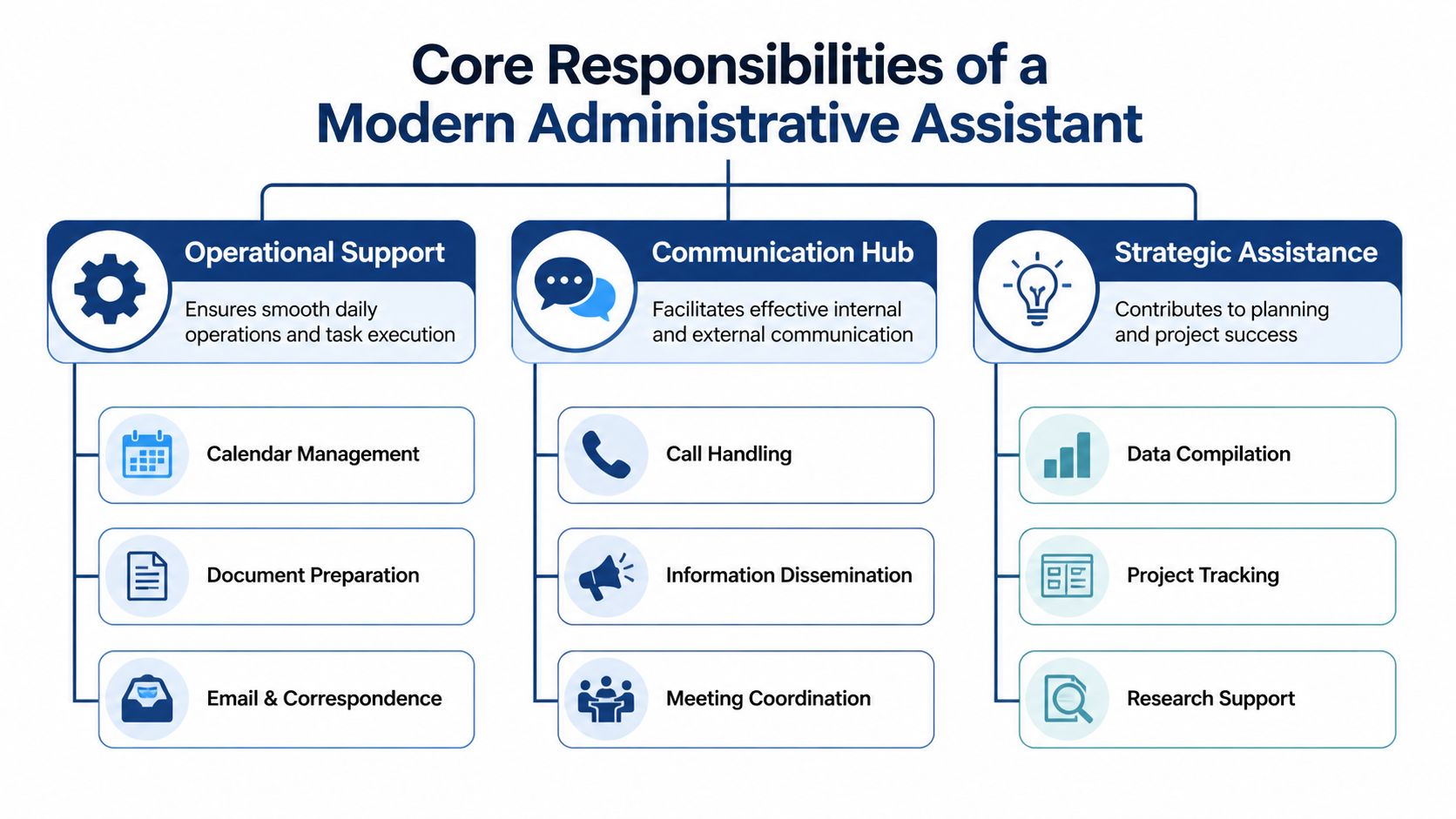
Once you define the administrative assistant role as an operational hub, the daily work becomes much easier to scope. In a service business, the job usually sits across three lanes. Financial administration. People operations. Executive and office support.
Those lanes overlap. That’s normal. A new hire setup might touch Gusto, your shared drive, a manager’s calendar, and a welcome checklist on the same day.
Financial administration
For many service firms, the role often proves far more valuable than owners expect. The admin may not own accounting, but they often support the work that keeps accounting timely and accurate.
Common responsibilities include:
- Invoice coordination: preparing draft invoices, confirming billing details, and sending reminders on overdue balances
- AP support: collecting bills, checking approvals, and making sure payables are entered on time
- Expense organization: gathering receipts, coding backup materials, and keeping documentation attached
- QuickBooks support: helping with transaction categorization, vendor records, and report prep
- Month-end readiness: making sure statements, attachments, and files are in the right place before close
In plain language, this person reduces cleanup. They help your financial team work from organized inputs instead of scattered fragments.
People operations support
This area often gets ignored when owners write job descriptions, even though it’s one of the highest-friction parts of a growing business. A good admin helps move people-related tasks through the system without creating confusion or compliance risk.
Daily or weekly examples might include:
- New hire onboarding: collecting forms, coordinating start dates, and initiating setup in Gusto
- Employee record upkeep: maintaining folders, updating contact details, and tracking missing documents
- Time-off coordination: routing PTO requests and keeping managers informed
- Benefits support: helping employees know where to submit questions and what deadlines matter
- Communication follow-up: making sure policy updates and reminders reach the right people
The point isn’t that the admin becomes your HR department. The point is that someone owns the process so managers don’t each invent their own version.
Executive and office support
This is the visible part of the role, and it still matters. Calendar management, meeting prep, email triage, and document organization are not “small” when they affect leadership focus.
According to Berry Virtual’s discussion of top admin skills, advanced administrative assistants in financial services often integrate workflow automation, calendar management, and cross-departmental coordination. That same discussion describes the role as an operational hub that manages filing systems, schedules meetings, coordinates with outside stakeholders, and prepares reports and presentations. It also notes that admins with supervisory experience and at least three years in related financial fields tend to be more operationally effective.
A typical week might include:
- Calendar control: resolving overlaps, adding buffers, and confirming attendees
- Meeting logistics: building agendas, gathering files, and sending reminders
- Inbox filtering: identifying what needs a reply, what needs delegation, and what can wait
- Client communication: sending confirmations, collecting requested materials, and tracking next steps
- Document management: organizing contracts, templates, and shared folders so people can find what they need
The best admin work is often invisible. You notice it when meetings start on time, payroll inputs arrive before the deadline, and nobody has to ask where the latest version lives.
Why these tasks belong together
Owners sometimes try to split these duties among several people. That can work in a larger company. In a smaller service business, it often creates gaps because no one sees the full chain.
A single well-scoped admin role helps because one person can connect the handoffs:
- A new employee is hired.
- Payroll onboarding starts.
- Calendar time is booked for training.
- Access requests are tracked.
- The employee record is stored correctly.
- The manager gets a clean status update.
That’s what “operational hub” means in practice. It’s not glamorous. It’s valuable.
Essential Skills and Competencies to Hire For
A lot of hiring mistakes happen because owners focus on personality first and operating ability second. Being friendly helps. Being organized helps more. In a financial and people-operations environment, the right hire needs both technical competence and judgment.
The easiest way to assess the administrative assistant role is to separate hard skills from core competencies. One is about tool use. The other is about how the person behaves when details, deadlines, and interruptions collide.
Hard skills that matter in real work
The technical side of the role should match your actual stack. If you use QuickBooks Online, Gusto, Outlook, Google Workspace, Slack, and a CRM, your hire should be comfortable learning and working inside those systems.
Look for evidence of these skills:
- Financial system fluency: confidence navigating QuickBooks Online, attaching backup, and keeping records organized
- Payroll and HR platform use: basic comfort with Gusto workflows such as onboarding steps and employee data review
- Spreadsheet competence: ability to track lists, reconcile simple discrepancies, and maintain clean logs in Excel or Google Sheets
- Document discipline: skill with shared drives, naming conventions, templates, and version control
- Reporting support: pulling clean information for leadership without scrambling through inboxes
According to Zippia’s overview of technical administrative assistant work, administrative assistants in financial and accounting settings must demonstrate advanced database management and data entry accuracy, and record-keeping needs to be error-free. The same profile notes that assistants handling AP, AR, and month-end reporting must maintain 99%+ accuracy rates in transaction entry because small discrepancies can create larger reconciliation and audit issues.
That single benchmark tells you a lot. Attention to detail isn’t a personality preference here. It’s an operating requirement.
Competencies you can’t afford to ignore
Soft skills are often described too vaguely, so let’s make them concrete.
A strong candidate should show:
- Discretion: they’ll handle payroll data, compensation details, and employee records without casual sharing
- Proactivity: they notice a missing form, an incomplete invoice, or a scheduling conflict before someone asks
- Task triage: they know how to sort urgent, important, and deferrable work
- Follow-through: they close loops instead of assuming someone else did
- Resourcefulness: they can solve a routine problem without escalating everything upward
When you review resumes or interview answers, look for examples that showcase problem-solving abilities in concrete situations. The best candidates don’t just say they’re organized. They describe how they resolved a broken process, prevented an error, or kept multiple stakeholders aligned.
Hire for calm accuracy. In a service business, the person who stays composed while handling sensitive details is often worth more than the person with the flashiest resume.
A simple hiring lens
If you’re unsure how to weigh skills, use this quick test:
| If the job requires this | You should look for this evidence |
|---|---|
| QuickBooks support | examples of maintaining clean financial records |
| Gusto onboarding tasks | comfort handling sensitive employee information |
| calendar and inbox control | examples of prioritizing competing requests |
| document-heavy workflows | habits around naming, filing, and version control |
A candidate doesn’t need to know everything on day one. But they do need the habits that keep your books clean, your people data secure, and your leadership team unburdened.
How to Hire Your First Administrative Assistant
Your first hire in this role should solve a real operational problem, not just make the org chart look more complete. Before you post anything, list the work that repeats every week and keeps falling back to you. That list is your job description.
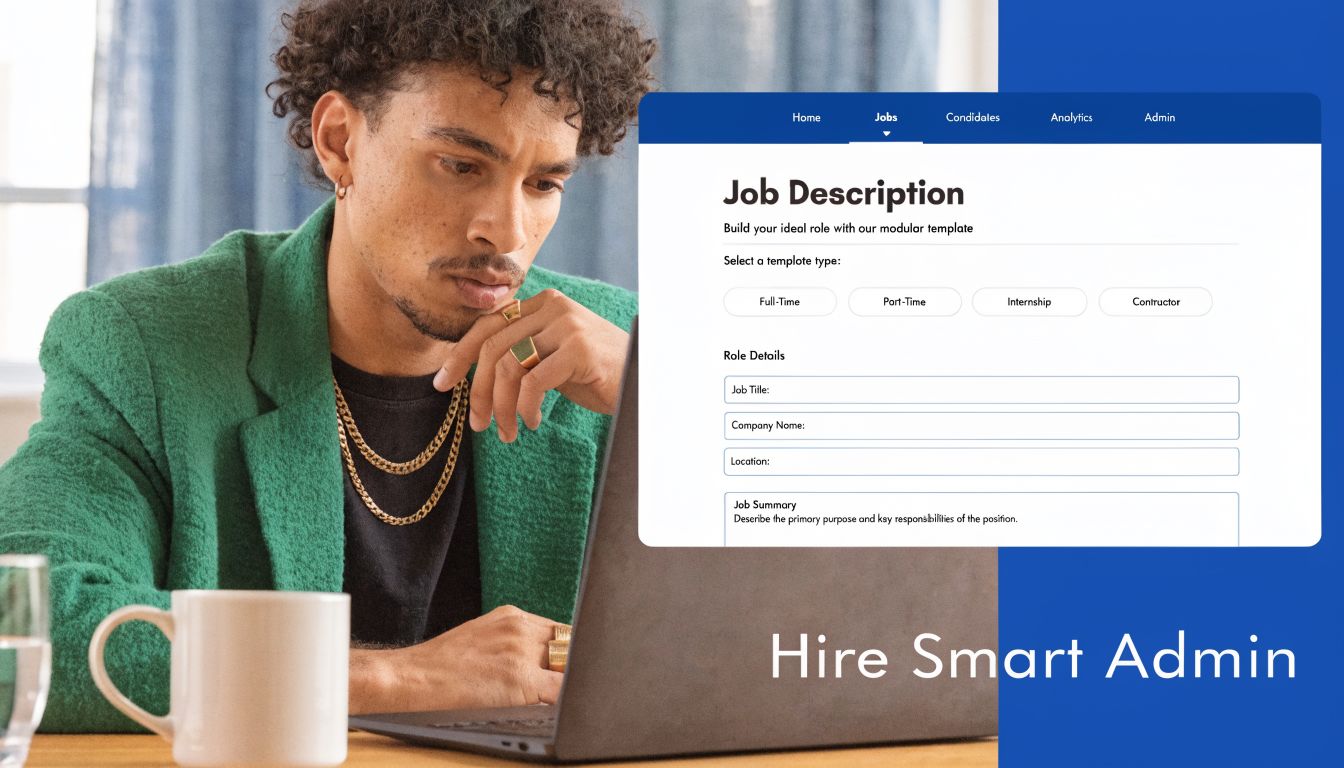
Start with a modular job description
Don’t write a vague ad that asks for a “rockstar” who can “wear many hats.” Strong candidates usually skip postings like that because they signal chaos.
Use a structure like this instead:
Role summary
Describe the role as the coordinator of daily operations across scheduling, documents, financial support, and people processes.
Core responsibilities
Include duties such as:
- Financial coordination: invoice follow-up, bill collection, expense documentation, and QuickBooks support
- People operations: new hire paperwork, Gusto onboarding steps, PTO tracking, and employee record maintenance
- Executive support: calendar management, meeting prep, inbox triage, and stakeholder communication
- Process maintenance: file organization, checklist use, recurring task tracking, and status updates
Required skills
Name the essential tools and behaviors you need:
- Software comfort: QuickBooks Online, Gusto, Google Workspace or Microsoft 365, and spreadsheet use
- Accuracy: ability to work carefully with financial and employee data
- Communication: professional writing and follow-up with clients, vendors, and staff
- Judgment: ability to prioritize requests and escalate appropriately
Success profile
Explain what good performance looks like after the first few months. For example, leadership calendars stay organized, onboarding tasks move without reminders, financial support items are complete before deadlines, and shared files are easy to locate.
A lot of the same planning principles also apply if you’re considering remote support. If that’s part of your search, Fluidwave’s VA hiring strategies offer useful guidance on defining tasks, communication rhythms, and fit before you hire.
Interview for behavior, not buzzwords
Many candidates know how to say they’re detail-oriented. Fewer can prove it. The interview should pressure-test how they think when priorities compete.
Ask questions like these:
- Tell me about a time you received conflicting requests from two managers. How did you decide what came first?
- Walk me through how you’d collect and verify information for a new employee before entering it into Gusto.
- Describe a situation where you caught an error in a financial or administrative record before it caused a larger problem.
- How do you keep recurring tasks from slipping when your day gets interrupted?
- What system do you use for managing documents so the team can find the latest version quickly?
- If an invoice was missing key information and the owner was unavailable, what would you do next?
Listen for process, not performance. Strong candidates explain steps. Weak candidates stay abstract.
Ask for one example of a mistake they made and how they corrected it. The answer tells you more about maturity than a polished story about strengths.
A short visual primer can help you frame the hiring process before interviews begin.
Choose a test that reflects the job
Skip trivia tests. Use a practical exercise instead. Give the candidate a small packet with a mock calendar conflict, a missing onboarding document, an invoice that needs follow-up, and a file organization problem. Ask them what they’d handle first, what they’d clarify, and how they’d document progress.
That mirrors the job better than asking whether they’re “good under pressure.” If they can create order from mixed inputs, they’re probably viable.
Onboarding and Measuring Success
Hiring the right person won’t help much if you drop them into a messy environment with no process map. Many owners assume a capable admin will “figure it out.” They might, but you’ll waste time and create avoidable errors.
The first months should give them clear access, clear ownership, and clear definitions of done.
A 30 60 90 day onboarding rhythm
The first month should focus on orientation and system familiarity. Give access only to the tools they need, explain what each system is for, and show how work moves from one place to another. If your business uses QuickBooks, Gusto, a CRM, shared drives, and messaging tools, explain who owns each one and where the admin fits.
Use your internal processes, but align them with proven employee onboarding best practices for growing teams so the role starts with structure instead of guesswork.
A practical rhythm looks like this:
Days 1 to 30
- System access: email, calendar, file storage, QuickBooks access level, Gusto permissions, CRM
- Process shadowing: billing flow, onboarding flow, document storage, meeting cadence
- Key introductions: owner, finance lead, payroll contact, department managers
- Early wins: calendar cleanup, file organization, checklist management, meeting coordination
Days 31 to 60
- Independent ownership: recurring scheduling, follow-up on documents, invoice support, onboarding checklists
- Process documentation: update SOPs based on what they’re seeing
- Error review: identify friction points and create prevention steps
- Weekly check-ins: discuss priorities, questions, and blocked work
Days 61 to 90
- Expanded scope: more autonomy with financial admin and people ops support
- Reporting rhythm: regular status updates to leadership
- Improvement work: suggest one or two process fixes that reduce handoff friction
- Performance review: compare output against role expectations
Measure output, not vague helpfulness
The biggest management mistake with this role is giving only subjective feedback. “You’re doing great” or “be more proactive” doesn’t tell the person what to repeat or improve.
Track a few concrete indicators instead.
| KPI Category | Metric | Example Target |
|---|---|---|
| Scheduling | Calendar conflict rate | Near-zero preventable conflicts |
| Financial support | Invoice processing timeliness | Completed within the company’s defined billing window |
| Data quality | Accuracy of entered records | Consistently meets internal accuracy standards |
| Onboarding | Completion of required steps | All assigned setup tasks completed before start date |
| Communication | Follow-up closure | Open requests are documented and closed promptly |
| Document control | File organization consistency | Shared files follow naming and storage rules |
The exact targets should match your business, but the pattern is the same. Tie the role to timeliness, accuracy, and follow-through.
A good admin shouldn’t have to guess whether they’re succeeding. If the role matters, the scorecard should be visible.
One more management habit
Hold a short weekly review. Not a general catch-up. A real operational review with open items, upcoming deadlines, blocked requests, and process issues. That meeting keeps the role strategic instead of reactive.
When owners do this well, the admin stops being a catch-all and becomes a reliable part of the operating system.
Compensation Guidance and Growth Pathways
Compensation for the administrative assistant role should start with market data, then move quickly into role design. If you’re hiring someone to answer phones and schedule meetings, your pay range may look very different from hiring someone who supports QuickBooks workflows, payroll onboarding, and sensitive employee records.
The market gives you a baseline, not an excuse to under-scope the role.
Use benchmarks as a floor, not the full answer
According to the Bureau of Labor Statistics profile for secretaries and administrative assistants, the median annual wage was $47,460 in May 2024, while recent job postings showed a $52,000 median. The same source notes Robert Half 2026 starting salary data of $42,000 low, $46,500 mid, and $52,750 high. It also says employment is projected to show little or no change from 2024 to 2034, yet about 358,300 openings each year are expected due to replacement needs.
That last point matters. Even if long-term growth is flat, businesses will still compete for capable people.

What should shape your offer
A smarter compensation discussion includes more than base pay.
Consider:
- Role complexity: does the person handle only admin support, or also financial and HR-related workflows?
- Tool expectations: are you requiring QuickBooks, Gusto, reporting, or spreadsheet competence?
- Risk exposure: will they work with payroll data, invoice support, or confidential employee records?
- Ownership level: are they waiting for assignments, or running recurring processes independently?
Those factors often matter more than title.
Retention usually depends on the path
Owners lose good admins when the role feels like a dead end. If the business treats the position as permanently tactical, ambitious people leave for titles with a future.
Give the role a visible next step. That could be:
- Office manager
- Operations coordinator
- People operations specialist
- Client service coordinator
- Executive assistant with broader project ownership
You don’t need a huge company to offer growth. You need a clear progression in responsibility, training, and decision rights. Pair that with thoughtful benefits, flexible work design where appropriate, and regular development conversations. If retention is already becoming an issue, these practical ways to improve employee retention can help you think beyond salary alone.
People stay where the role grows with them. They leave when they’re asked to carry more complexity without more trust, pay, or opportunity.
Frequently Asked Questions About the Admin Role
When should a service business hire an administrative assistant
Hire when the owner or senior team is repeatedly doing recurring coordination work that doesn’t require their level of judgment. If scheduling, invoice follow-up, onboarding steps, and file cleanup are interrupting revenue work every week, you’re likely ready.
Should the role be in-house or virtual
Choose based on workflow, not preference. If the work is mostly digital and process-driven, a virtual setup can work well. If the role depends on in-person office coordination, physical mail, or frequent on-site support, in-house may be the better fit.
Does an admin need QuickBooks or Gusto experience
Not always, but it helps when the role touches financial administration or people operations. If your admin will support billing, payroll onboarding, or employee records, comfort with those systems reduces training time and mistakes.
What’s the difference between an administrative assistant and an office manager
An administrative assistant usually handles coordination and execution. An office manager often has broader authority over office systems, vendors, facilities, or team operations. In smaller businesses, one person may gradually grow from the first role into the second.
What’s the biggest mistake owners make with this role
They hire vaguely and manage vaguely. They don’t define responsibilities, they don’t build repeatable processes, and they don’t measure output. Then they conclude the role “didn’t work,” when the underlying problem was role design.
If you’re building a service business and want a cleaner back office around bookkeeping, payroll, onboarding, and operational workflows, Steingard Financial can help you design the systems around the role, not just react to the chaos after it shows up.