 Skip to content
You finished the work. The crew is off the site, the deliverable is in the client’s hands, and now you need the part that turns effort into revenue. For many service businesses, that’s where friction starts. The invoice goes out late, the description is vague, the due date is buried, or it lands in the wrong inbox.
That’s not a minor admin problem. It’s a cash flow problem.
Incorrect invoices are tied to 61% of late payments, and most businesses handle around 500 invoices each month, which makes small mistakes expensive at scale according to Skynova’s invoicing statistics. If you run a field service company, agency, consulting practice, or trade business, an invoice for job work needs to do more than request money. It needs to document the work clearly, protect your records, support collections, and feed your bookkeeping system cleanly.
A professional invoicing process also shapes how clients see your business. A clean invoice says you’re organized. A sloppy one says they may need to double-check everything. Clients don’t usually say that out loud. They just pay slower, ask more questions, and create extra back-and-forth for your office.
Why a Great Invoice Is More Than Just a Bill
A lot of owners treat invoicing like the last small task after the main work is done. That’s backwards. The invoice is part of the job itself, because it closes the loop between operations, accounting, and cash collection.
When a client receives a clear invoice for job work, they can approve it quickly. Their accounts payable team sees what was done, when it was done, what they owe, and when it’s due. When the invoice is messy, that same client pauses payment and asks for clarification, backup, revised dates, or a corrected amount.
What the invoice actually does
A strong invoice serves several functions at once:
- Requests payment clearly by stating the amount due, due date, and payment instructions
- Documents the transaction for bookkeeping, audits, and tax reporting
- Confirms scope delivered so there’s less room for dispute
- Supports collections because your follow-up has a clean paper trail
- Feeds reporting so you can measure revenue by client, service line, or job
That’s why owners who want steadier cash flow stop thinking in terms of “sending a bill” and start thinking in terms of building a repeatable receivables process.
Practical rule: If a stranger in your client’s accounting department can’t understand your invoice in under a minute, it’s not ready to send.
Where businesses lose time and money
Most invoice issues are predictable. Someone copies an old template. The job description is too general. The due date isn’t obvious. The invoice number is missing. Or the invoice never gets recorded in QuickBooks, so no one notices it’s overdue until month-end.
That creates a chain reaction. Collections get delayed. Revenue reporting is incomplete. The owner thinks sales are strong, but cash in the bank says otherwise.
A great invoice for job work prevents that. It creates a smoother payment experience for the client and a cleaner back office for you.
Anatomy of a Professional Job Invoice
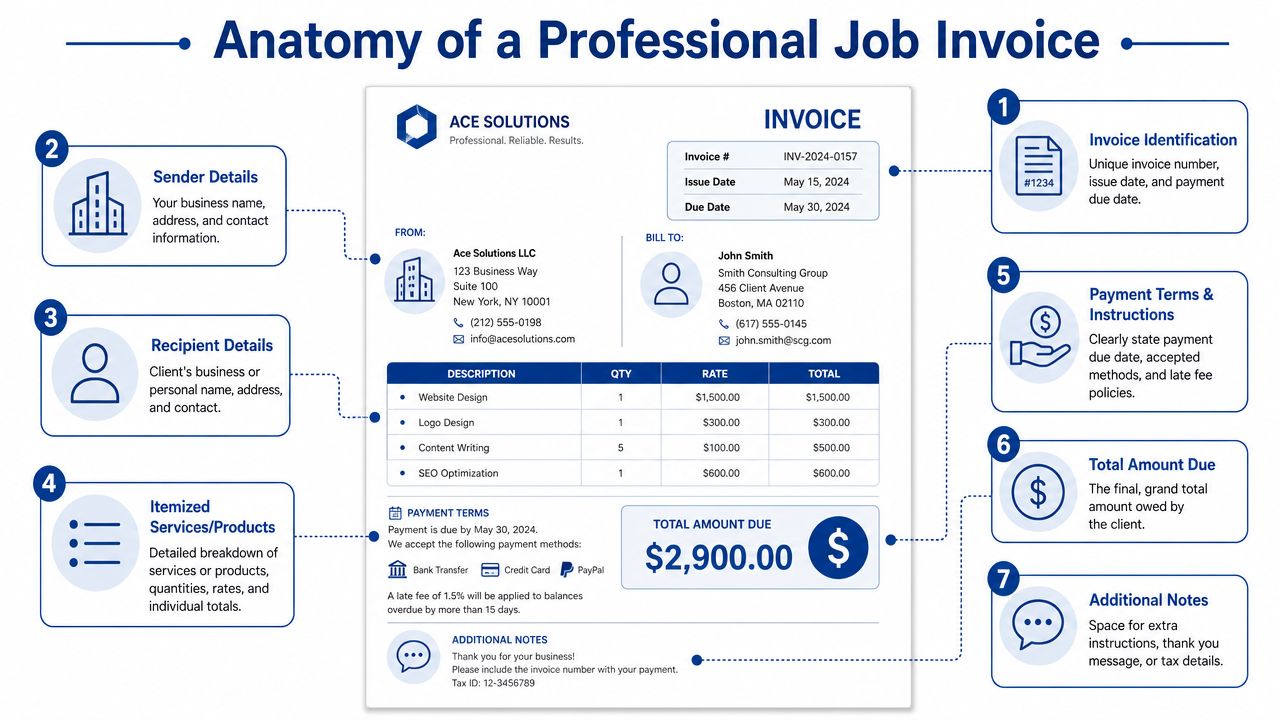
A professional invoice needs to be complete, readable, and easy to approve. According to Corcentric’s invoice billing and management best practices, a technically complete invoice requires five mandatory components to prevent disputes: a unique invoice number, clear issue and due dates, granular service descriptions with line items, defined payment terms, and complete contact information for both parties. Corcentric also notes that a confusing layout is a primary driver of payment delays.
Identification details that make the invoice trackable
Start with the basics at the top of the page.
Include:
- Invoice number that follows a consistent sequence
- Issue date so both sides know when the billing clock started
- Due date displayed prominently, ideally bolded
If you skip invoice numbering or use random names like “April client bill final,” your records get messy fast. Sequential numbering matters for filing, bookkeeping, and resolving disputes later.
Business and client information that routes the invoice correctly
Every invoice for job work should show complete contact details for both sides.
That means:
- Your business name and contact info
- Client legal or billing name
- Billing address or AP contact
- Project manager or department reference when relevant
This isn’t just formality. It helps the invoice reach the right person on the first try. In larger organizations, payment delays often happen because the invoice was sent to the operational contact instead of the billing contact.
Service descriptions that prevent avoidable questions
Many invoices fail here.
Do not write “job completed” or “services rendered” and expect quick approval. Use line items that explain:
- what was done
- quantity or hours
- rate
- line total
For example, “On-site troubleshooting and repair” is better than “labor,” but “On-site troubleshooting of network cabinet, 3 hours at agreed hourly rate” is stronger because it gives accounting and the client manager enough detail to approve it.
A client should never need a separate email to understand what they’re paying for.
If you want to see how self-employed professionals format this clearly, review these examples of invoices for self-employed businesses. The layouts are different, but the principle is the same: clean labels, clear lines, and no guessing.
Payment terms, total due, and final notes
A good invoice doesn’t hide the money details at the bottom in tiny text.
Make these easy to find:
- Payment terms such as Net 30 or Due Upon Receipt
- Accepted payment methods
- Late fee language if your agreement allows it
- Total amount due in a separate box or bold display
You can also use a short notes section for a thank-you message, a purchase order reference, or brief instructions. Keep that area short. Notes should support the invoice, not clutter it.
Setting Smart Payment Terms and Policies
The invoice format matters, but your payment terms determine how quickly cash moves. Many owners accept whatever timeline the client suggests, then wonder why receivables age badly. Smart terms create a standard. They also reduce negotiation on every single job.
Before you issue an invoice for job work, decide your default rule. If you don’t set one, clients will set it for you.
Common payment terms compared
| Term | Meaning | Best For |
|---|---|---|
| Due Upon Receipt | Payment is expected as soon as the client receives the invoice | Small jobs, one-time clients, urgent service calls, businesses that want tighter cash flow |
| Net 15 | Payment is due 15 days after the invoice date | Service firms that want a professional middle ground without long collection cycles |
| Net 30 | Payment is due 30 days after the invoice date | Established B2B relationships and clients with formal AP workflows |
| Progress Billing | Invoices are sent at agreed milestones during the job | Longer projects, custom work, retainers, and labor-heavy engagements |
| Deposit plus Final Invoice | Part is billed before work starts, with the balance due at completion | Projects with upfront labor scheduling, materials, or capacity constraints |
For many B2B service businesses, Net 30 is common because it aligns with how corporate accounts payable teams operate. But common doesn’t always mean best. If your payroll hits every two weeks and your vendors don’t wait, slower terms can put pressure on working capital. This overview of Net 30 invoicing practices is useful if you’re deciding whether standard corporate terms fit your business model.
What works and what usually fails
Clear terms work. Hidden terms don’t.
A few practical policies tend to hold up well:
- State terms before the work starts so the invoice doesn’t introduce surprises
- Match terms to the client type because enterprise AP and local owner-operators don’t pay the same way
- Use deposits for custom or labor-intensive jobs when you’re reserving time on the calendar
- Put late fee language in the agreement and invoice if you plan to enforce it
- Offer simple payment methods because convenience removes excuses
What usually fails is trying to sound flexible while hoping clients will still pay quickly. If your contract says one thing, your invoice says another, and your team verbally promised something else, you’ve created collection problems before the invoice was sent.
Policy language should sound professional
Late fees and early-pay incentives aren’t about being aggressive. They’re management tools.
Collection note: The best payment policy is the one your team applies consistently, not the one that sounds toughest on paper.
Keep the wording plain. State when payment is due, what happens if it’s late, and how the client can pay. If your policy changes by client, document those exceptions deliberately instead of letting them live in email threads.
Sending the Invoice and Following Up for Prompt Payment
Sending the invoice is where process starts to matter more than wording. A polished invoice sent late still hurts cash flow. A good invoice sent to the wrong person still won’t get approved.
The fastest-paying businesses usually do two things well. They send invoices promptly, and they follow up on a schedule instead of waiting until the account is badly overdue.
Send it with a short, useful email
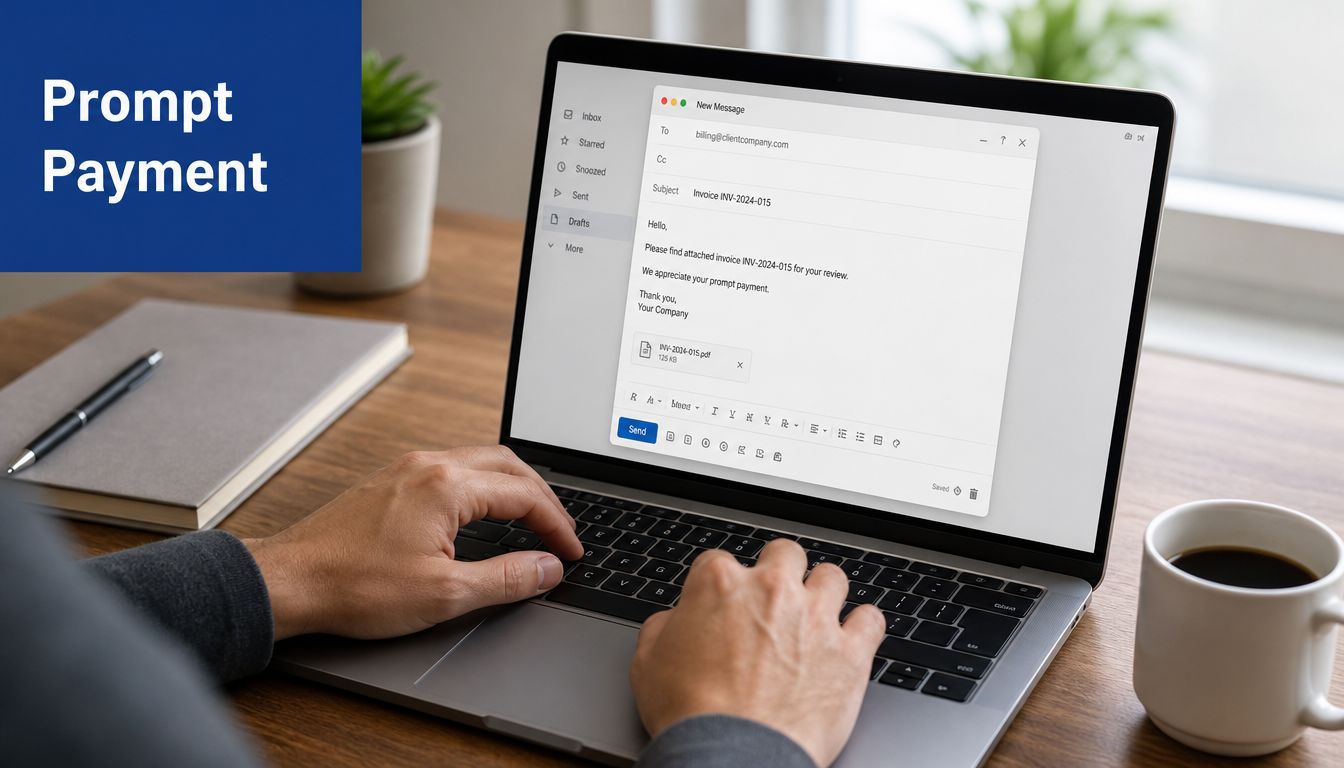
Don’t attach a PDF with no message. The email should tell the client exactly what they’re receiving.
A simple format works well:
- Subject line Invoice [number] for [job or project name]
- Opening Thank them for the work and identify the completed service
- Body State the amount due, due date, and payment method
- Close Invite questions right away so issues don’t delay approval
Example:
Hi [Client Name],
Attached is invoice [number] for the completed [job name or service description]. Payment is due on [due date]. If you need a PO reference, revised billing contact, or supporting detail for approval, let us know and we’ll send it promptly.
Thank you,
[Your Name / Company]
Use a follow-up cadence instead of ad hoc reminders
Most owners wait too long because collections feel awkward. A fixed reminder cadence removes emotion from the process.
Use something like this:
On send date
Confirm the invoice was issued and attached correctly.A few days before due date
Send a friendly reminder that payment is coming due.On the due date
Send a short note that the invoice is due today.Shortly after the due date
Ask whether anything is holding up payment.Ongoing overdue follow-up
Escalate tone gradually, stay professional, and keep records of every contact.
According to IBML’s invoice processing best practices, implementing automated invoice workflows and reminder systems can reduce manual entry errors by over 80% and significantly shorten invoice cycle times. IBML also notes that consistently communicating and enforcing payment terms through automated reminders is key to reducing payment delays.
That’s why many firms build reminder rules directly into QuickBooks or their invoicing platform. Consistency beats memory.
For a broader collection workflow, these accounts receivable best practices are worth using as an internal operating standard.
A short video can also help your team standardize how they communicate invoice follow-ups with clients:
Keep follow-up firm, not emotional
If a client goes silent, don’t send a frustrated email. Ask specific questions.
Try:
- Approval check Has the invoice been approved for payment?
- Routing check Is there a different AP contact we should copy?
- Documentation check Do you need time records, work order details, or a PO listed?
That approach keeps the conversation productive. It also gives you a record showing that your business followed up professionally.
Recording Invoices in Your Bookkeeping System
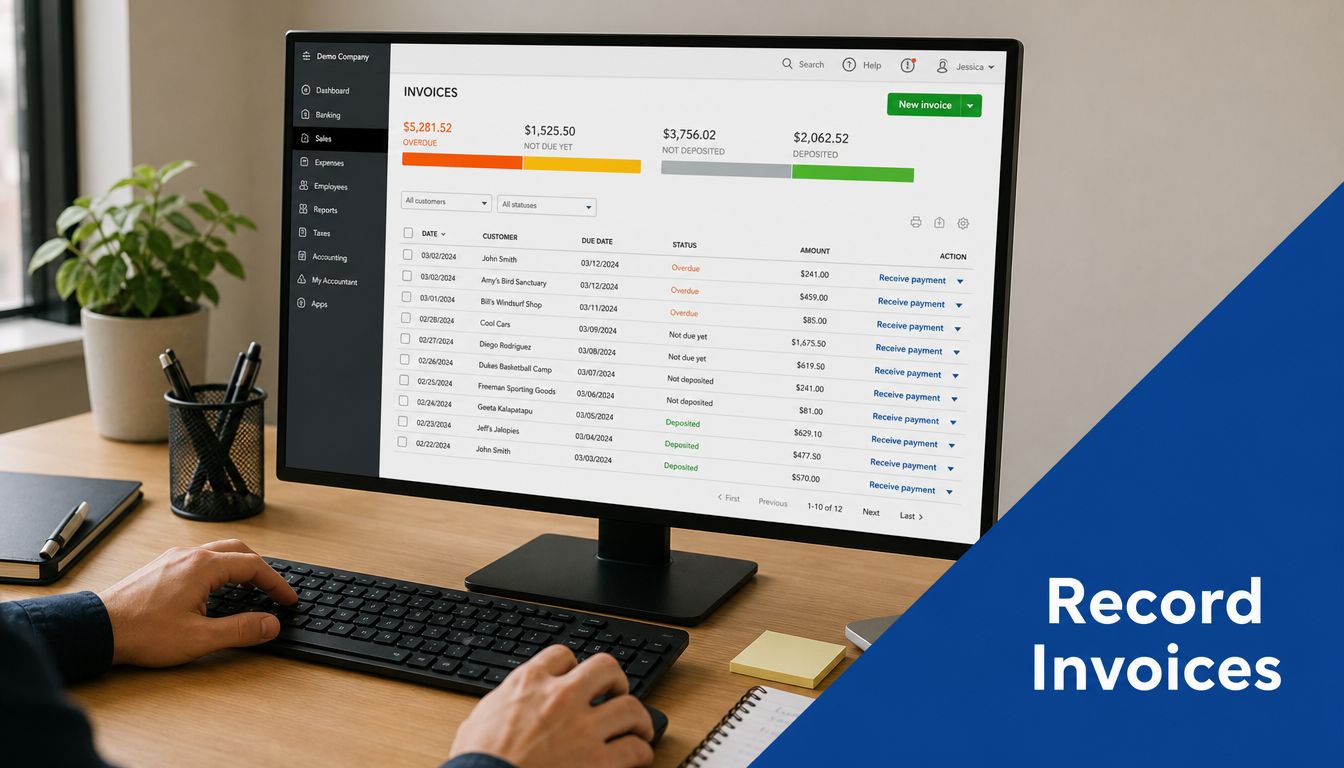
Sending a PDF is not the same as recording a receivable. If your invoice for job work lives only in email, you don’t have a reliable accounts receivable system. You have scattered billing documents and a memory problem waiting to happen.
The right process records the invoice in your accounting software the same day it’s issued. That creates an open receivable, ties the amount to the customer, and puts the invoice into aging reports so someone can monitor it.
What should happen in QuickBooks or similar software
At minimum, your bookkeeping workflow should do four things:
- Create the customer invoice in QuickBooks Online or your accounting platform
- Post it to accounts receivable so it appears on aging reports
- Assign the correct income category so revenue lands in the right part of the P&L
- Apply the payment correctly when cash comes in, instead of booking it as uncategorized income
That last point matters more than many owners realize. If payments are recorded as deposits without matching them to open invoices, your books may show revenue, but your receivables report will still be wrong.
Why the accounting side affects profitability
A clean invoice process gives you more than a payment trail. It gives you decision-quality data.
When invoices are coded correctly, you can start to answer better questions:
- Which jobs are producing the strongest margins?
- Which clients pay slowly enough to change your terms?
- Which service lines create the most write-offs or disputes?
- Which project managers close work cleanly and bill on time?
That’s where job costing becomes useful. For project-based and labor-based service businesses, each invoice should connect back to the specific customer, project, class, location, or service category you use for internal reporting. Without that link, revenue gets lumped together and profitability by job becomes guesswork.
Bookkeeping should tell you which work is worth repeating. It can’t do that if invoices aren’t structured and recorded consistently.
Why manual entry breaks down
Manual invoice handling is expensive and error-prone. Resolve’s analysis of manual versus automated invoice flows reports that manual invoice processing costs businesses an average of $15 to $16 per invoice, with labor making up about 62% of that cost. The same analysis says automated AP solutions can reduce the cost to as low as $3 per invoice and deliver 59% faster processing times.
Even if your business isn’t processing thousands of bills internally, the lesson still applies. Every manual touchpoint increases the chance of delays, coding errors, and missed follow-up. Owners often think they’re saving money by keeping invoicing informal. In practice, they’re spending time where software and process should be doing the work.
Advanced Billing Considerations for Job-Based Work
Not every invoice for job work is legally the same. That’s the part many template-driven guides skip.
If you invoice for a clearly defined project, the billing usually centers on deliverables, milestones, or scope completion. If you invoice for hourly job-based labor, the structure can raise bigger questions about worker classification, supervision, and compliance. Those aren’t just HR issues. They affect how the invoice should be documented and whether invoicing is even the right payment method.
Job-based billing can create classification risk
A 2023 to 2024 analysis from NELP found that 18 states are actively tightening independent contractor standards. The same analysis notes that in states such as California, client companies can face joint liability related to labor violations when workers are misclassified.
That means an invoice for job labor isn’t automatically valid just because both parties agreed to it. If the worker functions like an employee, works under close direction, or fits within a regulated labor framework, invoicing may create risk instead of solving a payment issue.
What to review before you bill hourly labor
If you’re using invoices for job-based work, check these points with your accountant or employment counsel:
- Nature of the engagement Is this a defined project, or ongoing supervised labor?
- Control over the work Does the worker decide how the work is done, or does the client manage day-to-day tasks?
- Documentation Do the agreement, scope, and invoice all describe the relationship consistently?
- State law exposure Are you operating in a state with stricter contractor standards?
This matters in staffing, consulting, caregiving, field services, and other labor-driven industries where the line between contractor and employee isn’t always obvious.
Cash flow tools should come after compliance
If slow-paying clients are squeezing working capital, some businesses explore financing options tied to receivables. A useful primer on what is invoice factoring explains how companies convert unpaid invoices into near-term cash. That can be a practical option in some cases, but it only works well when the underlying invoices are clean, collectible, and based on properly structured client relationships.
An invoice can support cash flow. It can’t fix a classification problem.
Frequently Asked Invoicing Questions
What’s the difference between an invoice, a quote, and a receipt
A quote is issued before work begins and outlines expected pricing. An invoice requests payment after work is performed, at a milestone, or on a schedule. A receipt confirms that payment has been received.
Use all three correctly and your records get much cleaner. The quote sets expectations, the invoice requests payment, and the receipt closes the transaction.
Should service businesses charge sales tax on an invoice for job work
That depends on the state, the type of service, and sometimes the materials included in the job. Some services are taxable in certain states, while others are not. If your jobs combine labor, products, reimbursable expenses, or subcontracted work, the answer can change based on how the invoice is structured.
This is one of those areas where guessing creates expensive cleanup later. Your invoicing process should follow the tax treatment already established in your accounting setup.
How long should I keep invoices and related records
Keep invoices, contracts, proof of delivery, payment confirmations, and client correspondence in an organized system long enough to support tax filings, disputes, and financial reviews. Digital storage is usually the most practical approach, especially if invoices need to tie back to customer history or project files.
The important thing is consistency. If some records live in email, some in QuickBooks, and some in a folder on one employee’s laptop, retrieval becomes difficult when you need the documentation.
Is hourly billing always the best way to invoice for job work
No. Hourly billing is simple, but it doesn’t always reflect value or protect margins. For recurring services, defined deliverables, and jobs with predictable scope, flat-fee or milestone billing is often easier for clients to approve and easier for you to manage internally.
The best method is the one that matches how the work is delivered, how the client buys, and how your business tracks profitability.
Can automation help with industry-specific billing issues
Yes, especially when billing has route, field service, dispatch, or proof-of-service complexity. If your operation overlaps with transportation or logistics workflows, this practical guide to AI strategies for transport finance is a useful example of how finance teams are using automation to reduce billing friction and improve back-office accuracy.
If your invoices are going out but cash still feels unpredictable, the problem usually isn’t just the template. It’s the back-office system behind it. Steingard Financial helps service businesses build accurate bookkeeping, dependable payroll, clean AR workflows, and reporting that shows what’s happening in the business.