 Skip to content
You’ve run payroll. Employees were paid. The bank balance dropped exactly when you expected.
Then you open QuickBooks and hit the part that makes a lot of owners hesitate: what, exactly, should the journal entry for payroll look like?
That hesitation is normal. Payroll feels simple when you think about the direct deposit hitting an employee’s account. It gets more complicated when you need the books to reflect gross wages, tax withholdings, employer-paid taxes, benefits, and the timing differences that show up at month-end. The confusion usually starts with one bad assumption, that payroll is just a cash payment. It isn’t.
A proper journal entry for payroll turns a payroll run into clean financial statements. If you get that bridge right, your profit and loss statement shows real labor cost, your balance sheet shows what you still owe, and your tax payments reconcile cleanly. If you get it wrong, the books can look fine on the surface while concealing misclassified liabilities, overstated expenses, or missing payroll tax expense.
Why Accurate Payroll Journal Entries Are Non-Negotiable
Most business owners first notice payroll accounting problems at month-end. Revenue looks right. Operating expenses look mostly right. Then payroll sits in one lump account, tax liabilities don’t clear, and nobody is fully confident that the financials reflect what actually happened.
That’s why the journal entry for payroll matters so much. A payroll journal entry is the accounting bridge that captures gross wages, employee withholdings, employer payroll taxes, and benefit liabilities in the general ledger. Major payroll guidance emphasizes recording gross wages first, then separate liabilities for taxes and deductions, and finally the net pay disbursement, as outlined in Rippling’s payroll journal entry guide.
When that structure is missing, three problems tend to follow:
- Your P&L gets distorted: Labor cost may be understated if employer taxes aren’t booked as an expense.
- Your balance sheet gets messy: Withholdings and benefits can sit in the wrong accounts or never clear properly.
- Tax filings become harder to trust: If liability balances don’t match what you owe, reconciliations become a scramble.
A lot of owners also blur the line between “we paid payroll” and “we recorded payroll.” Those are different events. Cash leaving the bank is only one piece of the accounting.
Practical rule: If your payroll entry only credits cash and debits payroll expense, it’s almost certainly incomplete.
Accurate entries give you something much more valuable than compliance. They give you visibility. You can see what labor costs, what portion belongs to employees versus taxing authorities, and what still needs to be remitted. That’s the foundation for reliable forecasting and clean closes, especially if you’re still getting comfortable with what payroll liabilities are.
Decoding Gross Wages Taxes and Net Pay
Before posting debits and credits, it helps to think of payroll as a breakdown of one total amount.
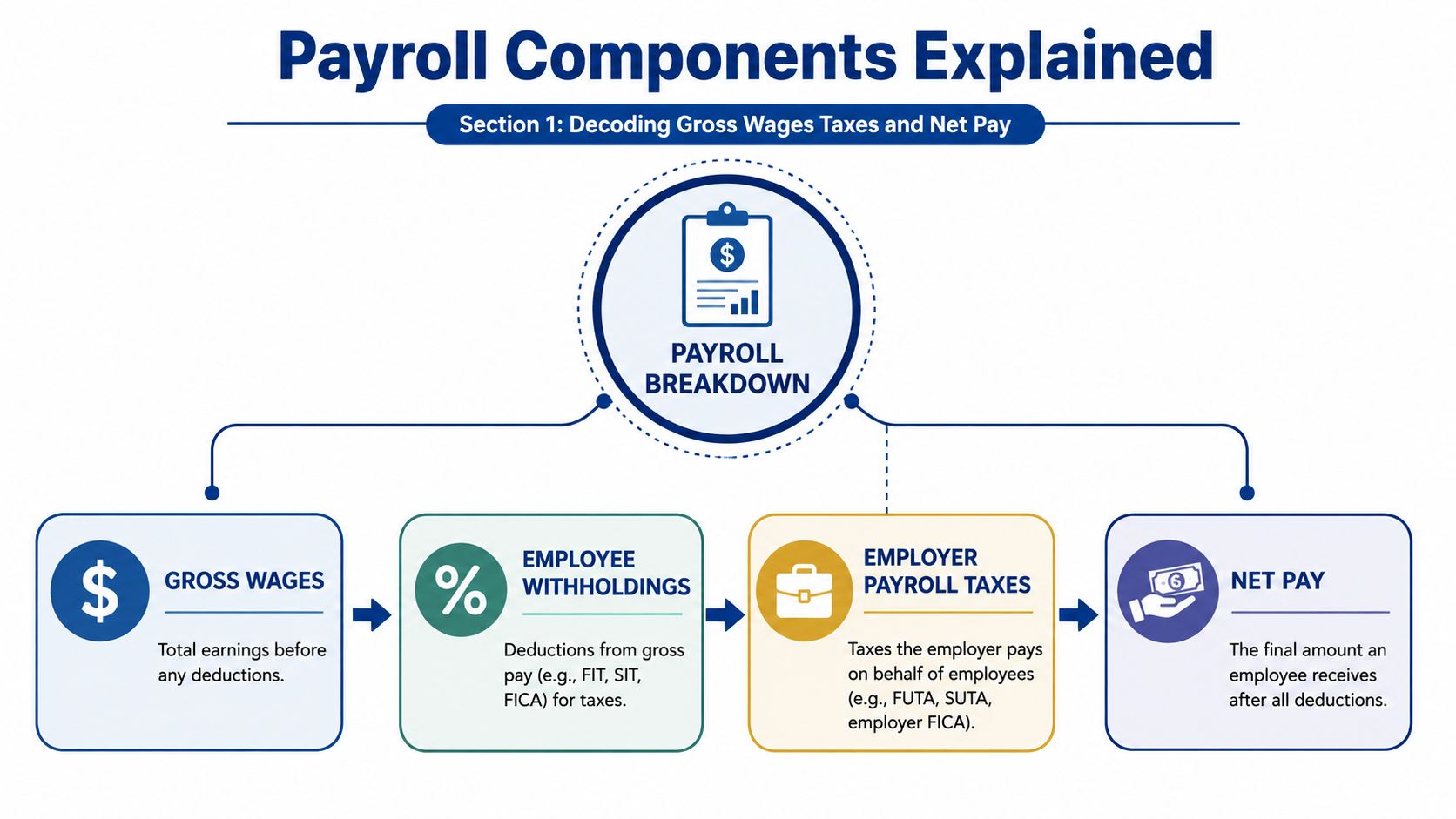
Start with gross wages. That’s the full amount the employee earned before anything comes out. From there, part of that amount gets withheld for taxes and deductions. What remains is net pay, the amount the employee receives.
The four pieces of payroll
A clean journal entry for payroll usually revolves around these components:
| Component | What it means | Where it usually lands |
|---|---|---|
| Gross wages | Total earnings before deductions | Expense |
| Employee withholdings | Amounts taken from employee pay | Liability |
| Employer payroll taxes | Taxes the company owes as its own cost | Expense and liability |
| Net pay | Amount paid to the employee | Cash or clearing movement |
The distinction between the middle two trips people up.
Employee withholdings are not the company’s expense. You’re holding those amounts on behalf of the employee until you remit them. That’s why they belong in liability accounts.
Employer payroll taxes are different. Those are your business’s own cost of employing people. They belong in payroll tax expense, with a matching payable until you send the money out.
Gross wages create expense. Employee deductions create liabilities. Net pay clears to cash.
That’s the basic logic behind every payroll entry, whether you’re paying a salaried team, hourly technicians, or a mixed workforce.
Why the entry is built in stages
Many payroll systems now follow a standard sequence: record gross wages, separate taxes and deductions into liabilities, then record net pay disbursement. That sequence exists because payroll accounting has to answer two questions at once:
- What did labor cost the business?
- Who is still owed money after payroll runs?
If you skip that separation, your reports stop being useful. Owners often think they have one payroll number. In reality, payroll splits between expense and short-term obligations. That’s why a beginner-friendly overview of how payroll works is helpful before you start mapping accounts in software.
The part that usually causes errors
The most common misunderstanding is treating all payroll taxes the same way. They are not the same in accounting terms.
- Withheld taxes from employees: liabilities
- Employer-paid taxes: expenses first, then liabilities until paid
- Benefit deductions such as health insurance or retirement withholdings: liabilities
- Take-home pay: cash disbursement
If you keep that framework in mind, the journal entry for payroll stops feeling like memorizing lines and starts feeling like a simple allocation of one payroll run.
Recording a Standard Payroll Run Step by Step
The most reliable approach is to use a Payroll Clearing Account. It keeps payroll expense recognition separate from the cash moving out of your bank. In practice, that makes review easier and creates a natural checkpoint if something doesn’t tie out.
A clearing workflow can reduce reconciliation errors by approximately 40% in mid-sized service firms, according to the verified methodology provided in your brief. It also helps prevent one of the biggest payroll mistakes: forgetting that the employer’s share of FICA is its own expense, which can understate total labor costs by 15% to 20% if omitted.

Step 1 Record gross wages
Your first entry captures the full gross payroll.
| Account | Debit | Credit |
|---|---|---|
| Wages Expense | Gross payroll | |
| Payroll Clearing Account | Gross payroll |
This entry says: employees earned this amount, and we are now routing that payroll through a clearing account rather than straight to cash.
If you’re still shaky on the mechanics, a refresher on understanding debits and credits can help before you build payroll-specific entries.
Step 2 Record employee withholdings and employer taxes
Many books go sideways on this point. Don’t combine employer taxes with employee withholdings just because both involve tax agencies.
Employee withholdings reduce what will be paid out from the clearing account and create liabilities.
Employer taxes create additional expense for the business and separate liabilities.
A simplified structure looks like this:
| Account | Debit | Credit |
|---|---|---|
| Payroll Clearing Account | Employee withholdings total | |
| Federal or state tax payable accounts | Withheld amounts | |
| FICA payable for employee portion | Withheld amounts | |
| Benefits payable | Deduction amounts |
Then record the employer side:
| Account | Debit | Credit |
|---|---|---|
| Payroll Tax Expense | Employer payroll taxes | |
| FICA payable for employer portion | Employer amount | |
| Other employer tax payable accounts | Employer amounts |
The verified guidance in your brief specifically notes the employer’s FICA share as 6.2% Social Security plus 1.45% Medicare. That amount should not be buried inside wage expense or mixed into employee withholding logic.
Owner check: If your general ledger doesn’t clearly show employer payroll tax expense apart from payroll liabilities, month-end reporting will be harder than it needs to be.
A short visual walkthrough can help if you want to see the flow in plain terms before posting entries:
Step 3 Clear net pay to cash
After deductions and tax liabilities are carved out, what remains in the clearing account is net pay.
| Account | Debit | Credit |
|---|---|---|
| Payroll Clearing Account | Net pay | |
| Cash | Net pay |
Now the actual disbursement is reflected in the books.
What works and what doesn’t
What works:
- A dedicated clearing account: It isolates payroll flows and makes unreconciled items obvious.
- Separate entries for employer tax expense: It keeps labor cost accurate.
- Posting from the payroll register, not from memory: The register is the source document.
What doesn’t work:
- One big entry to payroll expense and cash: Too much detail gets lost.
- Mixing all taxes together: You won’t know what was withheld versus what the company owes.
- Leaving a clearing balance behind: That usually signals an incomplete posting or mapping issue.
When this workflow is set up correctly, the entry is repeatable. That’s the goal. Payroll accounting shouldn’t feel creative. It should feel controlled.
Journal Entries for Accruals Benefits and Reversals
A standard payroll run covers normal payday. Real bookkeeping gets harder at month-end, when the books close in the middle of a pay cycle, or when benefits and deductions don’t line up neatly with cash movement.
That’s where owners often realize the basic payroll entry they learned isn’t enough.
Month-end accruals
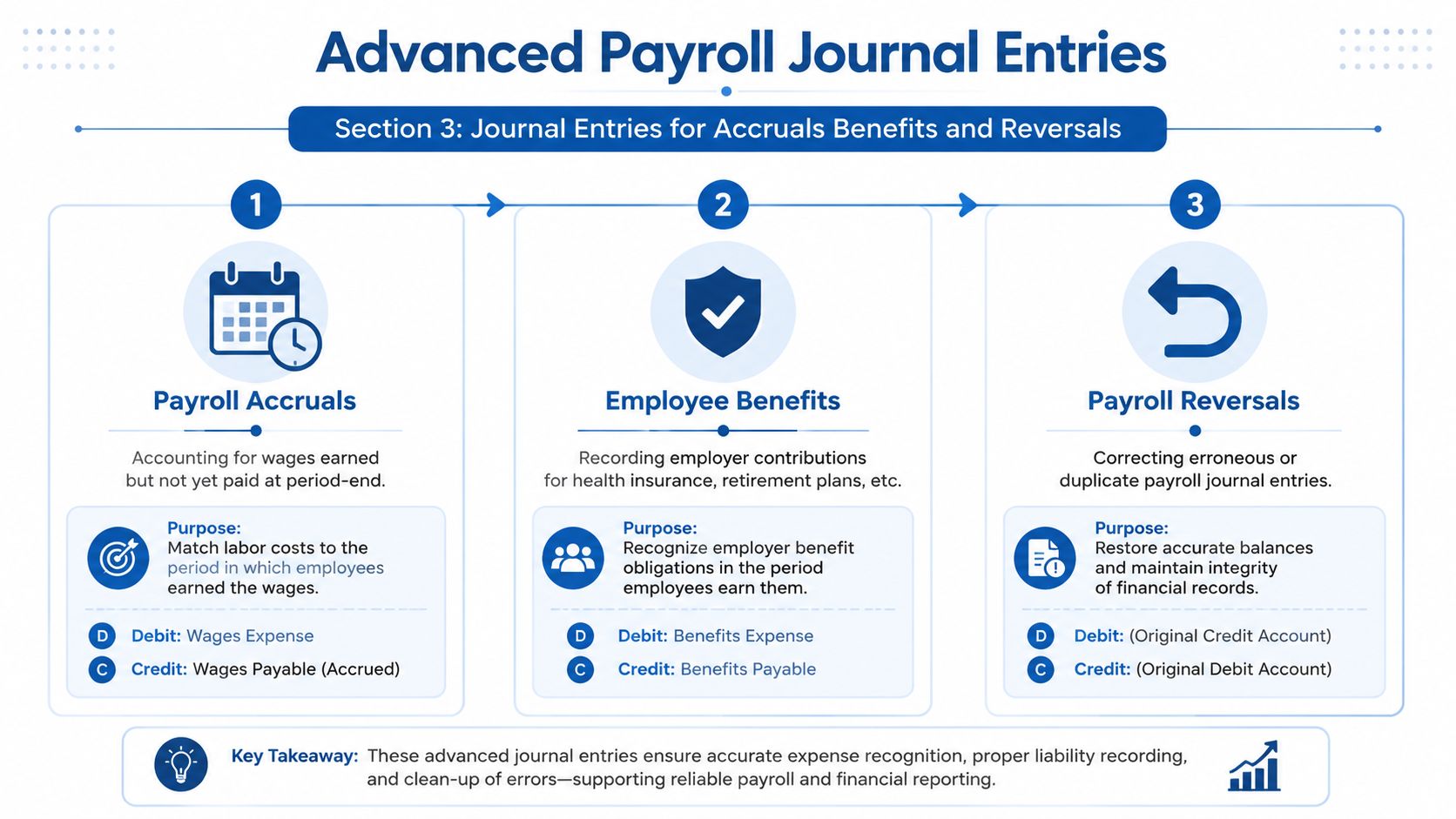
Say your team worked the last few days of the month, but payday falls in the next month. If you wait until payday to record that payroll, the labor expense lands in the wrong period.
The accrual entry is straightforward:
| Account | Debit | Credit |
|---|---|---|
| Wages Expense | Earned but unpaid wages | |
| Accrued Wages Payable | Earned but unpaid wages |
That entry recognizes the cost in the correct month.
The gap many owners miss is timing. The brief you provided notes that accrued entries need a reversing entry at the start of the next period. It also notes that failure to reverse can result in a 25% inflation of double-counted expenses in the following quarter, and that automated reversing processes maintain 95% consistency in expense recognition, compared with 65% for manual processes.
Benefit deductions and benefit liabilities
Another common scenario is benefits. An employee enrolls in health insurance or contributes to a retirement plan. Those deductions reduce net pay, but they are not your expense in the same way wages are.
For employee-paid portions, record them as liabilities until remitted:
- Health insurance withholding: credit a benefits payable account
- Retirement withholding: credit the relevant contributions payable account
- Any employee-paid deduction: treat it as money held for someone else
If the employer also contributes to benefits, that employer portion is separate. It belongs in an expense account with a matching payable until funded.
A benefit deduction coming out of an employee check is not “extra payroll expense.” It’s a liability waiting to be paid to the carrier or plan administrator.
That distinction becomes especially important if your payroll platform syncs directly into QuickBooks. Poor account mapping can make employee deductions look like company expense, which inflates labor cost and muddies reporting.
Reversing entries at the start of the next period
A reversing entry undoes the accrual on day one of the next period.
| Account | Debit | Credit |
|---|---|---|
| Accrued Wages Payable | Accrued amount | |
| Wages Expense | Accrued amount |
Then, when the actual payroll is processed, the standard payroll entry posts cleanly without doubling the expense.
This is one area where accrual accounting discipline matters. If your company closes monthly and runs payroll on a biweekly schedule, you need a habit around cutoff dates. A useful background refresher on accruals and deferrals can help if these timing entries still feel abstract.
A practical way to think about these advanced entries
Use this simple test:
- If employees earned it already, but you haven’t paid it yet, that’s usually an accrual.
- If money was withheld from their pay, but not yet remitted, that’s usually a liability.
- If you booked an accrual last month, you’ll usually need a reversal this month.
These are the entries that separate clean monthly books from books that only look right on payday.
Payroll Reconciliation and Chart of Accounts Best Practices
Posting payroll is only half the job. The other half is proving the entry is right.
Most cleanup work starts with the chart of accounts. If payroll is mapped into vague buckets such as “payroll expense” and “taxes payable,” you lose the visibility needed to catch mistakes. Better account design makes reconciliation easier because you can tell, at a glance, what belongs to the business and what belongs to an employee or tax agency.
Build enough detail into the chart of accounts
At minimum, separate these categories:
| Category | Example account types |
|---|---|
| Wage expense | Salaries, hourly wages, bonuses |
| Employer tax expense | Employer FICA, unemployment taxes |
| Employee tax liabilities | Federal withholding payable, state withholding payable, employee FICA payable |
| Benefit liabilities | Health insurance payable, retirement contributions payable |
| Clearing and accrual accounts | Payroll clearing, accrued wages payable |
If your accounts are too broad, payroll reports may still look balanced while the details are wrong. For a practical primer on setting up your chart of accounts, that resource gives a helpful framework before you start mapping payroll codes.
Keep employer taxes separate from employee withholdings
This is the most important control point in the entire payroll process.
The verified guidance in your brief states that employer taxes are expenses, while employee withholdings are liabilities. It also notes that 68% of small business payroll errors stem from misclassifying employer taxes. That kind of misclassification doesn’t just affect the balance sheet. It can obscure cash flow forecasting and create problems when quarterly payroll filings need to tie back to the books.
Here’s the clean distinction:
- Employee withholding: money withheld from employee earnings and owed onward
- Employer payroll tax: company expense created by having employees
- Benefit withholding: liability until remitted
- Employer benefit contribution: employer expense until paid
Reconciliation lens: Ask “Whose money is this?” If it belongs to the employee or a taxing authority, it’s usually a liability. If it’s the company’s cost of employing staff, it’s usually an expense.
Use a month-end payroll checklist
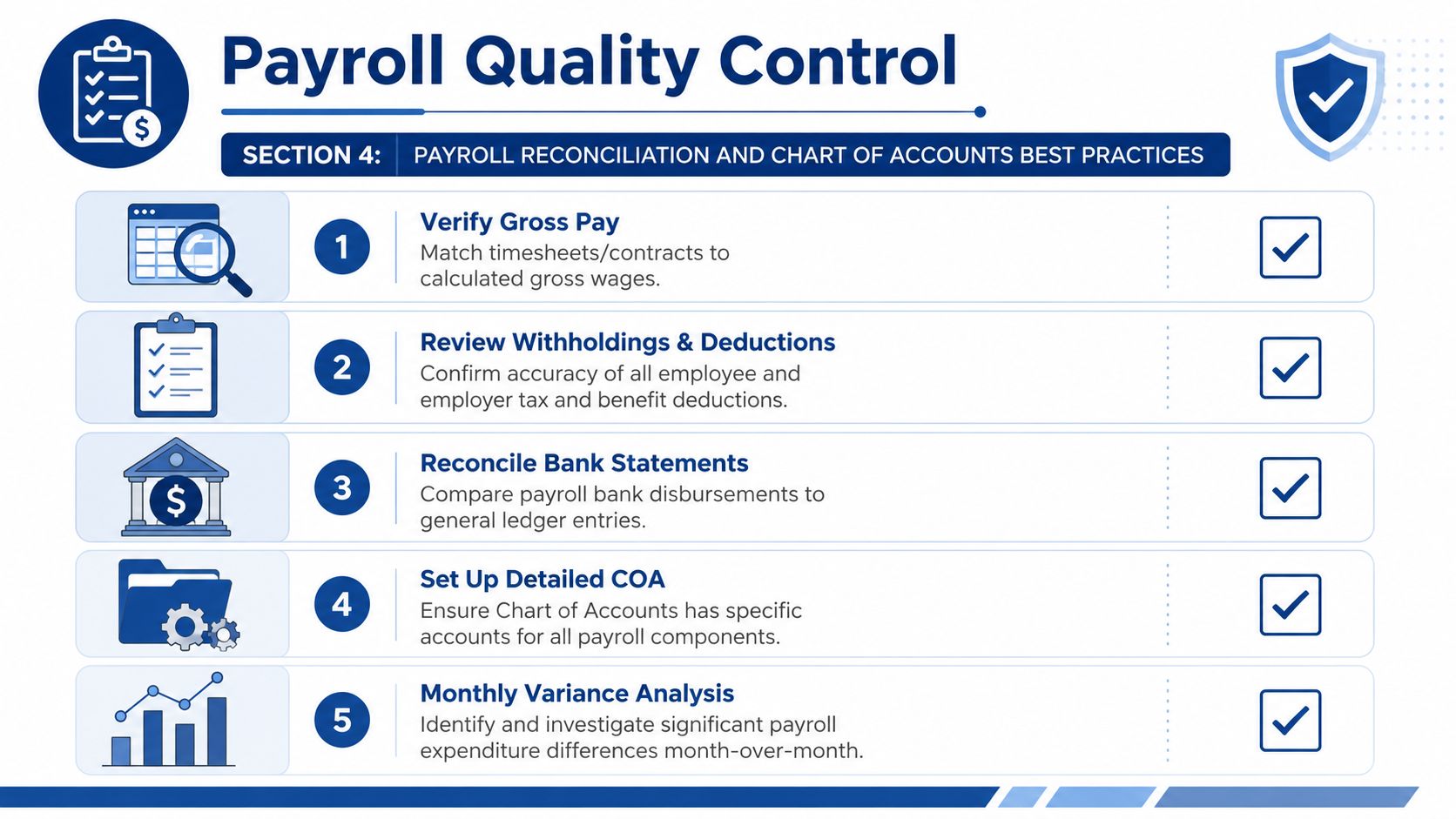
A basic payroll reconciliation should include:
- Match gross wages: Compare the payroll register to wage expense posted in the ledger.
- Review liabilities: Confirm tax and deduction payable balances agree to what hasn’t yet been remitted.
- Check cash movement: Tie net pay disbursements to the bank account or payroll clearing activity.
- Clear old balances: Investigate payroll clearing or accrued payroll balances that should have reversed or been paid.
- Scan for unusual variance: If payroll expense jumps or drops unexpectedly, trace it to hiring, terminations, bonus runs, mapping changes, or posting errors.
This process doesn’t need to be complicated. It does need to be consistent. Payroll errors tend to repeat when the books aren’t reviewed right after each run.
Automating Entries with Gusto and QuickBooks
Automation helps, but it doesn’t replace understanding the accounting. Gusto and QuickBooks Payroll can create and sync a journal entry for payroll automatically. That’s useful. It also means a mapping mistake can repeat itself every pay cycle until someone notices.
The key setup step is account mapping. Each payroll item in the payroll system should point to the right account in QuickBooks. Gross wages should map to wage expense accounts. Employee tax withholdings should map to liability accounts. Employer-paid taxes should map to payroll tax expense and related payables. Benefit deductions and employer benefit contributions should each have their own destination.
What to review after the sync
After the payroll entry lands in QuickBooks, check a few items every time:
- Does gross payroll match the payroll register?
- Did employee withholdings post to liabilities instead of expense?
- Did employer payroll taxes hit expense accounts separately?
- Did net pay clear through cash or the payroll clearing account the way you intended?
- Are any balances left behind in clearing or temporary accounts?
If one of those answers is no, don’t just edit the journal entry and move on. Fix the mapping in the payroll platform so the next payroll run posts correctly.
Where automation helps and where it doesn’t
Automation works well for repeatable payroll cycles, standard benefits, and routine posting into QuickBooks. It also helps teams that want fewer manual entries and a tighter monthly close. If you’re thinking more broadly about system design, this overview of mastering workflow automation is a useful way to frame where payroll sync fits inside the larger accounting process.
What automation doesn’t do on its own is decide your accounting policy. It won’t know whether you want one wage expense account or several. It won’t decide how detailed your liability structure should be. It also won’t catch every month-end accrual issue unless someone has built that process intentionally.
For businesses using Gusto or QuickBooks Payroll, this is usually the right division of labor: let the software generate the repetitive entry, and let a qualified bookkeeper review the mapping, reconcile the accounts, and handle accruals, reversals, and exceptions. Firms such as Steingard Financial support that kind of setup by aligning payroll systems with the chart of accounts and ongoing close process.
If you want help getting your payroll entries, account mapping, and month-end reconciliations cleaned up, Steingard Financial works with service businesses using tools like Gusto and QuickBooks to build a payroll process that posts correctly and closes cleanly.