 Skip to content

A transaction fee is a charge a business pays for each electronic payment it processes, typically for credit cards, debit cards, or digital wallets. In practice, it’s often a layered charge rather than one simple fee, and common pricing can look like 2.5% + $0.30, which means the cost changes depending on the sale amount.
If you run a service business, you’ve probably seen this already. You invoice a client for one amount, then the bank deposit lands for a little less. Or you look in QuickBooks, compare sales to deposits, and wonder why the numbers don’t match.
That gap is usually a transaction fee.
For a new business owner, transaction fees can feel small enough to ignore. From a bookkeeping point of view, that’s a mistake. They affect your profit on every paid invoice, they change your cash flow timing, and if you don’t record them correctly, your revenue and expense reports get messy fast. This matters at every level, from a solo consultant collecting online payments to a growing agency running payroll in Gusto and keeping the books in QuickBooks Online.
Why Transaction Fees Impact Your Bottom Line
Start with the practical version.
You send a $1,000 invoice. Your client pays by card. You expect to see $1,000 hit the bank, but the deposit is lower because the payment platform kept its fee before sending the rest. Nothing is “wrong,” but your books need to show the full income and the fee expense separately. If you only record the net deposit, you understate revenue and lose visibility into cost.
That’s the practical answer to what is a transaction fee. It’s the cost of getting paid electronically. For a service business, that cost is part convenience, part infrastructure, and part access to clients who want to pay online.
The reason this deserves attention is scale. In the U.S. card-payments system, banks collected $66 billion in interchange fees in 2025, according to the St. Louis Fed’s review of card-fee economics, which shows how large and routine these charges have become in modern payments (Federal Reserve data summarized by the St. Louis Fed).
Practical rule: If a fee happens every time you get paid, treat it like a real operating expense, not background noise.
For service firms, the damage usually shows up in three places:
- Profit margin: Every fee reduces what you keep from a sale.
- Cash flow: Your bank often receives the net amount, not the gross amount billed.
- Reporting accuracy: If you don’t separate fees from revenue, your P&L gets distorted.
This is one reason owners need a solid grasp of what counts as a business expense. Merchant fees belong in that conversation because they are recurring costs tied directly to collections.
There’s also a budgeting angle. Businesses often focus on software subscriptions and payroll first, but payment costs can become one more line item that grows with volume. That’s similar to the way teams evaluate tools that look inexpensive up front but carry tradeoffs in actual use, which is part of Ticketsmith’s take on free software. Free or low-friction tools can still create downstream costs. Payment processing works the same way.
The Anatomy of a Transaction Fee
Most owners see one line on a processor statement and assume there’s one fee. Usually, there isn’t.
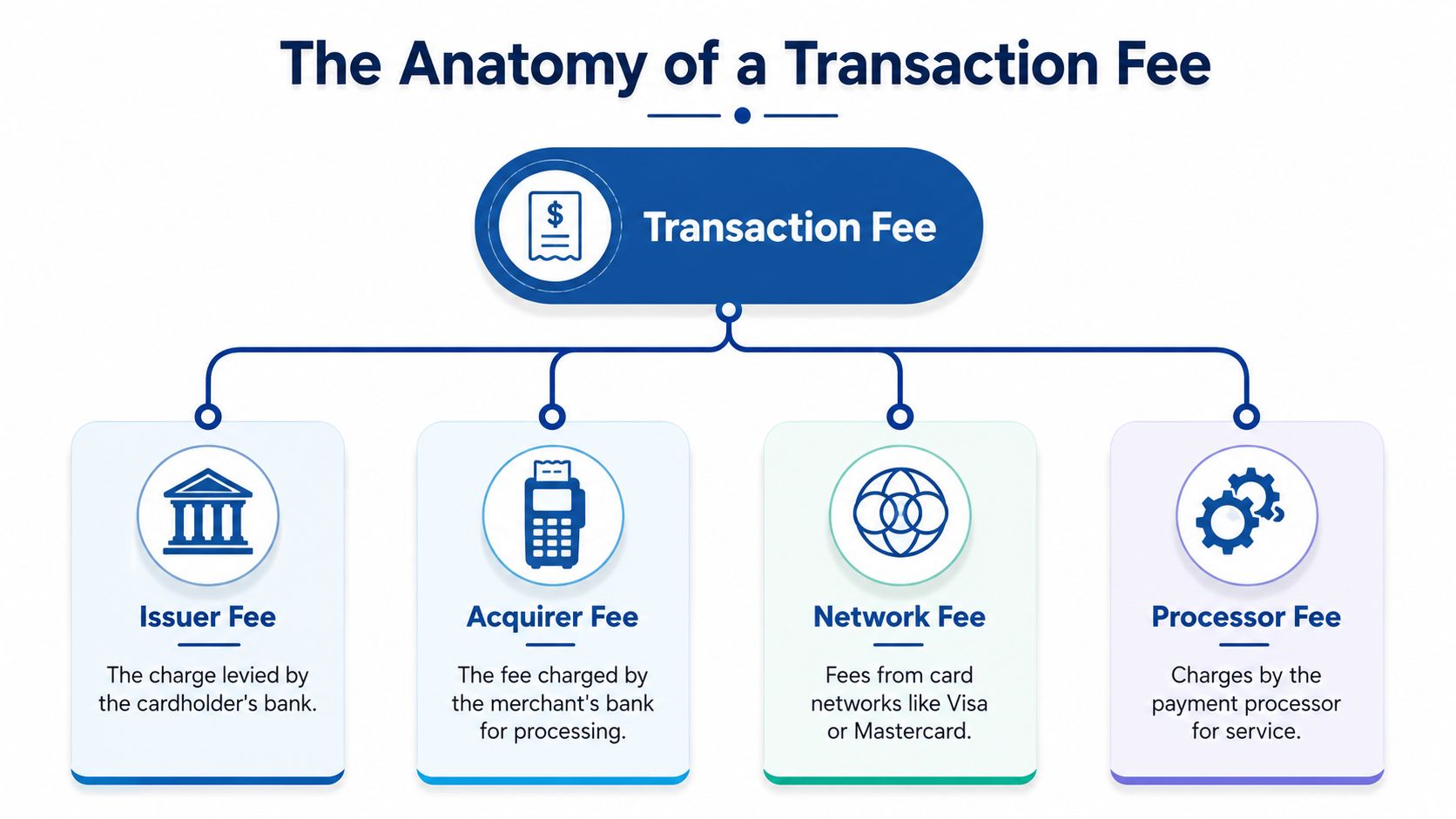
Think of a transaction fee like an onion. The number you see on the outside is the total charge, but inside it are several layers. One layer goes to the bank that issued your customer’s card. Another goes to the card network. Another goes to the company that processes the payment for your business.
The biggest layer is usually interchange
Interchange is the part that typically goes to the cardholder’s bank. If your client pays with a business credit card, rewards card, or debit card, the underlying interchange can differ based on the transaction type and setup. You usually don’t negotiate this part directly. It’s built into the card ecosystem.
That matters because many business owners spend time trying to reduce the wrong part of the fee. The underlying cost structure isn’t always fully flexible, so the area you can often control is the processor’s markup and the payment methods you accept.
The rest is network and processor cost
The card network handles the rails that move the payment information. Your processor or merchant services provider handles the tools you use, such as checkout pages, invoice payment links, reporting, and settlement.
In day-to-day terms, you might see one bundled rate instead of separate line items. A common model is 2.5% + $0.30, and the effect changes with the invoice size. A $5 payment costs $0.43, while a $200 payment costs $5.30. That’s why the effective rate is much harsher on small transactions than larger ones (Checkout.com’s explanation of fee structure).
Here’s the part many owners miss. The fixed portion of the fee is why lots of small client charges can produce a worse blended result than fewer larger invoices, even when the posted rate looks the same.
When a processor advertises one simple rate, that’s often a pricing wrapper around several underlying charges.
Why this matters in bookkeeping
When you’re reviewing settlements in QuickBooks, you’re not just looking for “a fee.” You’re looking for the full path from invoice to customer payment to processor deduction to net bank deposit.
That’s also why statement review is tedious by hand. If you deal with lots of bank and merchant charges, tools that automate bank fee categorization can help surface recurring charges faster before you finalize coding.
For your books, the key takeaway is simple:
- Gross sale amount is revenue.
- Processor deduction is an expense.
- Net deposit is just what arrived in the bank.
If you combine those into one number, your books stop telling the truth.
How to Record Transaction Fees in Your Books
Service business owners often find this aspect confusing. The bank only shows what landed. Your processor statement shows what was withheld. QuickBooks needs both.
If you’re using QuickBooks Online, set this up so the bookkeeping mirrors reality rather than the bank feed shortcut.
Create a dedicated expense account
In your chart of accounts, create an expense account such as Bank & Merchant Fees, Payment Processing Fees, or Merchant Account Fees. The exact name matters less than consistency.
You want these fees isolated for two reasons. First, you can track the total cost of getting paid. Second, you can review whether your payment mix is changing over time. Industry guides commonly place card-processing fees in the 0.5% to 5% range and note that fees should be reconciled against processor statements because lots of small payments can raise your blended cost even when the quoted rate doesn’t change (Bill.com on transaction fee ranges and bookkeeping treatment).
If you lump these fees into a vague “bank charges” bucket with unrelated items, you lose useful visibility.
Record the full sale, not just the deposit
Suppose you send a client a $100 invoice and your processor keeps a $2.90 fee. Your bank receives $97.10.
Your books should show the whole event, not only the deposit.
| Account | Debit | Credit | Description |
|---|---|---|---|
| Bank | $97.10 | Net deposit received | |
| Bank & Merchant Fees | $2.90 | Transaction fee expense | |
| Revenue | $100.00 | Full customer payment |
That entry preserves both facts that matter. You earned $100 in revenue, and you paid $2.90 to collect it.
How this looks inside QuickBooks
You can handle this a few different ways depending on your workflow.
If QuickBooks receives the payment detail
If you use QuickBooks Payments or a synced platform, the software may create the gross payment and fee automatically. Still check it. Automation is helpful, but it’s not a substitute for review.
Look for these points:
- Match gross to the customer payment: The invoice should close for the full amount.
- Check the fee posting account: Make sure fees flow to the dedicated merchant fee expense account.
- Confirm the bank deposit amount: The net deposit should match the bank feed.
If you only see the net deposit in the bank feed
This is common with third-party processors. In that case, don’t accept the bank feed as income and move on. Record the gross receipt and fee first, then match the net deposit.
A clean workflow often looks like this:
- Receive the customer payment against the invoice for the full amount.
- Record the processor fee to your merchant fee expense account.
- Match the bank deposit to the net transfer that arrived.
That extra step prevents understated sales.
If your P&L only reflects what hit the bank, your revenue is probably wrong.
Reconcile processor statements monthly
This is the part owners skip when they’re busy.
Each month, compare three records:
- Your processor statement
- Your bank deposits
- Your QuickBooks activity
The totals should tie out. If they don’t, common causes include withheld fees, timing differences, refunds, chargebacks, or duplicate imports.
For service businesses, this matters more than people think because online invoices, recurring retainers, and client autopay can produce a large number of small deductions. If you use Gusto for payroll reimbursements or contractor payments, remember that payroll and payment processing are separate workflows. Don’t mix card-processing expenses into payroll clearing or reimbursement accounts just because they both involve money moving through software.
A practical way to stay organized is to keep a recurring close checklist that includes merchant statement reconciliation alongside bank and credit card reconciliations. If your current system is messy, a guide on how to keep track of business expenses can help you standardize the workflow before your books sprawl.
What good records let you do later
Once fees are consistently recorded, you can answer useful questions:
- Are card fees rising because sales are up, or because clients are paying in smaller chunks?
- Which processor is costing more?
- Should certain clients move to ACH?
- Are payment links inside QuickBooks cheaper to manage than an outside invoicing tool once admin time is included?
Without clean coding and reconciliation, those decisions become guesswork.
Pricing Strategies for Transaction Fees
Once you know what the fee is and how to book it, the next question is who should absorb it.
For a service business, there are two broad approaches. You either build the cost into your pricing, or you pass some of it through to the client where allowed and clearly disclosed.

Absorb the cost into your rates
Many firms do this because it keeps payment simple. A client sees one invoice amount, pays it, and moves on. That usually creates less friction.
This approach often makes sense when your average project value is healthy, your market expects card payment options, or your team wants a cleaner client experience. In that setup, transaction fees become part of overhead, similar to scheduling software, payroll software, or other back-office tools.
For example, specialist service businesses often have to price in hidden operating costs that clients never see directly. You can see the same principle in niche advisory markets, including Bornbir on fertility expert fees, where the listed service price has to account for the actual cost of delivering and administering the service.
Pass the cost through carefully
Some businesses add a separate fee for card payments or offer a lower-cost option like ACH. This can protect margin, especially when fees are cutting too much into smaller invoices.
The upside is obvious. You keep more of the billed amount.
The downside is client reaction. Some customers don’t mind. Others see a separate fee as irritating, especially if competitors don’t charge one. There are also compliance issues. Card network rules, processor contracts, and state-level requirements can affect what you’re allowed to do and how you disclose it.
A practical way to decide
Ask these questions before changing your pricing policy:
- How do most clients pay now
- Do you compete on convenience
- Are your invoices usually small enough that fixed fees hurt
- Would an ACH option solve the margin problem without adding friction
- Can your team apply the policy consistently on every invoice
If you want the simplest administration, absorb the fee and price accordingly. If margin pressure is stronger than convenience concerns, offer clients a lower-cost payment method and make the choice clear before they pay.
Actionable Ways to Reduce Transaction Fees
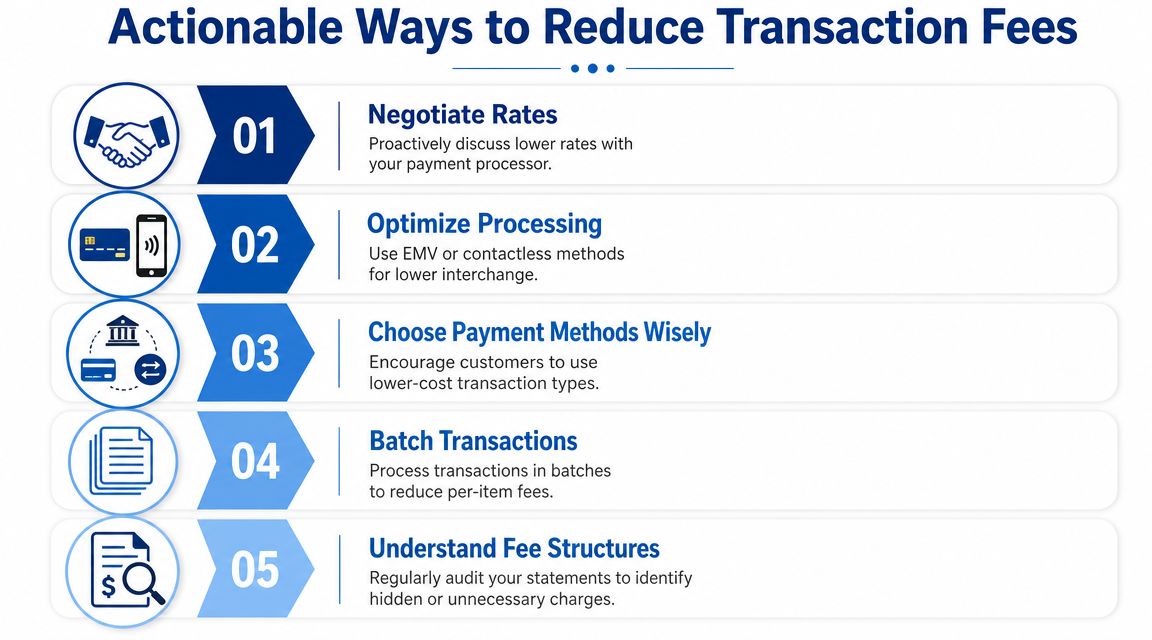
Not every part of a transaction fee is under your control, but some parts are. That’s why reviewing your setup is worth doing. The Federal Reserve reported that, for transactions covered by Regulation II, the average level of interchange fees has not changed materially since late 2011, which is a useful reminder that businesses often have more control over processor markups and payment mix than over the underlying interchange base (Federal Reserve interchange fee report).
Use that fact as your mindset. Don’t waste time trying to negotiate what isn’t really negotiable. Focus on the parts you can influence.
Audit your statements like an owner
Start with your merchant statements, not the sales dashboard. Processors often present clean front-end reports while the detailed statement tells the full story.
Look for:
- Pricing model: Flat rate, bundled, or another structure.
- Recurring charges: Monthly platform or service fees.
- Fee patterns: Whether certain payment types cost more.
- Small-ticket drag: Whether many low-dollar invoices are inflating the effective cost.
If you can’t explain every recurring deduction, ask your processor for a plain-English breakdown.
Push more clients toward lower-cost payment methods
For many service firms, the easiest lever is payment method mix. If clients can pay by ACH, bank transfer, or another lower-cost route, you may reduce your overall processing cost without changing your headline pricing.
That works especially well for retainers, recurring invoices, and larger project payments. A card option is still useful, but it doesn’t need to be the default for every invoice.
Clean up how you bill
The way you structure invoices affects fees.
- Combine small charges when appropriate: Fewer, larger invoices can reduce the bite of fixed per-transaction charges.
- Set clear billing cycles: Predictable invoicing makes it easier to guide clients to autopay or bank transfer.
- Avoid manual workarounds: Keyed or inconsistent payment collection methods create more room for errors and harder reconciliation.
Here’s a useful walkthrough on payment operations and software setup:
Use systems that make review easier
A messy stack creates hidden fee problems. If invoicing lives in one tool, deposits in another, and reporting in spreadsheets, you won’t spot fee trends quickly.
This is where software choice matters. Some businesses use QuickBooks payments alone. Others pair QuickBooks with a processor and payroll platform like Gusto. Others need outside bookkeeping support to reconcile it all. Steingard Financial’s automated billing software guide is one useful reference if you’re reviewing tools that affect both collections and bookkeeping workflow.
The cheapest payment option on paper isn’t always the cheapest once you count admin time, reconciliation headaches, and reporting gaps.
Ask for a review before you assume the rate is fixed
If your volume has grown, if your average invoice has changed, or if your business has become less risky operationally, ask your processor to review your pricing. You may not change the underlying network cost, but you can sometimes improve the markup, eliminate unnecessary extras, or move to a structure that fits your billing pattern better.
That kind of request works best when you have clean records. Bring actual statements, your payment mix, and a clear explanation of how clients pay.
FAQ About Transaction Fees for Service Businesses
Are transaction fees an expense or a reduction of income
For clean bookkeeping, treat them as an expense. Record the full amount the client paid as revenue, then record the fee separately in a merchant-fee expense account. That gives you accurate sales reporting and makes processor costs visible on the P&L.
How do transaction fees show up if I use QuickBooks and Gusto
QuickBooks usually handles the customer payment side and the accounting record. Gusto handles payroll, contractor payments, and related cash movement. Keep those workflows separate. A card-processing fee from a client payment shouldn’t be buried inside payroll accounts or reimbursement categories.
What about foreign transaction fees
They often show up when you buy software from an overseas vendor or when you deal with international clients. Consumer guidance commonly places foreign transaction fees in the 1% to 3% range, which matters for both expense tracking and revenue reconciliation when currencies or international cards are involved (Stripe’s overview of transaction fees and foreign transaction fees).
How can I spot hidden fees on a processor statement
Look beyond the headline rate. Compare the gross customer payments, all deductions on the processor statement, and the net bank deposit. If the totals don’t tie, isolate recurring platform charges, withheld fees, refunds, and any line items you can’t explain in plain language.
Should I let clients pay by card at all
Usually yes, because convenience helps businesses get paid faster and with less chasing. The better question is whether card payments should be available for every invoice or reserved for cases where the convenience is worth the cost.
If your books don’t clearly separate revenue, merchant fees, payroll activity, and net deposits, Steingard Financial can help you clean up the workflow inside QuickBooks and support the people and payroll side through Gusto-centric processes. For service businesses, that means clearer monthly reporting, cleaner reconciliations, and fewer surprises when the cash in the bank doesn’t match the invoice total.