 Skip to content
You paid an annual insurance bill, renewed a year of software, and sent a retainer to outside counsel. Cash left the bank immediately. Then month-end arrives, and your profit looks worse than the business performed.
That’s where many service business owners get tripped up.
The payment was real, but the expense recognition usually shouldn’t happen all at once under accrual accounting. If the benefit stretches into future months, the unexpired portion belongs on the balance sheet first. That single bookkeeping choice affects your profit and loss statement, your working capital view, and the decisions you make from both.
What Are Prepaid Expenses and Why They Matter
You pay a full year of insurance in January. Your bank balance drops right away, but the coverage helps your business month after month. That gap between when cash leaves and when the benefit is used is the heart of a prepaid expense.
A prepaid expense is a payment for something your business will use over future periods, rather than all at once today. Common examples include annual software subscriptions, insurance premiums, rent paid ahead, and professional retainers.
The easiest way to understand it is this: your business has purchased future use. Until that use is consumed, part of what you paid still has value. Under accrual accounting, that unexpired value is recorded on the balance sheet first and then moved to expense over time.
Why the payment is not the full expense yet
A prepaid expense functions much like paying for a 12-month gym membership. The cash goes out on day one, but you do not consume all 12 months of value on day one. Your business works the same way with software, insurance, and service contracts.
That accounting treatment follows the matching principle. You record the cost in the same periods that receive the benefit. If you want a quick refresher on how that fits into the bigger financial picture, this guide on how to read a balance sheet helps connect the balance sheet and profit and loss statement.
Practical rule: If you paid in advance for future months of benefit, do not post the full amount straight to expense without checking the coverage period.
Why owners should care
Correctly managing prepaid expenses directly impacts profitability reporting, cash flow analysis, and planning decisions.
If you book an annual payment entirely in one month, that month looks less profitable than it really was. Later months can look better than they really are because they are benefiting from something already paid for. For a service business owner, that can lead to bad calls on hiring, owner draws, pricing, or whether overhead is under effective control.
It also affects how you read cash. A large prepayment can make cash look tight this month without meaning operations suddenly became less efficient. When prepaid expenses are tracked correctly, you can separate a timing issue from a real spending problem.
QuickBooks users feel this difference quickly at month-end. If a yearly software bill is dumped into expense in one shot, your P&L can swing for the wrong reason. Setting it up as a prepaid asset and recognizing it monthly gives you cleaner reports, which makes forecasting and budget reviews far more useful.
Common places this shows up
- Annual software plans for tools like QuickBooks apps, Microsoft 365, Adobe, or CRM platforms
- Insurance policies covering future months
- Prepaid rent or lease-related charges
- Professional retainers for legal, HR, or consulting support
The core idea is simple. Cash timing and expense timing are often different. Once your books reflect that difference, your financial statements become much more useful for running the business, not just closing the month.
Locating Prepaid Expenses on Your Balance Sheet
You open your balance sheet in QuickBooks after paying a full year of insurance. Cash is lower, which makes sense. The part that often throws owners off is the other side of that entry. It does not belong with this month’s operating expenses. It sits on the balance sheet as an asset because your business still has months of coverage left to use.
A prepaid expense works a lot like a store credit you have already paid for. The cash is gone, but the value has not disappeared. It is still available to the business over future months, so the balance sheet holds that value until it is used up.
Where it sits
In most service businesses, prepaid expenses appear under Current Assets because the benefit will be used within the next 12 months.
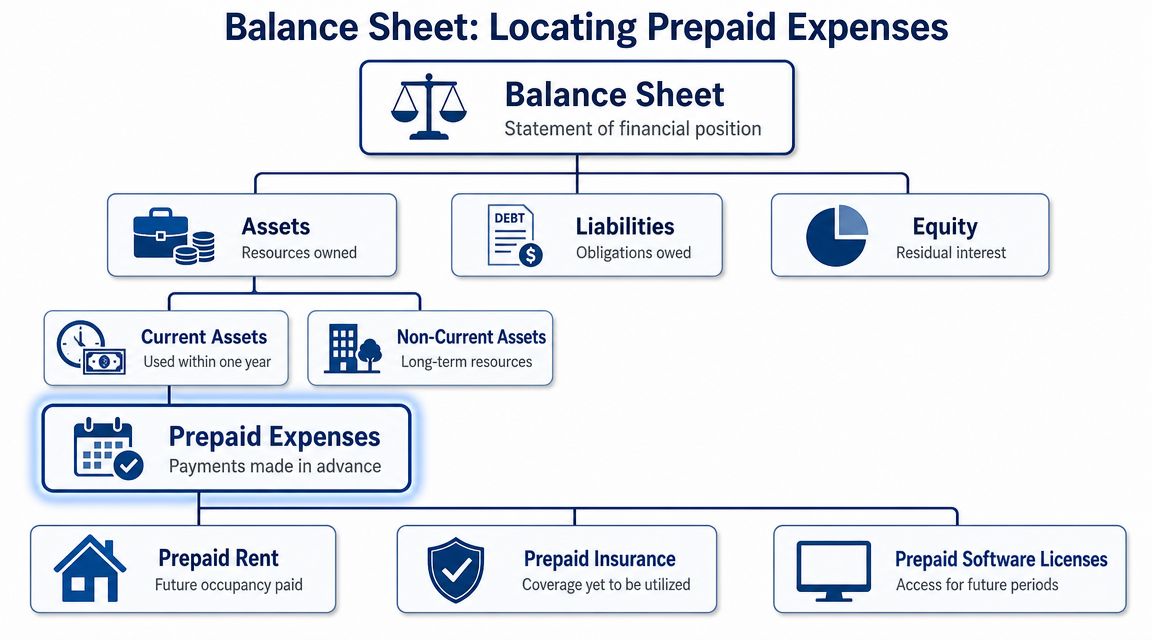
A simplified balance sheet layout often looks like this:
| Section | Example line items |
|---|---|
| Current Assets | Cash, Accounts Receivable, Prepaid Expenses |
| Non-Current Assets | Equipment, long-term deposits, other long-term assets |
| Liabilities | Accounts Payable, credit cards, loans |
| Equity | Owner’s equity, retained earnings |
If you want a clearer picture of how those sections relate to each other, this guide on reading a balance sheet for small business owners gives helpful context.
Some businesses carry a portion of a prepaid item as a long-term asset when the benefit extends beyond one year. For example, if you pay for a multi-year policy or contract, the amount used in the next year is current, and the rest may sit below current assets. Many small service firms will only deal with the current portion, but the distinction matters if you sign larger contracts.
Why the classification matters
Prepaid expenses can make a balance sheet look stronger at first glance than the business feels in real life. They count as assets, but they are not cash, and they cannot be used to make payroll or cover a vendor bill next week.
That matters when you review working capital, compare current months, or decide whether the business has room for a hire, owner draw, or software purchase. A high prepaid balance may be perfectly reasonable, but it changes how you interpret liquidity.
Prepaid expenses improve reporting accuracy. They do not improve available cash.
This is one reason service business owners should not stop at the total current assets number. You want to know how much of that total is available to spend, how much is tied up in receivables, and how much is sitting in prepaid items that will only turn into expense over time.
A simple review habit for QuickBooks users
When you open the Balance Sheet report in QuickBooks and see Prepaid Expenses, pause and check three things:
- What payments make up the balance? Review the transaction detail so you know whether it is insurance, software, rent, or a retainer.
- What period does each item cover? The service dates matter more than the payment date.
- Is the balance declining as months pass? If it stays flat, monthly adjustments may be missing.
That last check is where reporting problems usually start. If the prepaid asset never goes down, your profit can stay overstated on the balance sheet side and understated on the expense side at the wrong times, which makes trend reporting less useful for decisions.
In QuickBooks, it helps to keep prepaid items in a dedicated other current asset account rather than mixing them into miscellaneous assets. That small setup choice makes month-end review faster and makes it easier to spot old balances that should have already been released to expense.
Recording Prepaid Expenses From Payment to Expense
You pay an annual insurance bill in January. Your bank balance drops that day, but the insurance protects the business all year. If you record the full payment as January expense, that month looks weaker than it really was, and the rest of the year looks better than it really is.
Prepaid accounting fixes that timing problem by splitting the transaction into two parts. First, you record what the business bought. Then, over time, you move the used portion into expense.
Step one at the time of payment
At the payment date, the business has not used the full benefit yet. It has exchanged cash for a future benefit, so the first entry goes to the balance sheet.
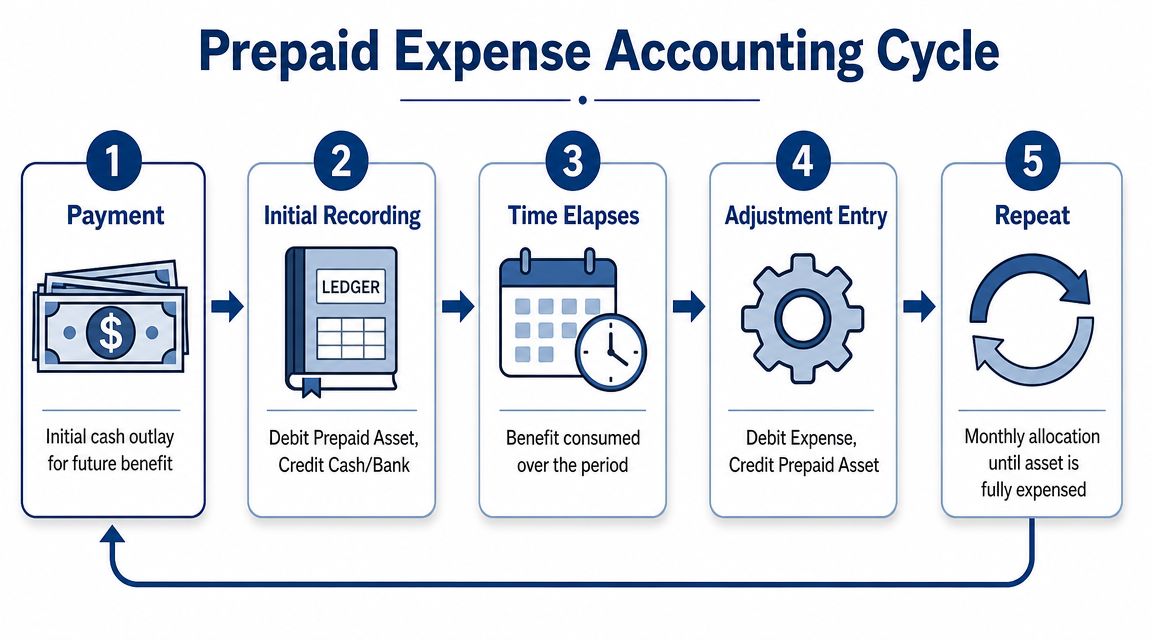
The standard entry is:
- Debit prepaid expense
- Credit cash
A simple way to view it is this. Cash left the business, but the cost has not fully expired yet.
For example, if your company pays $1,200 for a 12-month insurance policy, the day-one entry is:
- Debit Prepaid Insurance $1,200
- Credit Cash $1,200
That keeps the payment out of the income statement until the coverage period begins to pass.
Step two during each month-end close
As each month goes by, one portion of that prepaid asset is used up. That is when it belongs on the income statement.
For the same annual policy, the monthly adjusting entry is usually:
- Debit Insurance Expense $100
- Credit Prepaid Insurance $100
After each monthly entry, the prepaid balance gets smaller and the expense account reflects the coverage used in that period. If you want a broader refresher on how this fits into accrual accounting, this guide to accruals and deferrals gives the bigger picture.
QuickBooks users often make this easier by creating a dedicated Prepaid Expenses or Prepaid Insurance asset account, then posting a recurring monthly journal entry during the close. That small bit of structure saves time and makes review easier when you compare the balance sheet to the contract dates.
The impact beyond the journal entry
The journal entry is the easy part. The business impact shows up in your reports.
If the monthly release is missed, assets stay too high and expenses stay too low for that period. Profit can look stronger than reality. That affects more than clean bookkeeping. It changes how you read monthly margins, compare one month to another, and judge whether overhead is under control.
For a service business owner, that can lead to bad calls. You might think a month was highly profitable when part of the cost has not been recognized yet. You might also overestimate working capital if a chunk of current assets is tied up in prepaid contracts rather than available cash.
A short video can help if you want to see the mechanics visually.
One caution for uneven contracts
Some prepaid items do not expire evenly month by month.
If the contract delivers value unevenly, the expense recognition should follow the actual pattern of use. That comes up with seasonal service agreements, front-loaded implementation contracts, or arrangements where usage changes throughout the year.
In those cases, a straight monthly amount can misstate both expense and the remaining asset. The practical question is simple. When did the business receive the benefit? Your expense pattern should follow that answer, not just the payment date.
Building an Amortization Schedule for Prepaid Items
A prepaid entry is easy to book once. Managing it month after month is where discipline matters.
The cleanest way to do that is with an amortization schedule. This can live in Excel, Google Sheets, or inside your close checklist. The point is simple. You need one place that shows the beginning balance, the amount to release, and what should remain after each month-end.
What the schedule should show
A useful schedule doesn’t need to be fancy. It should answer these questions at a glance:
- When did the prepaid start
- How long does the benefit last
- How much should move to expense each period
- What balance should still be on the books
The schedule is the control. Without it, monthly entries often depend on memory.
For a prepaid item that is consumed evenly, the math is predictable. If your business paid $1,200 for a 12-month insurance policy, the monthly expense is $100.
Example amortization schedule
| Month | Beginning Balance | Monthly Expense | Ending Balance |
|---|---|---|---|
| Month 1 | $1,200 | $100 | $1,100 |
| Month 2 | $1,100 | $100 | $1,000 |
| Month 3 | $1,000 | $100 | $900 |
| Month 4 | $900 | $100 | $800 |
| Month 5 | $800 | $100 | $700 |
| Month 6 | $700 | $100 | $600 |
| Month 7 | $600 | $100 | $500 |
| Month 8 | $500 | $100 | $400 |
| Month 9 | $400 | $100 | $300 |
| Month 10 | $300 | $100 | $200 |
| Month 11 | $200 | $100 | $100 |
| Month 12 | $100 | $100 | $0 |
This table gives you a target. When your prepaid account in QuickBooks doesn’t match the ending balance in the schedule, you know where to investigate.
When straight-line works and when it doesn’t
Straight-line amortization is common because many prepaid contracts deliver fairly even benefit. Insurance is often the cleanest example.
But some contracts don’t work that way. A marketing sponsorship tied to a specific event date, a seasonal service package, or a vendor agreement with uneven delivery may need a different release pattern.
Use straight-line only when it matches the way the business receives benefit. If the contract says one thing and your monthly expense pattern says another, trust the contract and the operational reality.
A simple close habit that prevents cleanup later
At each month-end, compare three items:
- The vendor contract or invoice
- Your amortization schedule
- The current prepaid asset balance in QuickBooks
That quick reconciliation catches the most common issues before they snowball into quarter-end cleanup.
Real-World Examples of Prepaid Expenses
Most service businesses already have prepaid expenses. They just don’t always label them that way.
If you’re scanning bank activity or coding bills in QuickBooks, these are the items worth slowing down for.
Common prepaid items in service firms
Annual software subscriptions. If you pay upfront for tools like Adobe, Microsoft 365, project management software, or industry-specific platforms, you’ve paid for future access. That future access is the reason the payment may belong in prepaid expenses first.
Insurance premiums. General liability, E&O, cyber coverage, and workers’ compensation often involve payments that cover future months.
Rent paid ahead. First month, last month, or advance occupancy payments are classic prepaid items when they apply to future periods.
Professional retainers. Some legal, consulting, or outsourced support arrangements involve paying before the work is fully performed. If the benefit extends forward, the accounting may need prepaid treatment.
Conference and sponsorship costs. If you pay months ahead for a future event, the timing deserves attention. The cash left now, but the business benefit may not land until later.
A useful way to spot them in your books
A good test is this: if you stopped the calendar on the payment date, would you accurately say the entire benefit had already been consumed?
If the answer is no, you may be looking at a prepaid item.
For owners reviewing budgets, it can also help to compare these costs against broader fixed expenses examples so you can separate recurring operating commitments from timing-related accounting treatment. A cost can be fixed and still need prepaid accounting if it was paid in advance.
Avoiding Common Prepaid Expense Bookkeeping Mistakes
A prepaid mistake often starts with a completely reasonable shortcut.
You pay a $6,000 annual insurance bill, code it to Insurance Expense, and move on. The cash really did leave the bank. But if the whole cost hits one month, that month looks weaker than it was, and the next eleven months look better than they should. For a service business that relies on clean monthly reporting, that distortion can affect pricing decisions, hiring plans, bonus discussions, and even how confident you feel about cash.
The mistakes that show up most often
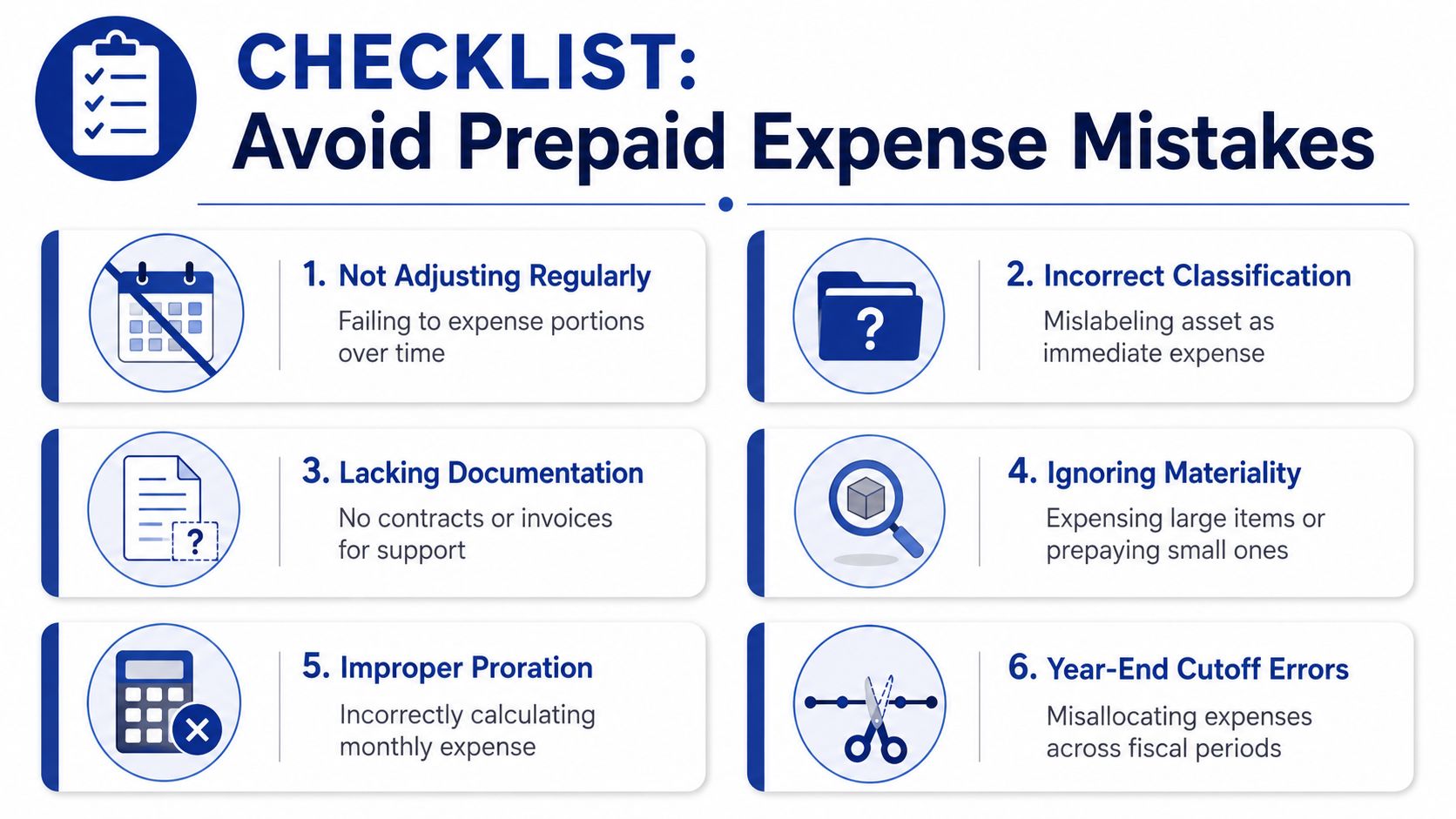
Expensing the full payment right away. This usually happens because the bill looks like a normal operating cost. The result is a profit and loss statement that absorbs too much cost upfront instead of spreading it over the months that receive the benefit.
Missing the monthly adjusting entry. The first entry may be correct, but the follow-up gets skipped during close. Then the balance sheet keeps showing an asset that should have been shrinking, while expenses stay too low.
Using the wrong amortization amount. A contract that starts mid-month, renews on an unusual date, or covers 13 months instead of 12 can throw off a simple divide-by-12 approach. Small errors stack up and leave a leftover balance that no longer matches reality.
Letting old prepaids sit on the books. A finished contract with a remaining asset balance is like a gift card that was already used but still shows value. It makes current assets look stronger than they are.
Posting to the wrong account in QuickBooks. If one team member uses Prepaid Expenses and another uses office expense, software expense, or insurance expense directly, your schedule will never tie cleanly to the general ledger.
Why these mistakes matter beyond the journal entry
Prepaid accounting affects more than bookkeeping neatness. It changes how useful your financial statements are.
If prepaids are too high, your balance sheet overstates assets. If the monthly releases are missing, your profit and loss understates expenses. That can lead a business owner to conclude that overhead is under control when it is really just delayed on paper.
Cash flow analysis can get blurry too. A service business may look healthy because current assets seem strong, but prepaid balances are not cash you can redeploy next week. If you are reviewing runway, planning owner distributions, or deciding whether you can afford another hire, that distinction matters.
Lenders, board members, and tax preparers notice these timing problems quickly. So do owners who compare one month to the next and cannot tell whether margins changed because of operations or because bookkeeping timing slipped.
If you want a practical refresher on how these month-end corrections work, this adjusting entries example for accrual accounting is a helpful companion.
Clean prepaid accounting makes monthly reports easier to trust, and easier to use for decisions.
A short prevention checklist
- Read the service period before you code the payment. The invoice date matters less than the period the payment covers.
- Keep one schedule for each material prepaid item. Include vendor, start date, end date, total amount, monthly release, and remaining balance.
- Match the schedule to QuickBooks every month. The prepaid asset account in the general ledger should agree to your schedule, line for line.
- Set a recurring reminder for adjusting entries. If your close process lives in QuickBooks or a month-end checklist, add prepaid amortization as a standing task.
- Zero out completed items promptly. Once the coverage or service period ends, the related prepaid should be fully released.
- Attach invoices and contracts in QuickBooks. That gives whoever reviews the file a clear record of dates, terms, and support.
A simple rule helps here. If future months still benefit, part of the cost probably still belongs on the balance sheet. If the benefit is gone, the asset should be gone too.
Advanced Tips for Managing Prepaid Expenses
Once the entries are working, prepaid expenses become more than an accounting cleanup item. They become a management signal.
A growing prepaid balance can tell you something about vendor commitments, front-loaded spending, and how much of your current assets are usable for near-term cash needs.

Read prepaid balances as a forecasting clue
Prepaid expenses are a forecasting signal. A growing prepaid balance can indicate front-loaded spending, and because these assets won’t convert to cash, they can make working capital appear stronger than it is. This distinction is important for accurate cash runway analysis, especially in service businesses with significant annual subscriptions or insurance costs, as described in Rho’s article on prepaid expenses in a balance sheet.
That doesn’t mean prepaids are bad. Some annual commitments save money or simplify operations. It does mean you shouldn’t treat them as if they strengthen liquidity the same way cash does.
QuickBooks habits that make this easier
If you use QuickBooks Online, a few setup choices help a lot:
Set up a dedicated asset account
Create a Prepaid Expenses or more specific account such as Prepaid Insurance in your Chart of Accounts under Other Current Assets. That gives you a clean place to park future benefit instead of burying it in expense accounts.
Use recurring journal entries carefully
For prepaid items with even monthly recognition, set a recurring journal entry for the monthly release. Review the start and end dates carefully so QuickBooks stops the entry when the asset should be fully amortized.
Attach the source document
Upload the invoice, policy, or contract directly to the transaction. The next person reviewing the books should be able to confirm the service period without searching email.
Build a month-end review step
Don’t rely on memory. Add prepaid review to your close checklist. Compare the prepaid account balance in QuickBooks to your amortization schedule before you finalize statements.
A note on cash-basis and accrual-basis thinking
Owners often toggle mentally between cash and accrual even if the books are officially maintained on accrual. That’s normal.
Cash-basis thinking asks, “When did the money leave?” Accrual-basis thinking asks, “When was the benefit used?” With prepaids, those answers are often different. The strongest operators know when to look at both views, especially when planning runway, hiring, or large annual renewals.
If your prepaid balance rises while cash gets tighter, don’t assume working capital improved. Check what portion is tied up in future services.
Tax treatment can differ from financial statement treatment depending on your situation, so it’s worth checking with your tax advisor before assuming the same timing applies everywhere.
If you want clean books that show prepaid expenses on the balance sheet correctly, along with dependable month-end reporting and QuickBooks support, Steingard Financial can help. Their team works with service businesses that need accurate bookkeeping, better reporting visibility, and a back office that keeps up as the company grows.